Kling IMAGE 4.0

Kling IMAGE 4.0 is an image model for text-to-image and reference-guided generation at native 2K, 4K, and 8K, with natural lighting and skin and material detail close to a camera photo. It renders up to 2,000 characters of legible text in seven languages, combines up to 10 reference images and elements, and plans series of up to 10 images that keep subjects and style consistent. It also designs e-commerce product pages and websites as a single tall image, which suits storyboards, slide decks, product shoots, and campaign visuals.
Product pages and websites
How to design an e-commerce product page or a website as one tall image with Kling IMAGE 4.0, from product photos or a prompt, and set how many sections it has.
Introduction
A product detail page is a column of sections: a hero, the selling points, close-ups, a specs table. With settings.pageType, Kling IMAGE 4.0 designs the whole column as one tall image, planning the photography and the copy into one layout. The blender page below came from two product photos and a paragraph of selling points.

An English-only e-commerce product detail page for the blender in <<<image_1>>>, with its blade assembly shown in <<<image_2>>>, for a home appliance store. The product is called "Mira Blend". Selling points: a 1,200 W motor, a 1.5 liter borosilicate glass jar, five speeds on one dial, a pulse mode for ice, and six stainless steel blades that come out for cleaning. Show the blender in a bright kitchen with fruit and smoothies, a close-up of the blades, a speed guide, and a specifications table. Warm cream, sage green and white design, rounded serif headings and clean sans-serif body text. All text on the page in English only.
- Product
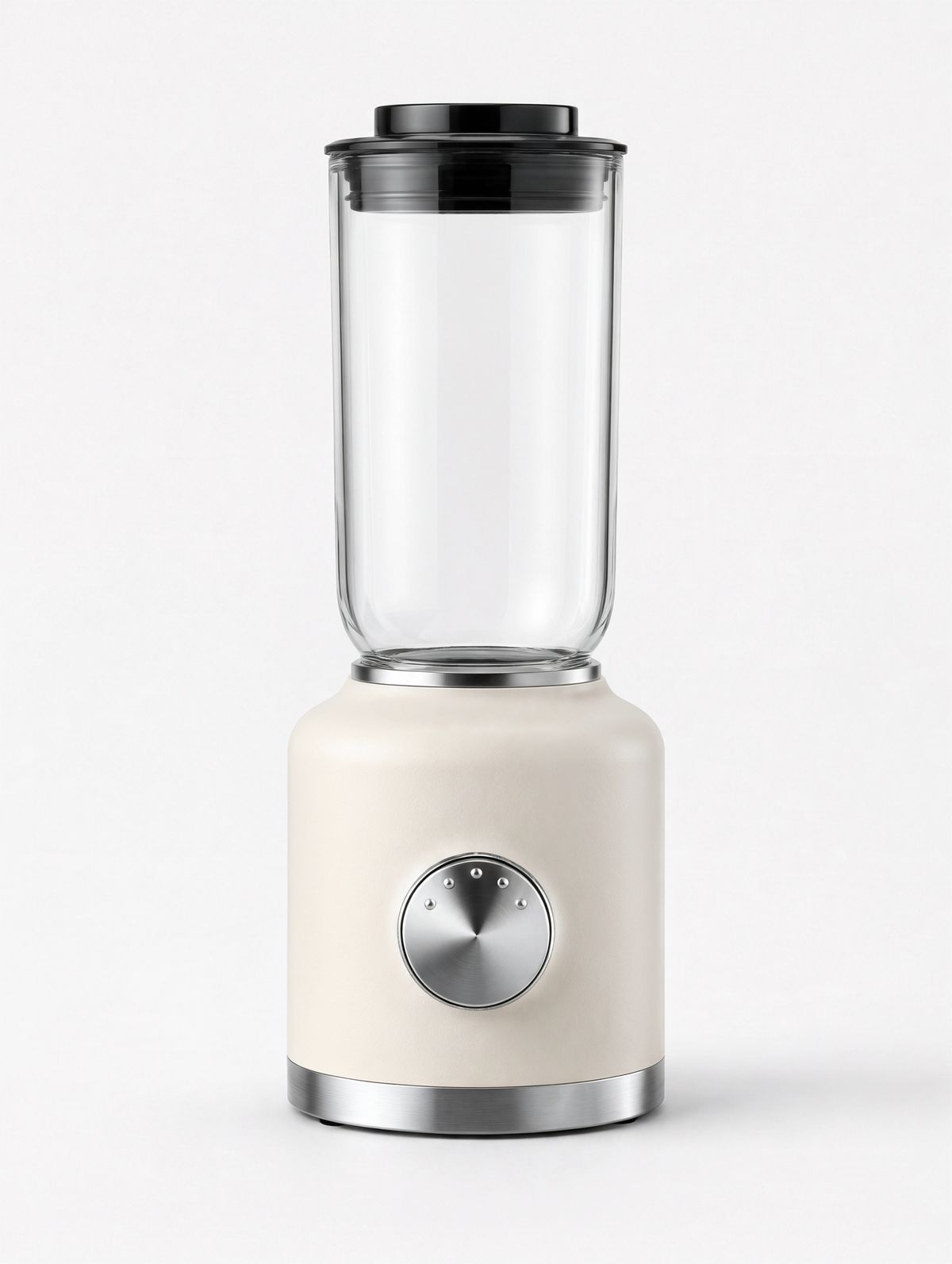
An e-commerce packshot of a countertop blender with a matte cream body, a brushed steel base ring, a single large chrome dial with five settings, and a tall clear glass jar with a black lid. Standing on a plain white backdrop. Soft even studio lighting, a subtle contact shadow. Photoreal product photography, no logos, no text.
- Blades
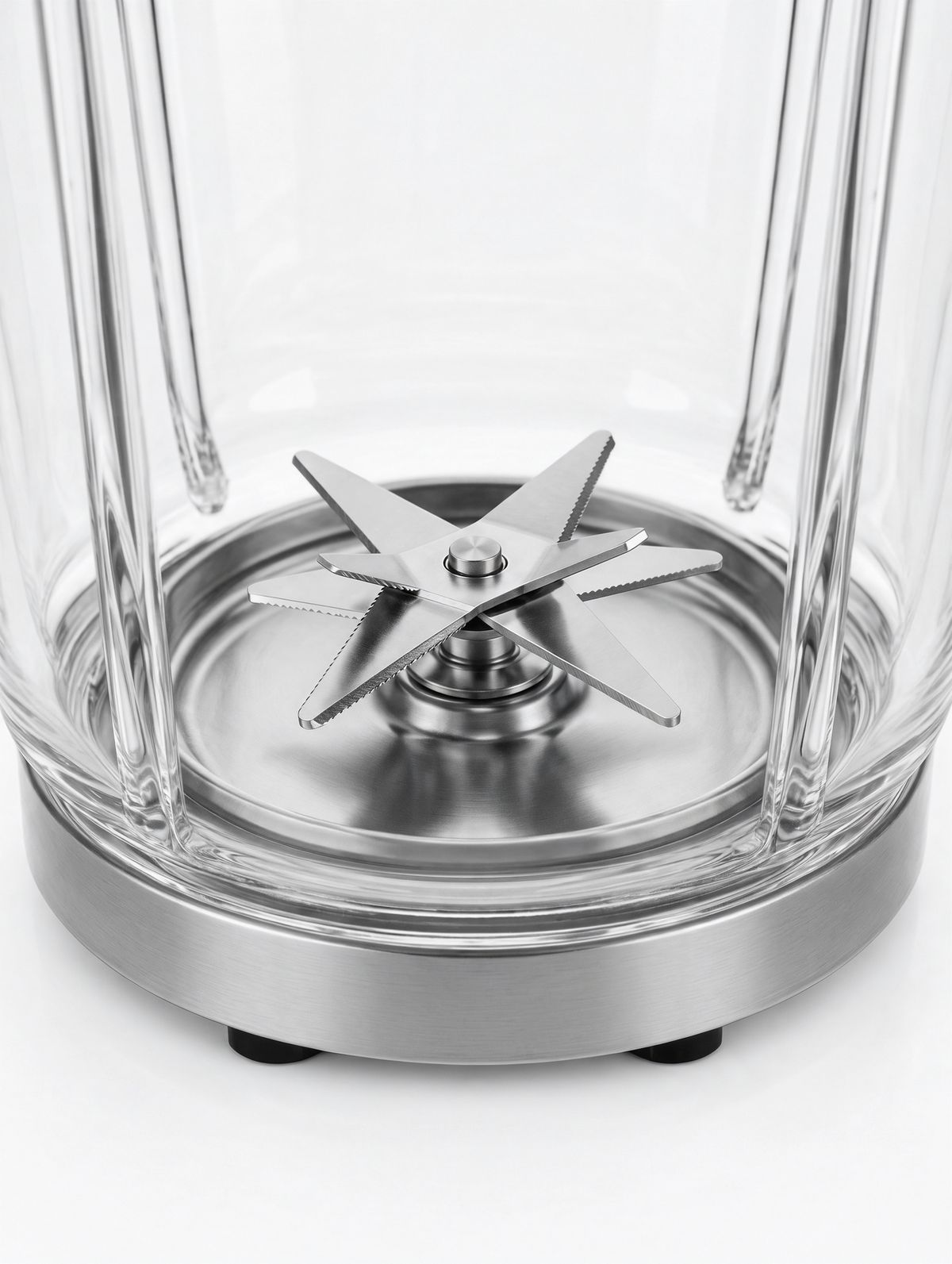
A close-up product detail photo of the steel blade assembly at the bottom of a clear glass blender jar, six angled stainless blades, seen from slightly above against a plain white backdrop. Soft even studio lighting, crisp metal reflections. Photoreal product photography, no logos, no text.


The page is planned from the selling points. Each one in the prompt shows up as a section, a feature tile or a row of the specifications table, and the shot list adds the kitchen photos and the blade close-ups. The size is the model's choice, and this page came back at 2048 × 26239.
This guide covers the request, how long a product page runs, writing the page brief, and designing websites.
The request
A page is an ordinary request with settings.pageType set to the kind of page. This is the request behind the blender page:
import { createClient } from '@runware/sdk'

const client = await createClient({ apiKey: process.env.RUNWARE_API_KEY })
await client.connect()

const [result] = await client.run({
  model: 'klingai:kling-image@4.0',
  positivePrompt: 'An English-only e-commerce product detail page for the blender in <<<image_1>>>, with its blade assembly shown in <<<image_2>>>, for a home appliance store. The product is called "Mira Blend". Selling points: a 1,200 W motor, a 1.5 liter borosilicate glass jar, five speeds on one dial, a pulse mode for ice, and six stainless steel blades that come out for cleaning. Show the blender in a bright kitchen with fruit and smoothies, a close-up of the blades, a speed guide, and a specifications table. Warm cream, sage green and white design, rounded serif headings and clean sans-serif body text. All text on the page in English only.',
  resolution: '2K',
  inputs: {
    referenceImages: [
      'https://assets.runware.ai/guides/klingai-image-4-0/product-pages-and-websites/source-blender.jpg',
      'https://assets.runware.ai/guides/klingai-image-4-0/product-pages-and-websites/source-blender-detail.jpg'
    ]
  },
  settings: {
    pageType: 'ecommerce',
    pageLength: 'medium'
  }
})
import asyncio
import os
from runware import Runware
async def main():
async with Runware(api_key=os.environ["RUNWARE_API_KEY"]) as client:
results = await client.run({
"model": "klingai:kling-image@4.0",
"positivePrompt": "An English-only e-commerce product detail page for the blender in <<<image_1>>>, with its blade assembly shown in <<<image_2>>>, for a home appliance store. The product is called \"Mira Blend\". Selling points: a 1,200 W motor, a 1.5 liter borosilicate glass jar, five speeds on one dial, a pulse mode for ice, and six stainless steel blades that come out for cleaning. Show the blender in a bright kitchen with fruit and smoothies, a close-up of the blades, a speed guide, and a specifications table. Warm cream, sage green and white design, rounded serif headings and clean sans-serif body text. All text on the page in English only.",
"resolution": "2K",
"inputs": {
"referenceImages": [
"https://assets.runware.ai/guides/klingai-image-4-0/product-pages-and-websites/source-blender.jpg",
"https://assets.runware.ai/guides/klingai-image-4-0/product-pages-and-websites/source-blender-detail.jpg"
]
},
"settings": {
"pageType": "ecommerce",
"pageLength": "medium"
}
})
asyncio.run(main())curl https://api.runware.ai/v1 \
-H "Authorization: Bearer $RUNWARE_API_KEY" \
-H "Content-Type: application/json" \
-d '[
{
  "taskType": "imageInference",
  "taskUUID": "5f9b3d27-4e1a-4c68-a7d2-9b6e3f1c8a54",
  "model": "klingai:kling-image@4.0",
  "positivePrompt": "An English-only e-commerce product detail page for the blender in <<<image_1>>>, with its blade assembly shown in <<<image_2>>>, for a home appliance store. The product is called \"Mira Blend\". Selling points: a 1,200 W motor, a 1.5 liter borosilicate glass jar, five speeds on one dial, a pulse mode for ice, and six stainless steel blades that come out for cleaning. Show the blender in a bright kitchen with fruit and smoothies, a close-up of the blades, a speed guide, and a specifications table. Warm cream, sage green and white design, rounded serif headings and clean sans-serif body text. All text on the page in English only.",
  "resolution": "2K",
  "inputs": {
    "referenceImages": [
      "https://assets.runware.ai/guides/klingai-image-4-0/product-pages-and-websites/source-blender.jpg",
      "https://assets.runware.ai/guides/klingai-image-4-0/product-pages-and-websites/source-blender-detail.jpg"
    ]
  },
  "settings": {
    "pageType": "ecommerce",
    "pageLength": "medium"
  }
}
]'runware run klingai:kling-image@4.0 \
positivePrompt="An English-only e-commerce product detail page for the blender in <<<image_1>>>, with its blade assembly shown in <<<image_2>>>, for a home appliance store. The product is called \"Mira Blend\". Selling points: a 1,200 W motor, a 1.5 liter borosilicate glass jar, five speeds on one dial, a pulse mode for ice, and six stainless steel blades that come out for cleaning. Show the blender in a bright kitchen with fruit and smoothies, a close-up of the blades, a speed guide, and a specifications table. Warm cream, sage green and white design, rounded serif headings and clean sans-serif body text. All text on the page in English only." \
resolution=2K \
inputs.referenceImages.0=https://assets.runware.ai/guides/klingai-image-4-0/product-pages-and-websites/source-blender.jpg \
inputs.referenceImages.1=https://assets.runware.ai/guides/klingai-image-4-0/product-pages-and-websites/source-blender-detail.jpg \
settings.pageType=ecommerce \
settings.pageLength=medium{
"taskType": "imageInference",
"taskUUID": "5f9b3d27-4e1a-4c68-a7d2-9b6e3f1c8a54",
"model": "klingai:kling-image@4.0",
"positivePrompt": "An English-only e-commerce product detail page for the blender in <<<image_1>>>, with its blade assembly shown in <<<image_2>>>, for a home appliance store. The product is called \"Mira Blend\". Selling points: a 1,200 W motor, a 1.5 liter borosilicate glass jar, five speeds on one dial, a pulse mode for ice, and six stainless steel blades that come out for cleaning. Show the blender in a bright kitchen with fruit and smoothies, a close-up of the blades, a speed guide, and a specifications table. Warm cream, sage green and white design, rounded serif headings and clean sans-serif body text. All text on the page in English only.",
"resolution": "2K",
"inputs": {
"referenceImages": [
"https://assets.runware.ai/guides/klingai-image-4-0/product-pages-and-websites/source-blender.jpg",
"https://assets.runware.ai/guides/klingai-image-4-0/product-pages-and-websites/source-blender-detail.jpg"
]
},
"settings": {
"pageType": "ecommerce",
"pageLength": "medium"
}
}Response
[
  {
    "taskType": "imageInference",
    "taskUUID": "5f9b3d27-4e1a-4c68-a7d2-9b6e3f1c8a54",
    "imageUUID": "a7e3c1f9-2d58-4b46-8f0a-3c9e7d1b5a62",
    "imageURL": "https://im.runware.ai/image/os/a14d18/ws/2/ii/a7e3c1f9-2d58-4b46-8f0a-3c9e7d1b5a62.jpg"
  }
]settings.pageTypeisecommercefor a product detail page orwebpagefor a website design.- An
ecommercepage needs one to three product photos ininputs.referenceImages. Awebpagetakes none, and an optionalinputs.subjectImageandinputs.styleImageinstead. resolutionis1Kor2K, with1Kas the default. The page comes back as one image whose size the model picks to fit the layout, so the request sends nowidthorheight.- A page request takes no
inputs.elementsand nosettings.seriesLength. - The prompt can run up to 166,000 English characters, or 71,000 in a non-Latin script, which is room for a full brief with every line of copy.
Page length
settings.pageLength sets how many sections a product page runs to: short is about 2 to 5, medium about 6 to 10 and long about 11 to 18. It applies to ecommerce pages only, and medium is the default. The two earbud pages below share one brief and differ only in pageLength:

An e-commerce packshot of a pair of wireless earbuds in matte white with soft gray silicone tips, resting in front of their open pebble-shaped charging case in matte white with a small status light. On a plain light gray backdrop. Soft even studio lighting, a subtle contact shadow. Photoreal product photography, no logos, no text.

An English-only e-commerce product detail page for the wireless earbuds in <<<image_1>>>, "Aura Buds 2", for an online electronics store. Selling points: active noise cancellation, 30 hours of battery with the case, a 10-minute quick charge for 2 hours of listening, IPX4 sweat resistance, and a fit for small ears with three tip sizes. Clean light gray and white design with one accent color #6C5CE7, modern sans-serif type. All text on the page in English only.

An English-only e-commerce product detail page for the wireless earbuds in <<<image_1>>>, "Aura Buds 2", for an online electronics store. Selling points: active noise cancellation, 30 hours of battery with the case, a 10-minute quick charge for 2 hours of listening, IPX4 sweat resistance, and a fit for small ears with three tip sizes. Clean light gray and white design with one accent color #6C5CE7, modern sans-serif type. All text on the page in English only.
Match the length to the number of selling points. Five points fit a short page. A long page has room for eleven or more sections, and it fills them with or without material from the brief: the long page above added two features the brief never mentioned and a comparison with an older model. Give a long brief enough facts for every section.
Writing the page brief
A page brief is the product and its selling points. Kling's own examples are a single sentence, such as "an English e-commerce product page for a perfume", and the model plans everything else. Each part you add takes a decision away from it:
Name the language of the page. "All text on the page in English only" fixes the copy. A website brief that named no language came back with its copy in Chinese.
List the selling points as facts. "A 1,200 W motor" and "a 10-minute quick charge for 2 hours of listening" are numbers the page can set as headlines and list in a specs table, where a list of adjectives leaves the table empty.
Leave the look of a product page to the model. All three product pages in this guide came back in a palette of their own instead of the colors and type their briefs asked for: the blender page in charcoal and cream, the earbud pages in peach and in cream and gold. The sections do follow the brief, so name one when the page must have it, as the blender brief does with its specifications table.
Websites
With pageType set to webpage, the model designs a full homepage as one image: navigation, hero, content blocks and footer. A prompt alone is enough. The brief below lists the blocks it wants, in order:

An English-only homepage design for "Casa Lumen", a twelve-room boutique hotel on a cliff above the sea in southern Portugal. A navigation bar with "Rooms", "Dining", "Experiences", "Location" and a "Book a stay" button, a full-width hero photo of a whitewashed terrace with an infinity pool at sunset, a short welcome paragraph, a row of three room cards with photos and nightly prices from €240, a dining section with a photo of grilled fish and a sentence about the kitchen, a guest quote, a map and directions block, and a footer with contact details and social links. Calm Mediterranean palette of white, sand and deep sea blue, elegant serif headings with a clean sans-serif body. All text in English only.
Write the navigation as quoted labels: all five came back in the menu as written, next to a "Reserve" button the model added. The sections are followed more loosely. The page kept the hero and a featured room from €240, and left out the dining section, the guest quote and the map the brief listed.
From brand photos
A webpage takes two images of its own in place of referenceImages. inputs.subjectImage is kept as it appears and the page is designed around it, and inputs.styleImage lends the page its look. The yoga studio site below was designed around a photo of the studio, in the style of a ceramics studio's website:

An English-only website for "North Light Yoga", a neighborhood yoga studio, designed around the photo of the studio and in the visual and layout style of the reference site. A header with the studio name and a "Book a class" button, a hero with the studio photo and the line "Slow mornings, strong practice", a weekly class timetable, a section introducing the teachers, a pricing section with a drop-in class at $22 and a monthly pass at $140, and a footer with the address and opening hours. All text in English only.
- Subject
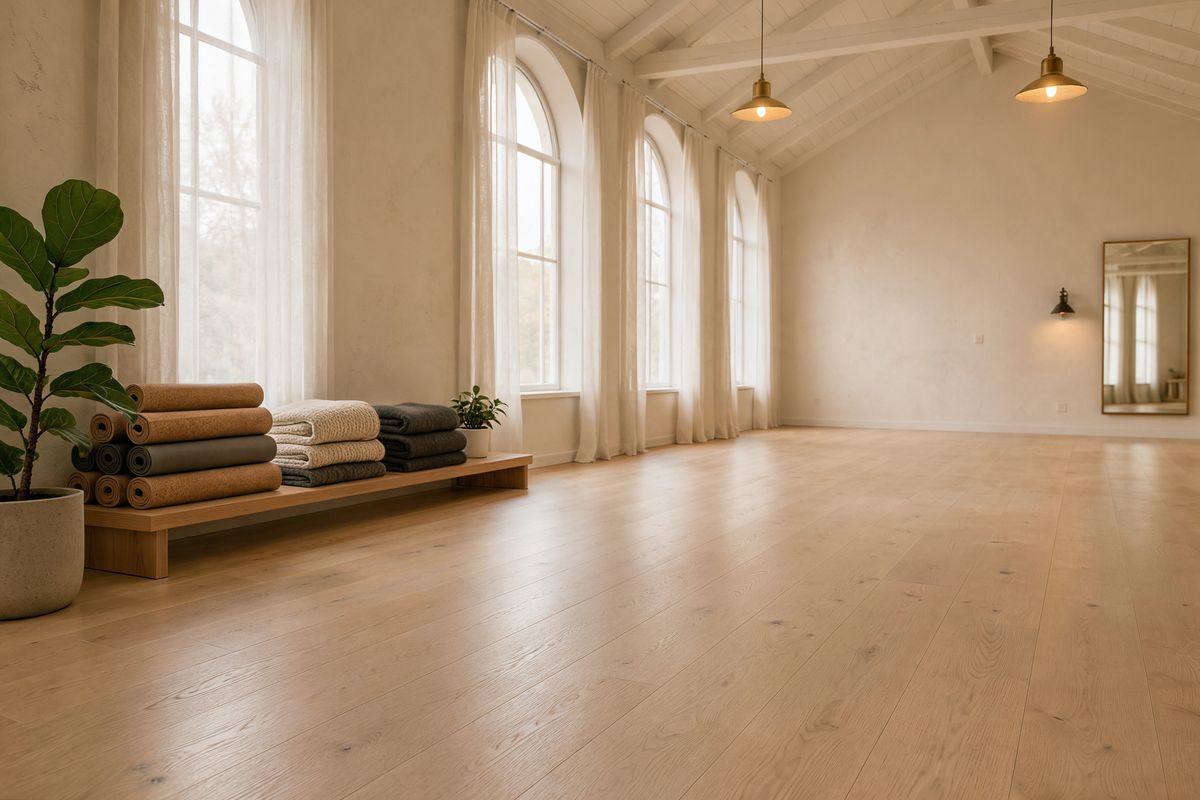
A photo of an empty yoga studio in the morning: pale birch wood floors, white plaster walls, tall arched windows with sheer curtains, a row of rolled cork mats and wool blankets on a low shelf, and a large fiddle-leaf fig in the corner. Soft warm daylight. Photoreal interior photography, no people, no text, no logos.
- Style
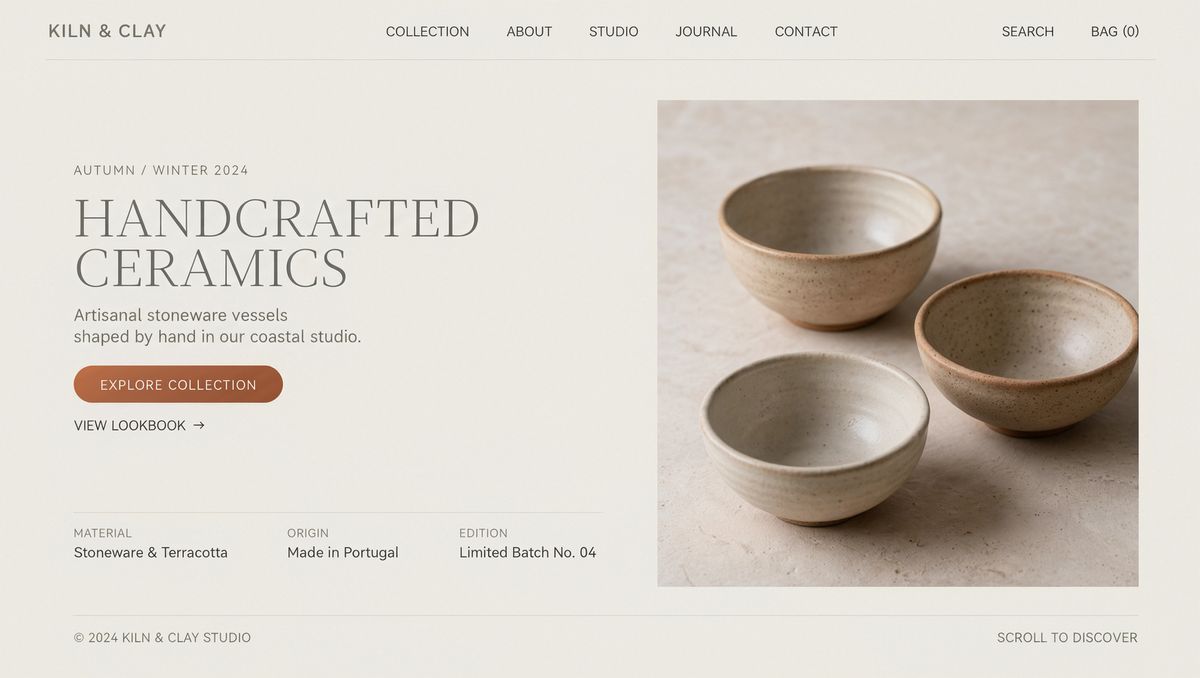
A front-on screenshot of a minimalist website home page for an independent ceramics studio: an off-white background, a thin top navigation bar, a large light serif headline on the left, one terracotta pill-shaped button, generous white space, and a full-bleed photo of handmade stoneware bowls on the right half. Clean editorial web design, flat, no browser frame, no device.


Each one takes a single image, both optional:
{
  "inputs": {
    "subjectImage": "https://assets.runware.ai/guides/klingai-image-4-0/product-pages-and-websites/source-yoga-studio.jpg",
    "styleImage": "https://assets.runware.ai/guides/klingai-image-4-0/product-pages-and-websites/source-yoga-style.jpg"
  }
}
Name the two images in words: the prompt calls them "the photo of the studio" and "the reference site", and "a hero with the studio photo" places the subject on the page. The page took the look of the ceramics site and none of its content: every photo on it is the studio, down to the teachers posing in it. Its sections fall in the same order as the hotel page above, which had no style image, so here the reference set the type and the palette rather than the layout. It also left out the pricing section the brief asked for and added a row of class styles, so check a page against its brief before you use it.
Tips
-
Send one to three product photos for an
ecommercepage. Awebpageworks from a prompt alone, plus an optionalsubjectImageandstyleImage. -
Name the page language in the brief. "All text in English only" keeps every block in one language.
-
List selling points as facts and numbers. They become the headlines and the specs table.
-
Pick
pageLengthby how much you have to say. About 2 to 5 sections forshort, up to 18 forlong. -
Quote the navigation labels the page needs. They come back in the menu, with a few the model adds.
-
Leave the size to the model. A page request takes
resolutiononly, and the height follows the layout. -
Check every fact the page states. A page with more sections than the brief can fill adds features and specs of its own.