P-Video-2-Pro-Replace

P-Video-2-Pro-Replace is Pruna AI's character replacement model that puts the person from one or two photos into an existing video. It keeps the original camera, background, timing, and motion, carries over the source soundtrack with lips that follow it, and replaces two people at once with a prompt that says who replaces whom. It takes source clips from 1 second to 2 minutes and outputs from 480p up to 4K, for UGC ad variations, localized spokesperson videos, and recasting existing footage.
Lip sync and soundtrack
How to work with the source audio in Pruna P-Video-2-Pro-Replace: lip sync, the original voice, voiceover clips and outputs with no audio track.
Introduction
P-Video-2-Pro-Replace keeps the soundtrack of the source and drives the new person's lips with it, so the person from the photo delivers the original line on the original beats. Turn the sound on:
- Source video
A gym owner, a man in his forties with a shaved head and a gray beard, in a plain black polo shirt, stands at the front desk of his bright neighborhood gym and says to the camera, "First week is on us. Just bring a water bottle and come say hi." Then he grins and points toward the gym floor behind him. Medium shot from the chest up, locked-off camera, bright even light, treadmills and racks softly out of focus behind him. Photoreal small-business local ad, no text, no logos. Audio: his warm clear speaking voice close to the microphone, quiet gym ambience, no music.
- Photo
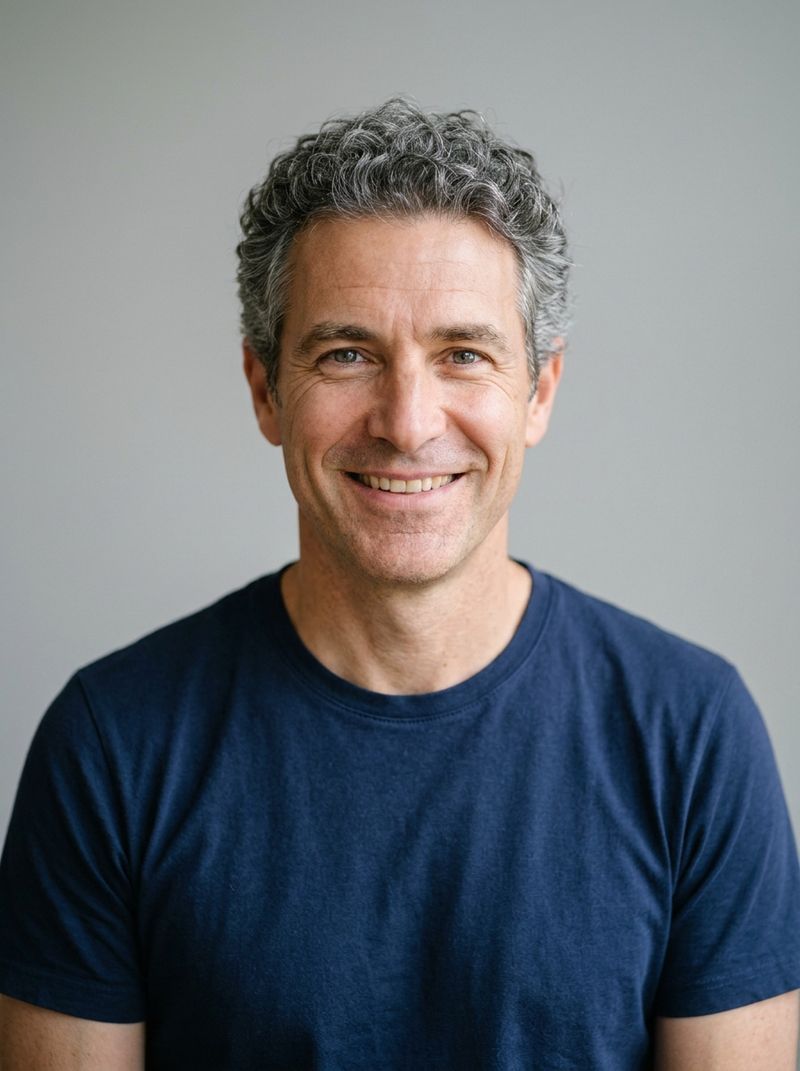
A head-and-shoulders portrait photo of a man in his late forties with short graying curly hair and a clean-shaven face, wearing a plain navy t-shirt, facing the camera with a friendly expression. Plain light gray background, soft even light. Photoreal, no text.

Two settings change that behavior. settings.sourceAudioSync decides whether the audio drives the lips, and settings.preserveAudio decides whether the soundtrack is on the output. Both default to true, which is the hero above. This guide covers the voice, sources whose audio is not the person on screen, and outputs delivered without sound.
The original voice
The soundtrack is carried over as it is, so the voice belongs to the original speaker. The new face speaks with it. A photo of someone the voice could plausibly belong to reads as one person. A mismatch in apparent age or gender reads as a dub.
Choose the photo to fit the voice. In the hero, a man in his forties replaces a man in his forties, and the warm low voice fits the new face as well as it fitted the old one.
Voiceover and music in the source
Not every soundtrack is the person on screen talking. A narrator over b-roll or a song under a montage has no speaker in the frame. Sync is on by default, and it tells the model to take the soundtrack as the person's speech. Turn sourceAudioSync off for those clips, and the person is generated without listening to the audio:

A head-and-shoulders portrait photo of a woman in her thirties with long wavy auburn hair, wearing a plain cream t-shirt, facing the camera with a calm expression. Plain light gray background, soft even light. Photoreal, no text.
A hotel receptionist, a woman in her thirties with her hair in a neat bun, in a dark green blazer, stands behind a marble front desk in a bright hotel lobby, sliding keycards into small paper sleeves. She looks down at her hands the whole time with her mouth closed and never speaks. Medium shot from the front, locked-off camera, warm lobby light. Photoreal hospitality advertising cinematography, no text, no logos. Audio: an off-screen male narrator voiceover says, "Members check out late, every stay, at no extra cost." Soft lobby ambience underneath, no music.
Replace the receptionist with the woman in the image. Keep her dark green blazer exactly as it is in the source video.
The new receptionist keeps her mouth closed and goes on sleeving keycards, as the original did, while the narrator's line plays over her. The narration is still on the output, because preserveAudio is a separate setting and it is still on.
import { createClient } from '@runware/sdk'

const client = await createClient({ apiKey: process.env.RUNWARE_API_KEY })
await client.connect()

const [result] = await client.run({
  model: 'prunaai:p-video@2-pro-replace',
  inputs: {
    video: 'https://assets.runware.ai/guides/prunaai-p-video-2-pro-replace/lip-sync-and-soundtrack/source-front-desk.mp4',
    referenceImages: [
      'https://assets.runware.ai/guides/prunaai-p-video-2-pro-replace/lip-sync-and-soundtrack/photo-front-desk.jpg'
    ]
  },
  positivePrompt: 'Replace the receptionist with the woman in the image. Keep her dark green blazer exactly as it is in the source video.',
  settings: {
    sourceAudioSync: false
  },
  deliveryMethod: 'async'
})
import asyncio
import os
from runware import Runware
async def main():
async with Runware(api_key=os.environ["RUNWARE_API_KEY"]) as client:
results = await client.run({
"model": "prunaai:p-video@2-pro-replace",
"inputs": {
"video": "https://assets.runware.ai/guides/prunaai-p-video-2-pro-replace/lip-sync-and-soundtrack/source-front-desk.mp4",
"referenceImages": [
"https://assets.runware.ai/guides/prunaai-p-video-2-pro-replace/lip-sync-and-soundtrack/photo-front-desk.jpg"
]
},
"positivePrompt": "Replace the receptionist with the woman in the image. Keep her dark green blazer exactly as it is in the source video.",
"settings": {
"sourceAudioSync": False
},
"deliveryMethod": "async"
})
asyncio.run(main())curl https://api.runware.ai/v1 \
-H "Authorization: Bearer $RUNWARE_API_KEY" \
-H "Content-Type: application/json" \
-d '[
{
  "taskType": "videoInference",
  "taskUUID": "b2e6f841-7c39-4d0a-95b3-6e1a8d4c2f75",
  "model": "prunaai:p-video@2-pro-replace",
  "inputs": {
    "video": "https://assets.runware.ai/guides/prunaai-p-video-2-pro-replace/lip-sync-and-soundtrack/source-front-desk.mp4",
    "referenceImages": [
      "https://assets.runware.ai/guides/prunaai-p-video-2-pro-replace/lip-sync-and-soundtrack/photo-front-desk.jpg"
    ]
  },
  "positivePrompt": "Replace the receptionist with the woman in the image. Keep her dark green blazer exactly as it is in the source video.",
  "settings": {
    "sourceAudioSync": false
  },
  "deliveryMethod": "async"
}
]'runware run prunaai:p-video@2-pro-replace \
inputs.video=https://assets.runware.ai/guides/prunaai-p-video-2-pro-replace/lip-sync-and-soundtrack/source-front-desk.mp4 \
inputs.referenceImages.0=https://assets.runware.ai/guides/prunaai-p-video-2-pro-replace/lip-sync-and-soundtrack/photo-front-desk.jpg \
positivePrompt="Replace the receptionist with the woman in the image. Keep her dark green blazer exactly as it is in the source video." \
settings.sourceAudioSync=false \
deliveryMethod=async{
"taskType": "videoInference",
"taskUUID": "b2e6f841-7c39-4d0a-95b3-6e1a8d4c2f75",
"model": "prunaai:p-video@2-pro-replace",
"inputs": {
"video": "https://assets.runware.ai/guides/prunaai-p-video-2-pro-replace/lip-sync-and-soundtrack/source-front-desk.mp4",
"referenceImages": [
"https://assets.runware.ai/guides/prunaai-p-video-2-pro-replace/lip-sync-and-soundtrack/photo-front-desk.jpg"
]
},
"positivePrompt": "Replace the receptionist with the woman in the image. Keep her dark green blazer exactly as it is in the source video.",
"settings": {
"sourceAudioSync": false
},
"deliveryMethod": "async"
}Response
[
  {
    "taskType": "videoInference",
    "taskUUID": "b2e6f841-7c39-4d0a-95b3-6e1a8d4c2f75",
    "videoUUID": "6d3a9c15-2f84-4b7e-a0c6-9e5b1d8f3a27",
    "videoURL": "https://vm.runware.ai/video/os/a14d18/ws/2/vi/6d3a9c15-2f84-4b7e-a0c6-9e5b1d8f3a27.mp4"
  }
]
The rule is about who is speaking. When the voice belongs to the person you are replacing, leave sync on. When it belongs to someone off screen, or to a singer who is not in the shot, turn it off.
Delivering without sound
settings.preserveAudio: false returns the video with no audio track. It does not change the lips: with sourceAudioSync still on, the new face follows the source's dialogue, so the clip stays in sync when that dialogue goes back on in the edit under a new music bed or a fresh mix.
import { createClient } from '@runware/sdk'

const client = await createClient({ apiKey: process.env.RUNWARE_API_KEY })
await client.connect()

const [result] = await client.run({
  model: 'prunaai:p-video@2-pro-replace',
  inputs: {
    video: 'https://assets.runware.ai/guides/prunaai-p-video-2-pro-replace/lip-sync-and-soundtrack/source-gym.mp4',
    referenceImages: [
      'https://assets.runware.ai/guides/prunaai-p-video-2-pro-replace/lip-sync-and-soundtrack/photo-gym.jpg'
    ]
  },
  settings: {
    preserveAudio: false
  },
  deliveryMethod: 'async'
})
import asyncio
import os
from runware import Runware
async def main():
async with Runware(api_key=os.environ["RUNWARE_API_KEY"]) as client:
results = await client.run({
"model": "prunaai:p-video@2-pro-replace",
"inputs": {
"video": "https://assets.runware.ai/guides/prunaai-p-video-2-pro-replace/lip-sync-and-soundtrack/source-gym.mp4",
"referenceImages": [
"https://assets.runware.ai/guides/prunaai-p-video-2-pro-replace/lip-sync-and-soundtrack/photo-gym.jpg"
]
},
"settings": {
"preserveAudio": False
},
"deliveryMethod": "async"
})
asyncio.run(main())curl https://api.runware.ai/v1 \
-H "Authorization: Bearer $RUNWARE_API_KEY" \
-H "Content-Type: application/json" \
-d '[
{
  "taskType": "videoInference",
  "taskUUID": "8f1c5a37-4e92-4b60-b7d4-3a9e2c6f1d08",
  "model": "prunaai:p-video@2-pro-replace",
  "inputs": {
    "video": "https://assets.runware.ai/guides/prunaai-p-video-2-pro-replace/lip-sync-and-soundtrack/source-gym.mp4",
    "referenceImages": [
      "https://assets.runware.ai/guides/prunaai-p-video-2-pro-replace/lip-sync-and-soundtrack/photo-gym.jpg"
    ]
  },
  "settings": {
    "preserveAudio": false
  },
  "deliveryMethod": "async"
}
]'runware run prunaai:p-video@2-pro-replace \
inputs.video=https://assets.runware.ai/guides/prunaai-p-video-2-pro-replace/lip-sync-and-soundtrack/source-gym.mp4 \
inputs.referenceImages.0=https://assets.runware.ai/guides/prunaai-p-video-2-pro-replace/lip-sync-and-soundtrack/photo-gym.jpg \
settings.preserveAudio=false \
deliveryMethod=async{
"taskType": "videoInference",
"taskUUID": "8f1c5a37-4e92-4b60-b7d4-3a9e2c6f1d08",
"model": "prunaai:p-video@2-pro-replace",
"inputs": {
"video": "https://assets.runware.ai/guides/prunaai-p-video-2-pro-replace/lip-sync-and-soundtrack/source-gym.mp4",
"referenceImages": [
"https://assets.runware.ai/guides/prunaai-p-video-2-pro-replace/lip-sync-and-soundtrack/photo-gym.jpg"
]
},
"settings": {
"preserveAudio": false
},
"deliveryMethod": "async"
}Response
[
  {
    "taskType": "videoInference",
    "taskUUID": "8f1c5a37-4e92-4b60-b7d4-3a9e2c6f1d08",
    "videoUUID": "4c8e2b61-9a37-4f05-b1d3-7e6a5c9f2b84",
    "videoURL": "https://vm.runware.ai/video/os/a14d18/ws/2/vi/4c8e2b61-9a37-4f05-b1d3-7e6a5c9f2b84.mp4"
  }
]
The two settings are independent, and each combination has a use. The first row is the default:
| Source audio sync | Preserve audio | Lips | Output audio |
|---|---|---|---|
true | true | Follow the audio | Source soundtrack |
false | true | Not driven by it | Source soundtrack |
true | false | Follow the audio | None |
false | false | Not driven by it | None |
Tips
-
Pick a photo the voice fits. The voice is the original speaker's, so match the apparent age and gender of the photo to it.
-
Turn sync off when the speaker is off screen. A narrator or a song under b-roll is not the new person's speech, so it should not drive their lips.
-
Leave sync on for a silent delivery that gets its dialogue back.
preserveAudio: falsedrops the track and keeps the lips matched to it. -
Trim the audio with the picture. The soundtrack travels with the clip, so cut the source where both the picture and the sound start and end cleanly.