P-Video-2-Pro-Replace

P-Video-2-Pro-Replace is Pruna AI's character replacement model that puts the person from one or two photos into an existing video. It keeps the original camera, background, timing, and motion, carries over the source soundtrack with lips that follow it, and replaces two people at once with a prompt that says who replaces whom. It takes source clips from 1 second to 2 minutes and outputs from 480p up to 4K, for UGC ad variations, localized spokesperson videos, and recasting existing footage.
Choosing the photo
How to choose the photo for Pruna P-Video-2-Pro-Replace, which sets both the person and the outfit: a headshot, a full look, a kept uniform or a 3D character.
Introduction
The photo decides who appears in the video, and it also decides what they wear. Clothing the photo shows ends up on the person in the output, and what the photo leaves out is filled in from the source.
- Source video
A woman in her twenties with long dark hair walks toward the camera across a bright minimalist loft apartment, stops, does one slow turn to show her outfit and smiles at the lens. She wears a black oversized hoodie, gray sweatpants and white sneakers. Her whole body is visible from head to toe the entire time. Vertical framing, locked-off camera at waist height, soft daylight from tall windows. Photoreal fashion creator outfit video, no text, no logos. Audio: soft footsteps on a wooden floor, a light upbeat instrumental beat, no voice.
- Photo
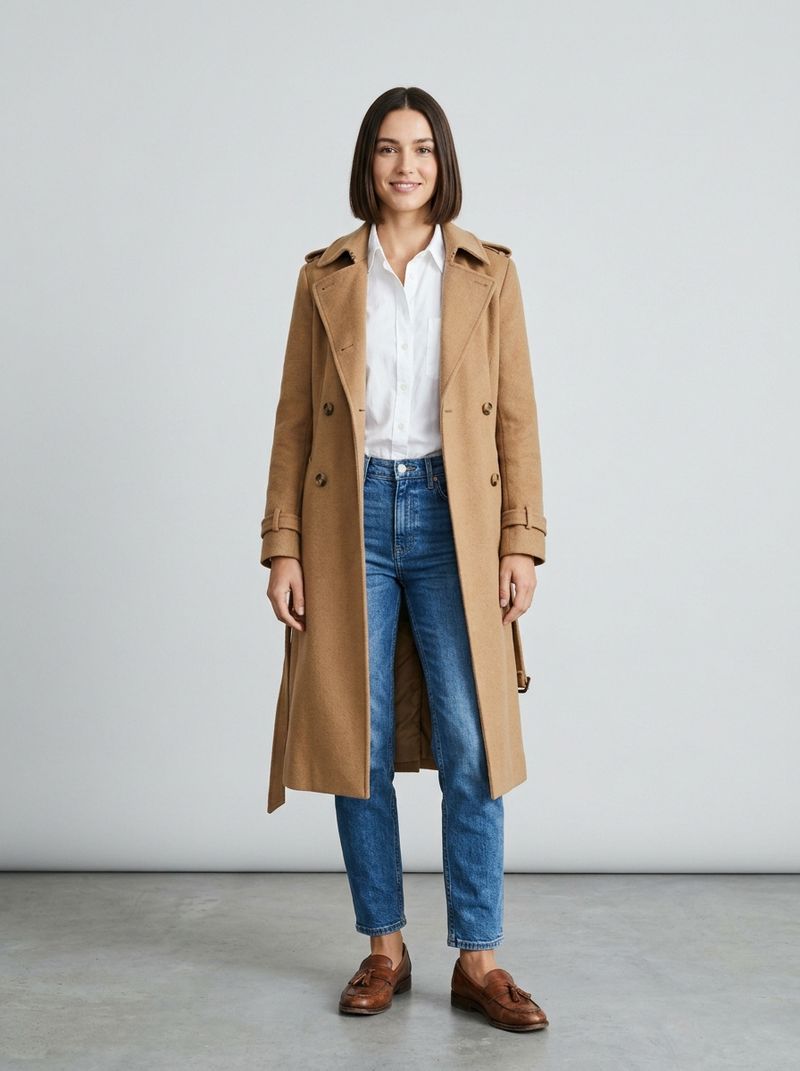
A full-length photo of a woman in her late twenties with a sleek dark bob, standing and facing the camera, her whole body visible from head to toe. She wears a camel wool trench coat open over a white button-up shirt, straight-leg blue jeans and brown leather loafers. Plain light gray studio background, soft even light. Photoreal fashion e-commerce photography, no text.

The source is an outfit clip in a black hoodie and sweatpants. The photo is a full-length shot of someone else in a camel trench coat, and the output is that person, in that coat, on the walk and the turn the source recorded. This guide covers how the framing of the photo sets the outfit, how to keep the source's clothing when it has to stay, and how to cast a 3D character in place of a person.
Headshot or full length
The framing of the photo sets how much of the outfit changes. The two photos below show the same man, once from the shoulders up in a white t-shirt and once head to toe in a light gray linen suit, and each was sent with the same source clip and no prompt:

A head-and-shoulders portrait photo of a man in his thirties with wavy brown hair and a short beard, wearing a plain white crew-neck t-shirt, facing the camera with a calm expression. Plain light gray background, soft even light. Photoreal, no text.

A full-length photo of the same man from the reference image, standing and facing the camera, his whole body visible from head to toe. He wears a light gray linen suit over a white crew-neck t-shirt and tan suede loafers. Plain light gray studio background, soft even light. Photoreal fashion e-commerce photography, no text.
A man in his thirties with short dark hair walks out of a glass office building and across a sunny paved plaza toward the camera, wearing a navy two-piece suit, a white shirt with no tie and black dress shoes. His whole body is visible from head to toe the entire time. Locked-off wide shot at chest height, bright midday light. Photoreal corporate stock footage, no text, no logos. Audio: his footsteps on the paving, light city ambience, no music, no voice.
With the headshot, the white t-shirt replaces the jacket and the shirt, and the navy trousers and black shoes stay, because the photo stops at the shoulders and has nothing to say about them. With the full-length photo, the whole outfit changes, linen suit and loafers included. The walk and the camera are the source's in both.
Crop the photo to what should change. A head-and-shoulders photo replaces the face, the hair and the top. A full-length photo replaces everything from head to toe, which is the one to send for a fashion look or a full costume.
The part the photo leaves out is not guaranteed to match the source. The model can restyle it to suit the new person: the trainer in Replacing people in video went from gray shorts to black leggings with a headshot. When the lower half has to match, send a full-length photo or name the pieces in the prompt.
Keeping the source's clothing
A uniform or a costume often has to survive the swap. With no prompt, the photo's clothing usually wins: a headshot of someone in a charcoal t-shirt takes the hi-vis vest off the warehouse worker below. Name the clothes in positivePrompt and the source keeps them:

A head-and-shoulders portrait photo of a man in his forties with a shaved head and a full dark beard, wearing a plain charcoal t-shirt, facing the camera. Plain light gray background, soft even light. Photoreal, no text.
A warehouse worker, a man in his thirties with a short beard, wearing a bright orange hi-vis vest over a navy polo shirt, scans a cardboard parcel with a handheld barcode scanner at a packing station and places it on a moving conveyor belt. Then he looks at the camera and says, "Most orders leave the building within the hour." Medium shot from the waist up, locked-off camera, bright even warehouse lighting, tall shelving in the background. Photoreal logistics company recruitment video, no text, no logos. Audio: his clear friendly voice, the beep of the scanner, conveyor and warehouse ambience, no music.
Replace the warehouse worker with the man in the image. Keep his orange hi-vis vest and navy polo shirt exactly as they are in the source video.
import { createClient } from '@runware/sdk'

const client = await createClient({ apiKey: process.env.RUNWARE_API_KEY })
await client.connect()

const [result] = await client.run({
  model: 'prunaai:p-video@2-pro-replace',
  inputs: {
    video: 'https://assets.runware.ai/guides/prunaai-p-video-2-pro-replace/choosing-the-photo/source-warehouse.mp4',
    referenceImages: [
      'https://assets.runware.ai/guides/prunaai-p-video-2-pro-replace/choosing-the-photo/photo-warehouse.jpg'
    ]
  },
  positivePrompt: 'Replace the warehouse worker with the man in the image. Keep his orange hi-vis vest and navy polo shirt exactly as they are in the source video.',
  deliveryMethod: 'async'
})
import asyncio
import os
from runware import Runware
async def main():
async with Runware(api_key=os.environ["RUNWARE_API_KEY"]) as client:
results = await client.run({
"model": "prunaai:p-video@2-pro-replace",
"inputs": {
"video": "https://assets.runware.ai/guides/prunaai-p-video-2-pro-replace/choosing-the-photo/source-warehouse.mp4",
"referenceImages": [
"https://assets.runware.ai/guides/prunaai-p-video-2-pro-replace/choosing-the-photo/photo-warehouse.jpg"
]
},
"positivePrompt": "Replace the warehouse worker with the man in the image. Keep his orange hi-vis vest and navy polo shirt exactly as they are in the source video.",
"deliveryMethod": "async"
})
asyncio.run(main())curl https://api.runware.ai/v1 \
-H "Authorization: Bearer $RUNWARE_API_KEY" \
-H "Content-Type: application/json" \
-d '[
{
  "taskType": "videoInference",
  "taskUUID": "e3a71c58-2d94-4f6b-8c03-7b5e9a1d4f26",
  "model": "prunaai:p-video@2-pro-replace",
  "inputs": {
    "video": "https://assets.runware.ai/guides/prunaai-p-video-2-pro-replace/choosing-the-photo/source-warehouse.mp4",
    "referenceImages": [
      "https://assets.runware.ai/guides/prunaai-p-video-2-pro-replace/choosing-the-photo/photo-warehouse.jpg"
    ]
  },
  "positivePrompt": "Replace the warehouse worker with the man in the image. Keep his orange hi-vis vest and navy polo shirt exactly as they are in the source video.",
  "deliveryMethod": "async"
}
]'runware run prunaai:p-video@2-pro-replace \
inputs.video=https://assets.runware.ai/guides/prunaai-p-video-2-pro-replace/choosing-the-photo/source-warehouse.mp4 \
inputs.referenceImages.0=https://assets.runware.ai/guides/prunaai-p-video-2-pro-replace/choosing-the-photo/photo-warehouse.jpg \
positivePrompt="Replace the warehouse worker with the man in the image. Keep his orange hi-vis vest and navy polo shirt exactly as they are in the source video." \
deliveryMethod=async{
"taskType": "videoInference",
"taskUUID": "e3a71c58-2d94-4f6b-8c03-7b5e9a1d4f26",
"model": "prunaai:p-video@2-pro-replace",
"inputs": {
"video": "https://assets.runware.ai/guides/prunaai-p-video-2-pro-replace/choosing-the-photo/source-warehouse.mp4",
"referenceImages": [
"https://assets.runware.ai/guides/prunaai-p-video-2-pro-replace/choosing-the-photo/photo-warehouse.jpg"
]
},
"positivePrompt": "Replace the warehouse worker with the man in the image. Keep his orange hi-vis vest and navy polo shirt exactly as they are in the source video.",
"deliveryMethod": "async"
}Response
[
  {
    "taskType": "videoInference",
    "taskUUID": "e3a71c58-2d94-4f6b-8c03-7b5e9a1d4f26",
    "videoUUID": "9b5d2e81-4c70-4a3f-b6e2-1d8f7c3a5e09",
    "videoURL": "https://vm.runware.ai/video/os/a14d18/ws/2/vi/9b5d2e81-4c70-4a3f-b6e2-1d8f7c3a5e09.mp4"
  }
]
The instruction names each garment that stays, the vest and the polo, and points at the source as the reference for them. Everything above the collar still comes from the photo. Write the same sentence for a sports kit, a medical uniform, chef's whites or a branded apron, naming the pieces by color and type.
Characters and mascots
The photo can show a character instead of a person. A 3D character render takes the place of the presenter and keeps its own style, while the source supplies the street, the phone, the gestures and the line:
- Source video
A young woman in her twenties with a high ponytail, in a white t-shirt and light blue jeans, stands on a bright city street holding a smartphone. She turns its screen toward the camera, then looks into the lens and says, "Pick a class, tap book, and you're in." She smiles. Vertical creator framing, from the knees up, handheld with very slight movement, soft daylight. Photoreal app marketing social video, the phone screen shows a plain bright interface with no readable text, no logos. Audio: her bright upbeat speaking voice close to the microphone, light street ambience, no music.
- Character
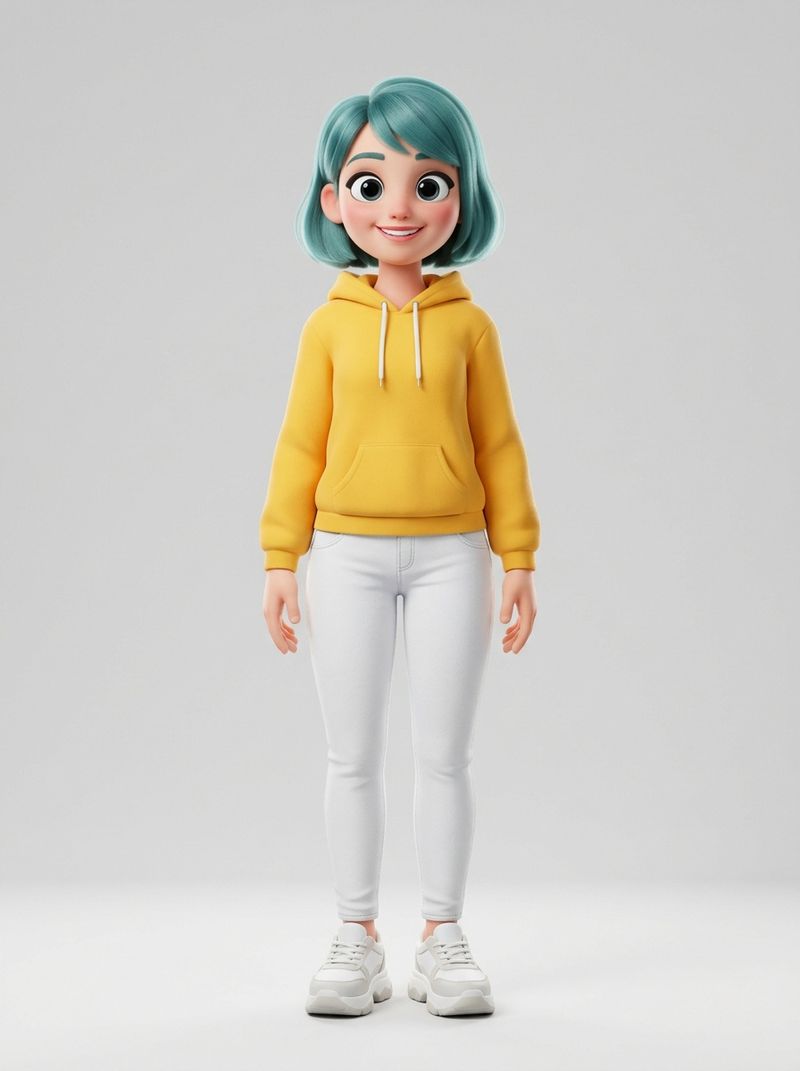
A full-length 3D animated character render of a cheerful young woman with oversized expressive eyes and a short teal bob, wearing a bright yellow hoodie, white jeans and chunky white sneakers, standing and facing the camera with a friendly smile. Stylized family animated feature look with soft rounded shapes and smooth shading. Plain light gray background, soft studio light. No text.

The render is full length because a character's clothes are part of its design, and a full-length photo carries them over. The same applies to a brand mascot: send the render the brand already uses, and the mascot fronts a clip recorded by a person.
Tips
-
Crop the photo to what should change. A headshot replaces the face, the hair and the top. A full-length photo replaces the whole outfit.
-
Name the clothes that must stay. Without a prompt the photo's clothing usually wins, so list the garments to keep and point at the source.
-
Send one person per photo. Each photo stands for one person on screen. For two people, send two photos and see Mapping photos to people.
-
Use full-length renders for characters. A mascot or a 3D character keeps its outfit only when the render shows it.
-
Match the photo to the voice. The soundtrack stays the source's, as Lip sync and soundtrack explains.