MiniMax H3

MiniMax H3 is a multimodal video generation model that supports text-to-video, first-frame and keyframe-guided generation, multi-reference conditioning, and audio-video continuation in a single workflow. It accepts text together with images, videos, and audio references to keep subjects, voice, motion, and scene identity more consistent across shots, while generating synchronized sound natively rather than as a separate dubbing pass. It is well suited to cinematic multi-shot generation, reference-driven character performance, instruction-based video editing, and continuation workflows that extend an existing clip or audio segment into a seamless new video.
Motion, camera, and performance
How to transfer motion, a camera move, or an acting performance from a reference video onto a new subject with MiniMax H3 Omni Reference.
Introduction
Reference images lock what a subject looks like. Reference videos lock what it does. Pass a clip in inputs.referenceVideos and MiniMax H3 lifts its motion, its camera move, or its acting and applies it to a new subject, so you can drive your own character through a movement you already have on film.
It works from two inputs, each given a distinct role: a reference clip for the movement, and a portrait for the character.
H3 reads the spin and freeze from Video 1 and drives the person from Image 1 through it, in a plaza neither input contained:
Use Video 1 as the motion reference and Image 1 as the character. The woman from Image 1 performs the exact dance move from Video 1, the same spin into the same freeze pose, in a bright sunlit urban plaza. Keep her identity, box braids, and orange tracksuit. Energetic, crisp. Sound: an upbeat street beat and footsteps.
- Motion reference
A dancer in plain grey clothes performs one energetic hip-hop move in a bright empty studio, full body in frame, a quick spin into a sharp freeze pose, clean even lighting, plain background. Photoreal, crisp. Sound: an upbeat street beat.
- The character
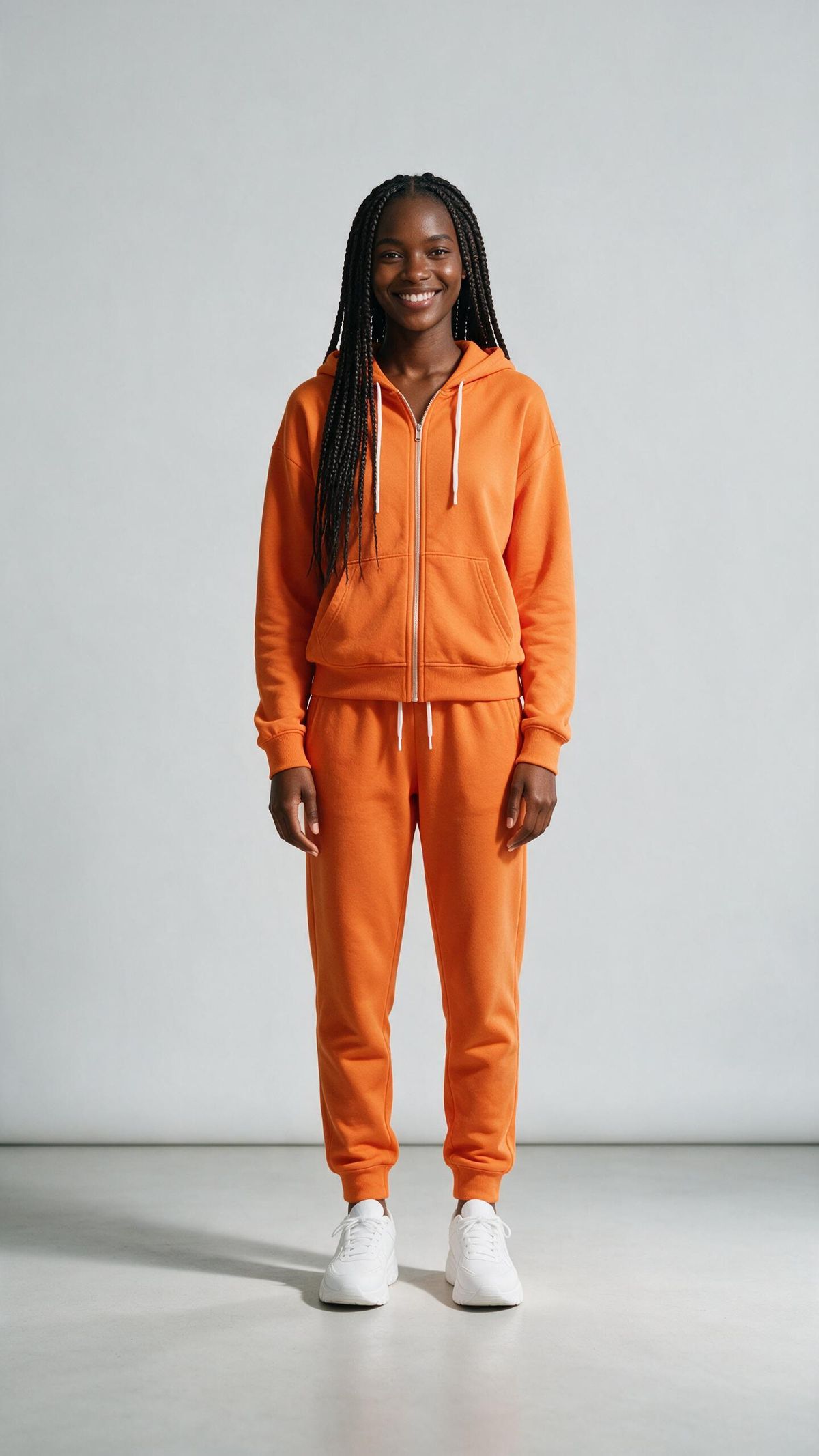
A full-length editorial studio portrait of a young Black woman in her mid-twenties with long, neat dark box braids falling past her shoulders, a bright warm smile and a relaxed, confident posture, standing squarely and facing the camera with her arms loose at her sides. She wears a vivid orange zip-up tracksuit, a hoodie and matching joggers with white drawstrings, and clean white chunky trainers. The setting is a clean, seamless pale-grey studio background with soft, even, diffused key lighting from the front and gentle fill, casting a soft natural shadow at her feet. Shot on a full-frame camera with an 85mm lens at eye level, the entire figure visible from head to toe with a little headroom and floor space, sharp focus, natural skin texture and fabric detail, true-to-life colour, high-end fashion photography, photoreal.

The reference supplies the movement and the timing, and the image supplies the identity and the wardrobe. Give the model a clean, full-body motion clip so the action is unambiguous, and a matching full-body character so it has a whole figure to animate.
Request shape
Reference clips go in inputs.referenceVideos (up to three, 2 to 15 seconds each), and a character to drive can go alongside in inputs.referenceImages. As with image references, the prompt names each source by index: "Video 1" for the motion, "Image 1" for the character.
import { createClient } from '@runware/sdk'

const client = await createClient({ apiKey: process.env.RUNWARE_API_KEY })
await client.connect()

const [result] = await client.run({
  model: 'minimax:h3@0',
  positivePrompt: 'Use Video 1 as the motion reference and Image 1 as the character. The woman from Image 1 performs the exact dance from Video 1 in a sunlit urban plaza, keeping her identity, braids, and orange tracksuit. Sound: an upbeat street beat.',
  width: 1440,
  height: 2560,
  duration: 5,
  inputs: {
    referenceVideos: [
      'https://vm.runware.ai/video/os/a14d18/ws/2/vi/2b3c4d5e-6f70-4812-9a3b-4c5d6e7f8091.mp4'
    ],
    referenceImages: [
      'https://im.runware.ai/image/os/a14d18/ws/2/ii/3c4d5e6f-7081-4923-8a4b-5c6d7e8f9012.jpg'
    ]
  }
})
import asyncio
import os
from runware import Runware
async def main():
async with Runware(api_key=os.environ["RUNWARE_API_KEY"]) as client:
results = await client.run({
"model": "minimax:h3@0",
"positivePrompt": "Use Video 1 as the motion reference and Image 1 as the character. The woman from Image 1 performs the exact dance from Video 1 in a sunlit urban plaza, keeping her identity, braids, and orange tracksuit. Sound: an upbeat street beat.",
"width": 1440,
"height": 2560,
"duration": 5,
"inputs": {
"referenceVideos": [
"https://vm.runware.ai/video/os/a14d18/ws/2/vi/2b3c4d5e-6f70-4812-9a3b-4c5d6e7f8091.mp4"
],
"referenceImages": [
"https://im.runware.ai/image/os/a14d18/ws/2/ii/3c4d5e6f-7081-4923-8a4b-5c6d7e8f9012.jpg"
]
}
})
asyncio.run(main())curl https://api.runware.ai/v1 \
-H "Authorization: Bearer $RUNWARE_API_KEY" \
-H "Content-Type: application/json" \
-d '[
{
  "taskType": "videoInference",
  "taskUUID": "e0f1a2b3-4c5d-4e6f-9a7b-8c9d0e1f2a3b",
  "model": "minimax:h3@0",
  "positivePrompt": "Use Video 1 as the motion reference and Image 1 as the character. The woman from Image 1 performs the exact dance from Video 1 in a sunlit urban plaza, keeping her identity, braids, and orange tracksuit. Sound: an upbeat street beat.",
  "width": 1440,
  "height": 2560,
  "duration": 5,
  "inputs": {
    "referenceVideos": [
      "https://vm.runware.ai/video/os/a14d18/ws/2/vi/2b3c4d5e-6f70-4812-9a3b-4c5d6e7f8091.mp4"
    ],
    "referenceImages": [
      "https://im.runware.ai/image/os/a14d18/ws/2/ii/3c4d5e6f-7081-4923-8a4b-5c6d7e8f9012.jpg"
    ]
  }
}
]'runware run minimax:h3@0 \
positivePrompt="Use Video 1 as the motion reference and Image 1 as the character. The woman from Image 1 performs the exact dance from Video 1 in a sunlit urban plaza, keeping her identity, braids, and orange tracksuit. Sound: an upbeat street beat." \
width=1440 \
height=2560 \
duration=5 \
inputs.referenceVideos.0=https://vm.runware.ai/video/os/a14d18/ws/2/vi/2b3c4d5e-6f70-4812-9a3b-4c5d6e7f8091.mp4 \
inputs.referenceImages.0=https://im.runware.ai/image/os/a14d18/ws/2/ii/3c4d5e6f-7081-4923-8a4b-5c6d7e8f9012.jpg{
"taskType": "videoInference",
"taskUUID": "e0f1a2b3-4c5d-4e6f-9a7b-8c9d0e1f2a3b",
"model": "minimax:h3@0",
"positivePrompt": "Use Video 1 as the motion reference and Image 1 as the character. The woman from Image 1 performs the exact dance from Video 1 in a sunlit urban plaza, keeping her identity, braids, and orange tracksuit. Sound: an upbeat street beat.",
"width": 1440,
"height": 2560,
"duration": 5,
"inputs": {
"referenceVideos": [
"https://vm.runware.ai/video/os/a14d18/ws/2/vi/2b3c4d5e-6f70-4812-9a3b-4c5d6e7f8091.mp4"
],
"referenceImages": [
"https://im.runware.ai/image/os/a14d18/ws/2/ii/3c4d5e6f-7081-4923-8a4b-5c6d7e8f9012.jpg"
]
}
}Response
[
  {
    "taskType": "videoInference",
    "taskUUID": "e0f1a2b3-4c5d-4e6f-9a7b-8c9d0e1f2a3b",
    "videoUUID": "7d8e9f0a-1b2c-4d3e-8f4a-5b6c7d8e9f0a",
    "videoURL": "https://vm.runware.ai/video/os/a14d18/ws/2/vi/7d8e9f0a-1b2c-4d3e-8f4a-5b6c7d8e9f0a.mp4"
  }
]
Reference videos are part of Omni Reference, so this mode cannot be combined with first and last frame. Every clip still comes back with native audio.
Matching a camera move
A reference video can carry the camera rather than a performer. The reference below is a slow orbit around a tree. To move that camera onto a new subject, the output prompt names Video 1 for the path and then describes only the plaza and the sculpture, saying nothing about what the move actually is:
Use Video 1 as the camera reference and follow its exact camera path. Apply that movement to a completely different subject: a sleek chrome sculpture on a bright public plaza at midday, people passing in the background. Photoreal, bright. Sound: light plaza ambience and footsteps.
- The camera move
A smooth cinematic 180-degree camera orbit around a lone bare tree on a grassy hill at golden hour, the camera circling steadily at a constant distance. Photoreal, warm light. Sound: soft wind and birdsong.
The important part is what the prompt leaves out. Describe the subject, not the move. If it also spelled out "a 180-degree orbit", you could no longer tell whether the camera came from the reference or from those words, and you would be steering the shot with your description instead of letting the model read the path from Video 1. Name Video 1 for the camera, describe the new scene, and let the reference supply the movement.
Transferring a performance
The finest use is acting. A reference of a facial performance drives the expression and timing of a different face, which is how you give a character a specific delivery. The two inputs are the performance clip and the character portrait:
Use Video 1 as the performance reference and Image 1 as the character. The man from Image 1 delivers the same performance as Video 1, the same widening surprise breaking into a big delighted grin with a hand rising toward his mouth, in a bright cafe with a softly blurred background. Keep his identity, silver beard, glasses, and forest-green jumper. Photoreal, warm. Sound: a soft surprised gasp then a warm delighted male laugh, with gentle cafe ambience.
- The performance
Close-up portrait video of a man in his late twenties with short dark hair and light stubble in a neutral studio, who looks at camera with a neutral expression, then his eyes widen and his eyebrows lift in genuine surprise, and he breaks into a big delighted open-mouthed grin with one hand rising toward his mouth. Shot on a 50mm lens, shallow depth of field, photoreal. Sound: a soft surprised gasp then a warm delighted male laugh.
- The character
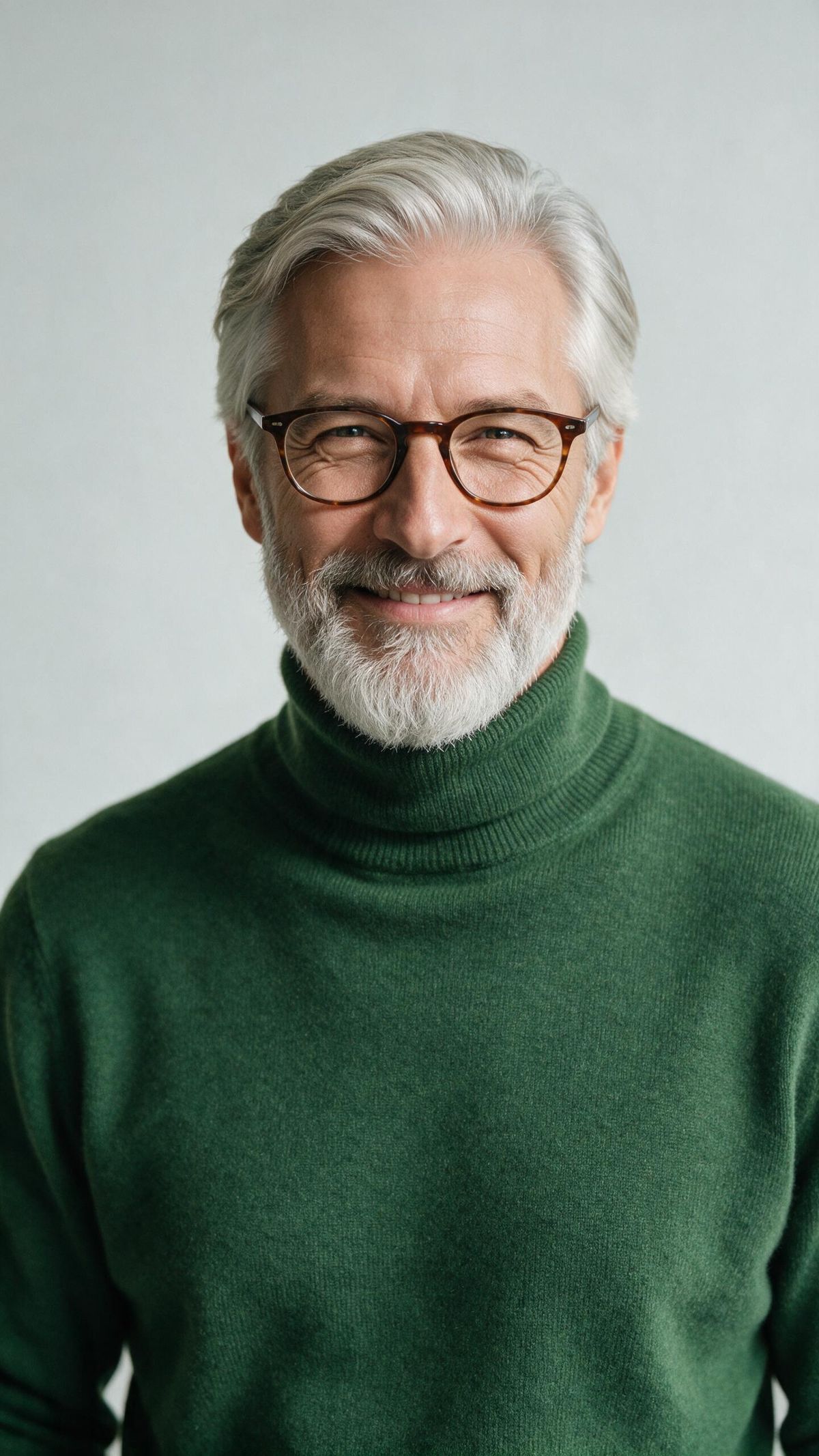
A waist-up editorial studio portrait of a distinguished man in his late fifties with a full, neatly groomed silver-grey beard, swept-back silver hair, and warm crinkled eyes behind thin tortoiseshell glasses, an approachable and camera-ready presence, looking directly at the camera. He wears a soft forest-green wool roll-neck jumper with a fine ribbed texture. The background is a clean, seamless pale-grey studio backdrop, lit with soft, even, diffused studio lighting, a large softbox key from the front-left and gentle fill on the right for flattering, natural modelling on his face. Shot on a full-frame camera with an 85mm portrait lens at eye level, shallow depth of field, crisp focus on the eyes, natural skin texture with visible pores and fine facial hair detail, true-to-life colour, high-end editorial portrait photography, photoreal.

The surprise, the widening eyes, and the delighted grin all carried onto a different face. Keep a performance reference tight, since a clean close-up reads more accurately than a wide shot when the model is copying the expression and not the framing.
One thing to watch is the sound. A reference video carries its audio as well as its motion, so the output's voice takes after the reference. A laugh recorded from a woman will read as a woman's laugh even on a man's face, which is why the reference here is a man to match the character. Match the reference's voice to your subject, or name the voice you want in the Sound: clause, such as a warm male laugh.
Where it fits
This mode is strongest when the motion is clear and the new subject is close in kind to the reference: a full body driving a full body, a face driving a face. It is weaker when the shapes diverge sharply, so a human dance mapped onto a four-legged animal, or a delicate hand gesture read from a wide shot, will drift. When the transfer matters, match the reference's framing and body type to the subject you are driving.
Tips
-
Name the source and the role. "Video 1 for the motion, Image 1 for the character" tells the model what to copy from where.
-
Give a clean reference. A plain-background, well-lit clip of just the motion transfers better than busy footage with competing action.
-
Match framing to the job. Full-body motion needs a full-body reference and character, while a facial performance needs a tight close-up on both.
-
For camera moves, describe the new subject. Ask for the movement from the reference, then say what the frame should now hold.
-
Keep the subject close in kind. A body drives a body and a face drives a face reliably, while mapping across very different shapes drifts.
-
Mind the reference's audio. A reference video carries its sound as well as its motion, so match its voice to your subject or state the voice you want in the
Sound:clause. -
Reference video is Omni Reference. It replaces anchor frames, and it can sit alongside image and audio references in the same call.