Kling VIDEO 4.0

Kling VIDEO 4.0 is a unified video model that generates 1080p clips of up to 30 seconds from text, images, reference videos, and reusable elements. It follows up to 10 keyframes per clip, including first, middle, and last frames, and combines reference images, reference videos, and elements in a single request to hold subjects, style, and motion. It also edits an existing video from a prompt, which suits long narrative shots, storyboard-driven sequences, and reference-driven production work.
Elements
How to save a character in Kling VIDEO 4.0 as an element under your own id, build it from several angles or a short clip, and reuse it across a series of videos.
Introduction
An element is a character or an object that Kling VIDEO 4.0 saves for reuse under an id you choose. The first request builds it from a set of images or a short clip. Every later request names the same id and gets the same person back without sending the images again, which is what keeps a brand ambassador or a host recognizable across a whole series.
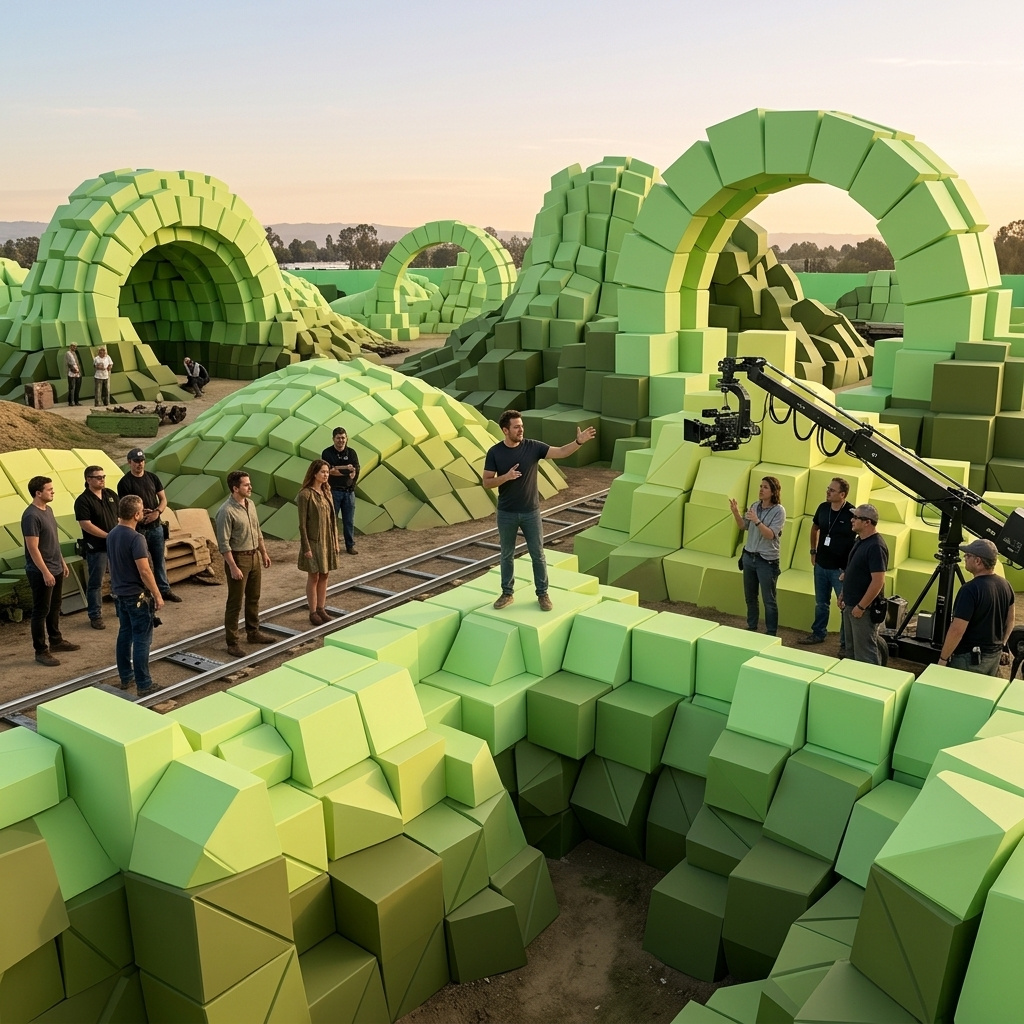
<<<element_1>>> walks through the electronics store in <<<image_1>>>, stops at a table, picks up a laptop, and turns it toward the camera with a confident smile. She says in clear American English: "This one's my favorite for travel." Smooth handheld tracking shot, bright store light. Audio: her voice, footsteps, soft store ambience, no music, no subtitles.
- Front
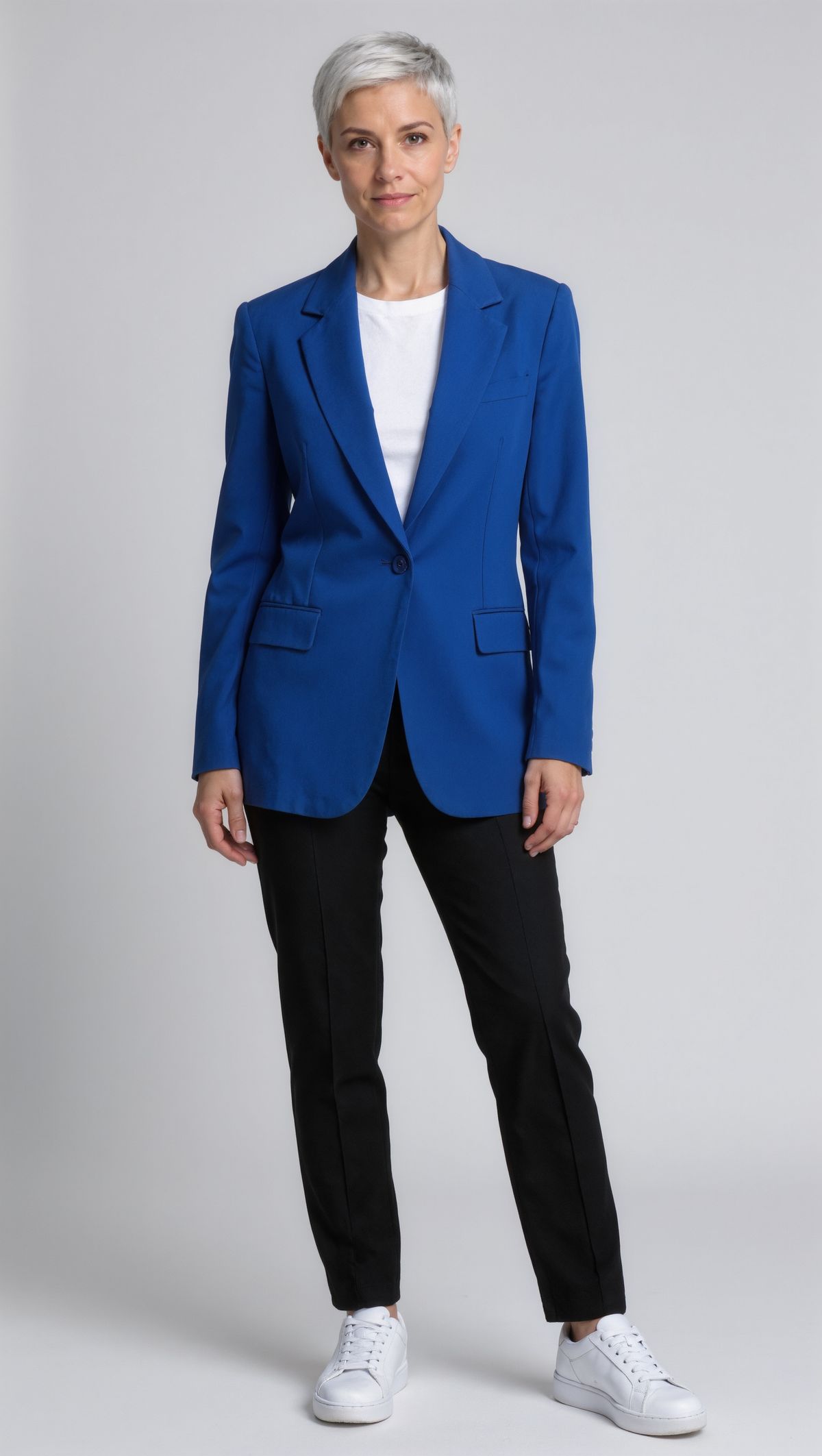
Front-facing full-length portrait of a woman in her thirties with a short silver pixie cut, wearing a cobalt blue blazer over a white t-shirt, slim black trousers, and white sneakers, standing straight with her arms relaxed against a plain light gray studio backdrop. Even light, photoreal.
- Three-quarter
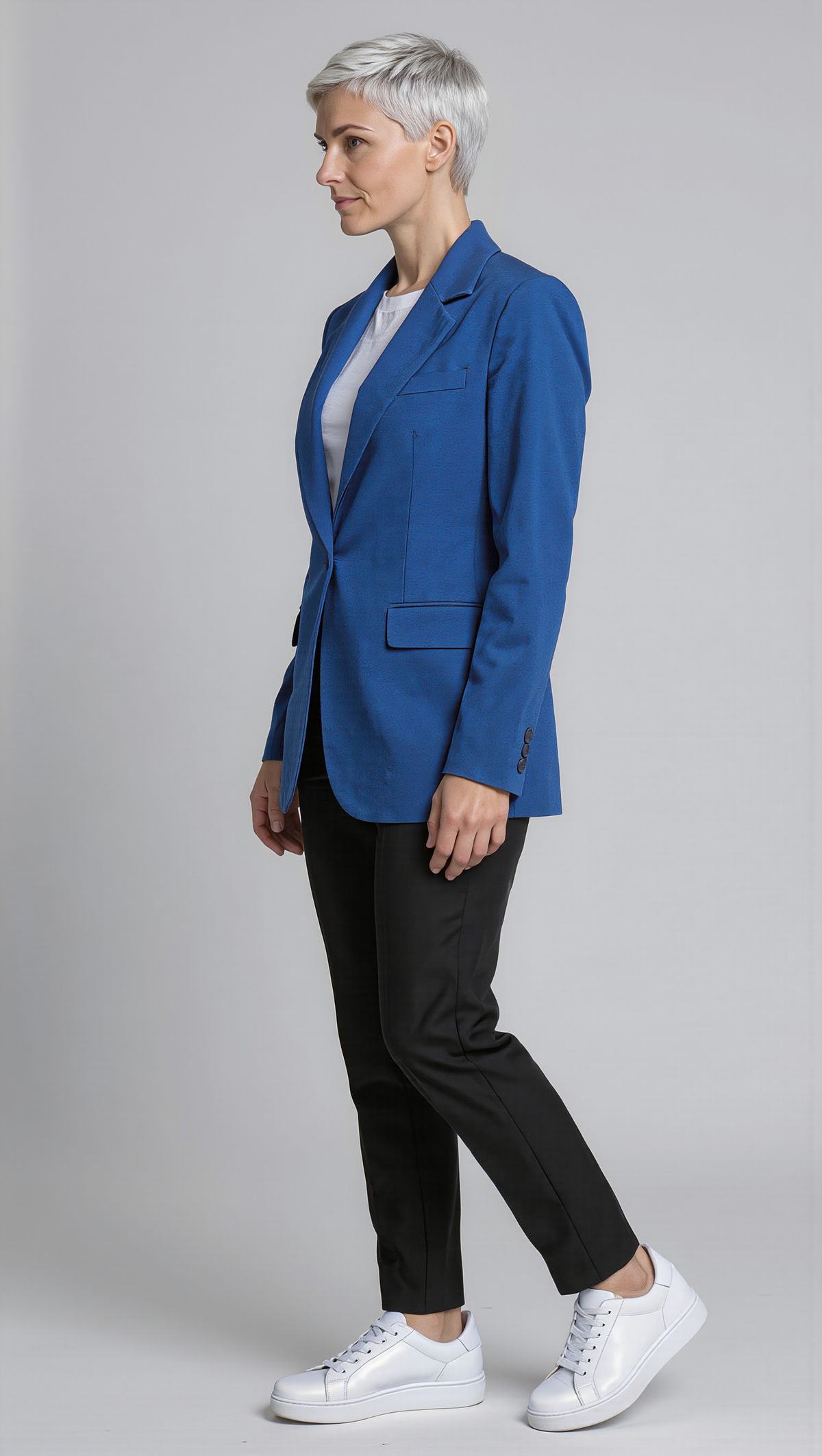
The same woman with the same silver pixie cut, cobalt blazer, white t-shirt, black trousers, and white sneakers, in a three-quarter view turned to her left, against the same light gray backdrop in the same light. Full length, photoreal.
- Back
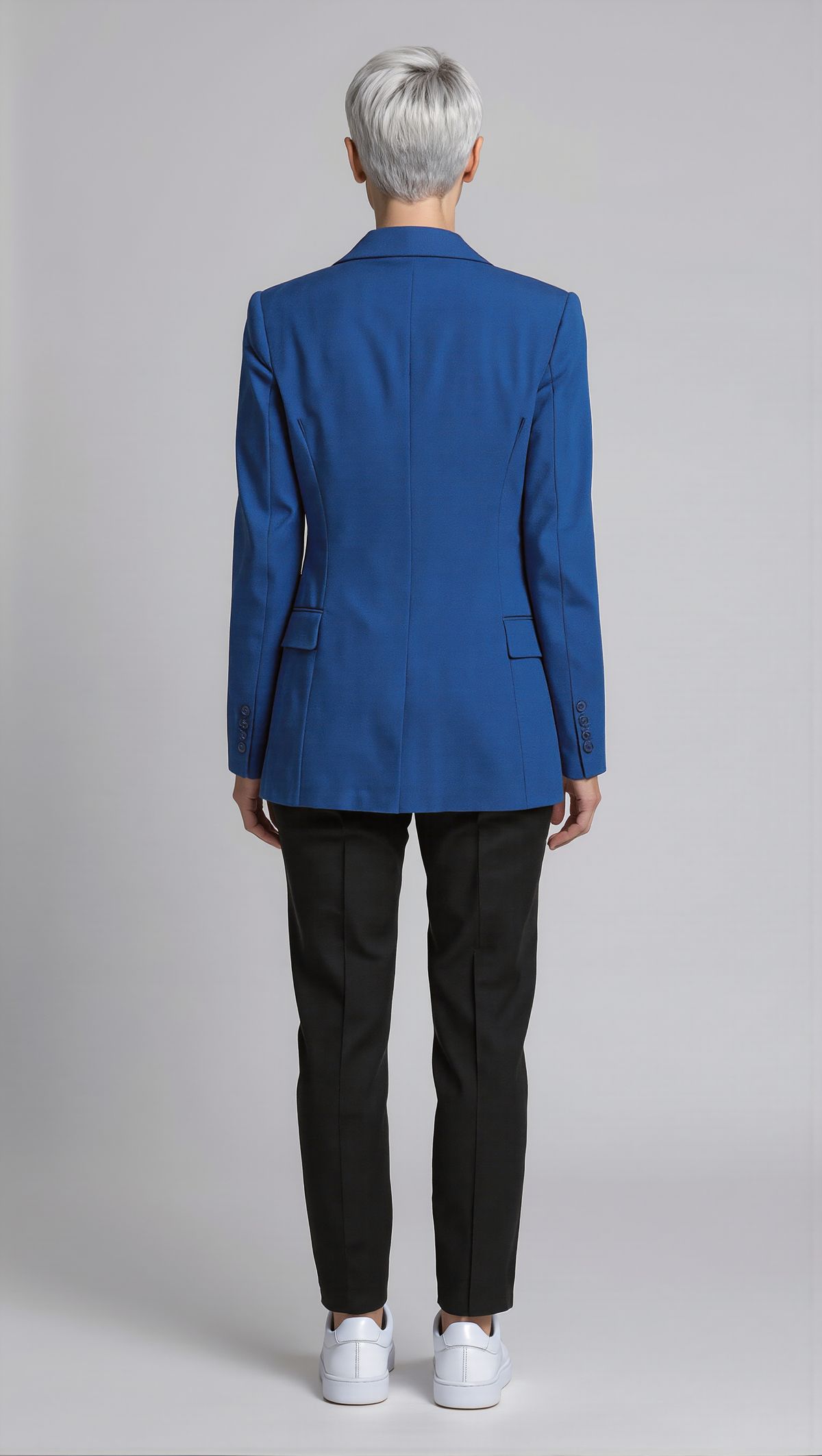
The same woman with the same silver pixie cut, cobalt blazer, black trousers, and white sneakers, seen from directly behind, against the same light gray backdrop in the same light. Full length, photoreal.
- Location
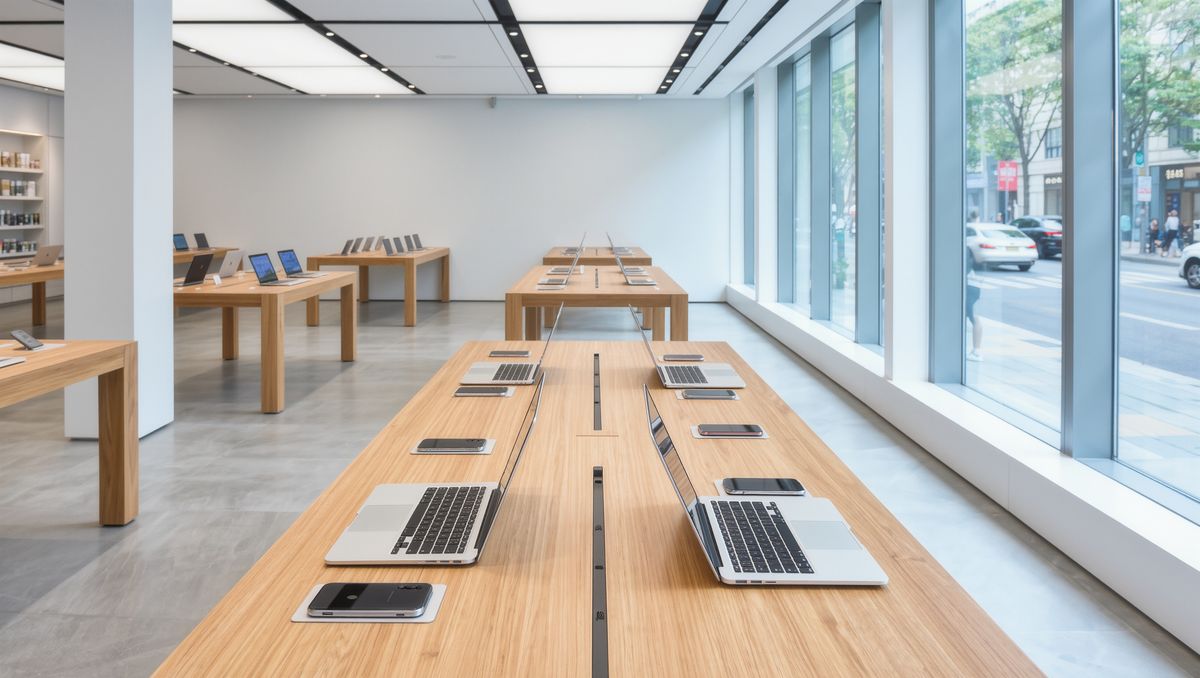
The interior of a bright electronics store with long light wood tables of laptops and phones, white walls, and large windows. Photoreal, no people, no logos.


The three portraits became the element, and the store photo is an ordinary reference image for the location. In the next request the store is gone, and the ambassador is still available by name.
Request shape
Elements go in inputs.elements. An image element needs an id, a short description, a frontalImage, and one to three more angles in images. In the prompt it is <<<element_1>>>, numbered in array order and separately from the images:
import { createClient } from '@runware/sdk'

const client = await createClient({ apiKey: process.env.RUNWARE_API_KEY })
await client.connect()

const [result] = await client.run({
  model: 'klingai:kling-video@4.0',
  positivePrompt: '<<<element_1>>> walks through the electronics store in <<<image_1>>>, stops at a table, picks up a laptop, and turns it toward the camera with a confident smile. She says in clear American English: "This one\'s my favorite for travel." Audio: her voice, footsteps, soft store ambience, no music, no subtitles.',
  width: 1920,
  height: 1080,
  duration: 8,
  inputs: {
    elements: [
      {
        id: 'k4-ambassador',
        description: 'Brand ambassador with a silver pixie cut in a cobalt blazer',
        frontalImage: 'https://im.runware.ai/image/os/a14d18/ws/2/ii/2f3a4b5c-6d7e-4f8a-9b0c-1d2e3f4a5b6c.jpg',
        images: [
          'https://im.runware.ai/image/os/a14d18/ws/2/ii/3a4b5c6d-7e8f-4a9b-8c0d-2e3f4a5b6c7d.jpg',
          'https://im.runware.ai/image/os/a14d18/ws/2/ii/4b5c6d7e-8f9a-4b0c-9d1e-3f4a5b6c7d8e.jpg'
        ],
        tags: [
          'Character'
        ]
      }
    ],
    referenceImages: [
      'https://im.runware.ai/image/os/a14d18/ws/2/ii/5c6d7e8f-9a0b-4c1d-8e2f-4a5b6c7d8e9f.jpg'
    ]
  }
})
import asyncio
import os
from runware import Runware
async def main():
async with Runware(api_key=os.environ["RUNWARE_API_KEY"]) as client:
results = await client.run({
"model": "klingai:kling-video@4.0",
"positivePrompt": "<<<element_1>>> walks through the electronics store in <<<image_1>>>, stops at a table, picks up a laptop, and turns it toward the camera with a confident smile. She says in clear American English: \"This one's my favorite for travel.\" Audio: her voice, footsteps, soft store ambience, no music, no subtitles.",
"width": 1920,
"height": 1080,
"duration": 8,
"inputs": {
"elements": [
{
"id": "k4-ambassador",
"description": "Brand ambassador with a silver pixie cut in a cobalt blazer",
"frontalImage": "https://im.runware.ai/image/os/a14d18/ws/2/ii/2f3a4b5c-6d7e-4f8a-9b0c-1d2e3f4a5b6c.jpg",
"images": [
"https://im.runware.ai/image/os/a14d18/ws/2/ii/3a4b5c6d-7e8f-4a9b-8c0d-2e3f4a5b6c7d.jpg",
"https://im.runware.ai/image/os/a14d18/ws/2/ii/4b5c6d7e-8f9a-4b0c-9d1e-3f4a5b6c7d8e.jpg"
],
"tags": [
"Character"
]
}
],
"referenceImages": [
"https://im.runware.ai/image/os/a14d18/ws/2/ii/5c6d7e8f-9a0b-4c1d-8e2f-4a5b6c7d8e9f.jpg"
]
}
})
asyncio.run(main())curl https://api.runware.ai/v1 \
-H "Authorization: Bearer $RUNWARE_API_KEY" \
-H "Content-Type: application/json" \
-d '[
{
  "taskType": "videoInference",
  "taskUUID": "1e2f3a4b-5c6d-4e7f-8a9b-0c1d2e3f4a5b",
  "model": "klingai:kling-video@4.0",
  "positivePrompt": "<<<element_1>>> walks through the electronics store in <<<image_1>>>, stops at a table, picks up a laptop, and turns it toward the camera with a confident smile. She says in clear American English: \"This one's my favorite for travel.\" Audio: her voice, footsteps, soft store ambience, no music, no subtitles.",
  "width": 1920,
  "height": 1080,
  "duration": 8,
  "inputs": {
    "elements": [
      {
        "id": "k4-ambassador",
        "description": "Brand ambassador with a silver pixie cut in a cobalt blazer",
        "frontalImage": "https://im.runware.ai/image/os/a14d18/ws/2/ii/2f3a4b5c-6d7e-4f8a-9b0c-1d2e3f4a5b6c.jpg",
        "images": [
          "https://im.runware.ai/image/os/a14d18/ws/2/ii/3a4b5c6d-7e8f-4a9b-8c0d-2e3f4a5b6c7d.jpg",
          "https://im.runware.ai/image/os/a14d18/ws/2/ii/4b5c6d7e-8f9a-4b0c-9d1e-3f4a5b6c7d8e.jpg"
        ],
        "tags": [
          "Character"
        ]
      }
    ],
    "referenceImages": [
      "https://im.runware.ai/image/os/a14d18/ws/2/ii/5c6d7e8f-9a0b-4c1d-8e2f-4a5b6c7d8e9f.jpg"
    ]
  }
}
]'runware run klingai:kling-video@4.0 \
positivePrompt="<<<element_1>>> walks through the electronics store in <<<image_1>>>, stops at a table, picks up a laptop, and turns it toward the camera with a confident smile. She says in clear American English: \"This one's my favorite for travel.\" Audio: her voice, footsteps, soft store ambience, no music, no subtitles." \
width=1920 \
height=1080 \
duration=8 \
inputs.elements.0.id=k4-ambassador \
inputs.elements.0.description="Brand ambassador with a silver pixie cut in a cobalt blazer" \
inputs.elements.0.frontalImage=https://im.runware.ai/image/os/a14d18/ws/2/ii/2f3a4b5c-6d7e-4f8a-9b0c-1d2e3f4a5b6c.jpg \
inputs.elements.0.images.0=https://im.runware.ai/image/os/a14d18/ws/2/ii/3a4b5c6d-7e8f-4a9b-8c0d-2e3f4a5b6c7d.jpg \
inputs.elements.0.images.1=https://im.runware.ai/image/os/a14d18/ws/2/ii/4b5c6d7e-8f9a-4b0c-9d1e-3f4a5b6c7d8e.jpg \
inputs.elements.0.tags.0=Character \
inputs.referenceImages.0=https://im.runware.ai/image/os/a14d18/ws/2/ii/5c6d7e8f-9a0b-4c1d-8e2f-4a5b6c7d8e9f.jpg{
"taskType": "videoInference",
"taskUUID": "1e2f3a4b-5c6d-4e7f-8a9b-0c1d2e3f4a5b",
"model": "klingai:kling-video@4.0",
"positivePrompt": "<<<element_1>>> walks through the electronics store in <<<image_1>>>, stops at a table, picks up a laptop, and turns it toward the camera with a confident smile. She says in clear American English: \"This one's my favorite for travel.\" Audio: her voice, footsteps, soft store ambience, no music, no subtitles.",
"width": 1920,
"height": 1080,
"duration": 8,
"inputs": {
"elements": [
{
"id": "k4-ambassador",
"description": "Brand ambassador with a silver pixie cut in a cobalt blazer",
"frontalImage": "https://im.runware.ai/image/os/a14d18/ws/2/ii/2f3a4b5c-6d7e-4f8a-9b0c-1d2e3f4a5b6c.jpg",
"images": [
"https://im.runware.ai/image/os/a14d18/ws/2/ii/3a4b5c6d-7e8f-4a9b-8c0d-2e3f4a5b6c7d.jpg",
"https://im.runware.ai/image/os/a14d18/ws/2/ii/4b5c6d7e-8f9a-4b0c-9d1e-3f4a5b6c7d8e.jpg"
],
"tags": [
"Character"
]
}
],
"referenceImages": [
"https://im.runware.ai/image/os/a14d18/ws/2/ii/5c6d7e8f-9a0b-4c1d-8e2f-4a5b6c7d8e9f.jpg"
]
}
}Response
[
  {
    "taskType": "videoInference",
    "taskUUID": "1e2f3a4b-5c6d-4e7f-8a9b-0c1d2e3f4a5b",
    "videoUUID": "6d7e8f9a-0b1c-4d2e-9f3a-5b6c7d8e9f0a",
    "videoURL": "https://vm.runware.ai/video/os/a14d18/ws/2/vi/6d7e8f9a-0b1c-4d2e-9f3a-5b6c7d8e9f0a.mp4"
  }
]
The id is yours to pick: up to 20 letters, digits, hyphens or underscores. Choose one you will recognize later, since it is the only handle you keep. tags is optional and classifies the element, with values such as Character, Item, Costume or Scene.
Angles are what an element adds over a single reference. The three-quarter and back views show what a front view cannot: the back of the blazer and the shape of the haircut when she turns. Shoot them against the same backdrop and in the same light, so the only thing that changes between them is the angle.
Reusing an element
To bring the ambassador back, send the element with its id and description and no images at all. The model looks the element up and places the saved character in the new scene:
import { createClient } from '@runware/sdk'

const client = await createClient({ apiKey: process.env.RUNWARE_API_KEY })
await client.connect()

const [result] = await client.run({
  model: 'klingai:kling-video@4.0',
  positivePrompt: '<<<element_1>>> stands on a sunny city sidewalk outside a train station and holds a phone up to the camera. She says in clear American English: "Same me, new city, and still on one charge." Vertical handheld creator style, bright daylight. Audio: her voice, street ambience, no music, no subtitles.',
  width: 1080,
  height: 1920,
  duration: 8,
  inputs: {
    elements: [
      {
        id: 'k4-ambassador',
        description: 'Brand ambassador with a silver pixie cut in a cobalt blazer'
      }
    ]
  }
})
import asyncio
import os
from runware import Runware
async def main():
async with Runware(api_key=os.environ["RUNWARE_API_KEY"]) as client:
results = await client.run({
"model": "klingai:kling-video@4.0",
"positivePrompt": "<<<element_1>>> stands on a sunny city sidewalk outside a train station and holds a phone up to the camera. She says in clear American English: \"Same me, new city, and still on one charge.\" Vertical handheld creator style, bright daylight. Audio: her voice, street ambience, no music, no subtitles.",
"width": 1080,
"height": 1920,
"duration": 8,
"inputs": {
"elements": [
{
"id": "k4-ambassador",
"description": "Brand ambassador with a silver pixie cut in a cobalt blazer"
}
]
}
})
asyncio.run(main())curl https://api.runware.ai/v1 \
-H "Authorization: Bearer $RUNWARE_API_KEY" \
-H "Content-Type: application/json" \
-d '[
{
  "taskType": "videoInference",
  "taskUUID": "7e8f9a0b-1c2d-4e3f-8a4b-6c7d8e9f0a1b",
  "model": "klingai:kling-video@4.0",
  "positivePrompt": "<<<element_1>>> stands on a sunny city sidewalk outside a train station and holds a phone up to the camera. She says in clear American English: \"Same me, new city, and still on one charge.\" Vertical handheld creator style, bright daylight. Audio: her voice, street ambience, no music, no subtitles.",
  "width": 1080,
  "height": 1920,
  "duration": 8,
  "inputs": {
    "elements": [
      {
        "id": "k4-ambassador",
        "description": "Brand ambassador with a silver pixie cut in a cobalt blazer"
      }
    ]
  }
}
]'runware run klingai:kling-video@4.0 \
positivePrompt="<<<element_1>>> stands on a sunny city sidewalk outside a train station and holds a phone up to the camera. She says in clear American English: \"Same me, new city, and still on one charge.\" Vertical handheld creator style, bright daylight. Audio: her voice, street ambience, no music, no subtitles." \
width=1080 \
height=1920 \
duration=8 \
inputs.elements.0.id=k4-ambassador \
inputs.elements.0.description="Brand ambassador with a silver pixie cut in a cobalt blazer"{
"taskType": "videoInference",
"taskUUID": "7e8f9a0b-1c2d-4e3f-8a4b-6c7d8e9f0a1b",
"model": "klingai:kling-video@4.0",
"positivePrompt": "<<<element_1>>> stands on a sunny city sidewalk outside a train station and holds a phone up to the camera. She says in clear American English: \"Same me, new city, and still on one charge.\" Vertical handheld creator style, bright daylight. Audio: her voice, street ambience, no music, no subtitles.",
"width": 1080,
"height": 1920,
"duration": 8,
"inputs": {
"elements": [
{
"id": "k4-ambassador",
"description": "Brand ambassador with a silver pixie cut in a cobalt blazer"
}
]
}
}Response
[
  {
    "taskType": "videoInference",
    "taskUUID": "7e8f9a0b-1c2d-4e3f-8a4b-6c7d8e9f0a1b",
    "videoUUID": "8f9a0b1c-2d3e-4f4a-9b5c-7d8e9f0a1b2c",
    "videoURL": "https://vm.runware.ai/video/os/a14d18/ws/2/vi/8f9a0b1c-2d3e-4f4a-9b5c-7d8e9f0a1b2c.mp4"
  }
]<<<element_1>>> stands on a sunny city sidewalk outside a train station and holds a phone up to the camera. She says in clear American English: "Same me, new city, and still on one charge." Vertical handheld creator style, bright daylight. Audio: her voice, street ambience, no music, no subtitles.
Nothing about her looks is in the prompt: it describes the scene and the action, and the element supplies her appearance.
An element belongs to the organization that created it. Its id only resolves in requests from that same organization, and an id that was never created there is rejected.
Video elements
An element can also come from a single clip of 3 to 8 seconds, in videos instead of frontalImage and images. A clip shows how a person moves and gestures as well as how they look:
<<<element_1>>> stands at a whiteboard in a modern meeting room and explains a simple bar chart to the camera, gesturing the same way he does in his source clip. He says in American English: "Three numbers, that's all you need to watch. When all three go up together, you had a good quarter." Static medium shot, natural office light. Audio: his voice, quiet office ambience, no music, no subtitles.
- Element clip
A medium shot of a man in his forties with a short gray beard and a denim shirt, talking with his hands in a bright office, turning slightly toward the camera and smiling. Static camera, natural daylight. He says in American English: "Here's the thing nobody tells you." Audio: his voice, quiet room tone, no music, no subtitles.
{
  "id": "k4-presenter",
  "description": "Presenter with a short gray beard in a denim shirt",
  "videos": ["https://vm.runware.ai/video/os/a14d18/ws/2/vi/9a0b1c2d-3e4f-4a5b-8c6d-8e9f0a1b2c3d.mp4"]
}
A video element takes one clip and cannot be mixed with images in the same element. Its clip also counts toward the video budget of the request: five input videos and 30 seconds in total, shared with inputs.video and inputs.referenceVideos.
Several elements in one clip
A request takes up to seven elements, at most three of them built from video, and each one gets its own number in the prompt. Two saved hosts in one scene are <<<element_1>>> and <<<element_2>>>, placed and given lines the same way as people in Dialogue and on-screen text.
Tips
-
Create once, reuse many times. Later requests need the
idand the description, not the images. -
Give an image element several angles. A front view plus a three-quarter and a back view covers the turns a scene asks for.
-
Keep the backdrop and light constant. Across the angles, only the pose should change.
-
Use a short clip when gestures matter. A video element carries how someone moves, within 3 to 8 seconds.
-
Describe the scene, not the element. Its appearance comes from the saved images.
-
Pick ids you will remember. The
idis the only handle you keep, and it works only inside your organization.