Seedance 2.5

Seedance 2.5 is ByteDance's higher-end multimodal video generation model for production-oriented creative work. It supports native 30-second video generation, larger reference sets across image, video, and audio inputs, and stronger instruction following for complex shots, multilingual prompts, and reference-heavy creative direction. It is especially well suited to branded storytelling, advertising, explainers, and other commercial workflows that need longer continuous scenes, tighter subject and style consistency, and precise edits that preserve the rest of the shot.
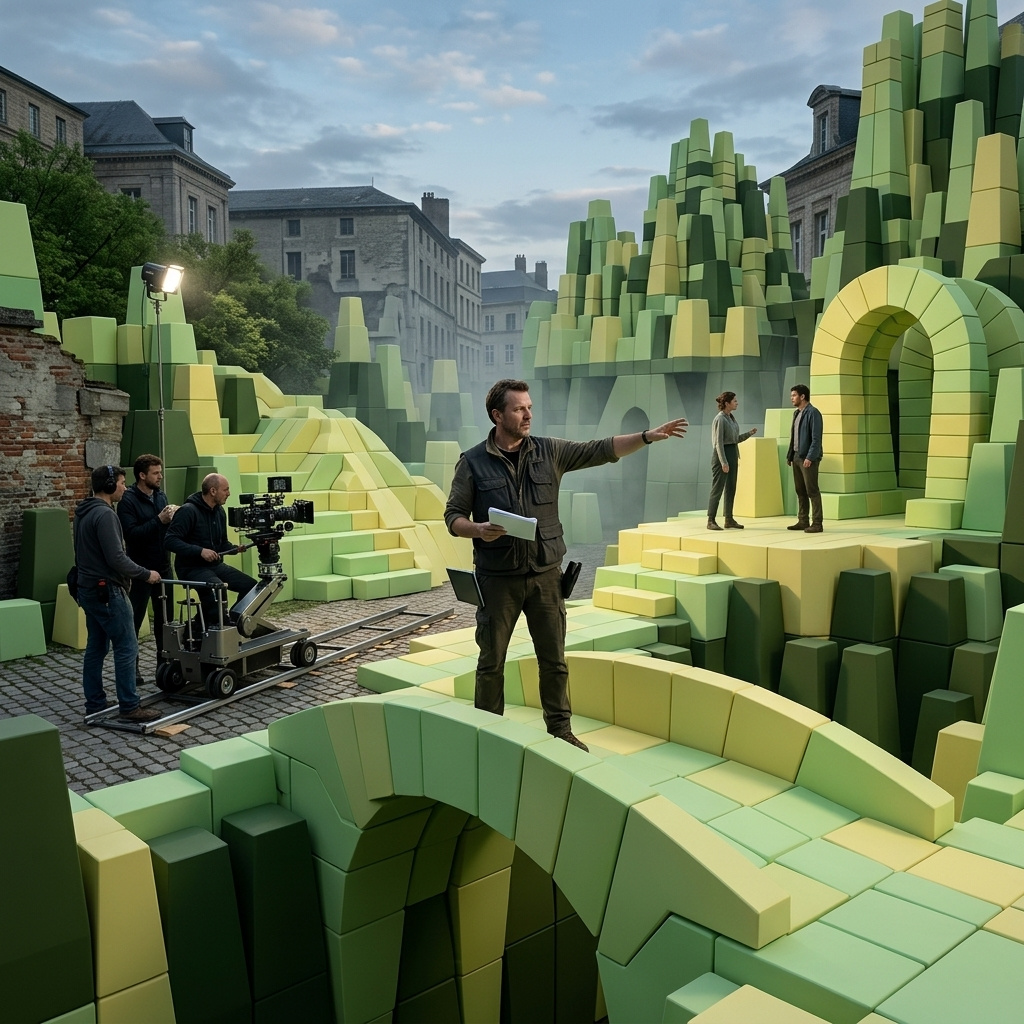
Multimodal reference
How to compose up to 30 images, 10 videos, and 10 audio clips into one Seedance 2.5 call with typed @-tag addressing, from cast ensembles and product families to audio-driven scenes.
Introduction
Reference is where generated video either holds an identity or drifts off it. One reference covers a talking head, and two or three cover most spots. Past that the model has to keep several faces, products, or voices stable at once, and that is exactly what Seedance 2.5 widens.
A single call takes up to 30 images, 10 videos, and 10 audio clips as references. You address each one in the prompt by its position in its array, @Image1 through @Image30, @Video1, @Audio1, and the model binds each reference to the role you give it. The three studio portraits below were cast into one band, each face locked to its own reference.
A warm cinematic indie band performance in a small intimate venue with a low wooden stage and string lights overhead. Three members, each locked to a portrait reference. The lead singer references @Image1 stands centre at a microphone, singing with eyes half-closed. The guitarist references @Image2 plays to her right, head nodding. The drummer references @Image3 sits at a compact kit behind them. Warm amber stage light mixing with a cool blue wash, gentle haze in the beams. A slow gentle push-in toward the singer as the chorus lands. Preserve each member's face, hair, and wardrobe from their reference. Audio: a driving indie-rock performance, the singer's voice over the instruments, warm room tone and light crowd presence.
- Lead singer (@Image1)
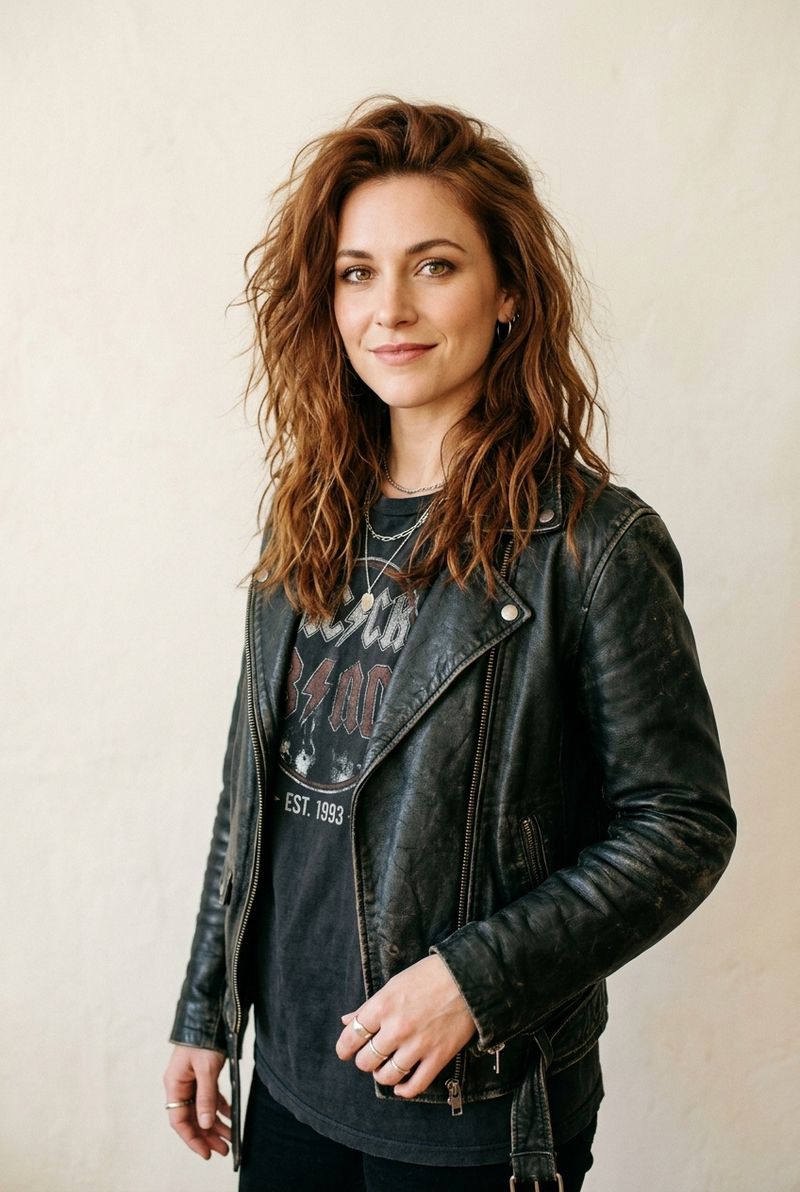
An editorial studio portrait of a lead singer in her late twenties with tousled auburn hair, warm hazel eyes, and a relaxed half-smile, wearing a faded vintage band t-shirt under a worn black leather jacket, three-quarter facing the camera on a warm off-white studio backdrop.
- Guitarist (@Image2)
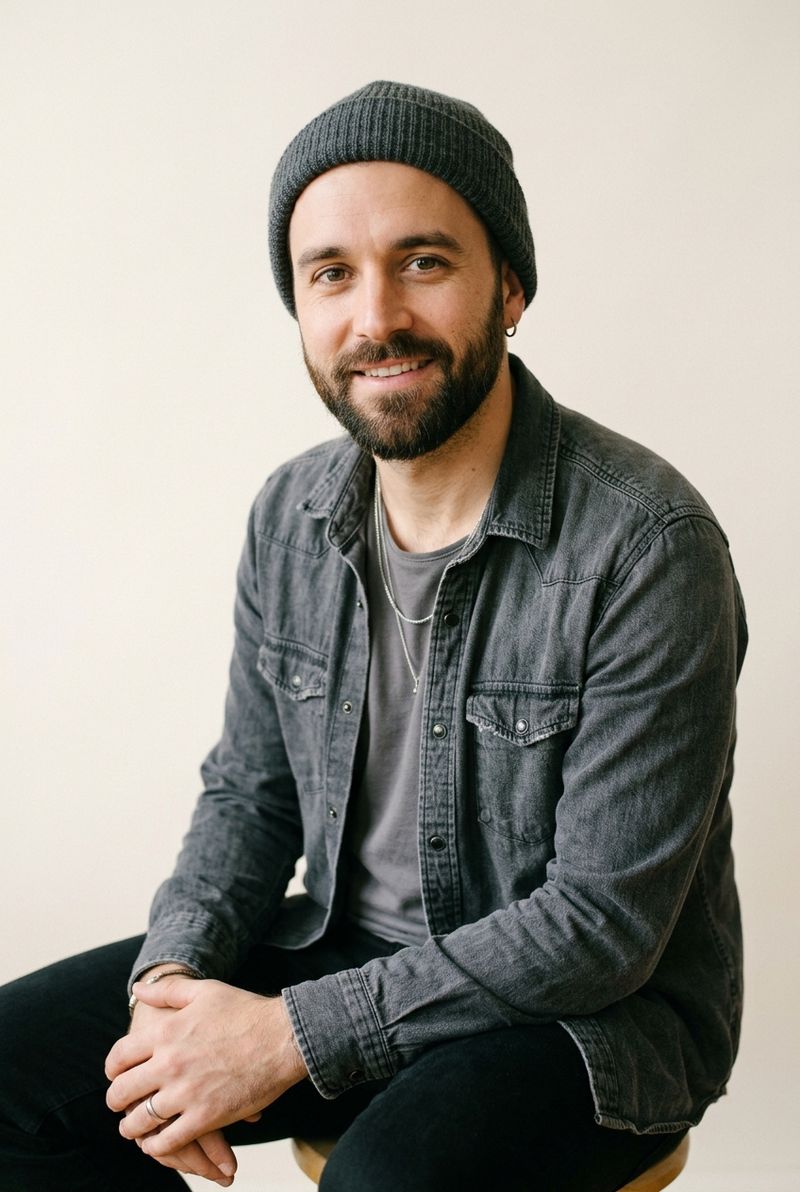
An editorial studio portrait of a guitarist in his early thirties with a short dark beard and a calm easy expression, wearing a charcoal denim shirt over a grey tee and a knitted grey beanie, three-quarter facing the camera on a warm off-white studio backdrop.
- Drummer (@Image3)
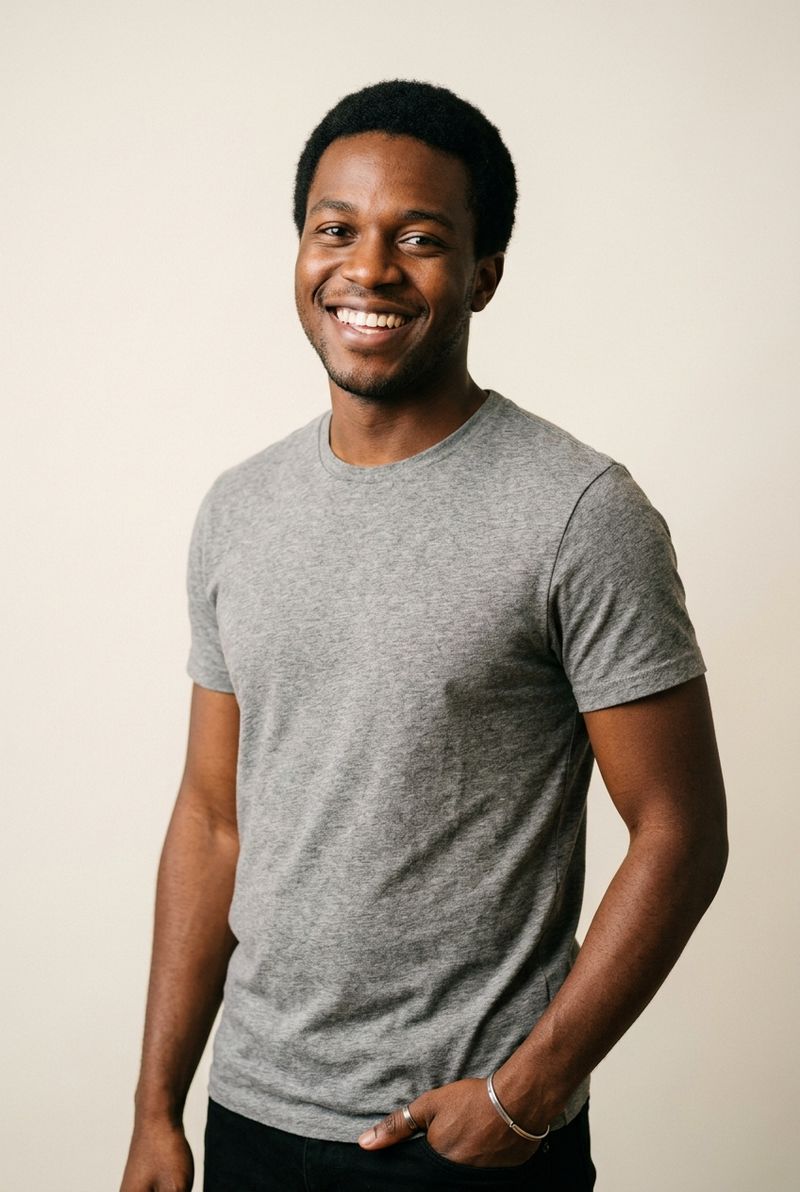
An editorial studio portrait of a drummer in his mid-twenties with close-cropped black hair, warm brown skin, and a bright open smile, wearing a heather-grey graphic t-shirt, three-quarter facing the camera on a warm off-white studio backdrop.


Each face came from its own studio portrait, and each one holds through the push-in. This guide covers the request shape, the @-tag addressing that binds references to roles, the kinds of reference the model reads across image and audio, and the count that different jobs actually need.
Request shape
References live under inputs, split by type, and the prompt does the binding.
import { createClient } from '@runware/sdk'

const client = await createClient({ apiKey: process.env.RUNWARE_API_KEY })
await client.connect()

const [result] = await client.run({
  model: 'bytedance:seedance@2.5',
  inputs: {
    referenceImages: [
      'https://example.com/vocalist.jpg',
      'https://example.com/guitarist.jpg',
      'https://example.com/drummer.jpg'
    ]
  },
  positivePrompt: 'A warm indie band performance on a small stage. The lead singer references @Image1 sings centre at the mic, the guitarist references @Image2 plays to her right, the drummer references @Image3 sits behind. Slow push-in as the chorus lands. Preserve each member\'s face, hair, and wardrobe from their reference.',
  resolution: '720p',
  duration: 8,
  deliveryMethod: 'async'
})
import asyncio
import os
from runware import Runware
async def main():
async with Runware(api_key=os.environ["RUNWARE_API_KEY"]) as client:
results = await client.run({
"model": "bytedance:seedance@2.5",
"inputs": {
"referenceImages": [
"https://example.com/vocalist.jpg",
"https://example.com/guitarist.jpg",
"https://example.com/drummer.jpg"
]
},
"positivePrompt": "A warm indie band performance on a small stage. The lead singer references @Image1 sings centre at the mic, the guitarist references @Image2 plays to her right, the drummer references @Image3 sits behind. Slow push-in as the chorus lands. Preserve each member's face, hair, and wardrobe from their reference.",
"resolution": "720p",
"duration": 8,
"deliveryMethod": "async"
})
asyncio.run(main())curl https://api.runware.ai/v1 \
-H "Authorization: Bearer $RUNWARE_API_KEY" \
-H "Content-Type: application/json" \
-d '[
{
  "taskType": "videoInference",
  "taskUUID": "a1b2c3d4-e5f6-7890-abcd-ef1234567890",
  "model": "bytedance:seedance@2.5",
  "inputs": {
    "referenceImages": [
      "https://example.com/vocalist.jpg",
      "https://example.com/guitarist.jpg",
      "https://example.com/drummer.jpg"
    ]
  },
  "positivePrompt": "A warm indie band performance on a small stage. The lead singer references @Image1 sings centre at the mic, the guitarist references @Image2 plays to her right, the drummer references @Image3 sits behind. Slow push-in as the chorus lands. Preserve each member's face, hair, and wardrobe from their reference.",
  "resolution": "720p",
  "duration": 8,
  "deliveryMethod": "async"
}
]'runware run bytedance:seedance@2.5 \
inputs.referenceImages.0=https://example.com/vocalist.jpg \
inputs.referenceImages.1=https://example.com/guitarist.jpg \
inputs.referenceImages.2=https://example.com/drummer.jpg \
positivePrompt="A warm indie band performance on a small stage. The lead singer references @Image1 sings centre at the mic, the guitarist references @Image2 plays to her right, the drummer references @Image3 sits behind. Slow push-in as the chorus lands. Preserve each member's face, hair, and wardrobe from their reference." \
resolution=720p \
duration=8 \
deliveryMethod=async{
"taskType": "videoInference",
"taskUUID": "a1b2c3d4-e5f6-7890-abcd-ef1234567890",
"model": "bytedance:seedance@2.5",
"inputs": {
"referenceImages": [
"https://example.com/vocalist.jpg",
"https://example.com/guitarist.jpg",
"https://example.com/drummer.jpg"
]
},
"positivePrompt": "A warm indie band performance on a small stage. The lead singer references @Image1 sings centre at the mic, the guitarist references @Image2 plays to her right, the drummer references @Image3 sits behind. Slow push-in as the chorus lands. Preserve each member's face, hair, and wardrobe from their reference.",
"resolution": "720p",
"duration": 8,
"deliveryMethod": "async"
}Response
[
  {
    "taskType": "videoInference",
    "taskUUID": "a1b2c3d4-e5f6-7890-abcd-ef1234567890",
    "videoUUID": "9c1b2d3a-4e5f-6789-abcd-ef0123456789",
    "videoURL": "https://vm.runware.ai/video/os/a14d18/ws/2/vi/9c1b2d3a-4e5f-6789-abcd-ef0123456789.mp4"
  }
]
The caps, and how they behave:
inputs.referenceImagestakes up to 30 images, each a URL, a data URI, or a UUID.inputs.referenceVideostakes up to 10 videos andinputs.referenceAudiosup to 10 audio clips, each a URL or a UUID. The combined duration of the videos stays under 30 seconds, and the same for the audio.- A UUID works for any of the three, image, video, or audio. It is either a previous generation's output or an asset you uploaded once through the Media Storage API to reuse across runs.
- The three pools share a single addressing scheme but count separately, so a call can carry the full 30 images alongside its videos and audio.
positivePromptis required, up to 10,000 characters, and it is where every reference gets its role.
Reference videos carry motion, camera, and pacing rather than a static look, and they drive their own set of jobs (performance transfer, lip-sync, clay-render to finished shot). Those live in the motion and performance guide. This guide is about composing images and audio into a scene.
The @-tag addressing convention
A reference is addressed by its position in the array, not its filename. The first image is @Image1, the second @Image2, on up to @Image30, and videos and audio number from one in their own pools as @Video1 and @Audio1. Two rules keep those pointers stable:
- Never address a slot you didn't pass.
@Image11in a call with ten images is a dead pointer, and the model quietly drops the clause that carried it. - Rebind when you reorder. The address is the index. Move a reference from slot 3 to slot 5 and every
@Image3in the prompt now points at the wrong asset.
The reliable pattern is role binding: name a role, bind it to a reference, then refer to the role by name for the rest of the prompt.
The lead singer references @Image1.
The guitarist references @Image2.
The drummer references @Image3.

The lead singer sings centre at the microphone while the guitarist
plays to her right and the drummer keeps the beat behind them.
Preserve each member's face, hair, and wardrobe from their reference.
Role names are yours to invent, and the model treats each as a stable identifier for the referenced entity. When several subjects appear, list the mappings one by one rather than trusting the model to infer them. And bind identity in the prompt text, not inside the image: a name written on the reference picture is read as picture content, not as a label, so it tends to end up printed in the frame instead of naming the character.
The kinds of reference
Seedance reads more than appearance off a reference. Naming what a reference is for is what separates a clean result from a muddy one:
- Subject. The appearance or identity of a person, product, or scene. "Use the singer in
@Image1as the lead." - Style. The look of an image or clip, its palette and grade. "Grade the shot in the cold teal night look of
@Image1." - Audio. Music, rhythm, a voice timbre, or ambience from an audio reference. "Match the beat and mood of
@Audio1", or "give the narrator the voice timbre of@Audio1." - Motion. Action, camera path, and pacing from a video reference, covered in the motion guide.
State the job for each reference, and if only part of an asset should carry over, say which part. "Use @Image1 for the wardrobe only" reads differently from "use @Image1 as the character."
Casting an ensemble
The higher cap earns its keep the moment a scene needs more than one anchored subject. One character reference is a solved problem. A full cast holding identity across a moving shot was not. The band shown at the top of this guide was cast from three portraits, one per member.
Every face in the performance resolves to its portrait, and the wardrobe holds as the camera moves. Bind each person to a distinct role name. Three portraits passed without role names collapse into an averaged ensemble where the model interpolates between the closest matches. singer references @Image1 and drummer references @Image3 give it a stable identifier per person that survives the push-in and any cut.
The ensemble pattern also covers a scene where only some of the people need to be recognisable. Anchor the leads with reference portraits, describe the rest of the crowd in prose, and the model treats the anchored set as fixed while it fills the background.
Assembling a product family
The same budget composes separately shot products into one staged scene. Before the higher cap, a set of packshots that lived alone became several generations plus a compositing pass. Now one call renders the composed shot. The three tech products below were each shot as an isolated packshot, then staged on one desk.
A cinematic lifestyle hero for a work-from-home tech brand on a warm oak desk in a bright home office. Matte off-white headphones reference @Image1 rest on a low walnut stand, a smartwatch with a sage-green band references @Image2 stands propped at centre, a cream-and-grey mechanical keyboard references @Image3 sits square in the mid-ground. Soft morning daylight from the upper left, a slow push-in across the desk. Preserve each product's colour, materials, finish, and shape from its reference. Audio: quiet room tone and light morning birdsong.
- Headphones (@Image1)
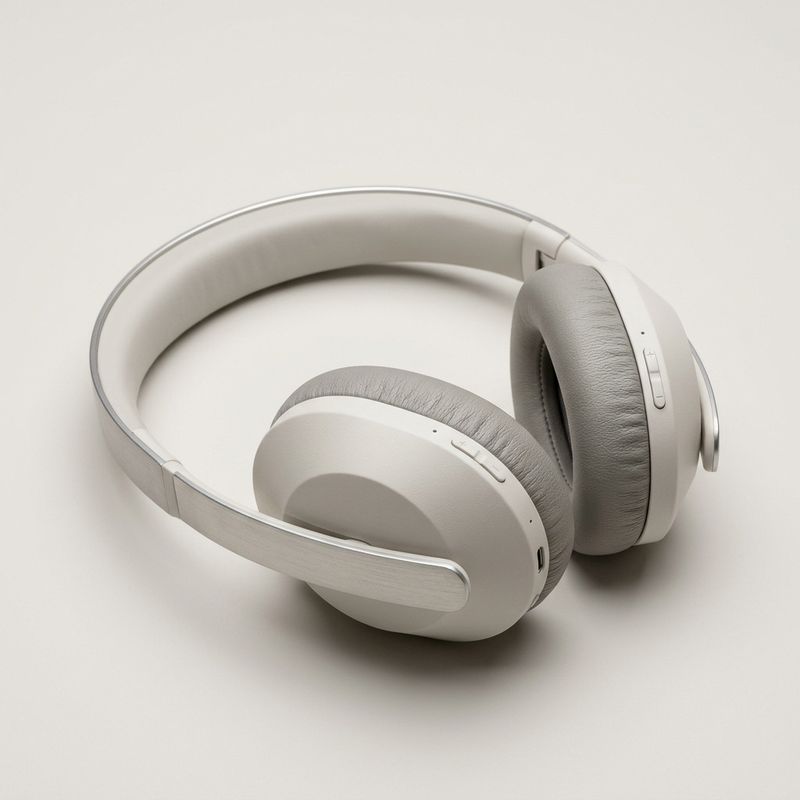
A pair of premium wireless over-ear headphones in matte off-white with soft grey ear cushions and a slim brushed-silver headband, at a slight three-quarter angle on a neutral off-white seamless studio backdrop, soft even overhead lighting.
- Smartwatch (@Image2)
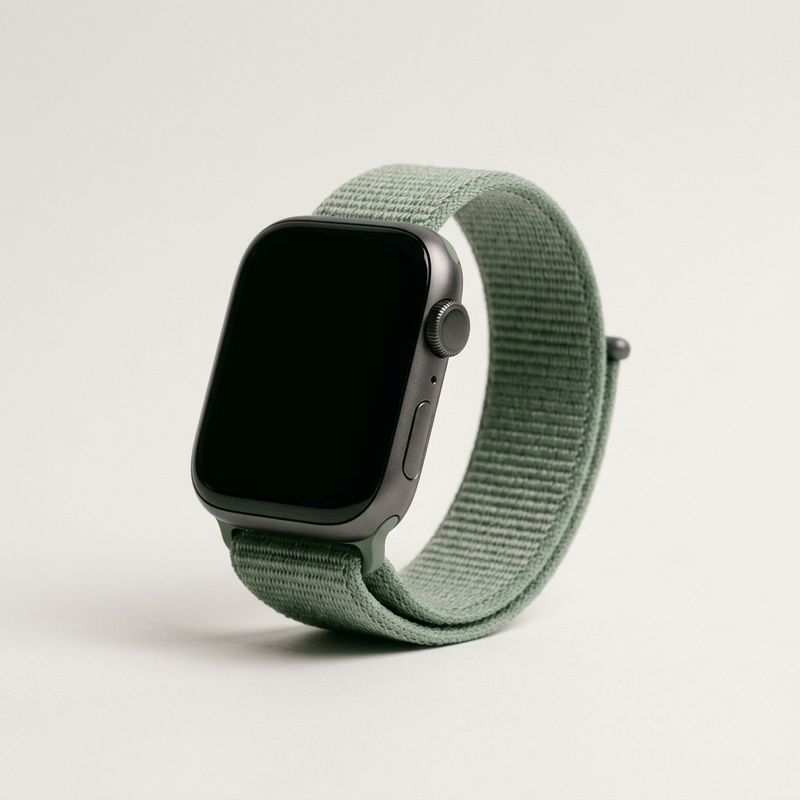
A modern smartwatch with a rounded charcoal aluminium case and a soft sage-green woven sport band, screen dark, propped at a slight angle on a neutral off-white seamless studio backdrop, soft even overhead lighting.
- Keyboard (@Image3)
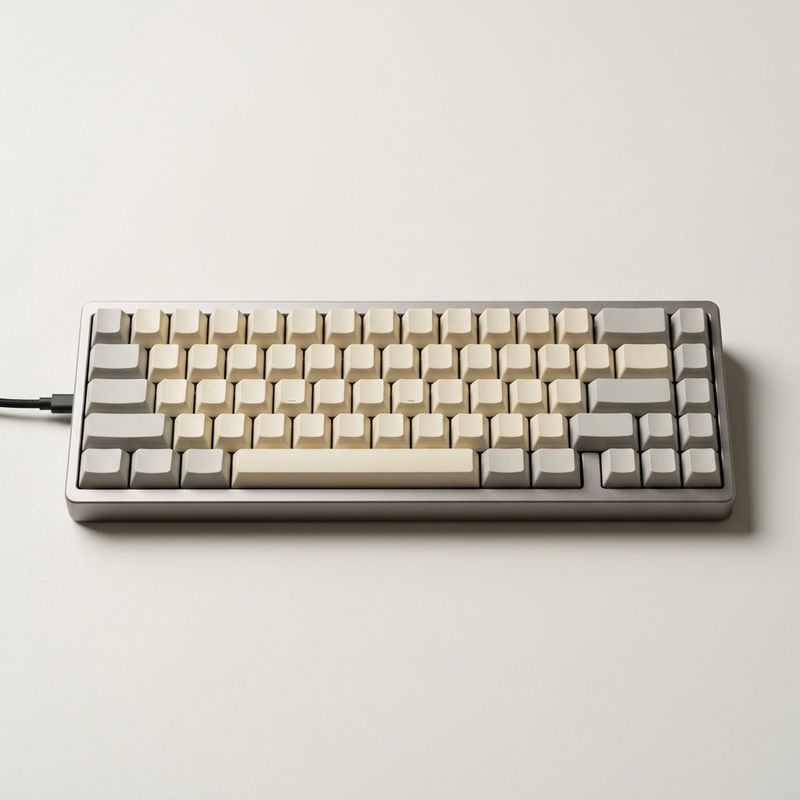
A compact low-profile mechanical keyboard with warm cream and pale-grey keycaps in a slim aluminium frame, angled slightly on a neutral off-white seamless studio backdrop, soft even overhead lighting.


Each product keeps the exact colour and finish it had in its packshot. Address each one by its content, not just its index. @Image1 alone is a bare pointer, but "the matte off-white headphones reference @Image1" gives the model both the address and a description to hold to, so when a render starts to drift it has something to pull back toward.
Building from a single generated still
A reference can be a still you generated a moment earlier. For a hero shot where one frame has to look exactly right, it is faster to iterate the still in an image model and then hand it to Seedance as ground truth than to re-roll a whole video each time. The film still below was generated in an image model, and Seedance animated the moment around it.
A cinematic atmospheric shot built from a single reference still. The scene references @Image1 exactly: the lone figure in a charcoal coat at the end of a misty pier at dawn, the muted teal-and-grey palette, the low fog. Bring the moment to life: the fog drifts across the water, faint ripples spread from the pier posts, and the figure slowly turns to look back over one shoulder as the camera pushes very slowly in. Preserve the composition, palette, wardrobe, and mood of the reference. Audio: gentle lapping water, distant birdsong, soft wind, no music.
- Generated still
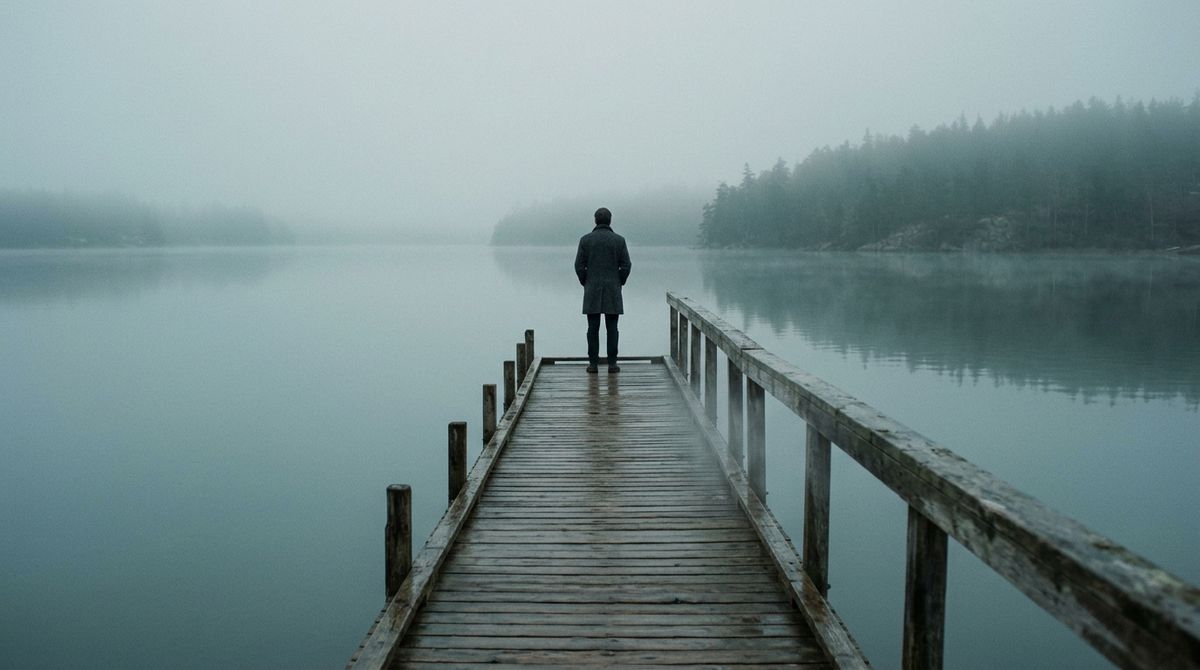
A wide cinematic film still of a lone figure in a long charcoal wool coat standing at the far end of a weathered wooden pier over still glassy water at misty dawn, muted teal-and-grey palette, soft diffused light through low fog, a distant treeline across the water, the figure seen from behind and small in a wide frame.

The frame holds the composition and palette of the still while the fog, the water, and the figure come to life. A still iterates in seconds where a video takes minutes, so a strong single reference is often the fastest way to lock a hero look before committing it to motion. Pass it as inputs.referenceImages[0] when the composition can evolve. Pin it with inputs.frameImages when the still must be the literal opening frame, which the image-to-video guide covers.
Composing image and audio
Every reference so far has been an image, but the same call reads audio references too, addressed as @Audio1 next to @Image1. An audio clip hands the model a sound to build toward, a musical mood and tempo or a specific voice, so one request can carry an identity from a picture and a soundtrack or a voice from a clip.
A music reference scores the scene. Pass a track through inputs.referenceAudios, name it in the prompt, and the generated performance takes its mood and tempo with the motion settling onto the pulse. Below, a dancer cast from a single portrait performs to a reference score.
A cinematic solo contemporary dance piece scored to a reference track. The dancer references @Image1 exactly: the same woman, dark hair in a low bun, charcoal-grey leotard, lean athletic build. She performs a flowing expressive solo in a warm sunlit studio with pale wood floors and tall windows behind her, moving through slow arm extensions, turns, and reaches, her phrasing rising and settling with the mood and tempo of the reference audio @Audio1 so her accents land on the pulse of the music. Match the beat and mood of @Audio1 as the score of the piece. Preserve her exact face, build, and wardrobe from @Image1. Audio: the music of @Audio1 as the score, her soft breath and the light brush of bare feet on the wood between beats.
- The dancer (@Image1)
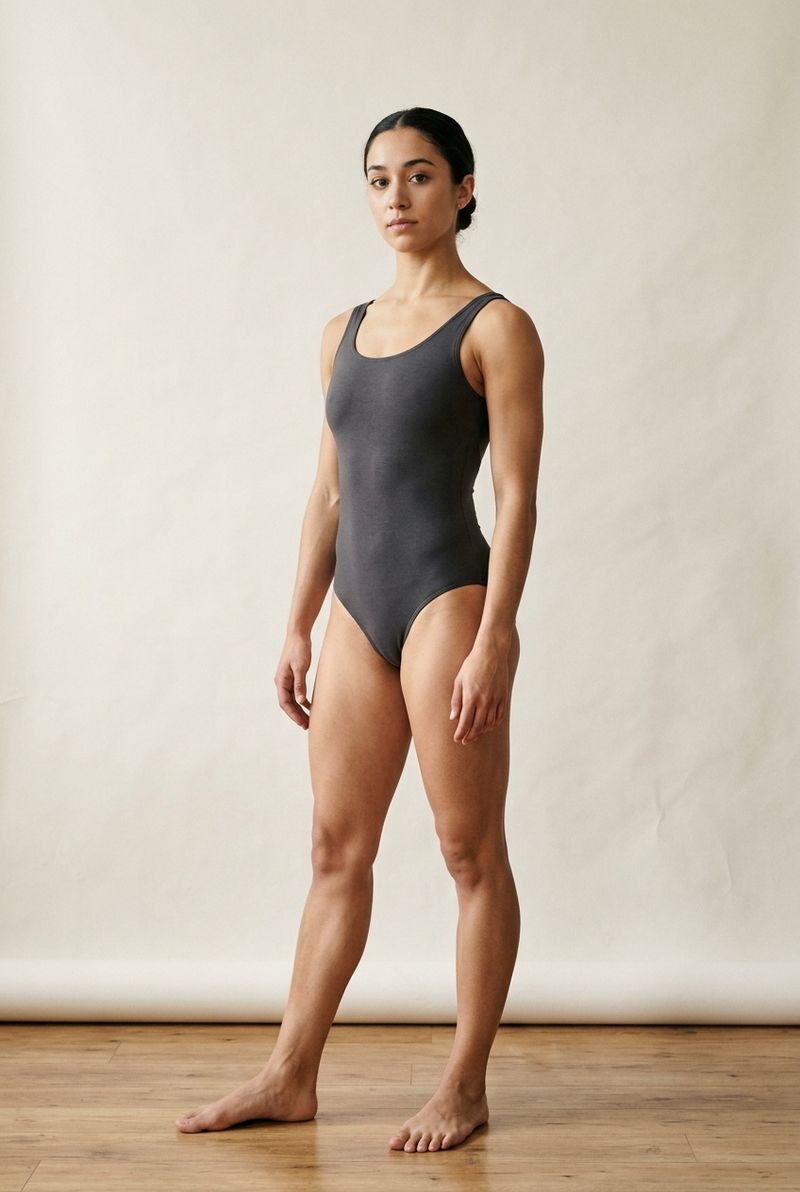
An editorial studio portrait of a contemporary dancer, a woman in her twenties with a lean athletic build and dark hair drawn back into a low bun, wearing a simple fitted charcoal-grey dance leotard, standing three-quarter to the camera in a relaxed neutral full-body pose on a plain warm off-white studio backdrop, even soft studio light.
- The score (@Audio1)0:00
A warm cinematic instrumental score at a slow-to-mid tempo around 90 BPM, soft felt piano and gentle strings over a quiet pulsing bass, contemplative and hopeful, no vocals.

Her identity comes from the portrait and the pacing of the piece follows the track. That is the difference between animating to a placeholder and generating straight to the sound you already have.
A voice reference works the same way for spoken delivery. Attach a voice clip, describe the visible speaker, and the model gives the speaker that voice with the lip-sync matched to it. Here a brand presenter cast from one portrait speaks in a generated reference voice.
A warm corporate brand spokesperson video. The presenter references @Image1 exactly: the same woman, shoulder-length dark hair, charcoal blazer over a white tee. She stands in a bright modern open-plan office with softly defocused desks behind her and speaks to camera with small natural hand gestures. She delivers the voiceover in @Audio1 exactly, her mouth and timing lip-synced to that clip, so both the words and the voice come from @Audio1. Preserve her exact face, hair, and wardrobe from @Image1. Audio: the voiceover from @Audio1, precise lip-sync, quiet room tone, no music.
- The presenter (@Image1)

An editorial studio portrait of a warm, confident brand presenter, a woman in her thirties with shoulder-length dark hair and an easy approachable smile, wearing a smart charcoal blazer over a white tee, head-and-chest framing facing the camera on a plain warm off-white studio backdrop, even soft studio light.
- The voice (@Audio1)0:00
Every product we build starts with one simple question: how do we make your day a little easier?

One face and one voice composed into a talking clip. Swapping either reference holds the other fixed, which is how a spokesperson keeps a consistent voice across many faces, or one face carries many voices across markets. The pools compose the same way the images did, so a single call can carry a full cast of portraits and an audio bed together, each held by its own tag.
How many references a job needs
The caps are ceilings, not targets. Stability falls off well before them, so match the count to what the shot actually has to lock:
- Image subjects hold well from 1 to 8. Nine to twelve can work, with lower stability and a few more attempts.
- Video or audio subjects are tighter: 1 to 5 is the reliable band, and 6 to 10 gets shakier.
- Keep each subject's video or audio reference short, roughly 5 to 10 seconds. Longer inputs cost stability.
- For more than five subjects, prefer a single clean view per subject. If a subject genuinely needs several angles, pass them as separate images rather than one collage, which the model reads as one busy picture.
The right number is however many identities the final shot has to keep fixed. Fewer references render faster and cost less. More of them make a dense ensemble possible and remove the compositing pass that used to sit between the packshots and the deliverable.
Tips
-
Address by index, describe by content.
@Image1is always the first entry ininputs.referenceImages. Pairing the tag with a short description ("the sage-band smartwatch reference@Image2") gives the model something to pull back to when a render drifts. -
Give each anchored subject a distinct role name.
singer references @Image1survives camera moves and cuts. Without a role name, similar references average together and identifying detail slips. -
Bind identity in the prompt, never inside the image. A name painted on a reference picture is read as picture content and tends to print in the frame. State the mapping in the prompt text.
-
Order the array by priority. The lowest-index references hold identity most consistently, so put the lead character or the hero product first and supporting elements after.
-
Close with a preservation clause. "Preserve the exact face, hair, and wardrobe of each subject from their reference" is what holds unmentioned detail steady through a move. Combine it with the
@-tags rather than replacing them. -
Keep references clean and isolated. A packshot on a neutral ground and a portrait on a plain backdrop resolve more reliably than a lifestyle photo, which drags its own background into the new scene.
-
Iterate a hero still in an image model, then animate it. When one frame has to look exactly right, generate it in an image model first and pass it as
inputs.referenceImages[0]. A still iterates in seconds. A video does not. -
Store repeat references as UUIDs. A campaign that reuses the same cast or product across many runs is lighter to send if the assets are uploaded once through the Media Storage API and referenced by UUID.