Seedance 2.5

Seedance 2.5 is ByteDance's higher-end multimodal video generation model for production-oriented creative work. It supports native 30-second video generation, larger reference sets across image, video, and audio inputs, and stronger instruction following for complex shots, multilingual prompts, and reference-heavy creative direction. It is especially well suited to branded storytelling, advertising, explainers, and other commercial workflows that need longer continuous scenes, tighter subject and style consistency, and precise edits that preserve the rest of the shot.
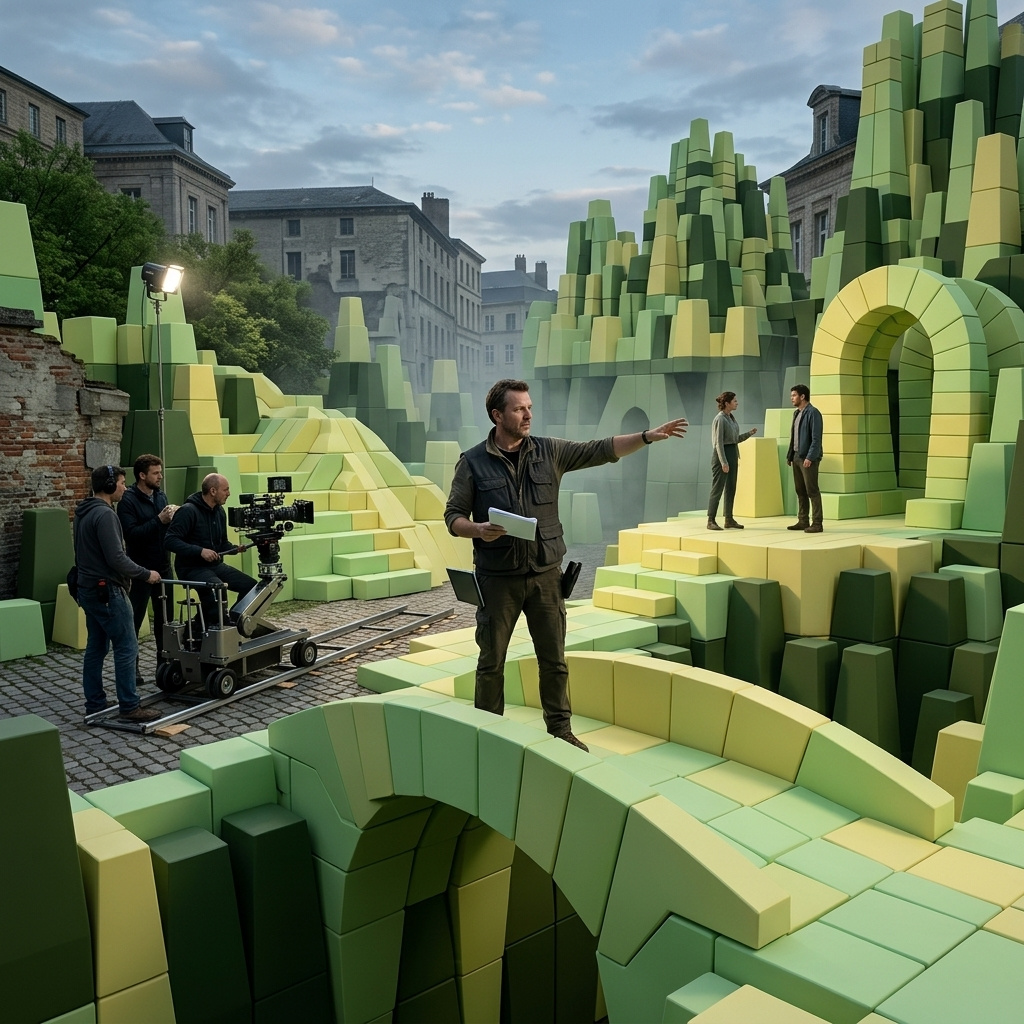
Motion and performance transfer
How to drive Seedance 2.5 with a reference video for motion, camera, and lip-sync while a reference image supplies identity: motion transfer, character swaps, and clay to finished shot.
Introduction
Text-to-video invents the motion on every run. That is what you want for a first shot, and the wrong tool when a performance already exists and has to reappear on a new subject. The exact dance you captured, now danced by an animated character. The one clip you shot, now delivered in six languages. A grey pre-vis turntable your director already signed off, now rendered in real materials.
Seedance 2.5 handles those with inputs.referenceVideos. A reference video hands over motion, camera path, pacing, and lip-sync timing, a reference image hands over identity or material, and the prompt names what changed. The example below fuses two inputs, a video of a live-action dance and a still of a 3D fox character, into one clip where the fox performs the dance move for move.
Transfer the exact dance movement, timing, and framing from @Video1 onto the character in @Image1. The stylized 3D fox character references @Image1: warm orange fur, green scarf, expressive face. It performs the identical full-body movement beat for beat: the slow arm reach overhead, the sweep down with a half-turn, the fold into a low crouch, at the same pace on the same pale-wood stage. Preserve the fox's design and proportions throughout, with natural weight and follow-through. High-quality 3D animated film look. Audio: soft footfalls on wood, quiet studio tone, no music.
- The motion
A contemporary dancer in charcoal practice wear performs a short flowing full-body movement on a bare pale-wood stage in a bright studio, wide 16:9 locked camera showing the full body, soft daylight from the left. The dancer reaches one arm overhead, sweeps it down while turning a half-turn, then folds into a low crouch with the head bowed.
- The character
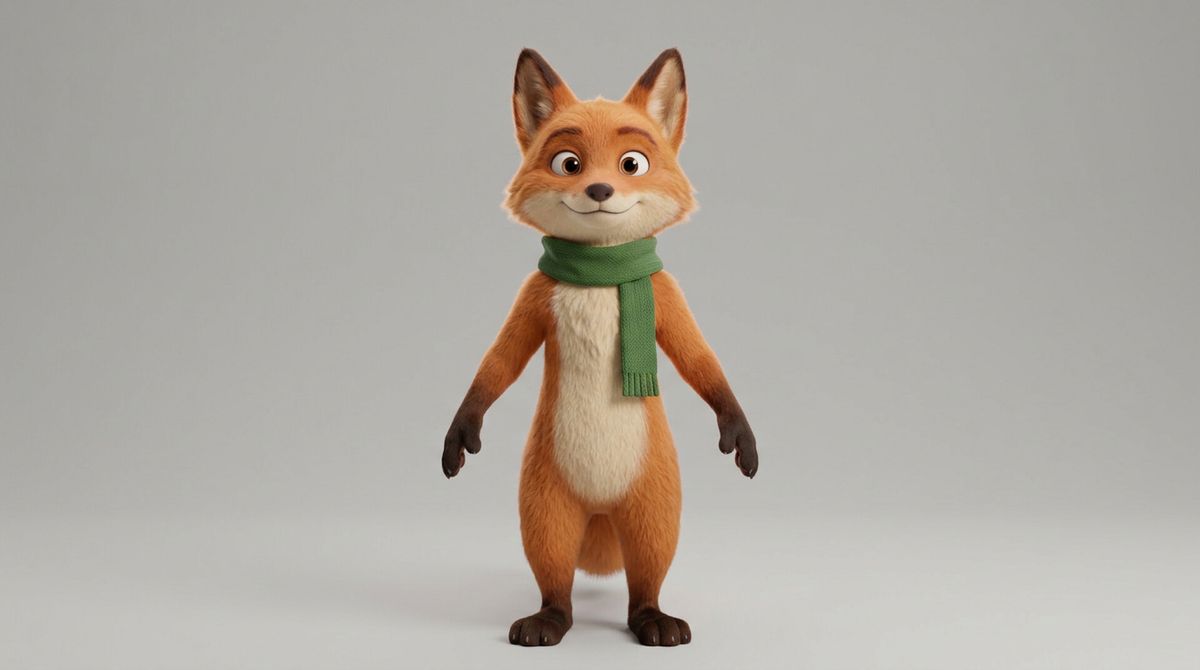
A stylized 3D-animated anthropomorphic fox character standing upright in a neutral pose, full body, warm orange fur with a cream chest, an expressive friendly face, wearing a forest-green scarf, on a plain soft neutral-grey studio backdrop, animated-film render.

This guide covers what a reference video actually carries, then the three jobs it does best: transferring motion across subjects, recasting a performance, and turning a clay pre-vis into a finished shot.
Request shape
A call takes inputs.referenceVideos for the motion and inputs.referenceImages for the identity, addressed in the prompt as @Video1 and @Image1.
import { createClient } from '@runware/sdk'

const client = await createClient({ apiKey: process.env.RUNWARE_API_KEY })
await client.connect()

const [result] = await client.run({
  model: 'bytedance:seedance@2.5',
  inputs: {
    referenceVideos: [
      'https://example.com/dance.mp4'
    ],
    referenceImages: [
      'https://example.com/character.jpg'
    ]
  },
  positivePrompt: 'Transfer the exact movement and timing from @Video1 onto the character in @Image1. It performs the identical full-body sequence beat for beat, at the same pace, on the same stage. Preserve the character\'s design and proportions throughout.',
  width: 1280,
  height: 720,
  duration: 6,
  deliveryMethod: 'async'
})
import asyncio
import os
from runware import Runware
async def main():
async with Runware(api_key=os.environ["RUNWARE_API_KEY"]) as client:
results = await client.run({
"model": "bytedance:seedance@2.5",
"inputs": {
"referenceVideos": [
"https://example.com/dance.mp4"
],
"referenceImages": [
"https://example.com/character.jpg"
]
},
"positivePrompt": "Transfer the exact movement and timing from @Video1 onto the character in @Image1. It performs the identical full-body sequence beat for beat, at the same pace, on the same stage. Preserve the character's design and proportions throughout.",
"width": 1280,
"height": 720,
"duration": 6,
"deliveryMethod": "async"
})
asyncio.run(main())curl https://api.runware.ai/v1 \
-H "Authorization: Bearer $RUNWARE_API_KEY" \
-H "Content-Type: application/json" \
-d '[
{
  "taskType": "videoInference",
  "taskUUID": "a1b2c3d4-e5f6-7890-abcd-ef1234567890",
  "model": "bytedance:seedance@2.5",
  "inputs": {
    "referenceVideos": [
      "https://example.com/dance.mp4"
    ],
    "referenceImages": [
      "https://example.com/character.jpg"
    ]
  },
  "positivePrompt": "Transfer the exact movement and timing from @Video1 onto the character in @Image1. It performs the identical full-body sequence beat for beat, at the same pace, on the same stage. Preserve the character's design and proportions throughout.",
  "width": 1280,
  "height": 720,
  "duration": 6,
  "deliveryMethod": "async"
}
]'runware run bytedance:seedance@2.5 \
inputs.referenceVideos.0=https://example.com/dance.mp4 \
inputs.referenceImages.0=https://example.com/character.jpg \
positivePrompt="Transfer the exact movement and timing from @Video1 onto the character in @Image1. It performs the identical full-body sequence beat for beat, at the same pace, on the same stage. Preserve the character's design and proportions throughout." \
width=1280 \
height=720 \
duration=6 \
deliveryMethod=async{
"taskType": "videoInference",
"taskUUID": "a1b2c3d4-e5f6-7890-abcd-ef1234567890",
"model": "bytedance:seedance@2.5",
"inputs": {
"referenceVideos": [
"https://example.com/dance.mp4"
],
"referenceImages": [
"https://example.com/character.jpg"
]
},
"positivePrompt": "Transfer the exact movement and timing from @Video1 onto the character in @Image1. It performs the identical full-body sequence beat for beat, at the same pace, on the same stage. Preserve the character's design and proportions throughout.",
"width": 1280,
"height": 720,
"duration": 6,
"deliveryMethod": "async"
}Response
[
  {
    "taskType": "videoInference",
    "taskUUID": "a1b2c3d4-e5f6-7890-abcd-ef1234567890",
    "videoUUID": "9c1b2d3a-4e5f-6789-abcd-ef0123456789",
    "videoURL": "https://vm.runware.ai/video/os/a14d18/ws/2/vi/9c1b2d3a-4e5f-6789-abcd-ef0123456789.mp4"
  }
]
The fields that matter here:
inputs.referenceVideostakes up to 10 videos, each a URL or a UUID, with the combined duration under 30 seconds. One video is the common case. Several let the model blend cues, like a follow move from one and an orbit from another.inputs.referenceImagessupplies identity, up to 30. One image covers a straight character or product swap.- Match the output size to the reference video. A landscape source paired with a portrait output pulls the model between two structures. Set
widthandheight(orresolution) to the source's shape.
What a reference video carries
A reference video hands five things to the output:
- Camera movement: the exact orbit, dolly, pan, or handheld drift arrives on the render.
- Pacing: how long each beat holds and how fast the subject moves between them.
- Framing: a head-and-shoulders shot stays head-and-shoulders.
- Motion trajectory: an arm lift lands at the same moment, a turn reaches the same angle on the same beat.
- Lip-sync duration: every phrase occupies the same span the source phrase did.
That last one is the load-bearing signal for recasting and localization. It is what stops a dubbed line from finishing before the mouth closes, or a gesture timed to English syllables from cutting a Japanese line short.
A reference video is a motion signal, not the frame content. Seedance rebuilds the shot around the movement, so the wardrobe and materials come from the prompt and the reference images, not from the source pixels. When the job is to keep the source's exact pixels and change one thing in place, that is an edit, and it uses inputs.video instead, covered in the editing guide.
Transferring motion across subjects
The clearest case is a performance that has to move to a completely different body. A motion-capture shoot is expensive. A reference video is not. In the hero above, the live-action dance drives the motion while the fox reference supplies the body.
The fox lands every beat of the dance at the same moment the dancer did, with the weight and follow-through carried across. The transfer works because the two share a body plan: an upright figure with two arms maps cleanly onto another upright figure. Push it further, onto a very different anatomy, and the model has to invent how the movement would translate, so keep the target's structure close to the source's when the motion has to read exactly.
Recasting and localizing at scale
The pattern that only inputs.referenceVideos delivers is one performance, many faces and languages. The reference video holds the gestures and the exact lip-sync timing, a reference image swaps the face, and the prompt swaps the language. Below, a single English recipe-tip clip becomes three regional creators, each in a different language, off the same source.
A home cook in a linen apron films a short recipe tip at a bright kitchen counter, portrait 9:16 phone-camera framing, head-and-chest composition. He speaks warmly to the camera in English, lifts a small wooden board of chopped green herbs to show the lens, sets it down, and continues explaining with small hand gestures. Warm morning window light, softly defocused kitchen behind.
Recreate the exact recipe-tip performance from @Video1, cast with the woman in @Image1. Preserve every beat: the framing, the lift of the herb board, the set-down, the hand gestures, and the exact lip-sync duration of every phrase. She speaks fluent Latin American Spanish with a warm friendly tone. UGC vlog aesthetic, warm kitchen light matching the source.
Recreate the exact recipe-tip performance from @Video1, cast with the man in @Image1. Preserve every beat: the framing, the lift of the herb board, the set-down, the hand gestures, and the exact lip-sync duration of every phrase. He speaks fluent Tokyo-accented Japanese with a calm friendly tone. UGC vlog aesthetic, warm kitchen light matching the source.
Recreate the exact recipe-tip performance from @Video1, cast with the woman in @Image1. Preserve every beat: the framing, the lift of the herb board, the set-down, the hand gestures, and the exact lip-sync duration of every phrase. She speaks fluent Parisian French with a warm friendly tone. UGC vlog aesthetic, warm kitchen light matching the source.
Every variant lifts the herb board on the same beat and holds each phrase for the same span, so three different languages all fit the timing the source left for them. Each output is one call with a new reference image and a new language line, which is what turns a single shoot into a market-by-market rollout: five markets and twenty creator cuts share one motion source, and each variant is a fresh request. The multilingual guide covers the language and lip-sync side in depth.
Name the language with an accent and a delivery, not just a country. "Fluent Parisian French, warm and unhurried" performs more consistently than "in French", and the cue carries into the audio track Seedance generates alongside the video.
Clay pre-vis to finished shot
A 3D commercial often locks the camera and blocking before the materials exist. The director signs off a grey clay turntable, and the CG team spends days on the material pass. Feeding the clay render to Seedance as the reference video collapses that gap: the clay carries the motion and pacing, a packshot carries the material, and the output is the same move in production quality.
Follow the exact turntable motion and camera path from @Video1, but render the armchair in @Image1 in finished production quality. Preserve the identical orbital arc, pacing, viewing angle, and framing. Replace the grey clay with the tan leather upholstery, tufted cushions, and walnut legs of the reference. Relight as a high-end furniture commercial, soft warm light from the upper left, a gentle floor shadow, warm off-white backdrop. Audio: subtle studio room tone, no music.
- Clay turntable
A grey untextured 3D clay pre-visualisation render of a mid-century lounge armchair on a matte grey turntable in a plain grey stage, all flat matte grey clay with no colour or texture. A slow smooth 360-degree orbital camera path around the armchair at a three-quarter angle, even soft key light from above.
- Finished packshot
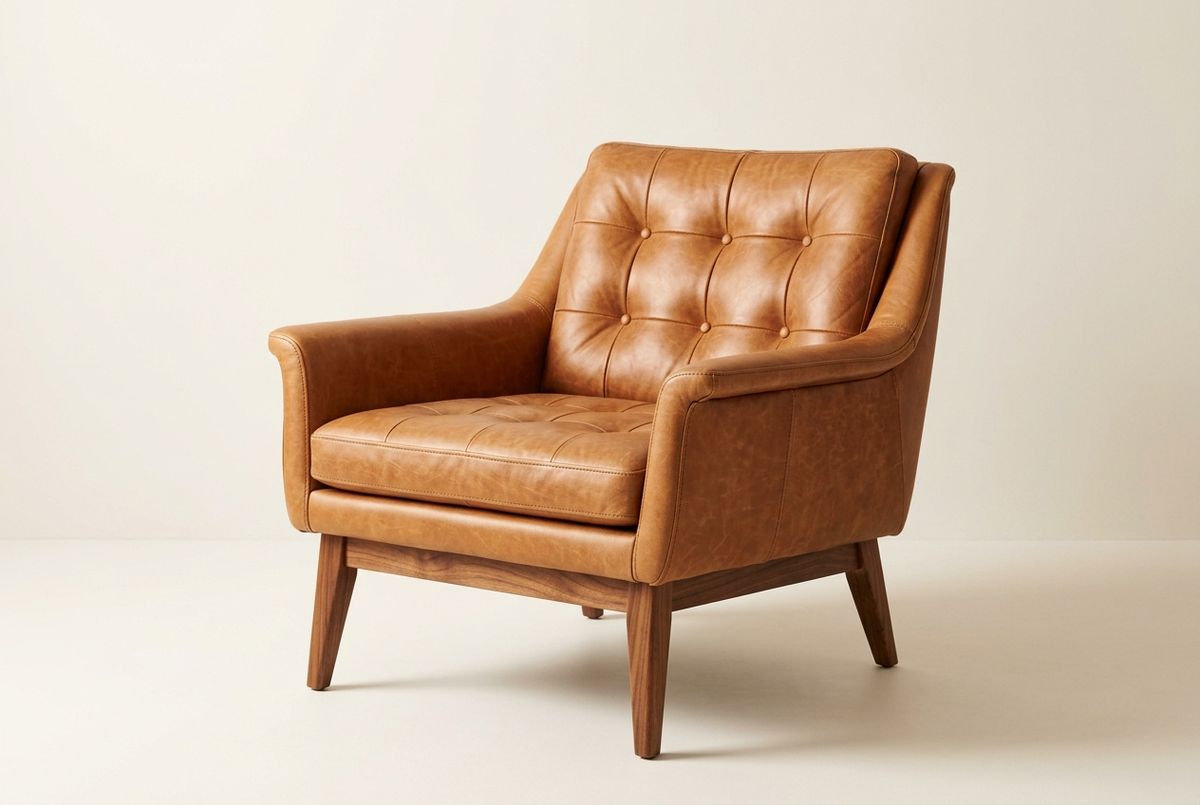
A high-end furniture packshot of a mid-century lounge armchair with warm tan leather upholstery, softly tufted cushions, tapered walnut legs, and a low curved backrest, three-quarter angle on a warm off-white studio backdrop, soft warm directional light.

The rendered chair follows the clay frame for frame: the same arc at the same speed, the same three-quarter angle reached on the same beat. Every material property comes from the packshot, the leather grain and the walnut all lifted from the still. The pattern generalises past turntables to any pre-vis that carries an approved camera move, an architectural walkthrough or a car reveal locked to a specific arc, so the material pass moves out of the render queue and into a prompt.
Tips
-
Match the output size to the source. A reference video sets the motion structure, so a landscape source with a portrait output fights itself. Keep the aspect and size of the source unless there is a reason to differ.
-
Send a reference image whenever identity matters. A reference video alone preserves motion but reinvents the face, product, and wardrobe each run. Character swaps, product locks, and material renders all need at least one reference image.
-
Keep the target's body plan close to the source's. Motion maps cleanly between similar structures. The further the target anatomy is from the source, the more the model has to invent, so an upright character reads a human performance better than a very different body would.
-
Pin the pacing explicitly. Adding "preserve every gesture and the exact lip-sync duration of each phrase" reinforces what the reference video already carries, and heads off the subtle timing drift a dubbed line can pick up.
-
Feed a clean, well-lit source. Motion blur, low light, and shake all degrade the motion signal, and the render inherits the noise. Recasting is the most sensitive, since the model reads small mouth movements to hold lip-sync.
-
Keep localization sources short and gesture-driven. A five-to-eight-second clip with a clean opening gesture, a delivered line, and a closing beat relocalizes cleanly across a dozen variants. Long dialogue-heavy sources have more phonemes to re-match.
-
Reach for
inputs.videowhen the goal is to keep the source pixels. Reference videos regenerate the shot around the motion. To swap one element while everything else stays put, that is an in-place edit, covered in the editing guide.