HeyGen Video 1.0

HeyGen Video 1.0 is HeyGen's video generation model for short clips with synchronized audio. It generates the full frame from a text prompt, a first-frame image, or up to 12 image, video, and audio references, and produces dialogue, ambience, and sound effects in the same pass, with no separate lip-sync step. It outputs 5 to 15 second clips at 480p, 768p, 1080p, or 2K, suited to presenter shots, product and training content, and social video.
Animating a still with a first frame
How to start a HeyGen Video 1.0 clip from your own image with inputs.frameImages, why the still decides the output shape, and how to get several motions from one packshot.
Introduction
Give HeyGen Video 1.0 an image in inputs.frameImages and it uses that image as the literal first frame. The clip opens exactly as the still looks, then moves on from there, with sound generated in the same pass.
That makes it the mode for work that already has approved imagery: a campaign photo, a packshot, a listing photo or a headshot. The look and the framing are settled by the image. The prompt only has to say what happens next.
The man keeps walking toward the camera at an easy pace, glances to his left at the blue door, then looks back ahead and smiles slightly. The camera stays locked off. The warm late-morning light holds steady. Audio: his leather shoes on the cobbles, a scooter passing on a street nearby, and swallows calling overhead. No music, no dialogue.
- First frame
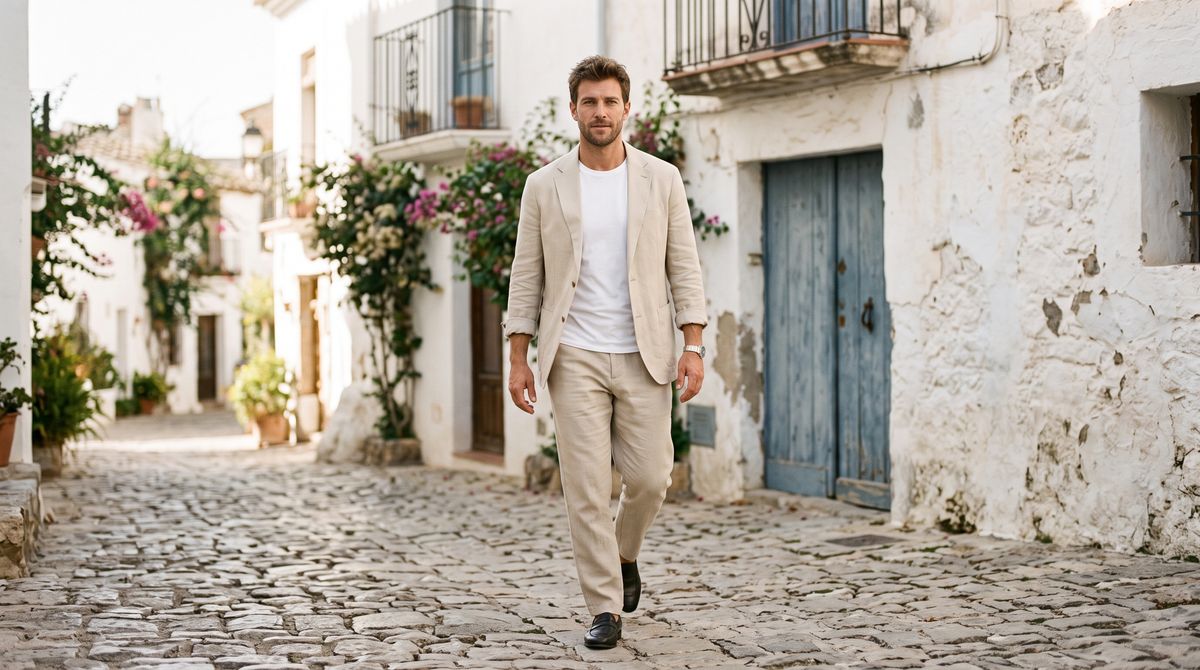
A photoreal editorial fashion photograph. A man in his thirties in a relaxed sand-colored linen suit and a plain white t-shirt walks toward the camera mid-stride on a sunlit cobbled street in a Mediterranean town, whitewashed walls and a faded blue wooden door behind him. Shot on a 50mm lens at eye level, natural late-morning light, muted warm color, real skin texture. No logos, brand names or printed words anywhere in frame.

This guide covers the request, how to write a prompt that starts from a frame, how the still decides the shape of the output, and how to get several different motions out of one image.
The request
An image-to-video call takes the still in inputs.frameImages and the prompt in positivePrompt.
import { createClient } from '@runware/sdk'

const client = await createClient({ apiKey: process.env.RUNWARE_API_KEY })
await client.connect()

const [result] = await client.run({
  model: 'heygen:video@1.0',
  positivePrompt: 'The man keeps walking toward the camera at an easy pace, glances to his left at the blue door, then looks back ahead and smiles slightly. The camera stays locked off. The warm late-morning light holds steady. Audio: his leather shoes on the cobbles, a scooter passing on a street nearby, and swallows calling overhead. No music, no dialogue.',
  inputs: {
    frameImages: [
      {
        image: 'https://example.com/campaign/linen-suit.jpg',
        frame: 'first'
      }
    ]
  },
  duration: 8
})
import asyncio
import os
from runware import Runware
async def main():
async with Runware(api_key=os.environ["RUNWARE_API_KEY"]) as client:
results = await client.run({
"model": "heygen:video@1.0",
"positivePrompt": "The man keeps walking toward the camera at an easy pace, glances to his left at the blue door, then looks back ahead and smiles slightly. The camera stays locked off. The warm late-morning light holds steady. Audio: his leather shoes on the cobbles, a scooter passing on a street nearby, and swallows calling overhead. No music, no dialogue.",
"inputs": {
"frameImages": [
{
"image": "https://example.com/campaign/linen-suit.jpg",
"frame": "first"
}
]
},
"duration": 8
})
asyncio.run(main())curl https://api.runware.ai/v1 \
-H "Authorization: Bearer $RUNWARE_API_KEY" \
-H "Content-Type: application/json" \
-d '[
{
  "taskType": "videoInference",
  "taskUUID": "2f8b6d13-9a4e-4c71-b8d5-0e3c7a19f624",
  "model": "heygen:video@1.0",
  "positivePrompt": "The man keeps walking toward the camera at an easy pace, glances to his left at the blue door, then looks back ahead and smiles slightly. The camera stays locked off. The warm late-morning light holds steady. Audio: his leather shoes on the cobbles, a scooter passing on a street nearby, and swallows calling overhead. No music, no dialogue.",
  "inputs": {
    "frameImages": [
      {
        "image": "https://example.com/campaign/linen-suit.jpg",
        "frame": "first"
      }
    ]
  },
  "duration": 8
}
]'runware run heygen:video@1.0 \
positivePrompt="The man keeps walking toward the camera at an easy pace, glances to his left at the blue door, then looks back ahead and smiles slightly. The camera stays locked off. The warm late-morning light holds steady. Audio: his leather shoes on the cobbles, a scooter passing on a street nearby, and swallows calling overhead. No music, no dialogue." \
inputs.frameImages.0.image=https://example.com/campaign/linen-suit.jpg \
inputs.frameImages.0.frame=first \
duration=8{
"taskType": "videoInference",
"taskUUID": "2f8b6d13-9a4e-4c71-b8d5-0e3c7a19f624",
"model": "heygen:video@1.0",
"positivePrompt": "The man keeps walking toward the camera at an easy pace, glances to his left at the blue door, then looks back ahead and smiles slightly. The camera stays locked off. The warm late-morning light holds steady. Audio: his leather shoes on the cobbles, a scooter passing on a street nearby, and swallows calling overhead. No music, no dialogue.",
"inputs": {
"frameImages": [
{
"image": "https://example.com/campaign/linen-suit.jpg",
"frame": "first"
}
]
},
"duration": 8
}Response
[
  {
    "taskType": "videoInference",
    "taskUUID": "2f8b6d13-9a4e-4c71-b8d5-0e3c7a19f624",
    "videoUUID": "8c4a2e97-f6b1-4d38-a0e5-7b91d3c2f846",
    "videoURL": "https://vm.runware.ai/video/os/a14d18/ws/2/vi/8c4a2e97-f6b1-4d38-a0e5-7b91d3c2f846.mp4"
  }
]inputs.frameImagestakes exactly one image, used as the first frame. It can be a plain image or an object withframeset tofirst. Each image can be up to 16 MB.widthandheightare not accepted in this mode. The output takes its shape from the image, covered in The still sets the shape.resolutionis optional:480p,768p,1080por2k, defaulting to768p.durationruns from 5 to 15 seconds, defaulting to 5.
A first frame cannot be combined with reference inputs. A request with both inputs.frameImages and any of referenceImages, referenceVideos or referenceAudios is rejected. To carry a product or a person into a new scene instead of opening on a fixed frame, use the reference guide.
Prompting from a first frame
The image already answers every question about the look: the subject, the wardrobe, the light, the lens. The prompt answers the questions the image cannot: what moves, how the camera behaves and what it sounds like.
That changes how the prompt is written. The hero prompt above names the man by role instead of describing him, and spends every sentence on the action, the camera and the audio. Re-describing the image adds nothing the frame has not already fixed, and it takes space the prompt could spend on motion.
The same applies to speech. A headshot becomes a talking clip when the prompt quotes the line and says who speaks it:
The shop owner speaks directly to the camera, in a warm, confident voice: "We service every bike in forty-eight hours, or the tune-up is free. Drop it off before noon." Her lips stay in sync with every word, and she gives a small nod at the end. The camera stays locked off. Audio: her voice close and clear over a quiet workshop room tone, with a faint freewheel ticking somewhere behind her. No music.
- First frame
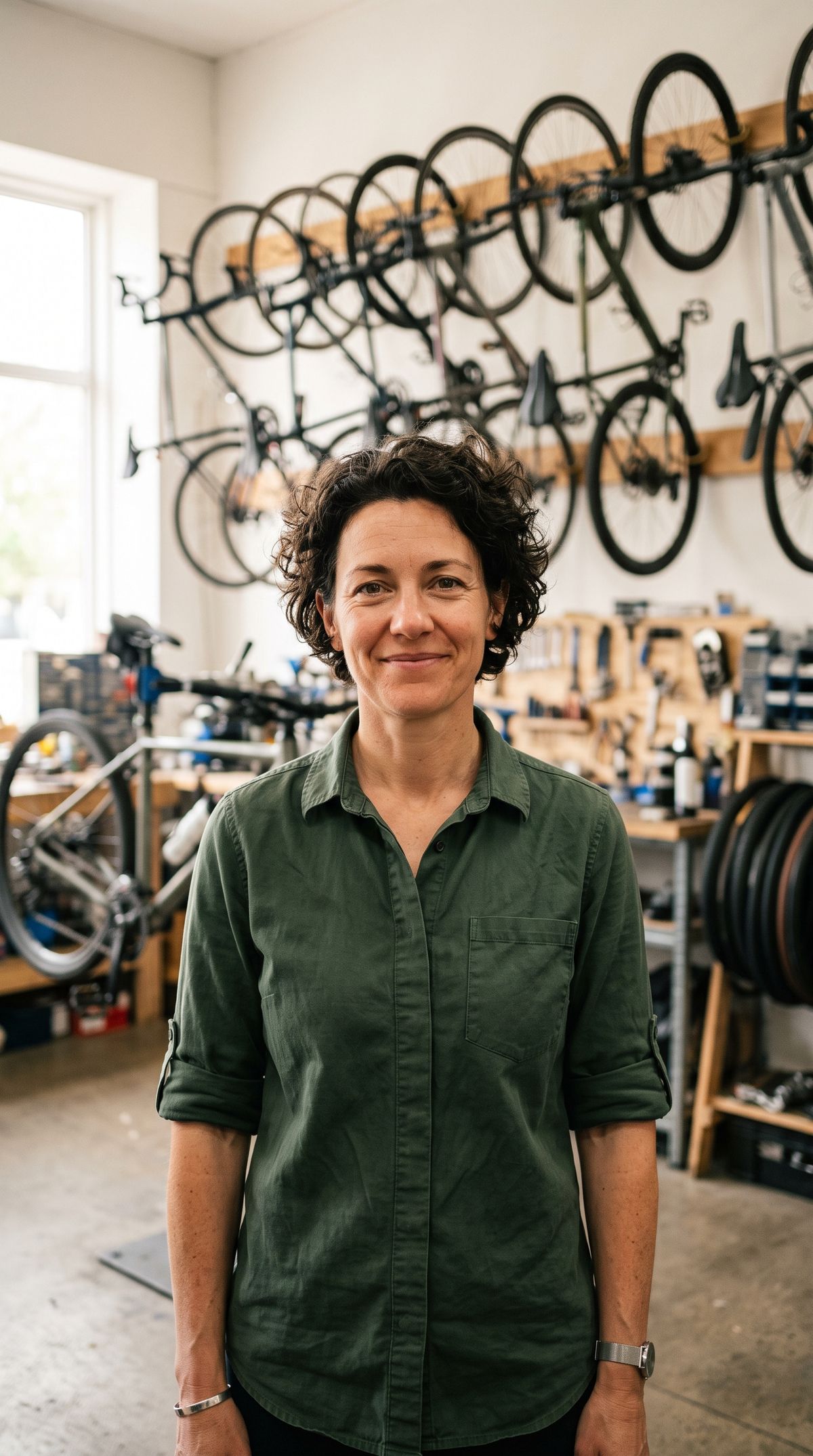
A photoreal portrait photograph of a bicycle-shop owner in her forties with cropped curly dark hair, in a dark green work shirt with the sleeves rolled up, standing in her bright repair workshop with bicycles hanging on wall hooks behind her, softly out of focus. She looks straight into the lens with a friendly half-smile, her mouth closed. Waist-up framing, shot on a 50mm lens, soft window light from the left, real skin texture. No logos, brand names or printed words anywhere in frame.

The portrait was shot with her mouth closed, which gives the model a neutral starting point to animate the speech from. A still caught mid-word or mid-laugh makes the opening frames harder to land. The dialogue and sound guide covers writing the line and fitting it to the duration.
For listings and interiors, the prompt can ask for almost no motion at all. A slow push in and a change of light is enough to turn a photo into a clip, and it keeps every surface exactly as it was photographed.
The camera pushes in very slowly and steadily toward the windows. The daylight brightens slightly as a thin cloud passes and the sun comes out. Nothing in the room moves. Audio: a quiet room tone and birdsong from the garden. No music, no dialogue.
- First frame
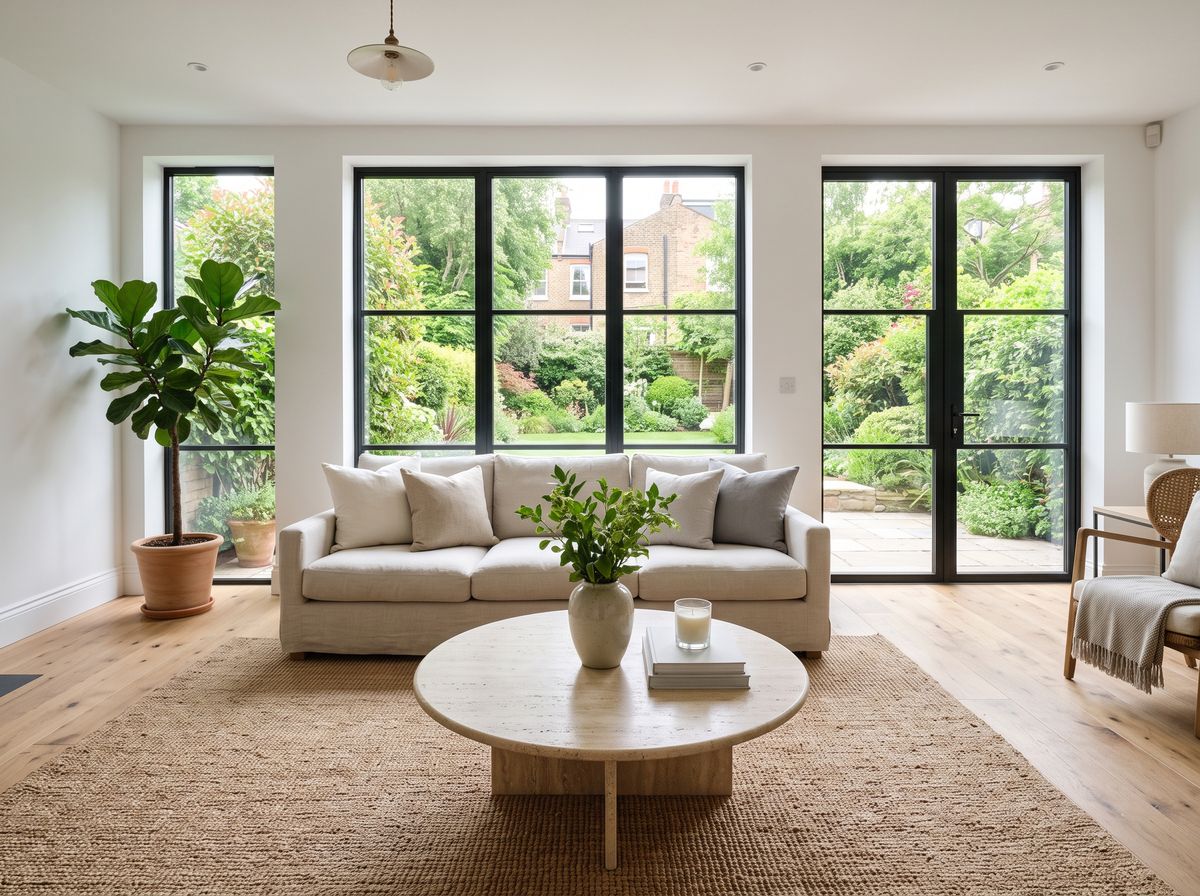
A photoreal real-estate photograph of a bright living room in a renovated townhouse: a pale linen sofa, a round travertine coffee table, a large jute rug, white walls, wide oak floorboards, and full-height windows looking out onto a green garden. Wide-angle interior photography with straight verticals, soft even daylight. No people, no logos, no printed words anywhere in frame.

Name what stays still as well as what moves. "Nothing in the room moves" is the clause that holds the listing exactly as it was photographed.
The still sets the shape
In image-to-video, the output follows the image's aspect ratio, including its EXIF orientation. There is no width or height to override it. To change the shape of the clip, crop the still before sending it.
The two clips below come from one beach photo. The first uses the 16:9 original. The second uses a centered 9:16 crop of it, with an identical prompt.
The surf instructor keeps walking slowly toward the camera along the waterline with the board under her arm, and a small wave washes over her feet. The camera stays locked off. Audio: waves breaking and hissing up the sand, her footsteps in the wet sand, and a light onshore wind. No music, no dialogue.
- 16:9 first frame
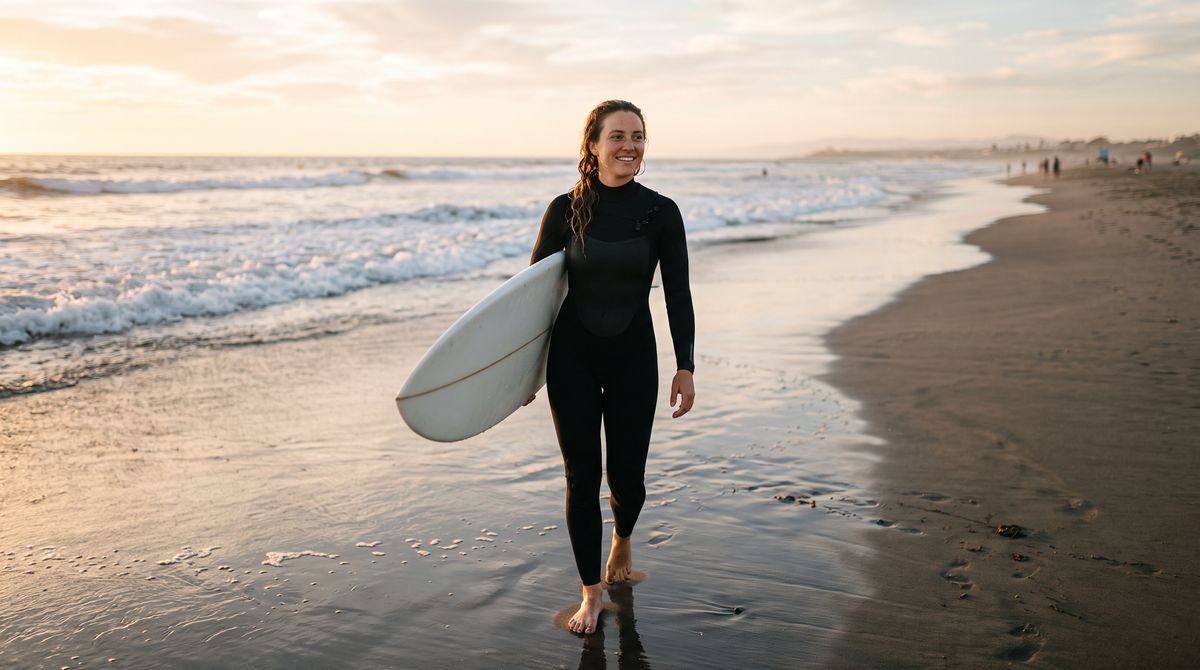
A photoreal lifestyle photograph of a surf instructor in her twenties in a plain black wetsuit, carrying a white surfboard under one arm, walking toward the camera along the edge of the water on a wide sandy beach at golden hour. She is centered in the frame, with small waves breaking behind her and open sand on both sides. Shot on a 35mm lens at eye level, warm low sun, real skin texture. No logos, brand names or printed words anywhere in frame, including on the wetsuit and the board.

The surf instructor keeps walking slowly toward the camera along the waterline with the board under her arm, and a small wave washes over her feet. The camera stays locked off. Audio: waves breaking and hissing up the sand, her footsteps in the wet sand, and a light onshore wind. No music, no dialogue.
- 9:16 crop
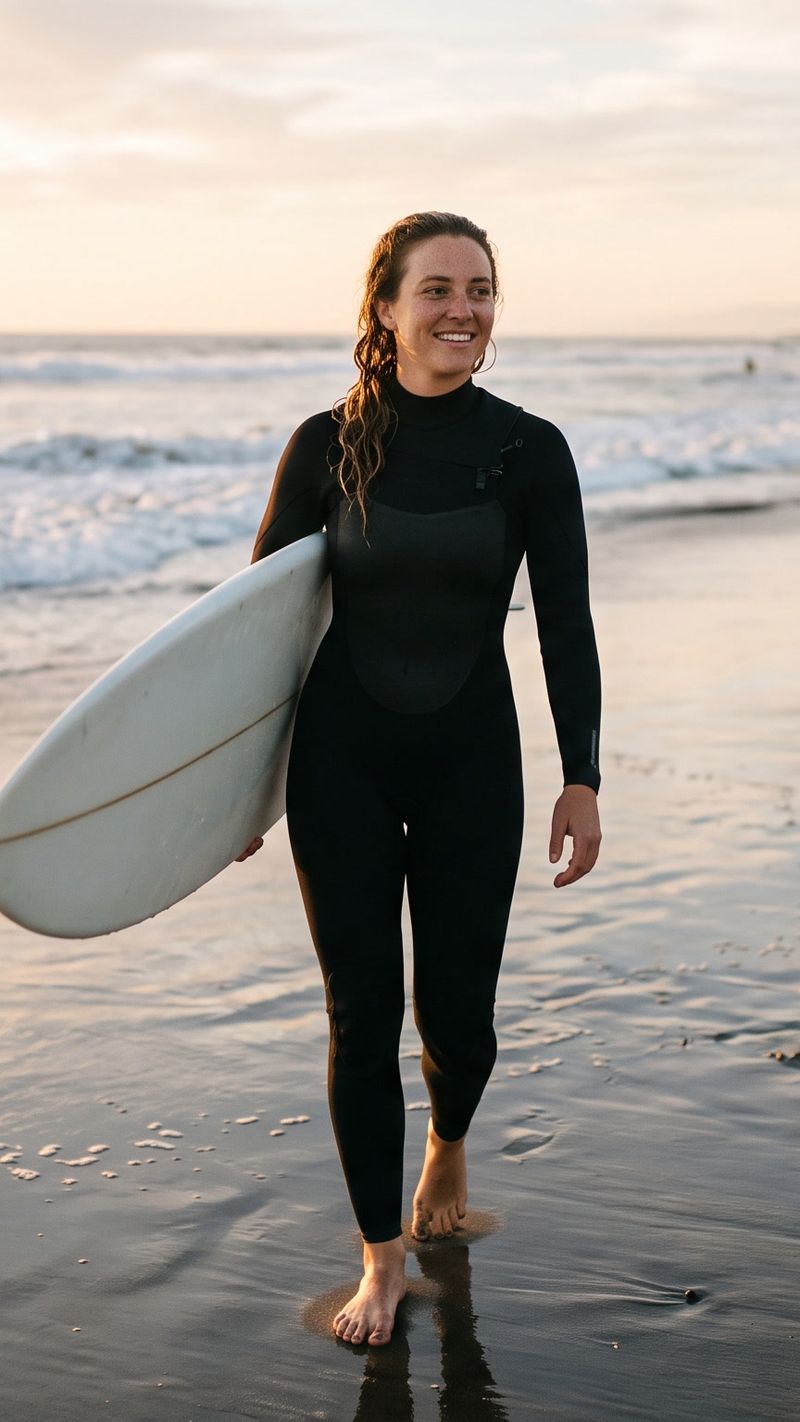

Each clip comes back in the shape of the image it started from. Cropping in your pipeline is the only lever, so frame the subject with room to crop when the still will feed more than one placement.
One still, several motions
The first frame fixes the look, which leaves the prompt free to try different motions on the same approved image. For e-commerce, that turns one packshot into a set of clips for different placements.

A photoreal e-commerce packshot of a frosted glass bottle of body oil with a matte black pump, standing centered on a round sandstone plinth against a warm beige backdrop. Soft diffused studio light from the left and a gentle shadow falling to the right. The bottle is completely unlabeled. No logos, brand names or printed words anywhere in frame.
The bottle stays perfectly still on the plinth while a soft band of warm light sweeps slowly across it from left to right, glowing through the frosted glass. The camera does not move. Audio: a quiet studio room tone. No music, no dialogue.
Two small drops of golden oil run slowly down the outside of the frosted bottle from just below the pump, catching the light as they go. The bottle stays still on the plinth, and the camera pushes in very slightly. Audio: a quiet studio room tone. No music, no dialogue.
A hand with short, neutral nails enters from the right, wraps its fingers around the body of the bottle below the pump, and lifts it straight up off the plinth and out of the top of the frame, leaving the empty plinth. The camera does not move. Audio: a soft scrape of glass on stone as the bottle lifts, and a quiet studio room tone. No music, no dialogue.
The light sweep and the oil drops keep the product still and move something around it, which is the safest way to animate a packshot. The lift puts a hand on the product, so its prompt names where the fingers grip and where the bottle goes. Contact is where a vague prompt goes wrong, as the prompting guide covers.
Tips
-
Treat the image as final. Everything in it, from the wardrobe to the light, carries into the clip. Fix it in the image, not in the prompt.
-
Prompt the motion, the camera and the sound. The image already covers the look. Spend the prompt on what happens next.
-
Crop the still to the shape you need. The output follows the image's aspect ratio, and
widthandheightare not accepted in this mode. -
Start talking clips from a closed-mouth portrait. A neutral first frame gives the speech a clean start.
-
Say what should stay still. "Nothing in the room moves" or "the bottle stays perfectly still" keeps the parts of the image that matter untouched.
-
Move the light, not the product. A light sweep or a slow push in animates a packshot without risking the product's shape.
-
Name the grip when a hand touches the subject. Where the fingers go and where the object ends up.
-
Switch to references when the frame should not be fixed. To place a product in a new scene rather than open on a given photo, use
referenceImagesinstead offrameImages.