HeyGen Video 1.0

HeyGen Video 1.0 is HeyGen's video generation model for short clips with synchronized audio. It generates the full frame from a text prompt, a first-frame image, or up to 12 image, video, and audio references, and produces dialogue, ambience, and sound effects in the same pass, with no separate lip-sync step. It outputs 5 to 15 second clips at 480p, 768p, 1080p, or 2K, suited to presenter shots, product and training content, and social video.
Voices and soundtracks from audio references
How to use inputs.referenceAudios with HeyGen Video 1.0 to give a character a specific voice, play your own voiceover word for word, or score a clip with your own track.
Introduction
HeyGen Video 1.0 accepts audio files in inputs.referenceAudios, and the prompt decides what each one is for. The same kind of input can do two different jobs:
- A voice source. The character speaks the line written in the prompt, in the voice from the reference. The words in the reference do not matter, only how it sounds.
- The soundtrack itself. The clip carries your audio as its track, with the picture animated to it: a voiceover spoken word for word with the lips in sync, or a music track the action moves to.
The language tutor below speaks a line from the prompt, in the voice of a separate recording.
Shot on a large-format cinema camera with a 50mm lens at T2, locked off at eye level, a waist-up medium shot. The language tutor from <Picture 1> sits at her desk in a bright home study and speaks to the camera in the voice of <Audio 1>. She says: "Today we'll practice checking in at a hotel. Listen first, then repeat each line after me." Her lips stay in sync with every word. Keep her face, short black hair and blue sweater exactly as in <Picture 1>. Soft window light. No logos, brand names or printed words anywhere in frame. Audio: her voice close and natural over a quiet room tone. No music.
- Picture 1
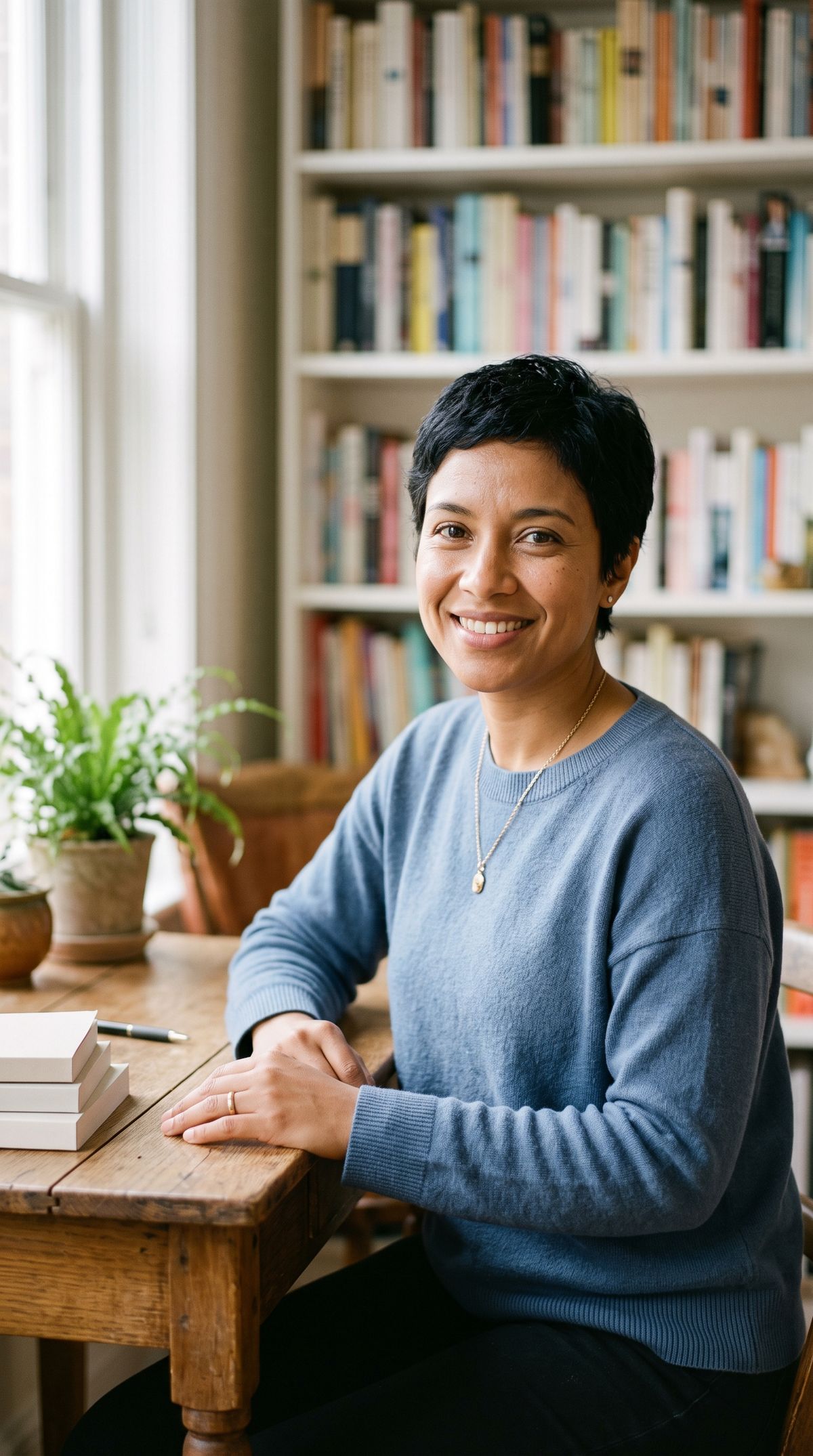
A photoreal portrait photograph of a language tutor in her early thirties with short black hair in a pixie cut and light brown skin, in a plain soft blue knit sweater, sitting at a small wooden desk in a bright, cozy home study with a bookshelf softly out of focus behind her. She looks into the camera with a warm, closed-mouth smile. Waist-up framing, soft window light, real skin texture. No logos, brand names or printed words anywhere in frame, including on the book spines.
- Audio 1: voice0:00
[speak warmly and naturally, at a relaxed pace, like a friendly teacher] Hi, I'm glad you're here. Learning a language is mostly about showing up, a little bit, every single day. So get comfortable, and let's start with something easy.

The reference says one thing and the clip says another. What carries over is the voice, which is what a language app or an online course needs to keep the same across every clip in a series.
The request
Audio references go in inputs.referenceAudios and are addressed in the prompt as <Audio 1>, <Audio 2> and so on, numbered separately from the images.
import { createClient } from '@runware/sdk'

const client = await createClient({ apiKey: process.env.RUNWARE_API_KEY })
await client.connect()

const [result] = await client.run({
  model: 'heygen:video@1.0',
  positivePrompt: 'Shot on a large-format cinema camera with a 50mm lens at T2, locked off at eye level, a waist-up medium shot. The language tutor from <Picture 1> sits at her desk in a bright home study and speaks to the camera in the voice of <Audio 1>. She says: "Today we\'ll practice checking in at a hotel. Listen first, then repeat each line after me." Her lips stay in sync with every word. Keep her face, short black hair and blue sweater exactly as in <Picture 1>. Soft window light. No logos, brand names or printed words anywhere in frame. Audio: her voice close and natural over a quiet room tone. No music.',
  inputs: {
    referenceImages: [
      'https://example.com/refs/tutor.jpg'
    ],
    referenceAudios: [
      'https://example.com/refs/tutor-voice.mp3'
    ]
  },
  duration: 8
})
import asyncio
import os
from runware import Runware
async def main():
async with Runware(api_key=os.environ["RUNWARE_API_KEY"]) as client:
results = await client.run({
"model": "heygen:video@1.0",
"positivePrompt": "Shot on a large-format cinema camera with a 50mm lens at T2, locked off at eye level, a waist-up medium shot. The language tutor from <Picture 1> sits at her desk in a bright home study and speaks to the camera in the voice of <Audio 1>. She says: \"Today we'll practice checking in at a hotel. Listen first, then repeat each line after me.\" Her lips stay in sync with every word. Keep her face, short black hair and blue sweater exactly as in <Picture 1>. Soft window light. No logos, brand names or printed words anywhere in frame. Audio: her voice close and natural over a quiet room tone. No music.",
"inputs": {
"referenceImages": [
"https://example.com/refs/tutor.jpg"
],
"referenceAudios": [
"https://example.com/refs/tutor-voice.mp3"
]
},
"duration": 8
})
asyncio.run(main())curl https://api.runware.ai/v1 \
-H "Authorization: Bearer $RUNWARE_API_KEY" \
-H "Content-Type: application/json" \
-d '[
{
  "taskType": "videoInference",
  "taskUUID": "4e9c1a86-3b72-4d05-9f18-a6d2c7e03b59",
  "model": "heygen:video@1.0",
  "positivePrompt": "Shot on a large-format cinema camera with a 50mm lens at T2, locked off at eye level, a waist-up medium shot. The language tutor from <Picture 1> sits at her desk in a bright home study and speaks to the camera in the voice of <Audio 1>. She says: \"Today we'll practice checking in at a hotel. Listen first, then repeat each line after me.\" Her lips stay in sync with every word. Keep her face, short black hair and blue sweater exactly as in <Picture 1>. Soft window light. No logos, brand names or printed words anywhere in frame. Audio: her voice close and natural over a quiet room tone. No music.",
  "inputs": {
    "referenceImages": [
      "https://example.com/refs/tutor.jpg"
    ],
    "referenceAudios": [
      "https://example.com/refs/tutor-voice.mp3"
    ]
  },
  "duration": 8
}
]'runware run heygen:video@1.0 \
positivePrompt="Shot on a large-format cinema camera with a 50mm lens at T2, locked off at eye level, a waist-up medium shot. The language tutor from <Picture 1> sits at her desk in a bright home study and speaks to the camera in the voice of <Audio 1>. She says: \"Today we'll practice checking in at a hotel. Listen first, then repeat each line after me.\" Her lips stay in sync with every word. Keep her face, short black hair and blue sweater exactly as in <Picture 1>. Soft window light. No logos, brand names or printed words anywhere in frame. Audio: her voice close and natural over a quiet room tone. No music." \
inputs.referenceImages.0=https://example.com/refs/tutor.jpg \
inputs.referenceAudios.0=https://example.com/refs/tutor-voice.mp3 \
duration=8{
"taskType": "videoInference",
"taskUUID": "4e9c1a86-3b72-4d05-9f18-a6d2c7e03b59",
"model": "heygen:video@1.0",
"positivePrompt": "Shot on a large-format cinema camera with a 50mm lens at T2, locked off at eye level, a waist-up medium shot. The language tutor from <Picture 1> sits at her desk in a bright home study and speaks to the camera in the voice of <Audio 1>. She says: \"Today we'll practice checking in at a hotel. Listen first, then repeat each line after me.\" Her lips stay in sync with every word. Keep her face, short black hair and blue sweater exactly as in <Picture 1>. Soft window light. No logos, brand names or printed words anywhere in frame. Audio: her voice close and natural over a quiet room tone. No music.",
"inputs": {
"referenceImages": [
"https://example.com/refs/tutor.jpg"
],
"referenceAudios": [
"https://example.com/refs/tutor-voice.mp3"
]
},
"duration": 8
}Response
[
  {
    "taskType": "videoInference",
    "taskUUID": "4e9c1a86-3b72-4d05-9f18-a6d2c7e03b59",
    "videoUUID": "b1f7d4c2-8e36-4a95-b0c7-2d9e5f18a364",
    "videoURL": "https://vm.runware.ai/video/os/a14d18/ws/2/vi/b1f7d4c2-8e36-4a95-b0c7-2d9e5f18a364.mp4"
  }
]inputs.referenceAudiostakes up to 3 files, each up to 32 MB.- An audio reference needs a visual reference beside it: at least one entry in
referenceImagesorreferenceVideos. Audio on its own is rejected. - Audio references cannot be combined with
inputs.frameImages. - All references together, images, videos and audio, are capped at 12.
The output shape follows the first reference image, as in the reference guide, which also covers labeling and keeping a person's identity.
Giving a character a voice
To use a recording as a voice, quote the new line in the prompt and say whose voice speaks it: "speaks … in the voice of <Audio 1>". The words in the recording are ignored. Its pitch and timbre are what the model takes.
The clip below runs the hero prompt without the audio reference. Everything else is identical.
Shot on a large-format cinema camera with a 50mm lens at T2, locked off at eye level, a waist-up medium shot. The language tutor from <Picture 1> sits at her desk in a bright home study and speaks to the camera. She says: "Today we'll practice checking in at a hotel. Listen first, then repeat each line after me." Her lips stay in sync with every word. Keep her face, short black hair and blue sweater exactly as in <Picture 1>. Soft window light. No logos, brand names or printed words anywhere in frame. Audio: her voice close and natural over a quiet room tone. No music.
Without a reference, the model picks a voice that fits the person it sees, and a second generation can pick a different one. With a reference, the voice is fixed by a file you control. That is the difference between a one-off clip and a presenter who sounds the same in every episode.
Using your own voiceover word for word
To play a recording as the character's speech, say so directly: "his speech is <Audio 1>, word for word, with his lips in sync". The clip then carries the recording itself, and the mouth is animated to it. This is how a script recorded once, by a voice actor or a text-to-speech system, becomes a talking clip without being retyped into the prompt.
Match the clip length to the recording. When the clip runs longer than the audio, the seconds after the last word need direction too. The pair below uses one short safety instruction, in a 6-second clip and in a 10-second one, and both prompts end by telling the operator to nod and hold still after the last word.
Shot on a large-format cinema camera with a 50mm lens at T2.8, locked off on a tripod at chest height. The machine operator from <Picture 1> stands beside a large industrial packaging machine on a clean factory floor and speaks directly to the camera. His speech is <Audio 1>, word for word, with his lips in sync. When the last word ends, he stops speaking, gives a short nod and holds still. Keep his face, beard, safety glasses and hi-vis vest exactly as in <Picture 1>. Even overhead factory light. No logos, brand names or printed words anywhere in frame. No music.
- Picture 1

A photoreal portrait photograph of a machine operator in his fifties with a short gray beard, wearing clear safety glasses and a hi-vis yellow vest over a navy work shirt, standing on a clean, bright factory floor with industrial machinery softly out of focus behind him. He looks into the camera with a neutral, closed-mouth expression. Waist-up framing, even overhead light, real skin texture. No logos, brand names or printed words anywhere in frame, including on the vest.
- Audio 1: voiceover0:00
Before starting the machine, check the guard is closed and the emergency stop is released.

Shot on a large-format cinema camera with a 50mm lens at T2.8, locked off on a tripod at chest height. The machine operator from <Picture 1> stands beside a large industrial packaging machine on a clean factory floor and speaks directly to the camera. His speech is <Audio 1>, word for word, with his lips in sync. When the last word ends, he stops speaking, gives a short nod and holds still. Keep his face, beard, safety glasses and hi-vis vest exactly as in <Picture 1>. Even overhead factory light. No logos, brand names or printed words anywhere in frame. No music.
The 6-second clip ends with the recording, and the instruction reaches the viewer exactly as it was approved. The 10-second clip runs on after the last word, and the closing direction covers the gap: he nods and holds still. For training and compliance content, trim or pad the recording to a whole number of seconds and set duration to match, so there is as little gap as possible to cover.
Scoring a clip with your own track
A music file works the same way as a voiceover. Name it as the soundtrack and tie the action to its beat: "stepping up and down in time with the beat of <Audio 1>", "the soundtrack is <Audio 1>".
Shot on a full-frame mirrorless camera with a 28mm lens at f/4, locked off on a tripod at hip height, full body in frame. The fitness instructor from <Picture 1> leads a step-aerobics routine on the low step platform in a bright studio with a mirrored wall, stepping up and down in time with the beat of <Audio 1>, clapping on the claps and pointing toward the camera to cue the class. The soundtrack is <Audio 1>, with her sneakers tapping the step underneath it. Keep her braids, lime-green top and black leggings exactly as in <Picture 1>. Even, bright studio light. No logos, brand names or printed words anywhere in frame. No dialogue.
- Picture 1
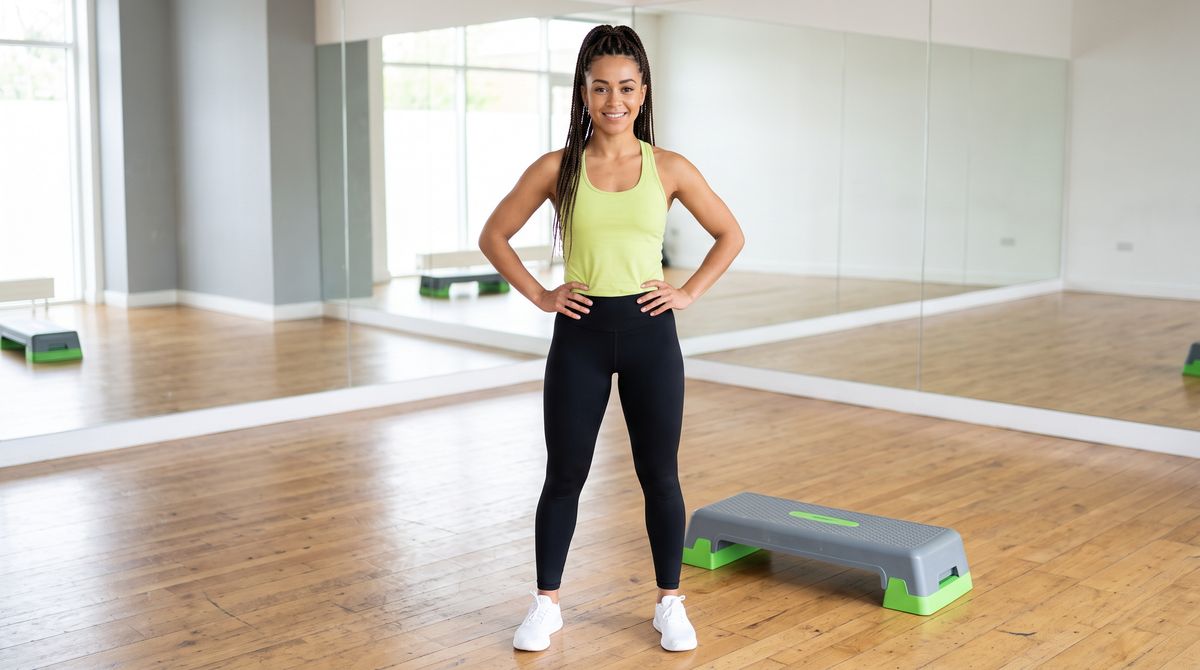
A photoreal full-length photograph of a fitness instructor in her late twenties with her hair in high braids, in a plain lime-green sports top, black leggings and white training shoes, standing next to a low aerobic step platform in a bright studio with a mirrored wall and wooden floor. She stands relaxed with her hands on her hips, smiling. Even, bright studio light. No logos, brand names or printed words anywhere in frame.
- Audio 1: music0:00
An upbeat, energetic instrumental workout track at 128 beats per minute, with a punchy four-on-the-floor kick drum, bright claps on every second beat, a driving bassline and a catchy synth lead. The groove starts immediately, with no slow intro. Clean, modern studio production.

The clip's audio is the supplied track, and the steps and claps follow its beat. The track was trimmed to 10 seconds before upload, matching duration, for the same reason as a voiceover: the clip should end where the audio does. Use a track you have the rights to, since it goes out in the final clip.
To describe music rather than supply it, leave referenceAudios out and write the track into the prompt's Audio: clause. The dialogue and sound guide covers briefing a music bed in words.
Two voices in one scene
Up to three audio references can be used at once, each addressed by its own label. For a scene with two speakers, tie each quoted line to a person and a voice: the advisor from <Picture 1> in the voice of <Audio 1>, the client from <Picture 2> in the voice of <Audio 2>.
Shot on a large-format cinema camera with a 35mm lens at T2.8, locked off on a tripod at seated eye level, both people in a medium two-shot. In a bright, modern bank branch office, the advisor from <Picture 1> sits on the left side of a pale wood desk, facing the client from <Picture 2>, who sits on the right. The advisor turns a tablet toward her and says, in the voice of <Audio 1>: "The fixed rate keeps your payment the same every month for five years." The client nods and replies, in the voice of <Audio 2>: "That's exactly what I was hoping for." Each person's lips move only on their own line. Keep both faces and outfits exactly as in <Picture 1> and <Picture 2>. Soft daylight from a window behind them. No logos, brand names or printed words anywhere in frame, including on the tablet screen. Audio: both voices close and natural over a quiet office room tone. No music.
- Picture 1
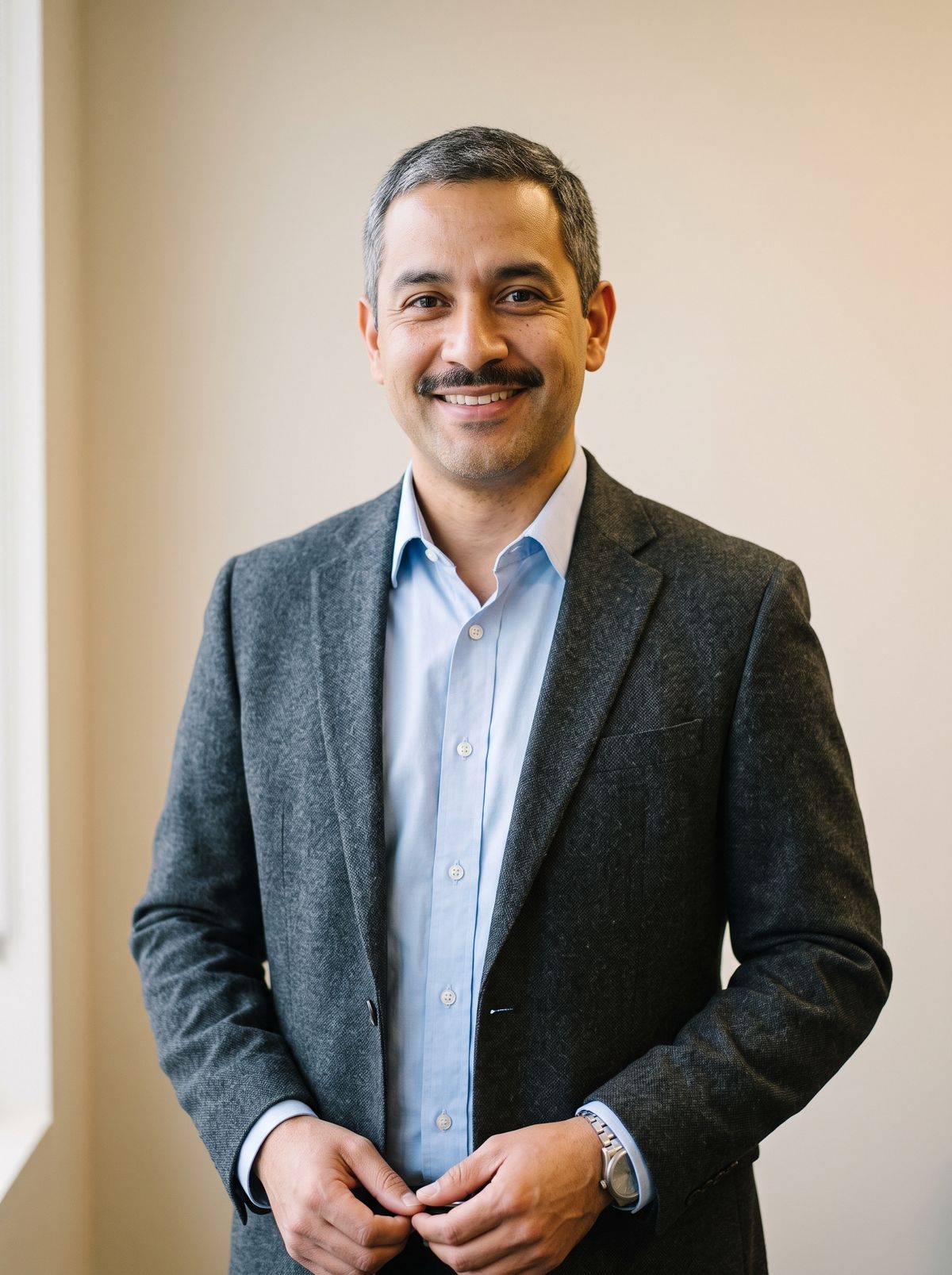
A photoreal portrait photograph of a bank advisor in his forties with short black hair and a trimmed mustache, in a light blue shirt and a dark gray blazer, no tie, against a plain light background. He looks into the camera with a friendly, closed-mouth expression. Waist-up framing, soft even light, real skin texture. No logos, brand names or printed words anywhere in frame.
- Picture 2
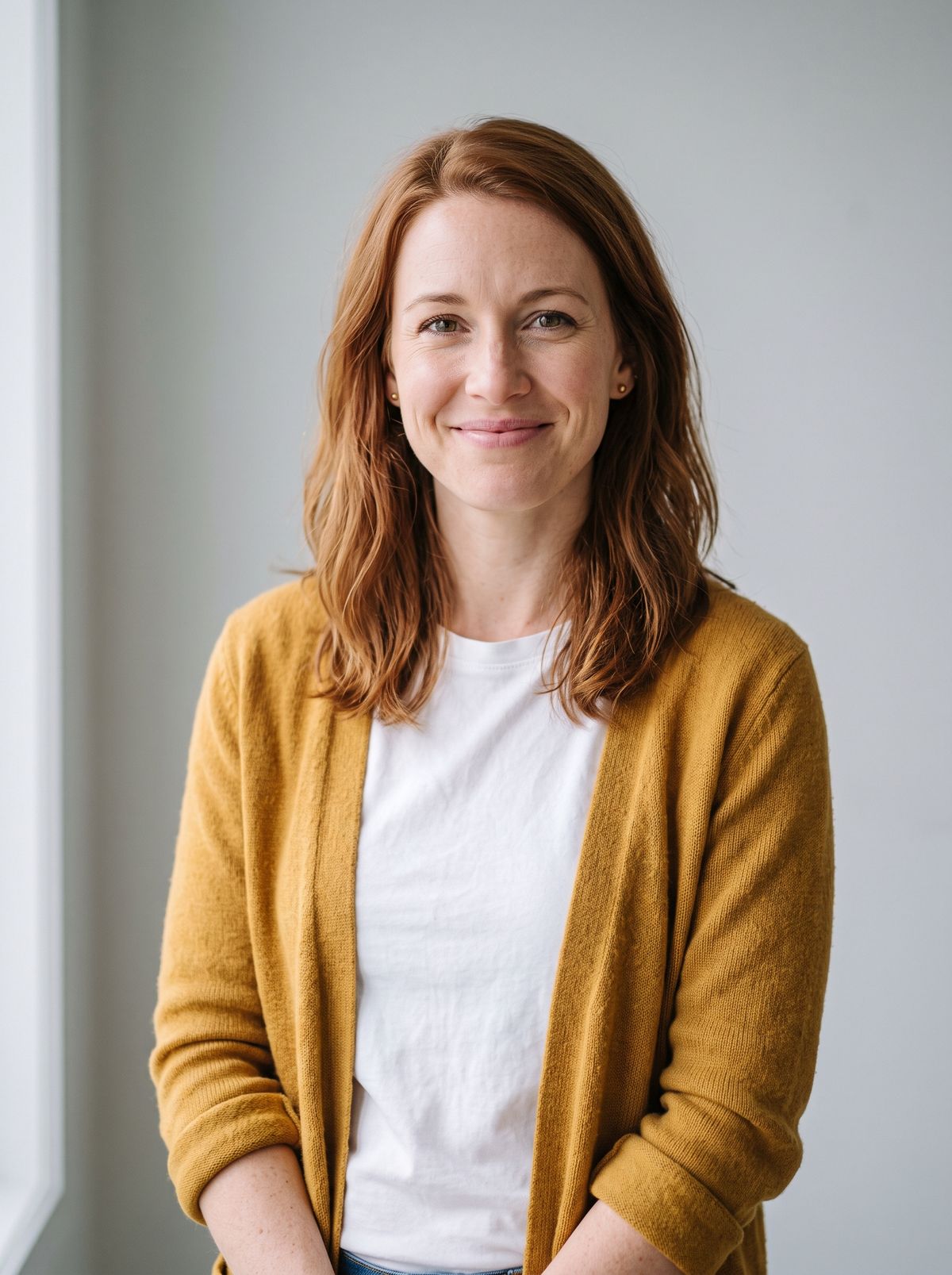
A photoreal portrait photograph of a woman in her early thirties with shoulder-length auburn hair, in a mustard-yellow cardigan over a white t-shirt, against a plain light background. She looks into the camera with a warm, closed-mouth smile. Waist-up framing, soft even light, real skin texture. No logos, brand names or printed words anywhere in frame.
- Audio 1: advisor0:00
Thanks for coming in today. Let me pull up the numbers we talked about last week.
- Audio 2: client0:00
Hi, I booked an appointment for three o'clock, but I think I'm a few minutes early.


Both portraits are 3:4, so the request sets width 1344 and height 768 to get a landscape two-shot instead of a clip shaped like the first portrait. The pairing is spelled out twice in the prompt, once per line, so each voice stays with the person it was assigned to.
Tips
-
Say what each audio reference is for. "In the voice of
<Audio 1>" borrows the voice. "His speech is<Audio 1>" or "the soundtrack is<Audio 1>" plays the file itself. -
Quote the line when you borrow a voice. The words in the reference are not used. The words in the prompt are.
-
Pair every audio reference with a visual one. At least one reference image or video is required.
-
Match the clip length to the recording. Trim or pad the audio to whole seconds and set
durationto the same value, so the clip ends where the audio does. -
Tell the speaker what to do after the last word. A nod or a held expression gives the final frames something to show.
-
Tie the action to the beat for music. "In time with the beat of
<Audio 1>" makes the movement follow the track. -
Use audio you have the rights to. A supplied voiceover or track goes out in the final clip as it is.