HeyGen Avatar 6

HeyGen Avatar 6 is an audio-driven avatar video model that animates a HeyGen avatar, a single photo, or a reference video of an animated or illustrated character. It generates gestures and facial expressions that match what is being said, with accurate lip sync and native 2K output, and a motion prompt can direct gestures, posture and camera. It suits presenter, training and product videos where natural motion matters.
Directing gestures with motion prompts
How to direct HeyGen Avatar 6 with a motion prompt: gestures cued to the words they land on, counted gestures, expressions, camera moves and calmer motion.
Introduction
HeyGen Avatar 6 animates a person from a photo and a speech track, and it gestures on its own to match what is being said. positivePrompt is its motion prompt: up to 1,200 characters that place a gesture on a chosen phrase, set the person's expression and posture, and direct the camera.
The photo supplies the person and the setting, and the audio supplies the words. That leaves the prompt one job: how the person moves while saying them. A prompt that describes the room or repeats the script spends characters on things the inputs already decide.
Upbeat fitness coach, full of energy. On 'Welcome back', wave at the camera with your right hand. On 'over there', point over your shoulder with your thumb. On 'twenty minutes', clap your hands once. On 'You've got this', clench your right fist and give a small pump.
{
  "taskType": "videoInference",
  "taskUUID": "695a2190-7299-40dc-9db6-c2b0dd786e39",
  "model": "heygen:avatar@6",
  "positivePrompt": "Upbeat fitness coach, full of energy. On 'Welcome back', wave at the camera with your right hand. On 'over there', point over your shoulder with your thumb. On 'twenty minutes', clap your hands once. On 'You've got this', clench your right fist and give a small pump.",
  "inputs": {
    "referenceImages": ["https://assets.runware.ai/guides/heygen-avatar-6/prompting/reference-coach.jpg"],
    "audio": "https://assets.runware.ai/guides/heygen-avatar-6/prompting/speech-coach.mp3"
  }
}- Photo
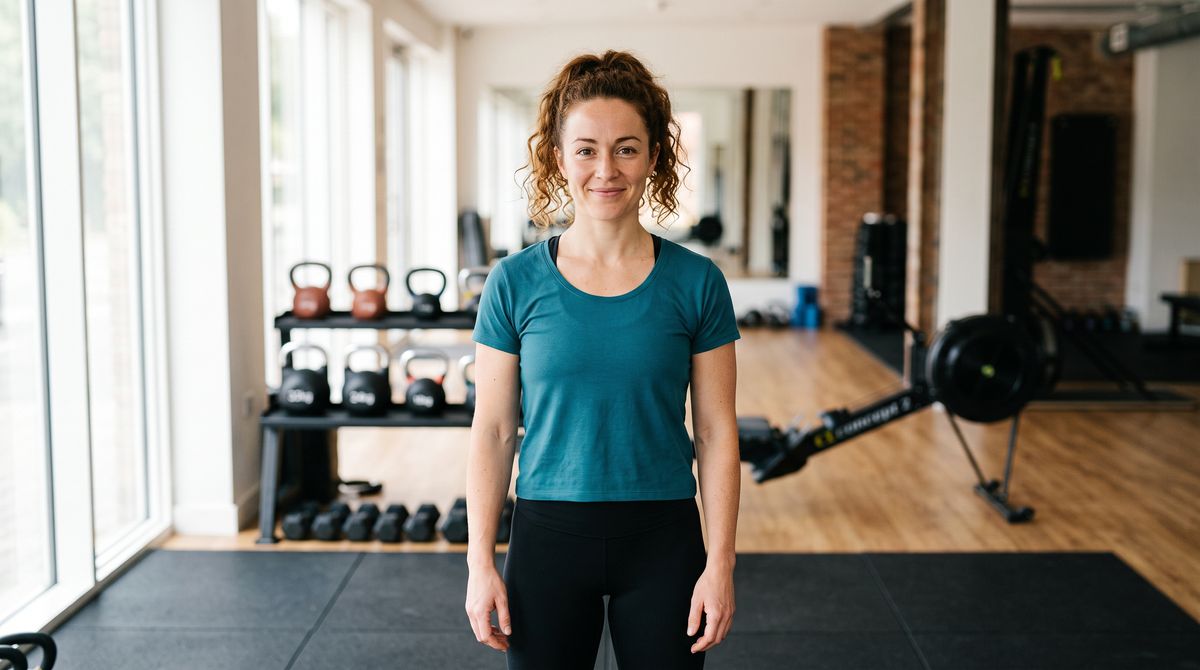
A photoreal photograph of a fitness coach in her early thirties with curly auburn hair tied up and light freckled skin, in a plain teal training top and black leggings, standing in a bright boutique gym with kettlebells and a rowing machine softly out of focus behind her. She faces the camera with a relaxed, closed-mouth smile, arms loose at her sides. Framed from mid-thigh up with both hands in frame, soft daylight from large windows, real skin texture. No logos, brand names or printed words anywhere in frame.
- Speech0:00
Welcome back! Today we're keeping it short and strong. Grab your water bottle from over there, put your phone face down, and give me twenty minutes. You've got this.

This guide covers the request, cueing a gesture to a phrase, counted gestures, expressions and posture, camera direction, and calmer motion with settings.motionExpressiveness.
The request
A photo of the person goes in inputs.referenceImages, the speech in inputs.audio, and the motion prompt in positivePrompt.
import { createClient } from '@runware/sdk'

const client = await createClient({ apiKey: process.env.RUNWARE_API_KEY })
await client.connect()

const [result] = await client.run({
  model: 'heygen:avatar@6',
  positivePrompt: 'Upbeat fitness coach, full of energy. On \'Welcome back\', wave at the camera with your right hand. On \'over there\', point over your shoulder with your thumb. On \'twenty minutes\', clap your hands once. On \'You\'ve got this\', clench your right fist and give a small pump.',
  inputs: {
    referenceImages: [
      'https://assets.runware.ai/guides/heygen-avatar-6/prompting/reference-coach.jpg'
    ],
    audio: 'https://assets.runware.ai/guides/heygen-avatar-6/prompting/speech-coach.mp3'
  }
})
import asyncio
import os
from runware import Runware
async def main():
async with Runware(api_key=os.environ["RUNWARE_API_KEY"]) as client:
results = await client.run({
"model": "heygen:avatar@6",
"positivePrompt": "Upbeat fitness coach, full of energy. On 'Welcome back', wave at the camera with your right hand. On 'over there', point over your shoulder with your thumb. On 'twenty minutes', clap your hands once. On 'You've got this', clench your right fist and give a small pump.",
"inputs": {
"referenceImages": [
"https://assets.runware.ai/guides/heygen-avatar-6/prompting/reference-coach.jpg"
],
"audio": "https://assets.runware.ai/guides/heygen-avatar-6/prompting/speech-coach.mp3"
}
})
asyncio.run(main())curl https://api.runware.ai/v1 \
-H "Authorization: Bearer $RUNWARE_API_KEY" \
-H "Content-Type: application/json" \
-d '[
{
  "taskType": "videoInference",
  "taskUUID": "695a2190-7299-40dc-9db6-c2b0dd786e39",
  "model": "heygen:avatar@6",
  "positivePrompt": "Upbeat fitness coach, full of energy. On 'Welcome back', wave at the camera with your right hand. On 'over there', point over your shoulder with your thumb. On 'twenty minutes', clap your hands once. On 'You've got this', clench your right fist and give a small pump.",
  "inputs": {
    "referenceImages": [
      "https://assets.runware.ai/guides/heygen-avatar-6/prompting/reference-coach.jpg"
    ],
    "audio": "https://assets.runware.ai/guides/heygen-avatar-6/prompting/speech-coach.mp3"
  }
}
]'runware run heygen:avatar@6 \
positivePrompt="Upbeat fitness coach, full of energy. On 'Welcome back', wave at the camera with your right hand. On 'over there', point over your shoulder with your thumb. On 'twenty minutes', clap your hands once. On 'You've got this', clench your right fist and give a small pump." \
inputs.referenceImages.0=https://assets.runware.ai/guides/heygen-avatar-6/prompting/reference-coach.jpg \
inputs.audio=https://assets.runware.ai/guides/heygen-avatar-6/prompting/speech-coach.mp3{
"taskType": "videoInference",
"taskUUID": "695a2190-7299-40dc-9db6-c2b0dd786e39",
"model": "heygen:avatar@6",
"positivePrompt": "Upbeat fitness coach, full of energy. On 'Welcome back', wave at the camera with your right hand. On 'over there', point over your shoulder with your thumb. On 'twenty minutes', clap your hands once. On 'You've got this', clench your right fist and give a small pump.",
"inputs": {
"referenceImages": [
"https://assets.runware.ai/guides/heygen-avatar-6/prompting/reference-coach.jpg"
],
"audio": "https://assets.runware.ai/guides/heygen-avatar-6/prompting/speech-coach.mp3"
}
}Response
[
  {
    "taskType": "videoInference",
    "taskUUID": "695a2190-7299-40dc-9db6-c2b0dd786e39",
    "videoUUID": "abcf5ffe-e23e-4082-9a01-75ad8ea065fe",
    "videoURL": "https://vm.runware.ai/video/os/a14d18/ws/2/vi/abcf5ffe-e23e-4082-9a01-75ad8ea065fe.mp4"
  }
]positivePromptis optional and takes 1 to 1,200 characters.inputs.audiois required with a photo, and the video runs the length of the audio. There is no duration to set.- The reference images guide covers what the photo decides about the output, and the reference videos guide covers driving a character from a clip. The motion prompt works the same way with either.
- HeyGen Avatar 6 Turbo (
heygen:avatar@6-turbo) takes the same request and the same prompts.
Cueing a gesture to a phrase
Without a prompt, the model already picks gestures that fit the speech. A cue replaces that choice at one moment: write On '<phrase>', <action>. and the model performs the action on those words.
{
  "taskType": "videoInference",
  "taskUUID": "d8c54e2b-9820-4339-b138-63f540cf1c57",
  "model": "heygen:avatar@6",
  "inputs": {
    "referenceImages": ["https://assets.runware.ai/guides/heygen-avatar-6/prompting/reference-shop.jpg"],
    "audio": "https://assets.runware.ai/guides/heygen-avatar-6/prompting/speech-shop.mp3"
  }
}Friendly small-business owner. On 'from this room', sweep your left hand toward the shelves behind you. On 'before noon', tap your wrist with two fingers. On 'a handwritten thank-you card', mime writing on your left palm with your right hand. On 'from me', place your right hand on your chest.
{
  "taskType": "videoInference",
  "taskUUID": "9536d24f-3dc8-44a9-8592-f66cf90035dc",
  "model": "heygen:avatar@6",
  "positivePrompt": "Friendly small-business owner. On 'from this room', sweep your left hand toward the shelves behind you. On 'before noon', tap your wrist with two fingers. On 'a handwritten thank-you card', mime writing on your left palm with your right hand. On 'from me', place your right hand on your chest.",
  "inputs": {
    "referenceImages": ["https://assets.runware.ai/guides/heygen-avatar-6/prompting/reference-shop.jpg"],
    "audio": "https://assets.runware.ai/guides/heygen-avatar-6/prompting/speech-shop.mp3"
  }
}- Photo

A photoreal vertical photograph of an online shop owner in her late twenties with a long black braided ponytail and dark brown skin, in a mustard-yellow apron over a white T-shirt, standing in a small, bright stockroom with shelves of plain kraft-paper parcels and stacked cardboard boxes behind her. She faces the camera with a friendly, closed-mouth smile. Framed from the hips up with both hands in frame, soft overhead light, real skin texture. No logos, brand names or printed words anywhere in frame, including on the boxes and parcels.
- Speech0:00
Hi, I'm Amara, and every order you place ships from this room. Order before noon and it leaves the same day. And every box gets a handwritten thank-you card, from me.

The model finds each moment by the words a cue quotes, so copy the phrase from the script exactly as it is spoken. Between cues it keeps gesturing on its own, as the cued take does on the lines no cue names.
Every prompt in this guide follows the same shape: a short persona line, then one cue per phrase.
The persona line describes the delivery between the cues. The actions name the hand and the direction ("your left hand toward the shelves behind you"), which the model can act on, where "gesture at the products" leaves it to guess.
Counted gestures
Holding up fingers is cued the same way. It suits numbered steps and lists, where the hand repeats the number the person says.
Clear, patient product guide. On 'three steps', hold up three fingers. On 'First', hold up one finger. On 'Second', hold up two fingers. On 'Third', hold up three fingers. On 'ready to go', open both hands toward the camera.
{
  "taskType": "videoInference",
  "taskUUID": "67b12a35-8fbc-4b6f-b48b-facb70f96f3b",
  "model": "heygen:avatar@6",
  "positivePrompt": "Clear, patient product guide. On 'three steps', hold up three fingers. On 'First', hold up one finger. On 'Second', hold up two fingers. On 'Third', hold up three fingers. On 'ready to go', open both hands toward the camera.",
  "inputs": {
    "referenceImages": ["https://assets.runware.ai/guides/heygen-avatar-6/prompting/reference-onboarding.jpg"],
    "audio": "https://assets.runware.ai/guides/heygen-avatar-6/prompting/speech-onboarding.mp3"
  }
}- Photo

A photoreal photograph of a product specialist in his thirties with short black hair, a neat beard and light brown skin, in a plain navy crew-neck sweater, sitting at a light wooden desk in a bright open-plan office with plants and colleagues softly out of focus behind him. He faces the camera with a calm, closed-mouth smile, forearms resting on the desk and both hands in frame. Waist-up framing, soft daylight, real skin texture. No laptop, no logos, brand names or printed words anywhere in frame.
- Speech0:00
Setting up your workspace takes three steps. First, invite your team. Second, connect your calendar. Third, pick a template, and you're ready to go.

Give each number its own cue. "Count the steps on your fingers" leaves the timing to the model, while a cue on 'First', 'Second' and 'Third' puts every count on its word. Write the script with the count in mind: a cue needs a spoken word to land on, so a list the speaker never numbers has nowhere to put the fingers.
Expressions, head and posture
A cue can direct the face and the head as well as the hands: a smile, raised eyebrows, a nod, a lean toward the camera. One cue can carry two of them, as "raise your eyebrows and lean slightly toward the camera" does.
Warm hotel concierge. On 'Good evening', smile and give a small bow of the head. On 'the whole bay', raise your eyebrows and lean slightly toward the camera. On 'anything at all', tilt your head to one side and soften your expression. On 'just call down', nod once.
{
  "taskType": "videoInference",
  "taskUUID": "81c17219-775c-471e-8b6d-831862d1d6aa",
  "model": "heygen:avatar@6",
  "positivePrompt": "Warm hotel concierge. On 'Good evening', smile and give a small bow of the head. On 'the whole bay', raise your eyebrows and lean slightly toward the camera. On 'anything at all', tilt your head to one side and soften your expression. On 'just call down', nod once.",
  "inputs": {
    "referenceImages": ["https://assets.runware.ai/guides/heygen-avatar-6/prompting/reference-concierge.jpg"],
    "audio": "https://assets.runware.ai/guides/heygen-avatar-6/prompting/speech-concierge.mp3"
  }
}- Photo
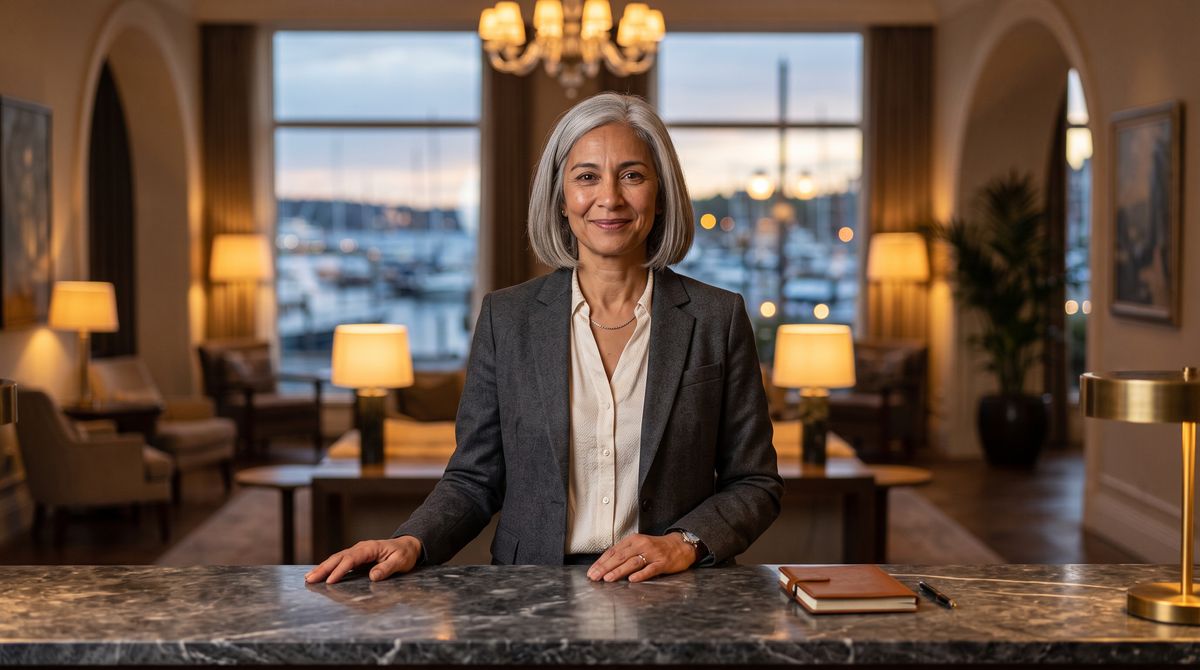
A photoreal photograph of a hotel concierge in her fifties with a silver bob and warm olive skin, in a tailored charcoal blazer over a cream blouse, standing behind a polished marble front desk in an elegant hotel lobby at dusk, warm lamps and a large window onto a harbor softly out of focus behind her. She faces the camera with a gentle, closed-mouth smile, hands resting lightly on the desk. Waist-up framing, warm evening light, real skin texture. No logos, brand names or printed words anywhere in frame.
- Speech0:00
Good evening, and welcome. Your room is on the twelfth floor, with a view of the whole bay. If you need anything at all tonight, just call down to the front desk.

Small cues like a nod or a tilt of the head suit presenters who should stay composed, such as front-desk staff, advisors, nurses and support agents, where a big hand gesture on every line would read as a sales pitch.
Camera direction
The motion prompt also directs the camera. Say what the move is, where it starts and where it ends.
Relaxed tech reviewer. The camera holds a steady medium shot, then slowly pushes in toward his face on 'the part that surprised me' and stays close until the end.
{
  "taskType": "videoInference",
  "taskUUID": "5dc93c1e-d985-48cd-bff4-8b34fe95bfa5",
  "model": "heygen:avatar@6",
  "positivePrompt": "Relaxed tech reviewer. The camera holds a steady medium shot, then slowly pushes in toward his face on 'the part that surprised me' and stays close until the end.",
  "inputs": {
    "referenceImages": ["https://assets.runware.ai/guides/heygen-avatar-6/prompting/reference-reviewer.jpg"],
    "audio": "https://assets.runware.ai/guides/heygen-avatar-6/prompting/speech-reviewer.mp3"
  }
}- Photo
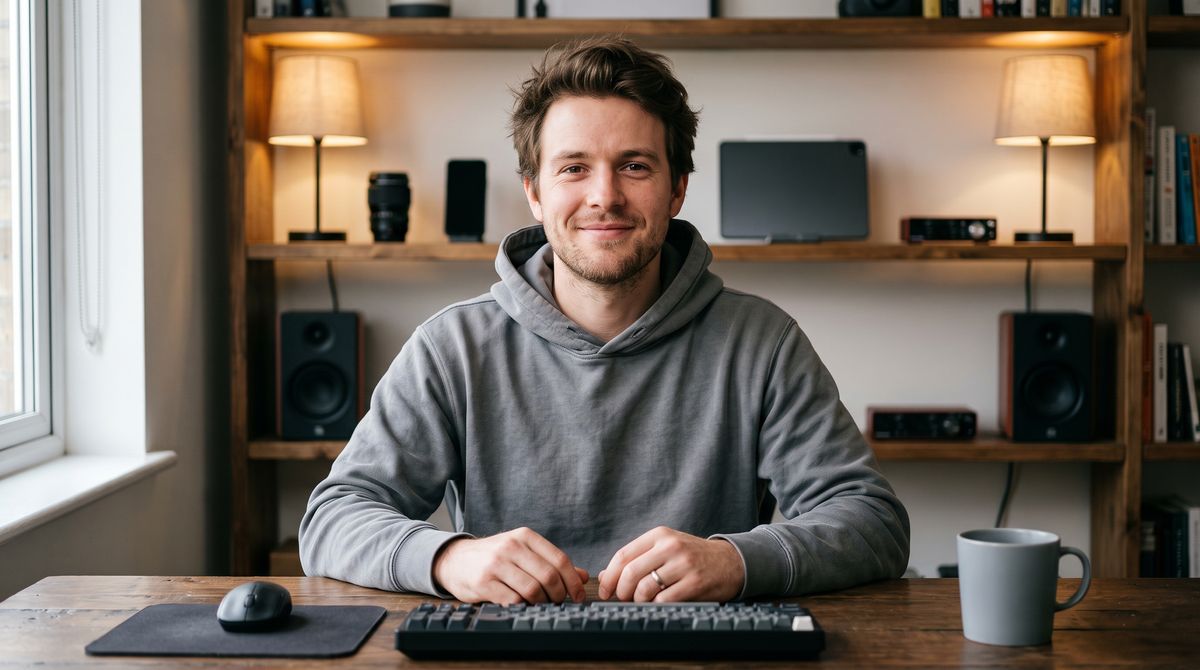
A photoreal photograph of a tech reviewer in his late twenties with tousled brown hair, light stubble and fair skin, in a plain gray hoodie, sitting at a desk in a tidy home studio with a shelf of plain gadgets and warm practical lamps softly out of focus behind him. He faces the camera with an easy, closed-mouth smile, both hands resting on the desk in frame. Medium shot from the chest up, soft key light from the left, real skin texture. No logos, brand names or printed words anywhere in frame, including on the gadgets.
- Speech0:00
I've had this keyboard on my desk for two weeks now. The typing feel is good, the battery is fine, but here's the part that surprised me: I stopped using my mouse almost completely.

A camera cue is anchored to a phrase like any other, so the move lands on the line it should emphasize. "Stays close until the end" closes the move, so the shot holds on the face instead of drifting back out.
Calmer motion
settings.motionExpressiveness sets how much the person moves overall. default is the model's usual motion. less gives fewer, smaller gestures and calmer expressions, and the person still moves and speaks naturally.
"settings": {
  "motionExpressiveness": "less"
}
The three takes below share the photo and the speech. The third adds one cue on top of less.
{
  "taskType": "videoInference",
  "taskUUID": "c5cf8509-02ba-4fb4-9358-08e51252eee7",
  "model": "heygen:avatar@6",
  "inputs": {
    "referenceImages": ["https://assets.runware.ai/guides/heygen-avatar-6/prompting/reference-meditation.jpg"],
    "audio": "https://assets.runware.ai/guides/heygen-avatar-6/prompting/speech-meditation.mp3"
  }
}{
"taskType": "videoInference",
"taskUUID": "db21f9b1-ff0c-4594-a445-955eaab95573",
"model": "heygen:avatar@6",
"inputs": {
"referenceImages": ["https://assets.runware.ai/guides/heygen-avatar-6/prompting/reference-meditation.jpg"],
"audio": "https://assets.runware.ai/guides/heygen-avatar-6/prompting/speech-meditation.mp3"
},
"settings": {
"motionExpressiveness": "less"
}
}On 'one slow breath in', place both hands flat on your chest.
{
  "taskType": "videoInference",
  "taskUUID": "c481f419-31f1-4578-a9e3-9845b275347e",
  "model": "heygen:avatar@6",
  "positivePrompt": "On 'one slow breath in', place both hands flat on your chest.",
  "inputs": {
    "referenceImages": ["https://assets.runware.ai/guides/heygen-avatar-6/prompting/reference-meditation.jpg"],
    "audio": "https://assets.runware.ai/guides/heygen-avatar-6/prompting/speech-meditation.mp3"
  },
  "settings": {
    "motionExpressiveness": "less"
  }
}- Photo
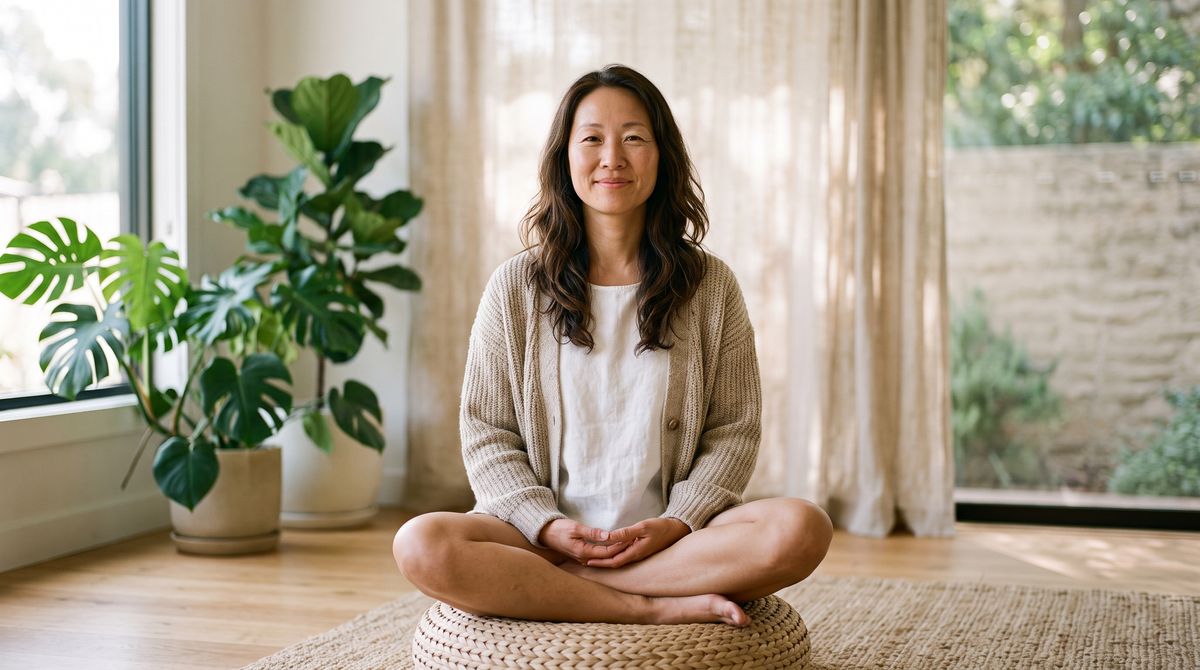
A photoreal photograph of a meditation teacher in her forties with long dark hair loose over her shoulders and East Asian features, in a soft oatmeal knit cardigan, sitting cross-legged on a floor cushion in a calm, sunlit room with plants and a linen curtain softly out of focus behind her. She faces the camera with a peaceful, closed-mouth smile, hands resting in her lap in frame. Framed from the knees up, soft morning light, real skin texture. No logos, brand names or printed words anywhere in frame.
- Speech0:00
Before we begin, find a comfortable seat and let your shoulders drop. Now take one slow breath in, and let it all the way out.

Where the two overlap, the prompt wins. The third take keeps the calm of less and still performs the one gesture the cue asks for. For wellness and healthcare content, set less for the tone, then cue the few gestures that matter.
Tips
-
Quote the script word for word. The model places a cue by the words it quotes, so a paraphrased phrase leaves it guessing where the gesture goes.
-
Write the script and the cues together. A cue needs a spoken phrase to land on. If you want three fingers on screen, put "three steps" in the script.
-
Name the hand and the direction. "Sweep your left hand toward the shelves behind you" is an action the model can perform. "Gesture at the products" is a hope.
-
Leave lines uncued. Between cues the model keeps gesturing in the person's own manner, so a cue on every phrase adds little over a cue on the phrases that carry the message.
-
Open with a persona line. "Warm hotel concierge" or "Upbeat fitness coach" sets the delivery between cues in a few words.
-
Calm the delivery, then cue the rest.
lessbrings the overall motion down without freezing the person, and a cue still lands on top of it.
A prompt is optional. Without one, Avatar 6 still gestures and changes expression in time with the speech. For narration and support content that is often enough.