Seedream 5.0 Pro

Seedream 5.0 Pro is ByteDance's flagship image generation and editing model for teams that need stronger control than prompt-only workflows provide. It supports text-to-image and reference-guided image editing with up to 10 input images, and is designed for precise local changes using coordinates, masks, bounding boxes, sketches, and material or color instructions. The model also supports multi-image fusion, advanced layer separation, and strong multilingual rendering, making it well suited to design, marketing, e-commerce, and storyboard-driven content production.
Prompting
How to prompt Seedream 5.0 Pro for text-to-image, reference-guided editing, and multi-image fusion in commercial workflows: campaign posters, product variants, and editorial still-life.
Introduction
Most image models take a prompt and hand back an interpretation. That's fine when the brief is loose. It's the wrong shape when the deliverable is a specific ad, a specific product variant, or a specific hero shot the client already signed off on. The prompt-only loop turns into a guessing game and the model's freedom becomes the problem.
Seedream 5.0 Pro is ByteDance's flagship image model built around direct control over what changes and what stays. It supports text-to-image for hero generation, reference-guided editing for identity-locked variants, and multi-image fusion for combining separate assets into one coherent still. This guide covers all three, with prompts that read like production briefs rather than image captions.

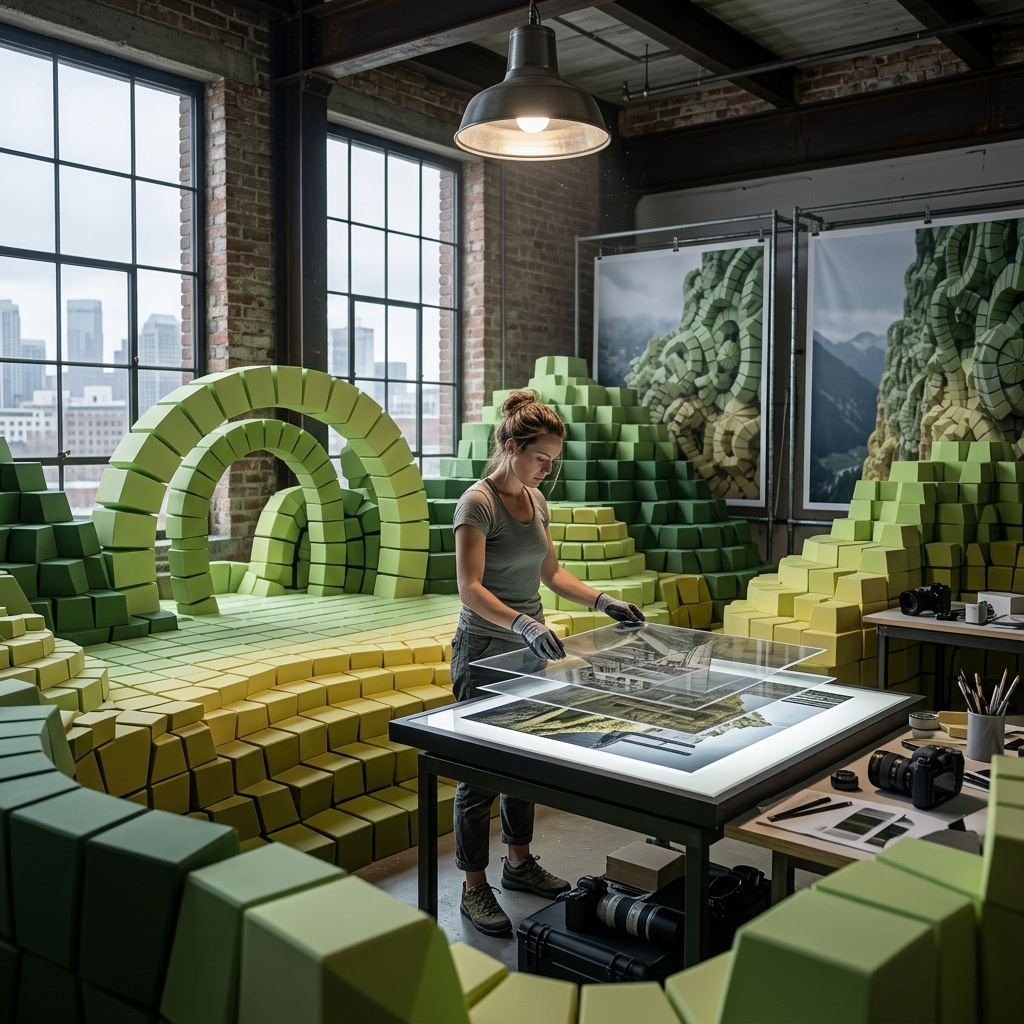
A wide cinematic brand campaign hero image for a boutique Mediterranean hotel. A whitewashed coastal courtyard at golden hour, warm sunlight streaming across curved stone arches, warm pink bougainvillea over an old stone wall, terracotta paving. A round marble bistro table with two woven cane chairs centred in the foreground, an open bottle of chilled rosé and two half-full glasses catching the low sun. A view through an arched garden gate to a Mediterranean bay at dusk. Editorial photoreal warm lifestyle campaign aesthetic.
The campaign hero above is one prompt run without a reference image. Every layer of the composition, from the wide atmospheric backdrop through the arched gate to the staged foreground detail on the bistro table, was directed inline. The rest of this guide walks through the three prompt shapes end to end.
Request shape
A Seedream 5.0 Pro request takes a positivePrompt and either dimensions or reference images. inputs.referenceImages is optional, up to 10 images, and unlocks image-to-image editing when present.
import { createClient } from '@runware/sdk'

const client = await createClient({ apiKey: process.env.RUNWARE_API_KEY })
await client.connect()

const [result] = await client.run({
  model: 'bytedance:seedream@5.0-pro',
  positivePrompt: 'A cinematic streaming series poster in portrait orientation. A lone detective at the edge of a moonlit apple orchard, back-lit by an approaching flashlight. Title MIDNIGHT ORCHARD in tall condensed serif type.',
  width: 1152,
  height: 2048
})
import asyncio
import os
from runware import Runware
async def main():
async with Runware(api_key=os.environ["RUNWARE_API_KEY"]) as client:
results = await client.run({
"model": "bytedance:seedream@5.0-pro",
"positivePrompt": "A cinematic streaming series poster in portrait orientation. A lone detective at the edge of a moonlit apple orchard, back-lit by an approaching flashlight. Title MIDNIGHT ORCHARD in tall condensed serif type.",
"width": 1152,
"height": 2048
})
asyncio.run(main())curl https://api.runware.ai/v1 \
-H "Authorization: Bearer $RUNWARE_API_KEY" \
-H "Content-Type: application/json" \
-d '[
{
  "taskType": "imageInference",
  "taskUUID": "a1b2c3d4-e5f6-7890-abcd-ef1234567890",
  "model": "bytedance:seedream@5.0-pro",
  "positivePrompt": "A cinematic streaming series poster in portrait orientation. A lone detective at the edge of a moonlit apple orchard, back-lit by an approaching flashlight. Title MIDNIGHT ORCHARD in tall condensed serif type.",
  "width": 1152,
  "height": 2048
}
]'runware run bytedance:seedream@5.0-pro \
positivePrompt="A cinematic streaming series poster in portrait orientation. A lone detective at the edge of a moonlit apple orchard, back-lit by an approaching flashlight. Title MIDNIGHT ORCHARD in tall condensed serif type." \
width=1152 \
height=2048{
"taskType": "imageInference",
"taskUUID": "a1b2c3d4-e5f6-7890-abcd-ef1234567890",
"model": "bytedance:seedream@5.0-pro",
"positivePrompt": "A cinematic streaming series poster in portrait orientation. A lone detective at the edge of a moonlit apple orchard, back-lit by an approaching flashlight. Title MIDNIGHT ORCHARD in tall condensed serif type.",
"width": 1152,
"height": 2048
}Response
[
  {
    "taskType": "imageInference",
    "taskUUID": "a1b2c3d4-e5f6-7890-abcd-ef1234567890",
    "imageUUID": "9c1b2d3a-4e5f-6789-abcd-ef0123456789",
    "imageURL": "https://im.runware.ai/image/os/a14d18/ws/2/ii/9c1b2d3a-4e5f-6789-abcd-ef0123456789.jpg"
  }
]
The essentials:
positivePromptis required, up to 3000 characters. The provider recommends keeping prompts under 600 English words. Longer prompts start scattering information and the model drops detail.widthandheightare required for text-to-image and optional for reference-guided runs. Their product must fall between 1,048,576 and 4,194,304 pixels (roughly 1024 × 1024 to 2048 × 2048). Aspect ratios from 1:16 to 16:1 are supported.inputs.referenceImagesaccepts up to 10 images. Each can be a URL, a data URI, or a UUID from the Media Storage API. When present, dimensions become optional and the model inherits framing cues from the references.- Output falls into two billing tiers: ≤ 2.36 MP (labeled 1.5K) and > 2.36 MP (labeled 2K). At 1:1 the ceiling is 2048 × 2048. At 16:9 the longest edge reaches 2752 × 1536.
Structuring the prompt
Seedream 5.0 Pro rewards layered prompts that separate subject, composition, lighting, style, and constraint into distinct clauses. The model treats each clause as a directive, not decoration, so the order and specificity of the layers change what you get back.

A fashion editorial magazine cover in portrait 3:4 orientation. A confident model in her early thirties with a short platinum blonde crop, wearing a structured oversized ivory linen blazer over a slate grey silk camisole, three-quarter facing the camera against a soft cream studio backdrop. Direct even north-facing studio light. Masthead ATRIUM across the top in heavy geometric sans-serif, cover line THE QUIET SEASON below in fine capitals. Editorial photorealism.
Every layer in the prompt above is doing work. The format layer ("editorial magazine cover, 3:4 portrait") frames the composition. The subject layer carries wardrobe, styling, and identity. The lighting layer decides north-facing daylight vs. a strobe kick, which visibly changes skin rendering. The in-image text layer names the exact masthead and cover line so the model treats them as copy, not filler. The style layer ties the whole thing to editorial photography rather than beauty or fashion illustration.
Name the format first. "Fashion editorial magazine cover" up front tells the model to reserve space for a masthead and cover line and to compose the subject like an art director, not a portrait photographer. Dropping that layer and the same prompt produces a portrait that looks correct but doesn't read as a cover.
Under 600 English words is a soft ceiling from the provider, and it's a useful discipline anyway. Beyond that length the model starts scattering attention and details drop out. Prefer tightening ambiguous clauses over adding more.
Reference-guided editing
Text-to-image is the right shape when the deliverable is a new hero. When the deliverable is a variant of something that already exists (a colourway, a season-two dress, a repackaged SKU), text-to-image starts over from a description and loses whatever was already approved. Pass the approved asset via inputs.referenceImages and Seedream treats it as the ground truth for the parts you don't want to change.
The source below is a plain white sneaker packshot. The prompt names one edit, the colourway, and explicitly pins everything else to the reference.

Using the sneaker from the reference image, produce a colourway variant: change the bodywork to a rich forest green suede with matching tonal midsole and dark walnut brown leather laces. A small stitched tonal side patch in dark green sits above the laces. Keep the exact sneaker silhouette, the exact camera angle, the exact seamless pale grey backdrop, and the exact studio lighting from the reference.
- Source packshot
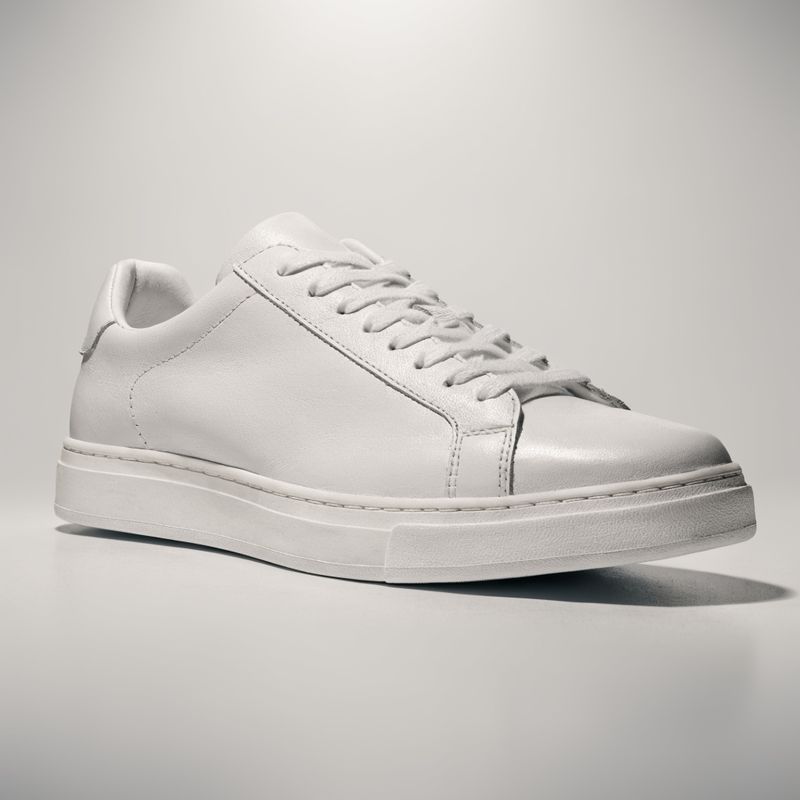
A pristine plain white leather sneaker with a clean minimalist silhouette and no visible branding, centered on a smooth pale grey seamless studio backdrop. Soft even overhead studio lighting with a subtle rim light from the back. Three-quarter angle showing the side and front of the shoe.

The silhouette is identical. The backdrop is identical. The three-quarter angle is identical. Only the material, the colour, and the laces changed. That's the workflow for product colourways at launch, seasonal variants of a hero shot, or any brand asset where the design signed off yesterday and now needs six SKUs by Friday.
Pin what must not change, by name. "Keep the exact silhouette, the exact camera angle, the exact backdrop, and the exact studio lighting" reads verbose but is doing work: without that closing clause the model treats every unmentioned element as fair game and drift creeps in around the edges.
Multi-image fusion
Reference-guided editing takes one asset and edits it. Multi-image fusion takes several separate assets and composes them into one still. The workflow is common in commercial production: three product packshots need to become one editorial still-life, five brand elements need to compose into one campaign visual. Seedream accepts up to 10 references and treats each as the ground truth for whichever product or element it represents.
The three products below were shot separately on plain backgrounds. One call to Seedream places them together on a walnut desk in warm late-afternoon light, preserving each product's exact appearance from its reference.

Compose the exact three products from the reference images into one editorial still-life photograph on a rich walnut wood desk. The tan leather-bound journal at centre-left with a slight diagonal, the antique brass fountain pen resting on top at an angle, the rose-gold pocket watch to the lower right with its chain draped over the corner of the journal. A folded cream linen napkin peeks in from the upper right. Warm late-afternoon window light from the upper left. Preserve the exact appearance of each product from its reference.
- Leather journal
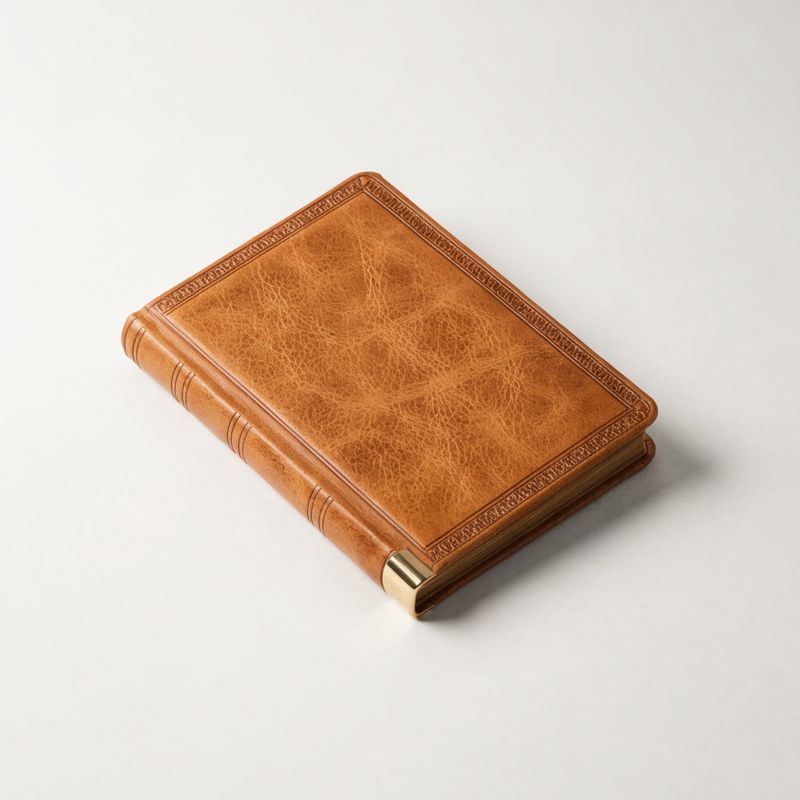
A closed vintage tan leather-bound journal with a fine embossed border pattern and a slim brass corner accent, lying flat on a plain neutral off-white background.
- Brass fountain pen
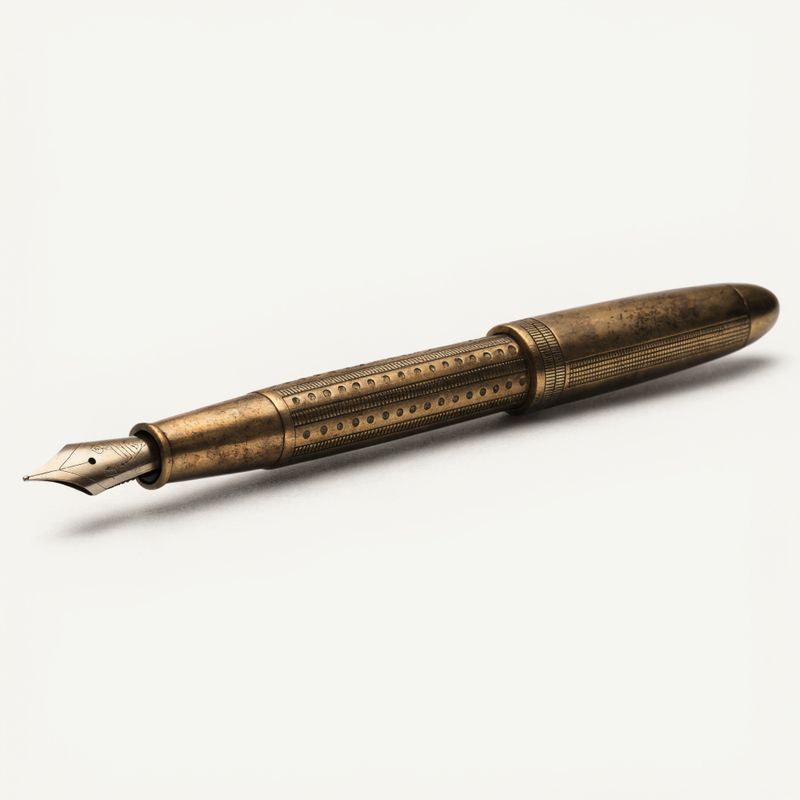
An antique brass fountain pen with fine engraved barrel detailing and a warm patina, laid diagonally on a plain neutral off-white background.
- Rose-gold pocket watch
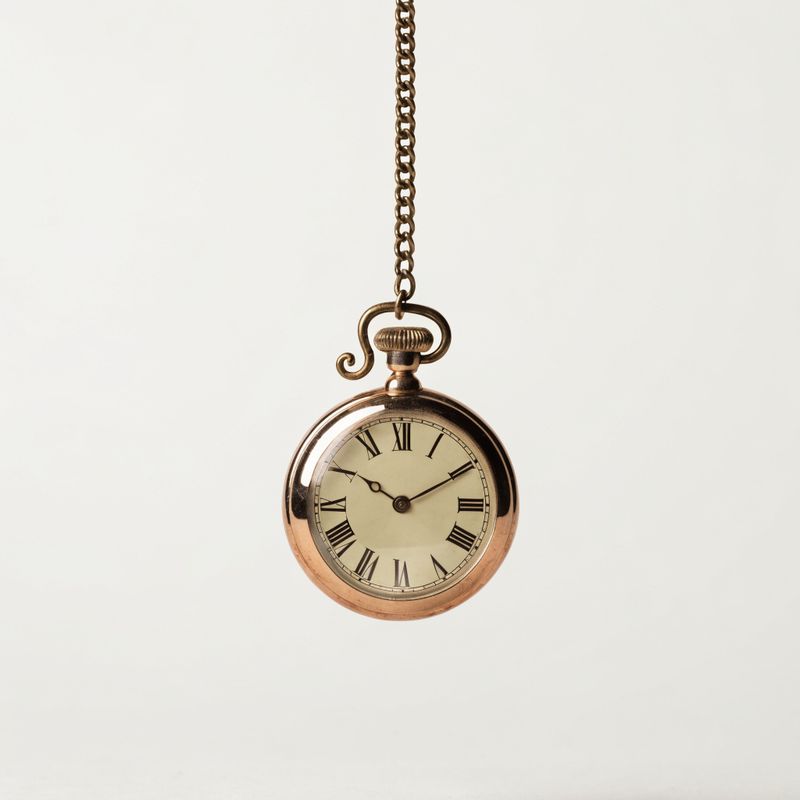
A round polished antique pocket watch with a delicate rose-gold case and an ivory enamel dial with fine Roman numerals, hanging from a fine curled brass chain on a plain neutral off-white background.


Each product reads as the same physical object it was in its reference. The embossed border on the journal, the engraved barrel of the pen, and the ivory Roman-numeral dial on the watch all carry through unchanged. The prompt only had to name the composition (where each product sits, how they relate) and the lighting environment. The identity work was done by the references.
Address references by their content, not by index. "The journal from the first reference" is more brittle than "the tan leather-bound journal" when references are re-ordered or replaced. Naming the content also lets the model resolve conflicts when two references share visual traits.
ByteDance's own multi-image fusion example uses white-background reference photos. If you have a choice between a packshot and a lifestyle image of the same product, prefer the packshot.
Tips
-
Layer the prompt: format, subject, composition, lighting, in-image text, style. Seedream reads each clause as a directive. Skipping any one of them hands that decision back to the model and the output drifts toward its defaults.
-
Name what must not change when you pass a reference. "Keep the silhouette, the camera angle, the backdrop, and the lighting from the reference" is what stops a colour swap from also rebuilding the shot. Without a pin clause, unmentioned elements start moving.
-
Prefer references over prose for identity and brand assets. A packshot in
inputs.referenceImageslocks a product's exact geometry, materials, and logos more reliably than any description. Reserve prose for the parts you want the model to reinterpret. -
Keep prompts under 600 English words. The provider ceiling is 3000 characters, but under 600 words is the sweet spot for detail retention. Longer prompts start scattering the model's attention and important clauses drop out.
-
Match aspect ratio to deliverable, not to a rule of thumb. Portrait 3:4 for magazine covers and film posters, 9:16 for streaming key art and vertical socials, 4:3 landscape for editorial still-lives, 1:1 for product packshots. Seedream's aspect range is 1:16 to 16:1, so pick what the brief actually calls for.
-
Use the 1.5K tier for iteration, the 2K tier for finals. Anything under 2.36 megapixels bills at the lower rate and iterates fast. Once the direction is set, bump to the 2K tier for the delivered asset.
-
For multi-image fusion, address references by their content. "The tan leather-bound journal" is more reliable than "the first reference" when the reference set changes. Content addressing also helps the model resolve conflicts when two references share visual traits.
-
In-image text is the multilingual text rendering guide. Titles, cover lines, brand names, and non-Latin scripts have their own conventions. Read that guide before writing prompts with dense typography.