MAGI-2

MAGI-2 is Sand AI's flagship video model, generating 1080p clips of 4 to 30 seconds with synchronized audio, including dialogue with lip sync, sound effects, ambience and music, in a single pass. It starts from a text prompt, from a first frame with an optional last frame, or from up to 10 reference images, 5 reference videos and 5 reference audio clips, in six aspect ratios from 21:9 to 9:16. It suits dialogue scenes, narrative shots and reference-driven work that needs consistent subjects and sound in one generation.
First and last frame
How to animate a first frame or connect a first and last frame with MAGI-2: what to write about the frame, building a matching pair, and ordering the motion between them.
Introduction
Frame images start MAGI-2 from stills you already have. Send one and it becomes the opening frame of the clip. Send two and both ends of the clip are fixed, with the model generating the motion that connects them.
Open on the first frame and end exactly on the last frame. Two hands, the only hands in the shot, build the poke bowl one topping at a time with the chopsticks: the salmon goes on first, then the avocado, the edamame, the cucumber and the carrot, and a pinch of sesame seeds and the nori strips land last. Locked-off top-down camera, single continuous shot, no cuts. Audio: the soft tap of the chopsticks on the dishes, each topping settling on the rice, quiet kitchen room tone, a light lo-fi beat underneath. No voices, no on-screen text.
- First frame
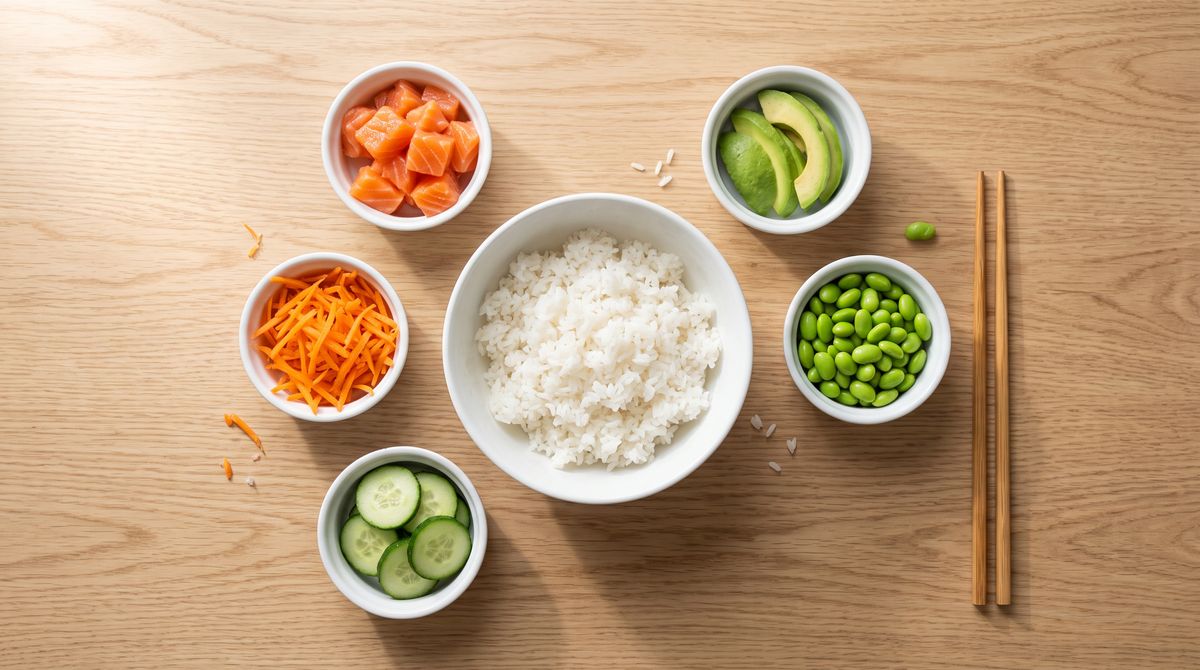
Overhead food photo for a recipe video. A white ceramic bowl of steamed white rice sits in the center of a light oak counter, surrounded by small round dishes of cubed raw salmon, sliced avocado, shelled edamame, sliced cucumber and shredded carrot, with a pair of wooden chopsticks resting at the side. Soft even daylight from the left, clean bright food photography, top-down camera, photoreal. No text, no logos.
- Last frame
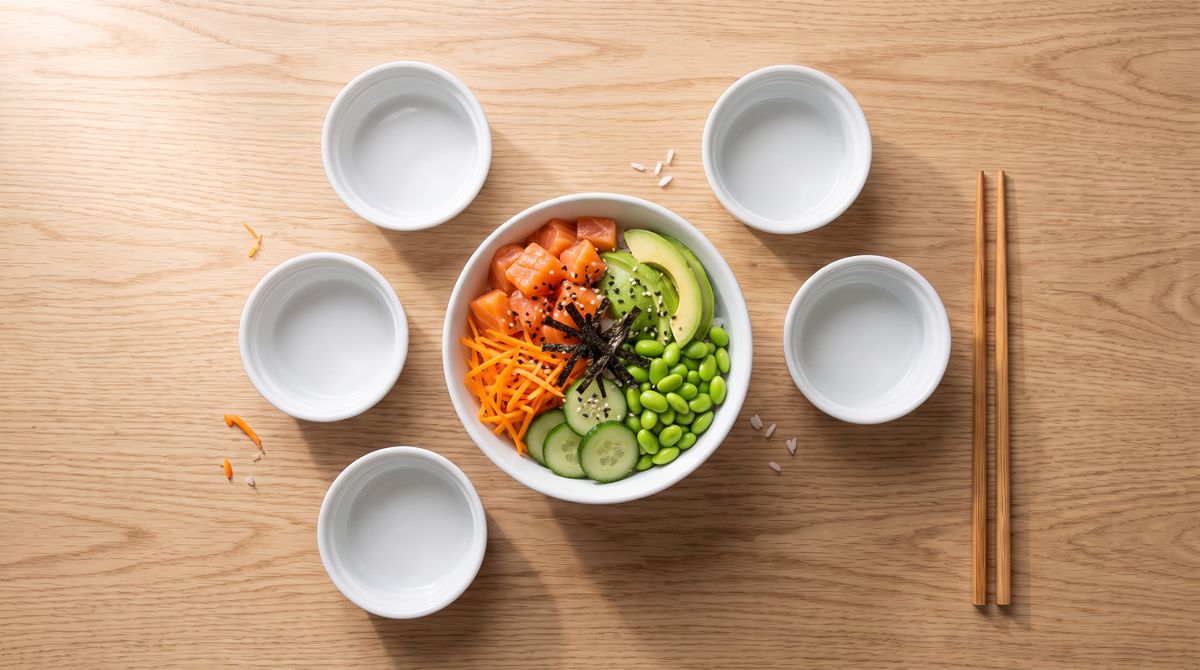
Finish this as a poke bowl. Arrange the salmon, avocado, edamame, cucumber and carrot on top of the rice in neat sections, add a sprinkle of sesame seeds and a few strips of nori, and leave the small dishes empty around the bowl. Keep the bowl, the counter, the chopsticks, the daylight and the top-down camera exactly the same.


The two frames share the bowl, the counter and the camera because the last one was edited from the first, the method Choosing a frame pair walks through.
Request shape
inputs.frameImages takes one or two items, each an image and its position, first or last. This is the hero request:
import { createClient } from '@runware/sdk'

const client = await createClient({ apiKey: process.env.RUNWARE_API_KEY })
await client.connect()

const [result] = await client.run({
  model: 'sandai:magi@2',
  positivePrompt: 'Open on the first frame and end exactly on the last frame. Two hands, the only hands in the shot, build the poke bowl one topping at a time with the chopsticks: the salmon goes on first, then the avocado, the edamame, the cucumber and the carrot, and a pinch of sesame seeds and the nori strips land last. Locked-off top-down camera, single continuous shot, no cuts. Audio: the soft tap of the chopsticks on the dishes, each topping settling on the rice, quiet kitchen room tone, a light lo-fi beat underneath. No voices, no on-screen text.',
  width: 1920,
  height: 1080,
  duration: 8,
  inputs: {
    frameImages: [
      {
        image: 'https://assets.runware.ai/guides/sandai-magi-2/first-and-last-frame/source-hero-first.jpg',
        frame: 'first'
      },
      {
        image: 'https://assets.runware.ai/guides/sandai-magi-2/first-and-last-frame/source-hero-last.jpg',
        frame: 'last'
      }
    ]
  }
})
import asyncio
import os
from runware import Runware
async def main():
async with Runware(api_key=os.environ["RUNWARE_API_KEY"]) as client:
results = await client.run({
"model": "sandai:magi@2",
"positivePrompt": "Open on the first frame and end exactly on the last frame. Two hands, the only hands in the shot, build the poke bowl one topping at a time with the chopsticks: the salmon goes on first, then the avocado, the edamame, the cucumber and the carrot, and a pinch of sesame seeds and the nori strips land last. Locked-off top-down camera, single continuous shot, no cuts. Audio: the soft tap of the chopsticks on the dishes, each topping settling on the rice, quiet kitchen room tone, a light lo-fi beat underneath. No voices, no on-screen text.",
"width": 1920,
"height": 1080,
"duration": 8,
"inputs": {
"frameImages": [
{
"image": "https://assets.runware.ai/guides/sandai-magi-2/first-and-last-frame/source-hero-first.jpg",
"frame": "first"
},
{
"image": "https://assets.runware.ai/guides/sandai-magi-2/first-and-last-frame/source-hero-last.jpg",
"frame": "last"
}
]
}
})
asyncio.run(main())curl https://api.runware.ai/v1 \
-H "Authorization: Bearer $RUNWARE_API_KEY" \
-H "Content-Type: application/json" \
-d '[
{
  "taskType": "videoInference",
  "taskUUID": "3cfe2e65-5440-456a-b554-ecab71448ed2",
  "model": "sandai:magi@2",
  "positivePrompt": "Open on the first frame and end exactly on the last frame. Two hands, the only hands in the shot, build the poke bowl one topping at a time with the chopsticks: the salmon goes on first, then the avocado, the edamame, the cucumber and the carrot, and a pinch of sesame seeds and the nori strips land last. Locked-off top-down camera, single continuous shot, no cuts. Audio: the soft tap of the chopsticks on the dishes, each topping settling on the rice, quiet kitchen room tone, a light lo-fi beat underneath. No voices, no on-screen text.",
  "width": 1920,
  "height": 1080,
  "duration": 8,
  "inputs": {
    "frameImages": [
      {
        "image": "https://assets.runware.ai/guides/sandai-magi-2/first-and-last-frame/source-hero-first.jpg",
        "frame": "first"
      },
      {
        "image": "https://assets.runware.ai/guides/sandai-magi-2/first-and-last-frame/source-hero-last.jpg",
        "frame": "last"
      }
    ]
  }
}
]'runware run sandai:magi@2 \
positivePrompt="Open on the first frame and end exactly on the last frame. Two hands, the only hands in the shot, build the poke bowl one topping at a time with the chopsticks: the salmon goes on first, then the avocado, the edamame, the cucumber and the carrot, and a pinch of sesame seeds and the nori strips land last. Locked-off top-down camera, single continuous shot, no cuts. Audio: the soft tap of the chopsticks on the dishes, each topping settling on the rice, quiet kitchen room tone, a light lo-fi beat underneath. No voices, no on-screen text." \
width=1920 \
height=1080 \
duration=8 \
inputs.frameImages.0.image=https://assets.runware.ai/guides/sandai-magi-2/first-and-last-frame/source-hero-first.jpg \
inputs.frameImages.0.frame=first \
inputs.frameImages.1.image=https://assets.runware.ai/guides/sandai-magi-2/first-and-last-frame/source-hero-last.jpg \
inputs.frameImages.1.frame=last{
"taskType": "videoInference",
"taskUUID": "3cfe2e65-5440-456a-b554-ecab71448ed2",
"model": "sandai:magi@2",
"positivePrompt": "Open on the first frame and end exactly on the last frame. Two hands, the only hands in the shot, build the poke bowl one topping at a time with the chopsticks: the salmon goes on first, then the avocado, the edamame, the cucumber and the carrot, and a pinch of sesame seeds and the nori strips land last. Locked-off top-down camera, single continuous shot, no cuts. Audio: the soft tap of the chopsticks on the dishes, each topping settling on the rice, quiet kitchen room tone, a light lo-fi beat underneath. No voices, no on-screen text.",
"width": 1920,
"height": 1080,
"duration": 8,
"inputs": {
"frameImages": [
{
"image": "https://assets.runware.ai/guides/sandai-magi-2/first-and-last-frame/source-hero-first.jpg",
"frame": "first"
},
{
"image": "https://assets.runware.ai/guides/sandai-magi-2/first-and-last-frame/source-hero-last.jpg",
"frame": "last"
}
]
}
}Response
[
  {
    "taskType": "videoInference",
    "taskUUID": "3cfe2e65-5440-456a-b554-ecab71448ed2",
    "videoUUID": "7b98a3b8-4909-40bc-8edf-10fb7cad8d72",
    "videoURL": "https://vm.runware.ai/video/os/a14d18/ws/2/vi/7b98a3b8-4909-40bc-8edf-10fb7cad8d72.mp4"
  }
]
A few rules come with frames:
- A last frame needs a first frame. A request with only a
lastitem is rejected. - Frames don't mix with references. Reference images, videos or audio in the same request as
inputs.frameImagesare rejected. - The prompt is still required, and it carries all of the motion the frames cannot show.
- Generate the frames in the shape you request.
widthandheighttake the same six 1080p pairs as text-to-video, and each frame can be up to 30 MB.
Animating one frame
A single frame tells the model where the clip starts, and everything after it comes from the prompt.
The bright living room from the listing photo, with its gray sofa, oak coffee table and large window with sheer curtains. A light breeze moves the curtains, the leaves of the trees outside sway, and the patch of sunlight on the floor shifts softly. The camera pushes in slowly from the doorway toward the window and ends on the view of the garden. Soft morning light. Audio: a gentle breeze, distant birdsong, quiet room tone, no music, no voices.
- First frame
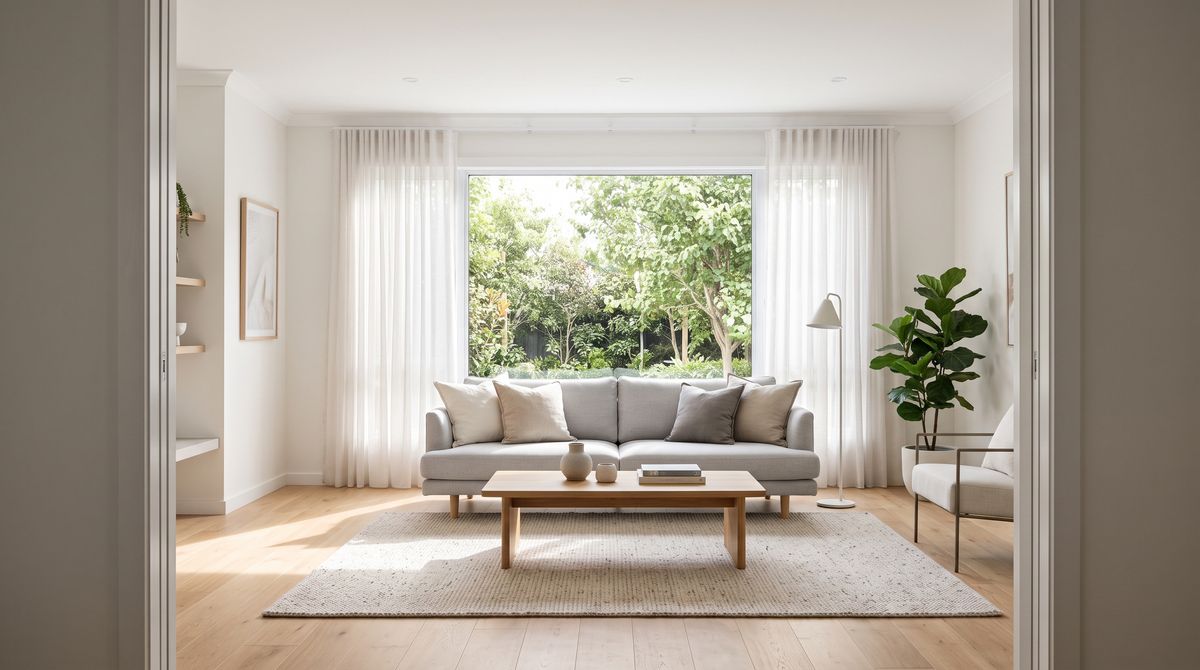
A real estate listing photo of a bright modern living room: a light gray sofa with linen cushions, a low oak coffee table, and a large window with sheer white curtains looking out on a garden with leafy trees. Morning sun comes through the window and lays a soft patch of light across the light oak floor. Wide eye-level shot from the doorway, straight vertical lines, photoreal. No people, no text, no logos.

Open with one sentence on what the frame already shows, then spend the rest of the prompt on what moves. A prompt that describes a different scene from the image can pull the clip away from it, so the first sentence keeps the prompt and the frame in agreement.
Move what the photo already holds. The curtains, the trees outside and the patch of sunlight are all in the frame, so everything that moves in the clip comes from the photo. The push-in ends on the garden view, so the camera has somewhere to arrive.
Choosing a frame pair
A pair works when the only difference between the frames is the change the clip shows. Match the person, the setting, the light and the lens, and the model has one thing to animate. With two unrelated photos, it has to invent a way to get from one shot to another.
The reliable way to get there is to build the last frame from the first with an image edit. Send the first frame to an image model as a reference, name the one change, list what stays the same, and request the edit at the first frame's size:
A makeup transformation reel. Open on the first frame and end exactly on the last frame. She smiles at the camera, lifts a large fluffy makeup brush and sweeps it across the lens, and as the brush clears the frame her finished look and loose hair are revealed in a single instant. She settles back into the same pose and smiles. Static camera, single continuous shot, no cuts. Audio: a soft whoosh as the brush passes the lens, a bright pop beat that drops on the reveal. No voices, no on-screen text.
- First frame
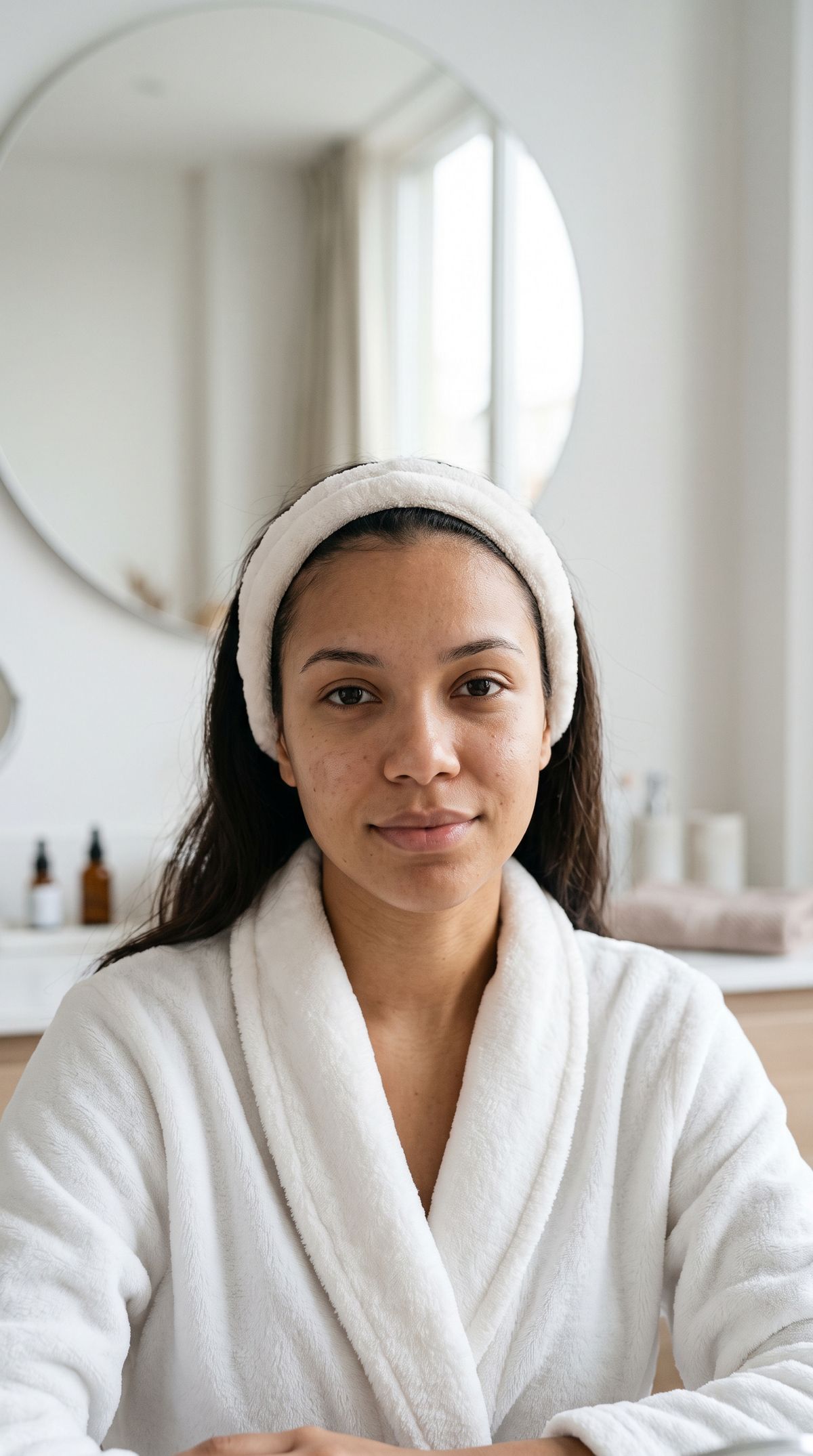
A vertical beauty creator photo. A woman in her twenties with light brown skin and long dark hair pulled back with a white headband sits at a vanity facing the camera with a bare face and no makeup, wearing a white robe. Behind her is a bright bathroom with a round mirror. Head-and-shoulders framing with space above her head, eye-level camera, soft even light, real skin texture, photoreal. No text, no logos.
- Last frame
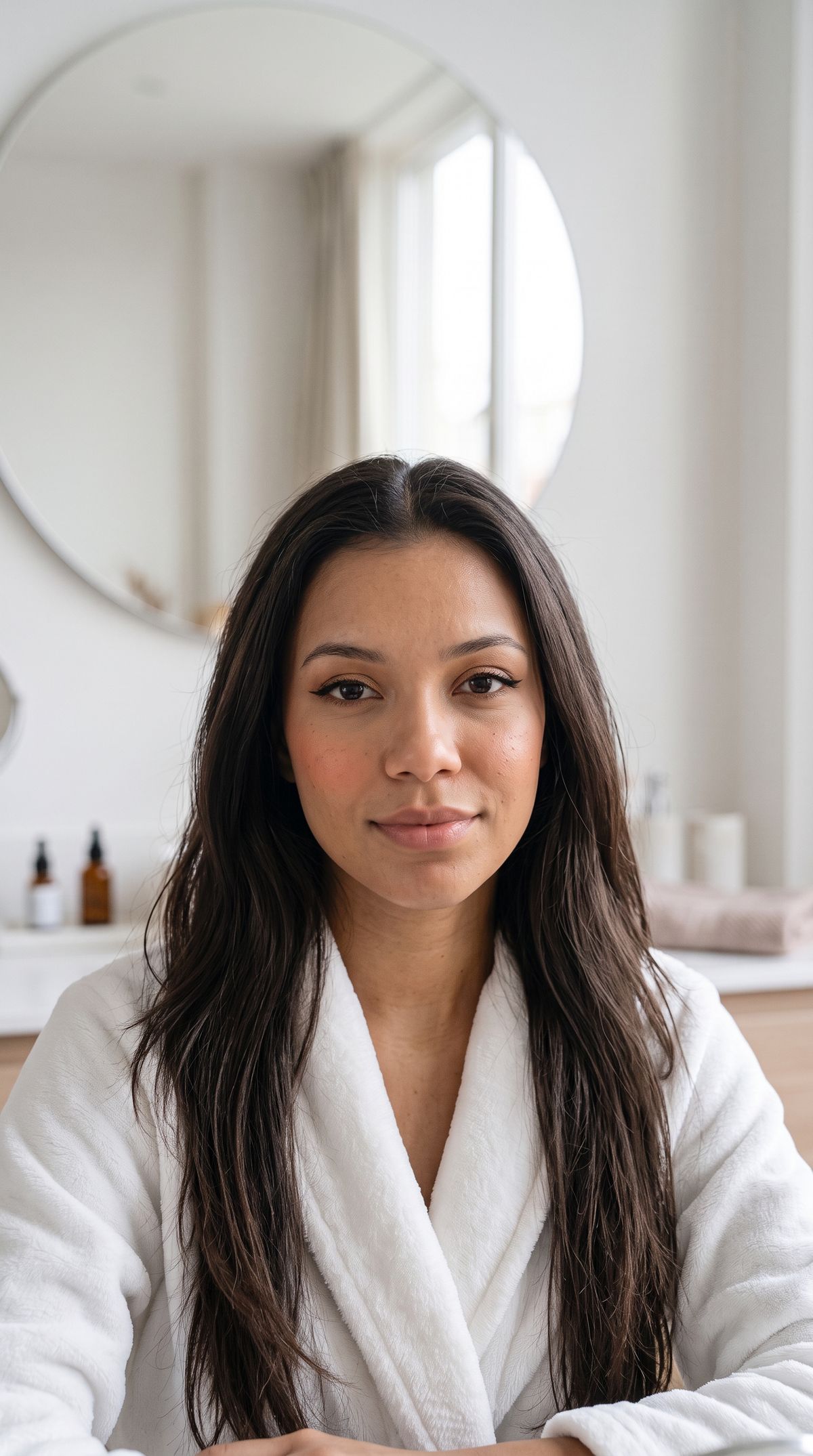
Give her a finished soft glam makeup look: even foundation, warm bronze eyeshadow, black winged eyeliner, defined brows, blush on the cheeks and a nude-pink lip. Take off the headband and let her long dark hair fall loose over her shoulders. Keep her face, the robe, the pose, the bathroom, the light and the framing exactly the same.


The video prompt never describes the makeup, since the last frame carries it. It spends its words on when the change happens: behind the brush as it sweeps across the lens, which hides the switch inside a single motion.
Describing the transition
The two frames fix the ends of the clip, and the prompt sets the route between them: what changes, and in what order.
Put the changes in a sequence. "The salmon goes on first" and "the nori strips land last" give seven changes an order, so the bowl fills the way a cook would build it. Lock the camera when both frames share a framing, because any move would have to end exactly where the last frame already is.
Tips
-
Open a single-frame prompt with what the frame shows. One sentence that matches the image, then the motion and the camera.
-
Keep both frames in one setting. Same person, set, light and lens, with one change between them.
-
Build the last frame from the first. An image edit with one named change keeps everything else identical.
-
Put the changes in order. Say what happens first and what lands last.
-
Lock the camera when both frames share a framing. Spend the prompt on the motion inside the frame instead.
-
Generate frames in the shape you request. Use the same aspect ratio for the frames and for
widthandheight.