Recraft V4 Styles

Recraft V4 Styles is the standard raster model in Recraft's V4 Styles family for reference-driven style consistency. It lets teams create a reusable visual style from reference images and then generate new assets that stay close not only to the broad aesthetic direction, but also to finer details such as texture, composition, and rendering character. It is designed for workflows that need immediate style reuse without fine-tuning or LoRA setup, making it a strong fit for branded content, editorial systems, product campaigns, and any image pipeline where a repeatable visual language matters more than one-off prompt creativity.
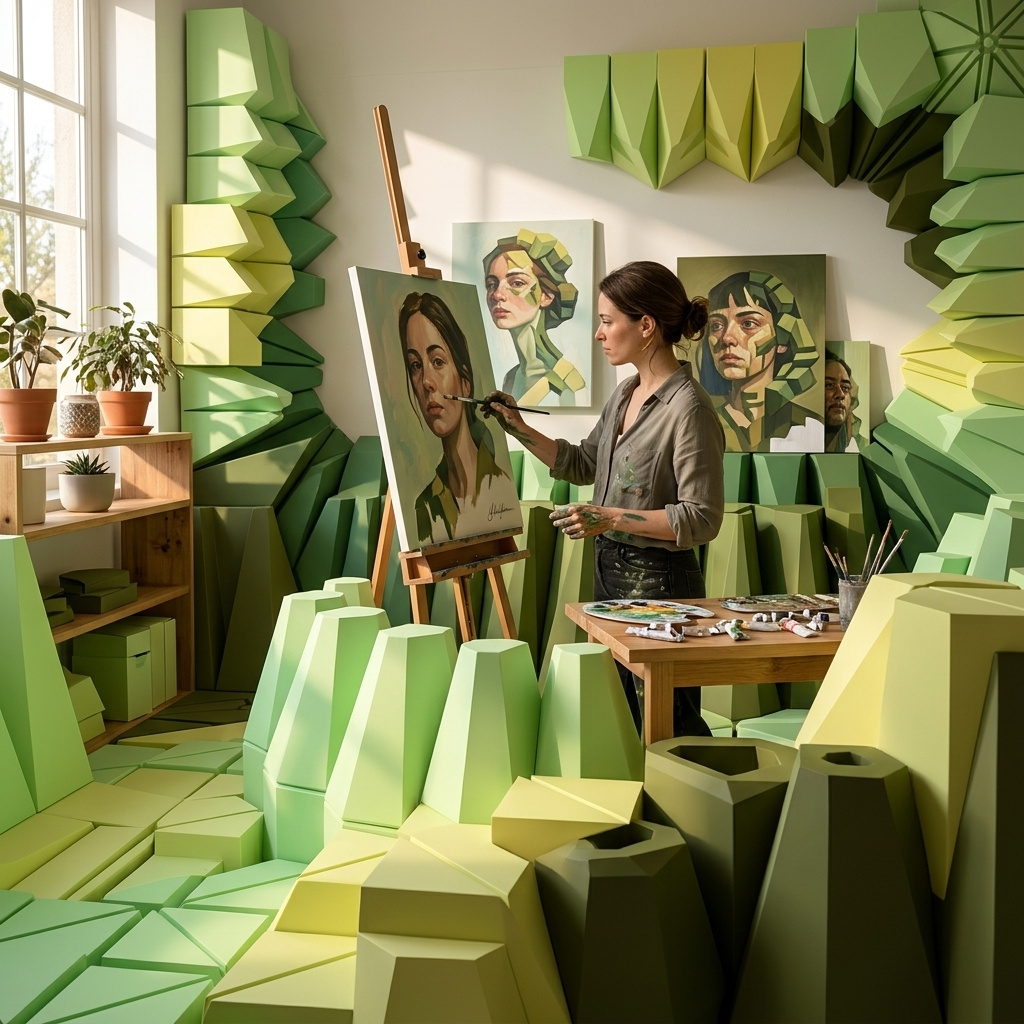
Prompting
How to prompt Recraft V4 Styles: how references pin the style, what the prompt controls, dimensions, and patterns for consistent output.
Introduction
Recraft V4 Styles is a text-to-image model built around reusable style consistency. Attach one to ten reference images and every generation after that holds the same visual language, down to line quality, palette, texture, and rendering character. There is no LoRA training or fine-tuning step. The style is built from the references on the first generate call and returned as a styleId you can reuse for every subsequent call.
The hero below was generated using the four editorial illustrations under it as references. The subject is one the model had never seen in those references, but the ink line, muted earth-tone watercolor palette, and pencil crosshatch shading carry through cleanly.

An astronaut in a white spacesuit floating in weightless orbit above Earth, holding a small potted green seedling in gloved hands, Earth's blue curvature and star field visible behind. Wide portrait framing, small figure against vast space, cinematic composition. Editorial magazine illustration style.
- Chef
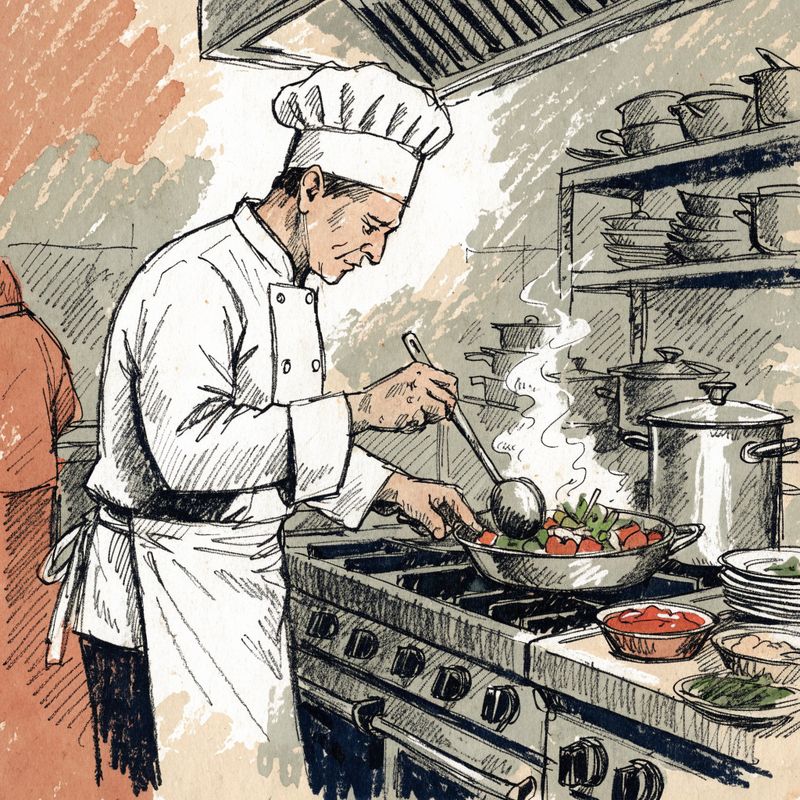
Editorial magazine illustration, bold black ink line work with muted earth-tone palette (terracotta, sage green, cream, deep navy), textured watercolor fills with visible paper grain, pencil crosshatch shading, of a chef in whites sautéing vegetables in a busy restaurant kitchen. Simple neutral background. New Yorker or The Atlantic editorial aesthetic.
- City street
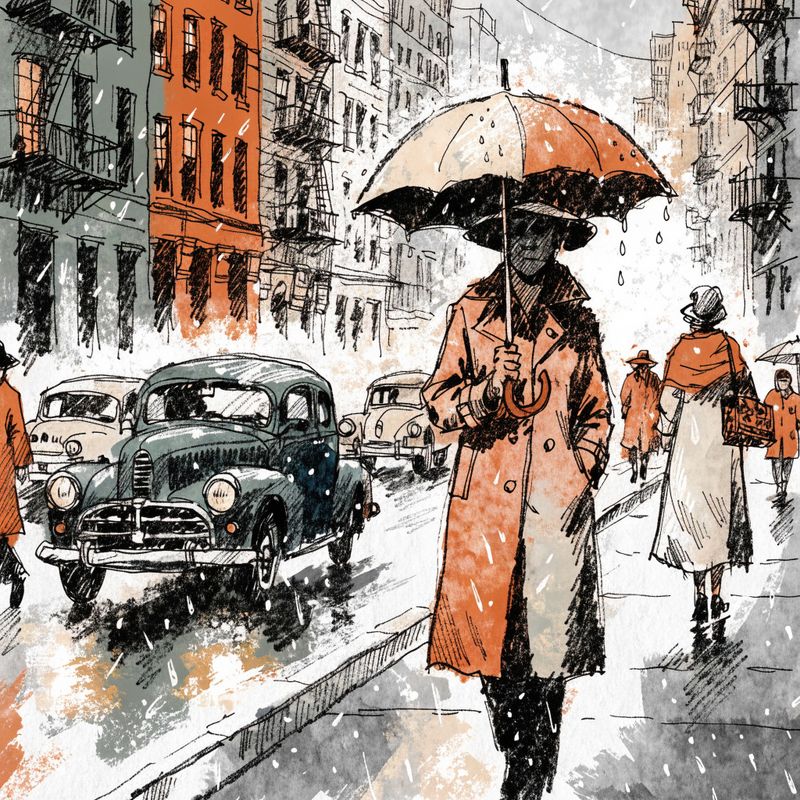
Editorial magazine illustration, bold black ink line work with muted earth-tone palette (terracotta, sage green, cream, deep navy), textured watercolor fills with visible paper grain, pencil crosshatch shading, of a busy city street with pedestrians and vintage cars. Simple neutral background. New Yorker or The Atlantic editorial aesthetic.
- Scientist
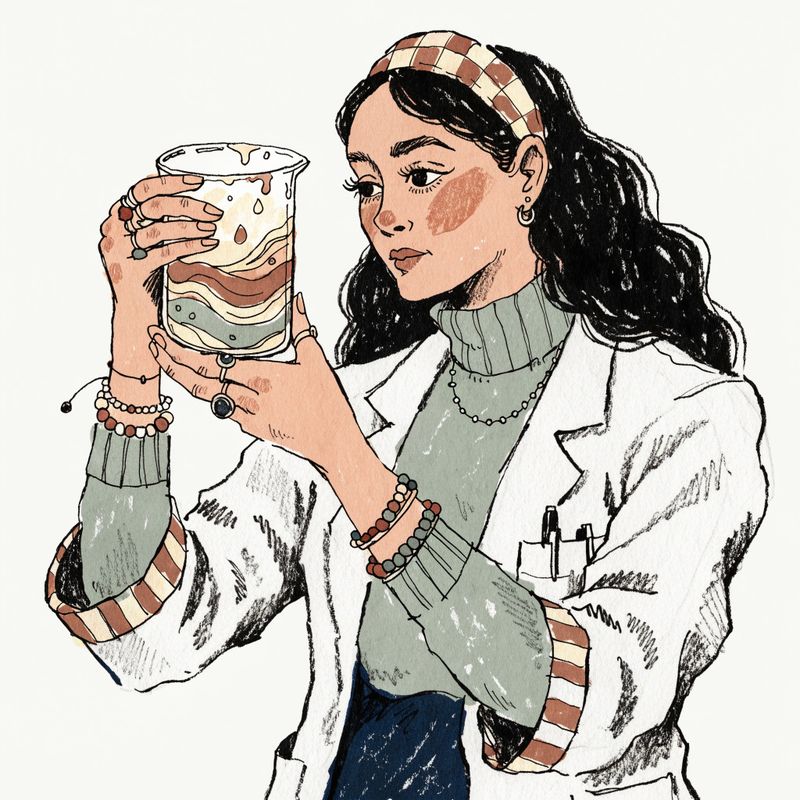
Editorial magazine illustration, bold black ink line work with muted earth-tone palette (terracotta, sage green, cream, deep navy), textured watercolor fills with visible paper grain, pencil crosshatch shading, of a woman scientist in a white lab coat holding a beaker with a swirling coloured liquid. Simple neutral background. New Yorker or The Atlantic editorial aesthetic.
- Pianist
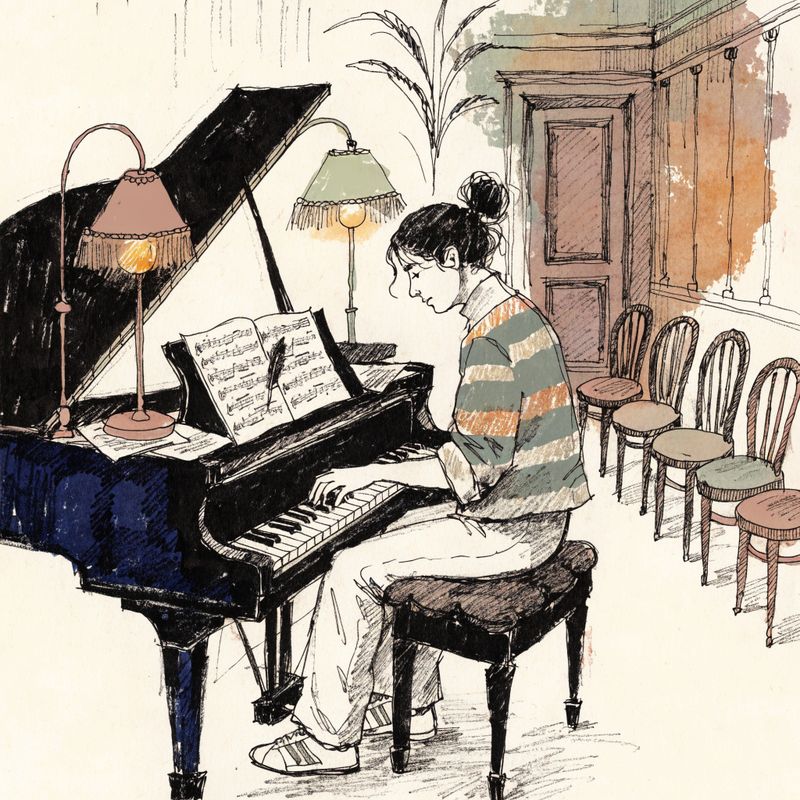
Editorial magazine illustration, bold black ink line work with muted earth-tone palette (terracotta, sage green, cream, deep navy), textured watercolor fills with visible paper grain, pencil crosshatch shading, of a pianist playing a grand piano in a small warmly lit concert hall. Simple neutral background. New Yorker or The Atlantic editorial aesthetic.


This guide covers the request shape, the two ways to pin a style (direct references or a reusable style ID), how the prompt and the references split the work, the dimensions the model ships at, and the patterns worth internalising.
Request shape
Every V4 Styles request needs a positivePrompt and either inputs.referenceImages or inputs.styleId. The two are mutually exclusive per request. Pass width and height from the fixed pixel-pair list. Nothing else is required.
import { createClient } from '@runware/sdk'

const client = await createClient({ apiKey: process.env.RUNWARE_API_KEY })
await client.connect()

const [result] = await client.run({
  model: 'recraft:v4@styles',
  positivePrompt: 'An astronaut in a white spacesuit floating in weightless orbit above Earth, holding a small potted green seedling in gloved hands, Earth\'s blue curvature and star field visible behind. Wide portrait framing, small figure against vast space, cinematic composition.',
  inputs: {
    referenceImages: [
      'https://im.runware.ai/image/os/a14d18/ws/2/ii/aabb1122-3344-5566-7788-99aabbccddee.jpg',
      'https://im.runware.ai/image/os/a14d18/ws/2/ii/bbcc2233-4455-6677-8899-aabbccddeeff.jpg',
      'https://im.runware.ai/image/os/a14d18/ws/2/ii/ccdd3344-5566-7788-99aa-bbccddeeff00.jpg',
      'https://im.runware.ai/image/os/a14d18/ws/2/ii/ddee4455-6677-8899-aabb-ccddeeff0011.jpg'
    ]
  },
  width: 832,
  height: 1280
})
import asyncio
import os
from runware import Runware
async def main():
async with Runware(api_key=os.environ["RUNWARE_API_KEY"]) as client:
results = await client.run({
"model": "recraft:v4@styles",
"positivePrompt": "An astronaut in a white spacesuit floating in weightless orbit above Earth, holding a small potted green seedling in gloved hands, Earth's blue curvature and star field visible behind. Wide portrait framing, small figure against vast space, cinematic composition.",
"inputs": {
"referenceImages": [
"https://im.runware.ai/image/os/a14d18/ws/2/ii/aabb1122-3344-5566-7788-99aabbccddee.jpg",
"https://im.runware.ai/image/os/a14d18/ws/2/ii/bbcc2233-4455-6677-8899-aabbccddeeff.jpg",
"https://im.runware.ai/image/os/a14d18/ws/2/ii/ccdd3344-5566-7788-99aa-bbccddeeff00.jpg",
"https://im.runware.ai/image/os/a14d18/ws/2/ii/ddee4455-6677-8899-aabb-ccddeeff0011.jpg"
]
},
"width": 832,
"height": 1280
})
asyncio.run(main())curl https://api.runware.ai/v1 \
-H "Authorization: Bearer $RUNWARE_API_KEY" \
-H "Content-Type: application/json" \
-d '[
{
  "taskType": "imageInference",
  "taskUUID": "3f8a2b1c-5d6e-4790-b1a2-c3d4e5f60718",
  "model": "recraft:v4@styles",
  "positivePrompt": "An astronaut in a white spacesuit floating in weightless orbit above Earth, holding a small potted green seedling in gloved hands, Earth's blue curvature and star field visible behind. Wide portrait framing, small figure against vast space, cinematic composition.",
  "inputs": {
    "referenceImages": [
      "https://im.runware.ai/image/os/a14d18/ws/2/ii/aabb1122-3344-5566-7788-99aabbccddee.jpg",
      "https://im.runware.ai/image/os/a14d18/ws/2/ii/bbcc2233-4455-6677-8899-aabbccddeeff.jpg",
      "https://im.runware.ai/image/os/a14d18/ws/2/ii/ccdd3344-5566-7788-99aa-bbccddeeff00.jpg",
      "https://im.runware.ai/image/os/a14d18/ws/2/ii/ddee4455-6677-8899-aabb-ccddeeff0011.jpg"
    ]
  },
  "width": 832,
  "height": 1280
}
]'runware run recraft:v4@styles \
positivePrompt="An astronaut in a white spacesuit floating in weightless orbit above Earth, holding a small potted green seedling in gloved hands, Earth's blue curvature and star field visible behind. Wide portrait framing, small figure against vast space, cinematic composition." \
inputs.referenceImages.0=https://im.runware.ai/image/os/a14d18/ws/2/ii/aabb1122-3344-5566-7788-99aabbccddee.jpg \
inputs.referenceImages.1=https://im.runware.ai/image/os/a14d18/ws/2/ii/bbcc2233-4455-6677-8899-aabbccddeeff.jpg \
inputs.referenceImages.2=https://im.runware.ai/image/os/a14d18/ws/2/ii/ccdd3344-5566-7788-99aa-bbccddeeff00.jpg \
inputs.referenceImages.3=https://im.runware.ai/image/os/a14d18/ws/2/ii/ddee4455-6677-8899-aabb-ccddeeff0011.jpg \
width=832 \
height=1280{
"taskType": "imageInference",
"taskUUID": "3f8a2b1c-5d6e-4790-b1a2-c3d4e5f60718",
"model": "recraft:v4@styles",
"positivePrompt": "An astronaut in a white spacesuit floating in weightless orbit above Earth, holding a small potted green seedling in gloved hands, Earth's blue curvature and star field visible behind. Wide portrait framing, small figure against vast space, cinematic composition.",
"inputs": {
"referenceImages": [
"https://im.runware.ai/image/os/a14d18/ws/2/ii/aabb1122-3344-5566-7788-99aabbccddee.jpg",
"https://im.runware.ai/image/os/a14d18/ws/2/ii/bbcc2233-4455-6677-8899-aabbccddeeff.jpg",
"https://im.runware.ai/image/os/a14d18/ws/2/ii/ccdd3344-5566-7788-99aa-bbccddeeff00.jpg",
"https://im.runware.ai/image/os/a14d18/ws/2/ii/ddee4455-6677-8899-aabb-ccddeeff0011.jpg"
]
},
"width": 832,
"height": 1280
}Response
[
  {
    "taskType": "imageInference",
    "taskUUID": "3f8a2b1c-5d6e-4790-b1a2-c3d4e5f60718",
    "imageUUID": "9d3e2f4a-5b6c-7890-abcd-ef1234567890",
    "imageURL": "https://im.runware.ai/image/os/a14d18/ws/2/ii/9d3e2f4a-5b6c-7890-abcd-ef1234567890.jpg",
    "outputs": {
      "styleId": "5b9e7c8a-1234-4b8f-9c5d-8f7e6a5b4c3d"
    }
  }
]
The response includes outputs.styleId. That UUID represents the style the model built from your references, and you can pass it as inputs.styleId on any later call to generate more images in the same style without re-uploading the references.
References or style ID
Two flows produce the same style-consistent output. The choice is about when the style gets built.
Direct references. Attach inputs.referenceImages on a fresh call. The model reads the references, builds the internal style representation, and generates in that style. The response returns a styleId you can keep for later use. Reach for this on the first call of a new style pipeline, or for one-off generations where you know you won't need the style again.
Reusable style ID. Pass inputs.styleId on the call. The model applies the already-built style directly, skipping the reference-read step. Faster than re-uploading references on every call, and the ID is portable within its family (raster IDs across styles and styles-pro, vector IDs across styles-vector and styles-pro-vector). Reach for this on any pipeline that generates many images in one style.
The four references shown alongside the hero at the top of this guide are all editorial illustrations in the same style with different subjects. The model reads them together as one style, extracting what they share.
Style references can come from anywhere the model can fetch: prior Runware generations, other model outputs, brand or campaign assets, scans of physical art, editorial imagery from a client library. Each image must be at least 256 × 256 pixels and no larger than 10 MB, and the combined attachment for a single request cannot exceed 64 MB.
What the prompt does
The positivePrompt describes the subject and the shot: who or what is in the image, the action, the composition, the framing. It does not need to describe the style, because the references already do.
A style-consistent generation with V4 Styles is a split of labour. References pin the look, the prompt names the content. That split changes how the prompt should be written compared to a plain text-to-image call. The four techniques below cover most of what makes a V4 Styles prompt land.
Name the subject and the action
Vague subjects get generic output. "A person at a desk" gives a person of the model's choosing at a desk of the model's choosing. The extra words are not decoration, they are the difference between the model inventing the scene and the model rendering yours. Pin the age, distinctive features, wardrobe, and the specific props in the frame. "A woman in her forties with grey hair in a low bun at a warm walnut desk with two laptops and a small potted succulent" leaves the model far less to invent.
Action verbs tighten the moment. "A woman at a desk" gets a static portrait. "A woman leaning forward and typing" gets action. "A woman leaning forward, half-standing to reach for a paper on the far side of the desk" gets a specific instant. The more specific the verb, the less the model has to guess about the pose.
Name the composition and framing
Composition and framing words are first-class directives. Reach for these consistently:
- Framing size: extreme close-up, close-up, mid-shot, chest-height mid-shot, wide, wide establishing shot
- Camera angle: eye level, low angle looking up, high angle looking down, three-quarter angle, overhead
- Subject placement: centred, small figure against a vast sky, off to the left, close to the frame edge, occupying the lower third
- Depth of field: shallow with the subject in sharp focus, deep with everything crisp, foreground element blurred
The hero above uses "wide portrait framing, small figure against vast space, cinematic composition" to place the astronaut small in a large frame. Without those words, the model would default to a closer, more centred crop.
Don't describe the style
Style words in the prompt compete with the references. A prompt like "an editorial illustration with bold black lines and muted earth-tone watercolor fills of a hiker at sunrise" tells the model two things at once: match the references, and match the words. When the words disagree with the references in any detail, the output drifts. Drop the style words. The prompt becomes shorter, the model reads it cleaner, and the output stays inside the reference world.
The two outputs below use the same four references as the hero. Neither prompt names the style. Both describe only the subject, the setting, and the shot.

A lone hiker with a red backpack standing on a rocky mountain ridge at sunrise, looking down at a valley of pine trees below wrapped in morning mist. Wide landscape framing, small figure against vast sky, warm golden light on the peaks. Editorial magazine illustration style.

A bustling outdoor farmers market at midday, wooden stalls with baskets of ripe tomatoes, peaches, and fresh herbs, a young woman shopper in a linen dress examining a tomato while the vendor smiles at her from behind the stall. Chest-height framing, warm midday sun overhead. Editorial magazine illustration style.
Both hold the reference style down to the specific ink treatment and colour palette. Every element the prompt names appears in the output, but the visual language stays inside the reference world.
Name specific characters
When a specific person or character needs to render (a spokesperson, a recurring illustrated character, a named subject in an editorial piece), name them with enough detail to pin their identity: age, hair length and colour, distinctive features, wardrobe. "A woman in her thirties with short blonde hair and wire-frame glasses in a cream sweater" pins the subject in a way "a woman at a desk" cannot. For character consistency across many generations, keep the same identity clause across every prompt so the model's read of the character stays stable.
Iteration workflow
A prompt rarely lands right on the first pass. The pattern for V4 Styles is to keep the reference set constant and change only the prompt, so each iteration isolates one variable and the style holds throughout.
Pass 1, establish the subject. Start with the smallest prompt that names the subject and the setting. Read the output. If the subject is wrong (wrong person, wrong object, wrong environment), fix that before touching anything else.

A remote worker at their desk.
Pass 2, pin the character and props. If the subject is right but the details are off (wrong age, wrong clothes, wrong specific objects), name them. Age, hair, wardrobe, and named props.

A woman in her forties with grey hair in a low bun, wearing a soft cream sweater, at a warm walnut desk with two laptops and a small potted succulent, warm morning light through a window on the left.
Pass 3, direct the shot. If the subject reads correctly but the framing or composition is generic, add camera direction. Framing size, angle, subject placement, depth.

A woman in her forties with grey hair in a low bun, wearing a soft cream sweater, at a warm walnut desk with two laptops and a small potted succulent, warm morning light through a window on the left. Chest-height mid-shot, camera slightly angled from the left, shallow depth of field with her hands and the closer laptop in sharp focus.
Each pass changes one dimension. The reference set stays the same across the three, so the style stays constant while the reader can see prompt refinement shifting the output shape only. Once a prompt lands, its structure often carries to the next subject: swap the subject clause, keep the composition clause, keep the depth clause.
Common failure modes
Four patterns cause most V4 Styles outputs to miss.
- Style words competing with references. The prompt names the style ("bold black lines, muted watercolor palette") on top of references that already have it. The model reads both, they disagree in some small detail, and the output drifts. Fix: drop the style words. The references carry the style. The prompt only describes what's happening in the image.
- Vague subject or ambiguous action. "A person doing something" leaves too much for the model to fill in. Fix: name the subject specifically (age, wardrobe, distinctive features) and the action concretely with a verb plus an object.
- Missing camera direction. Without framing or angle words, the model picks a default that varies from run to run. Fix: name the framing (wide, mid-shot, close-up), the angle (eye level, overhead, three-quarter), and where the subject sits in the frame.
- Over-long prompts. Piling on forty adjectives past the useful ones dilutes the model's attention. The most concrete beats near the front land best. Softer clauses drop out. Fix: cut anything that isn't a subject, action, prop, camera, or setting cue. Style words go first (see above), then any adjective that doesn't change what appears on screen.
When a first render is close but wrong in one specific way, iterate that specific miss using the pattern above. Rewriting the whole prompt usually swaps one problem for another.
Reusing the style ID
Once a request returns a styleId, later calls skip the reference upload:
import { createClient } from '@runware/sdk'

const client = await createClient({ apiKey: process.env.RUNWARE_API_KEY })
await client.connect()

const [result] = await client.run({
  model: 'recraft:v4@styles',
  positivePrompt: 'A woman on a subway platform late at night, holding a warm coffee cup in both hands, reading a book, empty tiled tunnels stretched behind her, single overhead station light. Chest-height framing, muted ambient light.',
  inputs: {
    styleId: '5b9e7c8a-1234-4b8f-9c5d-8f7e6a5b4c3d'
  },
  width: 832,
  height: 1280
})
import asyncio
import os
from runware import Runware
async def main():
async with Runware(api_key=os.environ["RUNWARE_API_KEY"]) as client:
results = await client.run({
"model": "recraft:v4@styles",
"positivePrompt": "A woman on a subway platform late at night, holding a warm coffee cup in both hands, reading a book, empty tiled tunnels stretched behind her, single overhead station light. Chest-height framing, muted ambient light.",
"inputs": {
"styleId": "5b9e7c8a-1234-4b8f-9c5d-8f7e6a5b4c3d"
},
"width": 832,
"height": 1280
})
asyncio.run(main())curl https://api.runware.ai/v1 \
-H "Authorization: Bearer $RUNWARE_API_KEY" \
-H "Content-Type: application/json" \
-d '[
{
  "taskType": "imageInference",
  "taskUUID": "7d8c9b0a-1e2f-3d4c-5b6a-7f8e9d0c1b2a",
  "model": "recraft:v4@styles",
  "positivePrompt": "A woman on a subway platform late at night, holding a warm coffee cup in both hands, reading a book, empty tiled tunnels stretched behind her, single overhead station light. Chest-height framing, muted ambient light.",
  "inputs": {
    "styleId": "5b9e7c8a-1234-4b8f-9c5d-8f7e6a5b4c3d"
  },
  "width": 832,
  "height": 1280
}
]'runware run recraft:v4@styles \
positivePrompt="A woman on a subway platform late at night, holding a warm coffee cup in both hands, reading a book, empty tiled tunnels stretched behind her, single overhead station light. Chest-height framing, muted ambient light." \
inputs.styleId=5b9e7c8a-1234-4b8f-9c5d-8f7e6a5b4c3d \
width=832 \
height=1280{
"taskType": "imageInference",
"taskUUID": "7d8c9b0a-1e2f-3d4c-5b6a-7f8e9d0c1b2a",
"model": "recraft:v4@styles",
"positivePrompt": "A woman on a subway platform late at night, holding a warm coffee cup in both hands, reading a book, empty tiled tunnels stretched behind her, single overhead station light. Chest-height framing, muted ambient light.",
"inputs": {
"styleId": "5b9e7c8a-1234-4b8f-9c5d-8f7e6a5b4c3d"
},
"width": 832,
"height": 1280
}Response
[
  {
    "taskType": "imageInference",
    "taskUUID": "7d8c9b0a-1e2f-3d4c-5b6a-7f8e9d0c1b2a",
    "imageUUID": "1a2b3c4d-5e6f-7890-abcd-ef1234567890",
    "imageURL": "https://im.runware.ai/image/os/a14d18/ws/2/ii/1a2b3c4d-5e6f-7890-abcd-ef1234567890.jpg",
    "outputs": {
      "styleId": "5b9e7c8a-1234-4b8f-9c5d-8f7e6a5b4c3d"
    }
  }
]
The result is identical to what a fresh reference upload would have produced, but without the reference-read cost:

A woman on a subway platform late at night, holding a warm coffee cup in both hands, reading a book, empty tiled tunnels stretched behind her, single overhead station light. Chest-height framing, muted ambient light. Editorial magazine illustration style.
A style ID belongs to your workspace and persists indefinitely. Store it alongside the assets you generate so downstream pipelines can pick up the same look without needing the source images.
The ID is portable within its family. A style built with recraft:v4@styles (1K raster) can drive recraft:v4@styles-pro (2K raster) from the same UUID, and a style built with recraft:v4@styles-vector (1K SVG) can drive recraft:v4@styles-pro-vector (2K SVG). The ID does not cross the raster and vector boundary. To get both formats from the same reference set, build a raster style and a vector style separately from those references.
Dimensions
Set width and height from the model's fixed pixel-pair list. Fourteen pairs cover the common aspect ratios at the 1K tier for styles and the same aspects at 2K for styles-pro. Pick by delivery target: landscape 3:2 or 16:9 for landing heroes and article banners, square 1:1 for social feeds, portrait 2:3 or 9:16 for stories and vertical placements. See the Recraft V4 Styles model reference for the full pixel-pair list.
Aspect is per-call, not per-style. A style built from portrait references still renders landscape or square outputs when a later call specifies those dimensions. Match the aspect to the delivery target, not to the reference set.
For SVG output, use recraft:v4@styles-vector or recraft:v4@styles-pro-vector. A style ID from any raster variant works with the other raster variant, and a style ID from any vector variant works with the other vector variant. Style IDs do not cross the raster and vector boundary.
Real use cases
Three concrete deliverables that fit the "one style, many outputs" pattern V4 Styles is built for. All three outputs below use the hero's four references, only the prompt and dimensions change.
Editorial illustration for an article header
Magazines and newsletters ship article-by-article illustrations that must all look like they came from the same publication. The pattern: pick or build a reference set once, save the returned styleId, and generate a fresh illustration per article prompt. Article headers, in-line spot illustrations, and social-share cards all draw from the same style ID. Prompt shape: describe the concept the article covers (the subject and the setting), name the framing for the placement (landscape banner for the header, square for social), skip the style.

A vast open-plan office at dusk with rows of empty desks and a single person still working at a distant desk under a warm task lamp, the glow of city lights visible through a wall of floor-to-ceiling windows behind them. Wide establishing shot, small figure against the empty office, cool blue evening light outside contrasting with the warm pool of lamp light on the working desk.
Ad hero for a subscription product
A single ad campaign often ships in ten to fifty variations across placements: hero banner, side rail, mobile interstitial, social feed, story frame. Same style ID, different width and height per placement, different prompt per variation. Prompt shape: keep the brand's tone consistent by using the same character identity across variations (if there's a spokesperson), vary the situation and setting per placement.

A young reader in a soft cream sweater curled up in a warm overstuffed reading chair by a large window, engrossed in a thick hardcover novel, a small stack of three unopened books on the floor beside the chair, autumn leaves visible outside the window, warm evening lamp light. Portrait framing, chest-height angle, shallow depth of field with the reader in sharp focus.
Marketing hero for a product landing page
Product marketing pages want a hero illustration that matches the rest of the site's visual system. The pattern: use the site's illustration system's reference set, generate the product-specific hero, drop it into the page. When the illustration system evolves (new palette, new rendering), rebuild the style from an updated reference set and regenerate the hero without touching the prompt.

A calm remote worker in her forties with grey hair in a low bun at a spacious warm walnut desk, two laptops open side by side showing subtle dashboards, a large paper sketch pad and pen beside them, a small ceramic mug of steaming coffee, a low potted succulent to her left, natural morning light through a large window on the right. Chest-height mid-shot, camera slightly angled from the left, shallow depth of field with her hands and the closer laptop in sharp focus.
Tips
-
Write the prompt as if the style were implied. References pin the look. The prompt names the subject and the shot. Style words in the prompt can compete with the references, so drop them.
-
Attach one to ten references. A single strong reference is enough to lock in a style. Multiple references reinforce the shared elements between them, and give the model more angles on the style.
-
Store the
styleIdfrom the first response. Later calls skip the reference upload and use the ID directly. Faster and cheaper for bulk work. -
A style ID is portable within its family. Raster style IDs work with
stylesandstyles-pro. Vector style IDs work withstyles-vectorandstyles-pro-vector. Style IDs do not cross the raster and vector boundary. To ship both formats from one reference set, build a raster style and a vector style separately. -
Pick a pixel pair, don't invent one. Only the fourteen listed dimensions validate. Anything else fails.
-
The style match mode defaults to precise. V4 Styles follows the reference style meticulously by default. Setting
settings.styleMatch: "flexible"loosens that match, closer to the V3 experience.