GPT-Image-2.6 Sunburst

GPT-Image-2.6 Sunburst is OpenAI's image model for detailed compositions and editing work that needs precise control. Besides raster images, it generates SVG graphics and animated GIFs from text, and it edits images from marks drawn over them, like a circle around the object to change. A thinking level sets how much it plans before rendering, separate from rendering quality.
Detailed editing
How to choose GPT-Image-2.6 Sunburst over Flare for dense, exact text and precise edits: a side-by-side comparison, a chain of focused edits and a markup edit.
Introduction
GPT-Image-2.6 ships as two models that take the same request and bill at the same token rates. OpenAI positions Flare for fast generation and editing in interactive workflows, and Sunburst for detailed compositions and edits that need precise control. A request written for one runs on the other once model changes, so the choice between them comes down to what comes back.
The cover below went through three rounds on Sunburst, each one taking the previous result as its source: a new headline, a new background behind the runner, then one new cover line. Each round changes one thing and names everything else as something to keep.

A fitness magazine cover in portrait format with a clean print-ready layout. The masthead "NORTHLINE" runs across the top in tall white condensed sans-serif capitals, with "NOVEMBER 2026" and "$8.99" in small white type just below it on the right. The cover photo is a waist-up studio portrait of a trail runner in her early thirties with dark curly hair tied back and a relaxed smile, wearing a fitted cobalt blue running jacket, turned slightly toward the camera against a plain warm orange studio backdrop, in soft even studio light. The main headline reads "RUN THE RIDGE" in large bold white capitals across the lower third. Three cover lines in white sans-serif capitals are stacked on the left side, reading "12 WINTER SHOES TESTED", "THE 20-MINUTE STRENGTH PLAN" and "FUEL FOR LONG DAYS". A small white barcode box sits in the lower right corner. Photoreal editorial cover photography, crisp accurate typography, every word spelled exactly as written, no other text.

Change only the main headline from "RUN THE RIDGE" to "OWN THE TRAIL", in the same bold white capitals, at the same size and in the same position. Keep the masthead, the date, the price, the three cover lines, the barcode, the runner, her face, her jacket, the orange backdrop, the framing and the lighting exactly as they are.

Replace only the plain orange studio backdrop behind the runner with a blue-gray mountain ridge under an overcast sky, softly out of focus. Keep the runner, her face, her hair, her jacket, her pose and the light on her exactly as they are, and keep the masthead, the date, the price, the headline "OWN THE TRAIL", the three cover lines and the barcode unchanged.

Change only the cover line "12 WINTER SHOES TESTED" to "9 WINTER JACKETS TESTED", in the same white sans-serif capitals, at the same size and in the same position. Keep the masthead, the date, the price, the headline "OWN THE TRAIL", the other two cover lines, the barcode, the runner, the mountain backdrop, the framing and the lighting exactly as they are.
Step through the rounds, then go back to Original. The type no instruction touched comes through all three: the masthead, the date, the price and the two remaining cover lines read the same at the last step as in the source, and the runner keeps her face and her jacket while the backdrop behind her changes.
This guide covers the request, running a chain of focused edits, the two models side by side on a dense text layout, pointing an edit at one line with a markup image, and choosing between the two.
The request
Sunburst takes the same parameters as Flare. Each round of the chain above is an ordinary edit: the image to change in inputs.referenceImages, the instruction in positivePrompt, and the source's own width and height so the result lines up with it. This is the first round:
import { createClient } from '@runware/sdk'

const client = await createClient({ apiKey: process.env.RUNWARE_API_KEY })
await client.connect()

const [result] = await client.run({
  model: 'openai:gpt-image@2.6-sunburst',
  positivePrompt: 'Change only the main headline from "RUN THE RIDGE" to "OWN THE TRAIL", in the same bold white capitals, at the same size and in the same position. Keep the masthead, the date, the price, the three cover lines, the barcode, the runner, her face, her jacket, the orange backdrop, the framing and the lighting exactly as they are.',
  inputs: {
    referenceImages: [
      'https://assets.runware.ai/guides/openai-gpt-image-2-6-sunburst/detailed-editing/source-cover.jpg'
    ]
  },
  settings: {
    quality: 'high',
    thinkingLevel: 'low'
  },
  width: 1536,
  height: 2048
})
import asyncio
import os
from runware import Runware
async def main():
async with Runware(api_key=os.environ["RUNWARE_API_KEY"]) as client:
results = await client.run({
"model": "openai:gpt-image@2.6-sunburst",
"positivePrompt": "Change only the main headline from \"RUN THE RIDGE\" to \"OWN THE TRAIL\", in the same bold white capitals, at the same size and in the same position. Keep the masthead, the date, the price, the three cover lines, the barcode, the runner, her face, her jacket, the orange backdrop, the framing and the lighting exactly as they are.",
"inputs": {
"referenceImages": [
"https://assets.runware.ai/guides/openai-gpt-image-2-6-sunburst/detailed-editing/source-cover.jpg"
]
},
"settings": {
"quality": "high",
"thinkingLevel": "low"
},
"width": 1536,
"height": 2048
})
asyncio.run(main())curl https://api.runware.ai/v1 \
-H "Authorization: Bearer $RUNWARE_API_KEY" \
-H "Content-Type: application/json" \
-d '[
{
  "taskType": "imageInference",
  "taskUUID": "5c2e9a71-4b38-4d0f-a6e2-8f13b7c94d20",
  "model": "openai:gpt-image@2.6-sunburst",
  "positivePrompt": "Change only the main headline from \"RUN THE RIDGE\" to \"OWN THE TRAIL\", in the same bold white capitals, at the same size and in the same position. Keep the masthead, the date, the price, the three cover lines, the barcode, the runner, her face, her jacket, the orange backdrop, the framing and the lighting exactly as they are.",
  "inputs": {
    "referenceImages": [
      "https://assets.runware.ai/guides/openai-gpt-image-2-6-sunburst/detailed-editing/source-cover.jpg"
    ]
  },
  "settings": {
    "quality": "high",
    "thinkingLevel": "low"
  },
  "width": 1536,
  "height": 2048
}
]'runware run openai:gpt-image@2.6-sunburst \
positivePrompt="Change only the main headline from \"RUN THE RIDGE\" to \"OWN THE TRAIL\", in the same bold white capitals, at the same size and in the same position. Keep the masthead, the date, the price, the three cover lines, the barcode, the runner, her face, her jacket, the orange backdrop, the framing and the lighting exactly as they are." \
inputs.referenceImages.0=https://assets.runware.ai/guides/openai-gpt-image-2-6-sunburst/detailed-editing/source-cover.jpg \
settings.quality=high \
settings.thinkingLevel=low \
width=1536 \
height=2048{
"taskType": "imageInference",
"taskUUID": "5c2e9a71-4b38-4d0f-a6e2-8f13b7c94d20",
"model": "openai:gpt-image@2.6-sunburst",
"positivePrompt": "Change only the main headline from \"RUN THE RIDGE\" to \"OWN THE TRAIL\", in the same bold white capitals, at the same size and in the same position. Keep the masthead, the date, the price, the three cover lines, the barcode, the runner, her face, her jacket, the orange backdrop, the framing and the lighting exactly as they are.",
"inputs": {
"referenceImages": [
"https://assets.runware.ai/guides/openai-gpt-image-2-6-sunburst/detailed-editing/source-cover.jpg"
]
},
"settings": {
"quality": "high",
"thinkingLevel": "low"
},
"width": 1536,
"height": 2048
}Response
[
  {
    "taskType": "imageInference",
    "taskUUID": "5c2e9a71-4b38-4d0f-a6e2-8f13b7c94d20",
    "imageUUID": "a83f0d6e-2c17-4b95-8e41-7d9b3c5f12a6",
    "imageURL": "https://im.runware.ai/image/os/a14d18/ws/2/ii/a83f0d6e-2c17-4b95-8e41-7d9b3c5f12a6.jpg"
  }
]
Running the same edit on Flare changes one field: model becomes openai:gpt-image@2.6-flare, and everything else goes out unchanged. Every parameter is documented on the model reference, and the techniques this guide relies on have their own Flare guides: prompting, editing images, markup editing and quality and thinking level. They apply to Sunburst as written. This guide covers when to send a request to Sunburst instead.
Chaining focused edits
A chain is a series of edits where each round's reference is the previous round's output. Round two of the cover sends the file round one returned, and round three the file from round two. The imageUUID from the previous response works in inputs.referenceImages as well, so a pipeline can pass it along instead of uploading the image again.
Every round renders the whole frame again, so anything a round changes by accident is carried into every round after it. On a cover, that means the type a round was not asked to touch: the masthead and the cover lines have to come back letter for letter, three times over. Four habits keep the chain clean:
- One change per round. The headline, the background and the cover line went in as separate requests. When one round goes wrong you know which instruction caused it, and you rerun that round instead of the whole chain.
- A keep list that grows. Each instruction ends by naming what stays, and the list picks up what earlier rounds added: rounds two and three both keep "OWN THE TRAIL" because round one wrote it. Editing images covers writing the instruction itself.
- A low thinking level. The chain runs with
settings.thinkingLevelset tolow. OpenAI recommends a lower level for focused edits such as changing a background or a sign, and notes that a higher one can introduce unwanted changes in an edit. The default ishigh. - A check against the original. Compare the last round with Original as well as with the round before it. A small change repeated across rounds is easier to see end to end than one step at a time.
Dense, exact text
On packaging, one wrong character makes the asset unusable. A nutrition label that reads 18mg where the spec says 180mg cannot go on a product page, so every quoted string has to come back exactly as written. The prompt behind both renders below quotes the brand, the product name, all fourteen lines of a US Nutrition Facts label and the ingredients list. Both ran at 2304 × 1536 with settings.quality set to high, and only model differed.

Flat front-on packaging artwork for a carton of oat crackers, laid out as two adjoining panels on a plain light gray background. The left panel is the front of the box, deep forest green, with the brand name "WREN & RYE" in cream serif capitals at the top, the product name "Rosemary & Sea Salt Oat Crackers" below it, a photograph of a neat stack of round golden crackers with a sprig of rosemary in the middle, a small round cream badge reading "8g WHOLE GRAINS PER SERVING" and "NET WT 6 OZ (170g)" in the lower left corner. The right panel is the side of the box, white, with a standard US Nutrition Facts label in black type and thin black rules. The label reads, line by line, "Nutrition Facts", "About 6 servings per container", "Serving size 16 crackers (28g)", "Calories 130", "Total Fat 5g 6%", "Saturated Fat 0.5g 3%", "Trans Fat 0g", "Cholesterol 0mg 0%", "Sodium 180mg 8%", "Total Carbohydrate 19g 7%", "Dietary Fiber 2g 7%", "Total Sugars 1g", "Includes 0g Added Sugars 0%" and "Protein 3g". Below the label, small black type reads "INGREDIENTS: WHOLE GRAIN OATS, WHOLE WHEAT FLOUR, SUNFLOWER OIL, DRIED ROSEMARY, SEA SALT, BAKING SODA." and then "CONTAINS: WHEAT." Crisp print-ready packaging design, every word and number spelled exactly as written, no other text.

Flat front-on packaging artwork for a carton of oat crackers, laid out as two adjoining panels on a plain light gray background. The left panel is the front of the box, deep forest green, with the brand name "WREN & RYE" in cream serif capitals at the top, the product name "Rosemary & Sea Salt Oat Crackers" below it, a photograph of a neat stack of round golden crackers with a sprig of rosemary in the middle, a small round cream badge reading "8g WHOLE GRAINS PER SERVING" and "NET WT 6 OZ (170g)" in the lower left corner. The right panel is the side of the box, white, with a standard US Nutrition Facts label in black type and thin black rules. The label reads, line by line, "Nutrition Facts", "About 6 servings per container", "Serving size 16 crackers (28g)", "Calories 130", "Total Fat 5g 6%", "Saturated Fat 0.5g 3%", "Trans Fat 0g", "Cholesterol 0mg 0%", "Sodium 180mg 8%", "Total Carbohydrate 19g 7%", "Dietary Fiber 2g 7%", "Total Sugars 1g", "Includes 0g Added Sugars 0%" and "Protein 3g". Below the label, small black type reads "INGREDIENTS: WHOLE GRAIN OATS, WHOLE WHEAT FLOUR, SUNFLOWER OIL, DRIED ROSEMARY, SEA SALT, BAKING SODA." and then "CONTAINS: WHEAT." Crisp print-ready packaging design, every word and number spelled exactly as written, no other text.
Open both and read the side panel against the prompt, line by line. Both renders got every quoted string right: each label line has the value and the percentage the prompt gave it, and the ingredients list ends at "BAKING SODA." as written. The one difference is a line nobody asked for. Flare added "Amount per serving" above the calories, a standard line on a real label but not one the prompt quoted, while Sunburst printed only what was quoted.
A wrong digit in a nutrition label does not show at thumbnail size, so on this kind of layout checking every quoted string is the test that decides it. Run it on your own content before you settle on a model. One prompt on both models costs two renders.
Both renders ran at the default settings.thinkingLevel of high. OpenAI notes that a higher level helps with dense text and complex layouts, the opposite of its advice for focused edits, so a pipeline that generates a layout and then edits it can switch levels between the two calls. The same holds for any image where the text is the content, such as a menu with prices or a spec sheet.
Marking the edit
A schedule is a hard target for a written instruction. The poster below has eight rows with the same structure, and an instruction that says "the third talk" leaves the model to decide whether the keynote counts. inputs.markupImage points at the row instead of describing it: a transparent PNG at the source's exact size, with a red circle drawn where the change goes.


In the schedule row inside the red circle, change the session to "Onboarding That Sticks" and the speaker to "Jordan Whitaker", keeping the time "11:30 AM" and the same type, size and colors. Remove the red circle. Keep every other row, the title, the date line, the gray rules, the coral bar and the footer exactly as they are.
- Source
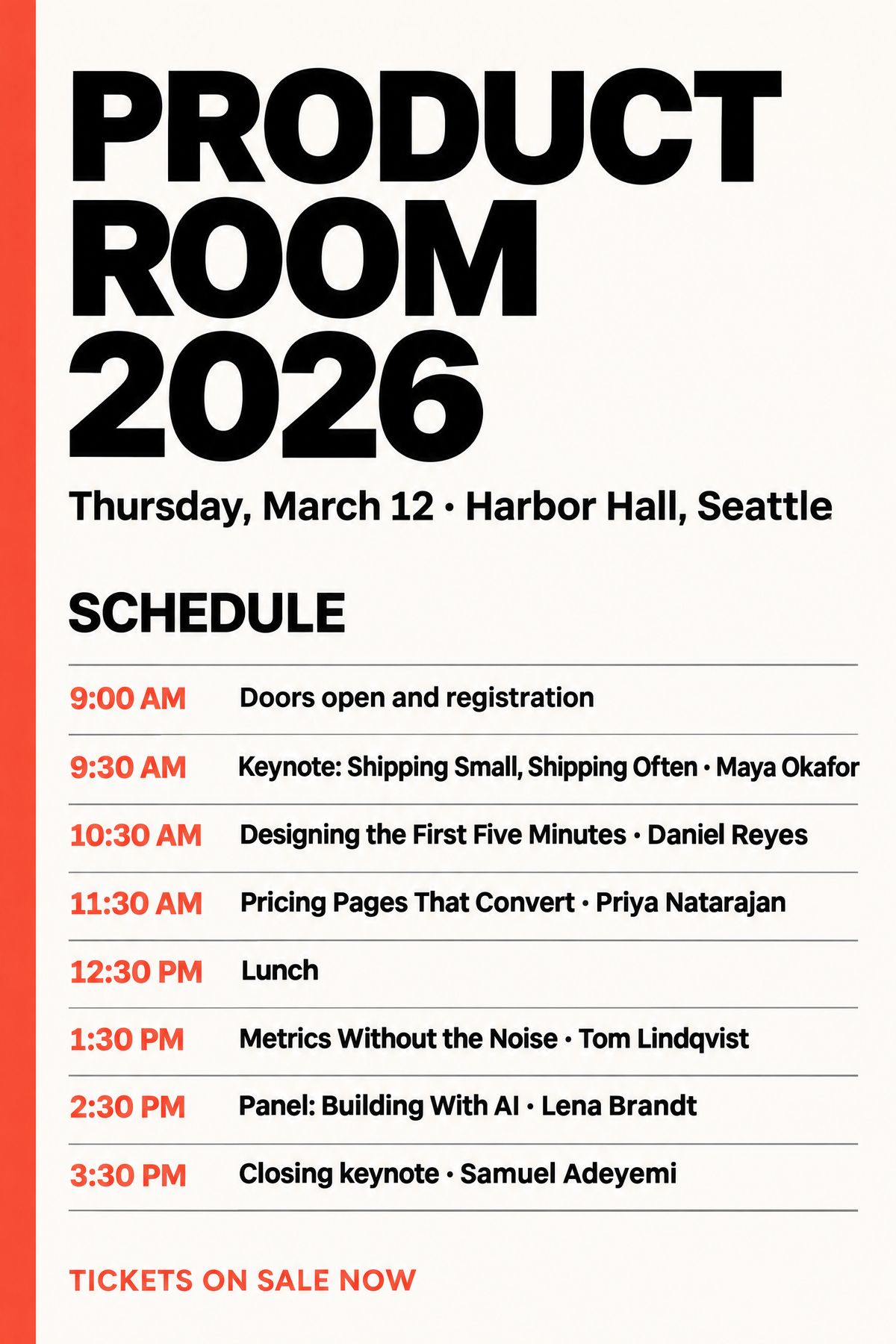
A portrait conference poster for a one-day product design conference, a clean Swiss-style layout on an off-white background with a single bold coral bar running down the left edge. At the top, the title "PRODUCT ROOM 2026" in heavy black sans-serif capitals, and below it "Thursday, March 12 · Harbor Hall, Seattle" in medium black type. The lower half of the poster is a schedule headed "SCHEDULE", with eight evenly spaced rows separated by thin gray rules. Each row has the time on the left in coral and the session and speaker on the right in black. The rows read "9:00 AM Doors open and registration", "9:30 AM Keynote: Shipping Small, Shipping Often · Maya Okafor", "10:30 AM Designing the First Five Minutes · Daniel Reyes", "11:30 AM Pricing Pages That Convert · Priya Natarajan", "12:30 PM Lunch", "1:30 PM Metrics Without the Noise · Tom Lindqvist", "2:30 PM Panel: Building With AI · Lena Brandt" and "3:30 PM Closing keynote · Samuel Adeyemi". At the bottom, "TICKETS ON SALE NOW" in small coral capitals. Crisp print-ready typography, every word spelled exactly as written, no other text.
- Markup image



import { createClient } from '@runware/sdk'

const client = await createClient({ apiKey: process.env.RUNWARE_API_KEY })
await client.connect()

const [result] = await client.run({
  model: 'openai:gpt-image@2.6-sunburst',
  positivePrompt: 'In the schedule row inside the red circle, change the session to "Onboarding That Sticks" and the speaker to "Jordan Whitaker", keeping the time "11:30 AM" and the same type, size and colors. Remove the red circle. Keep every other row, the title, the date line, the gray rules, the coral bar and the footer exactly as they are.',
  inputs: {
    referenceImages: [
      'https://assets.runware.ai/guides/openai-gpt-image-2-6-sunburst/detailed-editing/source-poster.jpg'
    ],
    markupImage: 'https://assets.runware.ai/guides/openai-gpt-image-2-6-sunburst/detailed-editing/markup-poster.png'
  },
  settings: {
    quality: 'high',
    thinkingLevel: 'low'
  },
  width: 1536,
  height: 2304
})
import asyncio
import os
from runware import Runware
async def main():
async with Runware(api_key=os.environ["RUNWARE_API_KEY"]) as client:
results = await client.run({
"model": "openai:gpt-image@2.6-sunburst",
"positivePrompt": "In the schedule row inside the red circle, change the session to \"Onboarding That Sticks\" and the speaker to \"Jordan Whitaker\", keeping the time \"11:30 AM\" and the same type, size and colors. Remove the red circle. Keep every other row, the title, the date line, the gray rules, the coral bar and the footer exactly as they are.",
"inputs": {
"referenceImages": [
"https://assets.runware.ai/guides/openai-gpt-image-2-6-sunburst/detailed-editing/source-poster.jpg"
],
"markupImage": "https://assets.runware.ai/guides/openai-gpt-image-2-6-sunburst/detailed-editing/markup-poster.png"
},
"settings": {
"quality": "high",
"thinkingLevel": "low"
},
"width": 1536,
"height": 2304
})
asyncio.run(main())curl https://api.runware.ai/v1 \
-H "Authorization: Bearer $RUNWARE_API_KEY" \
-H "Content-Type: application/json" \
-d '[
{
  "taskType": "imageInference",
  "taskUUID": "e4a17c29-8b53-4f06-9d2e-3c58a1f70b94",
  "model": "openai:gpt-image@2.6-sunburst",
  "positivePrompt": "In the schedule row inside the red circle, change the session to \"Onboarding That Sticks\" and the speaker to \"Jordan Whitaker\", keeping the time \"11:30 AM\" and the same type, size and colors. Remove the red circle. Keep every other row, the title, the date line, the gray rules, the coral bar and the footer exactly as they are.",
  "inputs": {
    "referenceImages": [
      "https://assets.runware.ai/guides/openai-gpt-image-2-6-sunburst/detailed-editing/source-poster.jpg"
    ],
    "markupImage": "https://assets.runware.ai/guides/openai-gpt-image-2-6-sunburst/detailed-editing/markup-poster.png"
  },
  "settings": {
    "quality": "high",
    "thinkingLevel": "low"
  },
  "width": 1536,
  "height": 2304
}
]'runware run openai:gpt-image@2.6-sunburst \
positivePrompt="In the schedule row inside the red circle, change the session to \"Onboarding That Sticks\" and the speaker to \"Jordan Whitaker\", keeping the time \"11:30 AM\" and the same type, size and colors. Remove the red circle. Keep every other row, the title, the date line, the gray rules, the coral bar and the footer exactly as they are." \
inputs.referenceImages.0=https://assets.runware.ai/guides/openai-gpt-image-2-6-sunburst/detailed-editing/source-poster.jpg \
inputs.markupImage=https://assets.runware.ai/guides/openai-gpt-image-2-6-sunburst/detailed-editing/markup-poster.png \
settings.quality=high \
settings.thinkingLevel=low \
width=1536 \
height=2304{
"taskType": "imageInference",
"taskUUID": "e4a17c29-8b53-4f06-9d2e-3c58a1f70b94",
"model": "openai:gpt-image@2.6-sunburst",
"positivePrompt": "In the schedule row inside the red circle, change the session to \"Onboarding That Sticks\" and the speaker to \"Jordan Whitaker\", keeping the time \"11:30 AM\" and the same type, size and colors. Remove the red circle. Keep every other row, the title, the date line, the gray rules, the coral bar and the footer exactly as they are.",
"inputs": {
"referenceImages": [
"https://assets.runware.ai/guides/openai-gpt-image-2-6-sunburst/detailed-editing/source-poster.jpg"
],
"markupImage": "https://assets.runware.ai/guides/openai-gpt-image-2-6-sunburst/detailed-editing/markup-poster.png"
},
"settings": {
"quality": "high",
"thinkingLevel": "low"
},
"width": 1536,
"height": 2304
}Response
[
  {
    "taskType": "imageInference",
    "taskUUID": "e4a17c29-8b53-4f06-9d2e-3c58a1f70b94",
    "imageUUID": "3b9e71c4-d052-4a8f-b6e3-91f4c0a7d258",
    "imageURL": "https://im.runware.ai/image/os/a14d18/ws/2/ii/3b9e71c4-d052-4a8f-b6e3-91f4c0a7d258.jpg"
  }
]
The slider shows the circle drawn onto the poster so you can see where it falls. The request sends them as two files: the clean poster in inputs.referenceImages and the circle alone in inputs.markupImage. The instruction names the new strings and asks for the circle to be removed, the way OpenAI's own markup example does. Drag the handle across the schedule: the circled row reads "Onboarding That Sticks · Jordan Whitaker" at 11:30 AM, and the other seven rows match the source line for line.
The markup image must have the same width and height as the first reference image and contain transparent pixels. A fully opaque PNG or one at another size is rejected. A markup image cannot be combined with inputs.maskImage, and with one in the request the first reference can have at most 16,777,216 pixels.
Markup editing covers drawing the marks and writing the instruction around them.
Choosing between them
The request and the rates are shared, so the choice can change from one call to the next without touching anything but model.
Reach for Flare when the loop matters more than any one frame: exploration, drafts, anything a user is waiting on in an interactive tool, and simple edits where one clearly named thing changes on an uncluttered frame. OpenAI positions it for interactive iteration.
Reach for Sunburst when the frame matters more than the loop. That covers layouts full of exact text, such as packaging or a schedule, and edits on a busy frame where everything outside the change has to come back as it was. It also covers the final render of anything going onto a product page or into print.
The shared request makes a third option cheap: both, at different stages. Explore on Flare, then run the settled prompt or instruction once on Sunburst for the asset that ships.
Sunburst is not a quality level. settings.quality and settings.thinkingLevel work the same way on both models and default to the same values, so choosing Sunburst raises neither one. Set them per request.
Tips
-
Swap the model string, keep everything else. A request written for Flare runs on Sunburst unchanged, so an A/B on your own content costs two renders.
-
Check every quoted string. On packaging and schedules the failure that matters is one wrong digit, and it does not show at thumbnail size.
-
Make one change per round. A chain of single changes tells you which round went wrong and lets you rerun only that one.
-
Use a low thinking level for focused edits. OpenAI recommends it for a new background or a new sign, and a higher one for dense text and complex layouts.
-
Mark the target when it repeats. When the change goes to one of several similar rows or items, a circle in
inputs.markupImagereplaces a description that can be miscounted. Ask for the circle to be removed. -
Explore on Flare, ship on Sunburst. Iteration is where the call volume is, and the final render is the one that has to read correctly.