GPT-Image-2.6 Flare

GPT-Image-2.6 Flare is OpenAI's fast image model for generation and editing in interactive workflows. Besides raster images, it generates SVG graphics and animated GIFs from text, and it edits images from marks drawn over them, like a circle around the object to change. A thinking level sets how much it plans before rendering, separate from rendering quality.
Editing images
How to edit images with GPT-Image-2.6 Flare: one source and a written instruction to remove, recolor, add or replace, and several references combined into one image.
Introduction
Regenerating a photo to change one thing in it gives you a different photo. Ask for the same living room with furniture in it and you get a new room: the windows move, and the light comes from somewhere else. That is no use on a listing for that apartment.
An edit starts from the file you already have. You send the image in inputs.referenceImages and the change in positivePrompt, and GPT-Image-2.6 Flare returns that image with the change made. The empty room below went in with one instruction to stage it.

A real estate listing photograph of an empty living room in a renovated apartment. Wide white oak floorboards, plain white walls with a simple white baseboard, two tall windows on the left wall letting in soft morning daylight that falls in long bright patches across the floor, a white radiator under the nearer window, a bare back wall and a plain white ceiling. Wide shot from the doorway at chest height, 24mm lens, verticals straight. No furniture, no people, no text. Photoreal interior photography, bright neutral palette.

Furnish this empty living room as a staged real estate listing photo. Add a low three-seat sofa in pale gray linen against the back wall, facing the camera, a framed abstract print centered above it, a round white oak coffee table on a large cream wool rug in front of the sofa, a black metal floor lamp to the right of the sofa and a tall fiddle-leaf fig in a terracotta pot beside the far window. Keep the floorboards, the walls, the windows, the radiator, the ceiling, the daylight falling across the floor and the camera angle exactly as they are.
Drag the handle across. The windows, the radiator and the floorboards are where they were, and the daylight still falls across the floor from the same windows, because the instruction named the furniture and listed the room as fixed.
This guide covers the request, how to write an instruction, removing, recoloring and adding on a catalog shot, swapping one piece of furniture in a styled scene, and building one image from several references. To point at a spot by drawing on the photo instead of describing it, see the markup editing guide.
The request
An edit is a generation request with the source in inputs.referenceImages. Sending a reference is what makes it an edit.
import { createClient } from '@runware/sdk'

const client = await createClient({ apiKey: process.env.RUNWARE_API_KEY })
await client.connect()

const [result] = await client.run({
  model: 'openai:gpt-image@2.6-flare',
  positivePrompt: 'Furnish this empty living room as a staged real estate listing photo. Add a low three-seat sofa in pale gray linen against the back wall, facing the camera, a framed abstract print centered above it, a round white oak coffee table on a large cream wool rug in front of the sofa, a black metal floor lamp to the right of the sofa and a tall fiddle-leaf fig in a terracotta pot beside the far window. Keep the floorboards, the walls, the windows, the radiator, the ceiling, the daylight falling across the floor and the camera angle exactly as they are.',
  inputs: {
    referenceImages: [
      'https://assets.runware.ai/guides/openai-gpt-image-2-6-flare/editing-images/source-room.jpg'
    ]
  },
  width: 1536,
  height: 1024
})
import asyncio
import os
from runware import Runware
async def main():
async with Runware(api_key=os.environ["RUNWARE_API_KEY"]) as client:
results = await client.run({
"model": "openai:gpt-image@2.6-flare",
"positivePrompt": "Furnish this empty living room as a staged real estate listing photo. Add a low three-seat sofa in pale gray linen against the back wall, facing the camera, a framed abstract print centered above it, a round white oak coffee table on a large cream wool rug in front of the sofa, a black metal floor lamp to the right of the sofa and a tall fiddle-leaf fig in a terracotta pot beside the far window. Keep the floorboards, the walls, the windows, the radiator, the ceiling, the daylight falling across the floor and the camera angle exactly as they are.",
"inputs": {
"referenceImages": [
"https://assets.runware.ai/guides/openai-gpt-image-2-6-flare/editing-images/source-room.jpg"
]
},
"width": 1536,
"height": 1024
})
asyncio.run(main())curl https://api.runware.ai/v1 \
-H "Authorization: Bearer $RUNWARE_API_KEY" \
-H "Content-Type: application/json" \
-d '[
{
  "taskType": "imageInference",
  "taskUUID": "8c2e4a61-3f7b-4d95-a1c8-5e0b9d7f2a34",
  "model": "openai:gpt-image@2.6-flare",
  "positivePrompt": "Furnish this empty living room as a staged real estate listing photo. Add a low three-seat sofa in pale gray linen against the back wall, facing the camera, a framed abstract print centered above it, a round white oak coffee table on a large cream wool rug in front of the sofa, a black metal floor lamp to the right of the sofa and a tall fiddle-leaf fig in a terracotta pot beside the far window. Keep the floorboards, the walls, the windows, the radiator, the ceiling, the daylight falling across the floor and the camera angle exactly as they are.",
  "inputs": {
    "referenceImages": [
      "https://assets.runware.ai/guides/openai-gpt-image-2-6-flare/editing-images/source-room.jpg"
    ]
  },
  "width": 1536,
  "height": 1024
}
]'runware run openai:gpt-image@2.6-flare \
positivePrompt="Furnish this empty living room as a staged real estate listing photo. Add a low three-seat sofa in pale gray linen against the back wall, facing the camera, a framed abstract print centered above it, a round white oak coffee table on a large cream wool rug in front of the sofa, a black metal floor lamp to the right of the sofa and a tall fiddle-leaf fig in a terracotta pot beside the far window. Keep the floorboards, the walls, the windows, the radiator, the ceiling, the daylight falling across the floor and the camera angle exactly as they are." \
inputs.referenceImages.0=https://assets.runware.ai/guides/openai-gpt-image-2-6-flare/editing-images/source-room.jpg \
width=1536 \
height=1024{
"taskType": "imageInference",
"taskUUID": "8c2e4a61-3f7b-4d95-a1c8-5e0b9d7f2a34",
"model": "openai:gpt-image@2.6-flare",
"positivePrompt": "Furnish this empty living room as a staged real estate listing photo. Add a low three-seat sofa in pale gray linen against the back wall, facing the camera, a framed abstract print centered above it, a round white oak coffee table on a large cream wool rug in front of the sofa, a black metal floor lamp to the right of the sofa and a tall fiddle-leaf fig in a terracotta pot beside the far window. Keep the floorboards, the walls, the windows, the radiator, the ceiling, the daylight falling across the floor and the camera angle exactly as they are.",
"inputs": {
"referenceImages": [
"https://assets.runware.ai/guides/openai-gpt-image-2-6-flare/editing-images/source-room.jpg"
]
},
"width": 1536,
"height": 1024
}Response
[
  {
    "taskType": "imageInference",
    "taskUUID": "8c2e4a61-3f7b-4d95-a1c8-5e0b9d7f2a34",
    "imageUUID": "d47a1e93-6b28-4c05-9f3e-2a8c5b1d7e60",
    "imageURL": "https://im.runware.ai/image/os/a14d18/ws/2/ii/d47a1e93-6b28-4c05-9f3e-2a8c5b1d7e60.jpg"
  }
]inputs.referenceImagesis an array of 1 to 16 images, each a URL, a UUID, a data URI or base64. One entry edits that image. Several are combined into one, covered in Combining several references.positivePromptcarries the instruction: the change you want and the parts of the image that stay.widthandheightare optional, covered in Output size.
Edits come back as JPG, PNG or WEBP. SVG and GIF output are text-to-image only on this model, so a request that pairs either one with inputs.referenceImages is rejected.
Output size
width and height are optional on an edit: leave them out and the model picks the size. Send them when the result has to line up with the source, as every comparison on this page does, or when the edited photo has to drop into the slot the original came from. The edit then comes back at the size you sent.
The size follows the same rules as a generation: both sides multiples of 16 and at most 3840, a ratio between 1:3 and 3:1, and 655,360 to 8,294,400 pixels in all. A camera photo can fall outside them. A 4032 × 3024 phone shot is over both the side limit and the pixel limit, so the largest same-shape size you can request is 3264 × 2448.
Writing the instruction
An instruction has two halves: what changes and what stays. The staging prompt from the introduction, broken down:
Every piece arrives with a material and a place. "A low three-seat sofa in pale gray linen" is a specific sofa rather than whichever one the model reaches for, and "against the back wall, facing the camera" says where it goes. Each place is anchored to something the model can see, either the room itself or a piece the instruction has already named.
The keep list is the other half, and in real estate it carries the most weight, because the room is what the listing sells. A staged photo that moves a window or changes the floor shows a different apartment, so name every part of the room that has to stay, down to the light on the floor.
Removing a detail
Catalog shots come off the set with things on them that cannot ship, like a price tag or a clip pinning the fabric at the back. A removal names the object and then says what goes where it was, here the sleeve and the dress the tag was hanging in front of.

An e-commerce catalog photograph of a woman in her thirties with shoulder-length dark brown hair, standing straight on against a seamless light gray studio backdrop, arms relaxed at her sides. She wears a long-sleeve ribbed knit midi dress in oatmeal wool and black leather ankle boots. A blank white cardboard price tag hangs on a short white string from the sleeve cuff on the right side of the frame. Soft even studio lighting with a faint floor shadow. Full-length shot at waist height, 50mm lens, centered. Photoreal fashion catalog photography, no text.

Remove the white price tag and its string from the sleeve cuff, and fill the space it covered with the knit sleeve and the dress behind it. Keep the woman, her face, her hair, her pose, the dress, the boots, the backdrop, the framing and the lighting exactly as they are.
The second clause answers what was behind the tag before the model has to guess, so the cuff closes over knit and the dress continues where the string hung.
The retouched shot is now the master. The next two edits both send it as the reference, by its URL or by the imageUUID from the response, so the tag stays out of every variant without being removed again in each one.
Recoloring a garment
A colorway run is one shoot and every color the product comes in. The instruction says "only", gives the old color and the new one, and then names what makes the dress this dress: the rib of the knit, the cut, the length and the way it falls.
Remove the white price tag and its string from the sleeve cuff, and fill the space it covered with the knit sleeve and the dress behind it. Keep the woman, her face, her hair, her pose, the dress, the boots, the backdrop, the framing and the lighting exactly as they are.

Change only the color of the dress from oatmeal to deep burgundy. Keep its ribbed knit texture, its cut, its length and the way it falls. Keep the woman, her face, her hair, her pose, the boots, the backdrop, the framing and the lighting exactly as they are.
The texture is the detail a shopper compares between colorways. Name it alongside the color, and the burgundy dress carries the same ribs from the neckline to the hem as the oatmeal one.
Adding an accessory
An accessory has to be worn, not just added. Describe the piece, here black leather with a gold clasp, and then how it hangs: from which shoulder, and where on the body the bag comes to rest.
Remove the white price tag and its string from the sleeve cuff, and fill the space it covered with the knit sleeve and the dress behind it. Keep the woman, her face, her hair, her pose, the dress, the boots, the backdrop, the framing and the lighting exactly as they are.

Add a small structured black leather shoulder bag with a gold clasp, hanging from the shoulder on the left side of the frame on a thin strap so the bag rests at her hip. Keep the woman, her face, her hair, her pose, the dress, the boots, the backdrop, the framing and the lighting exactly as they are.
"On a thin strap so the bag rests at her hip" gives the model the scale and the drop in one phrase. The keep list still names the dress, because the strap crosses it and the dress is still the product being sold. This is the styled shot a product page shows next to the plain one, made without a second shoot.
Replacing a piece of furniture
A furniture store shoots one styled scene and shows every product in it. Generate the deck once with a lounge chair on it, then swap the chair for each model the store sells.

A lifestyle photograph for an online outdoor furniture store. A sunny backyard deck of weathered gray boards in front of a white painted fence, a low teak lounge chair with white cushions standing in the center, a small round concrete side table to its right holding a glass carafe of water, and tall ornamental grasses in black planters on both sides. Late afternoon sun from the left casting soft shadows across the deck. Eye-level shot at standing height, 35mm lens, the chair centered. Photoreal outdoor lifestyle photography, no people, no text.

Replace only the teak lounge chair with white cushions with a lounge chair woven from charcoal gray outdoor rope on a black powder-coated aluminum frame, with a sand-colored seat cushion, in the same place on the deck, at the same size and turned the same way. Keep the side table, the carafe, the grasses and their planters, the fence, the deck, the sunlight and the camera angle exactly as they are.
A swap names the piece being replaced by how it looks, "the teak lounge chair with white cushions", then describes the new one in full and keeps its footprint: "in the same place on the deck, at the same size and turned the same way". With the footprint fixed, nothing around the chair has to move, and the keep list names each neighbor anyway.
One deck and one swap per product gives the catalog every chair in the same setting, each from a two-sentence instruction.
Combining several references
inputs.referenceImages takes up to 16 images. The first is the image being edited, and the rest bring in what it does not have. Below, a trail photo is the base, a packshot supplies the backpack and a fabric swatch supplies the color the backpack ships in.

Image 1 is the mountain trail photo to edit, image 2 is a hiking backpack and image 3 is a fabric swatch. Place the backpack from image 2 standing upright on the flat granite boulder at the right edge of the trail in image 1, angled slightly toward the camera, at the size of a real 30-liter pack in this scene. Make its slate gray fabric the burnt orange of the swatch in image 3, keeping its black shoulder straps, its black front pocket, its black compression straps, its black hip belt and every other detail from image 2. Light it with the same low morning sun as the trail, with a matching shadow on the boulder. Keep the trail, the boulder, the grass, the mountains, the sky and the camera angle of image 1 exactly as they are.
- 1 · Trail
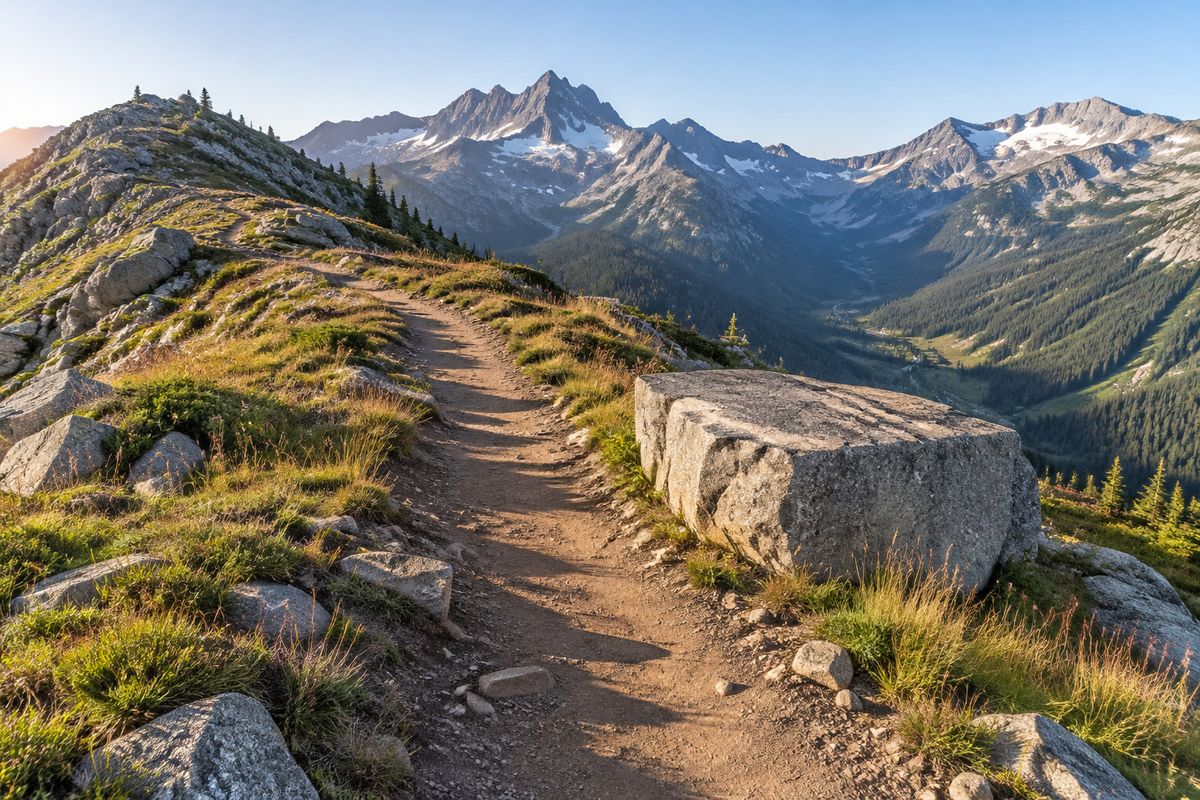
An outdoor photograph of a narrow dirt hiking trail running along a high mountain ridge, a flat-topped gray granite boulder at the right edge of the trail in the foreground, alpine grass and scattered stones on both sides, jagged peaks and a deep green valley in the distance under a clear pale blue sky. Low morning sun from the left casting long shadows across the trail. Eye-level shot at standing height, 35mm lens. Photoreal outdoor lifestyle photography, no people, no text.
- 2 · Backpack
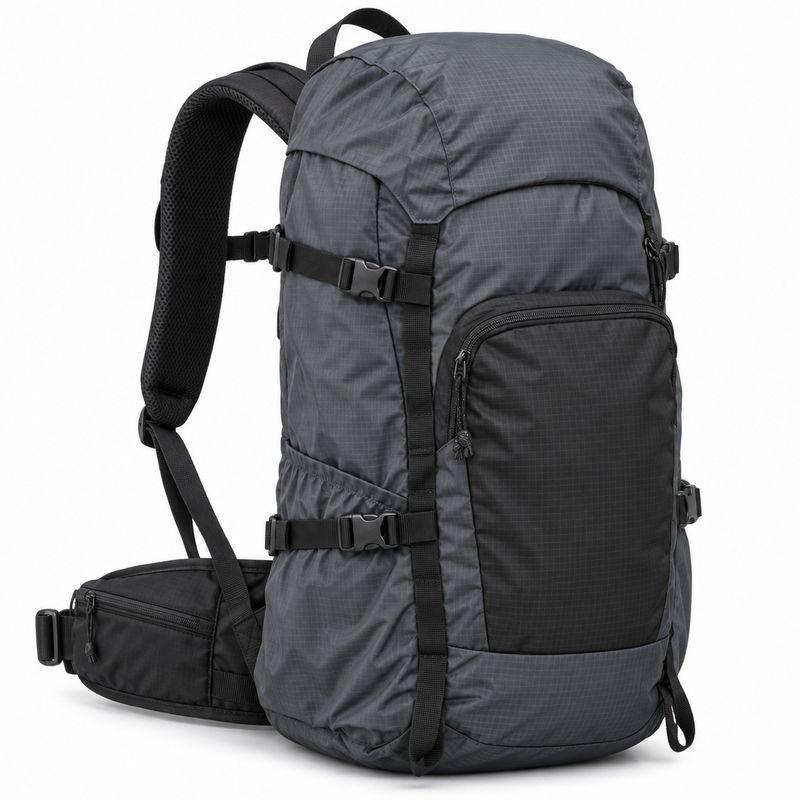
An e-commerce packshot of a 30-liter hiking backpack in slate gray ripstop nylon with black webbing shoulder straps, a black zippered front pocket, black compression straps on the sides and a black padded hip belt, standing upright in three-quarter view on a seamless white background. Soft even studio lighting, a faint contact shadow, crisp fabric detail. Photoreal product photography, no logos, no text.
- 3 · Swatch
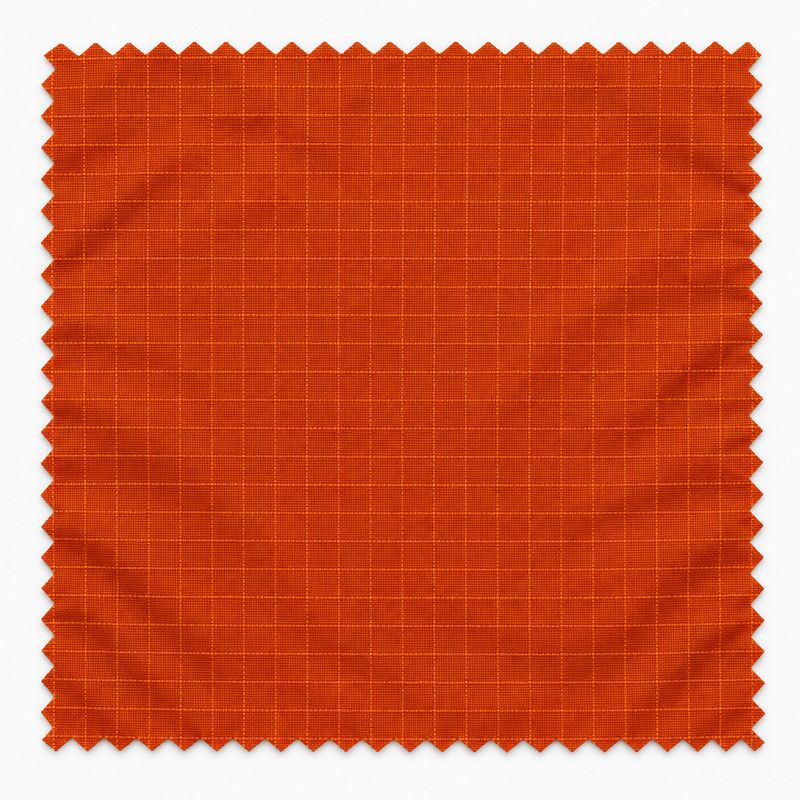
A product photograph of a single square fabric swatch of burnt orange ripstop nylon lying flat on a plain white surface, photographed straight down, the fine ripstop grid visible across the fabric, even soft daylight, the swatch filling the center of the frame. Photoreal material photography, no text, no other objects.


import { createClient } from '@runware/sdk'

const client = await createClient({ apiKey: process.env.RUNWARE_API_KEY })
await client.connect()

const [result] = await client.run({
  model: 'openai:gpt-image@2.6-flare',
  positivePrompt: 'Image 1 is the mountain trail photo to edit, image 2 is a hiking backpack and image 3 is a fabric swatch. Place the backpack from image 2 standing upright on the flat granite boulder at the right edge of the trail in image 1, angled slightly toward the camera, at the size of a real 30-liter pack in this scene. Make its slate gray fabric the burnt orange of the swatch in image 3, keeping its black shoulder straps, its black front pocket, its black compression straps, its black hip belt and every other detail from image 2. Light it with the same low morning sun as the trail, with a matching shadow on the boulder. Keep the trail, the boulder, the grass, the mountains, the sky and the camera angle of image 1 exactly as they are.',
  inputs: {
    referenceImages: [
      'https://assets.runware.ai/guides/openai-gpt-image-2-6-flare/editing-images/source-trail.jpg',
      'https://assets.runware.ai/guides/openai-gpt-image-2-6-flare/editing-images/ref-backpack.jpg',
      'https://assets.runware.ai/guides/openai-gpt-image-2-6-flare/editing-images/ref-swatch.jpg'
    ]
  },
  width: 1536,
  height: 1024
})
import asyncio
import os
from runware import Runware
async def main():
async with Runware(api_key=os.environ["RUNWARE_API_KEY"]) as client:
results = await client.run({
"model": "openai:gpt-image@2.6-flare",
"positivePrompt": "Image 1 is the mountain trail photo to edit, image 2 is a hiking backpack and image 3 is a fabric swatch. Place the backpack from image 2 standing upright on the flat granite boulder at the right edge of the trail in image 1, angled slightly toward the camera, at the size of a real 30-liter pack in this scene. Make its slate gray fabric the burnt orange of the swatch in image 3, keeping its black shoulder straps, its black front pocket, its black compression straps, its black hip belt and every other detail from image 2. Light it with the same low morning sun as the trail, with a matching shadow on the boulder. Keep the trail, the boulder, the grass, the mountains, the sky and the camera angle of image 1 exactly as they are.",
"inputs": {
"referenceImages": [
"https://assets.runware.ai/guides/openai-gpt-image-2-6-flare/editing-images/source-trail.jpg",
"https://assets.runware.ai/guides/openai-gpt-image-2-6-flare/editing-images/ref-backpack.jpg",
"https://assets.runware.ai/guides/openai-gpt-image-2-6-flare/editing-images/ref-swatch.jpg"
]
},
"width": 1536,
"height": 1024
})
asyncio.run(main())curl https://api.runware.ai/v1 \
-H "Authorization: Bearer $RUNWARE_API_KEY" \
-H "Content-Type: application/json" \
-d '[
{
  "taskType": "imageInference",
  "taskUUID": "2f9b6d14-8a3e-4c71-b5d0-7e1a4c8f3b29",
  "model": "openai:gpt-image@2.6-flare",
  "positivePrompt": "Image 1 is the mountain trail photo to edit, image 2 is a hiking backpack and image 3 is a fabric swatch. Place the backpack from image 2 standing upright on the flat granite boulder at the right edge of the trail in image 1, angled slightly toward the camera, at the size of a real 30-liter pack in this scene. Make its slate gray fabric the burnt orange of the swatch in image 3, keeping its black shoulder straps, its black front pocket, its black compression straps, its black hip belt and every other detail from image 2. Light it with the same low morning sun as the trail, with a matching shadow on the boulder. Keep the trail, the boulder, the grass, the mountains, the sky and the camera angle of image 1 exactly as they are.",
  "inputs": {
    "referenceImages": [
      "https://assets.runware.ai/guides/openai-gpt-image-2-6-flare/editing-images/source-trail.jpg",
      "https://assets.runware.ai/guides/openai-gpt-image-2-6-flare/editing-images/ref-backpack.jpg",
      "https://assets.runware.ai/guides/openai-gpt-image-2-6-flare/editing-images/ref-swatch.jpg"
    ]
  },
  "width": 1536,
  "height": 1024
}
]'runware run openai:gpt-image@2.6-flare \
positivePrompt="Image 1 is the mountain trail photo to edit, image 2 is a hiking backpack and image 3 is a fabric swatch. Place the backpack from image 2 standing upright on the flat granite boulder at the right edge of the trail in image 1, angled slightly toward the camera, at the size of a real 30-liter pack in this scene. Make its slate gray fabric the burnt orange of the swatch in image 3, keeping its black shoulder straps, its black front pocket, its black compression straps, its black hip belt and every other detail from image 2. Light it with the same low morning sun as the trail, with a matching shadow on the boulder. Keep the trail, the boulder, the grass, the mountains, the sky and the camera angle of image 1 exactly as they are." \
inputs.referenceImages.0=https://assets.runware.ai/guides/openai-gpt-image-2-6-flare/editing-images/source-trail.jpg \
inputs.referenceImages.1=https://assets.runware.ai/guides/openai-gpt-image-2-6-flare/editing-images/ref-backpack.jpg \
inputs.referenceImages.2=https://assets.runware.ai/guides/openai-gpt-image-2-6-flare/editing-images/ref-swatch.jpg \
width=1536 \
height=1024{
"taskType": "imageInference",
"taskUUID": "2f9b6d14-8a3e-4c71-b5d0-7e1a4c8f3b29",
"model": "openai:gpt-image@2.6-flare",
"positivePrompt": "Image 1 is the mountain trail photo to edit, image 2 is a hiking backpack and image 3 is a fabric swatch. Place the backpack from image 2 standing upright on the flat granite boulder at the right edge of the trail in image 1, angled slightly toward the camera, at the size of a real 30-liter pack in this scene. Make its slate gray fabric the burnt orange of the swatch in image 3, keeping its black shoulder straps, its black front pocket, its black compression straps, its black hip belt and every other detail from image 2. Light it with the same low morning sun as the trail, with a matching shadow on the boulder. Keep the trail, the boulder, the grass, the mountains, the sky and the camera angle of image 1 exactly as they are.",
"inputs": {
"referenceImages": [
"https://assets.runware.ai/guides/openai-gpt-image-2-6-flare/editing-images/source-trail.jpg",
"https://assets.runware.ai/guides/openai-gpt-image-2-6-flare/editing-images/ref-backpack.jpg",
"https://assets.runware.ai/guides/openai-gpt-image-2-6-flare/editing-images/ref-swatch.jpg"
]
},
"width": 1536,
"height": 1024
}Response
[
  {
    "taskType": "imageInference",
    "taskUUID": "2f9b6d14-8a3e-4c71-b5d0-7e1a4c8f3b29",
    "imageUUID": "a6e3c870-1d5f-4b92-8e47-0c9d2f6b5a13",
    "imageURL": "https://im.runware.ai/image/os/a14d18/ws/2/ii/a6e3c870-1d5f-4b92-8e47-0c9d2f6b5a13.jpg"
  }
]
The prompt opens with a roll call: one clause per image, giving its number and what it is. Every later sentence refers to an image by that number, so there is no question about which picture holds the backpack and which holds the color.
Each reference gets one job. Image 2 brings the backpack's shape and hardware and image 3 only its color, so the instruction says which details come from where. The color is also named in words, with the word giving the hue and the swatch the exact shade.
The last two sentences belong to image 1. A product placed into a scene has to take the scene's light, so the prompt asks for the low morning sun and a shadow on the boulder, then keeps the rest of image 1 as it is. Put the image you are editing first in every multi-reference request: it is also the image inputs.maskImage and inputs.markupImage apply to.
Tips
-
Name what changes, then what stays. The keep list is half the instruction, and on a listing photo it is the half that keeps the apartment true.
-
Give every new piece a material and a place. Anchor the place to the room itself or to a piece named earlier in the instruction.
-
Say what fills the gap. When you remove something, name what was behind it.
-
Retouch once, then branch. Clean up the master first and start every variant from it.
-
Keep the footprint when you swap. Same place and same size, so nothing around the new piece has to move.
-
Put the image being edited first. Then open the prompt with one clause per reference saying what each one is.
-
Send the source's dimensions for anything that has to line up with it. Leave them out and the model picks the size.
-
Try a lower thinking level for a focused edit. OpenAI suggests lower levels for changes like a background or a sign, and the quality and thinking level guide covers the trade.