LTX-2.5 Pro

LTX-2.5 Pro is the higher-capability model in the LTX 2.5 video family, built for production-quality multimodal video creation and transformation. It supports text-to-video, image-to-video, and audio-to-video workflows together with retake, extension, and reframing operations, pairing synchronized audio generation with higher-resolution output and longer-form clip control. It is well suited to commercial video production, concept films, storyboards, speaking-character shots, and other workflows that need stronger quality, broader modality support, and more flexible post-generation iteration than the Fast tier.
First and last frame
How to animate images with LTX-2.5 Pro using inputs.frameImages: turning a still into motion, directing the ending with a last frame, and building clean loops.
Introduction
Text-to-video starts from a description. Image-to-video starts from a picture you already have. With inputs.frameImages you hand LTX-2.5 Pro a first frame, and it animates outward from that exact image. Add a second frame and you also fix where the clip ends, so the model builds the motion that carries the shot from one image to the other.
Her dark waves stir gently in a soft breeze, she blinks slowly and turns her head a few degrees toward the camera with a faint, natural smile. Subtle and alive, nothing exaggerated. Photoreal. Sound: a quiet studio room tone and the faint rustle of hair, no music.
- First frame
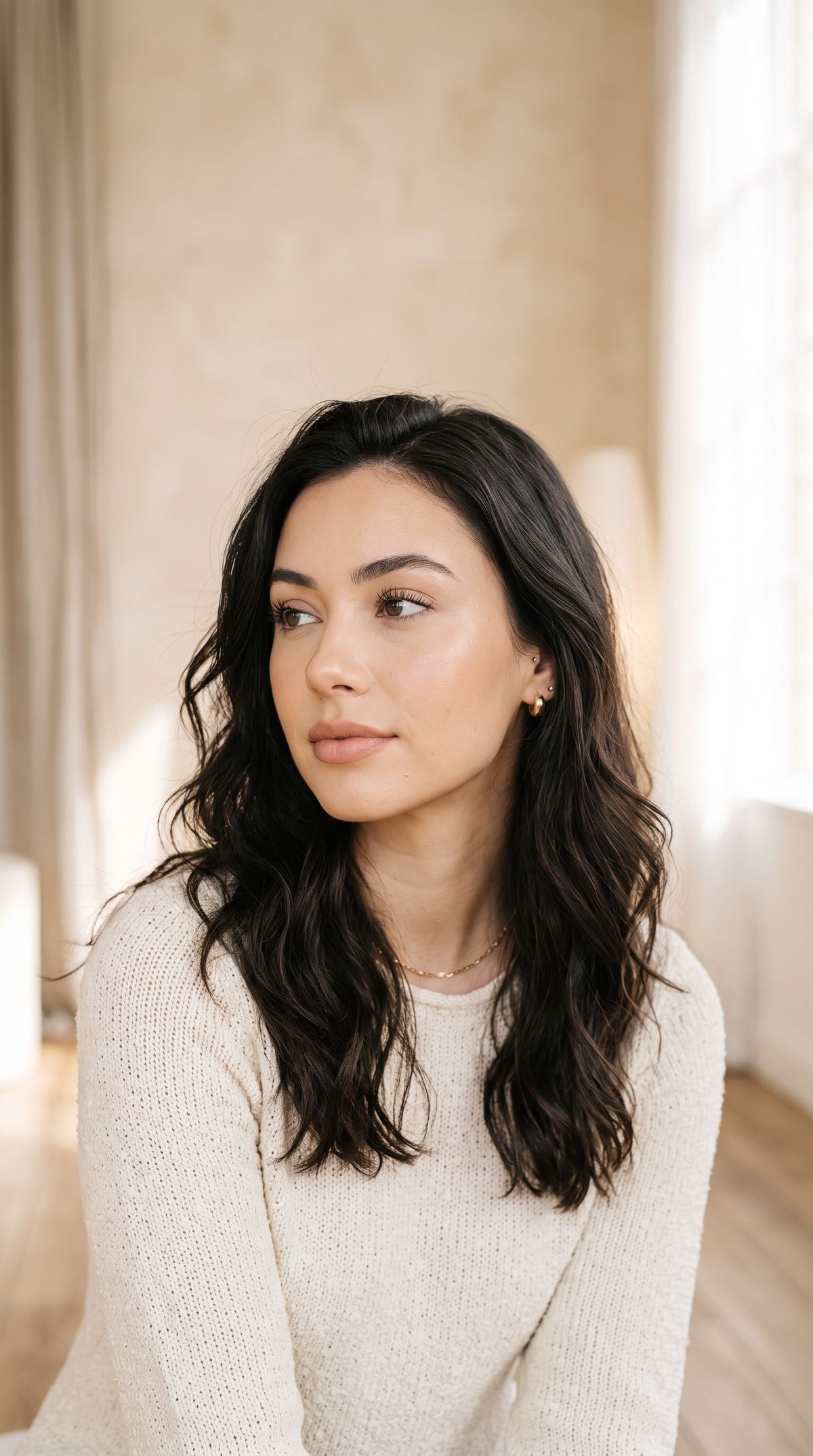
A fashion beauty portrait of a young woman with soft natural makeup and loose dark waves, looking just off camera with a calm expression, in a bright airy studio with a pale warm backdrop and soft daylight. Photoreal editorial portrait, shallow depth of field, no text.

The portrait clip began as the still beneath it. The model kept her exact likeness as the opening frame and added only what moves, a soft breeze in her hair, a slow blink, a small turn toward the camera. This guide covers the request, animating a still from one frame, directing the ending with two frames, and building a clean loop. Generating a clip from a prompt alone is the prompting guide.
The request
Image-to-video is the same call with a frameImages array in inputs.
import { createClient } from '@runware/sdk'

const client = await createClient({ apiKey: process.env.RUNWARE_API_KEY })
await client.connect()

const [result] = await client.run({
  model: 'lightricks:ltx@2.5-pro',
  positivePrompt: 'Her dark waves stir gently in a soft breeze, she blinks slowly and turns her head a few degrees toward the camera with a faint natural smile. Subtle and alive, nothing exaggerated. Sound: a quiet studio room tone and the faint rustle of hair, no music.',
  inputs: {
    frameImages: [
      {
        image: 'https://example.com/portrait.jpg',
        frame: 'first'
      }
    ]
  },
  width: 1080,
  height: 1920,
  duration: 6,
  settings: {
    audio: true
  }
})
import asyncio
import os
from runware import Runware
async def main():
async with Runware(api_key=os.environ["RUNWARE_API_KEY"]) as client:
results = await client.run({
"model": "lightricks:ltx@2.5-pro",
"positivePrompt": "Her dark waves stir gently in a soft breeze, she blinks slowly and turns her head a few degrees toward the camera with a faint natural smile. Subtle and alive, nothing exaggerated. Sound: a quiet studio room tone and the faint rustle of hair, no music.",
"inputs": {
"frameImages": [
{
"image": "https://example.com/portrait.jpg",
"frame": "first"
}
]
},
"width": 1080,
"height": 1920,
"duration": 6,
"settings": {
"audio": True
}
})
asyncio.run(main())curl https://api.runware.ai/v1 \
-H "Authorization: Bearer $RUNWARE_API_KEY" \
-H "Content-Type: application/json" \
-d '[
{
  "taskType": "videoInference",
  "taskUUID": "e6c2d5f4-8a9b-4a23-e4d5-f60718293b4c",
  "model": "lightricks:ltx@2.5-pro",
  "positivePrompt": "Her dark waves stir gently in a soft breeze, she blinks slowly and turns her head a few degrees toward the camera with a faint natural smile. Subtle and alive, nothing exaggerated. Sound: a quiet studio room tone and the faint rustle of hair, no music.",
  "inputs": {
    "frameImages": [
      {
        "image": "https://example.com/portrait.jpg",
        "frame": "first"
      }
    ]
  },
  "width": 1080,
  "height": 1920,
  "duration": 6,
  "settings": {
    "audio": true
  }
}
]'runware run lightricks:ltx@2.5-pro \
positivePrompt="Her dark waves stir gently in a soft breeze, she blinks slowly and turns her head a few degrees toward the camera with a faint natural smile. Subtle and alive, nothing exaggerated. Sound: a quiet studio room tone and the faint rustle of hair, no music." \
inputs.frameImages.0.image=https://example.com/portrait.jpg \
inputs.frameImages.0.frame=first \
width=1080 \
height=1920 \
duration=6 \
settings.audio=true{
"taskType": "videoInference",
"taskUUID": "e6c2d5f4-8a9b-4a23-e4d5-f60718293b4c",
"model": "lightricks:ltx@2.5-pro",
"positivePrompt": "Her dark waves stir gently in a soft breeze, she blinks slowly and turns her head a few degrees toward the camera with a faint natural smile. Subtle and alive, nothing exaggerated. Sound: a quiet studio room tone and the faint rustle of hair, no music.",
"inputs": {
"frameImages": [
{
"image": "https://example.com/portrait.jpg",
"frame": "first"
}
]
},
"width": 1080,
"height": 1920,
"duration": 6,
"settings": {
"audio": true
}
}Response
[
  {
    "taskType": "videoInference",
    "taskUUID": "e6c2d5f4-8a9b-4a23-e4d5-f60718293b4c",
    "videoUUID": "2c3d4e5f-6a7b-8901-cdef-123456789012",
    "videoURL": "https://vm.runware.ai/video/os/a14d18/ws/2/vi/2c3d4e5f-6a7b-8901-cdef-123456789012.mp4"
  }
]inputs.frameImagestakes one or two frames. Each is an object with animage(a URL, UUID, or data URI) and aframeposition.frameis"first"for the opening frame and"last"for the closing one. The index forms0and-1work the same way.- The prompt still describes the motion between the frames. The image sets the look, and the prompt says what happens.
frameImagescannot be combined with the audio-driven path (inputs.audio), but you can still generate a soundtrack withsettings.audio.
Animating a still
With one "first" frame, the model treats your image as the opening frame and moves outward from it. Keep the motion subtle, since a still holds a lot of fixed detail and a big move fights it. The landscape below stays exactly itself, and only what would move in real life comes to life.
From the still lake, the low mist drifts slowly across the water, the mirrored surface ripples and shimmers with the dawn light, and two birds glide low across the frame from the left. The camera holds nearly still with the faintest drift inward. Calm, cinematic, photoreal. Sound: soft lapping water, a gentle mountain breeze, distant birdsong, no music.
- First frame
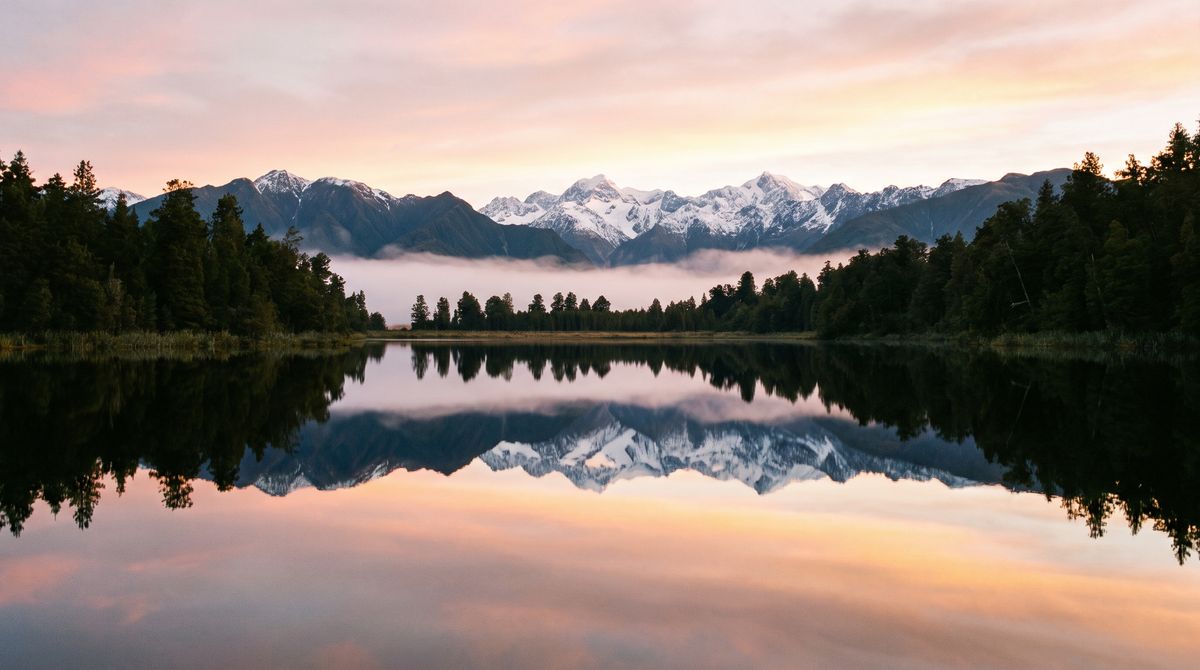
A serene alpine lake at dawn, perfectly still water mirroring snow-capped peaks and a low bank of mist, dark pines along the shore, soft pink and gold light in the sky. Wide cinematic landscape photograph, photoreal, calm, no text.

Ask for the motion the scene already implies: drifting mist, rippling water, a bird crossing the frame. The model animates what a scene like this naturally does and holds the fixed geometry steady, so the shot keeps its composition. Ask for something the frame cannot support, a person walking in or a big camera swing, and the fixed detail smears as the model invents what the photo never showed.
Directing the ending
Add a "last" frame and you pin both ends of the clip. The model then generates the motion that carries the first image to the last one, which is how you get a controlled reveal or transformation instead of a guess. Here the same sneaker is given a white first frame and a recolored last frame, and the clip morphs cleanly between them.
The white sneaker transforms smoothly into the bold teal-and-orange colorway across the shot, the color washing over the upper as the orange accents brighten on the laces and heel, the shoe holding its exact position on the pedestal and the camera locked. Clean product motion. Sound: a soft whoosh as the color sweeps in, a low studio room tone, no music.
- First frame
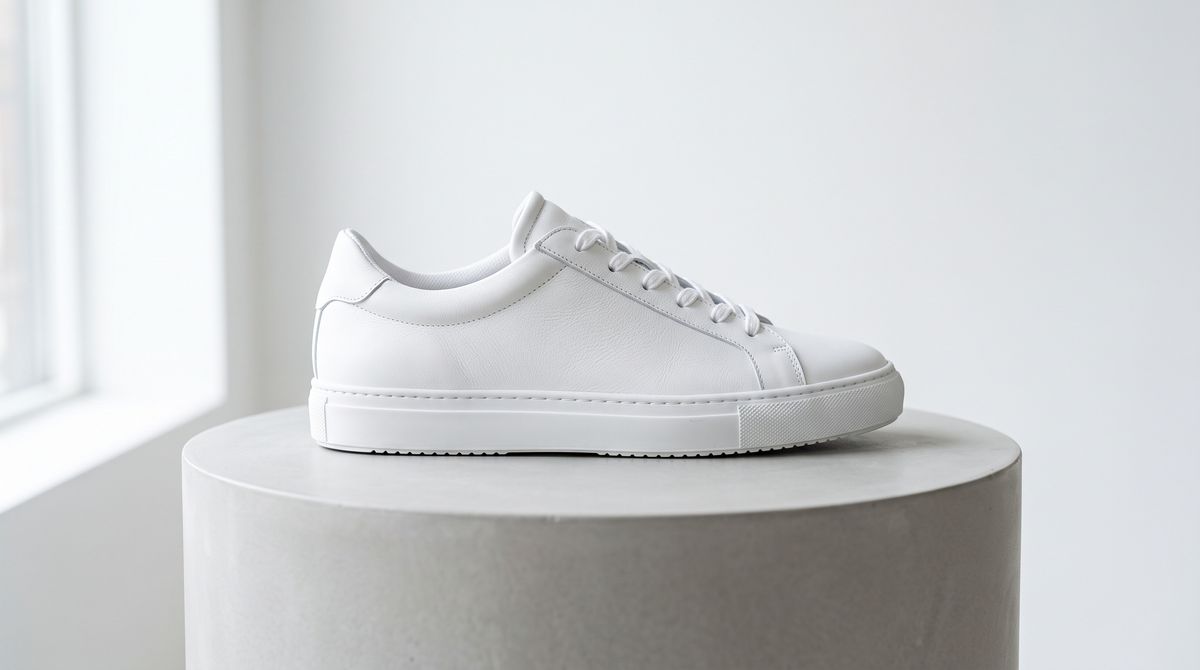
A single clean white leather low-top sneaker centered on a smooth pale grey studio pedestal, soft even daylight from the left picking out the texture, minimalist bright background. Photoreal product photography, crisp detail, no text, no branding.
- Last frame
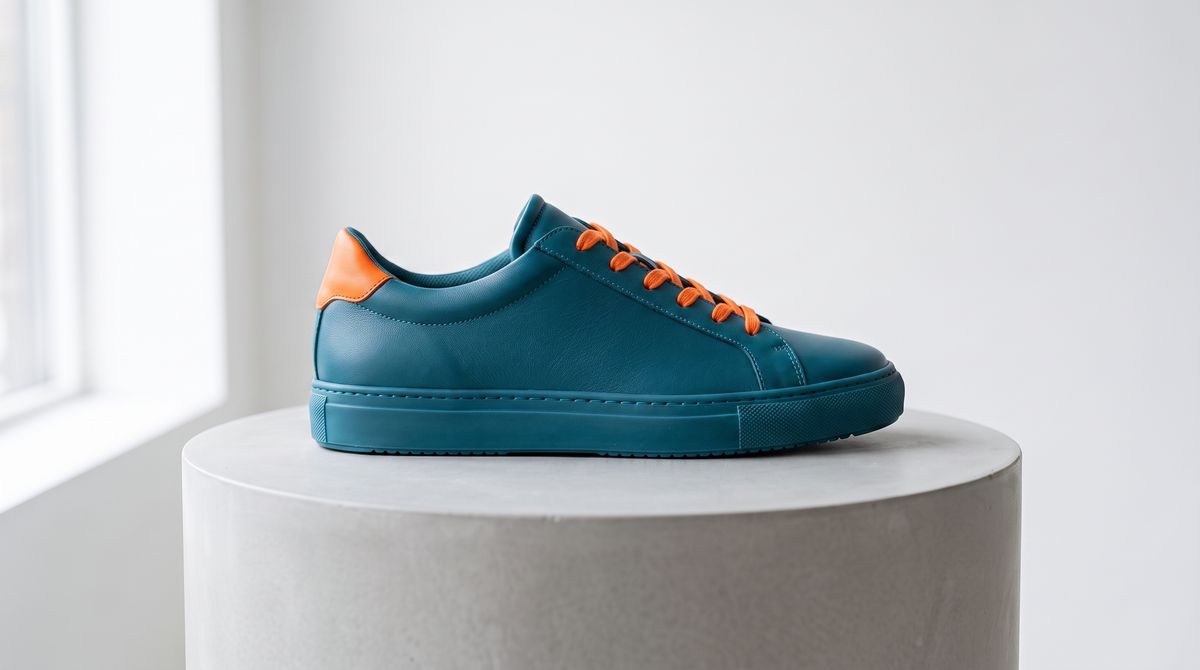
The same white sneaker recolored into a bold teal upper with bright orange accents on the laces and heel counter, keeping the exact same shoe shape and panels, the same pale grey pedestal, the same soft lighting, and the same centered framing. Photoreal product photography, crisp detail, no text, no branding.


Two frames work best when they share a frame and setup, the same subject, position, and light, differing only in the thing you want to change. The closer the two images are in everything but the target, the cleaner the interpolation. When the last frame is unrelated to the first, the model has to invent a bridge and the motion turns mushy. It is the pattern behind a product reveal, a day-to-dusk relight, or a before-and-after that has to hit an exact end state.
Looping cleanly
For a clean loop, pass the same image as both the first and last frame. The clip returns to precisely where it started, so it plays end to end with no visible cut, which is what a website hero or a background loop needs.
The tall white wind turbine turns its three long blades slowly and smoothly against the bright sky, unhurried and graceful, the clouds drifting gently behind it, the shot beginning and ending with the blades in the same position so it loops with no visible cut. Clean, bright, and unbroken. Sound: a soft steady wind, the faint low whoosh of the turning blades, and open-air ambience.
Keep the described motion cyclical so the clip can return home: turning blades, drifting smoke, a gentle sway. A one-way action, or a subject with distinct parts that can't complete a full turn in the clip, cannot resolve back to the opening image and the loop will jump.
Tips
-
Pass one frame to animate a still. A single
"first"frame keeps your image as the opening frame and moves out from it. -
Keep single-still motion subtle. Name small physical movements. A big move fights the fixed detail in the photo and smears it.
-
Pass two frames to fix the ending. A
"first"and a"last"frame let the model build the exact motion between them, for a controlled reveal or transformation. -
Match everything but the change across the pair. Same subject, framing, and light in both frames, differing only in the target, gives the cleanest interpolation.
-
Loop by repeating the image. The same picture as first and last frame returns the clip to its start for a clean loop, paired with cyclical motion.
-
Generate sound with
settings.audio. Image-to-video cannot take an input audio track, but it can still score itself when you turn onsettings.audio.