LTX-2.5 Pro

LTX-2.5 Pro is the higher-capability model in the LTX 2.5 video family, built for production-quality multimodal video creation and transformation. It supports text-to-video, image-to-video, and audio-to-video workflows together with retake, extension, and reframing operations, pairing synchronized audio generation with higher-resolution output and longer-form clip control. It is well suited to commercial video production, concept films, storyboards, speaking-character shots, and other workflows that need stronger quality, broader modality support, and more flexible post-generation iteration than the Fast tier.
Audio-driven characters
How to drive a lip-synced performance with LTX-2.5 Pro: pairing inputs.audio with a reference image, matching voice to subject, and the length, resolution, and framing rules.
Introduction
The native audio guide has LTX-2.5 Pro write a voice for you. This path runs the other direction: you bring the audio, a voiceover you recorded or a song, and LTX drives a subject to perform it in lip-sync. Hand it one still of a person or character plus an audio track, and it animates the face to speak or sing the words exactly.
A confident young founder in a bright modern office speaks warmly to the camera, gesturing lightly with one hand, her expression natural and engaged. Her lips and expression stay in sync with the voice. Soft office daylight, a clean commercial grade, shallow depth of field.
- The founder
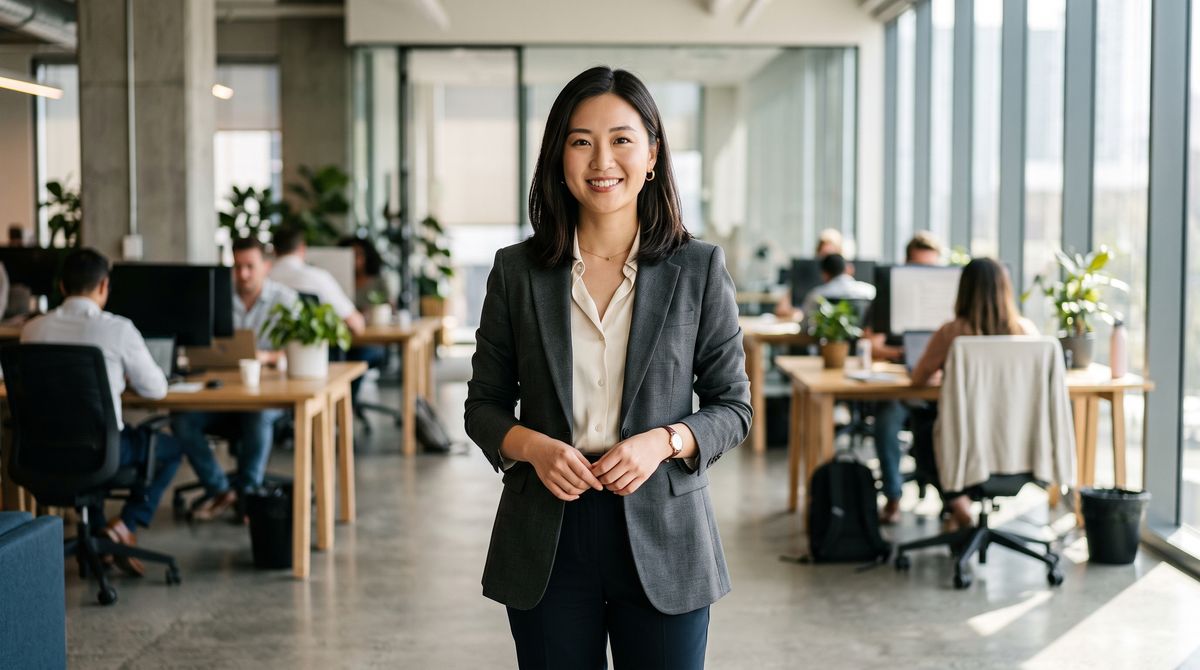
A confident young woman founder in a tailored blazer standing in a bright modern open-plan office with soft daylight and defocused desks behind her, looking at the camera with a warm composed expression. Photoreal editorial portrait, shallow depth of field, no text.
- Her voice0:00
Every launch, every product update, one script and one take. This is how our team ships now.

The founder above never said those words on camera. She came from the two references under the clip, a photo that fixes who she is and a voice track that supplies what she says. The image carries identity, the face, the wardrobe, and the setting, so a clean front-facing photo drives a cleaner performance than a busy or turned one. The audio carries the words and the timing, and the clip inherits its exact length, while the prompt directs the delivery and small motions without touching the words. This guide covers the request, framing for the platform, and driving non-human characters. To have the model generate the voice instead of supplying one, see the native audio guide.
The request
The call pairs inputs.audio with a single inputs.referenceImages entry. Both are required together.
import { createClient } from '@runware/sdk'

const client = await createClient({ apiKey: process.env.RUNWARE_API_KEY })
await client.connect()

const [result] = await client.run({
  model: 'lightricks:ltx@2.5-pro',
  positivePrompt: 'A confident young founder in a bright modern office speaks warmly to the camera, gesturing lightly, her expression natural and engaged, lips in sync with the voice. Soft office daylight, a clean commercial grade.',
  inputs: {
    referenceImages: [
      'https://example.com/founder.jpg'
    ],
    audio: 'https://example.com/voiceover.mp3'
  },
  width: 1920,
  height: 1080
})
import asyncio
import os
from runware import Runware
async def main():
async with Runware(api_key=os.environ["RUNWARE_API_KEY"]) as client:
results = await client.run({
"model": "lightricks:ltx@2.5-pro",
"positivePrompt": "A confident young founder in a bright modern office speaks warmly to the camera, gesturing lightly, her expression natural and engaged, lips in sync with the voice. Soft office daylight, a clean commercial grade.",
"inputs": {
"referenceImages": [
"https://example.com/founder.jpg"
],
"audio": "https://example.com/voiceover.mp3"
},
"width": 1920,
"height": 1080
})
asyncio.run(main())curl https://api.runware.ai/v1 \
-H "Authorization: Bearer $RUNWARE_API_KEY" \
-H "Content-Type: application/json" \
-d '[
{
  "taskType": "videoInference",
  "taskUUID": "f7d3e6a5-9b0c-4b34-f5e6-071829304c5d",
  "model": "lightricks:ltx@2.5-pro",
  "positivePrompt": "A confident young founder in a bright modern office speaks warmly to the camera, gesturing lightly, her expression natural and engaged, lips in sync with the voice. Soft office daylight, a clean commercial grade.",
  "inputs": {
    "referenceImages": [
      "https://example.com/founder.jpg"
    ],
    "audio": "https://example.com/voiceover.mp3"
  },
  "width": 1920,
  "height": 1080
}
]'runware run lightricks:ltx@2.5-pro \
positivePrompt="A confident young founder in a bright modern office speaks warmly to the camera, gesturing lightly, her expression natural and engaged, lips in sync with the voice. Soft office daylight, a clean commercial grade." \
inputs.referenceImages.0=https://example.com/founder.jpg \
inputs.audio=https://example.com/voiceover.mp3 \
width=1920 \
height=1080{
"taskType": "videoInference",
"taskUUID": "f7d3e6a5-9b0c-4b34-f5e6-071829304c5d",
"model": "lightricks:ltx@2.5-pro",
"positivePrompt": "A confident young founder in a bright modern office speaks warmly to the camera, gesturing lightly, her expression natural and engaged, lips in sync with the voice. Soft office daylight, a clean commercial grade.",
"inputs": {
"referenceImages": [
"https://example.com/founder.jpg"
],
"audio": "https://example.com/voiceover.mp3"
},
"width": 1920,
"height": 1080
}Response
[
  {
    "taskType": "videoInference",
    "taskUUID": "f7d3e6a5-9b0c-4b34-f5e6-071829304c5d",
    "videoUUID": "3d4e5f6a-7b8c-9012-defa-234567890123",
    "videoURL": "https://vm.runware.ai/video/os/a14d18/ws/2/vi/3d4e5f6a-7b8c-9012-defa-234567890123.mp4"
  }
]inputs.audiois the driving track, a URL or UUID, andinputs.referenceImagesis the single subject image. Neither works without the other.- The clip runs as long as the audio, from 2 to 20 seconds, so there is no
durationto set. - Output is 1080p only, 1920 × 1080 or 1080 × 1920. Match the pair to the reference image's orientation.
- The camera holds.
settings.cameraMovementandinputs.frameImagesdo not apply on this path. - The audio can be speech or a song. The prompt describes the look and the performance, not the words, since the words come from the track.
Framing for the platform
Match the resolution pair to where the clip runs. A 1080 × 1920 portrait reads as native talking-head content on stories and reels, so give the model a vertical reference photo and it frames the performance for the tall crop.
A young man sits in a cozy softly lit room talking directly to the camera like a friend, relaxed and expressive, with small natural hand movements and easy smiles. His lips and expression match the voice exactly. Warm casual lighting, a natural social-video look.
- The creator
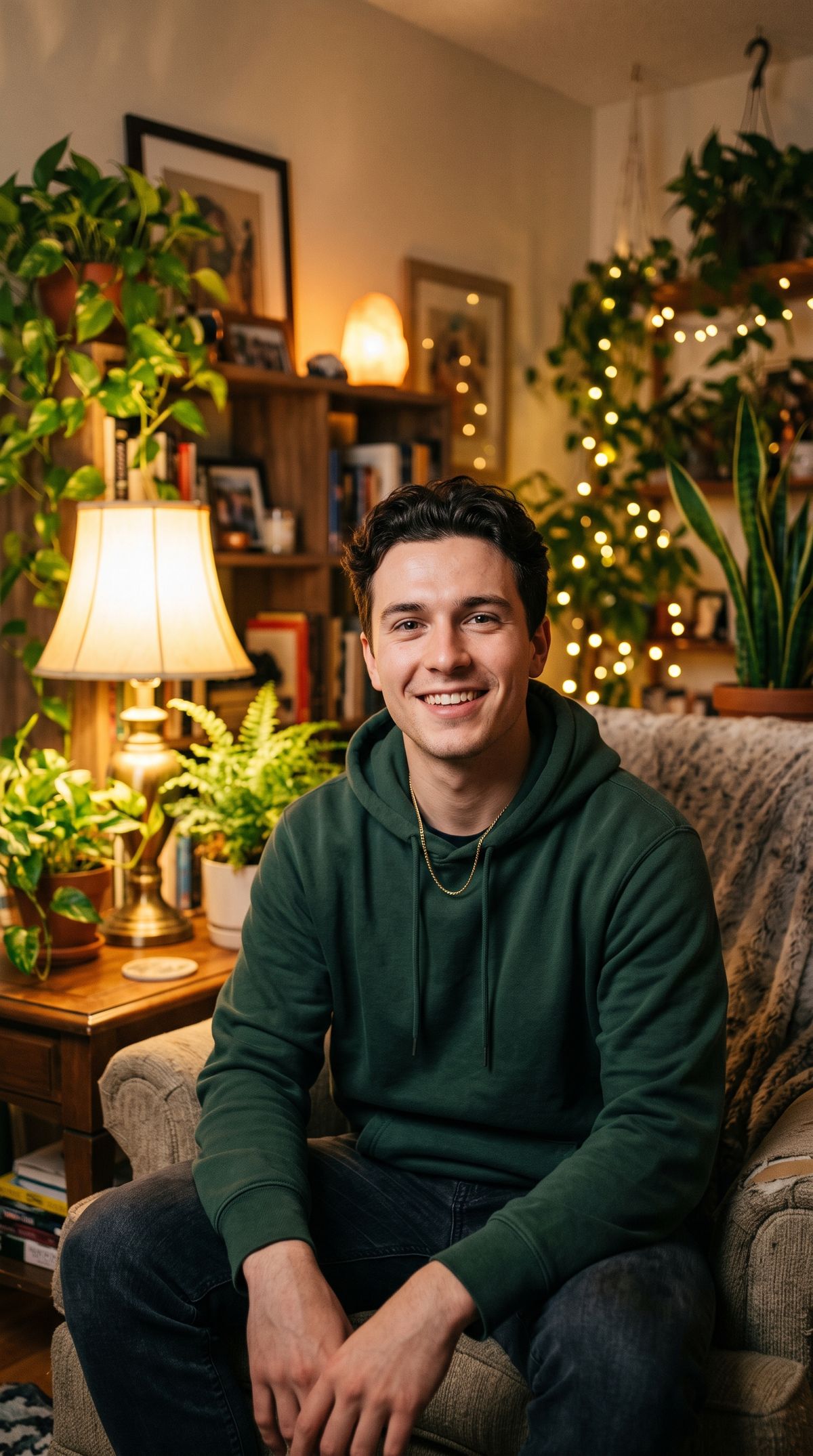
A friendly young man in a casual hoodie sitting in a cozy softly lit room with warm lamps and plants behind him, looking at the camera with an easy smile, framed for vertical social video. Photoreal, natural, shallow depth of field, no text.
- His voice0:00
Okay, I have tried a lot of these, and honestly, this is the only one I kept using. Let me show you why.

This is the shape of a creator testimonial or a UGC ad: one photo of the presenter, a script in the voice you want, and a vertical take that drops straight into a feed. Keep the reference photo framed the way the final clip should sit, since the model performs within the crop it is given rather than reframing a wide shot.
Driving any character
The reference does not have to be a real person. A stylized character, a mascot, or an illustrated avatar drives the same way, which turns a brand character into a spokesperson that can say anything.
A friendly rounded robot mascot stands in a clean bright studio and speaks cheerfully to the camera, its head tilting and its little arms gesturing. Its mouth and expression stay in sync with the voice. Soft even lighting, a polished 3D-animation look.
- The character
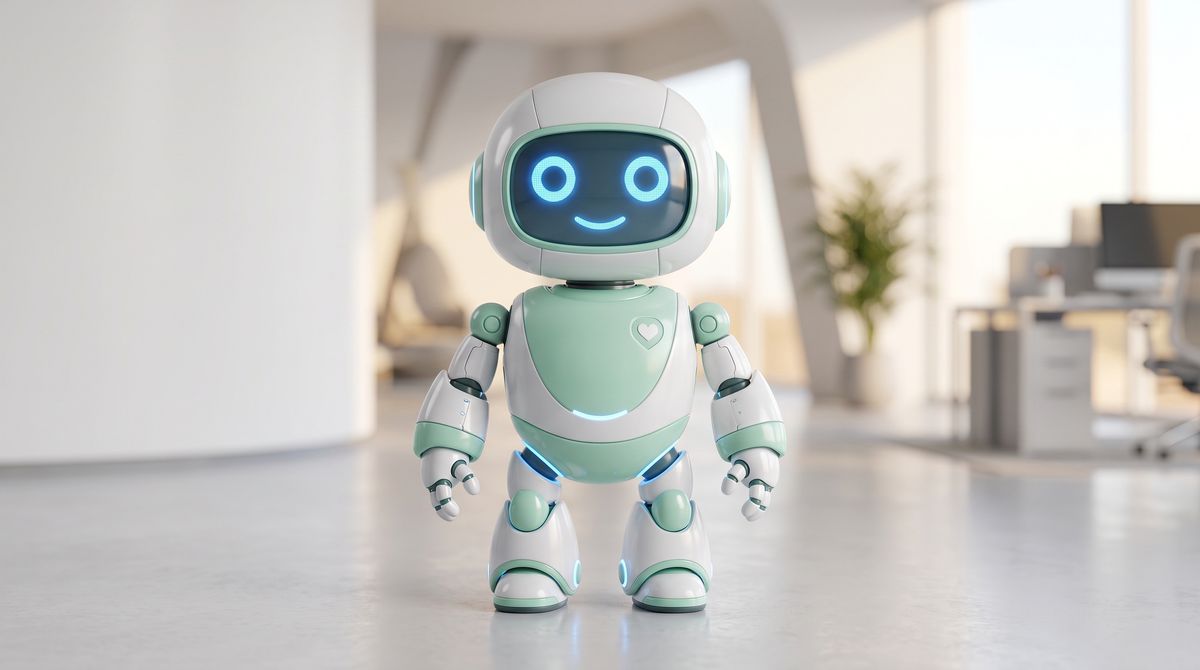
A friendly rounded robot mascot with a smooth white-and-mint body and large glowing blue eyes, standing in a clean bright studio and looking at the camera with a cheerful expression. Polished 3D character render, soft even lighting, no text, no branding.
- Its voice0:00
Hi there! I am Byte, your friendly helper. Tap the button below and I will get you set up in a few seconds.

Give the character a clear, front-facing mouth in the reference and the lip-sync has something to move. A mascot with a defined face reads well. One with no mouth or a fully abstract shape has nothing to animate. Beyond that the pattern is identical, so an onboarding helper or a branded character can deliver a fresh script whenever you swap the audio.
Driving a song
The track does not have to be speech. Feed a sung vocal and the model lip-syncs the mouth to the lyrics, so a still of a singer performs the song. The words and their timing come from the audio, the same as a voiceover.
A soulful young male singer at a vintage microphone sings into it with feeling, his mouth and expression moving in time with the vocal, small head movements and a gentle sway, warm amber stage light glowing behind him. His lips stay in sync with the singing. Photoreal, cinematic, shallow depth of field.
- The singer
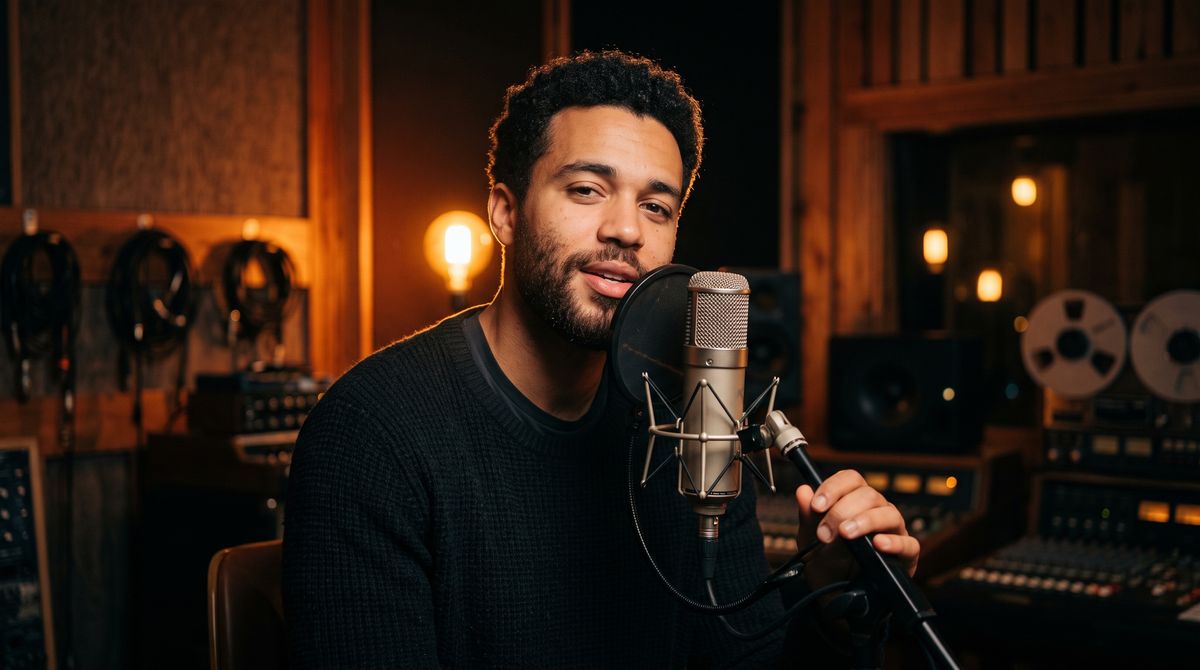
A soulful young male singer with a short beard at a vintage condenser microphone in a warm, moody studio, soft amber stage light glowing behind him, looking toward the camera with a relaxed expression and lips slightly parted. Photoreal cinematic portrait, shallow depth of field, no text.
- The song0:00
Every word I held so long, turning slowly into song.

Two things keep a sung take clean. Give the singer a clear front-facing mouth in the reference so the model has something to move, and feed a track with a distinct lead vocal rather than instrumental music, which has no words to follow. Because the audio path runs 2 to 20 seconds, a chorus or a hook fits where a full song would not, so trim the vocal to the section you want performed.
Tips
-
Pair audio with one reference image.
inputs.audioand a singleinputs.referenceImagesentry are both required, and neither runs alone. -
Let the audio set the length. The clip matches the track from 2 to 20 seconds, so there is no
durationfield on this path. -
Feed a clean, front-facing photo. Identity and framing come from the image, so a sharp, well-lit, forward-facing subject drives a cleaner lip-sync than a turned or busy one.
-
Match the resolution to the reference. Output is 1080p only, so pass 1920 × 1080 or 1080 × 1920 to match the photo's orientation and the target platform.
-
Keep the prompt off the words. Describe delivery and small motions, and let the track carry the dialogue, since the spoken words come from the audio, not the prompt.
-
Drive characters, not just people. A mascot or avatar with a clear front-facing mouth performs the same way, turning a brand character into a spokesperson.
-
Drive a song, not just speech. A sung vocal lip-syncs like a voiceover, so trim a chorus into the 2 to 20 second window and a singer performs it. Instrumental music has no words to sync.