Ideogram 4.5

Ideogram 4.5 is Ideogram's image generation and editing model, built for iterative work that keeps untouched regions intact across repeated edits. It generates images from text at 1K and 2K presets, and edits a source image using up to four more images as references, with an optional mask to limit where changes land. It suits product imagery, campaign variations, interior restyling, and pose changes guided by a skeleton reference.
Pose control
How to repose a model photo with Ideogram 4.5 using a pose skeleton reference and joint angles in the prompt, from one raised arm to a full lookbook from a single shot.
Introduction
A product page needs the same outfit in several poses, and a pose that was not shot on the day means booking the model and the studio again. Describing the pose in words gets close, but "arms raised" has a hundred versions, and none of them is guaranteed to be the one the art director drew.
Ideogram 4.5 takes a pose skeleton as a reference image. You pass the original photo as image 1 and a stick figure of the pose you want as image 2, and the model moves the body to match while keeping the person and the outfit. Every pose below comes from the same photo, each with its own skeleton.

Photorealistic e-commerce studio photograph of a woman in her late twenties with a dark high ponytail, wearing a fitted sage green sports bra, matching high-waisted sage green leggings and white training shoes, standing straight and facing the camera, arms relaxed at her sides, feet hip-width apart. Composition: she takes up only 60% of the image height. The top 30% of the image is completely empty light gray backdrop above her head, and the bottom 10% is empty studio floor below her feet. She takes up only the middle 30% of the image width, with empty backdrop filling the 35% on her left and the 35% on her right. Plain light gray seamless studio backdrop, soft even light.

Change only her arm pose to match the pose skeleton in image 2: both shoulders abducted 40 degrees and both elbows bent about 95 degrees inward, so her hands rest on her hips. Keep the same model, face, hair, outfit, lighting, camera framing and background.

Change only her arm pose to match the pose skeleton in image 2: both arms raised overhead in a wide V, both shoulders raised 150 degrees, elbows almost straight. Keep the same model, face, hair, outfit, lighting, camera framing and background.

Change only her arm pose to match the pose skeleton in image 2: her right arm raised in a wave, the right shoulder raised 145 degrees and the right elbow bent 20 degrees, palm facing the camera, and her left arm relaxed at her side. Keep the same model, face, hair, outfit, lighting, camera framing and background.

Change only her arm pose to match the pose skeleton in image 2: both upper arms raised out to the sides at shoulder height, both elbows bent 90 degrees with the fists pointing up, a double biceps pose. Keep the same model, face, hair, outfit, lighting, camera framing and background.

Change only her arm pose to match the pose skeleton in image 2: both arms raised out to the sides at 60 degrees from her body, elbows straight, palms facing forward. Keep the same model, face, hair, outfit, lighting, camera framing and background.

Change only her stance to match the pose skeleton in image 2: feet planted wide apart, both hips abducted 14 degrees, legs straight, arms relaxed slightly away from her sides. Keep the same model, face, hair, outfit, lighting, camera framing and background.

Change her pose to match the pose skeleton in image 2, a star jump landing: both arms raised 140 degrees in a wide V, legs spread wide with both hips abducted 18 degrees, both feet on the floor. Keep the same model, face, hair, outfit, lighting, camera framing and background.

Change only her arm pose to match the pose skeleton in image 2: both arms raised straight overhead, elbows slightly bent, hands clasped together above her head in an overhead stretch. Keep the same model, face, hair, outfit, lighting, camera framing and background.
Pick a skeleton to see the pose it produced, and go back to Original to compare. The ponytail and the seams of the leggings stay put while the limbs move.
This guide covers what a pose skeleton is and how to pass it, what the words in the prompt add, changing the stance and why every pose should start from the original.
The skeleton reference
A pose skeleton is a stick figure on a black background in the OpenPose convention, the format most pose tools read and write. It marks 18 keypoints (nose, eyes, ears, neck, shoulders, elbows, wrists, hips, knees and ankles) and joins them with limbs in fixed colors, so the model can tell a right forearm from a left shin by color alone.
Change only her arm pose to match the pose skeleton in image 2: her right arm raised in a wave, the right shoulder raised 145 degrees and the right elbow bent 20 degrees, palm facing the camera, and her left arm relaxed at her side. Keep the same model, face, hair, outfit, lighting, camera framing and background.
- Image 1
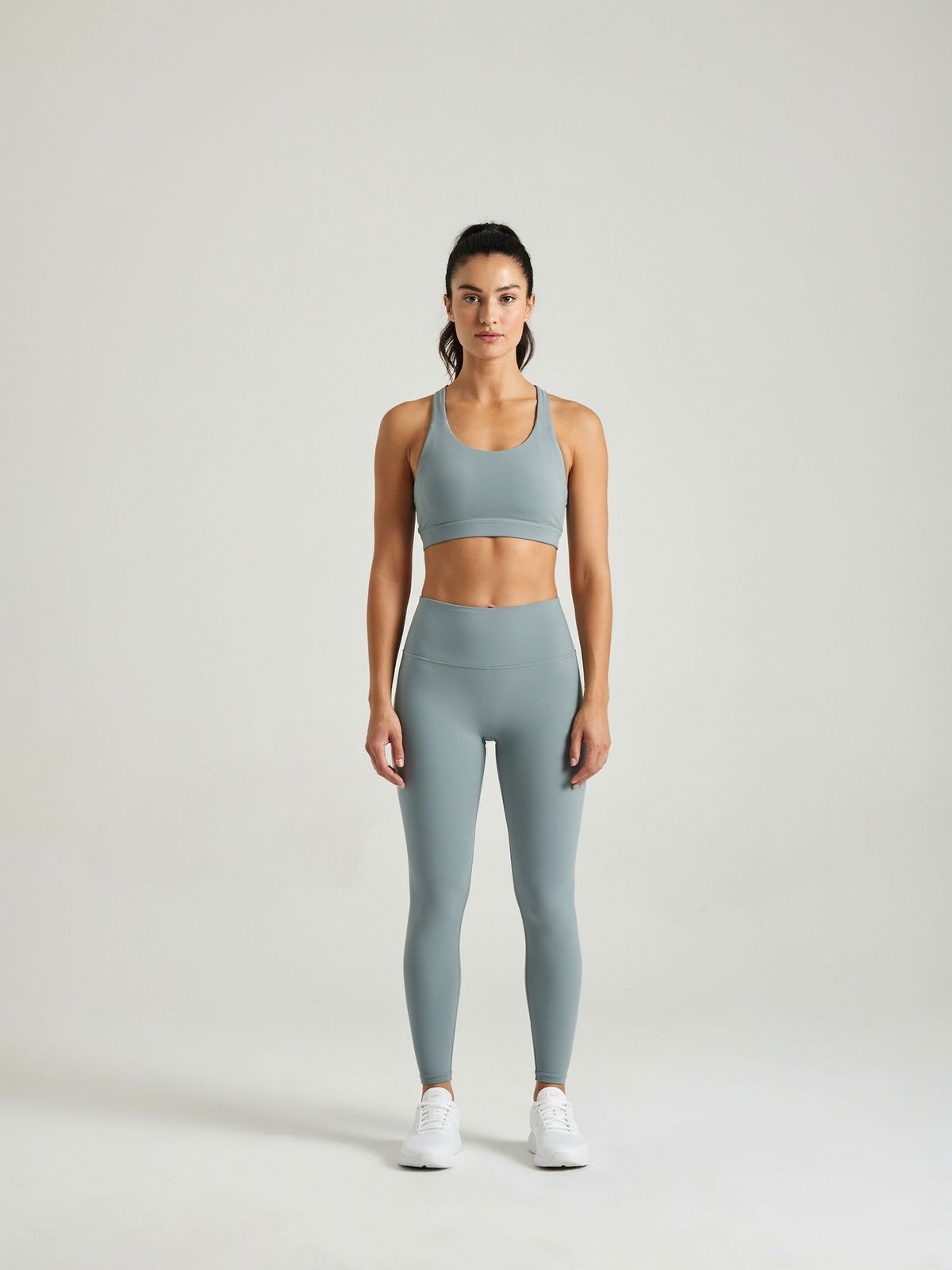
Photorealistic e-commerce studio photograph of a woman in her late twenties with a dark high ponytail, wearing a fitted sage green sports bra, matching high-waisted sage green leggings and white training shoes, standing straight and facing the camera, arms relaxed at her sides, feet hip-width apart. Composition: she takes up only 60% of the image height. The top 30% of the image is completely empty light gray backdrop above her head, and the bottom 10% is empty studio floor below her feet. She takes up only the middle 30% of the image width, with empty backdrop filling the 35% on her left and the 35% on her right. Plain light gray seamless studio backdrop, soft even light.
- Image 2
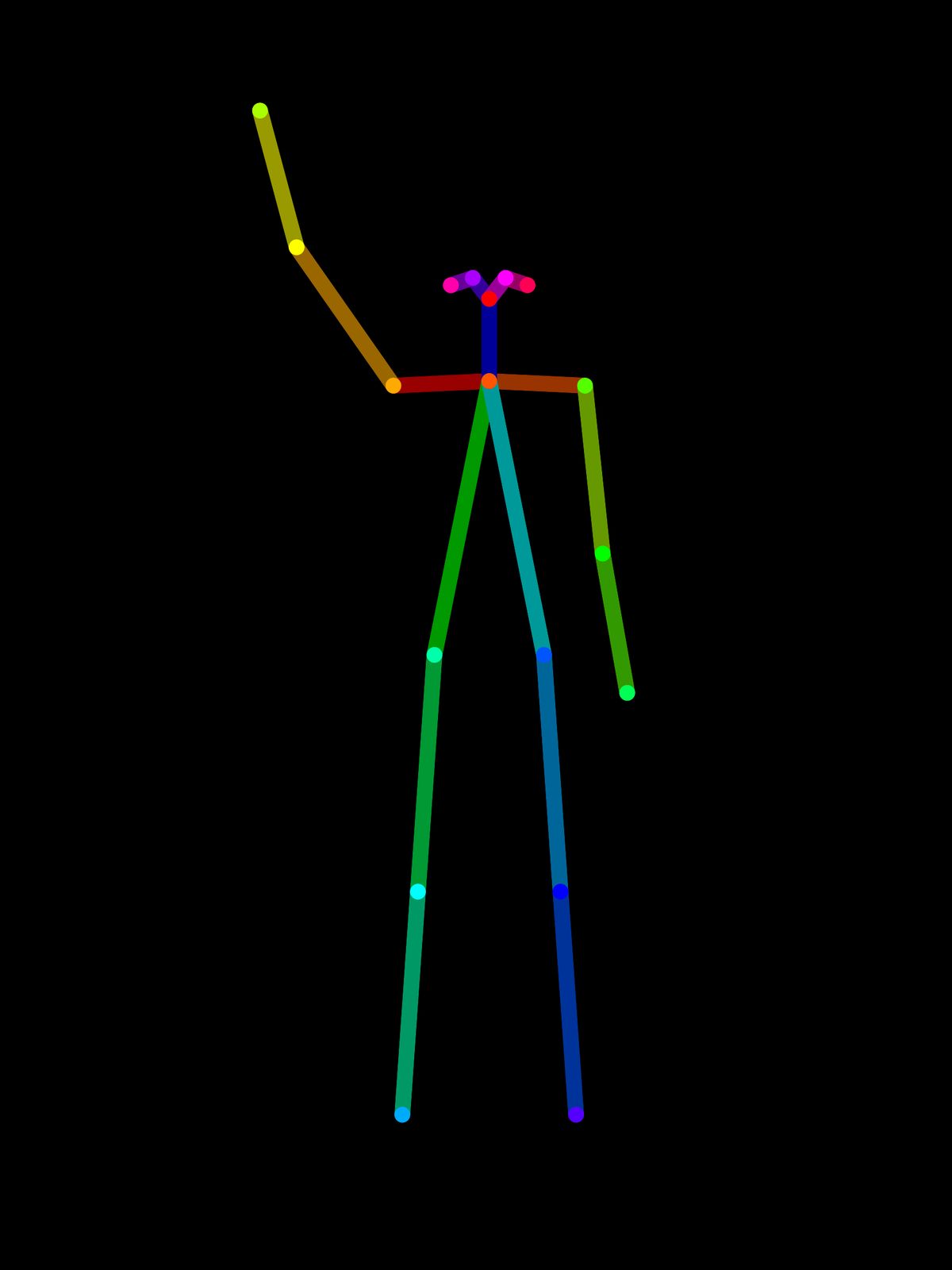

Draw the skeleton on a canvas the same size as the photo, at the size and position of the body in the shot. The model follows the skeleton's proportions as well as its angles, so a skeleton drawn smaller than the person shrinks the person to match. Only the limbs that should move differ from the body as shot.
There are two ways to get one. Draw it in code from joint positions, which is how the skeletons in this guide were made: a fixed body with each arm and leg rotated by the angles listed in the prompt. Or extract it from a photo of someone already in the pose you want, which is the quicker route when the pose exists as a picture rather than as numbers.
import { createClient } from '@runware/sdk'

const client = await createClient({ apiKey: process.env.RUNWARE_API_KEY })
await client.connect()

const [result] = await client.run({
  model: 'ideogram:4.5@0',
  positivePrompt: 'Change only her arm pose to match the pose skeleton in image 2: her right arm raised in a wave, the right shoulder raised 145 degrees and the right elbow bent 20 degrees, palm facing the camera, and her left arm relaxed at her side. Keep the same model, face, hair, outfit, lighting, camera framing and background.',
  inputs: {
    referenceImages: [
      'https://example.com/model-original.jpg',
      'https://example.com/skeleton-wave.png'
    ]
  },
  width: 1728,
  height: 2304
})
import asyncio
import os
from runware import Runware
async def main():
async with Runware(api_key=os.environ["RUNWARE_API_KEY"]) as client:
results = await client.run({
"model": "ideogram:4.5@0",
"positivePrompt": "Change only her arm pose to match the pose skeleton in image 2: her right arm raised in a wave, the right shoulder raised 145 degrees and the right elbow bent 20 degrees, palm facing the camera, and her left arm relaxed at her side. Keep the same model, face, hair, outfit, lighting, camera framing and background.",
"inputs": {
"referenceImages": [
"https://example.com/model-original.jpg",
"https://example.com/skeleton-wave.png"
]
},
"width": 1728,
"height": 2304
})
asyncio.run(main())curl https://api.runware.ai/v1 \
-H "Authorization: Bearer $RUNWARE_API_KEY" \
-H "Content-Type: application/json" \
-d '[
{
  "taskType": "imageInference",
  "taskUUID": "b7e2d4a1-8c39-4f65-a0d2-5e9b1c7f3a48",
  "model": "ideogram:4.5@0",
  "positivePrompt": "Change only her arm pose to match the pose skeleton in image 2: her right arm raised in a wave, the right shoulder raised 145 degrees and the right elbow bent 20 degrees, palm facing the camera, and her left arm relaxed at her side. Keep the same model, face, hair, outfit, lighting, camera framing and background.",
  "inputs": {
    "referenceImages": [
      "https://example.com/model-original.jpg",
      "https://example.com/skeleton-wave.png"
    ]
  },
  "width": 1728,
  "height": 2304
}
]'runware run ideogram:4.5@0 \
positivePrompt="Change only her arm pose to match the pose skeleton in image 2: her right arm raised in a wave, the right shoulder raised 145 degrees and the right elbow bent 20 degrees, palm facing the camera, and her left arm relaxed at her side. Keep the same model, face, hair, outfit, lighting, camera framing and background." \
inputs.referenceImages.0=https://example.com/model-original.jpg \
inputs.referenceImages.1=https://example.com/skeleton-wave.png \
width=1728 \
height=2304{
"taskType": "imageInference",
"taskUUID": "b7e2d4a1-8c39-4f65-a0d2-5e9b1c7f3a48",
"model": "ideogram:4.5@0",
"positivePrompt": "Change only her arm pose to match the pose skeleton in image 2: her right arm raised in a wave, the right shoulder raised 145 degrees and the right elbow bent 20 degrees, palm facing the camera, and her left arm relaxed at her side. Keep the same model, face, hair, outfit, lighting, camera framing and background.",
"inputs": {
"referenceImages": [
"https://example.com/model-original.jpg",
"https://example.com/skeleton-wave.png"
]
},
"width": 1728,
"height": 2304
}Response
[
  {
    "taskType": "imageInference",
    "taskUUID": "b7e2d4a1-8c39-4f65-a0d2-5e9b1c7f3a48",
    "imageUUID": "3f9c1e7a-5d24-4b80-a6e3-8c2f0d5b9e17",
    "imageURL": "https://im.runware.ai/image/os/a14d18/ws/2/ii/3f9c1e7a-5d24-4b80-a6e3-8c2f0d5b9e17.jpg"
  }
]
width and height repeat the photo's own dimensions, so the output lines up with the original frame for frame. Leave them out and the model picks its own canvas, and the poses stop matching each other.
Extracting a skeleton from a photo
Runware's OpenPose preprocessor reads the body in any photo and returns its skeleton in the same format. Pass the returned guideImageUUID as image 2 of the pose request.
import { createClient } from '@runware/sdk'

const client = await createClient({ apiKey: process.env.RUNWARE_API_KEY })
await client.connect()

const [result] = await client.run({
  model: 'runware:controlnet-preprocess@openpose',
  inputs: {
    image: 'https://example.com/pose-reference.jpg'
  }
})
import asyncio
import os
from runware import Runware
async def main():
async with Runware(api_key=os.environ["RUNWARE_API_KEY"]) as client:
results = await client.run({
"model": "runware:controlnet-preprocess@openpose",
"inputs": {
"image": "https://example.com/pose-reference.jpg"
}
})
asyncio.run(main())curl https://api.runware.ai/v1 \
-H "Authorization: Bearer $RUNWARE_API_KEY" \
-H "Content-Type: application/json" \
-d '[
{
  "taskType": "controlNetPreprocess",
  "taskUUID": "c4e8a1f2-6b3d-4a97-8e25-1d7f9b0c3a64",
  "model": "runware:controlnet-preprocess@openpose",
  "inputs": {
    "image": "https://example.com/pose-reference.jpg"
  }
}
]'runware run runware:controlnet-preprocess@openpose \
inputs.image=https://example.com/pose-reference.jpg{
"taskType": "controlNetPreprocess",
"taskUUID": "c4e8a1f2-6b3d-4a97-8e25-1d7f9b0c3a64",
"model": "runware:controlnet-preprocess@openpose",
"inputs": {
"image": "https://example.com/pose-reference.jpg"
}
}Response
[
  {
    "taskType": "imageControlNetPreProcess",
    "taskUUID": "c4e8a1f2-6b3d-4a97-8e25-1d7f9b0c3a64",
    "guideImageUUID": "7a2d9e4b-1c58-4f30-b6e7-3f8a0c5d2b91",
    "guideImageURL": "https://im.runware.ai/image/os/a14d18/ws/2/ii/7a2d9e4b-1c58-4f30-b6e7-3f8a0c5d2b91.jpg"
  }
]
Pick a pose photo with the same aspect ratio as the photo you are reposing, so the skeleton comes back on a canvas of the same shape. The person in it can be anyone, since only the pose carries over.
Angles in the prompt
The skeleton shows the pose, and the prompt can state it in numbers as well. The wave pose below was run three ways: the skeleton with a bare instruction, the angles in the prompt with no skeleton, and both together.

Change only her arm pose to match the pose skeleton in image 2. Keep the same model, face, hair, outfit, lighting, camera framing and background.

Change only her arm pose: her right arm raised in a wave, the right shoulder raised 145 degrees and the right elbow bent 20 degrees, palm facing the camera, and her left arm relaxed at her side. Keep the same model, face, hair, outfit, lighting, camera framing and background.
Change only her arm pose to match the pose skeleton in image 2: her right arm raised in a wave, the right shoulder raised 145 degrees and the right elbow bent 20 degrees, palm facing the camera, and her left arm relaxed at her side. Keep the same model, face, hair, outfit, lighting, camera framing and background.
The skeleton alone already puts the arm where the skeleton has it, and adding the angles changed little with this pose. The angles alone produced a clear wave with the palm to the camera, but the hand stops beside her head, well short of the 145 degrees in the prompt. The skeleton is what places the limbs. The words carry what a stick figure cannot show, such as which way the palm faces, and they are the whole instruction when there is no skeleton.
Write the angles from the model's point of view. "Her right arm" is the arm on the left of the image, and the skeleton follows the same rule: its right side is drawn on the left. Measure the shoulder from the arm hanging at her side (0 degrees) to straight overhead (180), and give the elbow bend on top of that.
Changing the stance
Legs work the same way as arms, with the hip angle measured from the leg pointing straight down. What changes is the scope of the instruction. "Change only her arm pose" keeps her feet planted where they were, and a pose that moves the legs has to say so.

Change her pose to match the pose skeleton in image 2, a star jump landing: both arms raised 140 degrees in a wide V, legs spread wide with both hips abducted 18 degrees, both feet on the floor. Keep the same model, face, hair, outfit, lighting, camera framing and background.
The star pose drops "only" and names both the arms and the legs, because both move. The instruction also asks for both feet on the floor, so the pose is a landing rather than a jump.
Every pose from the original
Run each pose from the original photo, not from the previous pose. Every result in this guide has the same image 1, so each one is a single step away from the source and none inherits the small changes of another.
Chaining poses (hips, then overhead from the hips result, then wave from the overhead result) stacks one full render on another, and Ideogram 4.5 renders the whole frame on every edit. For edits that do have to build on each other, see Iterative editing with Ideogram 4.5 Precise Edit.
Tips
-
Draw the skeleton to match the body. Same canvas as the photo, same size and position as the person in it, or the person is rescaled to fit.
-
Pass the photo's size. Set
widthandheightto the original's dimensions so every pose lines up. -
Let the skeleton place the limbs. Use the words for what a stick figure cannot show, such as the palm and the kind of gesture.
-
Name sides from the model's point of view. Her right arm is on the left of the image, in the prompt and in the skeleton.
-
Scope the instruction. "Only her arm pose" holds the stance, and a full-body pose names the legs.
-
Start every pose from the original. One step from the source keeps the whole set consistent.