FLUX 3 Image Klein

FLUX 3 Image Klein is the distilled checkpoint of Black Forest Labs' open-weights FLUX 3 image model, covering text-to-image generation and reference-based editing in a single model. It is built for speed without giving up quality, which suits interactive applications, rapid iteration, and high-volume production.
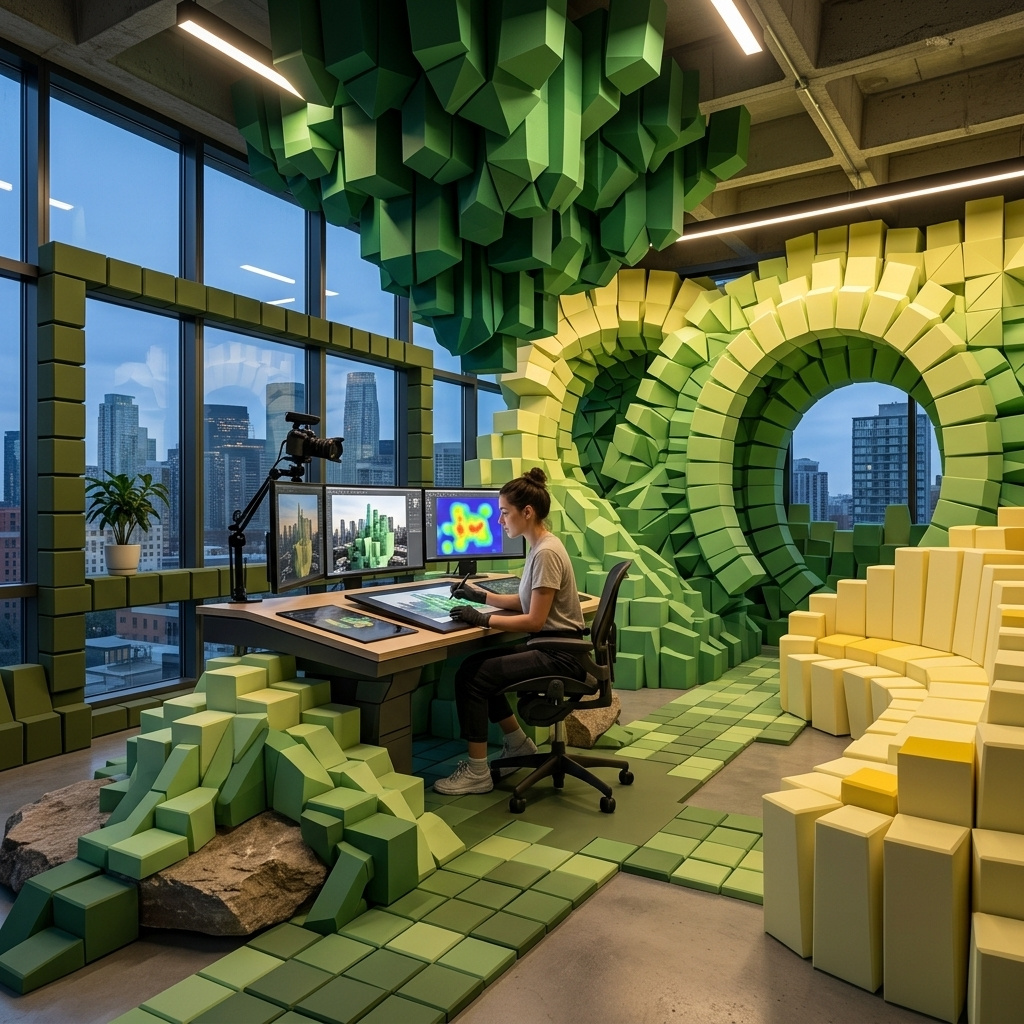
Multi-reference composition
How to combine up to four references with FLUX 3 Image Klein: assigning roles, keeping a product across scenes, placing it in your own photo, and borrowing a style.
Introduction
FLUX 3 Image Klein takes up to four reference images in inputs.referenceImages and combines them into one new picture. A person, a garment, a bag and a location that were photographed on different days come back as a single frame, because the prompt tells the model which image supplies which part of the result.

The man from image 1, with the same face, hair and beard, walking toward the camera down the cobblestone lane from image 4, wearing the olive field jacket from image 2 open over his white t-shirt with his light gray chinos and white sneakers, and carrying the tan leather messenger bag from image 3 on his right shoulder. Full-length shot at standing height, 50mm lens, the lane receding behind him. Soft overcast daylight. Photoreal fashion lookbook photography, muted autumn palette.
- Image 1, the model
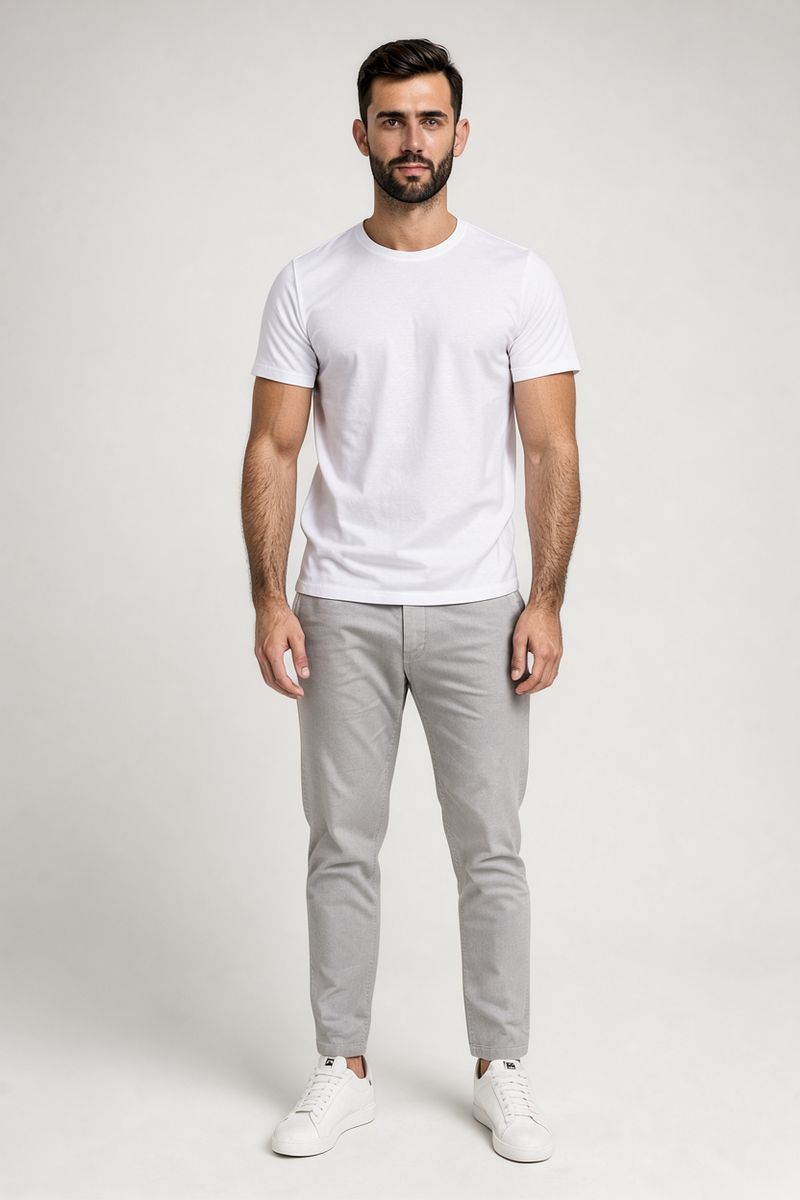
A full-length studio photo of a man in his late twenties with short dark hair and a trimmed beard, standing straight and facing the camera, wearing a plain white t-shirt, light gray chinos and white sneakers. Seamless light gray backdrop, soft even studio light. Photoreal e-commerce model photography, 50mm lens, neutral palette.
- Image 2, the jacket
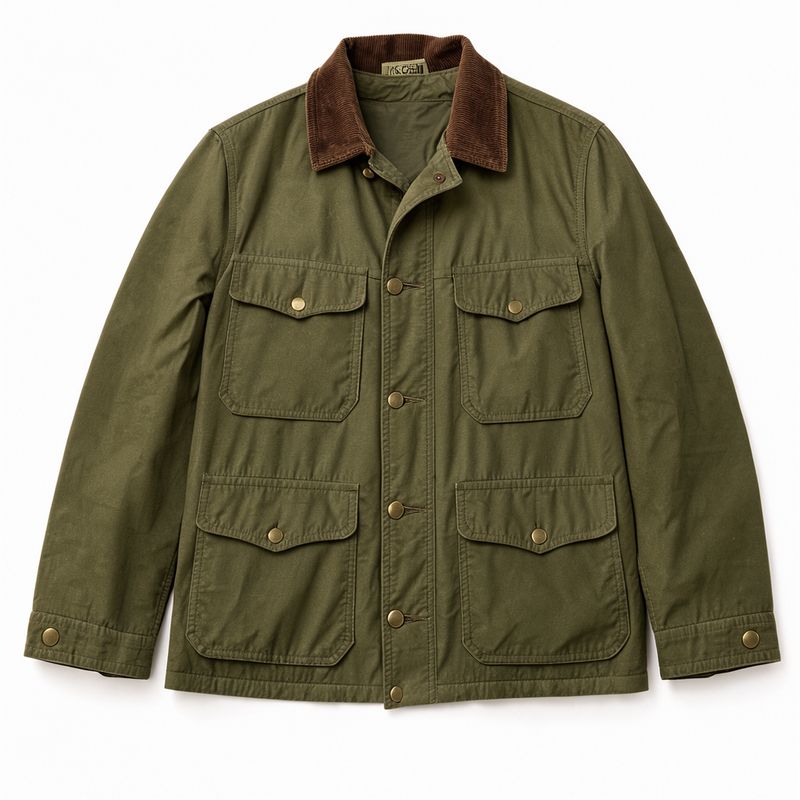
A flat packshot of an olive green waxed cotton field jacket with a brown corduroy collar, four flap pockets and brass snap buttons, laid flat on a seamless white background, shot from directly above. Even shadowless studio light. Photoreal apparel e-commerce packshot.
- Image 3, the bag
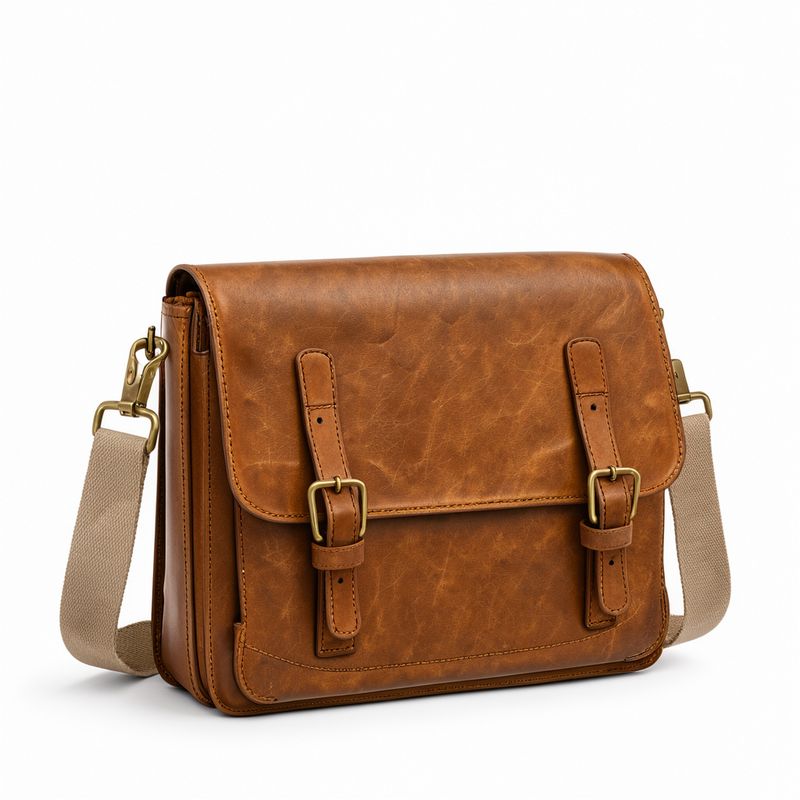
A packshot of a tan leather messenger bag with a flap closure, two brass buckles and a wide canvas shoulder strap, standing upright on a seamless white background. Even soft studio light, a faint contact shadow. Photoreal accessories e-commerce packshot.
- Image 4, the location
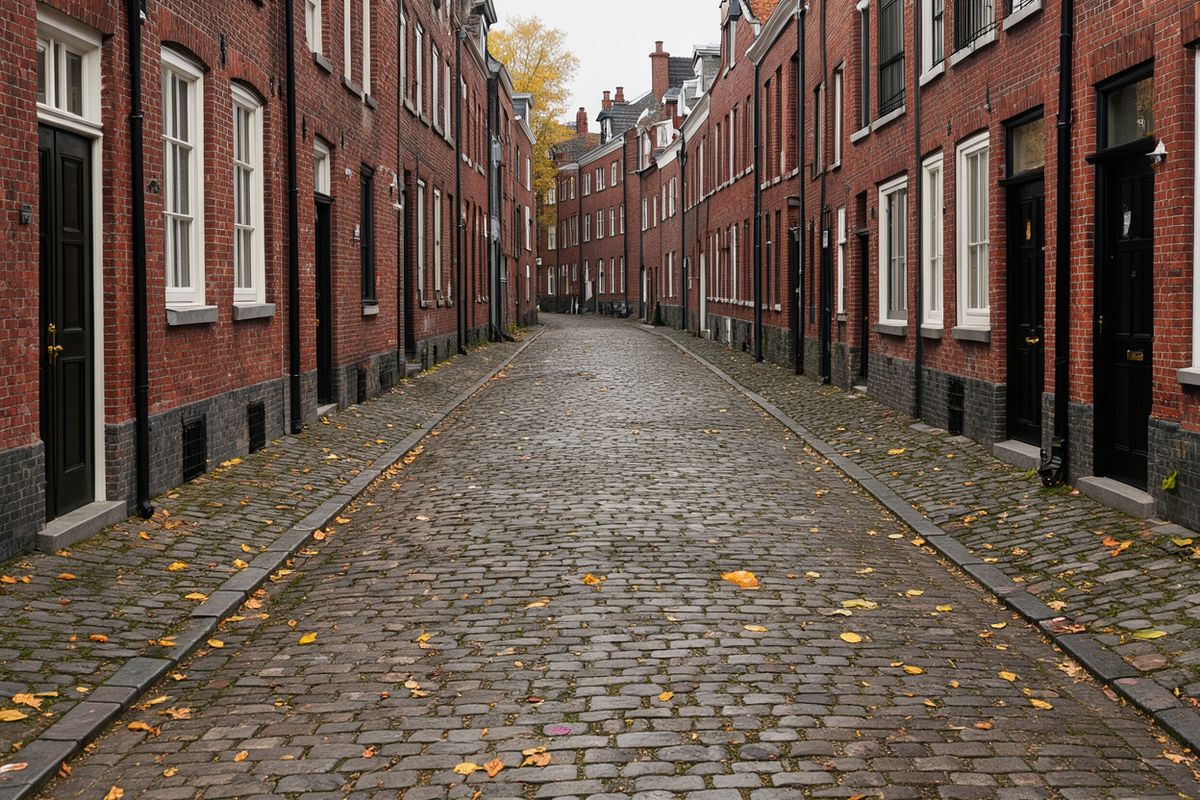
An empty cobblestone lane in an old European city on an overcast autumn morning, red brick townhouses with black doors on both sides, a few fallen yellow leaves on the stones. Soft flat daylight. Straight-on shot at standing height, 35mm lens, no people. Photoreal street photography, muted autumn palette.


This guide covers how to assign a role to each reference, how to keep one product consistent across several scenes, how to place a product into a photo you already have, and how to take the style of one image and apply it to new content.
Giving each reference a role
The references are numbered in the order you send them, starting at image 1. Refer to each one by that number and say what the model should take from it, such as the face from one image and the garment from another. An image the prompt never mentions has no job, and its influence on the result is left to chance.
import { createClient } from '@runware/sdk'

const client = await createClient({ apiKey: process.env.RUNWARE_API_KEY })
await client.connect()

const [result] = await client.run({
  model: 'bfl:flux@3-image-klein',
  positivePrompt: 'The man from image 1, with the same face, hair and beard, walking toward the camera down the cobblestone lane from image 4, wearing the olive field jacket from image 2 open over his white t-shirt with his light gray chinos and white sneakers, and carrying the tan leather messenger bag from image 3 on his right shoulder. Full-length shot at standing height, 50mm lens, the lane receding behind him. Soft overcast daylight. Photoreal fashion lookbook photography, muted autumn palette.',
  inputs: {
    referenceImages: [
      'https://im.runware.ai/image/os/a14d18/ws/2/ii/cf75071b-232d-405e-8cad-0547652a8fd4.jpg',
      'https://im.runware.ai/image/os/a14d18/ws/2/ii/1298242a-8c16-47e9-a7ad-9627943cf030.jpg',
      'https://im.runware.ai/image/os/a14d18/ws/2/ii/8baad788-639c-446b-a6a1-4f586404bc31.jpg',
      'https://im.runware.ai/image/os/a14d18/ws/2/ii/94348d04-6be4-46a9-b379-017c58a6e2d7.jpg'
    ]
  },
  width: 832,
  height: 1248
})
import asyncio
import os
from runware import Runware
async def main():
async with Runware(api_key=os.environ["RUNWARE_API_KEY"]) as client:
results = await client.run({
"model": "bfl:flux@3-image-klein",
"positivePrompt": "The man from image 1, with the same face, hair and beard, walking toward the camera down the cobblestone lane from image 4, wearing the olive field jacket from image 2 open over his white t-shirt with his light gray chinos and white sneakers, and carrying the tan leather messenger bag from image 3 on his right shoulder. Full-length shot at standing height, 50mm lens, the lane receding behind him. Soft overcast daylight. Photoreal fashion lookbook photography, muted autumn palette.",
"inputs": {
"referenceImages": [
"https://im.runware.ai/image/os/a14d18/ws/2/ii/cf75071b-232d-405e-8cad-0547652a8fd4.jpg",
"https://im.runware.ai/image/os/a14d18/ws/2/ii/1298242a-8c16-47e9-a7ad-9627943cf030.jpg",
"https://im.runware.ai/image/os/a14d18/ws/2/ii/8baad788-639c-446b-a6a1-4f586404bc31.jpg",
"https://im.runware.ai/image/os/a14d18/ws/2/ii/94348d04-6be4-46a9-b379-017c58a6e2d7.jpg"
]
},
"width": 832,
"height": 1248
})
asyncio.run(main())curl https://api.runware.ai/v1 \
-H "Authorization: Bearer $RUNWARE_API_KEY" \
-H "Content-Type: application/json" \
-d '[
{
  "taskType": "imageInference",
  "taskUUID": "2c3d4e5f-6a7b-4c8d-9e0f-1a2b3c4d5e6f",
  "model": "bfl:flux@3-image-klein",
  "positivePrompt": "The man from image 1, with the same face, hair and beard, walking toward the camera down the cobblestone lane from image 4, wearing the olive field jacket from image 2 open over his white t-shirt with his light gray chinos and white sneakers, and carrying the tan leather messenger bag from image 3 on his right shoulder. Full-length shot at standing height, 50mm lens, the lane receding behind him. Soft overcast daylight. Photoreal fashion lookbook photography, muted autumn palette.",
  "inputs": {
    "referenceImages": [
      "https://im.runware.ai/image/os/a14d18/ws/2/ii/cf75071b-232d-405e-8cad-0547652a8fd4.jpg",
      "https://im.runware.ai/image/os/a14d18/ws/2/ii/1298242a-8c16-47e9-a7ad-9627943cf030.jpg",
      "https://im.runware.ai/image/os/a14d18/ws/2/ii/8baad788-639c-446b-a6a1-4f586404bc31.jpg",
      "https://im.runware.ai/image/os/a14d18/ws/2/ii/94348d04-6be4-46a9-b379-017c58a6e2d7.jpg"
    ]
  },
  "width": 832,
  "height": 1248
}
]'runware run bfl:flux@3-image-klein \
positivePrompt="The man from image 1, with the same face, hair and beard, walking toward the camera down the cobblestone lane from image 4, wearing the olive field jacket from image 2 open over his white t-shirt with his light gray chinos and white sneakers, and carrying the tan leather messenger bag from image 3 on his right shoulder. Full-length shot at standing height, 50mm lens, the lane receding behind him. Soft overcast daylight. Photoreal fashion lookbook photography, muted autumn palette." \
inputs.referenceImages.0=https://im.runware.ai/image/os/a14d18/ws/2/ii/cf75071b-232d-405e-8cad-0547652a8fd4.jpg \
inputs.referenceImages.1=https://im.runware.ai/image/os/a14d18/ws/2/ii/1298242a-8c16-47e9-a7ad-9627943cf030.jpg \
inputs.referenceImages.2=https://im.runware.ai/image/os/a14d18/ws/2/ii/8baad788-639c-446b-a6a1-4f586404bc31.jpg \
inputs.referenceImages.3=https://im.runware.ai/image/os/a14d18/ws/2/ii/94348d04-6be4-46a9-b379-017c58a6e2d7.jpg \
width=832 \
height=1248{
"taskType": "imageInference",
"taskUUID": "2c3d4e5f-6a7b-4c8d-9e0f-1a2b3c4d5e6f",
"model": "bfl:flux@3-image-klein",
"positivePrompt": "The man from image 1, with the same face, hair and beard, walking toward the camera down the cobblestone lane from image 4, wearing the olive field jacket from image 2 open over his white t-shirt with his light gray chinos and white sneakers, and carrying the tan leather messenger bag from image 3 on his right shoulder. Full-length shot at standing height, 50mm lens, the lane receding behind him. Soft overcast daylight. Photoreal fashion lookbook photography, muted autumn palette.",
"inputs": {
"referenceImages": [
"https://im.runware.ai/image/os/a14d18/ws/2/ii/cf75071b-232d-405e-8cad-0547652a8fd4.jpg",
"https://im.runware.ai/image/os/a14d18/ws/2/ii/1298242a-8c16-47e9-a7ad-9627943cf030.jpg",
"https://im.runware.ai/image/os/a14d18/ws/2/ii/8baad788-639c-446b-a6a1-4f586404bc31.jpg",
"https://im.runware.ai/image/os/a14d18/ws/2/ii/94348d04-6be4-46a9-b379-017c58a6e2d7.jpg"
]
},
"width": 832,
"height": 1248
}Response
{
  "data": [
    {
      "taskType": "imageInference",
      "taskUUID": "2c3d4e5f-6a7b-4c8d-9e0f-1a2b3c4d5e6f",
      "imageUUID": "7d8e9f0a-1b2c-4d3e-8f4a-5b6c7d8e9f0a",
      "imageURL": "https://im.runware.ai/image/os/a14d18/ws/2/ii/7d8e9f0a-1b2c-4d3e-8f4a-5b6c7d8e9f0a.jpg"
    }
  ]
}
The prompt also restates the details that identify each item, such as the corduroy collar and the tan leather. The jacket keeps its collar and its flap pockets in the result, and the bag keeps its tan leather and brass hardware. The fourth image sets the light as well as the place, so the studio-lit model comes back under the flat overcast sky of the lane.
Keeping a product across scenes
One packshot can feed a whole set of lifestyle images. Send the product as the only reference and write a full caption for each scene, with the product described the same way every time.

A centered product packshot at lamp height: a table lamp with a ribbed terracotta ceramic base shaped like a squat gourd and a pleated off-white linen shade, the lamp switched off, standing on a seamless white background. Even soft studio light, a faint contact shadow. Photoreal home decor e-commerce packshot, clean white palette.

A medium shot at console height, the lamp on the left third of the frame: the table lamp from image 1, with the same ribbed terracotta gourd-shaped base and pleated off-white linen shade, switched on and standing on a walnut console table in an apartment entryway. Beside it, a shallow ceramic bowl for keys and a small stack of art books, and above them a round mirror on a warm white wall. Warm glow from the lamp and soft evening light from a doorway on the right. Photoreal home decor lifestyle photography, 50mm lens, warm palette.

A medium shot at bedside height, the lamp on the right third of the frame: the table lamp from image 1, with the same ribbed terracotta gourd-shaped base and pleated off-white linen shade, switched off and standing on a white oak bedside table next to a bed made with rumpled sage linen bedding. A glass of water and a paperback on the table. Soft morning daylight from a window on the left. Photoreal home decor lifestyle photography, 50mm lens, fresh sage and cream palette.

A medium shot at desk height, the lamp on the left third of the frame: the table lamp from image 1, with the same ribbed terracotta gourd-shaped base and pleated off-white linen shade, switched on and standing at the back corner of a pale oak home office desk, with an open laptop, a ceramic mug of pens and a linen notebook in front of it. A white wall with a pinned paper calendar behind. Overcast daylight from a window on the right and the warm lamp glow on the left. Photoreal home decor lifestyle photography, 50mm lens, calm neutral palette.
The double-gourd base and the pleated shade match the packshot in all three rooms, and the lamp sits where each framing clause put it. Repeating the same product description word for word in every prompt is what holds it, since each request is independent and the description is the only thing the three share besides the reference.
Placing a product in your own photo
When the scene already exists, send it as a reference too and tell the model which image is the scene. The product goes into the photo as it stands, instead of the model building a new background around the product.

Use image 2 as the scene, keeping the running track, the lane lines, the infield, the trees and the low morning sun exactly as they are. Place the running shoe from image 1, with the same lime green knit upper, white laces, white foam midsole and black outsole, standing on the track in the lower center of the frame with its toe on a white lane line, in side profile pointing left. Give it a long soft shadow that falls the same way as the shadows on the track. Photoreal footwear advertising photography, 35mm lens, warm morning palette.
- Image 1, the shoe
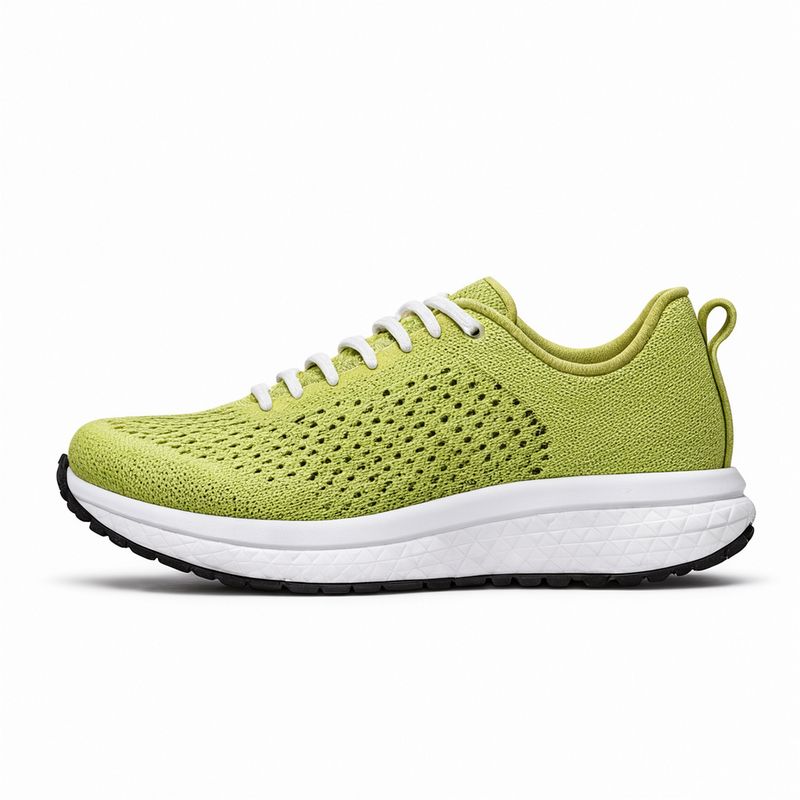
A side-profile packshot at shoe height, the shoe centered and pointing left: a running shoe with a lime green knit upper, white laces, a thick white foam midsole and a black rubber outsole, standing on a seamless white background. Even soft studio light, a faint contact shadow. Photoreal footwear e-commerce packshot, clean white palette.
- Image 2, the scene
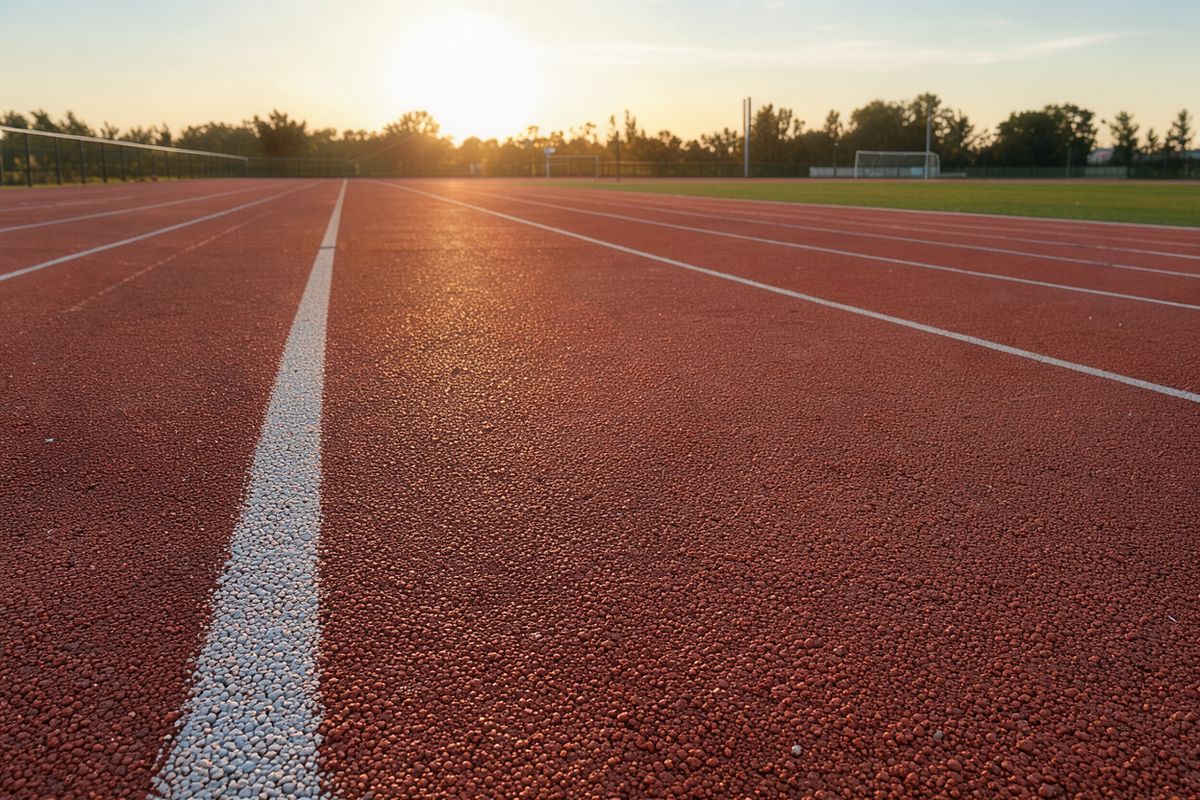
A low shot at ground level along an empty outdoor running track, the white lane lines running from the lower left toward the horizon. Red-orange rubber surface, a strip of green infield on the right and trees beyond it. Low early-morning sun from behind the camera, long soft shadows on the track. Photoreal sports photography, 35mm lens, warm morning palette, no people.


The track and the low sun are unchanged from the scene photo, and the shoe keeps its perforated knit and its midsole. The line about the shadow matters: asking for a shadow that matches the scene is what grounds the product, rather than leaving it floating with the soft studio shadow of its packshot.
Borrowing a style from a reference
A reference can supply a look instead of an object. Send one image in the style you want, then describe new content and say it should be drawn in the style of image 1, naming the traits that make up that style.

A red city tram crossing an old stone bridge over a river at sunset, with a row of townhouses on the far bank, drawn in the exact style of image 1: bold flat shapes with no outlines, the same teal, burnt orange, cream and deep navy palette, the same paper grain texture and long geometric shadows. No lettering.
- Image 1, the style
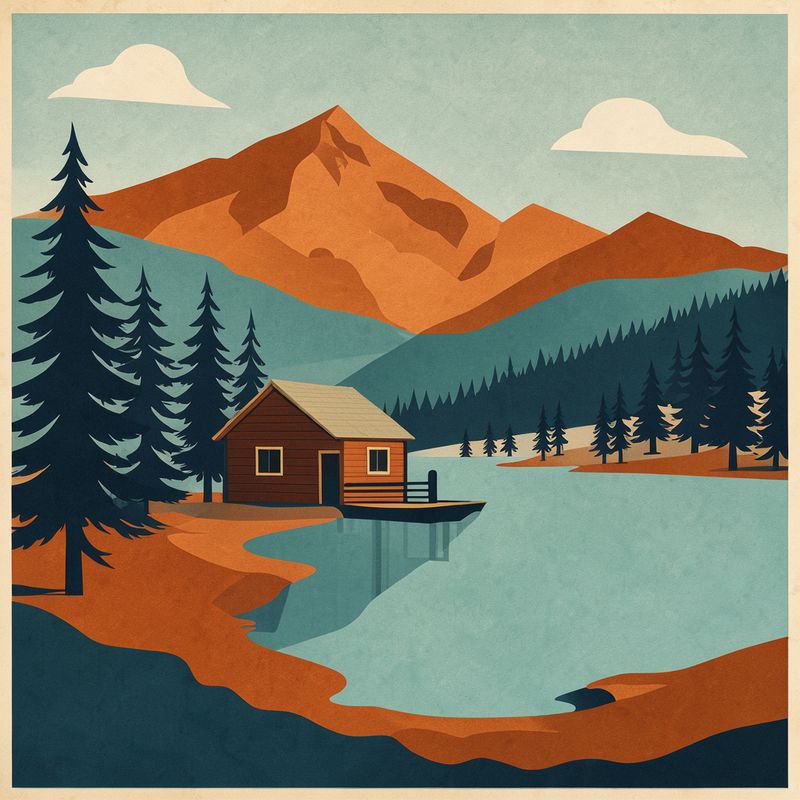
A flat vector travel poster illustration of a mountain lake with a small wooden boathouse and pine trees, built from bold flat shapes with no outlines, a limited palette of teal, burnt orange, cream and deep navy, subtle paper grain texture, long soft geometric shadows. Mid-century modern travel poster style, no lettering.

The tram and the bridge are new, and the palette, the outline-free shapes, the long shadows and the paper grain all come from the lake poster. Naming the traits in the prompt keeps the model on the treatment rather than the subject of the reference. This is how an illustrated campaign or a series of app illustrations stays in one house style.
Tips for best results
-
Refer to every image by its number. Image 1 is the first in
inputs.referenceImages. A reference the prompt never mentions has no defined job. -
Say what to take from each image. "The face from image 1" and "the jacket from image 2" are instructions. "Use these images" is not.
-
Restate the identifying details. Name the collar or the base shape in the prompt as well as showing it, and those details hold more closely.
-
Name the scene image when you have one. "Use image 2 as the scene" keeps your photo and adds the product to it.
-
Ask for a matching shadow. A product dropped into a photo looks pasted on until its shadow follows the light of the scene.
-
Keep to four references. Requests with more than four are rejected, so combine items into one packshot when a look needs more pieces.