FLUX 3 Image Klein

FLUX 3 Image Klein is the distilled checkpoint of Black Forest Labs' open-weights FLUX 3 image model, covering text-to-image generation and reference-based editing in a single model. It is built for speed without giving up quality, which suits interactive applications, rapid iteration, and high-volume production.
Editing images
How to edit a photo with FLUX 3 Image Klein: scoping the change, removing objects, writing scene-wide edits as captions, reframing, and chaining edits.
Introduction
FLUX 3 Image Klein edits a photo when you send it in inputs.referenceImages and describe the change in positivePrompt. The same model handles text-to-image and editing, so an edit is an ordinary request with one reference attached, and the result comes back at the size of that reference unless you ask for another.
The edit below is a virtual staging job for an apartment listing: an empty room in, a furnished room out, with the architecture and the daylight left exactly as photographed.

A wide shot from standing height in the doorway, looking straight at the back wall: the empty living room of a newly renovated apartment, with no furniture at all. Smooth white walls, wide pale oak floorboards, a white ceiling with a single recessed light, and two tall windows on the right with thin black frames looking onto green treetops. Bright even daylight from the windows, soft shadows on the floor. Photoreal real estate listing photography, 24mm lens, bright neutral palette.

Furnish the room as a staged living room: a light gray three-seater sofa against the back wall, a round oak coffee table in front of it on a large jute rug, a tall black floor lamp in the left corner, two framed abstract prints above the sofa and a potted olive tree beside the windows. Keep the walls, the windows, the floor, the ceiling light, the daylight and the camera position unchanged.
This guide covers how to scope an edit, how to remove an object, why scene-wide changes need a full caption, how to reframe a photo into a new shape, and how to chain several edits.
Naming the change and what stays
An edit prompt does two jobs. It names the one thing that changes, and it lists what must not move. The model reads the list as part of the instruction, so the things you name are the things it holds.

A full-length e-commerce shot, the model centered with space above the head: a woman in her twenties with shoulder-length black hair, standing relaxed with her hands in the front pocket of a heather gray oversized hoodie, wearing black straight-leg jeans and white sneakers. Behind her, a seamless warm light gray studio backdrop. Soft even studio light from the front, a faint floor shadow. Photoreal apparel catalog photography, 50mm lens, neutral palette.

Change the hoodie from heather gray to deep forest green. Keep the model, her face, her pose, the jeans, the sneakers, the backdrop, the lighting and the framing unchanged.
The hoodie changed color and kept its drawstrings and the folds of the fabric over her hands. Her face, the jeans, the sneakers and the floor shadow match the source. This is the request behind a colorway set for a catalog: one photo shoot, one edit per color.
import { createClient } from '@runware/sdk'

const client = await createClient({ apiKey: process.env.RUNWARE_API_KEY })
await client.connect()

const [result] = await client.run({
  model: 'bfl:flux@3-image-klein',
  positivePrompt: 'Change the hoodie from heather gray to deep forest green. Keep the model, her face, her pose, the jeans, the sneakers, the backdrop, the lighting and the framing unchanged.',
  inputs: {
    referenceImages: [
      'https://im.runware.ai/image/os/a14d18/ws/2/ii/4f7a6749-6ffb-4c2e-bd08-acac98c47411.jpg'
    ]
  }
})
import asyncio
import os
from runware import Runware
async def main():
async with Runware(api_key=os.environ["RUNWARE_API_KEY"]) as client:
results = await client.run({
"model": "bfl:flux@3-image-klein",
"positivePrompt": "Change the hoodie from heather gray to deep forest green. Keep the model, her face, her pose, the jeans, the sneakers, the backdrop, the lighting and the framing unchanged.",
"inputs": {
"referenceImages": [
"https://im.runware.ai/image/os/a14d18/ws/2/ii/4f7a6749-6ffb-4c2e-bd08-acac98c47411.jpg"
]
}
})
asyncio.run(main())curl https://api.runware.ai/v1 \
-H "Authorization: Bearer $RUNWARE_API_KEY" \
-H "Content-Type: application/json" \
-d '[
{
  "taskType": "imageInference",
  "taskUUID": "5e6f7a8b-9c0d-4e1f-a2b3-c4d5e6f7a8b9",
  "model": "bfl:flux@3-image-klein",
  "positivePrompt": "Change the hoodie from heather gray to deep forest green. Keep the model, her face, her pose, the jeans, the sneakers, the backdrop, the lighting and the framing unchanged.",
  "inputs": {
    "referenceImages": [
      "https://im.runware.ai/image/os/a14d18/ws/2/ii/4f7a6749-6ffb-4c2e-bd08-acac98c47411.jpg"
    ]
  }
}
]'runware run bfl:flux@3-image-klein \
positivePrompt="Change the hoodie from heather gray to deep forest green. Keep the model, her face, her pose, the jeans, the sneakers, the backdrop, the lighting and the framing unchanged." \
inputs.referenceImages.0=https://im.runware.ai/image/os/a14d18/ws/2/ii/4f7a6749-6ffb-4c2e-bd08-acac98c47411.jpg{
"taskType": "imageInference",
"taskUUID": "5e6f7a8b-9c0d-4e1f-a2b3-c4d5e6f7a8b9",
"model": "bfl:flux@3-image-klein",
"positivePrompt": "Change the hoodie from heather gray to deep forest green. Keep the model, her face, her pose, the jeans, the sneakers, the backdrop, the lighting and the framing unchanged.",
"inputs": {
"referenceImages": [
"https://im.runware.ai/image/os/a14d18/ws/2/ii/4f7a6749-6ffb-4c2e-bd08-acac98c47411.jpg"
]
}
}Response
{
  "data": [
    {
      "taskType": "imageInference",
      "taskUUID": "5e6f7a8b-9c0d-4e1f-a2b3-c4d5e6f7a8b9",
      "imageUUID": "0a1b2c3d-4e5f-4a6b-8c7d-9e0f1a2b3c4d",
      "imageURL": "https://im.runware.ai/image/os/a14d18/ws/2/ii/0a1b2c3d-4e5f-4a6b-8c7d-9e0f1a2b3c4d.jpg"
    }
  ]
}
The request carries no width or height, so the output is the same size as the reference, which is what lines the two frames up.
Removing an object
A removal works the same way, with one addition: say what fills the space. "Remove the smartphone" leaves the model to decide what goes there. "Leave the empty desk mat where it was" tells it.

A flat overhead shot looking straight down, the objects arranged in a loose grid: a stationery flat lay on a pale sage desk mat, with an open dotted notebook in the center, a black fountain pen beside it, a smartphone face down in the upper right, a small stack of kraft envelopes in the lower left and a brass paper clip. Soft even daylight from above, very light shadows. Photoreal product flat lay photography, 50mm lens, calm sage and cream palette.

Remove the smartphone and leave the empty desk mat where it was. Keep every other object, its position, the light and the framing unchanged.
The mat under the phone comes back with the same color and texture as the rest of it, and nothing else in the flat lay shifts. When there are several similar objects and you need to point at one exactly, the bounding boxes guide removes by region instead of by name.
Changes that reach the whole scene
Time of day and weather touch every surface in the frame, and a one-line instruction leaves it to the model how far the change spreads. Black Forest Labs pairs Klein with an upsampler that turns short edit instructions into full captions before the model sees them. On Runware the instruction reaches the model as written, so for a scene-wide change, write the caption of the result yourself.

A wide shot of a bright Scandinavian living room seen straight on from standing height. A light gray linen three-seater sofa sits against a white wall in the center, with a round walnut coffee table in front of it holding a stack of books and a ceramic vase with dried grasses. A tall green fiddle-leaf fig stands in a woven basket on the left, and a large window on the right lets in daylight. Pale oak floorboards and a cream wool rug. Soft midday daylight from the window, gentle shadows. Photoreal interior photography, 24mm lens, bright neutral palette.

Make it a winter night.

A wide shot of the same Scandinavian living room on a winter night, seen straight on from standing height. The light gray linen sofa against the white wall, the round walnut coffee table with books and a ceramic vase of dried grasses, the fiddle-leaf fig in a woven basket on the left and the cream wool rug are all unchanged. Through the large window on the right it is dark blue night and snow is falling. A warm brass floor lamp beside the sofa and three lit candles on the coffee table give soft amber light, with deep cozy shadows. Photoreal interior photography, 24mm lens, warm amber and blue palette.
"Make it a winter night" applied winter to the room itself: snow falls in front of the wall and buries the rug. The caption keeps the same furniture and puts the snow outside the window, then adds the light a room has at night, a floor lamp and candles. The pattern is to restate the framing, name every object that stays, and then describe the new light and weather as part of the scene.
Reframing to another shape
When you send width and height, the result takes that size even if the reference has a different shape, and the model rebuilds the scene to fill the new frame. That turns one landscape listing photo into a vertical story without a second shoot.

The same kitchen reframed as a tall vertical shot for a social media story, the island in the lower half of the frame and the brass pendant light near the top. Keep the sage green cabinets, the white marble island, the rattan bar stools, the open oak shelves, the window and the morning light unchanged, and extend the room naturally above and below to fill the frame.
- Source, 1248 × 832
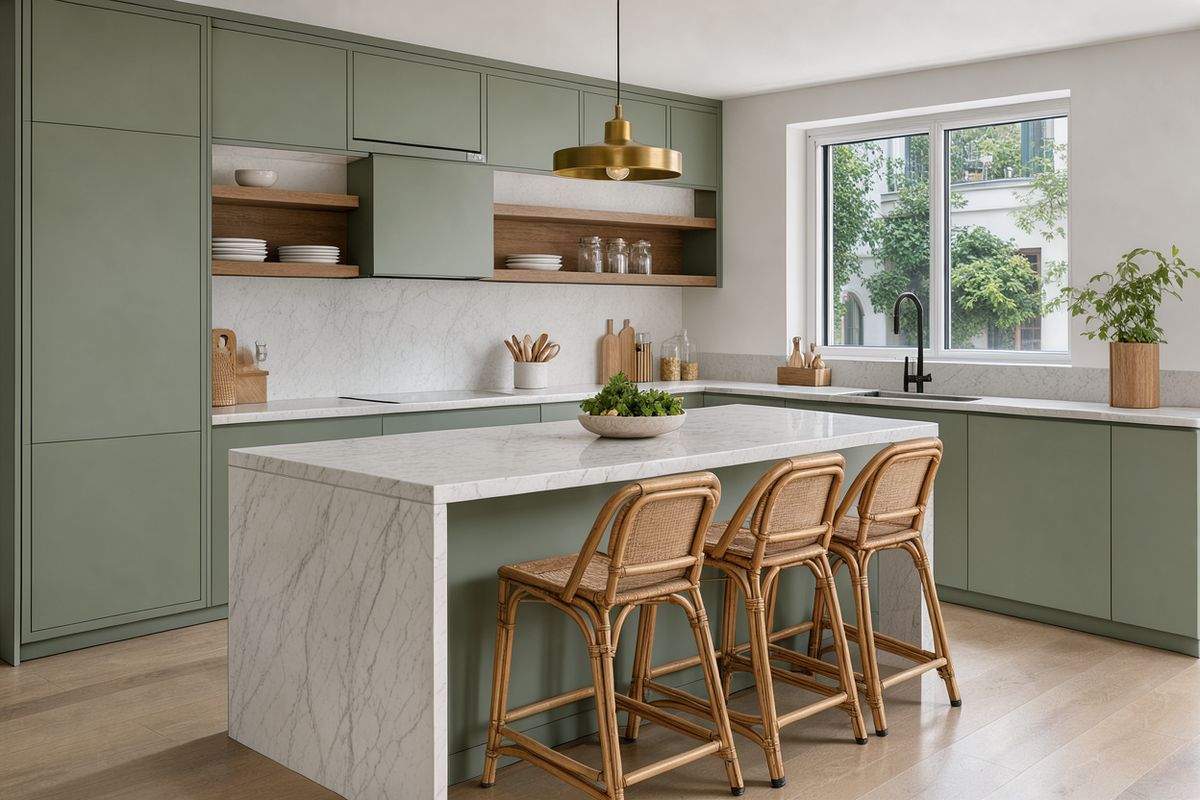
A wide shot at counter height, the island centered: a modern apartment kitchen with matte sage green cabinets, a white marble island with three rattan bar stools, open oak shelves holding white plates and glass jars, and a brass pendant light above the island. Behind it, a window over the sink looking onto a courtyard. Soft morning daylight from the window, gentle shadows on the marble. Photoreal real estate photography, 24mm lens, sage and white palette.

The 864 × 1536 result keeps the cabinets, the marble, the stools and the pendant, and fills the extra height with ceiling above and floor below. Say where the main elements should sit in the new frame, as the prompt does with the island and the pendant, or the model picks a crop for you.
Chaining edits
Every edit returns an ordinary image, so the output of one request can be the reference for the next. One change per round keeps each step easy to check, and a step that went wrong is the only one you redo.

A straight-on shot at counter height, the vanity centered: a hotel bathroom vanity with a single white vessel basin on a dark walnut counter, a brushed brass tap and a large rectangular frameless mirror above it. Behind it, walls in pale green zellige tiles. Nothing else on the counter. Soft even daylight from a window out of frame on the left. Photoreal hospitality interior photography, 35mm lens, calm green and walnut palette.

Add a stack of three folded white hand towels on the left side of the counter and a small set of amber glass soap and lotion bottles on a brass tray on the right. Keep the basin, the tap, the mirror, the tiles, the light and the framing unchanged.

Replace the rectangular wood-framed mirror with a round mirror in a thin brushed brass frame, centered above the basin. Keep the towels, the bottles and tray, the basin, the tap, the tiles, the light and the framing unchanged.

A straight-on shot at counter height of the same hotel bathroom vanity in the evening: the white vessel basin on the dark walnut counter, the brushed brass tap, the round brass-framed mirror, the folded white towels on the left and the amber bottles on a brass tray on the right are all unchanged, against the pale green zellige tiles. Warm light from a brass wall sconce on each side of the mirror, soft glowing reflections on the tiles, and dark blue dusk in the window reflection. Photoreal hospitality interior photography, 35mm lens, warm amber and green palette.
The towels and bottles added in the first round are still in place three rounds later. The first two steps are local, so they are written as instructions. The last one relights the whole room, so it is written as a caption, for the reason covered in the section on scene-wide changes.
Tips for best results
-
Name one change and list what stays. The keep list is part of the instruction. Objects you name are held, and objects you skip are open to change.
-
Write scene-wide edits as a caption of the result. Light and weather reach every surface, so describe the finished scene rather than the change.
-
Say what fills a removed object's place. "Leave the empty desk mat" or "continue the wall" gives the model a target.
-
Leave out the size to keep the reference's. Omit
widthandheightunless you want a new shape, and say where the subject sits in it. -
Chain edits for multi-step jobs. Feed each output back as the next reference, one change per round.
-
Reach for other tools when a name is not precise enough. Bounding boxes target a region, and multi-reference composition brings in a product or a person from a second image.