FLUX 3 Image Klein

FLUX 3 Image Klein is the distilled checkpoint of Black Forest Labs' open-weights FLUX 3 image model, covering text-to-image generation and reference-based editing in a single model. It is built for speed without giving up quality, which suits interactive applications, rapid iteration, and high-volume production.
Bounding boxes
How to place, move and remove elements by region with FLUX 3 Image Klein: the 0 to 1000 grid, laying out a frame, reserving space for copy, and editing by box.
Introduction
A prompt can say "on the left" or "in the corner", but it cannot say how far left or how large. settings.boundingBoxes can. Each box pins an element to a region of the frame, and FLUX 3 Image Klein builds the rest of the scene around it.

A flat overhead shot of running gear laid out on a smooth light gray concrete surface for a sports retailer banner: <shoe_1>, <bottle_1>, <watch_1> and <earbuds_1>, with clear empty concrete between them. Soft even daylight from above, small crisp shadows under each item. Photoreal flat lay product photography, 50mm lens, clean gray palette with bright accents.
[
  { "id": "shoe_1", "targetBox": [120, 60, 880, 420], "description": "a coral and white running shoe lying on its side, toe pointing up" },
  { "id": "bottle_1", "targetBox": [140, 480, 860, 610], "description": "a matte black insulated water bottle lying flat" },
  { "id": "watch_1", "targetBox": [200, 690, 520, 890], "description": "a sports smartwatch with a coral silicone strap, the screen dark" },
  { "id": "earbuds_1", "targetBox": [600, 700, 860, 880], "description": "an open white wireless earbuds charging case with both earbuds inside" }
]
Every item in the banner sits in the region its box gave it, with even gaps between them that a designer would otherwise have to arrange by hand. This guide covers how the coordinates work, how to lay out a frame from scratch, how to keep space free for copy, and how to move, remove and import elements in a reference.
How a box is written
A box is four numbers, [top, left, bottom, right], on a 0 to 1000 grid whatever the output size. [0, 0, 1000, 1000] is the whole frame and [0, 500, 500, 1000] is the top-right quarter. The same box lands in the same relative place on a square or a banner.
Each box has an id, and the prompt mentions that id in angle brackets, <shoe_1>, where the element belongs in the sentence. The description says what the element is, so the prompt can stay about the scene.
import { createClient } from '@runware/sdk'

const client = await createClient({ apiKey: process.env.RUNWARE_API_KEY })
await client.connect()

const [result] = await client.run({
  model: 'bfl:flux@3-image-klein',
  positivePrompt: 'A flat overhead shot of running gear laid out on a smooth light gray concrete surface for a sports retailer banner: <shoe_1>, <bottle_1>, <watch_1> and <earbuds_1>, with clear empty concrete between them. Soft even daylight from above, small crisp shadows under each item. Photoreal flat lay product photography, 50mm lens, clean gray palette with bright accents.',
  width: 1536,
  height: 864,
  settings: {
    boundingBoxes: [
      {
        id: 'shoe_1',
        targetBox: [
          120,
          60,
          880,
          420
        ],
        description: 'a coral and white running shoe lying on its side, toe pointing up'
      },
      {
        id: 'bottle_1',
        targetBox: [
          140,
          480,
          860,
          610
        ],
        description: 'a matte black insulated water bottle lying flat'
      },
      {
        id: 'watch_1',
        targetBox: [
          200,
          690,
          520,
          890
        ],
        description: 'a sports smartwatch with a coral silicone strap, the screen dark'
      },
      {
        id: 'earbuds_1',
        targetBox: [
          600,
          700,
          860,
          880
        ],
        description: 'an open white wireless earbuds charging case with both earbuds inside'
      }
    ]
  }
})
import asyncio
import os
from runware import Runware
async def main():
async with Runware(api_key=os.environ["RUNWARE_API_KEY"]) as client:
results = await client.run({
"model": "bfl:flux@3-image-klein",
"positivePrompt": "A flat overhead shot of running gear laid out on a smooth light gray concrete surface for a sports retailer banner: <shoe_1>, <bottle_1>, <watch_1> and <earbuds_1>, with clear empty concrete between them. Soft even daylight from above, small crisp shadows under each item. Photoreal flat lay product photography, 50mm lens, clean gray palette with bright accents.",
"width": 1536,
"height": 864,
"settings": {
"boundingBoxes": [
{
"id": "shoe_1",
"targetBox": [
120,
60,
880,
420
],
"description": "a coral and white running shoe lying on its side, toe pointing up"
},
{
"id": "bottle_1",
"targetBox": [
140,
480,
860,
610
],
"description": "a matte black insulated water bottle lying flat"
},
{
"id": "watch_1",
"targetBox": [
200,
690,
520,
890
],
"description": "a sports smartwatch with a coral silicone strap, the screen dark"
},
{
"id": "earbuds_1",
"targetBox": [
600,
700,
860,
880
],
"description": "an open white wireless earbuds charging case with both earbuds inside"
}
]
}
})
asyncio.run(main())curl https://api.runware.ai/v1 \
-H "Authorization: Bearer $RUNWARE_API_KEY" \
-H "Content-Type: application/json" \
-d '[
{
  "taskType": "imageInference",
  "taskUUID": "4f5a6b7c-8d9e-4f0a-b1c2-d3e4f5a6b7c8",
  "model": "bfl:flux@3-image-klein",
  "positivePrompt": "A flat overhead shot of running gear laid out on a smooth light gray concrete surface for a sports retailer banner: <shoe_1>, <bottle_1>, <watch_1> and <earbuds_1>, with clear empty concrete between them. Soft even daylight from above, small crisp shadows under each item. Photoreal flat lay product photography, 50mm lens, clean gray palette with bright accents.",
  "width": 1536,
  "height": 864,
  "settings": {
    "boundingBoxes": [
      {
        "id": "shoe_1",
        "targetBox": [
          120,
          60,
          880,
          420
        ],
        "description": "a coral and white running shoe lying on its side, toe pointing up"
      },
      {
        "id": "bottle_1",
        "targetBox": [
          140,
          480,
          860,
          610
        ],
        "description": "a matte black insulated water bottle lying flat"
      },
      {
        "id": "watch_1",
        "targetBox": [
          200,
          690,
          520,
          890
        ],
        "description": "a sports smartwatch with a coral silicone strap, the screen dark"
      },
      {
        "id": "earbuds_1",
        "targetBox": [
          600,
          700,
          860,
          880
        ],
        "description": "an open white wireless earbuds charging case with both earbuds inside"
      }
    ]
  }
}
]'runware run bfl:flux@3-image-klein \
positivePrompt="A flat overhead shot of running gear laid out on a smooth light gray concrete surface for a sports retailer banner: <shoe_1>, <bottle_1>, <watch_1> and <earbuds_1>, with clear empty concrete between them. Soft even daylight from above, small crisp shadows under each item. Photoreal flat lay product photography, 50mm lens, clean gray palette with bright accents." \
width=1536 \
height=864 \
settings.boundingBoxes.0.id=shoe_1 \
settings.boundingBoxes.0.targetBox.0=120 \
settings.boundingBoxes.0.targetBox.1=60 \
settings.boundingBoxes.0.targetBox.2=880 \
settings.boundingBoxes.0.targetBox.3=420 \
settings.boundingBoxes.0.description="a coral and white running shoe lying on its side, toe pointing up" \
settings.boundingBoxes.1.id=bottle_1 \
settings.boundingBoxes.1.targetBox.0=140 \
settings.boundingBoxes.1.targetBox.1=480 \
settings.boundingBoxes.1.targetBox.2=860 \
settings.boundingBoxes.1.targetBox.3=610 \
settings.boundingBoxes.1.description="a matte black insulated water bottle lying flat" \
settings.boundingBoxes.2.id=watch_1 \
settings.boundingBoxes.2.targetBox.0=200 \
settings.boundingBoxes.2.targetBox.1=690 \
settings.boundingBoxes.2.targetBox.2=520 \
settings.boundingBoxes.2.targetBox.3=890 \
settings.boundingBoxes.2.description="a sports smartwatch with a coral silicone strap, the screen dark" \
settings.boundingBoxes.3.id=earbuds_1 \
settings.boundingBoxes.3.targetBox.0=600 \
settings.boundingBoxes.3.targetBox.1=700 \
settings.boundingBoxes.3.targetBox.2=860 \
settings.boundingBoxes.3.targetBox.3=880 \
settings.boundingBoxes.3.description="an open white wireless earbuds charging case with both earbuds inside"{
"taskType": "imageInference",
"taskUUID": "4f5a6b7c-8d9e-4f0a-b1c2-d3e4f5a6b7c8",
"model": "bfl:flux@3-image-klein",
"positivePrompt": "A flat overhead shot of running gear laid out on a smooth light gray concrete surface for a sports retailer banner: <shoe_1>, <bottle_1>, <watch_1> and <earbuds_1>, with clear empty concrete between them. Soft even daylight from above, small crisp shadows under each item. Photoreal flat lay product photography, 50mm lens, clean gray palette with bright accents.",
"width": 1536,
"height": 864,
"settings": {
"boundingBoxes": [
{
"id": "shoe_1",
"targetBox": [
120,
60,
880,
420
],
"description": "a coral and white running shoe lying on its side, toe pointing up"
},
{
"id": "bottle_1",
"targetBox": [
140,
480,
860,
610
],
"description": "a matte black insulated water bottle lying flat"
},
{
"id": "watch_1",
"targetBox": [
200,
690,
520,
890
],
"description": "a sports smartwatch with a coral silicone strap, the screen dark"
},
{
"id": "earbuds_1",
"targetBox": [
600,
700,
860,
880
],
"description": "an open white wireless earbuds charging case with both earbuds inside"
}
]
}
}Response
{
  "data": [
    {
      "taskType": "imageInference",
      "taskUUID": "4f5a6b7c-8d9e-4f0a-b1c2-d3e4f5a6b7c8",
      "imageUUID": "9b0c1d2e-3f4a-4b5c-8d6e-7f8a9b0c1d2e",
      "imageURL": "https://im.runware.ai/image/os/a14d18/ws/2/ii/9b0c1d2e-3f4a-4b5c-8d6e-7f8a9b0c1d2e.jpg"
    }
  ]
}
Use ids that start with a letter and contain only letters, digits and underscores, like shoe_1, and keep each one unique within the request. Boxes guide placement and size, they are not masks: the element fills its region the way an object would, rather than to the pixel.
Laying out a frame
The two images below share a prompt and a seed. Only the box moved, from [150, 80, 560, 360] to [150, 640, 560, 920], and the vase moved with it.

A straight-on shot at sideboard height: a low walnut sideboard against a warm white plaster wall, its top empty except for <vase_1>. Soft daylight from the left, a gentle shadow on the wall. Photoreal home decor photography, 35mm lens, warm neutral palette.
[
  { "id": "vase_1", "targetBox": [150, 80, 560, 360], "description": "a tall matte sage ceramic vase holding a few branches of white blossom" }
]
A straight-on shot at sideboard height: a low walnut sideboard against a warm white plaster wall, its top empty except for <vase_1>. Soft daylight from the left, a gentle shadow on the wall. Photoreal home decor photography, 35mm lens, warm neutral palette.
[
  { "id": "vase_1", "targetBox": [150, 640, 560, 920], "description": "a tall matte sage ceramic vase holding a few branches of white blossom" }
]
The box covers the vase and its branches together, so its top edge at 150 is where the blossom stops. Size the box for the whole element, including anything that rises above or spreads beside it. A box drawn around the vase alone would leave the branches to squeeze in or spill out.
Keeping space for copy
Ads and banners need empty space for a headline, and an unboxed product tends to land in the middle of the frame. One box on the product reserves the rest of the frame without having to describe the empty part.

An advertising image for wireless headphones on a seamless pale sky blue background: a pair of matte white over-ear headphones with tan leather ear cushions, standing upright and slightly turned toward the camera. Soft even studio light from the upper left, a gentle contact shadow on the floor. Photoreal product advertising photography, 85mm lens, airy pale blue and white palette.

An advertising image for wireless headphones on a seamless pale sky blue background: <headphones_1>, standing upright and slightly turned toward the camera. Soft even studio light from the upper left, a gentle contact shadow on the floor. Photoreal product advertising photography, 85mm lens, airy pale blue and white palette.
[
  { "id": "headphones_1", "targetBox": [160, 600, 880, 920], "description": "a pair of matte white over-ear headphones with tan leather ear cushions" }
]
With the box, the headphones sit in the right third and the left half stays clean background, ready for a headline and a button. The same approach works for a story with space at the top, or a thumbnail with a subject on one side.
Moving an element in a reference
With a reference in inputs.referenceImages, a box can point at something that is already in the photo. referenceIndex says which reference the element comes from, counting from 0, sourceBox says where it is now, and targetBox says where it should go.

A wide shot at standing height of a hotel bedroom corner: a white bed with a gray wool throw against the back wall in the center, <armchair_1> on the left, and empty pale oak floor on the right in front of a tall window with sheer curtains. Soft daylight from the window, gentle shadows. Photoreal hospitality interior photography, 24mm lens, calm neutral palette.

Move <armchair_1> to the right side of the room in front of the window, angled toward the bed, and leave empty pale oak floor where it stood. Keep the bed, the throw, the window, the curtains, the light and the framing unchanged.
[
  { "id": "armchair_1", "referenceIndex": 0, "sourceBox": [420, 60, 900, 360], "targetBox": [420, 640, 900, 940], "description": "the mustard yellow velvet armchair" }
]import { createClient } from '@runware/sdk'
const client = await createClient({ apiKey: process.env.RUNWARE_API_KEY })
await client.connect()
const [result] = await client.run({
model: 'bfl:flux@3-image-klein',
positivePrompt: 'Move <armchair_1> to the right side of the room in front of the window, angled toward the bed, and leave empty pale oak floor where it stood. Keep the bed, the throw, the window, the curtains, the light and the framing unchanged.',
inputs: {
referenceImages: [
'https://im.runware.ai/image/os/a14d18/ws/2/ii/d0ba0393-8017-45eb-bb14-d8ece004a1fe.jpg'
]
},
settings: {
boundingBoxes: [
{
id: 'armchair_1',
referenceIndex: 0,
sourceBox: [
420,
60,
900,
360
],
targetBox: [
420,
640,
900,
940
],
description: 'the mustard yellow velvet armchair'
}
]
}
})import asyncio
import os
from runware import Runware
async def main():
async with Runware(api_key=os.environ["RUNWARE_API_KEY"]) as client:
results = await client.run({
"model": "bfl:flux@3-image-klein",
"positivePrompt": "Move <armchair_1> to the right side of the room in front of the window, angled toward the bed, and leave empty pale oak floor where it stood. Keep the bed, the throw, the window, the curtains, the light and the framing unchanged.",
"inputs": {
"referenceImages": [
"https://im.runware.ai/image/os/a14d18/ws/2/ii/d0ba0393-8017-45eb-bb14-d8ece004a1fe.jpg"
]
},
"settings": {
"boundingBoxes": [
{
"id": "armchair_1",
"referenceIndex": 0,
"sourceBox": [
420,
60,
900,
360
],
"targetBox": [
420,
640,
900,
940
],
"description": "the mustard yellow velvet armchair"
}
]
}
})
asyncio.run(main())curl https://api.runware.ai/v1 \
-H "Authorization: Bearer $RUNWARE_API_KEY" \
-H "Content-Type: application/json" \
-d '[
{
  "taskType": "imageInference",
  "taskUUID": "1a2b3c4d-5e6f-4a7b-8c9d-0e1f2a3b4c5d",
  "model": "bfl:flux@3-image-klein",
  "positivePrompt": "Move <armchair_1> to the right side of the room in front of the window, angled toward the bed, and leave empty pale oak floor where it stood. Keep the bed, the throw, the window, the curtains, the light and the framing unchanged.",
  "inputs": {
    "referenceImages": [
      "https://im.runware.ai/image/os/a14d18/ws/2/ii/d0ba0393-8017-45eb-bb14-d8ece004a1fe.jpg"
    ]
  },
  "settings": {
    "boundingBoxes": [
      {
        "id": "armchair_1",
        "referenceIndex": 0,
        "sourceBox": [
          420,
          60,
          900,
          360
        ],
        "targetBox": [
          420,
          640,
          900,
          940
        ],
        "description": "the mustard yellow velvet armchair"
      }
    ]
  }
}
]'runware run bfl:flux@3-image-klein \
positivePrompt="Move <armchair_1> to the right side of the room in front of the window, angled toward the bed, and leave empty pale oak floor where it stood. Keep the bed, the throw, the window, the curtains, the light and the framing unchanged." \
inputs.referenceImages.0=https://im.runware.ai/image/os/a14d18/ws/2/ii/d0ba0393-8017-45eb-bb14-d8ece004a1fe.jpg \
settings.boundingBoxes.0.id=armchair_1 \
settings.boundingBoxes.0.referenceIndex=0 \
settings.boundingBoxes.0.sourceBox.0=420 \
settings.boundingBoxes.0.sourceBox.1=60 \
settings.boundingBoxes.0.sourceBox.2=900 \
settings.boundingBoxes.0.sourceBox.3=360 \
settings.boundingBoxes.0.targetBox.0=420 \
settings.boundingBoxes.0.targetBox.1=640 \
settings.boundingBoxes.0.targetBox.2=900 \
settings.boundingBoxes.0.targetBox.3=940 \
settings.boundingBoxes.0.description="the mustard yellow velvet armchair"{
"taskType": "imageInference",
"taskUUID": "1a2b3c4d-5e6f-4a7b-8c9d-0e1f2a3b4c5d",
"model": "bfl:flux@3-image-klein",
"positivePrompt": "Move <armchair_1> to the right side of the room in front of the window, angled toward the bed, and leave empty pale oak floor where it stood. Keep the bed, the throw, the window, the curtains, the light and the framing unchanged.",
"inputs": {
"referenceImages": [
"https://im.runware.ai/image/os/a14d18/ws/2/ii/d0ba0393-8017-45eb-bb14-d8ece004a1fe.jpg"
]
},
"settings": {
"boundingBoxes": [
{
"id": "armchair_1",
"referenceIndex": 0,
"sourceBox": [
420,
60,
900,
360
],
"targetBox": [
420,
640,
900,
940
],
"description": "the mustard yellow velvet armchair"
}
]
}
}Response
{
  "data": [
    {
      "taskType": "imageInference",
      "taskUUID": "1a2b3c4d-5e6f-4a7b-8c9d-0e1f2a3b4c5d",
      "imageUUID": "6e7f8a9b-0c1d-4e2f-9a3b-4c5d6e7f8a9b",
      "imageURL": "https://im.runware.ai/image/os/a14d18/ws/2/ii/6e7f8a9b-0c1d-4e2f-9a3b-4c5d6e7f8a9b.jpg"
    }
  ]
}
The armchair arrives in its new place with the same velvet and walnut legs, and the floor where it stood is clear. A target box of a different size resizes the element as it moves, and a target equal to the source keeps it in place, which is how you edit one object without touching its position.
referenceIndex and sourceBox only apply when the request carries reference images. Without references, every box needs a targetBox, and the request is a layout from scratch.
Removing an element
Set targetBox to null and the element has nowhere to go, so the box removes it. Say in the prompt what should continue across the gap.

A straight-on shot at counter height of a white quartz kitchen counter against a wall of glossy white subway tiles: <toaster_1> on the left, a wooden bowl of lemons in the center and a ceramic jar of wooden spoons on the right. Soft morning daylight from the right. Photoreal real estate kitchen photography, 35mm lens, bright white palette.

Remove <toaster_1> and continue the clean white quartz counter and the subway tiles where it stood. Keep the bowl of lemons, the jar of spoons, the light and the framing unchanged.
The tile courses continue through the space the toaster covered, and the bowl and jar have not shifted. This is the cleanup pass on a real estate photo before it goes on the listing: small appliances and clutter out, everything else as photographed.
Bringing in an element from another image
referenceIndex can point at a reference other than the scene. Send the product and the room, say which image is the scene, and box the product in its packshot and in the room.

Use image 2 as the scene, keeping the arched window, the bookshelf, the jute rug, the terrazzo floor and the warm afternoon light unchanged. Place <chair_1> on the rug in the center of the room, angled slightly toward the window, with a soft shadow on the rug that matches the window light. Keep the chair exact, including its curved oak frame and its cream boucle cushions.
- Image 1, the chair
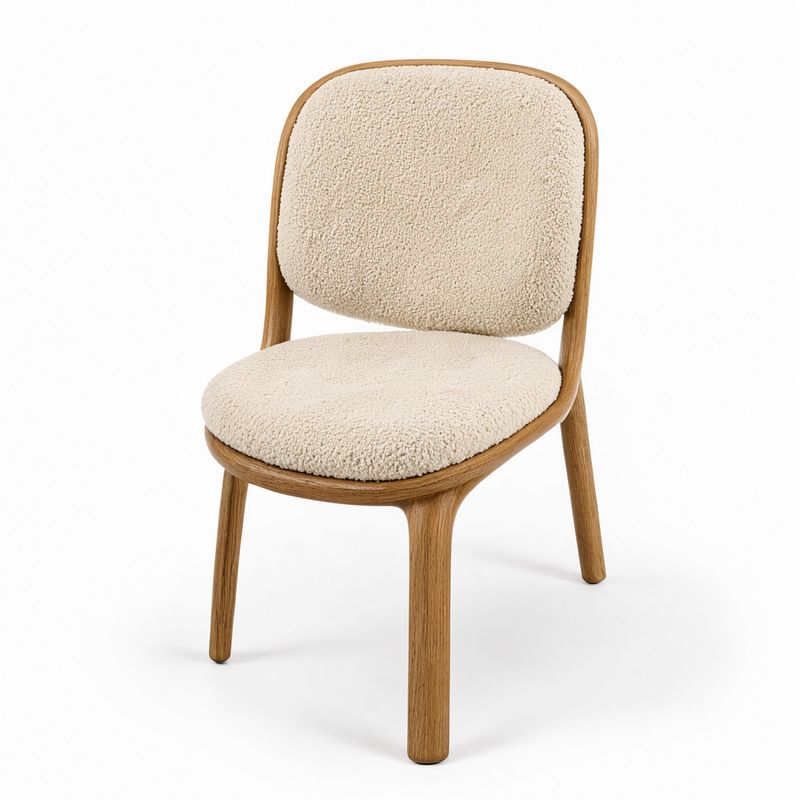
A furniture packshot on a seamless white background: <chair_1>, seen in three-quarter view. Even soft studio light, a faint contact shadow. Photoreal furniture e-commerce packshot, clean white palette.
[ { "id": "chair_1", "referenceIndex": 0, "sourceBox": [80, 250, 960, 750], "targetBox": [330, 360, 930, 660], "description": "the lounge chair with the curved oak frame and cream boucle cushions" } ] - Image 2, the scene
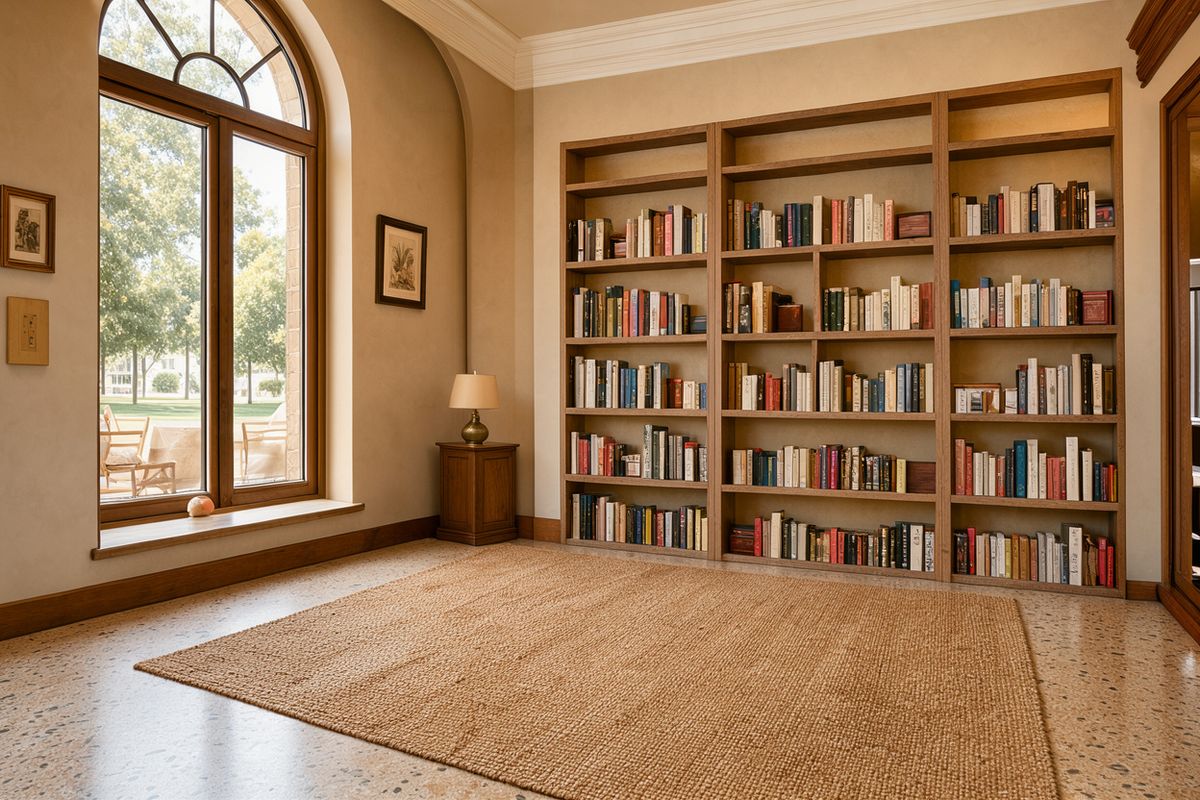
A wide shot at standing height of a quiet reading corner in a boutique hotel lounge: a tall arched window on the left, a low built-in bookshelf along the back wall and a jute rug on a terrazzo floor, with empty floor on the rug in the center of the frame. Warm afternoon daylight from the window. Photoreal hospitality interior photography, 24mm lens, warm sand and cream palette.


The chair comes from image 1, so its box has referenceIndex: 0 and a sourceBox around the chair in the packshot. Its targetBox, [330, 360, 930, 660], puts it on the rug at the size a real chair would have at that distance from the camera. The room and its window light are unchanged.
Tips for best results
-
Put the top coordinate first. A box is
[top, left, bottom, right], and a swapped pair puts the element in the wrong place. -
Mention every box in the prompt. Each
idshould appear as<id>where the element belongs in the sentence. -
Size the box for the whole element. Leave room for branches, handles, straps and shadows, or the element gets squeezed.
-
Use one box to reserve empty space. Boxing only the product keeps the rest of the frame free for copy.
-
Say what fills the gap. When an element moves or is removed, name the surface that should continue where it was.
-
Match the target size to the scene. A product placed into a room needs a box the size it would really be at that spot, or it reads as a sticker.