P-Video-Replace

P-Video-Replace is a video transformation model that swaps the on-camera character in an existing video with the character from a reference image. It is built to preserve the original motion, timing, camera behavior, lighting, and background while changing who appears in the clip, making it useful for UGC ad variations, content localization, avatar or mascot insertion, and other scalable character-replacement workflows.
Product and wardrobe variations
How to swap a single on-camera object (a product or a garment) in a source video with Pruna P-Video-Replace, without touching the rest of the frame.
Introduction
The companion guide on character replacement demonstrates the model's main use case: send a portrait, the on-camera character changes. This guide covers the localised-swap mode of the same model. With a reference image of just the target object (a product or garment) and a positivePrompt that explicitly names what to replace and what to preserve, the model can swap a single specific element of the source video without re-shooting and without touching the rest of the frame.
This guide covers the pattern in detail, then walks through three workflows: product placement, wardrobe variations, and combined personalisation that swaps a wardrobe item and a product in one call.
Request shape
Each replace call takes the source video, one to three reference images, and a positivePrompt that names the source element to replace and the elements to preserve. The example below uses the wardrobe swap (olive-green t-shirt to crisp white oxford button-down), the load-bearing pattern this guide teaches.
import { createClient } from '@runware/sdk'

const client = await createClient({ apiKey: process.env.RUNWARE_API_KEY })
await client.connect()

const [result] = await client.run({
  model: 'prunaai:p-video@replace',
  deliveryMethod: 'async',
  inputs: {
    video: 'https://example.com/source-creator-pitch.mp4',
    referenceImages: [
      'https://example.com/ref-wardrobe-oxford.jpg'
    ]
  },
  positivePrompt: 'Replace the olive-green t-shirt the woman is wearing in the source video with the crisp white oxford button-down shirt from the reference image. Preserve the woman, her face, her hair, the matte-black earbuds case in her right hand, her gestures, her speech, the studio, the lighting, the camera, and the audio exactly as they appear in the source. Only the top she is wearing should change; everything else stays as the source.',
  resolution: '720p'
})
import asyncio
import os
from runware import Runware
async def main():
async with Runware(api_key=os.environ["RUNWARE_API_KEY"]) as client:
results = await client.run({
"model": "prunaai:p-video@replace",
"deliveryMethod": "async",
"inputs": {
"video": "https://example.com/source-creator-pitch.mp4",
"referenceImages": [
"https://example.com/ref-wardrobe-oxford.jpg"
]
},
"positivePrompt": "Replace the olive-green t-shirt the woman is wearing in the source video with the crisp white oxford button-down shirt from the reference image. Preserve the woman, her face, her hair, the matte-black earbuds case in her right hand, her gestures, her speech, the studio, the lighting, the camera, and the audio exactly as they appear in the source. Only the top she is wearing should change; everything else stays as the source.",
"resolution": "720p"
})
asyncio.run(main())curl https://api.runware.ai/v1 \
-H "Authorization: Bearer $RUNWARE_API_KEY" \
-H "Content-Type: application/json" \
-d '[
{
  "taskType": "videoInference",
  "taskUUID": "a1b2c3d4-e5f6-7890-abcd-ef1234567890",
  "model": "prunaai:p-video@replace",
  "deliveryMethod": "async",
  "inputs": {
    "video": "https://example.com/source-creator-pitch.mp4",
    "referenceImages": [
      "https://example.com/ref-wardrobe-oxford.jpg"
    ]
  },
  "positivePrompt": "Replace the olive-green t-shirt the woman is wearing in the source video with the crisp white oxford button-down shirt from the reference image. Preserve the woman, her face, her hair, the matte-black earbuds case in her right hand, her gestures, her speech, the studio, the lighting, the camera, and the audio exactly as they appear in the source. Only the top she is wearing should change; everything else stays as the source.",
  "resolution": "720p"
}
]'runware run prunaai:p-video@replace \
deliveryMethod=async \
inputs.video=https://example.com/source-creator-pitch.mp4 \
inputs.referenceImages.0=https://example.com/ref-wardrobe-oxford.jpg \
positivePrompt="Replace the olive-green t-shirt the woman is wearing in the source video with the crisp white oxford button-down shirt from the reference image. Preserve the woman, her face, her hair, the matte-black earbuds case in her right hand, her gestures, her speech, the studio, the lighting, the camera, and the audio exactly as they appear in the source. Only the top she is wearing should change; everything else stays as the source." \
resolution=720p{
"taskType": "videoInference",
"taskUUID": "a1b2c3d4-e5f6-7890-abcd-ef1234567890",
"model": "prunaai:p-video@replace",
"deliveryMethod": "async",
"inputs": {
"video": "https://example.com/source-creator-pitch.mp4",
"referenceImages": [
"https://example.com/ref-wardrobe-oxford.jpg"
]
},
"positivePrompt": "Replace the olive-green t-shirt the woman is wearing in the source video with the crisp white oxford button-down shirt from the reference image. Preserve the woman, her face, her hair, the matte-black earbuds case in her right hand, her gestures, her speech, the studio, the lighting, the camera, and the audio exactly as they appear in the source. Only the top she is wearing should change; everything else stays as the source.",
"resolution": "720p"
}Response
[
  {
    "taskType": "videoInference",
    "taskUUID": "a1b2c3d4-e5f6-7890-abcd-ef1234567890",
    "videoUUID": "f1e2d3c4-b5a6-7890-1234-567890abcdef",
    "videoURL": "https://vm.runware.ai/video/os/a14d18/ws/2/vi/f1e2d3c4-b5a6-7890-1234-567890abcdef.mp4",
    "seed": 837412938
  }
]
The Combined personalisation case (covered later in this guide) keeps the same request shape, with the referenceImages array growing to two entries and the positivePrompt indexing them ("reference image 1", "reference image 2") to map each one to its target element.
Reference image and directive prompt
The model has two complementary controls. The reference image carries what the target should look like, and the positivePrompt carries what gets swapped for it and what stays. Sending one without the other does not produce a localised swap. Sending both, with each one carrying its share of the instruction, does.
The reference image should be a clean product photograph of the target object alone. No person or hands, no other props in the frame. A plain studio background with neutral lighting works best, because the model lifts the object's shape, colour, material, and proportions from the reference and any other content in the reference is just noise the model has to filter.
The positivePrompt does the localised steering. It names the specific thing to replace in the source ("the matte-black earbuds case the woman is holding") and everything that should stay the source's ("the woman, her face, her hair, her olive-green t-shirt, her gestures, her speech, the studio, the lighting, the camera, and the audio"). The closing line "Only the object in her right hand should change; everything else stays as the source" is the load-bearing direction that turns a global swap into a local one.
Product placement
The source is a creator pitching a product. The team wants the same creator presenting a different product without re-shooting. Generate a clean product photograph of the target product on a plain background, then run replace with a directive prompt that swaps the source's product for it.
The three reference variants below are all bare product shots. No person, no hand, no studio extras:

A photoreal product photograph of a single object on a plain background, no person, no hands, no other objects. The object is a small natural-terracotta clay plant pot the size of a teacup, containing a healthy little rosette-style green succulent with several thick fleshy pointed leaves spreading outward and a small visible layer of pale rocky topsoil. The pot sits centred in the frame on a plain pale grey seamless studio background. Soft even three-point lighting, gentle soft shadow under the pot, no other elements in the frame. Centered product shot, photorealistic studio quality.

A photoreal product photograph of a single object on a plain background, no person, no hands, no other objects. The object is a small soft cognac-brown leather-wrapped hardcover journal with a thin elastic dark grey band closure across the front, held upright with its front cover facing the camera. The journal sits centred in the frame on a plain pale grey seamless studio background. Soft even three-point lighting, gentle soft shadow behind the journal, no other elements in the frame. Centered product shot, photorealistic studio quality.

A photoreal product photograph of a single object on a plain background, no person, no hands, no other objects. The object is a tall brushed-stainless-steel insulated coffee tumbler with a small black silicone grip band around the middle and a matte-black push-top lid, standing upright. The tumbler sits centred in the frame on a plain pale grey seamless studio background. Soft even three-point lighting, gentle soft shadow under the tumbler, no other elements in the frame. Centered product shot, photorealistic studio quality.
Each one is sent into a replace call with a directive prompt that names the swap target and the elements to preserve. The model produces an output where Mira stays Mira and only the product in her hand changes:
Replace the matte-black earbuds case the woman is holding in the source video with the terracotta-potted succulent from the reference image. Preserve the woman, her face, her hair, her olive-green t-shirt, her gestures, her speech, the studio, the lighting, the camera, and the audio exactly as they appear in the source. Only the object in her right hand should change; everything else stays as the source.
Replace the matte-black earbuds case the woman is holding in the source video with the cognac-brown leather-wrapped journal from the reference image. Preserve the woman, her face, her hair, her olive-green t-shirt, her gestures, her speech, the studio, the lighting, the camera, and the audio exactly as they appear in the source. Only the object in her right hand should change; everything else stays as the source.
Replace the matte-black earbuds case the woman is holding in the source video with the brushed-stainless-steel coffee tumbler from the reference image. Preserve the woman, her face, her hair, her olive-green t-shirt, her gestures, her speech, the studio, the lighting, the camera, and the audio exactly as they appear in the source. Only the object in her right hand should change; everything else stays as the source.
A marketing team running A/B tests on UGC ad variants needs one creator recording plus one product photograph per variant, fanning out through one replace call per output.
Wardrobe variations
The same pattern works for clothing. Generate a flat-lay product photograph of the target garment on a plain background, run replace with a directive prompt that swaps the source's top for it:

A photoreal product photograph of a single garment on a plain background, no person, no hanger, no other objects. The garment is a clean cobalt-blue ribbed-knit crewneck sweater with a slightly relaxed fit, laid completely flat with arms slightly spread, the front face of the sweater fully visible to the camera from directly above. The sweater sits centred in the frame on a plain pale grey seamless studio surface. Soft even three-point lighting, subtle visible knit texture across the fabric, no other elements in the frame. Centered flat-lay product shot, photorealistic studio quality.

A photoreal product photograph of a single garment on a plain background, no person, no hanger, no other objects. The garment is a soft dark cocoa-brown leather biker jacket with a subtle matte sheen, laid completely flat with arms slightly spread, the front of the jacket fully visible to the camera from directly above, the front zipper running down the centre. The jacket sits centred in the frame on a plain pale grey seamless studio surface. Soft even three-point lighting, subtle visible grain on the leather, no other elements in the frame. Centered flat-lay product shot, photorealistic studio quality.

A photoreal product photograph of a single garment on a plain background, no person, no hanger, no other objects. The garment is a crisp white oxford button-down shirt with the sleeves rolled neatly to the elbows, laid completely flat with the front face fully visible to the camera from directly above, the row of buttons running down the centre, the collar at the top of the frame. The shirt sits centred in the frame on a plain pale grey seamless studio surface. Soft even three-point lighting, subtle visible weave texture across the cotton, no other elements in the frame. Centered flat-lay product shot, photorealistic studio quality.
Replace the olive-green t-shirt the woman is wearing in the source video with the cobalt-blue ribbed-knit crewneck sweater from the reference image. Preserve the woman, her face, her hair, the matte-black earbuds case in her right hand, her gestures, her speech, the studio, the lighting, the camera, and the audio exactly as they appear in the source. Only the top she is wearing should change; everything else stays as the source.
Replace the olive-green t-shirt the woman is wearing in the source video with the cocoa-brown leather biker jacket from the reference image. Preserve the woman, her face, her hair, the matte-black earbuds case in her right hand, her gestures, her speech, the studio, the lighting, the camera, and the audio exactly as they appear in the source. Only the top she is wearing should change; everything else stays as the source.
Replace the olive-green t-shirt the woman is wearing in the source video with the crisp white oxford button-down shirt from the reference image. Preserve the woman, her face, her hair, the matte-black earbuds case in her right hand, her gestures, her speech, the studio, the lighting, the camera, and the audio exactly as they appear in the source. Only the top she is wearing should change; everything else stays as the source.
The same pattern works for other garment categories with the same recipe: a clean flat-lay reference, plus a prompt that names the source's current item and lists what stays.
Combined personalisation
The referenceImages field accepts up to 3 images per call. For a combined wardrobe + product swap, send both reference images and a positivePrompt that names each reference by its position in the array ("reference image 1," "reference image 2") and maps it to the specific element it's replacing:
Replace the olive-green t-shirt the woman is wearing in the source video with the crisp white oxford button-down shirt from reference image 1, AND replace the matte-black earbuds case in her right hand with the brushed-stainless-steel coffee tumbler from reference image 2. Preserve the woman, her face, her hair, her gestures, her speech, the studio, the lighting, the camera, and the audio exactly as they appear in the source. Both the top and the object in her hand should change; everything else stays as the source.
- Reference image 1
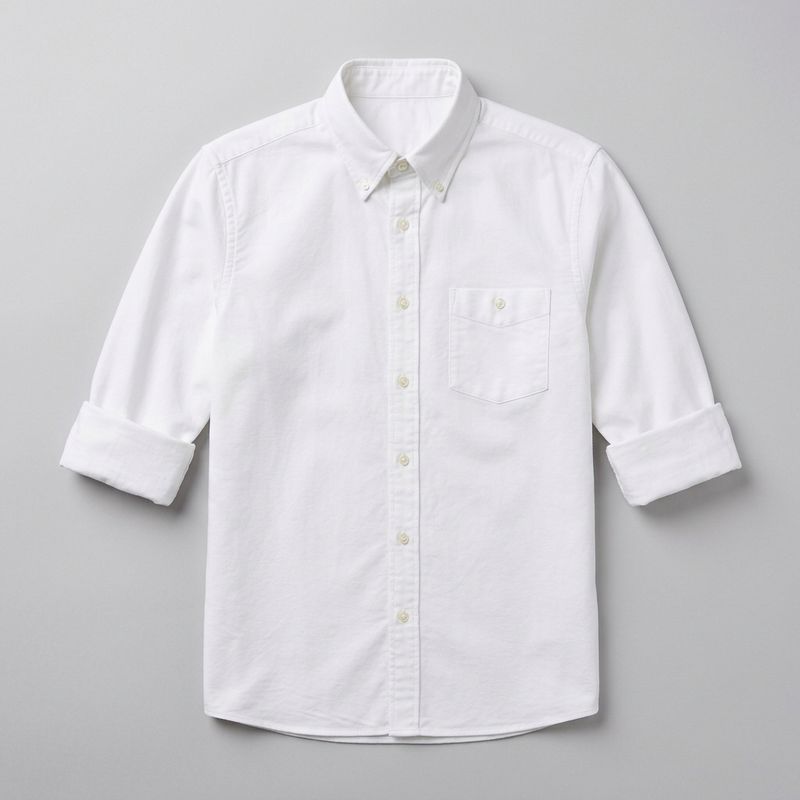
A photoreal product photograph of a single garment on a plain background, no person, no hanger, no other objects. The garment is a crisp white oxford button-down shirt with the sleeves rolled neatly to the elbows, laid completely flat with the front face fully visible to the camera from directly above, the row of buttons running down the centre, the collar at the top of the frame. The shirt sits centred in the frame on a plain pale grey seamless studio surface. Soft even three-point lighting, subtle visible weave texture across the cotton, no other elements in the frame. Centered flat-lay product shot, photorealistic studio quality.
- Reference image 2
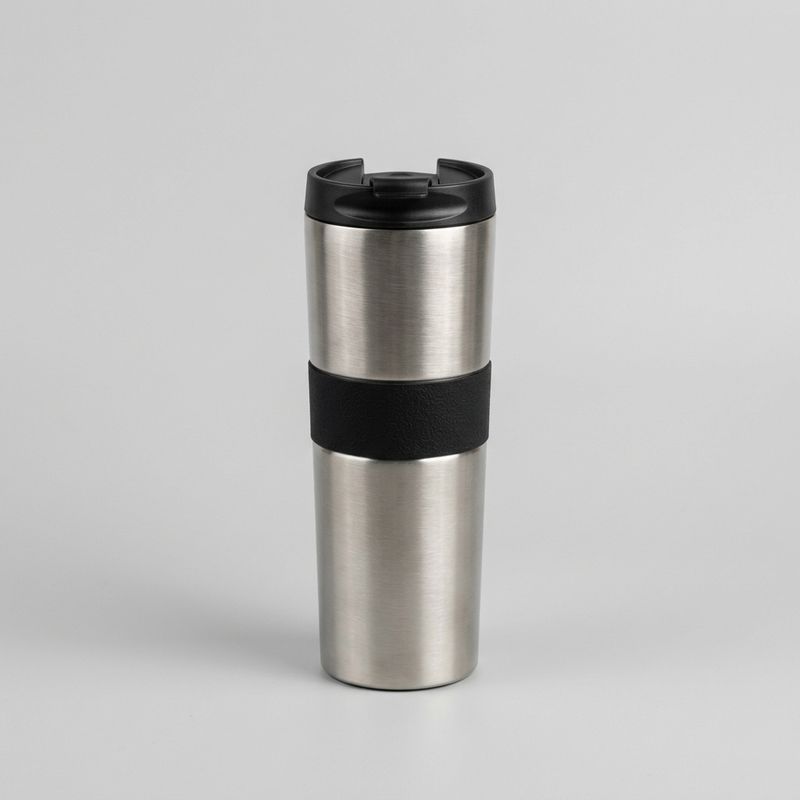
A photoreal product photograph of a single object on a plain background, no person, no hands, no other objects. The object is a tall brushed-stainless-steel insulated coffee tumbler with a small black silicone grip band around the middle and a matte-black push-top lid, standing upright. The tumbler sits centred in the frame on a plain pale grey seamless studio background. Soft even three-point lighting, gentle soft shadow under the tumbler, no other elements in the frame. Centered product shot, photorealistic studio quality.
The reference array is ["ref-wardrobe-oxford.jpg", "ref-product-tumbler.jpg"], and the prompt names each one by its index. This scales to a third reference by adding another image and one more matching clause to the prompt.
For batch production, the loop is straightforward. One source recording plus one reference image per variant element runs through one replace call per output combination. No compositing or masking required.
Limits
The directive prompt has to be specific about what's being replaced in the source. "Replace the earbuds case" is a clean instruction. "Replace the product" is too vague and may yield inconsistent results across runs because the model has to infer what "the product" means.
The model matches the reference's appearance into the source's scene, not pixel-for-pixel. Small print on a product label, a small accessory in the corner of the frame, or a subtle pattern on a garment may drift slightly between runs even when the rest of the scene is preserved. For pixel-perfect localised edits where every other pixel must stay frame-identical (a logo on a poster in the background, a number on a jersey, a specific barcode), reach for an inpainting model with a mask instead.
If the source contains the object you're trying to replace at a very small size (a product held far from camera, a sticker on a corner of a frame), the model may have less to work with and the swap quality drops. The target needs to occupy enough of the source frame for the pattern to hold.
Tips
- Generate reference images as bare product photographs. No person or hands, no studio extras. The model lifts the object's shape, colour, material, and proportions from the reference, and anything else is noise.
- Use the prompt to scope the swap. Name the specific thing to replace in the source and everything that should stay. The closing line "Only the X should change; everything else stays as the source" is what turns a global appearance match into a localised swap.
- Match the reference's framing to how the source presents the element. A product held vertically at chest level pairs with a vertical product shot. A garment seen torso-on pairs with a flat-lay shot of the garment with the front face visible.
- Use multiple references for multi-element swaps.
referenceImagesaccepts up to 3 images. Index each one in the prompt ("reference image 1," "reference image 2") and map it to its target. - Batch at 720p for review. A single source recording can fan into many product or wardrobe variants. Run the variant batch at 720p, then re-run only the approved variants at 1080p.
- Reach for an inpainting model when pixel preservation is critical. Replace lifts the reference into the scene as a whole, not pixel-for-pixel. If a tiny detail in the source (a logo in the background, a small text on a poster) must survive identically, an inpainting model with a mask is the right tool.