P-Video-2-Pro

P-Video-2-Pro is Pruna AI's quality-tier video generation model built on MiniMax H3, creating clips from text, from a first frame with an optional last frame, or from up to 9 reference images, 3 reference videos, and 3 reference audio tracks. It handles multi-beat camera moves, heavy physics like water, fire, and fabric, coherent full-body motion, and two-shot dialogue with lip sync, generating audio with every clip. It offers cost, speed, and quality recipes, three levels of prompt expansion, durations from 5 to 15 seconds, and 480p or 768p output at 24 FPS.
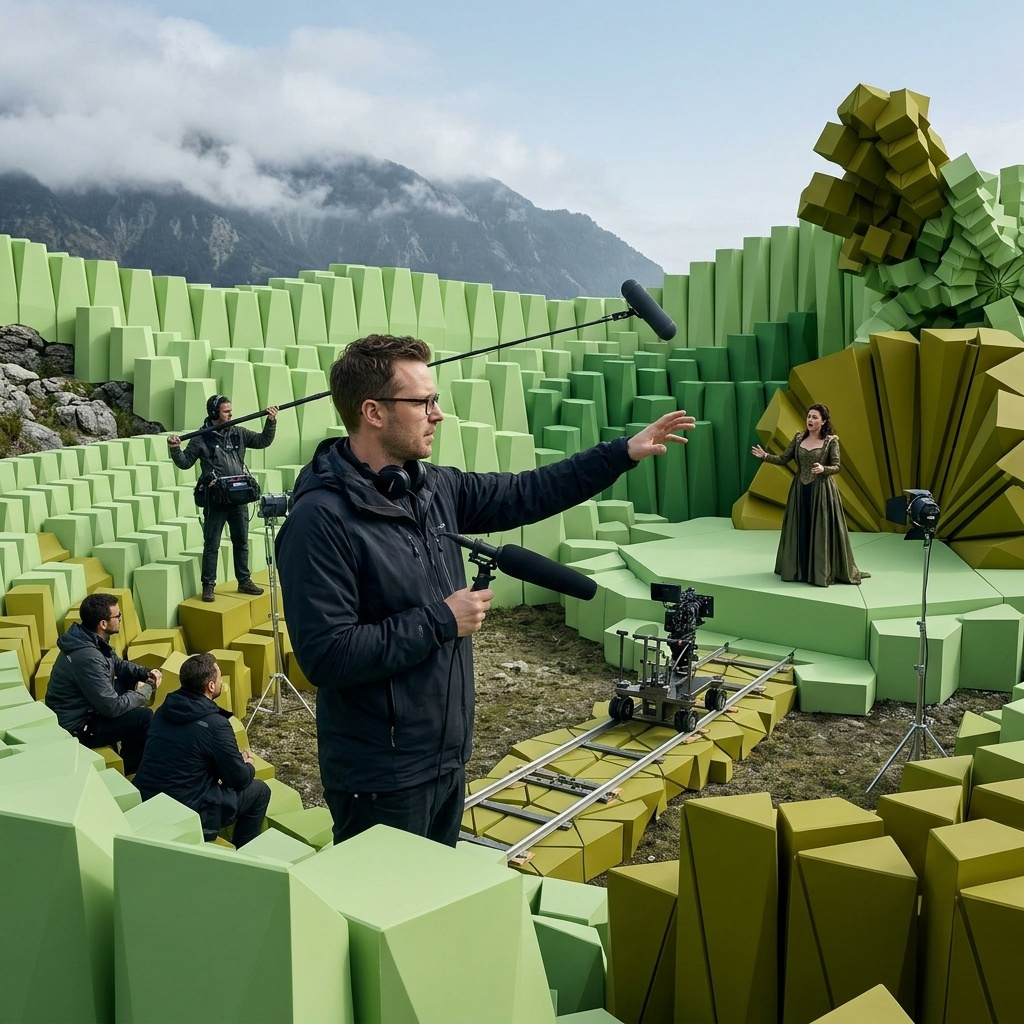
Starting and ending on frames you choose
How to animate a still with Pruna P-Video-2-Pro, pin both the first and last frame with inputs.frameImages, and turn a single image into a seamless loop.
Introduction
A prompt on its own leaves every frame to the model. inputs.frameImages lets you hand over the first frame, the last frame or both as stills you have already approved, and P-Video-2-Pro generates the motion that connects them.
A hand enters with a spoon, presses it down through the center of the lava cake and lifts away out of frame, and the cake splits open as molten chocolate pours slowly across the plate toward the ice cream, which softens at its edge. The camera holds still. Audio: the soft press of the spoon through the sponge, a slow glossy pour, quiet restaurant ambience, no music, no voice.
- First frame
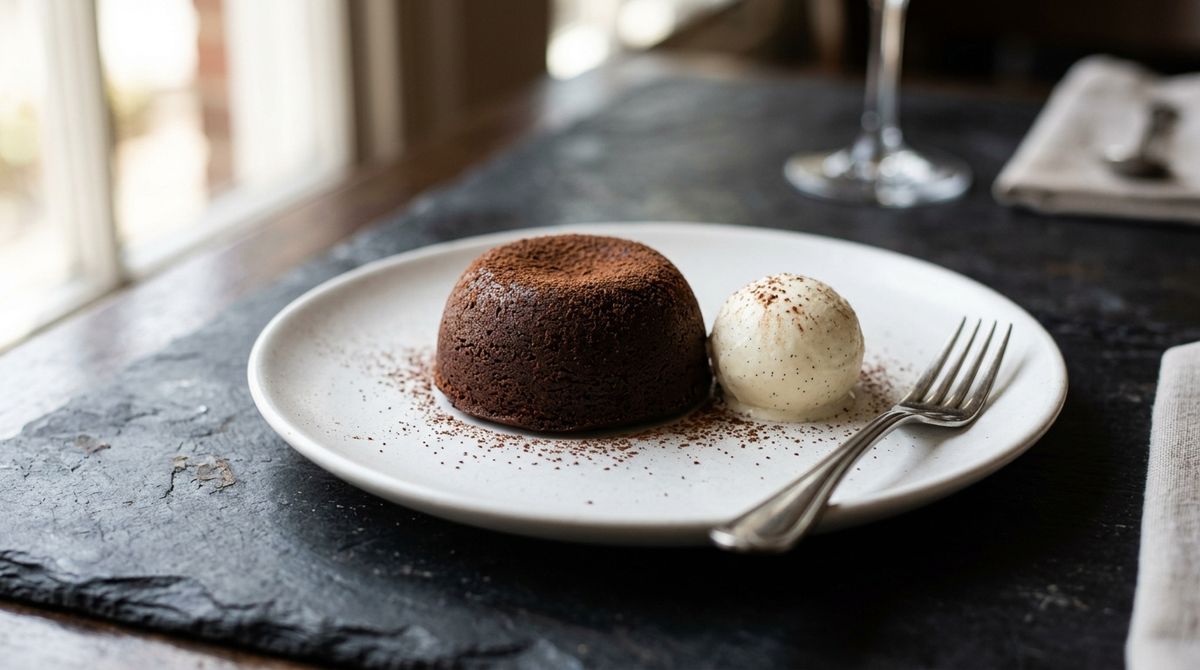
A single warm chocolate lava cake, perfectly intact with its domed top and sides unbroken, no cracks and no chocolate showing, on a matte white plate on a dark slate table, a small scoop of vanilla ice cream beside it and a dusting of cocoa powder, a dessert fork resting on the plate edge. Soft directional window light from the left. Photoreal restaurant menu food photography, three-quarter close-up at plate height, shallow depth of field, no text, no logos, no hands.
- Last frame
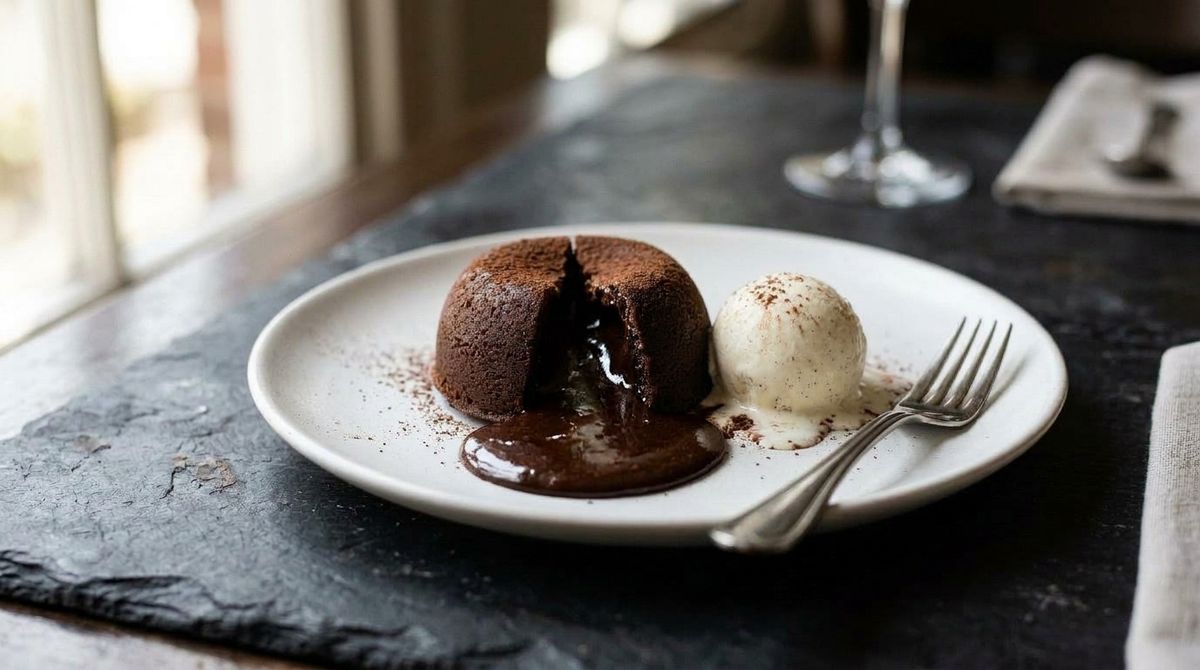
Keep this exact plate, the table, the ice cream, the fork, the light and the camera position identical. Change only this: the lava cake is split open down the middle and a thick glossy pool of molten chocolate has spread out of it across the plate and reached the ice cream, which has started to melt at its edge. No text, no logos, no hands.


The plate in the final frame is the plate the menu photo shows, because the last frame was that photo. The model only had to supply the spoon and the pour. This guide covers the request, animating from a single still, where the output shape comes from, pinning both ends, and a seamless loop.
The request
inputs.frameImages takes one or two items. Each item is either a bare image, which is read as the first frame, or an object with image and frame. frame accepts "first" and "last", or the indices 0 and -1.
{
  "inputs": {
    "frameImages": [
      { "image": "https://…/whole.jpg", "frame": "first" },
      { "image": "https://…/cut.jpg", "frame": "last" }
    ]
  }
}
The image can be a URL, a UUID from an earlier task, a data URI or base64. A still generated a moment earlier in the same pipeline can be passed by its UUID, with no upload of your own in between.
import { createClient } from '@runware/sdk'

const client = await createClient({ apiKey: process.env.RUNWARE_API_KEY })
await client.connect()

const [result] = await client.run({
  model: 'prunaai:p-video@2-pro',
  positivePrompt: 'A hand enters with a spoon, presses it down through the center of the lava cake and lifts away out of frame, and the cake splits open as molten chocolate pours slowly across the plate toward the ice cream, which softens at its edge. The camera holds still. Audio: the soft press of the spoon through the sponge, a slow glossy pour, quiet restaurant ambience, no music, no voice.',
  inputs: {
    frameImages: [
      {
        image: 'https://im.runware.ai/image/os/a14d18/ws/2/ii/5d8b3f16-2a74-4c90-9e31-7b4c1a8d2f65.jpg',
        frame: 'first'
      },
      {
        image: 'https://im.runware.ai/image/os/a14d18/ws/2/ii/c2e97a40-8d15-4b36-a6f2-3f9d5e1b7c84.jpg',
        frame: 'last'
      }
    ]
  },
  resolution: '768p',
  duration: 6,
  settings: {
    mode: 'quality',
    promptUpsampling: 'off'
  },
  deliveryMethod: 'async'
})
import asyncio
import os
from runware import Runware
async def main():
async with Runware(api_key=os.environ["RUNWARE_API_KEY"]) as client:
results = await client.run({
"model": "prunaai:p-video@2-pro",
"positivePrompt": "A hand enters with a spoon, presses it down through the center of the lava cake and lifts away out of frame, and the cake splits open as molten chocolate pours slowly across the plate toward the ice cream, which softens at its edge. The camera holds still. Audio: the soft press of the spoon through the sponge, a slow glossy pour, quiet restaurant ambience, no music, no voice.",
"inputs": {
"frameImages": [
{
"image": "https://im.runware.ai/image/os/a14d18/ws/2/ii/5d8b3f16-2a74-4c90-9e31-7b4c1a8d2f65.jpg",
"frame": "first"
},
{
"image": "https://im.runware.ai/image/os/a14d18/ws/2/ii/c2e97a40-8d15-4b36-a6f2-3f9d5e1b7c84.jpg",
"frame": "last"
}
]
},
"resolution": "768p",
"duration": 6,
"settings": {
"mode": "quality",
"promptUpsampling": "off"
},
"deliveryMethod": "async"
})
asyncio.run(main())curl https://api.runware.ai/v1 \
-H "Authorization: Bearer $RUNWARE_API_KEY" \
-H "Content-Type: application/json" \
-d '[
{
  "taskType": "videoInference",
  "taskUUID": "9a4c2e17-5b83-4d60-8f29-1e7d3b6a5c08",
  "model": "prunaai:p-video@2-pro",
  "positivePrompt": "A hand enters with a spoon, presses it down through the center of the lava cake and lifts away out of frame, and the cake splits open as molten chocolate pours slowly across the plate toward the ice cream, which softens at its edge. The camera holds still. Audio: the soft press of the spoon through the sponge, a slow glossy pour, quiet restaurant ambience, no music, no voice.",
  "inputs": {
    "frameImages": [
      {
        "image": "https://im.runware.ai/image/os/a14d18/ws/2/ii/5d8b3f16-2a74-4c90-9e31-7b4c1a8d2f65.jpg",
        "frame": "first"
      },
      {
        "image": "https://im.runware.ai/image/os/a14d18/ws/2/ii/c2e97a40-8d15-4b36-a6f2-3f9d5e1b7c84.jpg",
        "frame": "last"
      }
    ]
  },
  "resolution": "768p",
  "duration": 6,
  "settings": {
    "mode": "quality",
    "promptUpsampling": "off"
  },
  "deliveryMethod": "async"
}
]'runware run prunaai:p-video@2-pro \
positivePrompt="A hand enters with a spoon, presses it down through the center of the lava cake and lifts away out of frame, and the cake splits open as molten chocolate pours slowly across the plate toward the ice cream, which softens at its edge. The camera holds still. Audio: the soft press of the spoon through the sponge, a slow glossy pour, quiet restaurant ambience, no music, no voice." \
inputs.frameImages.0.image=https://im.runware.ai/image/os/a14d18/ws/2/ii/5d8b3f16-2a74-4c90-9e31-7b4c1a8d2f65.jpg \
inputs.frameImages.0.frame=first \
inputs.frameImages.1.image=https://im.runware.ai/image/os/a14d18/ws/2/ii/c2e97a40-8d15-4b36-a6f2-3f9d5e1b7c84.jpg \
inputs.frameImages.1.frame=last \
resolution=768p \
duration=6 \
settings.mode=quality \
settings.promptUpsampling=off \
deliveryMethod=async{
"taskType": "videoInference",
"taskUUID": "9a4c2e17-5b83-4d60-8f29-1e7d3b6a5c08",
"model": "prunaai:p-video@2-pro",
"positivePrompt": "A hand enters with a spoon, presses it down through the center of the lava cake and lifts away out of frame, and the cake splits open as molten chocolate pours slowly across the plate toward the ice cream, which softens at its edge. The camera holds still. Audio: the soft press of the spoon through the sponge, a slow glossy pour, quiet restaurant ambience, no music, no voice.",
"inputs": {
"frameImages": [
{
"image": "https://im.runware.ai/image/os/a14d18/ws/2/ii/5d8b3f16-2a74-4c90-9e31-7b4c1a8d2f65.jpg",
"frame": "first"
},
{
"image": "https://im.runware.ai/image/os/a14d18/ws/2/ii/c2e97a40-8d15-4b36-a6f2-3f9d5e1b7c84.jpg",
"frame": "last"
}
]
},
"resolution": "768p",
"duration": 6,
"settings": {
"mode": "quality",
"promptUpsampling": "off"
},
"deliveryMethod": "async"
}Response
[
  {
    "taskType": "videoInference",
    "taskUUID": "9a4c2e17-5b83-4d60-8f29-1e7d3b6a5c08",
    "videoUUID": "71f3b8d4-6e29-4a05-b8c7-2d5a9e4f1b36",
    "videoURL": "https://vm.runware.ai/video/os/a14d18/ws/2/vi/71f3b8d4-6e29-4a05-b8c7-2d5a9e4f1b36.mp4"
  }
]
width and height are rejected when inputs.frameImages is present. The canvas follows the image, and resolution (480p or 768p, default 768p) is the only size control you send.
Animating from a first frame
With a first frame in the request, everything visible in the still is settled. The prompt's job is what moves from here, both the camera and the subject. The same cabin listing photo with two different camera instructions:

The wooden deck of a modern cabin vacation rental at dusk, a steaming round cedar hot tub in the foreground, two folded gray towels on a bench beside it, warm string lights along the railing and dark pine trees beyond. Photoreal vacation rental listing photography, wide shot from the deck corner at standing height, no people, no text.
The camera pushes steadily forward across the deck until the hot tub fills the lower half of the frame, as steam drifts off the water and the string lights glow. Audio: gentle bubbling water, a soft evening breeze in the pines, faint crickets, no music, no voice.
The camera rises above the railing and turns slowly to the right, revealing a still forest lake below the cabin and the last light in the sky beyond it. Audio: gentle bubbling water, a soft evening breeze in the pines, faint crickets, no music, no voice.
The push travels toward things the photo already shows, so every surface it reaches was approved. The reveal rises past the railing and turns out of frame, and everything it uncovers is invented, including the lake and the sky beyond it.
That split decides which move fits the job. A reveal suits atmosphere, a teaser that sells the feeling of a stay. For a real property, where the lake has to be the actual lake, keep the camera inside the frame you supplied, or supply the view as a last frame.
Keep the prompt about motion. The still already answers what the subject looks like, so a sentence restating it spends prompt length on something the image decides anyway.
Output shape from the still
Because width and height are rejected alongside a frame, the output takes its aspect ratio from the image. A vertical still returns a vertical clip:

An unbranded white tube of mineral sunscreen with a coral cap lying on a striped beach towel on wet sand at the edge of the tide, bright midday sun, turquoise water at the top of the frame. Photoreal beauty e-commerce lifestyle photography, vertical framing, overhead three-quarter angle, no text, no logos, no people.
A shallow wave washes up across the sand around the towel, foams gently along its edge and slides back out, leaving the sand glistening. The camera holds still. Audio: a soft wave rushing in and draining back through the sand, distant gulls, no music, no voice.
So plan the shape when you make the still. A campaign that needs a 16:9 site banner and a 9:16 story needs two stills, one per shape, rather than one still and a crop of the finished clip.
Pinning both ends
A last frame turns the request into a start state and an end state, with the path between them left to the model. How far apart the two can sit decides what kind of motion you get. One first frame paired with two different endings:

A woman in her twenties with short dark hair, wearing a white t-shirt and black jeans, stands against a plain light gray studio wall holding a folded mid-blue denim jacket in both hands at waist height, looking at the camera. Even soft studio lighting. Photoreal fashion e-commerce photography, medium shot from the knees up, centered, no text, no logos.

Keep this exact woman, her hair, her t-shirt, her jeans, the studio wall, the lighting and the camera framing identical. Change only this: she is now wearing the mid-blue denim jacket, open at the front, with her hands relaxed at her sides. No text, no logos.

The same woman now wearing the mid-blue denim jacket, shot as a tight close-up of the collar and the top button from a low angle on her left side, the studio wall out of focus behind. Even soft studio lighting. No text, no logos.
She unfolds the denim jacket, swings it around her shoulders and slips her arms into the sleeves, then lets her hands fall to her sides. The camera holds still. Audio: denim rustling, quiet studio room tone, no music, no voice.
She unfolds the denim jacket and puts it on as the camera moves in close on the collar. Audio: denim rustling, quiet studio room tone, no music, no voice.
The near pair changes one thing, whether she is wearing the jacket, and the model fills the gap with the action that connects the two stills. The framing and the light hold because both ends agree on them.
The far pair changes the action, the framing and the camera angle at once, and the model bridges it with a camera move. She puts the jacket on while the camera pushes in and drops toward the collar, arriving on the close-up as the clip ends.
So a change of framing is not what breaks a pair. A gap a camera could travel is one the model travels. What both ends have to agree on is the subject: the same person in the same jacket.
The reliable way to build a pair is to generate the last frame from the first in your image model, changing only what the shot is about. That keeps the lens and everything else you are not changing identical at both ends.
With both ends fixed, duration sets how fast the change happens, anywhere from 5 to 15 seconds. Match it to how long the real action takes. A jacket goes on in a few seconds, and a slow change of light can use all fifteen.
A seamless loop
Pass the same image twice, as both the first and the last frame, and the clip ends exactly where it began:
The hammock sways gently in a light sea breeze and the palm fronds above it move slightly, and by the end the hammock settles back to exactly where it started. The camera holds perfectly still. Audio: soft waves and a light breeze in the palms, no music, no voice.
- First and last frame
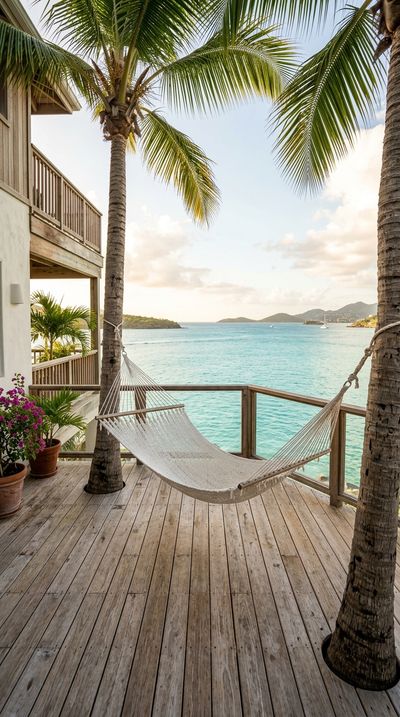
A white rope hammock strung between two palm trunks on the terrace of a beach villa, an empty wooden deck below it and a calm turquoise sea behind, bright late afternoon light. Photoreal travel and hospitality photography, vertical framing, wide shot, no people, no text, no logos.

The prompt has to describe motion that returns to rest, such as a sway or a drift of steam. Anything with a direction, a walk or a rotation, has to be walked back before the final frame and fights the loop.
The seam in the picture is exact. The soundtrack is not, and every clip from this model carries one. Remove the audio stream before the file goes into an autoplay slot or an app background, since a generated track restarts audibly at the loop point.
Tips
-
Label both frames. A bare image is read as the first frame, so name
"first"and"last"explicitly whenever you send two. -
Let the still set the shape. Send
resolutiononly, sincewidthandheightare rejected alongside a frame. -
Make one still per shape. A 16:9 still gives a 16:9 clip. A vertical deliverable needs a vertical still.
-
Prompt the motion, not the picture. The still answers what the subject looks like. The prompt answers what moves.
-
Keep the camera inside the still for accuracy. A move past the edge of the still invents what it reveals.
-
Keep the subject identical at both ends. Generate the last frame from the first. The framing can change, and the model moves the camera to cover it.
-
Match the duration to the action. With both ends fixed, the length sets the pace of the change.
-
Strip the audio from loops. The picture loops exactly and the generated track does not.