PixVerse V6

PixVerse V6 is a video generation model focused on multi-shot storytelling with native synchronized audio. It provides over 20 cinematic camera controls including focal length, aperture, depth of field, lens distortion, and vignetting. It features improved character consistency across shots using multi-image references, supports 1080p output at up to 15 seconds, and includes multilingual text rendering in frames.
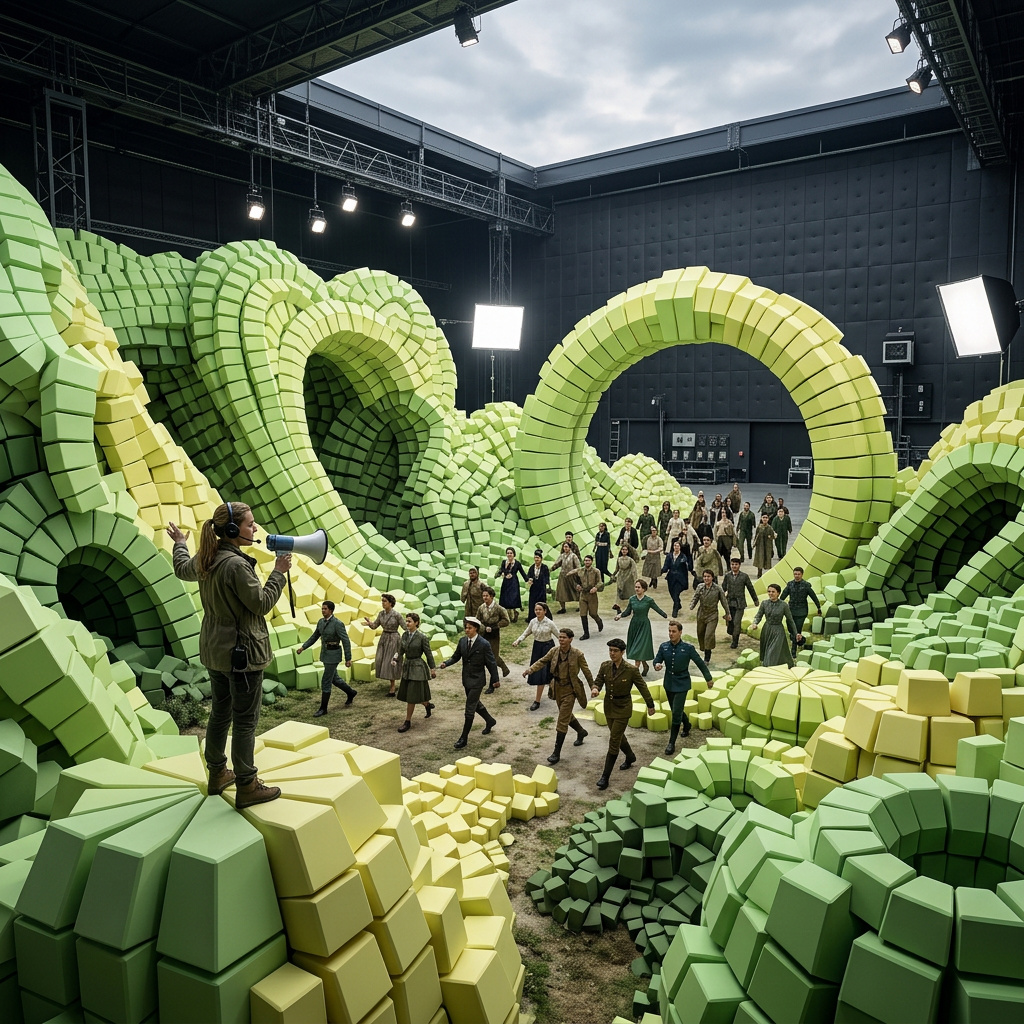
Multi-shot storytelling with anchor frames
How to use PixVerse V6 to generate multi-shot video reels from one or two anchor frames in a single call, using the beat-structured prompt pattern.
Introduction
Multi-shot reels are the awkward middle ground of generated video. A single text-to-video call produces one continuous take, which is fine for an atmospheric clip but wrong for anything that needs to cut between angles, locations, or moments. The usual workaround is the editor's bench: generate three or four shots separately, line them up on a timeline, match the color grade by hand, hope the subject reads as the same person or object across cuts.
PixVerse V6 collapses that workflow into a single call. You hand it one or two anchor frames, write a prompt that names the beats of the story, flip settings.multiClip on, and the model returns a multi-shot reel with the cuts in place and the subject carried through. The anchor frames lock the visual identity at the moments you care about. The prompt drives what happens between them.
A cinematic multi-shot sequence following a single harvest day at a Mediterranean hillside vineyard. Start with the misty sunrise establishing shot from the first frame. Cut to a lower tracking angle of weathered hands clipping ripe grape clusters into the basket. Shift to a mid shot of the full basket being lifted from the rows. End on the closing scene from the second frame image: the glass of deep ruby wine on the wooden table at golden hour. Preserve the same warm color grade across all shots.
- First anchor
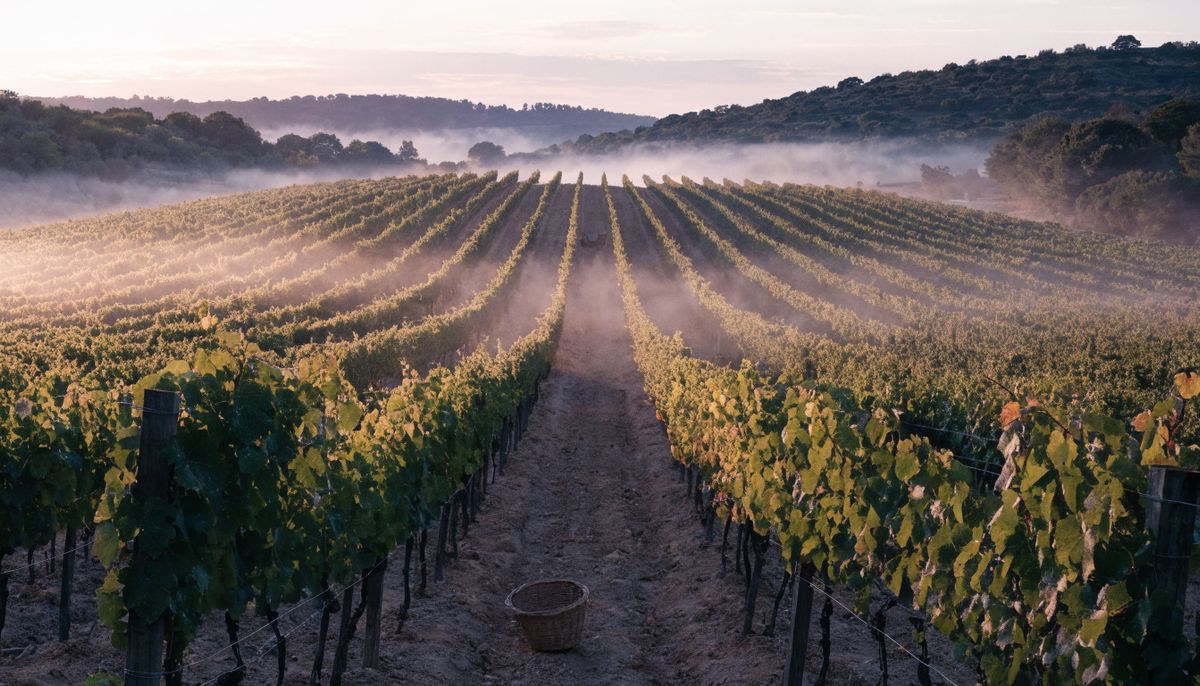
A misty Mediterranean hillside vineyard at sunrise, rows of trellised grapevines stretching across a gentle slope into soft pastel light, fine dewdrops catching the early sun on the leaves, low fog hanging between the rows, a single woven wicker basket on the dirt path
- Last anchor
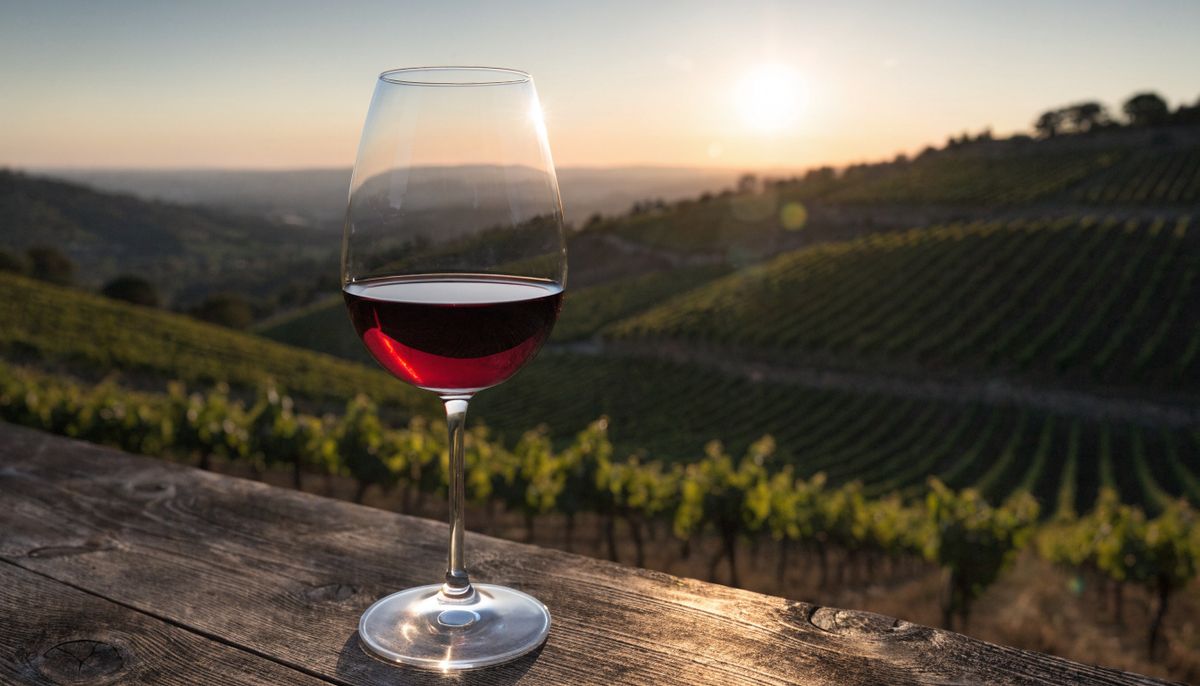
A single tall stemmed glass of deep ruby red wine resting on a weathered wooden table at golden hour, rolling Mediterranean vineyard slopes blurred softly into the warm sunset background, soft lens flare on the rim of the glass


The reel was generated in one API call from the two anchor frames beneath it. The model worked out the camera angles for the middle shots, kept the color grade consistent across cuts, and matched the bracketing frames at the open and close.
This guide covers the three input shapes V6 supports, the beat-structured prompt pattern that drives clean cuts, how to use a pair of anchors for a smooth transition instead of a reel, when the thinking parameter is worth flipping on, and how to think about the audio surcharge.
Request shape
A V6 multi-shot request takes a prompt, one or two anchor frames in inputs.frameImages, and a small set of flags in settings:
import { createClient } from '@runware/sdk'

const client = await createClient({ apiKey: process.env.RUNWARE_API_KEY })
await client.connect()

const [result] = await client.run({
  model: 'pixverse:1@8',
  positivePrompt: 'A cinematic multi-shot sequence... Start with... Cut to... Shift to... End with...',
  inputs: {
    frameImages: [
      {
        image: 'https://example.com/first.jpg',
        frame: 'first'
      },
      {
        image: 'https://example.com/last.jpg',
        frame: 'last'
      }
    ]
  },
  duration: 10,
  resolution: '1080p',
  settings: {
    multiClip: true,
    audio: true,
    thinking: 'enabled'
  }
})
import asyncio
import os
from runware import Runware
async def main():
async with Runware(api_key=os.environ["RUNWARE_API_KEY"]) as client:
results = await client.run({
"model": "pixverse:1@8",
"positivePrompt": "A cinematic multi-shot sequence... Start with... Cut to... Shift to... End with...",
"inputs": {
"frameImages": [
{
"image": "https://example.com/first.jpg",
"frame": "first"
},
{
"image": "https://example.com/last.jpg",
"frame": "last"
}
]
},
"duration": 10,
"resolution": "1080p",
"settings": {
"multiClip": True,
"audio": True,
"thinking": "enabled"
}
})
asyncio.run(main())curl https://api.runware.ai/v1 \
-H "Authorization: Bearer $RUNWARE_API_KEY" \
-H "Content-Type: application/json" \
-d '[
{
  "taskType": "videoInference",
  "taskUUID": "a1b2c3d4-e5f6-7890-abcd-ef1234567890",
  "model": "pixverse:1@8",
  "positivePrompt": "A cinematic multi-shot sequence... Start with... Cut to... Shift to... End with...",
  "inputs": {
    "frameImages": [
      {
        "image": "https://example.com/first.jpg",
        "frame": "first"
      },
      {
        "image": "https://example.com/last.jpg",
        "frame": "last"
      }
    ]
  },
  "duration": 10,
  "resolution": "1080p",
  "settings": {
    "multiClip": true,
    "audio": true,
    "thinking": "enabled"
  }
}
]'runware run pixverse:1@8 \
positivePrompt="A cinematic multi-shot sequence... Start with... Cut to... Shift to... End with..." \
inputs.frameImages.0.image=https://example.com/first.jpg \
inputs.frameImages.0.frame=first \
inputs.frameImages.1.image=https://example.com/last.jpg \
inputs.frameImages.1.frame=last \
duration=10 \
resolution=1080p \
settings.multiClip=true \
settings.audio=true \
settings.thinking=enabled{
"taskType": "videoInference",
"taskUUID": "a1b2c3d4-e5f6-7890-abcd-ef1234567890",
"model": "pixverse:1@8",
"positivePrompt": "A cinematic multi-shot sequence... Start with... Cut to... Shift to... End with...",
"inputs": {
"frameImages": [
{
"image": "https://example.com/first.jpg",
"frame": "first"
},
{
"image": "https://example.com/last.jpg",
"frame": "last"
}
]
},
"duration": 10,
"resolution": "1080p",
"settings": {
"multiClip": true,
"audio": true,
"thinking": "enabled"
}
}Response
[
  {
    "taskType": "videoInference",
    "taskUUID": "a1b2c3d4-e5f6-7890-abcd-ef1234567890",
    "videoUUID": "9c1b2d3a-4e5f-6789-abcd-ef0123456789",
    "videoURL": "https://vm.runware.ai/video/os/a14d18/ws/2/vi/9c1b2d3a-4e5f-6789-abcd-ef0123456789.mp4",
    "cost": 1.15
  }
]
One required field, the rest optional:
positivePromptis required and capped at 2048 characters. For multi-shot reels, the prompt drives the shot list. See Writing prompts for cuts below.inputs.frameImagesaccepts up to two anchor frames, each pinned to a position viaframe: "first"orframe: "last"(also0and-1). Each image accepts a URL, base64 string, data URI, or a UUID from the Media Storage API. The output aspect ratio is derived from the anchors.resolutionis"360p","540p","720p"(default), or"1080p".widthandheightare not accepted in this mode, the schema forbids them wheneverframeImagesis present.durationis 1 to 15 seconds, default 5.settings.multiClipflips the model into multi-shot mode. Off by default. See the next section.settings.audioenables synchronized audio. Off by default. See Audio surcharge below.settings.thinkingcontrols reasoning depth. See The thinking parameter below.
V6 also has a video-to-video mode via inputs.video and a text-to-video mode using width/height without frameImages. Both lock you out of multiClip, style, and thinking. Neither mode is where V6's multi-shot work happens, so keep editing passes on a model built for them.
Three input shapes
When you work with anchor frames, the decision tree is short: how many anchors do you have, and do you want one continuous shot or a cut reel?
| Anchors | multiClip | What you get |
|---|---|---|
| 1 frame | false | Single-shot continuation from the anchor as the opening image |
| 2 frames | false | Smooth interpolation from first to last, one continuous take |
| 1 or 2 frames | true | Multi-shot reel with cuts, anchors lock the bracketing look |
The same anchor frame produces a very different output depending on the flag. Below, a single image of a chef plating a dish drives two runs of the same model. The only difference between them is settings.multiClip.

Top-down view of professional chef hands plating a fine dining dish on a wide white ceramic plate, modern restaurant kitchen station with brushed steel surfaces softly defocused behind the plate
The chef finishes plating the dish with steady deliberate hands. A final garnish of fresh micro greens is placed carefully on top of the composition. Soft continuous motion, no cuts, slow gentle push toward the centre of the plate.
A cinematic multi-shot kitchen sequence from the plating moment. Start with the top-down hands placing the final garnish on the plate from the first frame. Cut to a side angle of steam rising from the finished dish under warm service light. Shift to a close mid shot of the plate sliding across the brushed steel pass. End on a server's gloved hand lifting the plate toward the dining room.
The first run reads the anchor as the opening frame of a single take and continues the action inside one continuous shot. The second run reads the anchor as the opening of a sequence and invents the cuts between the kitchen angles. The model holds the plate, the garnish, and the brushed-steel surroundings consistent across each shot, which is the part that traditional re-rolls of separate clips would have broken.
The two-frame interpolation mode lives in Smooth transitions further down, where it has a worked example of its own.
Writing prompts for cuts
multiClip opens the door to cuts, but it does not decide where they happen. The prompt does. V6 honors a beat-structured prompt that reads like a shot list and largely ignores prompts that read like image captions.
The pattern is four phrases anchored to four positions in the runtime:
Start withfor the opening shotCut tofor the second shotShift tofor the third shotEnd with(orEnd on) for the closing shot
You can drop one or two of those if the duration is shorter, but the four-beat structure produces the cleanest multi-shot output at 5 to 10 seconds. The model treats each beat as a hard cut and assembles them into a single reel.
The same single anchor image of the boutique handbag below drove two runs with identical settings. Only the prompt structure changed.

A matte black designer leather handbag with gold hardware sitting centred on a polished white marble plinth in a high end boutique window, soft warm overhead spotlight on the bag
A luxury handbag in a high end boutique window with elegant warm lighting and a sophisticated cinematic atmosphere. Premium editorial brand campaign.
A cinematic multi-shot luxury campaign built around the boutique handbag in the first frame. Start with a slow push in on the matte black bag on the marble plinth, soft warm spotlight from above catching the gold hardware. Cut to a low side angle that reveals the texture of the leather and the polished brass clasp. Shift to a top down shot of the open bag revealing a cream silk lining and a single neatly folded receipt. End on a model's gloved hand lifting the bag off the plinth and turning toward the storefront entrance.
The caption prompt described the mood and left the camera choices to the model. The model defaulted to a single slow push with multiClip on, which is the wrong default for a multiClip request. The beat-structured prompt named four explicit shots and got a four-shot reel: the push-in, the side angle, the top-down, the hand-off. The bag itself stays identical across every cut because the anchor frame is doing that work, not the prompt.
Holding the subject across cuts
A reader of the prompt above will notice the closing clause: "consistent bag design across every shot, no dialogue". Naming what must stay continuous is as important as naming the cuts. The model reads the multi-shot prompt and treats unmentioned attributes as fair game. If you do not pin the subject's identity, the bag's clasp can shift between shots, the wine glass can re-render with a different stem, the chef's gloves can change color.
The cue is short and goes at the end of the prompt. "Consistent bag design across every shot." "Preserve the same color grade across cuts." Each clause names one attribute you want preserved.
The vintage Vespa anchor below makes the difference visible. The same single anchor frame drives two runs with the same four-beat prompt. The only difference is whether the prompt closes with a clause naming the scooter's identifying details.

A vintage cherry red Vespa scooter parked on worn cobblestones outside a sun drenched Roman cafe, three quarter angle facing the camera, polished chrome handlebars catching the warm afternoon light, classic round headlight, a small Italian flag sticker on the front fairing
A cinematic multi-shot lifestyle vignette of the vintage cherry red Vespa scooter in Rome. Start with the wide establishing shot from the first frame. Cut to a low ground angle close on the chrome handlebars and the round headlight catching the sun. Shift to an over the shoulder shot looking down the cobblestone alleyway with the scooter in the foreground. End on a rider's hand reaching for the ignition key as they mount the scooter from behind.
A cinematic multi-shot lifestyle vignette of the vintage cherry red Vespa scooter in Rome. Start with the wide establishing shot from the first frame. Cut to a low ground angle close on the chrome handlebars and the round headlight catching the sun. Shift to an over the shoulder shot looking down the cobblestone alleyway with the scooter in the foreground. End on a rider's hand reaching for the ignition key as they mount the scooter from behind. Preserve the exact cherry red bodywork color, the polished chrome handlebar shape, the round single headlight, the worn leather seat, and the small Italian flag sticker on the front fairing across every shot.
The loose run reads the anchor at the open and then lets the small details drift as the camera changes angle. The headlight reshape between the close-up and the over-the-shoulder. The Italian flag sticker is gone by the last shot. The seat texture flips between the cuts. None of this would survive a brand-side review.
The locked run pins the bodywork color, the chrome handlebar shape, the round headlight, the worn leather seat, and the flag sticker in the closing clause. The model carries each one through. The scooter at the end is recognizably the same scooter from the open.
Cuts only render cleanly when the model recognizes the subject as continuous. A prompt that asks for cuts between a sneaker and a city skyline gives the model no continuous thread to carry. Multi-shot V6 works on a single subject moving through a sequence of moments, not a montage of unrelated images.
Beat structure across genres
The four-beat pattern is genre-agnostic. The same Start / Cut / Shift / End skeleton produces clean reels for a luxury campaign, a kitchen documentary, an outdoor narrative, or a noir mood piece. The model does not need a different prompt grammar per genre. It needs a clear shot list. Two reels below, from very different sources, both built from a single anchor frame and a four-beat prompt.
A cinematic multi-shot sequence of a solo coastal hike reaching its summit at golden hour. Start with the rear three quarter shot from the first frame, the hiker mid stride climbing the final grass ridge in the sun faded red windbreaker, walking poles in both hands. Cut to a low ground angle close on the worn hiking boot pressing into the springy turf with a walking pole tip planted beside it. Shift to a wide drone style aerial shot pulling back to reveal the full coastline below and the hiker as a small figure on the clifftop edge. End on the over the shoulder shot of the hiker standing at the cliff edge looking out at the golden ocean horizon. Preserve the red windbreaker, the walking poles, and the warm golden hour light across every shot.
A cinematic multi-shot neo noir sequence in the rain slicked Tokyo backstreet from the first frame. Start with the wide establishing shot from behind the trench coated detective, neon red and cyan glow reflecting on the wet asphalt. Cut to a close profile shot of the detective's face under the brim of the fedora, neon light catching the eyes and the jawline. Shift to a low angle handheld push down the alleyway from the detective's point of view, neon signs flickering at the edges of frame. End on a tight shot of a rain soaked door handle being turned at the dark end of the alley. Preserve the wet asphalt, the saturated red and cyan neon palette, the trench coat silhouette, and the foggy atmosphere across every shot.
Both prompts open with a single establishing line, name four shots, close with a preservation clause. The hike reel carries the red windbreaker and the walking poles through wide, low, aerial, and over-shoulder angles. The noir reel carries the neon palette and the trench coat silhouette through the wide, profile, point-of-view, and tight angles. Different genres, same skeleton.
Smooth transitions
multiClip off with two anchors is a different tool from multiClip on. The model treats the second anchor as the target state and renders one continuous interpolation from the first frame to the last. There are no cuts. Anything that differs between the two anchors morphs smoothly across the runtime.
The cherry blossom pair below demonstrates the shape. The first anchor is a bare branch on a grey overcast sky. The second is the same branch in full pink bloom against the same sky. The prompt names the transition arc and asks for the composition to stay locked.
A smooth seamless time lapse of a single cherry blossom branch awakening from winter to peak spring bloom. Start from the bare dormant branch in the first frame. Buds emerge gradually, open slowly into delicate pale pink flowers, then burst into full bloom matching the second frame. The branch shape, the diagonal composition, and the soft grey overcast sky stay locked across the full clip. Only the flowers evolve.
- First: bare branch
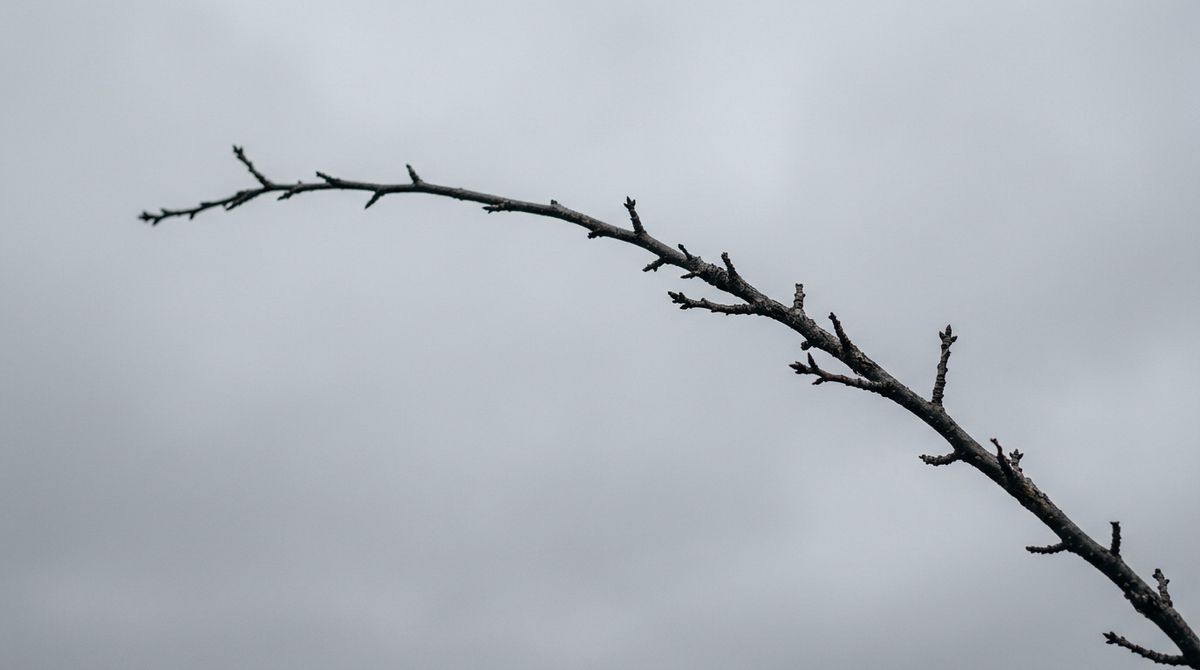
A single bare cherry blossom branch arcing diagonally across a soft uniform grey overcast sky, dark dormant branch, fine dry bark, no leaves, no buds
- Last: full bloom
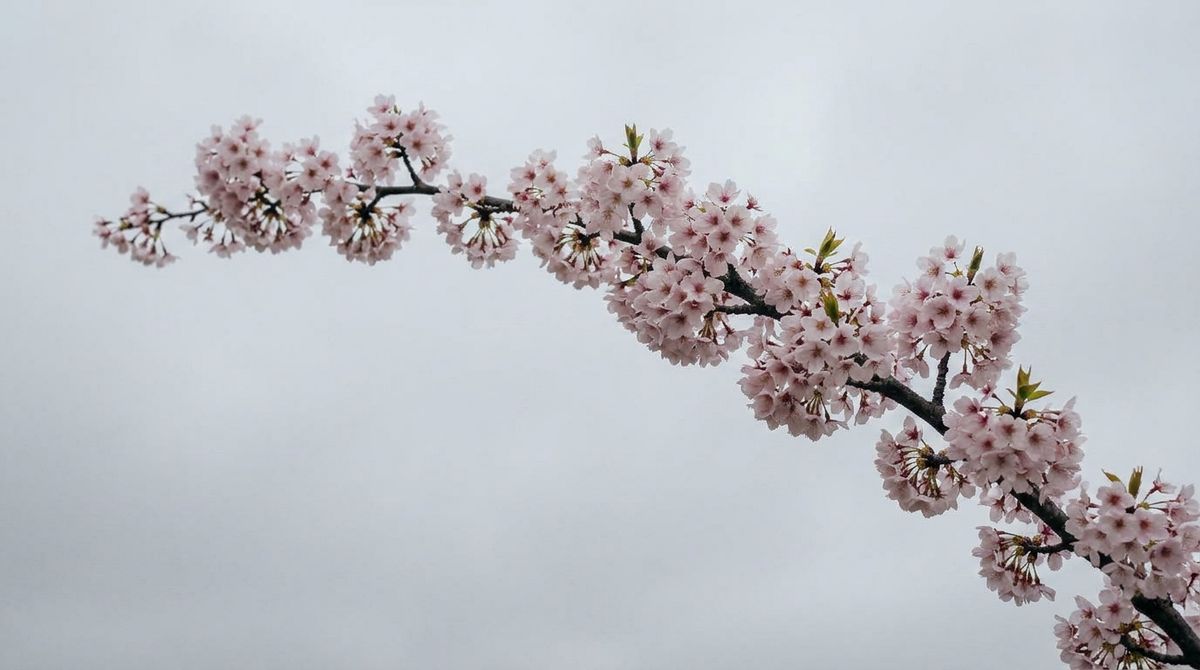
A single cherry blossom branch arcing diagonally across a soft uniform grey overcast sky, now in full pink bloom, dense delicate pale pink flowers covering every twig


The output is one take, no cuts. The branch stays in the same position across the eight seconds. Only the flowers evolve, which is the change the anchor pair encoded. Reach for this shape when the change you want is a single visual evolution rather than a sequence of moments. Day to night on the same skyline. Empty stage to packed venue from the same camera angle. Anything where the two endpoints define the whole arc and there is nothing in between worth cutting to.
The two-anchor transition still benefits from a "stays locked" clause in the prompt. The cherry blossom prompt says "the branch shape, the diagonal composition, and the soft grey overcast sky stay locked". Without that clause, the model can drift the composition mid-clip and land on the second anchor abruptly. With it, the path between the two frames stays clean.
The same shape works for atmospheric and lighting changes, not just changes in the subject's physical state. A pair of anchors of the same view at two different times of day gives the model the brackets it needs to evolve the light without inventing a new scene. The Manhattan skyline pair below holds the camera position, the building silhouettes, and the bridge composition locked across both anchors. Only the time of day changes.
A smooth seamless transition of the Manhattan skyline from midday to deep night. Start from the bright daylight scene in the first frame. Daylight fades through golden hour into deep dusk, then night settles in with the warm pinpoint glow of thousands of office window lights blinking on across the towers and the Brooklyn Bridge cable lights illuminating one by one. The camera position, the building silhouettes, and the Brooklyn Bridge cable composition stay locked. Only the time of day and the lighting evolve.
- First: midday
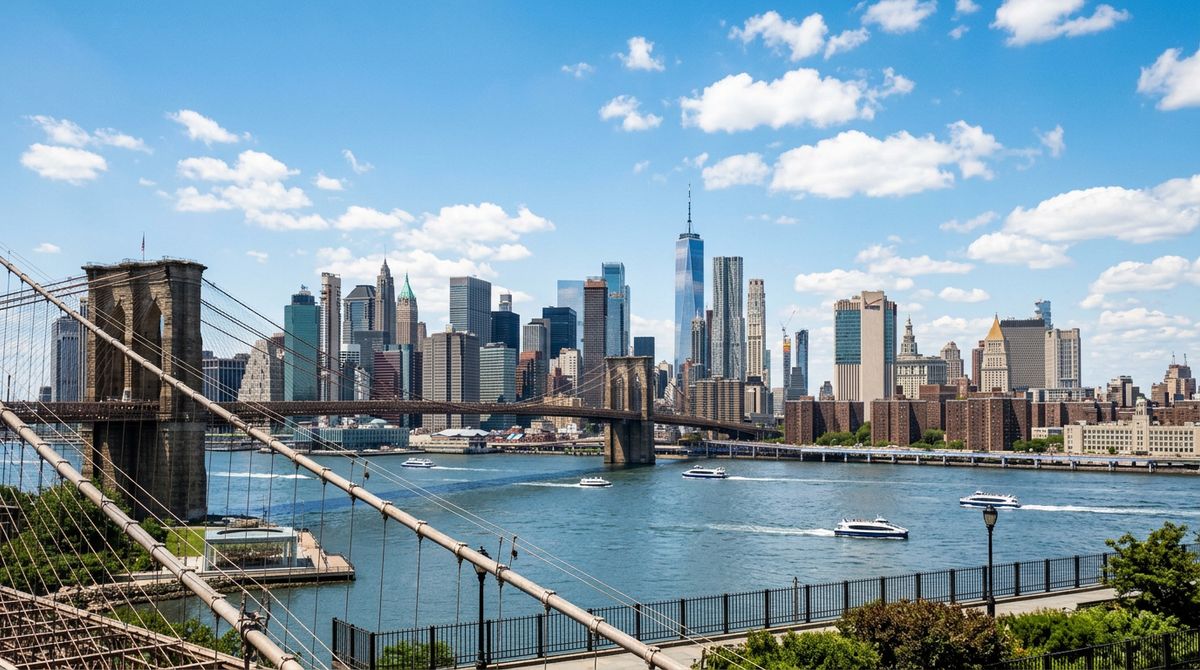
A wide cinematic skyline view of Manhattan from across the East River at midday, crisp blue sky with scattered white clouds, sharp midday sunlight on the glass facades of the towers, the Brooklyn Bridge cables crossing the lower left foreground
- Last: deep night
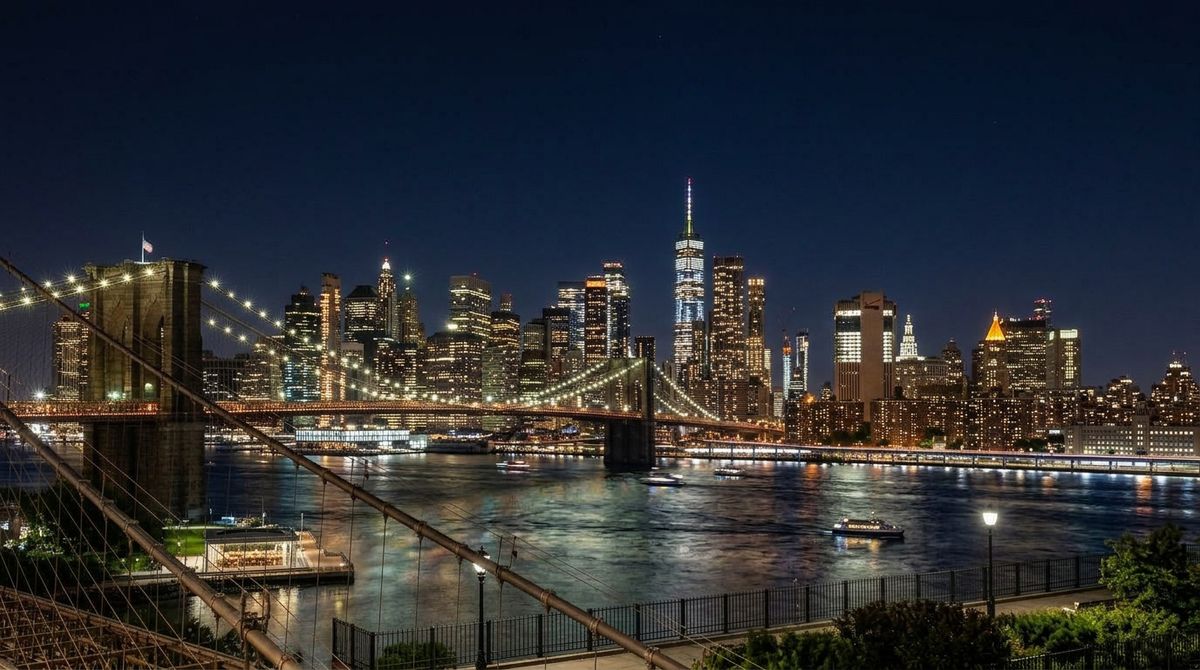
A wide cinematic skyline view of Manhattan from across the East River at deep night, dark navy sky, warm pinpoint glow of thousands of lit office windows scattered across the towers, the Brooklyn Bridge illuminated with its cable lights


The buildings stay where they were. The bridge cables stay where they were. The lighting moves through the full arc from noon glare to dusk to a dense field of warm window lights. This is the same mode the cherry blossom used. The difference is only what the anchors encode: the cherry blossom anchors locked composition and changed the subject's state, the skyline anchors lock composition and change the lighting.
The thinking parameter
settings.thinking controls how much reasoning the model spends interpreting the prompt and the anchors. The values it accepts depend on how many anchor frames the request carries:
- With zero or one anchor frame,
thinkingtakes"enabled","disabled", or"auto"(default). - With two anchor frames,
thinkingnarrows to"enabled"or"disabled". The"auto"value is rejected, you have to make the call explicitly.
Across both shapes the meaning is the same:
"enabled"spends extra compute on prompt interpretation, shot planning, and consistency tracking. Slower per call, more faithful to long prompts."disabled"skips the reasoning step. Faster, weaker adherence to complex shot lists."auto"lets the model decide.
| When | What thinking: "enabled" buys you |
|---|---|
| Multi-shot reels with four or more named beats | Cleaner cut placement, better adherence to the named shot order |
| Two-frame transitions with a non-linear arc | More careful interpolation when the change is not a simple morph |
| Prompts with explicit consistency clauses | Better preservation of the named attributes across cuts |
For single-anchor reels, leaving it on "auto" is the right default. For two-anchor calls you have to pick, and "enabled" is the safer choice when the prompt names beats or the anchor pair encodes a complex arc. Drop to "disabled" for fast iteration when you are still tuning a prompt and the output quality is secondary.
Audio surcharge
settings.audio: true generates a synchronized audio track at the same time as the video. The track is environmental by default: footsteps, ambient room tone, weather, mechanical sounds, distant voices. It is not a substitute for narration or licensed music.
The surcharge is real. From the model's pricing tiers:
| Resolution | Without audio (per second) | With audio (per second) | Premium |
|---|---|---|---|
| 720p | $0.045 | $0.060 | +33% |
| 1080p | $0.090 | $0.115 | +28% |
The premium earns its place on atmospheric reels where the soundtrack is the environment itself: wind through vines, footsteps on cobblestones, water in a fountain, the hum of a kitchen pass. PixVerse renders these in sync with the on-screen motion, which an editor would otherwise time and mix by hand. The synced bed also carries across cuts, so the audio does not pop between shots in a multiClip reel.
Leave it off when post will replace the track anyway. A reel headed into a longer edit with its own music or voiceover gains nothing from a synced ambient bed underneath. Same for assets destined for silent-autoplay platforms where the audio never reaches the audience. Dialog and licensed music belong in the post pipeline regardless of this flag.
Tips
-
Use the beat pattern for any multiClip request.
Start with/Cut to/Shift to/End withis the structure the model honors. Captioned mood prompts produce single takes even withmultiClip: true, which is the wrong output for the parameter. -
Always close the prompt with a consistency clause. Name the subject attributes the model must hold across cuts. Without that clause, hardware drifts, color grades reset between shots, and characters lose identifying details from one beat to the next.
-
Match the anchor framing to its pinned position. A
frame: "first"anchor should look like the opening of the reel, aframe: "last"anchor like the closing. Mismatched composition between the anchors and their pinned moments forces the model to redraw the bracketing frames, which defeats the point of anchoring. -
Two anchors with
multiClip: falseis a transition, not a reel. Reach for it when the change is a single visual arc with no cuts worth making. The cherry blossom shape, not the vineyard shape. -
thinking: "auto"for single-anchor reels, pick explicitly for two-anchor. The validator accepts"auto"only with zero or one frame. Two-anchor calls require either"enabled"or"disabled". Reach for"enabled"when the result missed a beat, dropped a consistency cue, or skipped a transition step. -
Pay the audio surcharge for atmospheric reels, skip it for cuts that will get a soundtrack downstream. Synced environmental audio is hard to add in post and easy to lose. Music and dialog belong in the edit, not in the generation call.