MiniMax H3 Max

MiniMax H3 Max is a performance-tuned variant of MiniMax H3 built for faster video generation while preserving strong prompt following and polished audiovisual results. It supports text-to-video and image-to-video workflows, including optional first-and-last-frame guidance for more controlled motion between key images, and is well suited to rapid ideation, high-volume content production, and interactive creative workflows that need lower latency without giving up visual quality.
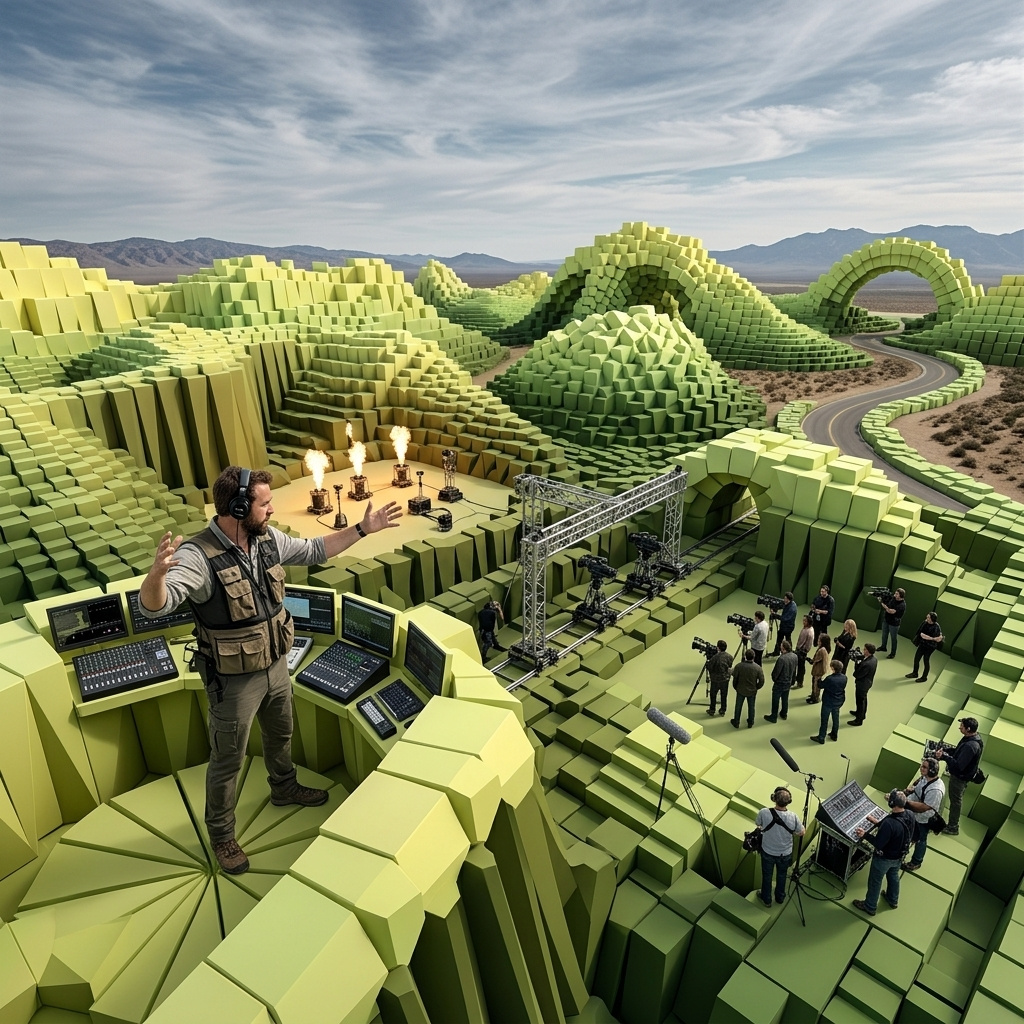
Generating video
How to generate video with MiniMax H3 Max: the fixed size pairs at 480p and 768p, animating a first and last frame, native synced audio, and rendering faster than playback.
Introduction
MiniMax H3 Max generates video with the sound written in the same pass as the picture. You send a prompt on its own, or a prompt plus images pinned to the endpoints of the shot, and a clip of 5 to 15 seconds comes back with its audio already in the file.
Output runs at 480p or 768p, taken from a fixed list of twelve size pairs. What the model trades that ceiling for is speed: a 5-second clip comes back in less time than it takes to play, which puts generated video inside a loop somebody is waiting in rather than a queue they come back to.
A bright modern gym in early morning light. A fitness trainer in a charcoal tank top swings a kettlebell in a steady rhythm, hips driving the movement, the bell arcing up to chest height and swinging back down between her knees. In the last two seconds she finishes the set and lowers the kettlebell onto the rubber floor beside her. The camera holds a steady medium shot, then pushes in slowly as the reps continue. Sound: her breathing timed to the reps with a sharp exhale on each drive, the rush of the bell through the air on each downswing, the low hum of an empty gym, and a heavy metallic clank as she sets the bell down on the floor at the end.
Play it with the sound on. The breathing, the rush of the bell through the air, the hum of the empty gym and the clank as she sets it down were all written into the same prompt as the picture.
This guide covers the request shape, the fixed sizes and the rule that decides which sizing field you send, animating from pinned frames, directing the native audio, and the draft-then-commit loop the model is built for.
Request shape
A text-to-video request is a prompt and a size.
import { createClient } from '@runware/sdk'

const client = await createClient({ apiKey: process.env.RUNWARE_API_KEY })
await client.connect()

const [result] = await client.run({
  model: 'minimax:h3@max',
  positivePrompt: 'A fitness trainer swings a kettlebell in a bright modern gym, the camera pushing slowly in as the reps continue. Sound: her steady breathing timed to the reps and the low hum of an empty gym.',
  width: 1344,
  height: 768,
  duration: 10,
  deliveryMethod: 'async'
})
import asyncio
import os
from runware import Runware
async def main():
async with Runware(api_key=os.environ["RUNWARE_API_KEY"]) as client:
results = await client.run({
"model": "minimax:h3@max",
"positivePrompt": "A fitness trainer swings a kettlebell in a bright modern gym, the camera pushing slowly in as the reps continue. Sound: her steady breathing timed to the reps and the low hum of an empty gym.",
"width": 1344,
"height": 768,
"duration": 10,
"deliveryMethod": "async"
})
asyncio.run(main())curl https://api.runware.ai/v1 \
-H "Authorization: Bearer $RUNWARE_API_KEY" \
-H "Content-Type: application/json" \
-d '[
{
  "taskType": "videoInference",
  "taskUUID": "a1b2c3d4-e5f6-7890-abcd-ef1234567890",
  "model": "minimax:h3@max",
  "positivePrompt": "A fitness trainer swings a kettlebell in a bright modern gym, the camera pushing slowly in as the reps continue. Sound: her steady breathing timed to the reps and the low hum of an empty gym.",
  "width": 1344,
  "height": 768,
  "duration": 10,
  "deliveryMethod": "async"
}
]'runware run minimax:h3@max \
positivePrompt="A fitness trainer swings a kettlebell in a bright modern gym, the camera pushing slowly in as the reps continue. Sound: her steady breathing timed to the reps and the low hum of an empty gym." \
width=1344 \
height=768 \
duration=10 \
deliveryMethod=async{
"taskType": "videoInference",
"taskUUID": "a1b2c3d4-e5f6-7890-abcd-ef1234567890",
"model": "minimax:h3@max",
"positivePrompt": "A fitness trainer swings a kettlebell in a bright modern gym, the camera pushing slowly in as the reps continue. Sound: her steady breathing timed to the reps and the low hum of an empty gym.",
"width": 1344,
"height": 768,
"duration": 10,
"deliveryMethod": "async"
}Response
[
  {
    "taskType": "videoInference",
    "taskUUID": "a1b2c3d4-e5f6-7890-abcd-ef1234567890",
    "videoUUID": "9c1b2d3a-4e5f-6789-abcd-ef0123456789",
    "videoURL": "https://vm.runware.ai/video/os/a14d18/ws/2/vi/9c1b2d3a-4e5f-6789-abcd-ef0123456789.mp4"
  }
]
Three things about that payload are not obvious from the parameter list:
positivePromptcarries the picture and the sound together, in a single string.widthandheightalways travel as a pair, and only as one of twelve fixed combinations.- Audio has no parameter of its own. Every clip comes back with a track whether you ask for one or not, and the prompt is the only place to direct it.
Sizes come from a fixed list
width and height are not free values. The model accepts twelve exact pairs, six aspect ratios at each of the two tiers, running from ~21:9 through 16:9, 4:3 and 1:1 to 3:4 and ~9:16. Anything else is rejected. The API reference lists every pair. Send neither field and you get 1344 × 768.
There is a second sizing field, resolution, and the two are mutually exclusive. Which one you use isn't a preference, it's decided by the request: a text-only prompt sizes with width and height, while a request carrying inputs.frameImages sizes with resolution and takes its shape from the image.
resolution is rejected on a text-only request, and width or height alongside inputs.frameImages is rejected too. The two paths never mix.
Both tiers cover the same six ratios, so a vertical cut for social and an ultrawide cut for a site header are both first-class rather than crops of a 16:9 master.
A fashion lookbook clip shot in a bright studio. A model in a tailored oversized cream blazer worn over a plain white crew-neck tee, with matching wide-leg trousers, walks toward the camera, turns on the spot so the fabric swings out and settles, then faces forward. Seamless warm grey backdrop, soft even studio light. Sound: the soft rustle of fabric and quiet studio room tone.
A cyclist in a teal jersey rides along an empty coastal road at dawn, pale flat sea on the left and dry grass verges on the right. The camera tracks alongside at riding speed in a wide anamorphic frame. Sound: the hum of tyres running on tarmac, the light whir of the chain under load, wind across the microphone, and distant surf.
Neither clip was cropped after the fact. The lookbook was requested at 768 × 1344 and the coastal ride at 1536 × 672, so each one composes for its own frame: the model walks toward a tall camera, the cyclist sits in a wide one with the sea filling the left of the shot.
Duration
Any whole number of seconds from 5 to 15, defaulting to 5. Length is not free, though: a 15-second request is 15 seconds the model has to fill, and a prompt written for a 5-second shot will loiter or drift when it's stretched. Give a long clip beats to hit. The blender below runs through loading the jug, blending, pouring and setting the glass down, each beat named in the prompt in the order it happens.
A bright modern kitchen. Hands pour frozen berries and banana slices into a glass blender jug, lock the jug onto the base, and press the button. The mixture turns and thickens into a deep purple smoothie. The jug lifts away, pours into a tall glass, and the glass is set down on the counter beside the blender. Sound: fruit tumbling into the jug, the lid clicking into place, the blender rising to a steady whirr and winding down, then the thick pour into the glass.
The same applies to the sound. Sequenced audio needs the events named in order, which is what keeps the lid click and the pour landing where the picture puts them.
Animating from a first frame
Pass a single image in inputs.frameImages and the clip opens on that exact frame, then moves according to the prompt. This is the path for anything where the opening composition is already settled, such as a packshot you've iterated in an image model.
The running shoe turns slowly on its stand while a key light travels across it, the mesh upper and the midsole tread catching the light in turn. The backdrop stays a clean seamless studio grey and the framing holds steady. Sound: quiet studio room tone.
- First frame
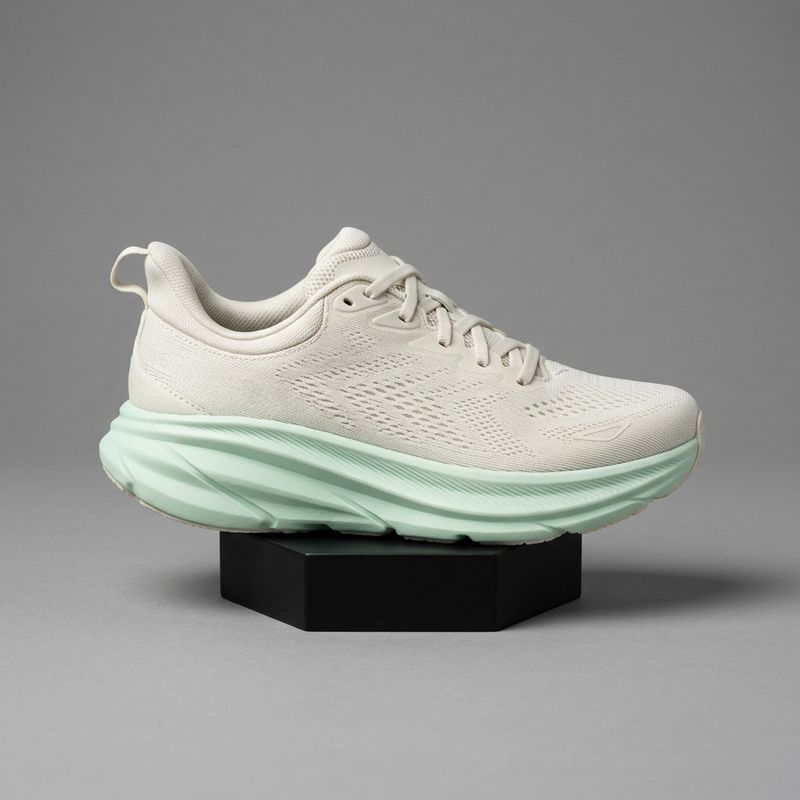
A single running shoe in off-white engineered mesh with a pale mint midsole, angled three-quarters on a low matte black display stand, centred on a seamless studio grey backdrop, soft even studio lighting with a gentle highlight running along the midsole.

The request swaps width and height for resolution, and the output takes its shape from the image, landing on the closest pair the tier allows. The square packshot above came back at 768 × 768, and a 1376 × 768 source lands on 1344 × 768 with a sliver cropped from the sides:
import { createClient } from '@runware/sdk'

const client = await createClient({ apiKey: process.env.RUNWARE_API_KEY })
await client.connect()

const [result] = await client.run({
  model: 'minimax:h3@max',
  positivePrompt: 'The running shoe turns slowly on its stand while a key light travels across it. Sound: quiet studio room tone.',
  inputs: {
    frameImages: [
      {
        image: 'https://example.com/sneaker.jpg',
        frame: 'first'
      }
    ]
  },
  resolution: '768p',
  duration: 5,
  deliveryMethod: 'async'
})
import asyncio
import os
from runware import Runware
async def main():
async with Runware(api_key=os.environ["RUNWARE_API_KEY"]) as client:
results = await client.run({
"model": "minimax:h3@max",
"positivePrompt": "The running shoe turns slowly on its stand while a key light travels across it. Sound: quiet studio room tone.",
"inputs": {
"frameImages": [
{
"image": "https://example.com/sneaker.jpg",
"frame": "first"
}
]
},
"resolution": "768p",
"duration": 5,
"deliveryMethod": "async"
})
asyncio.run(main())curl https://api.runware.ai/v1 \
-H "Authorization: Bearer $RUNWARE_API_KEY" \
-H "Content-Type: application/json" \
-d '[
{
  "taskType": "videoInference",
  "taskUUID": "b2c3d4e5-f6a7-8901-bcde-f12345678901",
  "model": "minimax:h3@max",
  "positivePrompt": "The running shoe turns slowly on its stand while a key light travels across it. Sound: quiet studio room tone.",
  "inputs": {
    "frameImages": [
      {
        "image": "https://example.com/sneaker.jpg",
        "frame": "first"
      }
    ]
  },
  "resolution": "768p",
  "duration": 5,
  "deliveryMethod": "async"
}
]'runware run minimax:h3@max \
positivePrompt="The running shoe turns slowly on its stand while a key light travels across it. Sound: quiet studio room tone." \
inputs.frameImages.0.image=https://example.com/sneaker.jpg \
inputs.frameImages.0.frame=first \
resolution=768p \
duration=5 \
deliveryMethod=async{
"taskType": "videoInference",
"taskUUID": "b2c3d4e5-f6a7-8901-bcde-f12345678901",
"model": "minimax:h3@max",
"positivePrompt": "The running shoe turns slowly on its stand while a key light travels across it. Sound: quiet studio room tone.",
"inputs": {
"frameImages": [
{
"image": "https://example.com/sneaker.jpg",
"frame": "first"
}
]
},
"resolution": "768p",
"duration": 5,
"deliveryMethod": "async"
}A plain image string works in place of the object form when the image is the first frame. The reference lists the size, aspect-ratio and file-size limits a frame image has to meet.
Bridging a first and last frame
Add a second image on last and the model has both endpoints, so it plans the motion that connects them instead of inventing where the shot ends up. A day-to-dusk interior is the clean case: two renders of one room, and the model works out the fade between them.
The same living room moves from late afternoon through to dusk. The daylight on the walls cools and falls away, the window deepens to blue, and the floor lamp and the table lamp come up one after the other until the room is lit by warm pools of lamplight. The furniture never moves and the camera holds the same locked-off frame throughout. Sound: quiet interior room tone with faint traffic outside the window.
- First frame
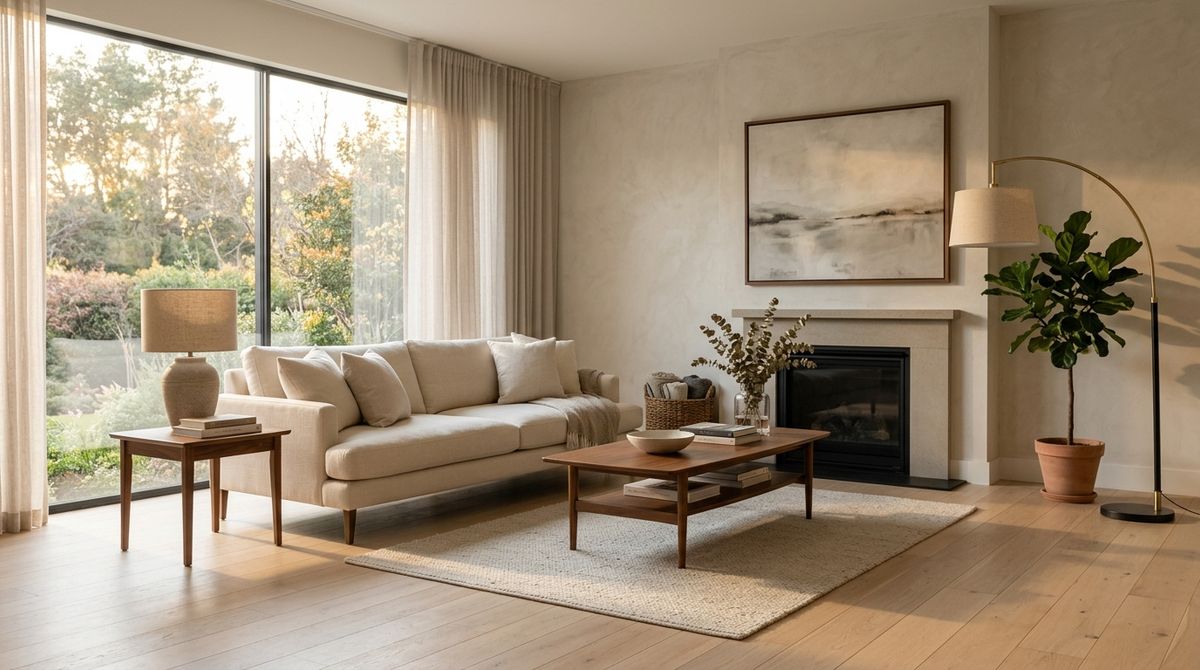
A modern living room in late afternoon daylight, a low cream sofa with linen cushions facing a walnut coffee table, a tall window on the left casting warm light across a pale oak floor, an unlit arc floor lamp in the far corner and an unlit ceramic table lamp on a side table.
- Last frame
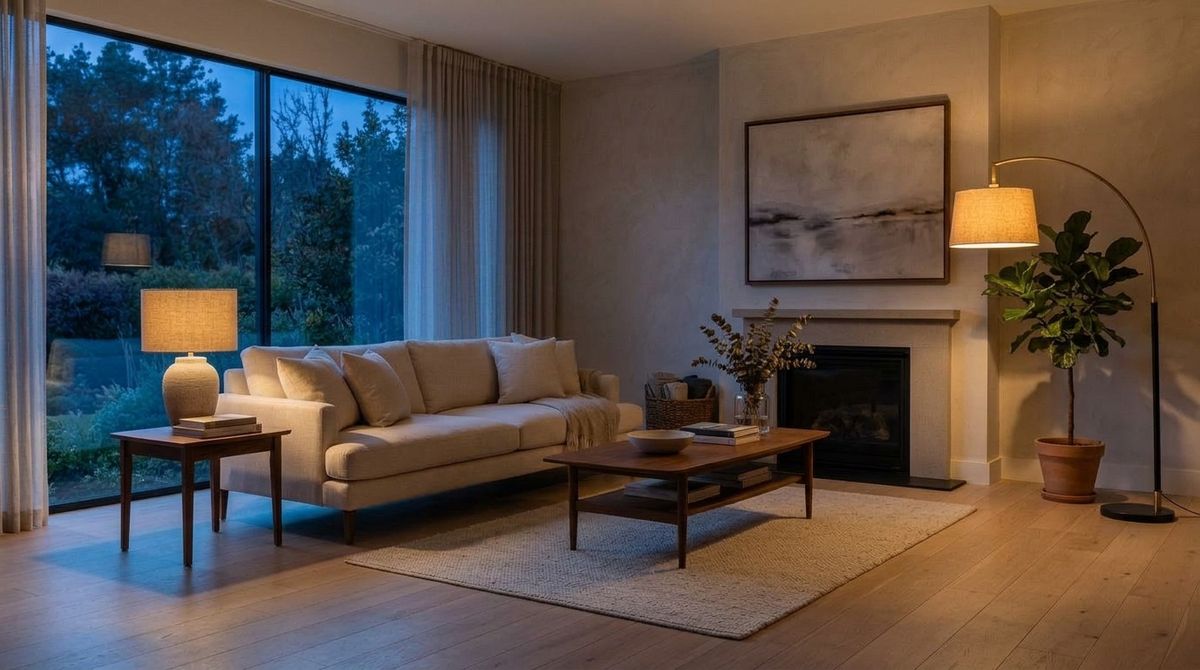
The same living room at dusk, from the exact same camera position and framing: the window now deep blue with the daylight gone, the arc floor lamp and the ceramic table lamp both switched on and casting warm pools of light across the oak floor, every piece of furniture in the same position.


frame takes first or last, and the numeric forms 0 and -1 mean the same thing. Two rules make the difference between a bridge and a jump cut:
- The endpoints have to share a framing. The second image here was generated by editing the first, which is what holds the furniture and the camera position identical while only the light changes. Two independent renders of "a living room" would force the model to travel between two different rooms.
- The prompt describes the journey, not the destination. The last frame already says where the shot lands, so the prompt's job is what happens on the way there.
Directing the sound
Audio is generated from the prompt rather than pulled from a library, and there is no second call. The working convention is a Sound: clause at the end: everything before it describes the picture, everything after it describes the track. The label is a convention rather than a keyword, so a plain sentence works too, but keeping it as a labelled clause makes prompts easier to edit later.
Naming each sound next to the action it belongs to is what puts it in time with the frame.
An indoor basketball court under bright ceiling lights. A player drives to the hoop, plants, and lays the ball up off the backboard, the net snapping as it drops through. The camera follows from the baseline in a steady handheld move. Sound: sneakers squeaking on the hardwood, two dribbles, the ball off the backboard, the snap of the net, then the ball bouncing away.
Dialogue works the same way, with one addition: quote the line you want spoken. The model matches the mouth to the words rather than approximating a talking motion.
A small bakery owner in a flour-dusted apron stands behind her counter and speaks straight to camera, warm and unhurried, trays of bread on the shelves behind her. Vertical framing for social, natural window light. Sound: she says, "We bake everything here before the sun comes up." Quiet shop ambience under her voice.
Ambience is worth naming even when nothing in the scene makes a noise. A clip with no Sound: clause still comes back with a track, and it will be the model's guess at what the room sounds like.
Drafting at 480p, committing at 768p
The 480p tier is what makes H3 Max worth reaching for on volume work. A draft pass at 480p answers the questions that don't depend on resolution: whether the composition holds and whether the sound lands where the action puts it. Only the runs that survive that need a 768p render.
A skincare serum bottle in frosted glass with a matte black dropper cap stands on a pale marble surface. A soft key light sweeps slowly across the bottle from left to right, the glass catching the light and a faint shadow travelling with it. A single drop falls from the dropper into a shallow dish beside the bottle. The bottle is completely unlabelled, plain frosted glass with no lettering or branding anywhere in frame. Sound: quiet studio room tone and the soft tick of the drop landing.
A skincare serum bottle in frosted glass with a matte black dropper cap stands on a pale marble surface. A soft key light sweeps slowly across the bottle from left to right, the glass catching the light and a faint shadow travelling with it. A single drop falls from the dropper into a shallow dish beside the bottle. The bottle is completely unlabelled, plain frosted glass with no lettering or branding anywhere in frame. Sound: quiet studio room tone and the soft tick of the drop landing.
Set a seed before you start drafting. It makes a run repeatable at the same settings, which is what lets you change one clause of a prompt and see what that clause did. Moving from 480p to 768p is a different render, and the pair above shows how much survives it: the bottle, the dish, the dropper and the travelling light land in the same places at both tiers, while the colour grade shifts from warm to cool. Treat the draft as a read on staging and pacing, not on grade or fine detail.
Speed this far past playback also changes what you can build, not only how you iterate. A clip that renders faster than it plays fits inside an interactive session: a prompt box that answers while the viewer is still watching the previous result, or a preview that re-renders as someone moves a control. That is a different product shape from submitting a job and collecting it later.
Tips
-
Pick the pair, don't compute it.
widthandheightaccept twelve exact pairs. Any arithmetic that lands between them is a rejected request. -
Let the sizing field follow the input. Text-only means
widthandheight. Pinned frames meanresolution, and the shape comes from your image rather than from the request. -
Match the frame image to the shape you want. The output lands on the pair closest to your image, so a vertical deliverable starts with a vertical first frame.
-
Write duration into the prompt. For anything past 5 seconds, name the beats in the order they happen. A single-action prompt stretched to 15 seconds drifts.
-
Name sounds beside their actions. A sound listed next to the moment it belongs to lands in time. A pile of sounds at the end of the prompt arrives roughly.
-
Quote spoken lines. Dialogue in quotation marks gets matched lip movement. Described dialogue gets mouth motion that fits nothing.
-
Draft at 480p on the same seed. Iterate the prompt at the small tier where each pass is quick, then re-render the keeper at 768p.
-
Generate endpoint frames as a pair. For a first-and-last shot, edit the second image out of the first so the framing is identical. Two separate renders of the same description will not line up.