Ideogram 4.6

Ideogram 4.6 is Ideogram's image generation and editing model, with native output up to 4096x4096. It generates images from text at any size on a 32-pixel grid, with an optional transparent background, and edits a source image using up to four more images as references. It keeps characters recognizable across scenes and matches exact colors more reliably than Ideogram 4.5, which suits product shots, brand recoloring, and campaign variations.
Transparent backgrounds
How to generate cut-out assets with Ideogram 4.6: settings.background and its formats, prompts for clean edges and hair, sticker sets with text and cut-outs from a photo.
Introduction
A product image on a storefront rarely keeps its own background. A tumbler lands on a category tile and a promo banner, each with a different color behind it. Generating it on white and cutting it out afterward adds a step to the pipeline, and it leaves a pale fringe wherever the cut was not perfect.
settings.background removes that step. Set it to transparent and Ideogram 4.6 renders the subject onto an alpha channel, so the file it returns is transparent everywhere outside the product.

A single insulated stainless steel tumbler in matte cobalt blue powder coat with a clear press-on lid and a brushed steel straw, a small debossed wave logo near the base, upright in a straight three-quarter view, floating with no background, no surface and no shadow, clean crisp edges all the way around. Photoreal product rendering, soft studio lighting from the front left with a gentle highlight along the right edge.
This guide covers the setting and the formats it needs, prompting for a clean cut-out, sticker sets with lettering, hair and soft edges, checking a file on light and dark tiles, and cutting a product out of an existing photo.
The request
Transparency is one field, settings.background, which takes transparent or opaque. opaque always returns a solid background, whatever the prompt says.
import { createClient } from '@runware/sdk'

const client = await createClient({ apiKey: process.env.RUNWARE_API_KEY })
await client.connect()

const [result] = await client.run({
  model: 'ideogram:4.6@0',
  positivePrompt: 'A single insulated stainless steel tumbler in matte cobalt blue powder coat with a clear press-on lid and a brushed steel straw, a small debossed wave logo near the base, upright in a straight three-quarter view, floating with no background, no surface and no shadow, clean crisp edges all the way around. Photoreal product rendering, soft studio lighting from the front left with a gentle highlight along the right edge.',
  settings: {
    background: 'transparent'
  },
  outputFormat: 'PNG',
  width: 3264,
  height: 4096
})
import asyncio
import os
from runware import Runware
async def main():
async with Runware(api_key=os.environ["RUNWARE_API_KEY"]) as client:
results = await client.run({
"model": "ideogram:4.6@0",
"positivePrompt": "A single insulated stainless steel tumbler in matte cobalt blue powder coat with a clear press-on lid and a brushed steel straw, a small debossed wave logo near the base, upright in a straight three-quarter view, floating with no background, no surface and no shadow, clean crisp edges all the way around. Photoreal product rendering, soft studio lighting from the front left with a gentle highlight along the right edge.",
"settings": {
"background": "transparent"
},
"outputFormat": "PNG",
"width": 3264,
"height": 4096
})
asyncio.run(main())curl https://api.runware.ai/v1 \
-H "Authorization: Bearer $RUNWARE_API_KEY" \
-H "Content-Type: application/json" \
-d '[
{
  "taskType": "imageInference",
  "taskUUID": "5d8a2f17-3c49-4e60-b8a1-9f2c7e4d1b36",
  "model": "ideogram:4.6@0",
  "positivePrompt": "A single insulated stainless steel tumbler in matte cobalt blue powder coat with a clear press-on lid and a brushed steel straw, a small debossed wave logo near the base, upright in a straight three-quarter view, floating with no background, no surface and no shadow, clean crisp edges all the way around. Photoreal product rendering, soft studio lighting from the front left with a gentle highlight along the right edge.",
  "settings": {
    "background": "transparent"
  },
  "outputFormat": "PNG",
  "width": 3264,
  "height": 4096
}
]'runware run ideogram:4.6@0 \
positivePrompt="A single insulated stainless steel tumbler in matte cobalt blue powder coat with a clear press-on lid and a brushed steel straw, a small debossed wave logo near the base, upright in a straight three-quarter view, floating with no background, no surface and no shadow, clean crisp edges all the way around. Photoreal product rendering, soft studio lighting from the front left with a gentle highlight along the right edge." \
settings.background=transparent \
outputFormat=PNG \
width=3264 \
height=4096{
"taskType": "imageInference",
"taskUUID": "5d8a2f17-3c49-4e60-b8a1-9f2c7e4d1b36",
"model": "ideogram:4.6@0",
"positivePrompt": "A single insulated stainless steel tumbler in matte cobalt blue powder coat with a clear press-on lid and a brushed steel straw, a small debossed wave logo near the base, upright in a straight three-quarter view, floating with no background, no surface and no shadow, clean crisp edges all the way around. Photoreal product rendering, soft studio lighting from the front left with a gentle highlight along the right edge.",
"settings": {
"background": "transparent"
},
"outputFormat": "PNG",
"width": 3264,
"height": 4096
}Response
[
  {
    "taskType": "imageInference",
    "taskUUID": "5d8a2f17-3c49-4e60-b8a1-9f2c7e4d1b36",
    "imageUUID": "a93e6c1b-4f72-4d08-9b5e-2c7d1a8f3e46",
    "imageURL": "https://im.runware.ai/image/os/a14d18/ws/2/ii/a93e6c1b-4f72-4d08-9b5e-2c7d1a8f3e46.png"
  }
]
transparent needs a format that can store alpha. Send outputFormat as PNG or WEBP with it. A transparent request that leaves outputFormat out, or asks for JPG, is rejected rather than returned flattened.
The size works the same as for any other generation, up to 4096 × 4096. Render a cut-out that will be scaled into many layouts large enough for the biggest one, since the edges are what softens first when a small file is scaled up.
Prompting for a clean cut-out
The setting gives the file an alpha channel. The prompt decides what ends up inside it, and a prompt that still reads like a photo shoot brings parts of the shoot along.
Name what is absent. A product photo usually has a surface and a shadow, so a prompt that does not rule them out leaves the model room to add them. "No background, no surface and no shadow" keeps a faint floor and a gray smudge out of the file. A shadow can always be added per layout in CSS or in the compositing step, while a baked-in one takes another render to remove.
Light the object, not a room. A product placed on a kitchen counter picks up the color and reflections of that kitchen, even when the counter is cut away. Give the light in studio terms instead: a direction and a softness.
The prompt describes the tumbler and its studio light, and rules out everything around it.
Sticker sets with lettering
Stickers and merch graphics are where transparency and Ideogram's text rendering meet: the lettering is part of the cut-out, set in the same pass as the illustration. For a set that has to read as one family, write the style once and append it to every subject, word for word.
as a die-cut vinyl sticker with a thick white border following its outline,
flat vector illustration, bold clean outlines, four flat colors in tomato red,
sunflower yellow, cream and charcoal, no gradients, floating with no background,
no surface and no shadow, crisp edges all the way around. Playful merch sticker
for a pet supply store.
A cheerful golden retriever wearing a red bandana, with the words "GOOD DOG CLUB" in chunky rounded capitals arched above its head, as a die-cut vinyl sticker with a thick white border following its outline, flat vector illustration, bold clean outlines, four flat colors in tomato red, sunflower yellow, cream and charcoal, no gradients, floating with no background, no surface and no shadow, crisp edges all the way around. Playful merch sticker for a pet supply store.

A tabby cat sitting next to an alarm clock with a bone-shaped treat on top, with the words "TREAT O'CLOCK" in chunky rounded capitals below them, as a die-cut vinyl sticker with a thick white border following its outline, flat vector illustration, bold clean outlines, four flat colors in tomato red, sunflower yellow, cream and charcoal, no gradients, floating with no background, no surface and no shadow, crisp edges all the way around. Playful merch sticker for a pet supply store.

A dachshund running at full speed with motion lines behind it, with the words "ZOOMIES CERTIFIED" in chunky rounded capitals on a ribbon banner below it, as a die-cut vinyl sticker with a thick white border following its outline, flat vector illustration, bold clean outlines, four flat colors in tomato red, sunflower yellow, cream and charcoal, no gradients, floating with no background, no surface and no shadow, crisp edges all the way around. Playful merch sticker for a pet supply store.
The thick white border in the style clause does double duty: it is the die-cut margin a print shop needs, and it gives the lettering a clean edge against whatever surface the sticker lands on.
Hair and soft edges
Hair breaks up into soft, partial edges, and it is where a background remover leaves a halo or chops curls into a helmet. A creator thumbnail is the common case: a person cut out at the waist, dropped onto a bright graphic.

A young man in his twenties with voluminous curly dark hair and a short beard, wearing an orange hoodie, pointing up and to the right with one hand and an excited open-mouthed expression, framed from the waist up, floating with no background, no surface and no shadow, every curl of his hair cleanly separated from the empty space around it. Photoreal portrait for a video thumbnail, bright even studio lighting.
The alpha channel follows the outline of the curls, with soft partial transparency where single strands thin out at the edge: about 6% of the pixels in the file are partly transparent, four in five of them around the hair and the raised hand. "Every curl of his hair cleanly separated from the empty space around it" names the hard part of the cut-out in the prompt, the same way "no shadow" rules out the shadow.
Checking on light and dark tiles
Before you ship a cut-out, place it on the lightest and the darkest background it will land on, as the creator cut-out is here:


Judge the edge on the dark tile. A fringe of light pixels left along an edge vanishes against off-white and shows up as a thin outline against charcoal. At full size, the charcoal tile shows a faint gray haze just outside the outer curls, where the soft edge still carries some of the light it was rendered with. At page size it disappears, so judge the cut-out at the size it ships.
Run the check with the colors of the layouts the asset ships into, and against both themes when the interface has a dark mode.
Cutting out an existing photo
The setting also works on an edit. Pass a photo in inputs.referenceImages, ask for the one object to keep, and the result comes back on an alpha channel.

Isolate the table lamp from image 1 on a transparent background. Remove the sideboard, the books, the plant, the wall and the print. Keep the lamp exactly as it is in image 1, at the same size and position, with no shadow.
- Image 1
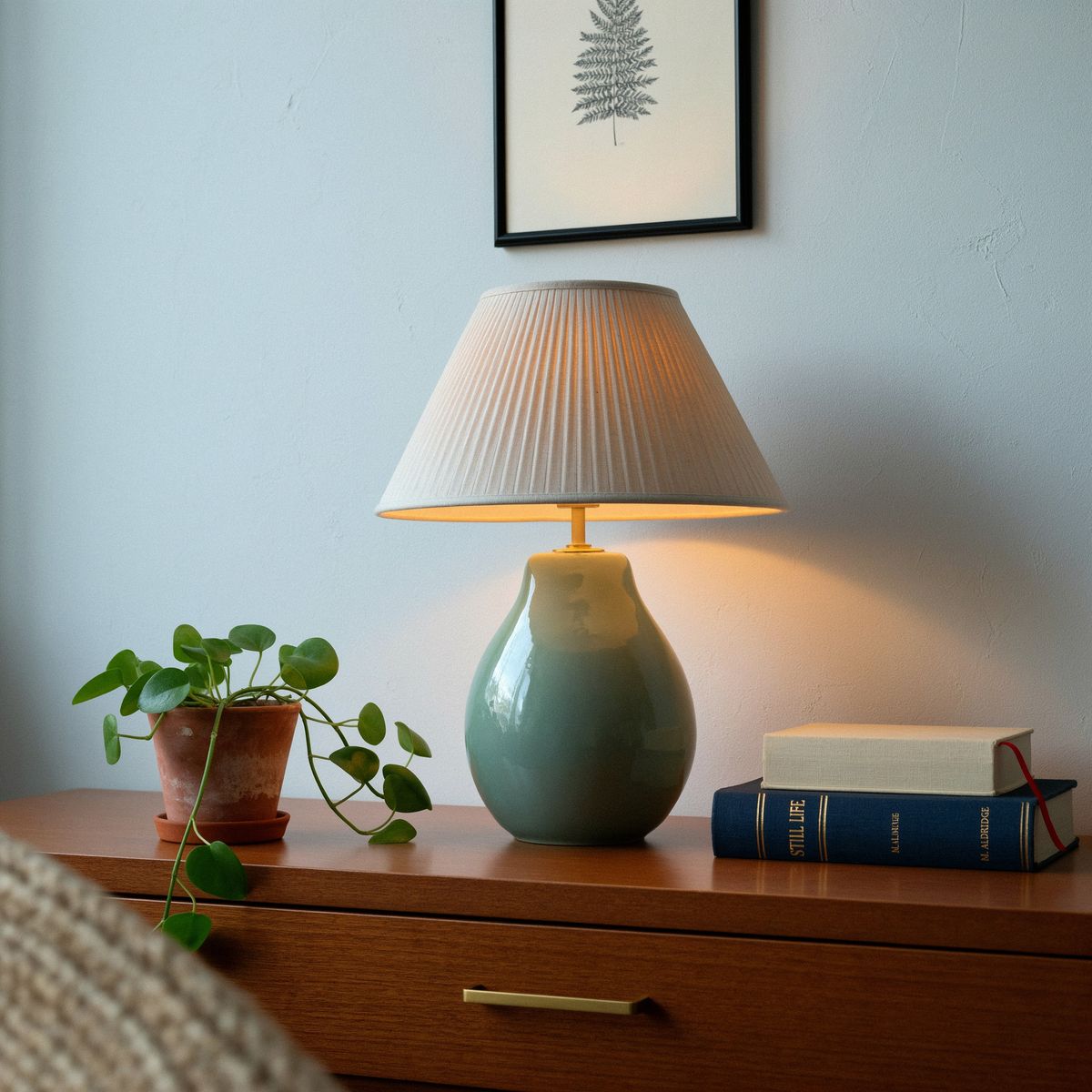
Photorealistic interior photograph of a living room corner: a ceramic table lamp with a sculpted sage green base and a pleated linen shade stands on a walnut sideboard, beside a stack of two books and a small trailing plant, against a light gray wall with a framed print. Warm evening light from the lamp and soft daylight from the left, shot straight-on at sideboard height with a 50mm lens.

import { createClient } from '@runware/sdk'

const client = await createClient({ apiKey: process.env.RUNWARE_API_KEY })
await client.connect()

const [result] = await client.run({
  model: 'ideogram:4.6@0',
  positivePrompt: 'Isolate the table lamp from image 1 on a transparent background. Remove the sideboard, the books, the plant, the wall and the print. Keep the lamp exactly as it is in image 1, at the same size and position, with no shadow.',
  inputs: {
    referenceImages: [
      'https://assets.runware.ai/guides/ideogram-4-6/transparent-backgrounds/source-lamp.jpg'
    ]
  },
  settings: {
    background: 'transparent'
  },
  outputFormat: 'PNG',
  width: 2048,
  height: 2048
})
import asyncio
import os
from runware import Runware
async def main():
async with Runware(api_key=os.environ["RUNWARE_API_KEY"]) as client:
results = await client.run({
"model": "ideogram:4.6@0",
"positivePrompt": "Isolate the table lamp from image 1 on a transparent background. Remove the sideboard, the books, the plant, the wall and the print. Keep the lamp exactly as it is in image 1, at the same size and position, with no shadow.",
"inputs": {
"referenceImages": [
"https://assets.runware.ai/guides/ideogram-4-6/transparent-backgrounds/source-lamp.jpg"
]
},
"settings": {
"background": "transparent"
},
"outputFormat": "PNG",
"width": 2048,
"height": 2048
})
asyncio.run(main())curl https://api.runware.ai/v1 \
-H "Authorization: Bearer $RUNWARE_API_KEY" \
-H "Content-Type: application/json" \
-d '[
{
  "taskType": "imageInference",
  "taskUUID": "8e1b4d72-6a3f-4c95-a207-5d9e2b6c1f48",
  "model": "ideogram:4.6@0",
  "positivePrompt": "Isolate the table lamp from image 1 on a transparent background. Remove the sideboard, the books, the plant, the wall and the print. Keep the lamp exactly as it is in image 1, at the same size and position, with no shadow.",
  "inputs": {
    "referenceImages": [
      "https://assets.runware.ai/guides/ideogram-4-6/transparent-backgrounds/source-lamp.jpg"
    ]
  },
  "settings": {
    "background": "transparent"
  },
  "outputFormat": "PNG",
  "width": 2048,
  "height": 2048
}
]'runware run ideogram:4.6@0 \
positivePrompt="Isolate the table lamp from image 1 on a transparent background. Remove the sideboard, the books, the plant, the wall and the print. Keep the lamp exactly as it is in image 1, at the same size and position, with no shadow." \
inputs.referenceImages.0=https://assets.runware.ai/guides/ideogram-4-6/transparent-backgrounds/source-lamp.jpg \
settings.background=transparent \
outputFormat=PNG \
width=2048 \
height=2048{
"taskType": "imageInference",
"taskUUID": "8e1b4d72-6a3f-4c95-a207-5d9e2b6c1f48",
"model": "ideogram:4.6@0",
"positivePrompt": "Isolate the table lamp from image 1 on a transparent background. Remove the sideboard, the books, the plant, the wall and the print. Keep the lamp exactly as it is in image 1, at the same size and position, with no shadow.",
"inputs": {
"referenceImages": [
"https://assets.runware.ai/guides/ideogram-4-6/transparent-backgrounds/source-lamp.jpg"
]
},
"settings": {
"background": "transparent"
},
"outputFormat": "PNG",
"width": 2048,
"height": 2048
}Response
[
  {
    "taskType": "imageInference",
    "taskUUID": "8e1b4d72-6a3f-4c95-a207-5d9e2b6c1f48",
    "imageUUID": "f27c9a3e-1d64-4b58-8e0c-6a3b9d2f7e15",
    "imageURL": "https://im.runware.ai/image/os/a14d18/ws/2/ii/f27c9a3e-1d64-4b58-8e0c-6a3b9d2f7e15.png"
  }
]
The prompt lists what to remove as well as what to keep. "The sideboard, the books, the plant, the wall and the print" leaves no doubt that the lamp is the only thing to survive. "At the same size and position" plus the source's own width and height keep it where it was in the frame, so the cut-out lines up with the original for a before and after.
Tips
-
Ask for a format with an alpha channel. Send
outputFormatasPNGorWEBP. Any other format, or none at all, is rejected. -
Name what is absent. "No background, no surface and no shadow" keeps the floor and the shadow of a product shoot out of the file.
-
Light the object, not a room. Give a direction and a softness. A room in the prompt can leave its reflections on the subject.
-
Share one style clause across a set. Append it word for word and change only the subject and the words.
-
Name the hard edge. Hair and fur get a clause of their own in the prompt.
-
Check every asset on a dark tile. A fringe that disappears on white shows as an outline on charcoal.
-
Cut out a photo by naming what stays. List what to remove too, and pass the source's size to keep the object in place.