Nano Banana 2

Nano Banana 2 (officially known as Gemini 3.1 Flash Image) is Google’s upgraded AI image generation and editing model that brings advanced visual creation capabilities to a broad audience. It generates detailed, expressive images from text and image prompts with sharp details, richer lighting, and improved adherence to complex instructions. Nano Banana 2 also supports multi-object and multi-character consistency, accurate text rendering within images, and flexible resolution control up to 4K. It is now integrated across Google’s AI platforms including the Gemini app, Search AI Mode, and other Gemini-powered services.
Keeping characters and products consistent
How to use Nano Banana 2 reference images to keep the same character or product identical across new scenes and styles.
Introduction
Generate a character you like, change the prompt to drop them into a new scene, and the model hands you someone else. Diffusion models render a fresh interpretation on every request, so the face you dialed in, or the exact product you shot, drifts the moment anything around it changes. For any project that spans more than one image, like a brand mascot or a product catalog, that drift is the core problem.
Nano Banana 2 solves it with reference images. You pass one or more images through inputs.referenceImages, describe the new scene in positivePrompt, and the model carries the subject's identity into that scene instead of inventing a new one. A single request accepts up to 14 reference images, enough to lock a character, a product, or several subjects together.

A high-fashion studio portrait of a woman with closely cropped platinum-blonde hair, bold red lipstick, sharp cheekbones, small silver stud earrings, wearing a black turtleneck, plain charcoal background, dramatic side lighting, editorial photography.

The same woman from the reference image standing on a city rooftop at night, neon skyline behind her, wearing a black trench coat, cinematic teal and magenta lighting. Keep her face, platinum-blonde cropped hair, and bold red lipstick identical.

The same woman from the reference image as a loose watercolor fashion illustration, visible brush textures, cream paper, minimal linework. Preserve her platinum-blonde cropped hair, bold red lipstick, and facial features.

The same woman from the reference image riding a vintage mint-green Vespa scooter through a sunny Mediterranean street, candid travel photography, motion blur in the background. Keep her face, platinum-blonde cropped hair, and bold red lipstick identical.
The four images above started from one studio portrait. The reference fixed her identity, and each prompt only changed the scene and the medium, down to a watercolor illustration that still reads as the same woman.
This guide covers the request shape, how to keep a character and a product consistent, how to strengthen results with multiple references, and how to combine more than one locked subject in a single image.
Reference-image consistency works across the Nano Banana family, including Nano Banana Pro. Nano Banana 2 adds higher resolution and the largest reference budget, so it's the strongest default for production consistency work.
Request shape
A consistency request is an ordinary image generation call with one addition: the inputs.referenceImages array.
import { createClient } from '@runware/sdk'

const client = await createClient({ apiKey: process.env.RUNWARE_API_KEY })
await client.connect()

const [result] = await client.run({
  model: 'google:4@3',
  positivePrompt: 'The same woman from the reference image sitting at a window table in a cozy bookstore cafe, holding a ceramic mug, warm afternoon light',
  width: 1200,
  height: 896,
  inputs: {
    referenceImages: [
      'https://example.com/character.jpg'
    ]
  }
})
import asyncio
import os
from runware import Runware
async def main():
async with Runware(api_key=os.environ["RUNWARE_API_KEY"]) as client:
results = await client.run({
"model": "google:4@3",
"positivePrompt": "The same woman from the reference image sitting at a window table in a cozy bookstore cafe, holding a ceramic mug, warm afternoon light",
"width": 1200,
"height": 896,
"inputs": {
"referenceImages": [
"https://example.com/character.jpg"
]
}
})
asyncio.run(main())curl https://api.runware.ai/v1 \
-H "Authorization: Bearer $RUNWARE_API_KEY" \
-H "Content-Type: application/json" \
-d '[
{
  "taskType": "imageInference",
  "taskUUID": "a1b2c3d4-e5f6-7890-abcd-ef1234567890",
  "model": "google:4@3",
  "positivePrompt": "The same woman from the reference image sitting at a window table in a cozy bookstore cafe, holding a ceramic mug, warm afternoon light",
  "width": 1200,
  "height": 896,
  "inputs": {
    "referenceImages": [
      "https://example.com/character.jpg"
    ]
  }
}
]'runware run google:4@3 \
positivePrompt="The same woman from the reference image sitting at a window table in a cozy bookstore cafe, holding a ceramic mug, warm afternoon light" \
width=1200 \
height=896 \
inputs.referenceImages.0=https://example.com/character.jpg{
"taskType": "imageInference",
"taskUUID": "a1b2c3d4-e5f6-7890-abcd-ef1234567890",
"model": "google:4@3",
"positivePrompt": "The same woman from the reference image sitting at a window table in a cozy bookstore cafe, holding a ceramic mug, warm afternoon light",
"width": 1200,
"height": 896,
"inputs": {
"referenceImages": [
"https://example.com/character.jpg"
]
}
}Response
{
  "data": [
    {
      "taskType": "imageInference",
      "taskUUID": "a1b2c3d4-e5f6-7890-abcd-ef1234567890",
      "imageUUID": "9d8c7b6a-5f4e-3d2c-1b0a-9e8d7c6b5a4f",
      "imageURL": "https://im.runware.ai/image/os/a14d18/ws/2/ii/9d8c7b6a-5f4e-3d2c-1b0a-9e8d7c6b5a4f.jpg"
    }
  ]
}
The reference and the prompt do different jobs. inputs.referenceImages tells the model who or what to keep. positivePrompt tells it what's new: the scene, the pose, the lighting, the style. You don't redescribe the subject's appearance, since the reference already carries it.
inputs.referenceImagesaccepts a URL, a UUID from a previous generation or the Media Storage API, a data URI, or a base64 string. Pass between 1 and 14.positivePromptdescribes the target image. Refer to the subject as "the same woman" or "the product from the reference", then spend the rest of the prompt on what changes.widthandheightset the output size, drawn from the model's supported dimensions. The examples here use 1200 × 896 and 896 × 1200.seedis optional and fixes the random seed, useful when you want to reproduce a result and vary one thing at a time.
Keeping a character consistent
Start from a reference that shows the subject clearly. A sharp, well-lit portrait gives the model the most to work with. From there, each new image is a prompt describing where the character goes and what they're doing.

The same woman from the reference image sitting at a window table in a cozy bookstore cafe, holding a ceramic mug, warm afternoon light, shallow depth of field, candid editorial photography. Keep her face, freckles, copper-red curly hair, and mustard-yellow corduroy jacket identical.
- Reference
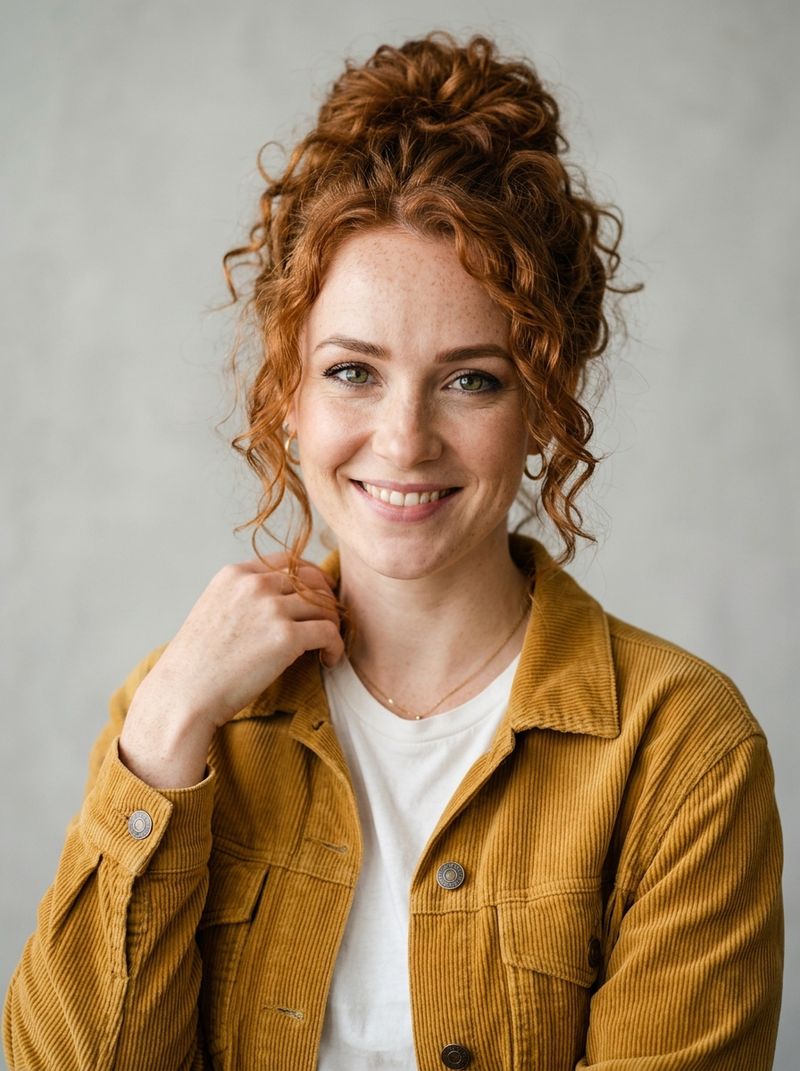
A photorealistic studio portrait of a woman in her late twenties with curly copper-red hair in a loose bun, light freckles across her nose and cheeks, green eyes, wearing a mustard-yellow corduroy jacket over a white tee, neutral light-gray background, soft natural lighting, sharp focus, editorial photography.

The reference set her face, her freckles, and her copper-red curls. The prompt for the new image never described any of that. It asked for a bookstore cafe and afternoon light, and the model kept her identity intact while building a new scene around her.
[
  {
    "taskType": "imageInference",
    "taskUUID": "b2c3d4e5-f6a7-8901-bcde-f23456789012",
    "model": "google:4@3",
    "positivePrompt": "The same woman from the reference image sitting at a window table in a cozy bookstore cafe, holding a ceramic mug, warm afternoon light, shallow depth of field, candid editorial photography. Keep her face, freckles, copper-red curly hair, and mustard-yellow corduroy jacket identical.",
    "width": 1200,
    "height": 896,
    "inputs": {
      "referenceImages": [
        "https://example.com/character.jpg"
      ]
    }
  }
]
Identity holds even when you change things people assume are part of the character:

The same woman from the reference image walking across a rainy city crosswalk holding a clear umbrella, low three-quarter angle, neon reflections on wet asphalt at dusk, cinematic. Keep her face, freckles, and copper-red curly hair identical.

The same woman from the reference image on a mountain trail at golden hour, wearing a teal windbreaker and a small backpack, smiling, natural light, outdoor lifestyle photography. Keep her face, freckles, green eyes, and copper-red curly hair identical even though the jacket is different.

The same woman from the reference image reimagined as a stylized 3D animated character, Pixar-style render, soft global illumination, friendly expression, preserving her copper-red curly hair, freckles, green eyes, and mustard-yellow corduroy jacket.
The street shot places her at a new angle in the rain, and her face survives the change in perspective and lighting. The trail shot swaps her mustard jacket for a teal windbreaker: identity lives in the face and hair, not the clothing, so a wardrobe change doesn't break the likeness. The last image re-renders her as a 3D animated character, and even across a full medium change the freckles and curls carry over, which is what lets a brand character move between photography and illustration.
Keeping a product consistent
The same mechanism works for objects. A product reference locks color, material, proportions, and details like a logo, so you can shoot a catalog's worth of scenes from one source image without the product subtly changing between shots.

The same teal ceramic travel mug from the reference image sitting on a light oak desk next to an open laptop and a notebook, bright morning light from a window, lifestyle product photography. Keep the mug teal color, cork base, and embossed white mountain logo identical.
- Reference
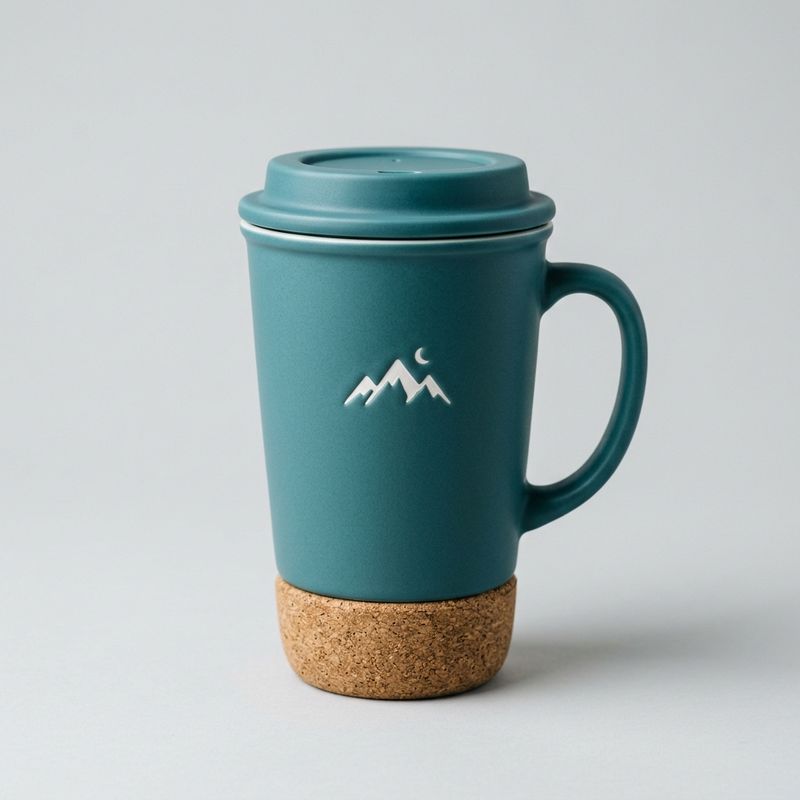
A product photo of a matte teal ceramic travel mug with a natural cork base and a small embossed white mountain-range logo on the front, seamless light-gray background, soft studio lighting, centered, e-commerce hero shot.

The mug's teal glaze, cork base, and embossed mountain logo stay identical from the reference into the desk scene. Only the setting and the lighting change.

The same teal ceramic travel mug from the reference image held in two hands at a misty mountain overlook at sunrise, steam rising from the top, shallow depth of field, adventure lifestyle photography. Keep the mug teal color, cork base, and embossed white mountain logo identical.

The same teal ceramic travel mug from the reference image shown from a high three-quarter top angle on a white marble surface with a sprig of eucalyptus beside it, catalog product photography. Keep the mug teal color, cork base, and embossed white mountain logo identical.
This is the difference between a reusable product asset and re-rolling until something close enough appears. Lock the product once, then generate every angle and context you need, from clean catalog shots to lifestyle scenes.
Strengthening results with multiple references
A single reference only carries what it shows. If the new scene reveals a side of the subject the reference never captured, the model has to guess it. The fix is to add references that cover the missing views. Nano Banana 2 takes up to 14, and they work together.
Here's the problem in one comparison. The reference below shows a denim jacket from the front, with a plain front panel. Nothing about the front hints at what the back looks like, so a second reference adds that view: a large embroidered golden phoenix.

A studio photo of a woman in her thirties with straight dark-brown shoulder-length hair and a small silver necklace, wearing a light-wash denim jacket over a white tee, front view with a plain denim front and a single chest pocket, neutral light-gray background, soft studio lighting, sharp focus.

The same woman and denim jacket from the reference image, viewed from directly behind, revealing a large detailed embroidered golden phoenix spanning the entire back of the denim jacket, neutral light-gray background, soft studio lighting. Keep her dark-brown hair and the jacket identical, adding only the phoenix embroidery on the back.
Now compare the same walking-away shot generated two ways, with the identical prompt, changing only the references:

The same woman in the light-wash denim jacket walking away down a sunny tree-lined city street, seen from behind with the back of her denim jacket clearly visible, candid street photography, golden afternoon light. Keep her dark-brown hair and the denim jacket consistent.

The same woman in the light-wash denim jacket walking away down a sunny tree-lined city street, seen from behind with the back of her denim jacket clearly visible, candid street photography, golden afternoon light. Keep her dark-brown hair and the denim jacket consistent.
With only the front reference, the model never saw the back, so it renders a plain denim back, a reasonable guess that happens to be wrong. Add the back reference and the phoenix comes through correctly, even though neither prompt mentioned it. The detail came from the reference, not the text.
So build a small reference set that covers the views your scenes will show. That means the front plus any side that carries detail the front can't reveal, like a back panel or an embossed base.
Combining consistent subjects
References don't have to point at the same subject. Pass references for two different locked subjects in one call and the model keeps both. This is how you stage your character with your product instead of generating them separately and compositing by hand.

The woman with copper-red curly hair, freckles, and a mustard-yellow corduroy jacket from the first reference image sitting on a park bench holding the teal ceramic travel mug with a cork base and white mountain logo from the second reference image, autumn leaves around her, warm afternoon light, lifestyle photography. Keep both her identity and the mug design identical.
This image used two references in a single request, the red-haired character and the teal mug. Both arrive intact: her identity from the first reference, the mug's design from the second. The same approach scales to 14 references, which opens up full scene composition from a set of locked elements.
Tips
-
Use a clean, well-lit reference. The model preserves what it can see clearly. A sharp, unobstructed reference transfers identity better than a busy or low-resolution one.
-
Describe what changes, not who. Let the reference carry the subject. Spend
positivePrompton the new scene, pose, lighting, or medium rather than re-describing a face you've already supplied. -
Name the details you care about. Calling out a detail like "the cork base" or "the embroidered phoenix" reinforces the features you most want held, especially in busy scenes.
-
Add a reference for every angle you'll show. One image covers one viewpoint. For a back, a profile, or a hidden detail, supply a reference that shows it instead of hoping the model guesses right.
-
Restyle freely. Identity survives a shift into 3D or watercolor, so one character reference can produce assets across formats.
-
Stack references to combine subjects. Pass multiple subjects' references in one call to place a character with a product, or several products together.