Gemini Omni Flash

Gemini Omni Flash is Google's multimodal video generation and editing model in the Gemini Omni family. It turns text, photos, and video into 10-second clips with native audio generation, supports photo-to-video creation from up to five reference images, and adds video-to-video plus multi-turn editing workflows. Google positions it as the Gemini app successor to Veo 3.1, combining Gemini's world understanding with conversational control for video creation and editing.
Editing video
How to edit existing footage with Gemini Omni Flash's inputs.video parameter to relight, restyle, swap weather, or add characters while preserving the source's composition and motion.
Introduction
The reference and frame-anchor workflows in the reference-driven video guide all start from a blank canvas. The model generates new footage that honors your references. That's the right answer when the shot doesn't exist yet. The wrong answer when the shot already exists and a single change is all you need: the day-for-night variant for a campaign film, the seasonal swap, the brand-mandated colour change that lands two days before launch. Re-generating from scratch loses everything you'd already approved.
Omni Flash's inputs.video parameter takes a clip you supply and edits it: change the lighting, replace the weather, restyle the look, add a character, hold everything else. The framing, the cuts, the motion, and every untouched region of the frame come from the source. Only what the prompt names changes.
The medieval street below started life as a quiet midday tracking shot through an empty stone alley. Three independent runs against the same source produced the variants on the right. The composition and the camera move are identical in every clip. Everything else changes.
A slow cinematic drone tracking shot moving slowly down a quiet narrow medieval European stone street at midday. Empty ancient cobblestones, weathered limestone facades on both sides with arched wooden doors and small shuttered windows, a single iron lamp bracket protruding from one wall, washing hanging from a rope strung between two upper windows, terracotta tile rooftops barely visible above. Bright neutral midday daylight, no people, soft natural ambient outdoor sound, faint distant church bell, no dialogue, no readable text.
Re-render the entire scene at night under a thick coastal fog. Replace the midday daylight with a single warm flickering iron lantern hanging from the wall bracket, casting a soft pool of amber light onto the wet cobblestones. The rest of the street fades into deep blue moonlit shadow. A faint silhouette of a passing figure crosses through the lamp pool in the middle distance. Keep the exact street composition, the exact wall facades, the exact drone tracking motion, and the hanging washing from the source video.
Populate the empty medieval street with a bustling medieval marketplace at golden hour. Wooden trestle stalls on both sides selling fabrics, baskets of bread, hanging cured meats, and brass cookware. Townsfolk in period-accurate medieval tunics and headcoverings haggling and walking. A blacksmith's forge glows orange between two stalls. Warm dramatic golden hour light spilling between the stone buildings. Keep the exact street composition, the exact wall facades, the exact terracotta rooftops, and the exact drone tracking motion from the source.
Re-render the entire scene as a moving classical oil painting in the style of 19th-century European romantic landscape painting. Visible thick textured brushstrokes across the stone facades and cobblestones, soft impasto highlights catching the light, warm earthy palette of deep ochres, burnt siennas, and muted moss greens. The exact composition and the exact drone tracking motion remain, but every frame reads as a slowly animated oil painting.
Where this fits in production: campaign variants, seasonal swaps, day-for-night recuts, brand colour locks, restyled drops, and the long tail of "same shot, slightly different" that a brief throws at you mid-flight. This guide covers the request shape, the three patterns that drive most edits, the constraints inputs.video imposes, and how to chain edits when one note builds on another.
Request shape
A video-edit Omni Flash request takes inputs.video and a positive prompt. The width, height, and duration fields used in generation mode are forbidden here, the model inherits them from the source.
import { createClient } from '@runware/sdk'

const client = await createClient({ apiKey: process.env.RUNWARE_API_KEY })
await client.connect()

const [result] = await client.run({
  model: 'google:gemini@omni-flash',
  positivePrompt: 'Re-render the scene at night under a thick coastal fog with a single warm lantern lighting the street. Keep the exact composition and camera motion from the source.',
  inputs: {
    video: 'https://example.com/source.mp4'
  }
})
import asyncio
import os
from runware import Runware
async def main():
async with Runware(api_key=os.environ["RUNWARE_API_KEY"]) as client:
results = await client.run({
"model": "google:gemini@omni-flash",
"positivePrompt": "Re-render the scene at night under a thick coastal fog with a single warm lantern lighting the street. Keep the exact composition and camera motion from the source.",
"inputs": {
"video": "https://example.com/source.mp4"
}
})
asyncio.run(main())curl https://api.runware.ai/v1 \
-H "Authorization: Bearer $RUNWARE_API_KEY" \
-H "Content-Type: application/json" \
-d '[
{
  "taskType": "videoInference",
  "taskUUID": "a1b2c3d4-e5f6-7890-abcd-ef1234567890",
  "model": "google:gemini@omni-flash",
  "positivePrompt": "Re-render the scene at night under a thick coastal fog with a single warm lantern lighting the street. Keep the exact composition and camera motion from the source.",
  "inputs": {
    "video": "https://example.com/source.mp4"
  }
}
]'runware run google:gemini@omni-flash \
positivePrompt="Re-render the scene at night under a thick coastal fog with a single warm lantern lighting the street. Keep the exact composition and camera motion from the source." \
inputs.video=https://example.com/source.mp4{
"taskType": "videoInference",
"taskUUID": "a1b2c3d4-e5f6-7890-abcd-ef1234567890",
"model": "google:gemini@omni-flash",
"positivePrompt": "Re-render the scene at night under a thick coastal fog with a single warm lantern lighting the street. Keep the exact composition and camera motion from the source.",
"inputs": {
"video": "https://example.com/source.mp4"
}
}Response
[
  {
    "taskType": "videoInference",
    "taskUUID": "a1b2c3d4-e5f6-7890-abcd-ef1234567890",
    "videoUUID": "9c1b2d3a-4e5f-6789-abcd-ef0123456789",
    "videoURL": "https://vm.runware.ai/video/os/a14d18/ws/2/vi/9c1b2d3a-4e5f-6789-abcd-ef0123456789.mp4"
  }
]
Two required fields, the rest depend on the edit:
inputs.videoaccepts a public URL or a UUID from a previous Runware generation. The clip is the source of truth: the framing, cuts, lighting, motion, and untouched regions all come from it.positivePromptis required, minimum two characters. Describe only what changes and end with a short clause naming what the model must hold. Unmentioned elements drift unless the prompt explicitly pins them.inputs.referenceImagesis optional and capped at 5 wheninputs.videois present (instead of the usual 7). Use a reference image to lock a style, character, or product into the edit. See Style transfer with a reference and Adding a character with a reference below.width,height,duration, andinputs.frameImagesare forbidden wheninputs.videois present. The output inherits the source's dimensions and runtime.
Three patterns that drive every edit
The prompt-only run is the workhorse: change a lighting, a weather, a colour, a season, an environment. The style-reference variant locks an aesthetic that's hard to write in words. The character-reference variant drops a specific person or product into a scene the source video did not contain. Almost every Omni Flash edit reduces to one of these three.
Prompt-only edits
Most workflows never need a reference image. Lead with a transformation verb the model recognises (change, replace, restyle, relight, add, remove), name the target attribute, then end the prompt with a short clause that pins the rest of the scene in place. That closing clause is what stops a "change the season" prompt from also moving the camera or replacing the path.
The autumn forest source below is driven through a single seasonal swap. The path geometry, the tree placement, and the slow forward dolly are identical in both clips.
Change the season from autumn to deep winter. The autumn leaves are replaced by a thick layer of fresh white snow blanketing the path and the bare dark branches of the trees overhead, with a steady gentle snowfall drifting down through the still air. The warm dappled light is replaced by soft diffuse silver-grey winter daylight. Keep the exact path composition, the exact tree placement, and the exact slow forward dolly motion from the source.
- Source clip
A slow cinematic dolly shot moving forward along a narrow winding forest path through a peaceful autumn deciduous wood at midday. Tall slender beech and oak trees on both sides, their leaves a saturated palette of warm orange, deep gold, and rich russet red. A thick crisp carpet of fallen leaves covers the path, soft dappled sunlight filtering through the canopy.
The leaves are gone, the canopy is bare, the snow blankets the path, the light is silver-grey. The path turns at the same point, the same trees are in the same positions, and the dolly tracks at the same speed. The model treated the prompt as a directorial note, not a scene re-write.
The prompts that work cleanest read like art-direction notes a colorist or compositor would receive. "Change the season to winter, replace the leaves with snow, keep the path and motion" is a direction. "A forest path in winter with snow" is a caption, and the model has to guess which parts of the source to honor and which to redraw.
Style transfer with a reference
When the target look is something you can't reproduce reliably in words (a brand identity, a film stock, a specific period aesthetic), pass a reference image alongside the source video. The model takes the reference as the truth for the look and the source as the truth for the scene.
The cafe interior below is re-rendered in the exact 1940s film noir aesthetic of the reference frame. The cafe geometry, the dolly motion, and the two background customers are preserved. The colour cinematography becomes high-contrast monochrome, harsh venetian-blind shadows fall across the back wall, and faint 35mm grain coats every frame.
Re-render the entire cafe scene in the exact 1940s film noir style of the reference image. Convert the warm colour cinematography to high-contrast theatrical black and white. Add harsh diagonal venetian-blind shadows cast across the back wall and the marble counter from an off-screen window, soft cigarette smoke drifting through the pendant lamp beams, faint 35mm film grain. Keep the exact cafe composition, the exact dolly motion, the table and counter geometry, and the two background customers exactly as in the source.
- Style reference
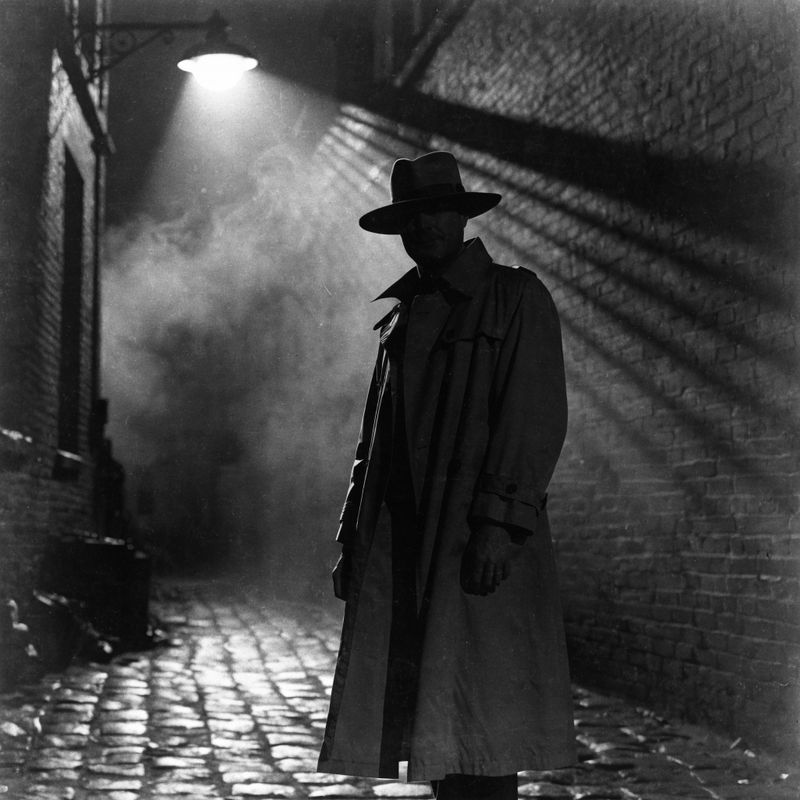
A still frame from a 1940s film noir motion picture, theatrical black and white photography. A man in a long trench coat and a wide-brim felt fedora stands silhouetted in a wet alleyway lit by a single overhead streetlamp, harsh diagonal venetian-blind shadows striped across the brick wall behind him, wisps of fog drifting through the lamp beam
- Source clip
A slow cinematic dolly shot through the interior of a modern Scandinavian-style coffee shop in the late afternoon. Light oak wood tables, brushed brass pendant lamps hanging low, a long pale marble counter at the back with a polished espresso machine, large windows on the left letting in warm afternoon sunlight.

The cafe is unmistakably the same room. The tables are in the same positions, the counter is in the same place, the camera lands at the same point. But the picture now reads as noir cinema. The reference defined the how, the prompt defined the what to hold.
Cap referenceImages at 5 in editing mode. The 7-image limit from the reference-driven generation guide does not apply when inputs.video is present. The model needs the headroom for the source video, so the schema reduces the reference cap. Five is plenty for a single style ref plus up to four character or product refs.
Adding a character with a reference
Reference images aren't only for style. Pass a clean mid-shot portrait of a person (or a packshot of a product), name where they belong in the scene, and the model drops them into the source video while preserving everything else.
The park bench source below has no person on it. The reference image is a portrait of an elderly woman, and the prompt instructs the model to seat her on the bench feeding the pigeons that are already on the path.
Add the elderly woman from the reference image seated calmly on the green park bench, her exact appearance preserved: silver-grey hair tied back, oatmeal chunky knit cardigan over the cream blouse, the silver pendant. She holds a small brown paper bag of seeds in her lap and tosses small handfuls onto the path. Several of the pigeons gather around her feet pecking at the seed. Keep the exact bench, the exact tree, the exact path geometry, and the exact camera framing from the source.
- The elderly woman
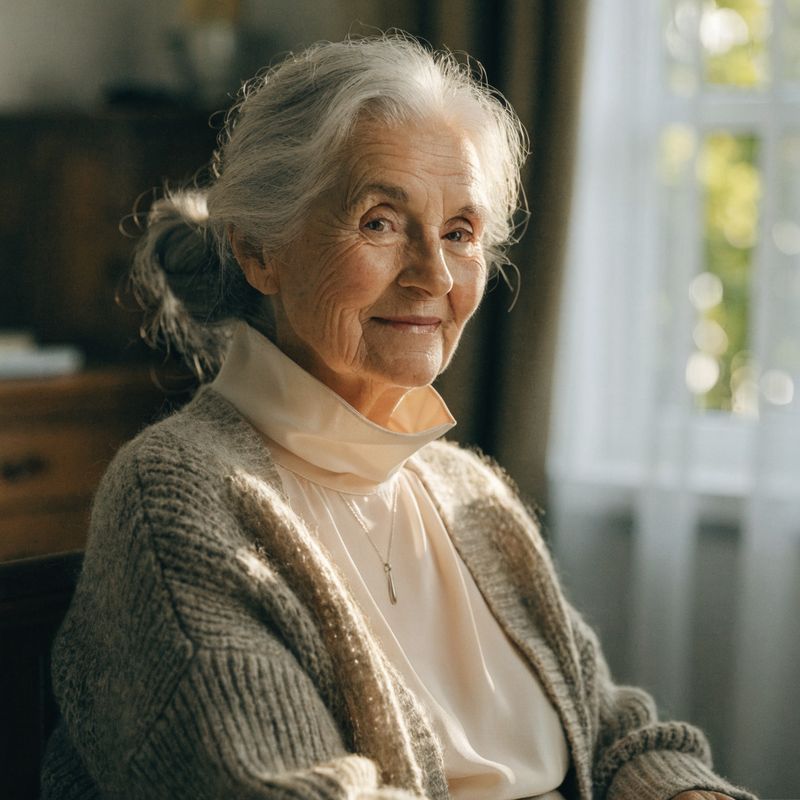
A warm portrait of a kindly elderly woman in her seventies, soft silver-grey hair tied back into a low bun, fair skin with gentle laugh lines, warm hazel eyes and a soft welcoming smile. She wears a cosy chunky knit oatmeal cardigan over a high-collared cream blouse, a small silver pendant on a fine chain at her throat. Mid-shot from the waist up at a three-quarter angle, soft warm autumnal natural daylight
- Source clip
A slow cinematic medium shot of a solitary empty park bench painted dark forest green, sitting on a paved path beneath a tall mature plane tree. Soft autumn leaves scattered on the path. A few pigeons walking quietly along the path in the middle distance. Bright clear autumn afternoon light.

The bench is the same bench in the same position. The plane tree, the leaves on the path, the warm autumn light, and the pigeons are all carried through from the source. The woman is sitting where the bench was empty, and she matches the reference: silver hair, oatmeal cardigan, the silver pendant. Identity from the reference, scene from the source.
A character or product reference works best when its framing matches the scale of the source. A waist-up portrait drops cleanly into a medium shot of a bench. A tightly cropped head-shot or a full-body shot adds more interpretation work for the model and degrades the lock. Match the reference framing to the scene framing whenever you can.
Chaining edits
When a brief evolves note by note ("change the lighting, now add weather, now drop in a passing subject"), you don't need to spell out every prior change in every prompt. Run the first edit, then feed its output back as the next call's inputs.video. Each turn is an ordinary edit call, but its source is the previous edit's result instead of the original clip.
Identity, framing, and motion survive the chain because each turn sees them as part of the source video. The prompt only names the new delta.
A young female travel vlogger in her twenties walks down a sunlit cobblestone alley in Alfama, Lisbon, holding a small black camera filming herself selfie-style. Pastel Portuguese tile facades on both sides, hanging laundry, terracotta rooftops in the distance. Bright clear midday daylight, handheld vlog cinematography, soft ambient city audio.
Change the time of day from midday to golden hour. Warm low sun catches the cobblestones, long shadows stretch across the alley, the pastel tiles take on a deeper amber tone. Keep the vlogger and the framing unchanged.
Change the vlogger's outfit to an elegant long black evening dress with delicate silver embroidery along the neckline, the fabric catching the warm golden hour light as she walks. Keep her face, her hair, the camera framing, the alley, and the golden hour lighting exactly as in the prior video.
Change the time of day from golden hour to evening night. The alley is now softly lit by warm yellow lanterns mounted on the building corners, the pastel tiles fade into deep blue shadow, the sky above shows the last violet light of twilight. Keep the vlogger, her elegant black evening dress, her walking motion, and the camera framing exactly as in the prior video.
Step 1 shifts the time of day on the source. Step 2 takes the golden-hour clip as its source and swaps the vlogger into an evening dress. Step 3 takes the golden-hour-dress clip and shifts the time of day from golden hour to night. The vlogger, her face, her walk, and the framing are preserved across all four clips because each step's source carries them forward.
There is one tactical cost to this pattern: each step re-uploads the prior step's full video as the next call's source. For short clips this is negligible. For long or high-resolution chains, the upload bytes add up. Keep edits as parallel inputs.video calls on the same source when they can be independent, and reach for the chain pattern only when a step genuinely builds on the previous one.
Tips
-
Describe only what changes, then pin the rest. Lead with a transformation verb (
change,replace,restyle,relight,add,remove), name the target attribute, and close with a short clause naming what the model must hold ("keep the framing, the camera motion, the bench, the pigeons"). The closing clause is the difference between a clean edit and a redrawn scene. -
Reach for a reference when the look is hard to describe. Period film stocks, brand identities, specific colour grades, named typography, and exact characters belong in
inputs.referenceImagesalongside the source, not in a longer prompt. The reference defines the how, the prompt defines the what to hold. -
Match reference framing to scene scale. A waist-up character reference drops into a medium shot cleanly. A head-shot or a full-body shot adds drift. Pick a reference whose framing is closest to where the character or product will live in the scene.
-
Chain by re-feeding outputs. When an edit builds on a previous edit, pass the previous output as the next call's
inputs.video. The chain preserves identity and framing because each turn sees them as part of the source. -
Run independent variants in parallel against the same source. When two edits don't build on each other (a colour swap and a relight, say), drive them as parallel
inputs.videocalls against the original source. Each one stands alone, and you keep more degrees of freedom than a chain would allow. -
Don't pass
width,height,duration, orframeImagesalongsideinputs.video. The schema rejects them. Dimensions and runtime are inherited from the source clip in edit mode. Use the reference-driven guide for first-frame anchoring, which is a generation-mode feature. -
Stable, well-lit source footage edits cleanest. Motion blur and low light add frame-to-frame drift the model has to work against. Stabilise and grade the source before editing if you can, then apply the prompt edit on top.
-
Keep the prompt short. Edits are deltas, not full scene descriptions. Three sentences is usually enough: one transformation verb, one elaboration, one pin clause.