Gemini Omni Flash 1.1

Gemini Omni Flash 1.1 is Google's updated multimodal video generation and editing model in the Gemini Omni family. It generates native synchronized audio from the prompt, and expands the original Omni Flash workflow with additional 1080p and 4K output modes, a 360p draft mode, scene extension in 3 to 10 second increments up to 30 seconds total, start-to-end frame interpolation for fluid transitions, and reference-to-video generation guided by both images and short video clips. It is built for teams that need stronger continuity, higher-resolution delivery, and more controllable multi-input video creation than the first Omni Flash release.
First and last frame control
How to pin the opening and closing frames of a Gemini Omni Flash 1.1 clip with inputs.frameImages, and prompt the transition the model builds between them.
Introduction
Most video generation gives you a starting point and hope. Gemini Omni Flash 1.1 lets you pin both ends of the shot: hand it the frame the clip opens on and the frame it closes on, and the model builds the motion that gets from one to the other.
That turns a whole class of commercial work into a single call. Any brief that is really "this state becomes that state" fits: an empty room staged with furniture, a closed box opened, a garment on a table worn on a model. You already have both stills, and the transition is the part you were going to pay an animator for.
A virtual staging transition for a property listing, in a single unbroken scene with no cuts. The camera holds the exact doorway framing throughout while the empty room fills in: the sofa settles against the back wall, the rug unrolls across the floorboards, the coffee table and the potted fig arrive, the prints appear above the sofa, and the flat overcast daylight warms into afternoon light through sheer curtains. Smooth continuous transformation, no camera movement. The audio is a quiet interior room tone, no music, no dialogue.
- First frame
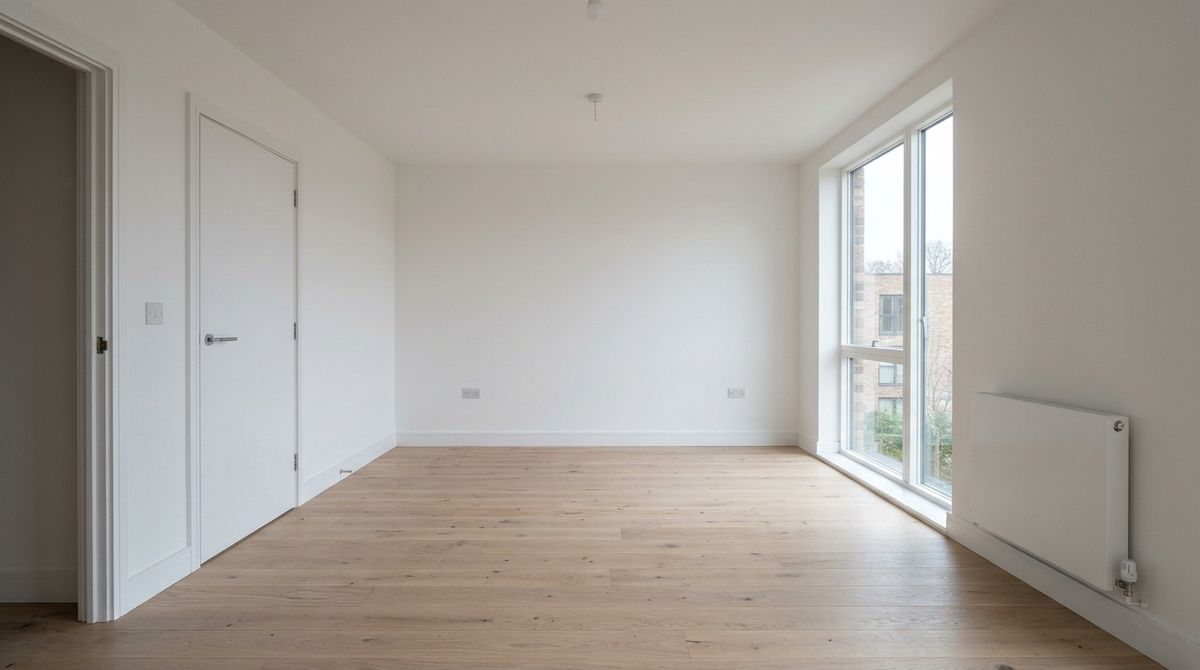
An empty unfurnished living room in a modern apartment, photographed straight on from the doorway. Bare pale oak floorboards, plain white walls, a tall window on the right with no curtains letting in flat overcast daylight, a plain white radiator under it, a closed white door on the left wall. Completely empty, no furniture, no rug, no pictures. Estate agent listing photograph, wide lens, sharp throughout, no text.
- Last frame
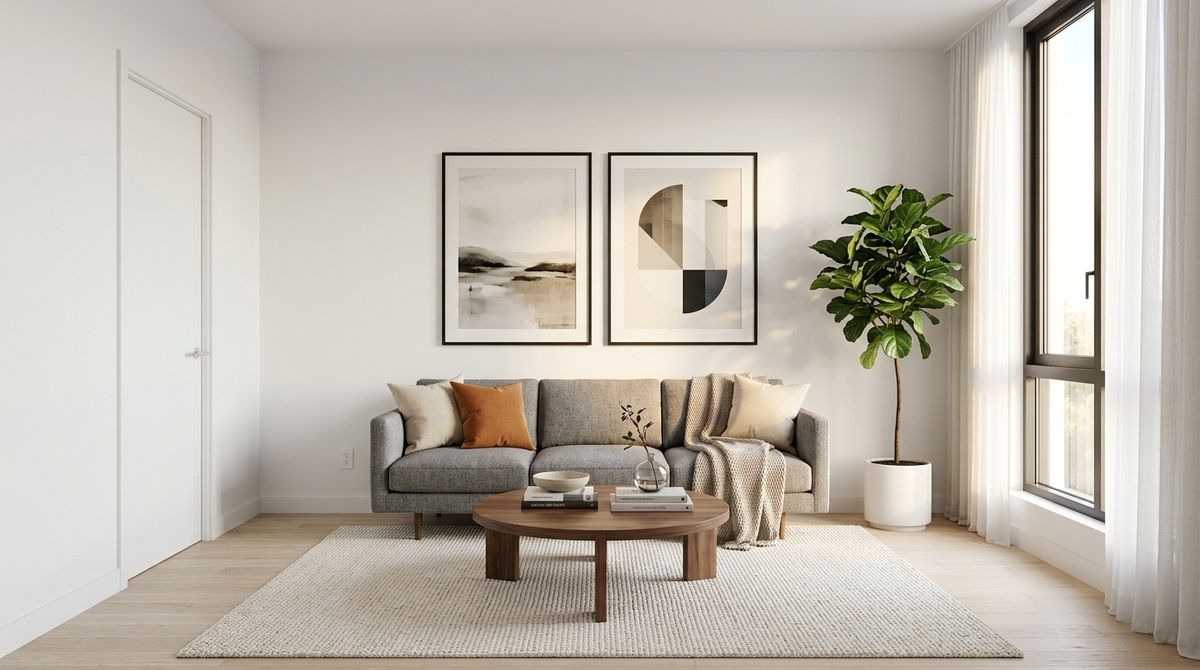
The same modern apartment living room photographed straight on from the doorway, now fully furnished for a property listing. The same pale oak floorboards, the same white walls, the same tall window on the right and the same closed white door on the left. A low grey three-seat sofa against the back wall, a round walnut coffee table on a cream wool rug, a tall potted fig in the corner beside the window, two framed prints above the sofa, warm afternoon light through sheer curtains. Estate agent listing photograph, identical camera position and lens, sharp throughout, no text.


Two listing photographs, one call, and the empty flat furnishes itself without the camera moving. This guide covers the request shape, what makes a good pair of frames, how to prompt the transition between them, and the rules the parameter enforces.
The request
Frames go in inputs.frameImages, each one an object pairing an image with the position it belongs to.
import { createClient } from '@runware/sdk'

const client = await createClient({ apiKey: process.env.RUNWARE_API_KEY })
await client.connect()

const [result] = await client.run({
  model: 'google:gemini@omni-flash-1.1',
  positivePrompt: 'A virtual staging transition for a property listing, in a single unbroken scene with no cuts. The camera holds the exact doorway framing throughout while the empty room fills in: the sofa settles against the back wall, the rug unrolls across the floorboards, the coffee table and the potted fig arrive. Smooth continuous transformation, no camera movement.',
  inputs: {
    frameImages: [
      {
        image: 'https://assets.runware.ai/guides/google-gemini-omni-flash-1-1/first-and-last-frame/frame-room-first.jpg',
        frame: 'first'
      },
      {
        image: 'https://assets.runware.ai/guides/google-gemini-omni-flash-1-1/first-and-last-frame/frame-room-last.jpg',
        frame: 'last'
      }
    ]
  },
  width: 1280,
  height: 720,
  duration: 8
})
import asyncio
import os
from runware import Runware
async def main():
async with Runware(api_key=os.environ["RUNWARE_API_KEY"]) as client:
results = await client.run({
"model": "google:gemini@omni-flash-1.1",
"positivePrompt": "A virtual staging transition for a property listing, in a single unbroken scene with no cuts. The camera holds the exact doorway framing throughout while the empty room fills in: the sofa settles against the back wall, the rug unrolls across the floorboards, the coffee table and the potted fig arrive. Smooth continuous transformation, no camera movement.",
"inputs": {
"frameImages": [
{
"image": "https://assets.runware.ai/guides/google-gemini-omni-flash-1-1/first-and-last-frame/frame-room-first.jpg",
"frame": "first"
},
{
"image": "https://assets.runware.ai/guides/google-gemini-omni-flash-1-1/first-and-last-frame/frame-room-last.jpg",
"frame": "last"
}
]
},
"width": 1280,
"height": 720,
"duration": 8
})
asyncio.run(main())curl https://api.runware.ai/v1 \
-H "Authorization: Bearer $RUNWARE_API_KEY" \
-H "Content-Type: application/json" \
-d '[
{
  "taskType": "videoInference",
  "taskUUID": "e0f5a417-1c2d-4356-e4f5-061728394051",
  "model": "google:gemini@omni-flash-1.1",
  "positivePrompt": "A virtual staging transition for a property listing, in a single unbroken scene with no cuts. The camera holds the exact doorway framing throughout while the empty room fills in: the sofa settles against the back wall, the rug unrolls across the floorboards, the coffee table and the potted fig arrive. Smooth continuous transformation, no camera movement.",
  "inputs": {
    "frameImages": [
      {
        "image": "https://assets.runware.ai/guides/google-gemini-omni-flash-1-1/first-and-last-frame/frame-room-first.jpg",
        "frame": "first"
      },
      {
        "image": "https://assets.runware.ai/guides/google-gemini-omni-flash-1-1/first-and-last-frame/frame-room-last.jpg",
        "frame": "last"
      }
    ]
  },
  "width": 1280,
  "height": 720,
  "duration": 8
}
]'runware run google:gemini@omni-flash-1.1 \
positivePrompt="A virtual staging transition for a property listing, in a single unbroken scene with no cuts. The camera holds the exact doorway framing throughout while the empty room fills in: the sofa settles against the back wall, the rug unrolls across the floorboards, the coffee table and the potted fig arrive. Smooth continuous transformation, no camera movement." \
inputs.frameImages.0.image=https://assets.runware.ai/guides/google-gemini-omni-flash-1-1/first-and-last-frame/frame-room-first.jpg \
inputs.frameImages.0.frame=first \
inputs.frameImages.1.image=https://assets.runware.ai/guides/google-gemini-omni-flash-1-1/first-and-last-frame/frame-room-last.jpg \
inputs.frameImages.1.frame=last \
width=1280 \
height=720 \
duration=8{
"taskType": "videoInference",
"taskUUID": "e0f5a417-1c2d-4356-e4f5-061728394051",
"model": "google:gemini@omni-flash-1.1",
"positivePrompt": "A virtual staging transition for a property listing, in a single unbroken scene with no cuts. The camera holds the exact doorway framing throughout while the empty room fills in: the sofa settles against the back wall, the rug unrolls across the floorboards, the coffee table and the potted fig arrive. Smooth continuous transformation, no camera movement.",
"inputs": {
"frameImages": [
{
"image": "https://assets.runware.ai/guides/google-gemini-omni-flash-1-1/first-and-last-frame/frame-room-first.jpg",
"frame": "first"
},
{
"image": "https://assets.runware.ai/guides/google-gemini-omni-flash-1-1/first-and-last-frame/frame-room-last.jpg",
"frame": "last"
}
]
},
"width": 1280,
"height": 720,
"duration": 8
}Response
[
  {
    "taskType": "videoInference",
    "taskUUID": "e0f5a417-1c2d-4356-e4f5-061728394051",
    "videoUUID": "7d8e9f0a-1b2c-4345-d6e7-f80912345678",
    "videoURL": "https://vm.runware.ai/video/os/a14d18/ws/2/vi/7d8e9f0a-1b2c-4345-d6e7-f80912345678.mp4"
  }
]inputs.frameImagesaccepts at most 2 items. Each carries animage(URL, UUID, data URI, or base64) and aframeposition.frametakesfirstorlast, or the equivalent indices0and-1.- Each image must be 5 MB or smaller and no larger than 4096 × 4096.
width/heightorresolutionsize the output as usual, anddurationsets how long the transition takes.
inputs.frameImages cannot be combined with any other media input. Attaching referenceImages, referenceVideos, or video in the same call is rejected. Frames are their own mode: if you need a character carried in from a reference, use the reference guide instead and let the prompt describe the opening composition.
A second rule is easy to trip over: the array must contain at least one item that is not a last frame. Sending a lone last frame fails validation, because the model has no opening state to move away from. A closing frame is always paired with an opening one.
One frame or two
A single first frame is a legal call, and it is the classic image-to-video shape: the still is where the clip starts and the prompt decides everything after it.
The shot begins exactly on the still and comes to life, in a single unbroken scene with no cuts. Fine rain keeps falling and beading down the brushed steel of the travel mug, the steam at the lid drifts and thins, and the defocused city lights behind flicker gently as the pre-sunrise sky lifts a shade. The camera holds its level side-on framing with only the faintest drift. Product lifestyle cinematography. The audio is light rain on stone, a distant city hum, and no music, no dialogue.
- First frame only
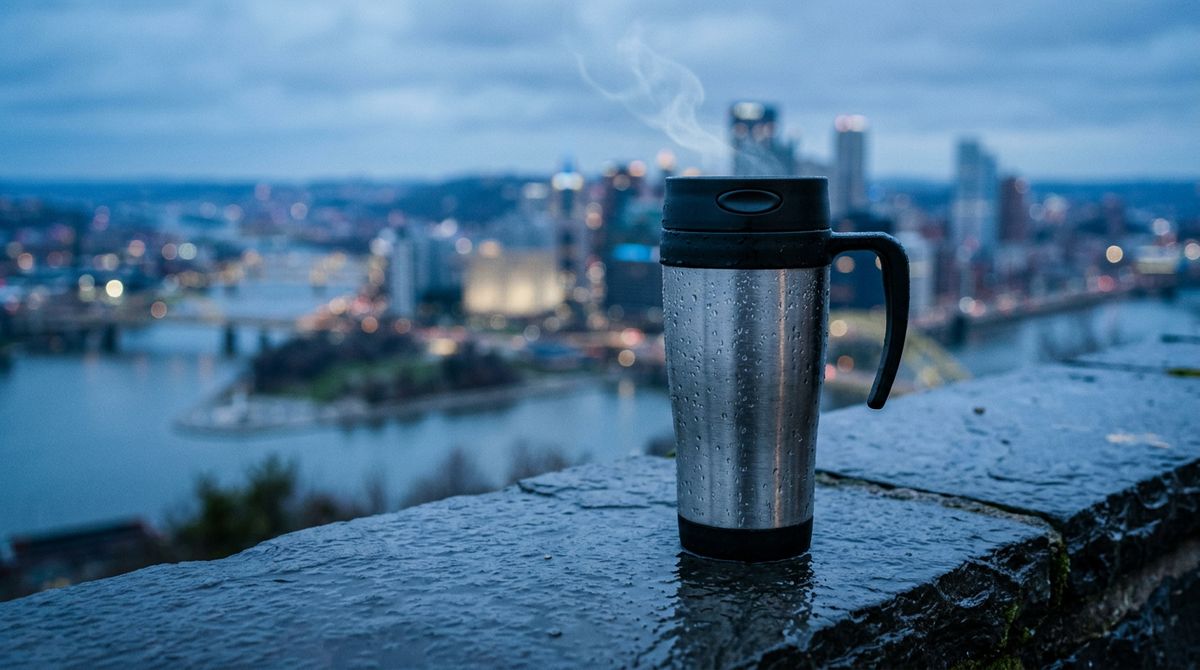
A stainless steel commuter travel mug standing on a wet dark stone ledge outdoors at dawn, photographed level from the side. Fine rain beading on the brushed metal, a city skyline softly defocused behind in cold blue pre-sunrise light. A faint wisp of steam at the lid. Product lifestyle photography, shallow depth of field, sharp on the mug, no text.

With one frame the model is free at the end, so the prompt has to carry the whole arc. With two frames it is constrained at both ends, and the prompt only has to describe the route. Reach for the pair whenever the final state is already decided, and for the single frame when the ending is open.
Choosing the pair
The quality of a two-frame clip is mostly decided before the call. The two stills have to be plausibly the same shot, because everything the model has to invent between them is motion, not reconciliation.
Three properties matter, and the room pair above has all of them: the camera position is identical, the framing and lens match, and the subject geometry is continuous. What changes is only what the transition is about.
An unboxing reveal for a subscription brand, in a single unbroken scene with no cuts. The camera holds the same high three-quarter angle while the ribbon loosens and slides off, the lid lifts away and settles behind the base, and the tissue paper parts to reveal the folded knit scarf and the amber glass candle inside. Smooth deliberate motion, no camera movement, the same soft daylight throughout. The audio is the slide of grosgrain ribbon, the soft scuff of the lid lifting, and the crisp rustle of tissue paper, no music, no dialogue.
- First frame
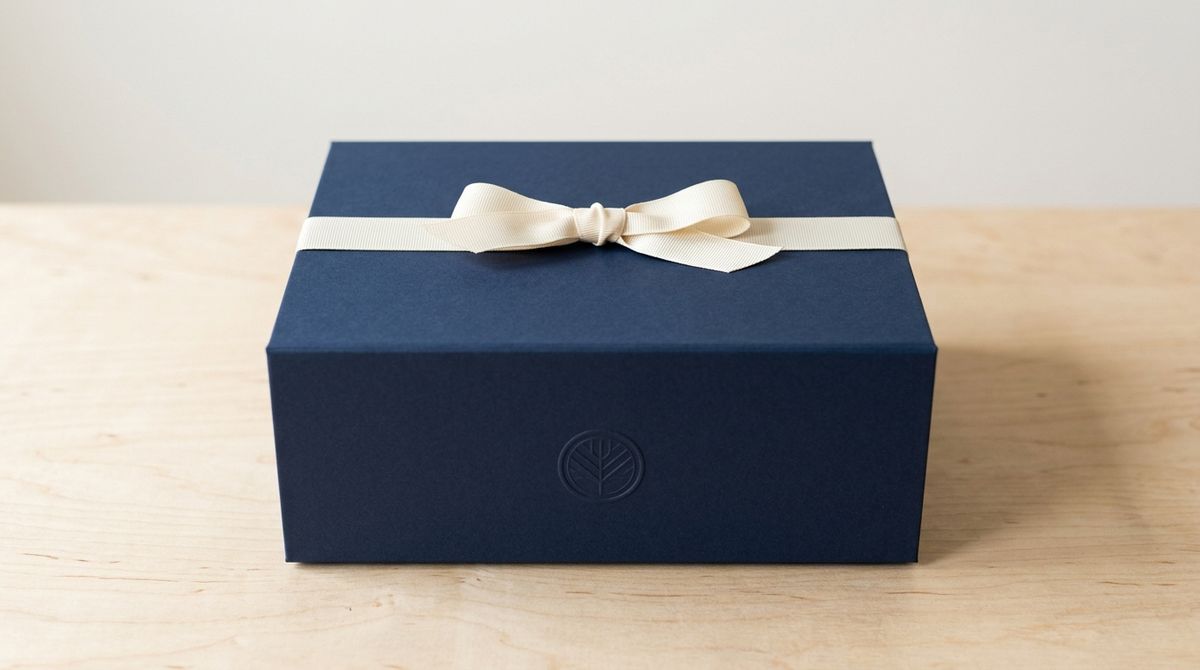
A closed matte navy subscription gift box sitting centred on a pale birch table, photographed from a high three-quarter angle. A cream grosgrain ribbon tied in a flat band across the lid, a small blind-embossed circular seal on the front, no readable text. Soft even daylight from the left, clean shadow to the right, plain pale background. E-commerce packshot photography, sharp throughout.
- Last frame
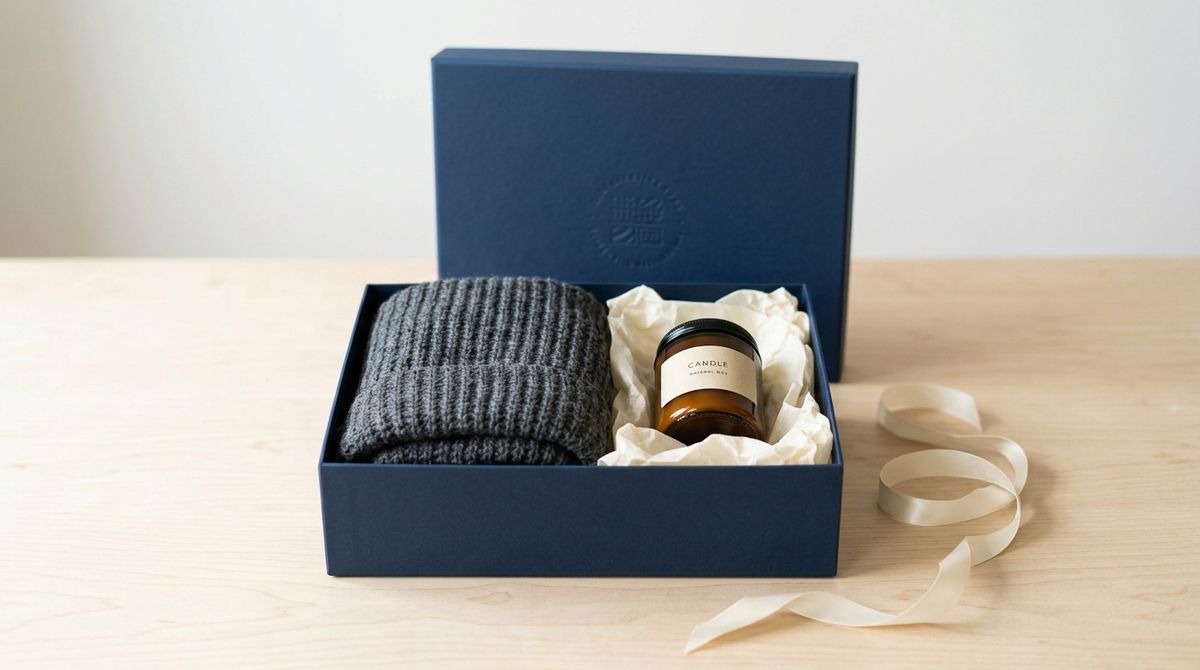
The same matte navy subscription gift box on the same pale birch table from the same high three-quarter angle, now open. The lid rests behind the base, the cream ribbon lies loose beside it, and inside the box a folded charcoal knit scarf and a small amber glass candle sit in cream tissue paper. Identical camera position, identical soft daylight from the left, plain pale background. E-commerce packshot photography, sharp throughout, no readable text.


Generating the pair together is the reliable way to get that match. Write the second still's prompt as an explicit restatement of the first ("the same box on the same table from the same high three-quarter angle, now open") rather than as a fresh description, and the two land close enough for the model to treat them as one shot.
The rule bends when the transition is supposed to be a leap. A flat-lay becoming a worn garment is not one camera position, and the model handles it because the prompt names the move as a transformation rather than as continuity.
A product-to-model transition for a fashion lookbook, in a single unbroken scene with no cuts. The overhead flat-lay of the rust-orange linen shirt dress lifts and rotates upright as the camera settles to a straight-on full-length view of the model wearing it against the same bone-white backdrop, the belt tying at the waist as the dress takes shape. Smooth continuous transformation, even studio light throughout. The audio is a quiet studio room tone and a soft rustle of linen, no music, no dialogue.
- First frame
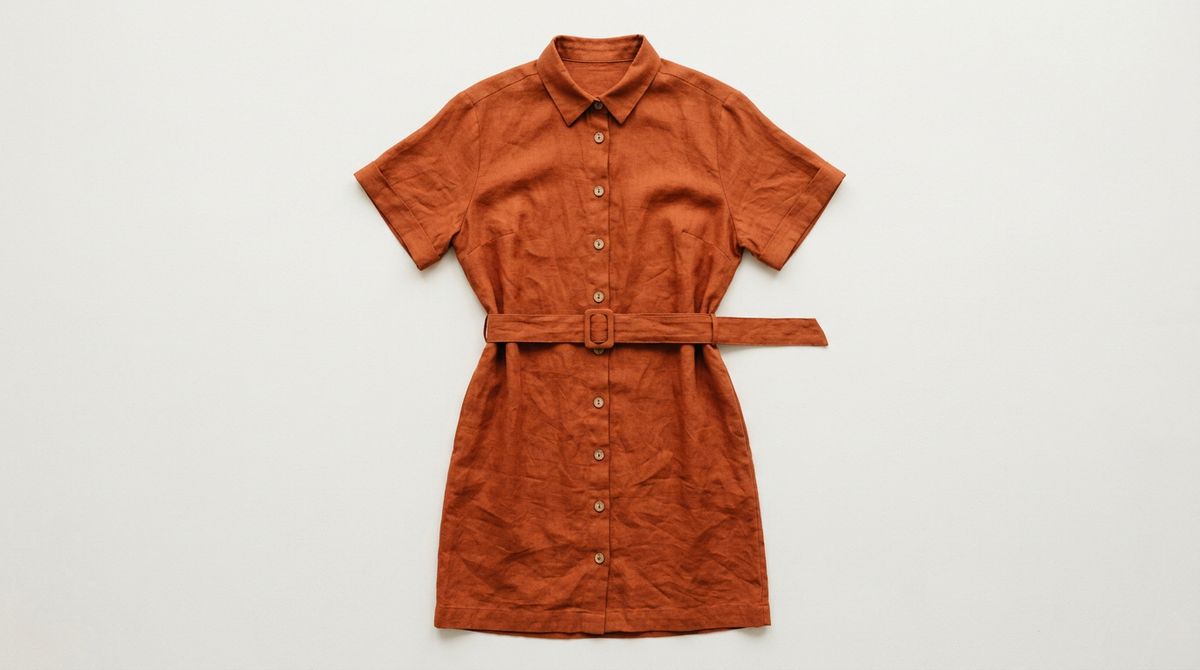
A flat-lay of a rust-orange linen shirt dress arranged neatly on a plain bone-white studio surface, photographed straight down from above. Buttons in a straight line down the centre, a fabric belt laid flat across the waist, sleeves folded in at slight angles, visible linen weave and natural creasing. Soft even studio light, no shadows, no props, fashion e-commerce photography, no text.
- Last frame
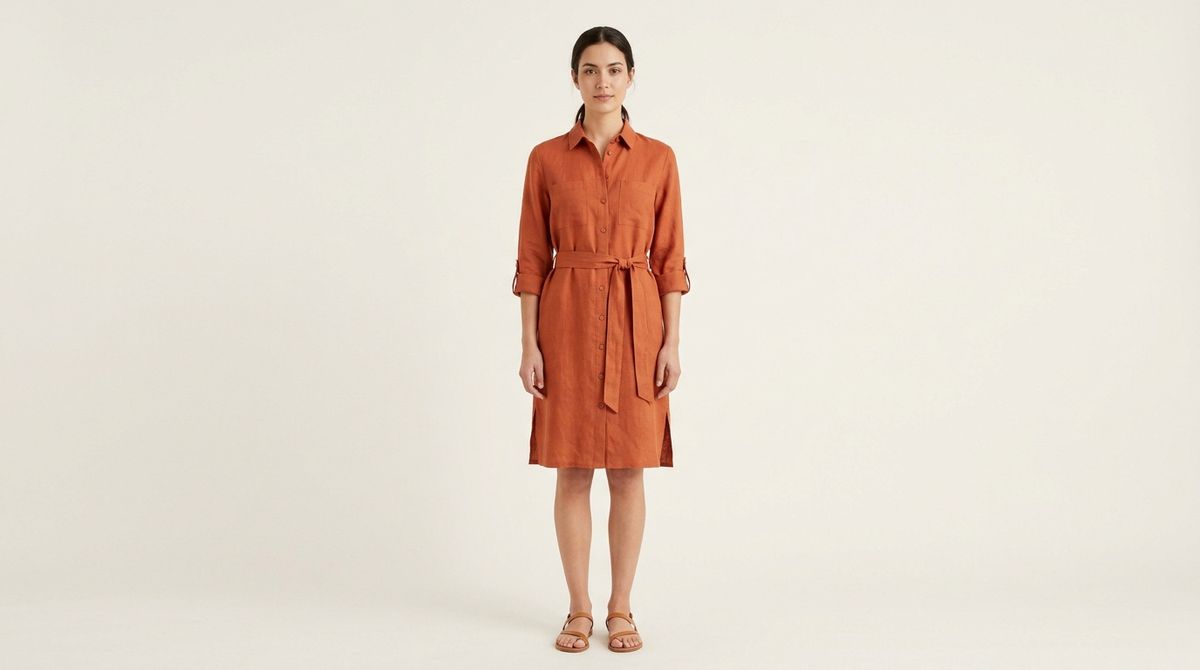
A full-length studio shot of a female model wearing the same rust-orange linen shirt dress with the fabric belt tied at the waist, standing straight on against a plain bone-white seamless backdrop. Natural relaxed posture, arms at her sides, dark hair tied back, plain tan flat sandals. Soft even studio light, fashion e-commerce lookbook photography, sharp throughout, no text.


Prompting the route
With both ends fixed, the prompt has one job: describe how the shot travels between them. Naming the endpoints again is wasted, the model can see them.
Say what moves and in what order ("the ribbon loosens and slides off, the lid lifts away and settles behind the base"), and say what holds still. "No camera movement" is worth writing explicitly whenever the pair shares a camera position, because the model will otherwise add a drift that fights the fixed frames.
Duration is the pacing control here. The staging clip runs 8 seconds because five things arrive in sequence, and the mug clip runs 6 because only weather and light change. Give a transition with several beats the room to land them.
Tips
-
Two frames maximum, and never a lone
last. The array caps at 2, and it must contain a non-last item. A closing frame always travels with an opening one. -
Generate the pair together. Write the second still's prompt as a restatement of the first with only the intended change, so the two read as one camera setup.
-
Match camera position, framing, and geometry whenever the transition is meant to be continuous. Everything the model does not have to reconcile is effort it spends on motion instead.
-
Say "no camera movement" for fixed-camera pairs. Without it the model tends to add drift that works against both pinned frames.
-
Describe the route, not the endpoints. Name what moves, in what order, and what stays put. The frames already carry the before and after.
-
Nothing else can ride along. No reference images, no reference videos, no source video. Frame mode is exclusive.
-
Pace the transition with
duration. Several sequential changes want 8 to 10 seconds. A single change reads fine at 6 and rushed under it. -
A single
firstframe is image-to-video. Use it when the ending is open, and reach for the pair when the final state is already approved.