Seedream 5.5

Seedream 5.5 is ByteDance's image generation and editing model, focused on visual realism, aesthetics and editing consistency. It supports text-to-image and reference-guided editing with up to 10 input images, keeps unedited areas stable across multi-turn edits, and outputs transparent images from a prompt or from references. It can also split an image into a base image and up to 99 editable layers, returning the text, position, font and style of each text layer, which suits poster, packaging and marketing design workflows.
Transparent backgrounds
How to make cut-out assets with Seedream 5.5: transparent output from a prompt or an existing photo, the auto default, matching sticker sets and soft hair edges.
Introduction
An image that ships into someone else's layout needs an alpha channel. A marketplace tile, a promo banner, the sticker tray of a chat app and a team page with a dark mode each put their own color behind it. Seedream 5.5 returns that channel directly when you set settings.background to transparent, from a prompt alone or from a photo you already have.

A single jar of whipped face cream: a squat jar in opaque matte sage-green ceramic, its brushed silver lid leaning against the right side of the jar, the white cream inside whipped into a soft peak, a slim cream-colored label on the front reading "CLOUD CREAM" in small dark green serif capitals. Front three-quarter view at eye level. Nothing behind it, no surface under it and no shadow, crisp clean edges all the way around. Photoreal skincare product photography, soft studio light from the upper left.
This guide covers the request and the formats it accepts, the auto default, prompts that keep a cut-out clean, cutting out an existing photo, sticker sets built from one reference, and checking soft hair edges on light and dark tiles.
Setting up the request
settings.background takes three values, and only one guarantees an alpha channel.
import { createClient } from '@runware/sdk'

const client = await createClient({ apiKey: process.env.RUNWARE_API_KEY })
await client.connect()

const [result] = await client.run({
  model: 'bytedance:seedream@5.5',
  positivePrompt: 'A single jar of whipped face cream: a squat jar in opaque matte sage-green ceramic, its brushed silver lid leaning against the right side of the jar, the white cream inside whipped into a soft peak, a slim cream-colored label on the front reading "CLOUD CREAM" in small dark green serif capitals. Front three-quarter view at eye level. Nothing behind it, no surface under it and no shadow, crisp clean edges all the way around. Photoreal skincare product photography, soft studio light from the upper left.',
  settings: {
    background: 'transparent'
  },
  outputFormat: 'PNG',
  width: 1600,
  height: 2000
})
import asyncio
import os
from runware import Runware
async def main():
async with Runware(api_key=os.environ["RUNWARE_API_KEY"]) as client:
results = await client.run({
"model": "bytedance:seedream@5.5",
"positivePrompt": "A single jar of whipped face cream: a squat jar in opaque matte sage-green ceramic, its brushed silver lid leaning against the right side of the jar, the white cream inside whipped into a soft peak, a slim cream-colored label on the front reading \"CLOUD CREAM\" in small dark green serif capitals. Front three-quarter view at eye level. Nothing behind it, no surface under it and no shadow, crisp clean edges all the way around. Photoreal skincare product photography, soft studio light from the upper left.",
"settings": {
"background": "transparent"
},
"outputFormat": "PNG",
"width": 1600,
"height": 2000
})
asyncio.run(main())curl https://api.runware.ai/v1 \
-H "Authorization: Bearer $RUNWARE_API_KEY" \
-H "Content-Type: application/json" \
-d '[
{
  "taskType": "imageInference",
  "taskUUID": "5c8e1f42-7a39-4d06-b2e8-9f14c3a7d651",
  "model": "bytedance:seedream@5.5",
  "positivePrompt": "A single jar of whipped face cream: a squat jar in opaque matte sage-green ceramic, its brushed silver lid leaning against the right side of the jar, the white cream inside whipped into a soft peak, a slim cream-colored label on the front reading \"CLOUD CREAM\" in small dark green serif capitals. Front three-quarter view at eye level. Nothing behind it, no surface under it and no shadow, crisp clean edges all the way around. Photoreal skincare product photography, soft studio light from the upper left.",
  "settings": {
    "background": "transparent"
  },
  "outputFormat": "PNG",
  "width": 1600,
  "height": 2000
}
]'runware run bytedance:seedream@5.5 \
positivePrompt="A single jar of whipped face cream: a squat jar in opaque matte sage-green ceramic, its brushed silver lid leaning against the right side of the jar, the white cream inside whipped into a soft peak, a slim cream-colored label on the front reading \"CLOUD CREAM\" in small dark green serif capitals. Front three-quarter view at eye level. Nothing behind it, no surface under it and no shadow, crisp clean edges all the way around. Photoreal skincare product photography, soft studio light from the upper left." \
settings.background=transparent \
outputFormat=PNG \
width=1600 \
height=2000{
"taskType": "imageInference",
"taskUUID": "5c8e1f42-7a39-4d06-b2e8-9f14c3a7d651",
"model": "bytedance:seedream@5.5",
"positivePrompt": "A single jar of whipped face cream: a squat jar in opaque matte sage-green ceramic, its brushed silver lid leaning against the right side of the jar, the white cream inside whipped into a soft peak, a slim cream-colored label on the front reading \"CLOUD CREAM\" in small dark green serif capitals. Front three-quarter view at eye level. Nothing behind it, no surface under it and no shadow, crisp clean edges all the way around. Photoreal skincare product photography, soft studio light from the upper left.",
"settings": {
"background": "transparent"
},
"outputFormat": "PNG",
"width": 1600,
"height": 2000
}Response
[
  {
    "taskType": "imageInference",
    "taskUUID": "5c8e1f42-7a39-4d06-b2e8-9f14c3a7d651",
    "imageUUID": "e27b9c14-3f58-4a6d-8c01-b4d6e9f2a738",
    "imageURL": "https://im.runware.ai/image/os/a14d18/ws/2/ii/e27b9c14-3f58-4a6d-8c01-b4d6e9f2a738.png"
  }
]autois the default. The model decides from the prompt and the output format.opaquealways fills the background, whatever the prompt asks for.transparentalways returns the subject on an alpha channel.
A transparent image is stored as PNG or WEBP. transparent with outputFormat set to JPG is rejected, and a transparent request that leaves outputFormat out comes back as a PNG.
To split a flat image you already have into separate transparent layers, use layer decomposition. It returns every layer on an alpha channel by itself, so a request that turns on settings.layerDecomposition is rejected with any settings.background value, transparent included.
Leaving it to auto
With auto, the output format decides first. A JPG cannot hold alpha, so an auto request that asks for JPG, or leaves outputFormat out and gets the JPG default, always comes back opaque. Send PNG or WEBP and the prompt decides: one that asks for an isolated asset on a transparent background can come back cut out.

A pair of white wireless earbuds resting in front of their open white charging case, a small green status light glowing on the case, three-quarter view from slightly above. Isolated on a transparent background, no surface and no shadow, crisp clean edges all the way around. Photoreal consumer electronics product shot, soft even studio light.
Pin the value when a pipeline depends on the alpha. auto is a decision the model makes again on every request, and a storefront that composites every product onto its tiles needs the same answer each time, so it sends transparent. opaque pins the other answer: a solid background, even for a prompt that mentions an isolated or cut-out look.
Writing the prompt
transparent clears everything outside the subject, and the prompt decides where the subject ends. A product photography prompt usually describes a tabletop and the shadow on it, and both can end up in the file when nothing rules them out.
Rule out what a photo shoot would add. "Nothing behind it, no surface under it and no shadow" covers the backdrop, the tabletop and the smudge under the jar.
Give the light as a direction. "Soft studio light from the upper left" shapes the ceramic without placing it anywhere.
The hero prompt, clause by clause:
Read top to bottom, the prompt is a product spec: what the object is, what is printed on it, how it faces the camera and what is absent from the frame.
Cutting out a photo
Seedream 5.5 also cuts out from a reference image, and the reference does not need an alpha channel. The photo below is an ordinary JPEG of a bag on a patterned quilt, the kind a seller takes on a phone before listing an item on a resale marketplace.

Cut out the handbag from the reference image, with the whole bag and its whole strap inside the frame. Keep its shape, materials, colors and details exactly as in the photo, at the same angle. Leave out the quilt, the bed and everything else around the bag, with no surface and no shadow. Relight it with soft, even, neutral studio light from the front.
- Phone photo
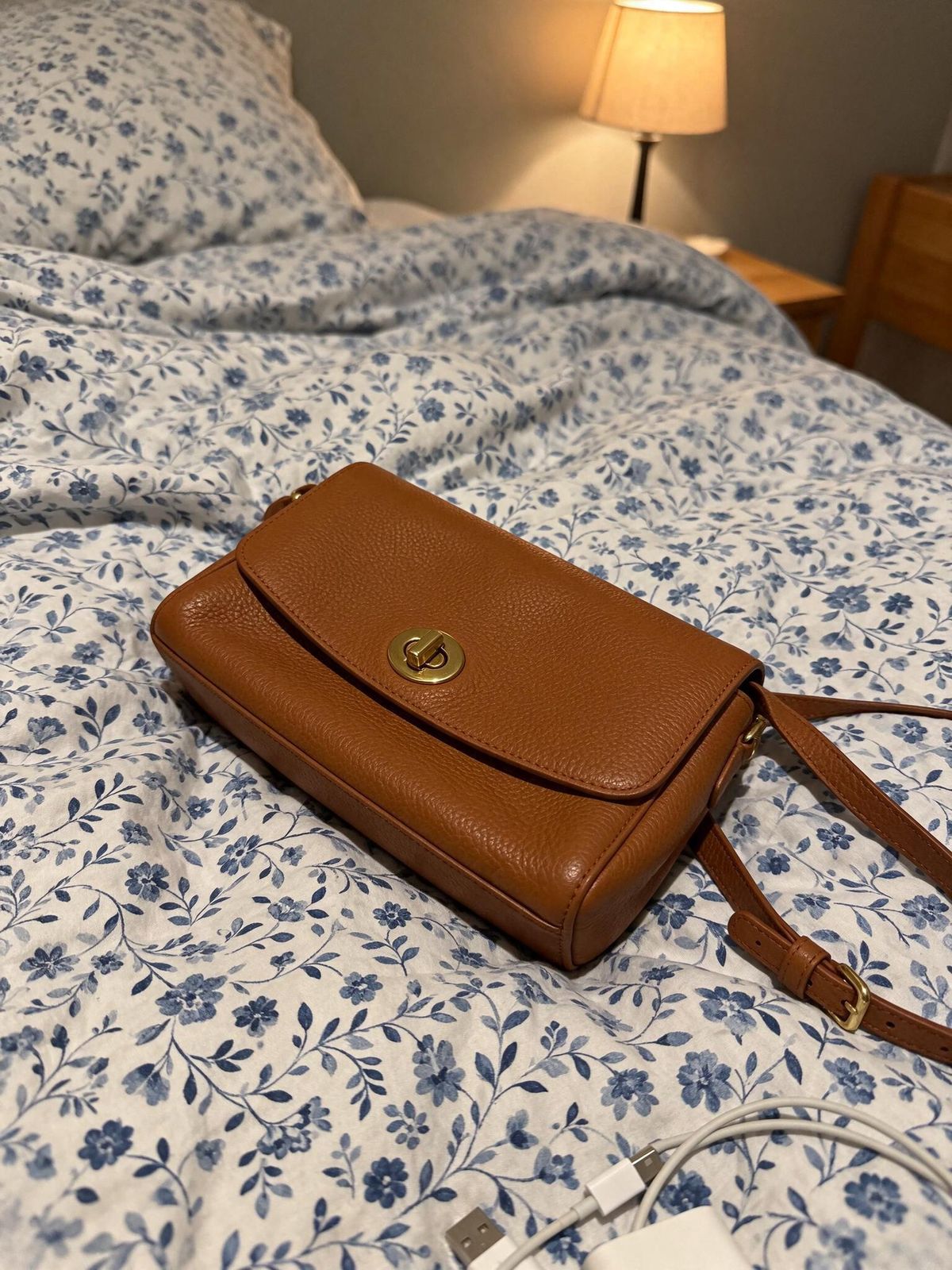
A casual smartphone photo taken to list a secondhand item for sale: a tan pebbled leather crossbody bag with a gold turn-lock clasp and a thin adjustable strap, lying slightly askew on an unmade bed covered with a busy blue and white patterned quilt, a corner of a pillow and a phone charger cable visible near the edge of the frame. Shot from above at a slight angle, handheld, slightly off-center, warm yellow light from a bedside lamp with soft shadows. Realistic phone camera photo with mild noise, no text.

import { createClient } from '@runware/sdk'

const client = await createClient({ apiKey: process.env.RUNWARE_API_KEY })
await client.connect()

const [result] = await client.run({
  model: 'bytedance:seedream@5.5',
  positivePrompt: 'Cut out the handbag from the reference image, with the whole bag and its whole strap inside the frame. Keep its shape, materials, colors and details exactly as in the photo, at the same angle. Leave out the quilt, the bed and everything else around the bag, with no surface and no shadow. Relight it with soft, even, neutral studio light from the front.',
  inputs: {
    referenceImages: [
      'https://assets.runware.ai/guides/bytedance-seedream-5-5/transparent-backgrounds/source-photo.jpg'
    ]
  },
  settings: {
    background: 'transparent'
  }
})
import asyncio
import os
from runware import Runware
async def main():
async with Runware(api_key=os.environ["RUNWARE_API_KEY"]) as client:
results = await client.run({
"model": "bytedance:seedream@5.5",
"positivePrompt": "Cut out the handbag from the reference image, with the whole bag and its whole strap inside the frame. Keep its shape, materials, colors and details exactly as in the photo, at the same angle. Leave out the quilt, the bed and everything else around the bag, with no surface and no shadow. Relight it with soft, even, neutral studio light from the front.",
"inputs": {
"referenceImages": [
"https://assets.runware.ai/guides/bytedance-seedream-5-5/transparent-backgrounds/source-photo.jpg"
]
},
"settings": {
"background": "transparent"
}
})
asyncio.run(main())curl https://api.runware.ai/v1 \
-H "Authorization: Bearer $RUNWARE_API_KEY" \
-H "Content-Type: application/json" \
-d '[
{
  "taskType": "imageInference",
  "taskUUID": "a93d0e57-1c6b-4f28-9e47-62b8d5f1c0a4",
  "model": "bytedance:seedream@5.5",
  "positivePrompt": "Cut out the handbag from the reference image, with the whole bag and its whole strap inside the frame. Keep its shape, materials, colors and details exactly as in the photo, at the same angle. Leave out the quilt, the bed and everything else around the bag, with no surface and no shadow. Relight it with soft, even, neutral studio light from the front.",
  "inputs": {
    "referenceImages": [
      "https://assets.runware.ai/guides/bytedance-seedream-5-5/transparent-backgrounds/source-photo.jpg"
    ]
  },
  "settings": {
    "background": "transparent"
  }
}
]'runware run bytedance:seedream@5.5 \
positivePrompt="Cut out the handbag from the reference image, with the whole bag and its whole strap inside the frame. Keep its shape, materials, colors and details exactly as in the photo, at the same angle. Leave out the quilt, the bed and everything else around the bag, with no surface and no shadow. Relight it with soft, even, neutral studio light from the front." \
inputs.referenceImages.0=https://assets.runware.ai/guides/bytedance-seedream-5-5/transparent-backgrounds/source-photo.jpg \
settings.background=transparent{
"taskType": "imageInference",
"taskUUID": "a93d0e57-1c6b-4f28-9e47-62b8d5f1c0a4",
"model": "bytedance:seedream@5.5",
"positivePrompt": "Cut out the handbag from the reference image, with the whole bag and its whole strap inside the frame. Keep its shape, materials, colors and details exactly as in the photo, at the same angle. Leave out the quilt, the bed and everything else around the bag, with no surface and no shadow. Relight it with soft, even, neutral studio light from the front.",
"inputs": {
"referenceImages": [
"https://assets.runware.ai/guides/bytedance-seedream-5-5/transparent-backgrounds/source-photo.jpg"
]
},
"settings": {
"background": "transparent"
}
}Response
[
  {
    "taskType": "imageInference",
    "taskUUID": "a93d0e57-1c6b-4f28-9e47-62b8d5f1c0a4",
    "imageUUID": "4f1c8a62-d907-4e3b-a5c2-81e6b0d4f97e",
    "imageURL": "https://im.runware.ai/image/os/a14d18/ws/2/ii/4f1c8a62-d907-4e3b-a5c2-81e6b0d4f97e.png"
  }
]
The request carries no size and no outputFormat, and both defaults suit a cut-out. Without a size the output keeps the photo's aspect ratio, and with transparent the file comes back as a PNG. A request takes up to 10 references, and each one can come with an alpha channel or without one.
Ask for a relight when the photo was taken under room light. The warm lamp light on the quilt belongs to the bedroom. Carried onto a white marketplace tile, it reads as the color of the leather.
Frame the whole product in the photo. The cut-out keeps the photo's crop. The strap runs out of the frame in the phone photo and stays cut in the result, even though the prompt asks for the whole strap.
Sticker sets
A sticker pack for a chat or creator app ships as a set: the same character in a dozen poses, each one its own cut-out. Generate the first sticker from a prompt, then pass it back as the reference for each pose that follows.

A chat sticker of a chubby cartoon shiba inu with a round face, a curled tail and warm orange, cream and white fur, sitting upright and waving one paw with a big open-mouthed smile. Flat vector cartoon style with thick dark brown outlines and soft cel shading. A thick white die-cut border follows the outline of the whole character. No text, nothing behind the sticker and no shadow.

A new chat sticker of the character in the reference image. Keep its design, proportions, colors, line style and the white die-cut border exactly. New pose: curled up asleep on its side with its eyes closed and its tail tucked around its body. No text, nothing behind the sticker and no shadow.

A new chat sticker of the character in the reference image. Keep its design, proportions, colors, line style and the white die-cut border exactly. New pose: standing on its hind legs and hugging a small red heart with both front paws, eyes squeezed shut in a happy grin. No text, nothing behind the sticker and no shadow.
The first sticker is a transparent PNG, so the second and third requests send a reference that has an alpha channel, the other half of the rule from the previous section:
import { createClient } from '@runware/sdk'

const client = await createClient({ apiKey: process.env.RUNWARE_API_KEY })
await client.connect()

const [result] = await client.run({
  model: 'bytedance:seedream@5.5',
  positivePrompt: 'A new chat sticker of the character in the reference image. Keep its design, proportions, colors, line style and the white die-cut border exactly. New pose: curled up asleep on its side with its eyes closed and its tail tucked around its body. No text, nothing behind the sticker and no shadow.',
  inputs: {
    referenceImages: [
      'https://assets.runware.ai/guides/bytedance-seedream-5-5/transparent-backgrounds/output-sticker-1.png'
    ]
  },
  settings: {
    background: 'transparent'
  },
  width: 1536,
  height: 1536
})
import asyncio
import os
from runware import Runware
async def main():
async with Runware(api_key=os.environ["RUNWARE_API_KEY"]) as client:
results = await client.run({
"model": "bytedance:seedream@5.5",
"positivePrompt": "A new chat sticker of the character in the reference image. Keep its design, proportions, colors, line style and the white die-cut border exactly. New pose: curled up asleep on its side with its eyes closed and its tail tucked around its body. No text, nothing behind the sticker and no shadow.",
"inputs": {
"referenceImages": [
"https://assets.runware.ai/guides/bytedance-seedream-5-5/transparent-backgrounds/output-sticker-1.png"
]
},
"settings": {
"background": "transparent"
},
"width": 1536,
"height": 1536
})
asyncio.run(main())curl https://api.runware.ai/v1 \
-H "Authorization: Bearer $RUNWARE_API_KEY" \
-H "Content-Type: application/json" \
-d '[
{
  "taskType": "imageInference",
  "taskUUID": "0d7b4e19-6a2c-4f85-b3e9-c1f5a8d2e067",
  "model": "bytedance:seedream@5.5",
  "positivePrompt": "A new chat sticker of the character in the reference image. Keep its design, proportions, colors, line style and the white die-cut border exactly. New pose: curled up asleep on its side with its eyes closed and its tail tucked around its body. No text, nothing behind the sticker and no shadow.",
  "inputs": {
    "referenceImages": [
      "https://assets.runware.ai/guides/bytedance-seedream-5-5/transparent-backgrounds/output-sticker-1.png"
    ]
  },
  "settings": {
    "background": "transparent"
  },
  "width": 1536,
  "height": 1536
}
]'runware run bytedance:seedream@5.5 \
positivePrompt="A new chat sticker of the character in the reference image. Keep its design, proportions, colors, line style and the white die-cut border exactly. New pose: curled up asleep on its side with its eyes closed and its tail tucked around its body. No text, nothing behind the sticker and no shadow." \
inputs.referenceImages.0=https://assets.runware.ai/guides/bytedance-seedream-5-5/transparent-backgrounds/output-sticker-1.png \
settings.background=transparent \
width=1536 \
height=1536{
"taskType": "imageInference",
"taskUUID": "0d7b4e19-6a2c-4f85-b3e9-c1f5a8d2e067",
"model": "bytedance:seedream@5.5",
"positivePrompt": "A new chat sticker of the character in the reference image. Keep its design, proportions, colors, line style and the white die-cut border exactly. New pose: curled up asleep on its side with its eyes closed and its tail tucked around its body. No text, nothing behind the sticker and no shadow.",
"inputs": {
"referenceImages": [
"https://assets.runware.ai/guides/bytedance-seedream-5-5/transparent-backgrounds/output-sticker-1.png"
]
},
"settings": {
"background": "transparent"
},
"width": 1536,
"height": 1536
}Response
[
  {
    "taskType": "imageInference",
    "taskUUID": "0d7b4e19-6a2c-4f85-b3e9-c1f5a8d2e067",
    "imageUUID": "b85e2d07-9c41-4a6f-8d13-f2a7c6e904b1",
    "imageURL": "https://im.runware.ai/image/os/a14d18/ws/2/ii/b85e2d07-9c41-4a6f-8d13-f2a7c6e904b1.png"
  }
]
A pose prompt names only what changes. It lists what to keep as categories (design, proportions, colors, line style, the border) and the reference supplies how each one looks. Describing the dog again in words would give the model a second version of it to reconcile with the image.
Hair and soft edges
Loose curls and flyaway strands are the hardest edge to cut. A strand can be thinner than a pixel, so the pixels along it are part hair and part background. A team-page headshot has plenty of them.

A professional team-page headshot of a woman in her early thirties with voluminous loose dark curly hair falling past her shoulders, a few stray curls and fine flyaway strands around the outline of her hair, a warm natural smile, wearing a rust-colored ribbed knit sweater. Head and shoulders framed from mid-chest up, body turned slightly to the left, looking at the camera. Nothing behind her and no shadow. Photoreal corporate portrait photography, soft key light from the front left with a gentle rim light along the hair.
Check the cut-out on the tiles it ships onto. The same file, composited onto the light and dark themes of a team page:


The dark tile is where a fringe shows. An edge pixel that kept some light color blends into off-white, and on near-black the same pixels trace a gray outline around the hair. The loupe sits on the flyaways on the left of her head: on the light tile they read as loose strands, and on the dark tile they carry a pale haze. Run the check with the tile colors of every layout the asset goes into, and against both themes when the interface has a dark mode.
Tips
-
Pin the background when the alpha has to be there.
transparentreturns it every time, whileautodecides per request from the prompt and the format. -
Pick a format that holds alpha, or none.
PNGandWEBPkeep it,JPGis rejected withtransparent, and an omitted format returns a PNG. -
Rule out the surface and the shadow. Name what a photo shoot would add and say it is absent.
-
Cut out photos you already have. A reference needs no alpha channel, and up to 10 go into one request. Shoot the whole product, since the cut-out keeps the photo's crop.
-
Relight room photos. Lamp or window light on the reference reads as the product's color on a plain tile.
-
Build a set from its first file. Pass the first sticker back as the reference and name only the pose.
-
Check soft edges on a dark tile. Hair and fur show a fringe there first.