Seedream 5.5

Seedream 5.5 is ByteDance's image generation and editing model, focused on visual realism, aesthetics and editing consistency. It supports text-to-image and reference-guided editing with up to 10 input images, keeps unedited areas stable across multi-turn edits, and outputs transparent images from a prompt or from references. It can also split an image into a base image and up to 99 editable layers, returning the text, position, font and style of each text layer, which suits poster, packaging and marketing design workflows.
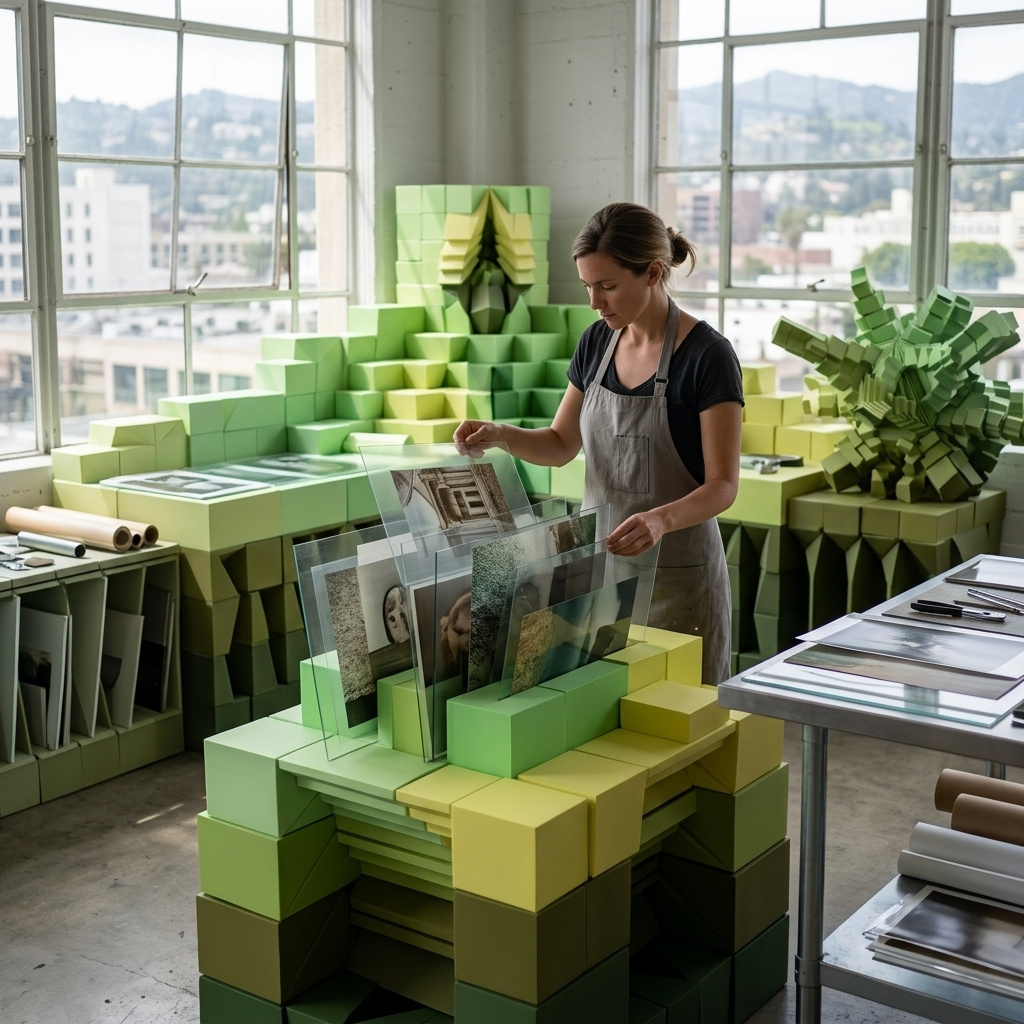
Multi-reference composition
How to compose one image from up to ten references with Seedream 5.5: assigning roles, dressing one model in a garment range, arranging a product set and sizing the output.
Introduction
A lookbook shot normally needs every element in front of one camera on one day. When the coat is still a sample or the model is booked elsewhere, the shot waits for the calendar.
Seedream 5.5 builds it from separate photos. Each element goes into inputs.referenceImages as its own image, up to ten per request, and the prompt says which image plays which part. The model returns one frame with every piece posed and relit together.

The woman from image 1 wearing the coat from image 2, buttoned and belted, and carrying the bag from image 3 on her left shoulder, walking down the steps from image 4 toward the camera. Keep her face, hair and the clothes under the coat from image 1. Keep the cut, color and buttons of the coat from image 2, and the shape, leather and clasp of the bag from image 3. Relight her with the soft overcast daylight of image 4 and give her a soft contact shadow on the steps. Full-length shot from a slightly low angle, 50mm lens. Photoreal editorial fashion lookbook photography.
- Image 1: model
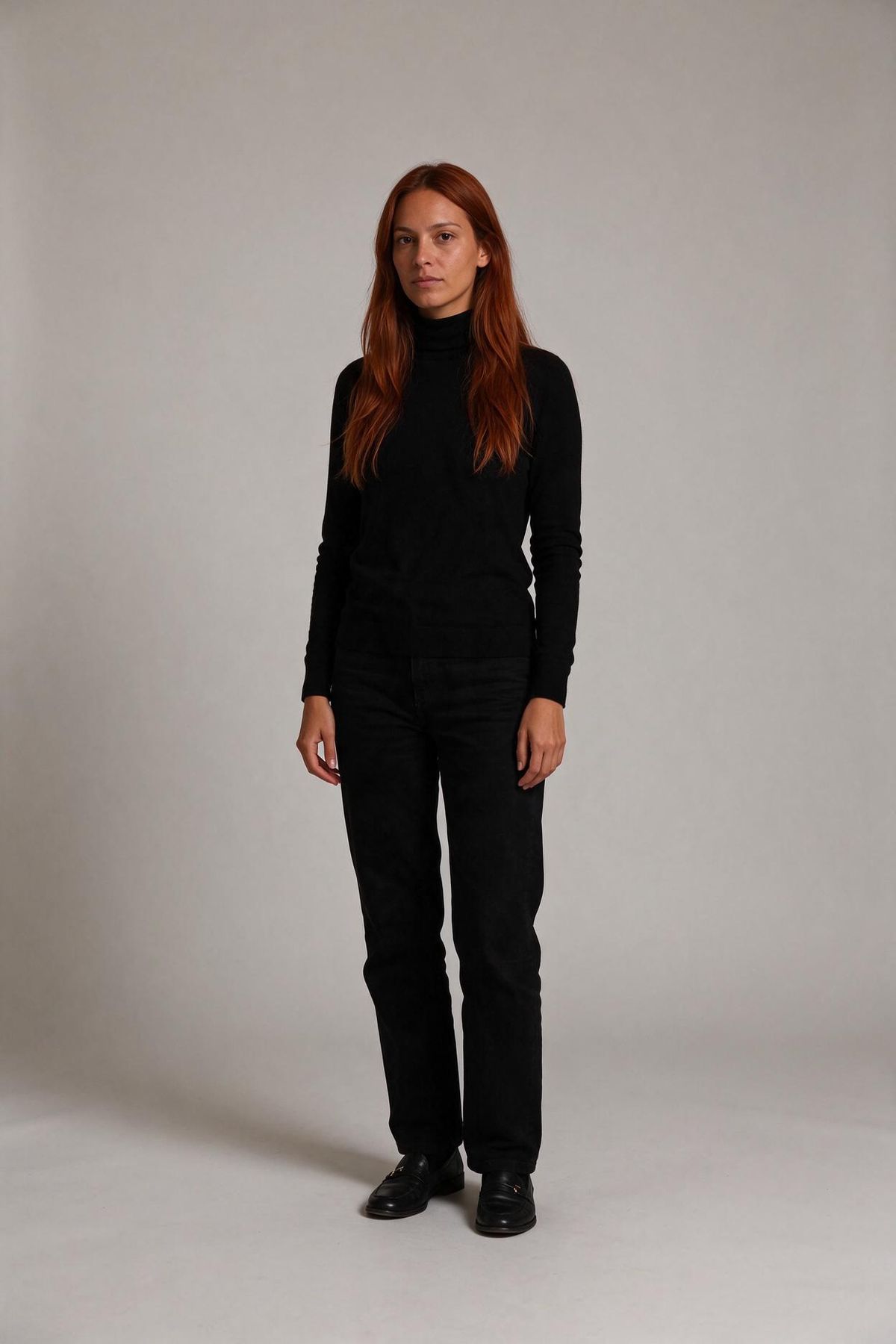
A full-length studio casting photograph of a woman in her early thirties with warm olive skin and long straight auburn hair worn loose, standing relaxed and facing the camera with her arms at her sides, wearing a fitted black turtleneck, straight black trousers and black leather loafers. Plain light gray seamless backdrop, soft even studio lighting, the whole figure inside the frame with space above her head and below her feet. Photoreal, no text.
- Image 2: coat
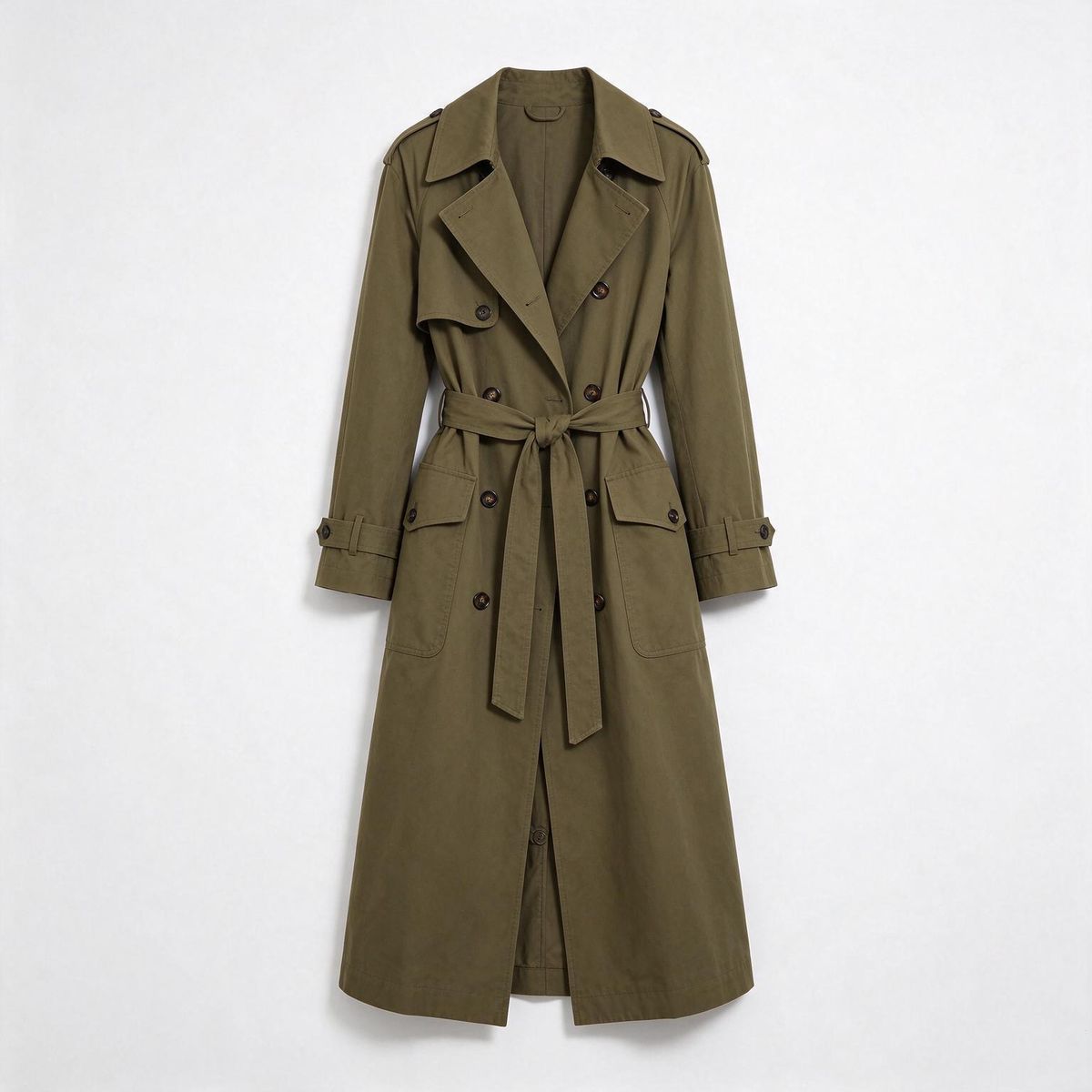
A long double-breasted cotton trench coat in olive green with wide lapels, dark horn buttons and a matching self-tie belt, shown front-on on an invisible mannequin, on a plain white backdrop. Soft even studio lighting, subtle contact shadow, photoreal e-commerce packshot, no logos, no text.
- Image 3: bag
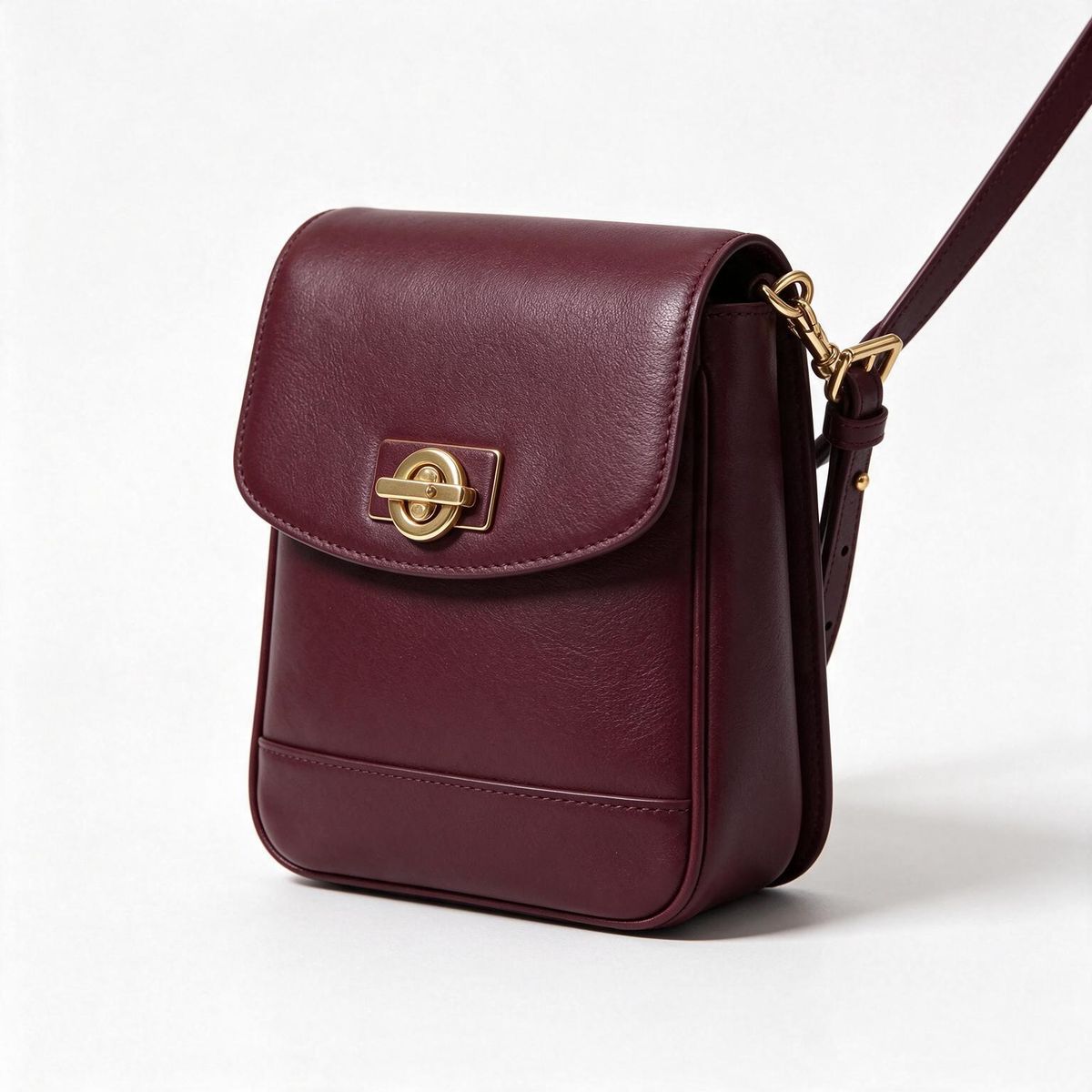
A structured crossbody bag in smooth burgundy leather with a gold turn-lock clasp and a thin adjustable leather strap, three-quarter view, on a plain white backdrop. Soft even studio lighting, subtle contact shadow, photoreal e-commerce packshot, no logos, no text.
- Image 4: location
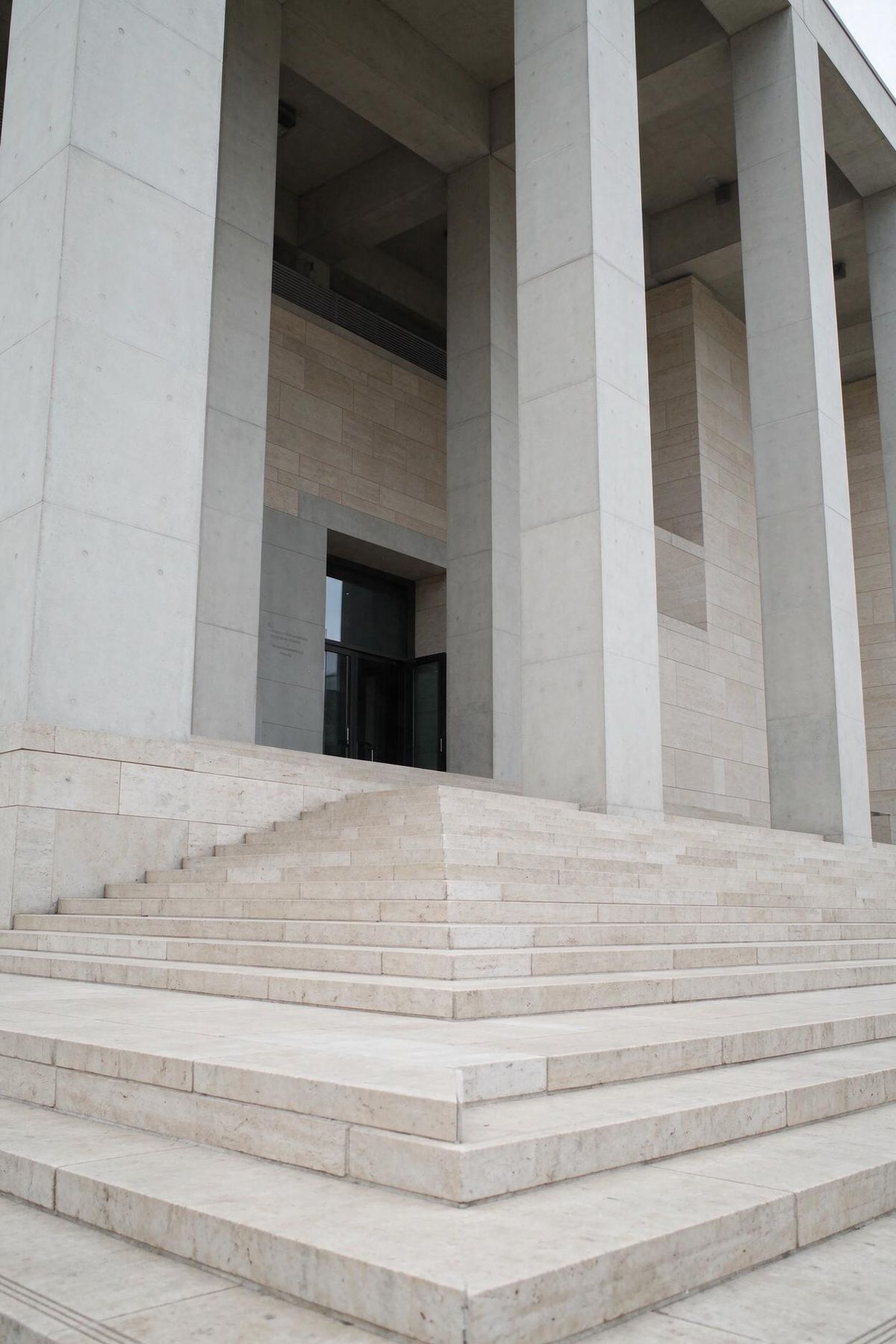
Wide pale limestone steps leading up to the entrance of a modern museum with tall square concrete columns, seen from the bottom of the steps looking up, portrait framing. Empty, no people. Soft overcast daylight with no hard shadows. Photoreal architectural location photography, no text.


The casting photo and the two packshots were never in the same room, and the coat was never worn. For a fashion retailer that is a lookbook page without a shoot, and a new colorway is one more packshot in image 2.
This guide covers the request, giving each image a role, dressing one model in a whole garment range, arranging ten products in one frame and sizing the output when references are present. Changing a single image with an instruction is covered in editing images.
The request
References go into inputs.referenceImages, and the prompt refers to them by their place in the array:
import { createClient } from '@runware/sdk'

const client = await createClient({ apiKey: process.env.RUNWARE_API_KEY })
await client.connect()

const [result] = await client.run({
  model: 'bytedance:seedream@5.5',
  positivePrompt: 'The woman from image 1 wearing the coat from image 2, buttoned and belted, and carrying the bag from image 3 on her left shoulder, walking down the steps from image 4 toward the camera. Keep her face, hair and the clothes under the coat from image 1. Keep the cut, color and buttons of the coat from image 2, and the shape, leather and clasp of the bag from image 3. Relight her with the soft overcast daylight of image 4 and give her a soft contact shadow on the steps. Full-length shot from a slightly low angle, 50mm lens. Photoreal editorial fashion lookbook photography.',
  width: 1664,
  height: 2496,
  inputs: {
    referenceImages: [
      'https://assets.runware.ai/guides/bytedance-seedream-5-5/multi-reference-composition/source-woman.jpg',
      'https://assets.runware.ai/guides/bytedance-seedream-5-5/multi-reference-composition/source-coat.jpg',
      'https://assets.runware.ai/guides/bytedance-seedream-5-5/multi-reference-composition/source-bag.jpg',
      'https://assets.runware.ai/guides/bytedance-seedream-5-5/multi-reference-composition/source-steps.jpg'
    ]
  }
})
import asyncio
import os
from runware import Runware
async def main():
async with Runware(api_key=os.environ["RUNWARE_API_KEY"]) as client:
results = await client.run({
"model": "bytedance:seedream@5.5",
"positivePrompt": "The woman from image 1 wearing the coat from image 2, buttoned and belted, and carrying the bag from image 3 on her left shoulder, walking down the steps from image 4 toward the camera. Keep her face, hair and the clothes under the coat from image 1. Keep the cut, color and buttons of the coat from image 2, and the shape, leather and clasp of the bag from image 3. Relight her with the soft overcast daylight of image 4 and give her a soft contact shadow on the steps. Full-length shot from a slightly low angle, 50mm lens. Photoreal editorial fashion lookbook photography.",
"width": 1664,
"height": 2496,
"inputs": {
"referenceImages": [
"https://assets.runware.ai/guides/bytedance-seedream-5-5/multi-reference-composition/source-woman.jpg",
"https://assets.runware.ai/guides/bytedance-seedream-5-5/multi-reference-composition/source-coat.jpg",
"https://assets.runware.ai/guides/bytedance-seedream-5-5/multi-reference-composition/source-bag.jpg",
"https://assets.runware.ai/guides/bytedance-seedream-5-5/multi-reference-composition/source-steps.jpg"
]
}
})
asyncio.run(main())curl https://api.runware.ai/v1 \
-H "Authorization: Bearer $RUNWARE_API_KEY" \
-H "Content-Type: application/json" \
-d '[
{
  "taskType": "imageInference",
  "taskUUID": "4c9e2a71-8d3b-4f06-b5e1-2a7d9c3f6b58",
  "model": "bytedance:seedream@5.5",
  "positivePrompt": "The woman from image 1 wearing the coat from image 2, buttoned and belted, and carrying the bag from image 3 on her left shoulder, walking down the steps from image 4 toward the camera. Keep her face, hair and the clothes under the coat from image 1. Keep the cut, color and buttons of the coat from image 2, and the shape, leather and clasp of the bag from image 3. Relight her with the soft overcast daylight of image 4 and give her a soft contact shadow on the steps. Full-length shot from a slightly low angle, 50mm lens. Photoreal editorial fashion lookbook photography.",
  "width": 1664,
  "height": 2496,
  "inputs": {
    "referenceImages": [
      "https://assets.runware.ai/guides/bytedance-seedream-5-5/multi-reference-composition/source-woman.jpg",
      "https://assets.runware.ai/guides/bytedance-seedream-5-5/multi-reference-composition/source-coat.jpg",
      "https://assets.runware.ai/guides/bytedance-seedream-5-5/multi-reference-composition/source-bag.jpg",
      "https://assets.runware.ai/guides/bytedance-seedream-5-5/multi-reference-composition/source-steps.jpg"
    ]
  }
}
]'runware run bytedance:seedream@5.5 \
positivePrompt="The woman from image 1 wearing the coat from image 2, buttoned and belted, and carrying the bag from image 3 on her left shoulder, walking down the steps from image 4 toward the camera. Keep her face, hair and the clothes under the coat from image 1. Keep the cut, color and buttons of the coat from image 2, and the shape, leather and clasp of the bag from image 3. Relight her with the soft overcast daylight of image 4 and give her a soft contact shadow on the steps. Full-length shot from a slightly low angle, 50mm lens. Photoreal editorial fashion lookbook photography." \
width=1664 \
height=2496 \
inputs.referenceImages.0=https://assets.runware.ai/guides/bytedance-seedream-5-5/multi-reference-composition/source-woman.jpg \
inputs.referenceImages.1=https://assets.runware.ai/guides/bytedance-seedream-5-5/multi-reference-composition/source-coat.jpg \
inputs.referenceImages.2=https://assets.runware.ai/guides/bytedance-seedream-5-5/multi-reference-composition/source-bag.jpg \
inputs.referenceImages.3=https://assets.runware.ai/guides/bytedance-seedream-5-5/multi-reference-composition/source-steps.jpg{
"taskType": "imageInference",
"taskUUID": "4c9e2a71-8d3b-4f06-b5e1-2a7d9c3f6b58",
"model": "bytedance:seedream@5.5",
"positivePrompt": "The woman from image 1 wearing the coat from image 2, buttoned and belted, and carrying the bag from image 3 on her left shoulder, walking down the steps from image 4 toward the camera. Keep her face, hair and the clothes under the coat from image 1. Keep the cut, color and buttons of the coat from image 2, and the shape, leather and clasp of the bag from image 3. Relight her with the soft overcast daylight of image 4 and give her a soft contact shadow on the steps. Full-length shot from a slightly low angle, 50mm lens. Photoreal editorial fashion lookbook photography.",
"width": 1664,
"height": 2496,
"inputs": {
"referenceImages": [
"https://assets.runware.ai/guides/bytedance-seedream-5-5/multi-reference-composition/source-woman.jpg",
"https://assets.runware.ai/guides/bytedance-seedream-5-5/multi-reference-composition/source-coat.jpg",
"https://assets.runware.ai/guides/bytedance-seedream-5-5/multi-reference-composition/source-bag.jpg",
"https://assets.runware.ai/guides/bytedance-seedream-5-5/multi-reference-composition/source-steps.jpg"
]
}
}Response
[
  {
    "taskType": "imageInference",
    "taskUUID": "4c9e2a71-8d3b-4f06-b5e1-2a7d9c3f6b58",
    "imageUUID": "e17b5c93-2f4a-4d8e-9a06-7c3e1b5d8f24",
    "imageURL": "https://im.runware.ai/image/os/a14d18/ws/2/ii/e17b5c93-2f4a-4d8e-9a06-7c3e1b5d8f24.jpg"
  }
]- The array order is the numbering. "Image 1" in the prompt is the first entry of
inputs.referenceImages, and "image 4" is the fourth. - Each reference is a URL, a UUID (a previous generation's, or one uploaded via Media Storage), a data URI or a base64 string, in JPEG, PNG or WebP.
- Each one needs at least 15 pixels on its short side and a shape between 1:16 and 16:1, and can be up to 36 MP and 30 MB.
Giving each image a role
A reference arrives as a picture with no job attached. The dock below could be the place to build the shot in or only a source of morning light, and the speaker could be the hero or a prop at the edge of the frame. The prompt hands out the jobs, one clause per job.

Use image 2 as the setting. Place the speaker from image 1 standing on the planks beside the folded blanket, in the lower right third of the frame, turned three-quarters toward the camera. Keep the speaker exact, including its woven fabric, its leather strap and the dial on top. Relight it with the low morning sun of image 2 coming from the left, with a soft contact shadow on the planks. Photoreal outdoor lifestyle product photography, shallow depth of field.
- Image 1: product
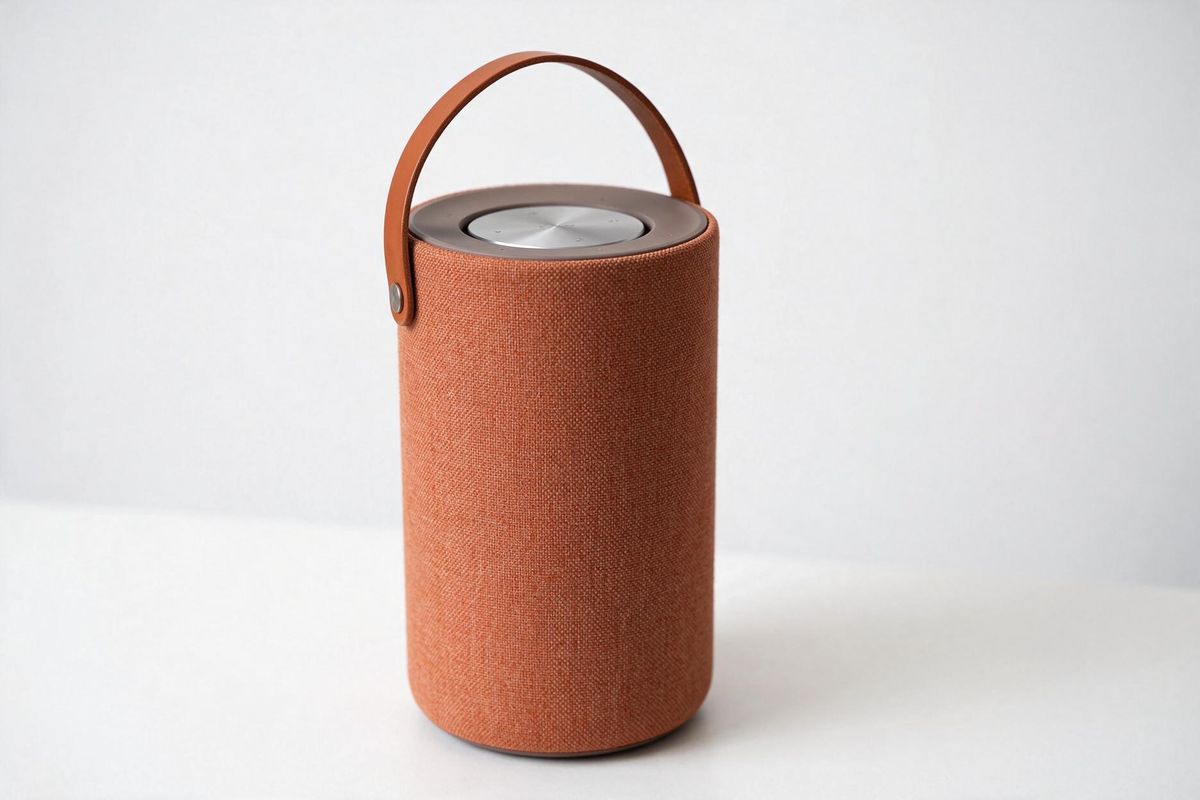
A cylindrical portable wireless speaker wrapped in terracotta woven fabric, with a tan leather carry strap and a round brushed aluminum control dial on top, standing upright in a three-quarter view, on a plain white backdrop. Soft even studio lighting, subtle contact shadow, photoreal e-commerce packshot, no logos, no text.
- Image 2: setting
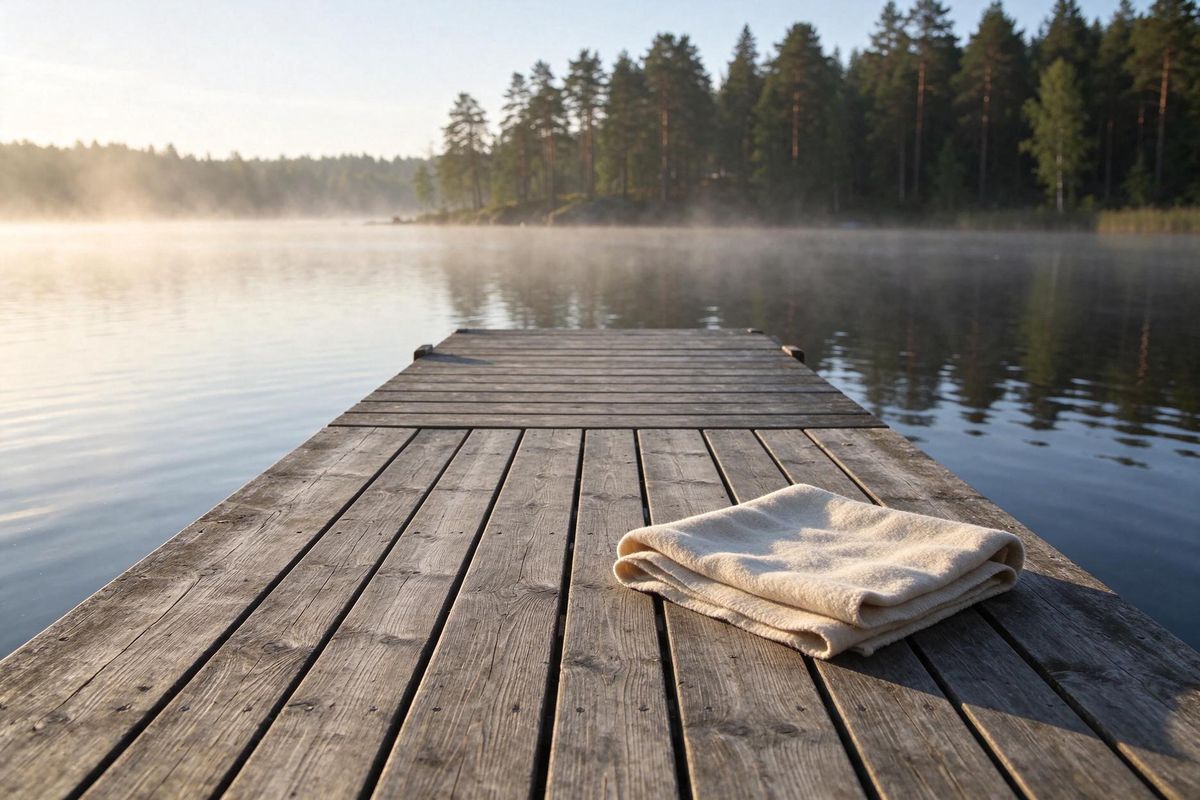
An empty wooden lake dock at early morning, weathered gray planks running away from the camera toward calm water, a folded cream wool blanket near the right edge of the planks, a pine forest shoreline across the lake with thin mist over the water. Low warm sun from the left, long soft shadows across the planks. Eye-level view from the start of the dock, photoreal outdoor lifestyle photography, no people, no text.


The prompt, clause by clause:
Four habits keep the roles from getting crossed:
- Name each image by number and by noun. "The speaker from image 1" says which entry to read and what to look for in it, so a reordered array does not silently swap the parts.
- Place the subject in the scene. The prompt stands the speaker on the planks beside the blanket, in the lower right third. The references cannot say how the pieces relate, so the prompt has to.
- List what survives as categories. The prompt keeps the fabric, the strap and the dial. The colors and the shape are already in image 1, and restating them in words gives the model a second description to reconcile with the picture.
- Hand the light to the setting. A packshot carries the light of the studio it was shot in. Naming the scene's light and a contact shadow is what seats the speaker on the dock instead of on top of the photo.
Dressing one model in a garment range
A catalog shoot repeats one model across a whole range. With references, the casting photo stays at image 1 in every request and only image 2 changes, one garment packshot per run. The three packshots below each went in as image 2:

A navy cotton twill chore jacket with a point collar, three patch pockets and dark brown buttons, shown front-on and buttoned on an invisible mannequin, on a plain white backdrop. Soft even studio lighting, subtle contact shadow, photoreal e-commerce packshot, no logos, no text.

A forest green quilted vest with diamond stitching, a corduroy stand collar and silver snap buttons, shown front-on and closed on an invisible mannequin, on a plain white backdrop. Soft even studio lighting, subtle contact shadow, photoreal e-commerce packshot, no logos, no text.

A single-breasted unstructured linen blazer in sand with two buttons, notch lapels and patch pockets, shown front-on and buttoned on an invisible mannequin, on a plain white backdrop. Soft even studio lighting, subtle contact shadow, photoreal e-commerce packshot, no logos, no text.
Image 1 is the same casting photo every time. Pick a garment to see its result:

A full-length studio casting photograph of a man in his late twenties with dark brown skin, short black hair and a short neat beard, standing relaxed and facing the camera with his arms at his sides, wearing a plain white crew-neck T-shirt, straight-leg stone-colored chinos and white canvas shoes. Plain warm gray seamless backdrop, soft even studio lighting, the whole figure inside the frame with space above his head and below his feet. Photoreal, no text.

Dress the man from image 1 in the jacket from image 2, worn open with his hands in his pockets, turned slightly to his left. He stands on a plain warm gray seamless studio backdrop. Keep his face, hair, beard and build from image 1, and keep his T-shirt, chinos and shoes from image 1 under the garment. Keep the cut, color, fabric, collar and fastenings of the garment from image 2. Soft even studio lighting from the front left, a soft shadow at his feet. Full-length shot at waist height, 50mm lens. Photoreal e-commerce lookbook photography.

Dress the man from image 1 in the vest from image 2, worn closed, mid-stride toward the camera with his arms relaxed. He stands on a plain warm gray seamless studio backdrop. Keep his face, hair, beard and build from image 1, and keep his T-shirt, chinos and shoes from image 1 under the garment. Keep the cut, color, fabric, collar and fastenings of the garment from image 2. Soft even studio lighting from the front left, a soft shadow at his feet. Full-length shot at waist height, 50mm lens. Photoreal e-commerce lookbook photography.

Dress the man from image 1 in the blazer from image 2, worn buttoned, facing the camera with his left hand adjusting his right cuff. He stands on a plain warm gray seamless studio backdrop. Keep his face, hair, beard and build from image 1, and keep his T-shirt, chinos and shoes from image 1 under the garment. Keep the cut, color, fabric, collar and fastenings of the garment from image 2. Soft even studio lighting from the front left, a soft shadow at his feet. Full-length shot at waist height, 50mm lens. Photoreal e-commerce lookbook photography.
The three prompts share everything after the first sentence, word for word: the backdrop, the keep-list for the man, the keep-list for the garment and the lighting. Only the garment noun and the pose change. Copying the shared part rather than rewriting it leaves the garment and the pose as the only changes you asked for, which is what a range has to show.
Cast the model in a plain base outfit. The white T-shirt and stone chinos in image 1 sit under a chore jacket, a vest and a blazer alike, so one casting photo serves the whole range.
Ten references in one frame
The array holds up to ten references, and a product range fills it. The banner below arranges ten products from ten separate packshots:

A pair of tortoiseshell acetate sunglasses with dark green lenses, folded, seen flat from directly above, on a plain white backdrop. Soft even studio lighting, subtle contact shadow, photoreal e-commerce packshot, no logos, no text.

A natural woven straw bucket hat with a black grosgrain band, seen flat from directly above, on a plain white backdrop. Soft even studio lighting, subtle contact shadow, photoreal e-commerce packshot, no logos, no text.

A rolled cotton beach towel with wide terracotta and cream stripes, seen flat from directly above, on a plain white backdrop. Soft even studio lighting, subtle contact shadow, photoreal e-commerce packshot, no logos, no text.

A pair of tan leather slide sandals with a single wide strap, side by side, seen flat from directly above, on a plain white backdrop. Soft even studio lighting, subtle contact shadow, photoreal e-commerce packshot, no logos, no text.

A sage green canvas tote bag with natural cotton handles, laid flat, seen flat from directly above, on a plain white backdrop. Soft even studio lighting, subtle contact shadow, photoreal e-commerce packshot, no logos, no text.

A cobalt blue stainless steel water bottle with a brushed steel cap, lying on its side, seen flat from directly above, on a plain white backdrop. Soft even studio lighting, subtle contact shadow, photoreal e-commerce packshot, no logos, no text.

A cognac leather passport holder with contrast stitching, closed, seen flat from directly above, on a plain white backdrop. Soft even studio lighting, subtle contact shadow, photoreal e-commerce packshot, no logos, no text.

A glossy white charging case for wireless earbuds, closed, seen flat from directly above, on a plain white backdrop. Soft even studio lighting, subtle contact shadow, photoreal e-commerce packshot, no logos, no text.

A compact silver digital camera of no particular brand, with a plain unmarked body, a black lens barrel with no lettering and a gray wrist strap, seen flat from directly above, on a plain white backdrop. Soft even studio lighting, subtle contact shadow, photoreal e-commerce packshot, no logos, no text.

A coral one-piece swimsuit with thin straps, folded neatly, seen flat from directly above, on a plain white backdrop. Soft even studio lighting, subtle contact shadow, photoreal e-commerce packshot, no logos, no text.

A summer travel website banner, a flat-lay shot from directly above on a warm sand-colored linen backdrop. Arrange the ten products from the reference images in two rows of five, in the order of the images: images 1 to 5 across the top row from left to right, and images 6 to 10 across the bottom row from left to right. Show each product exactly once, at a natural size relative to the others, and keep the colors, materials and details of each product from its image. Even spacing, soft midday light from the upper left with short soft shadows. Photoreal e-commerce flat-lay photography, no text.
With ten products, a sentence per product makes the layout the longest part of the prompt. Tying the layout to the array order does it in one sentence: images 1 to 5 across the top row, images 6 to 10 across the bottom. To move a product, move its packshot in the array and leave the prompt alone.
A packshot carries no scale of its own. Each product fills its own square, so the earbuds case and the beach towel arrive at the same size. "At a natural size relative to the others" lets the model size them against each other, and "exactly once" keeps a product from being repeated or dropped to even out the rows.
Output size
With references in the request, the size comes from one of three places:
| Request sends | Output |
|---|---|
| No size | The 2K tier, in the aspect ratio of the reference |
resolution (1K, 1.5K or 2K) | That tier, in the aspect ratio of the reference |
width and height | Exactly those pixels, whatever the shape of the references |
The dock request sends no size:
import { createClient } from '@runware/sdk'

const client = await createClient({ apiKey: process.env.RUNWARE_API_KEY })
await client.connect()

const [result] = await client.run({
  model: 'bytedance:seedream@5.5',
  positivePrompt: 'Use image 2 as the setting. Place the speaker from image 1 standing on the planks beside the folded blanket, in the lower right third of the frame, turned three-quarters toward the camera. Keep the speaker exact, including its woven fabric, its leather strap and the dial on top. Relight it with the low morning sun of image 2 coming from the left, with a soft contact shadow on the planks. Photoreal outdoor lifestyle product photography, shallow depth of field.',
  inputs: {
    referenceImages: [
      'https://assets.runware.ai/guides/bytedance-seedream-5-5/multi-reference-composition/source-speaker.jpg',
      'https://assets.runware.ai/guides/bytedance-seedream-5-5/multi-reference-composition/source-dock.jpg'
    ]
  }
})
import asyncio
import os
from runware import Runware
async def main():
async with Runware(api_key=os.environ["RUNWARE_API_KEY"]) as client:
results = await client.run({
"model": "bytedance:seedream@5.5",
"positivePrompt": "Use image 2 as the setting. Place the speaker from image 1 standing on the planks beside the folded blanket, in the lower right third of the frame, turned three-quarters toward the camera. Keep the speaker exact, including its woven fabric, its leather strap and the dial on top. Relight it with the low morning sun of image 2 coming from the left, with a soft contact shadow on the planks. Photoreal outdoor lifestyle product photography, shallow depth of field.",
"inputs": {
"referenceImages": [
"https://assets.runware.ai/guides/bytedance-seedream-5-5/multi-reference-composition/source-speaker.jpg",
"https://assets.runware.ai/guides/bytedance-seedream-5-5/multi-reference-composition/source-dock.jpg"
]
}
})
asyncio.run(main())curl https://api.runware.ai/v1 \
-H "Authorization: Bearer $RUNWARE_API_KEY" \
-H "Content-Type: application/json" \
-d '[
{
  "taskType": "imageInference",
  "taskUUID": "9a3f6d12-5e7c-4b81-a2d9-8f1c4e6b3a70",
  "model": "bytedance:seedream@5.5",
  "positivePrompt": "Use image 2 as the setting. Place the speaker from image 1 standing on the planks beside the folded blanket, in the lower right third of the frame, turned three-quarters toward the camera. Keep the speaker exact, including its woven fabric, its leather strap and the dial on top. Relight it with the low morning sun of image 2 coming from the left, with a soft contact shadow on the planks. Photoreal outdoor lifestyle product photography, shallow depth of field.",
  "inputs": {
    "referenceImages": [
      "https://assets.runware.ai/guides/bytedance-seedream-5-5/multi-reference-composition/source-speaker.jpg",
      "https://assets.runware.ai/guides/bytedance-seedream-5-5/multi-reference-composition/source-dock.jpg"
    ]
  }
}
]'runware run bytedance:seedream@5.5 \
positivePrompt="Use image 2 as the setting. Place the speaker from image 1 standing on the planks beside the folded blanket, in the lower right third of the frame, turned three-quarters toward the camera. Keep the speaker exact, including its woven fabric, its leather strap and the dial on top. Relight it with the low morning sun of image 2 coming from the left, with a soft contact shadow on the planks. Photoreal outdoor lifestyle product photography, shallow depth of field." \
inputs.referenceImages.0=https://assets.runware.ai/guides/bytedance-seedream-5-5/multi-reference-composition/source-speaker.jpg \
inputs.referenceImages.1=https://assets.runware.ai/guides/bytedance-seedream-5-5/multi-reference-composition/source-dock.jpg{
"taskType": "imageInference",
"taskUUID": "9a3f6d12-5e7c-4b81-a2d9-8f1c4e6b3a70",
"model": "bytedance:seedream@5.5",
"positivePrompt": "Use image 2 as the setting. Place the speaker from image 1 standing on the planks beside the folded blanket, in the lower right third of the frame, turned three-quarters toward the camera. Keep the speaker exact, including its woven fabric, its leather strap and the dial on top. Relight it with the low morning sun of image 2 coming from the left, with a soft contact shadow on the planks. Photoreal outdoor lifestyle product photography, shallow depth of field.",
"inputs": {
"referenceImages": [
"https://assets.runware.ai/guides/bytedance-seedream-5-5/multi-reference-composition/source-speaker.jpg",
"https://assets.runware.ai/guides/bytedance-seedream-5-5/multi-reference-composition/source-dock.jpg"
]
}
}Response
[
  {
    "taskType": "imageInference",
    "taskUUID": "9a3f6d12-5e7c-4b81-a2d9-8f1c4e6b3a70",
    "imageUUID": "5d8e2b47-1c9a-4f63-8e05-b3a7c9d2e1f6",
    "imageURL": "https://im.runware.ai/image/os/a14d18/ws/2/ii/5d8e2b47-1c9a-4f63-8e05-b3a7c9d2e1f6.jpg"
  }
]
Both of its references are 3:2, and the output came back at 2512 × 1680, the 2K budget in that shape.
References in different shapes leave the ratio open, so send a size with them. The lookbook shots mix a portrait casting photo with square packshots and ask for 1664 × 2496. The banner asks for 3136 × 1344, a 21:9 frame that none of its square references has. Explicit dimensions stay between 1:16 and 16:1 and between 921,600 and 4,624,220 pixels in total, and resolution cannot be sent together with them.
Every reference image is billed as an input on top of the output, so a ten-reference banner costs more than a two-reference composite at the same size.
Tips
-
Number the images in the prompt. "The coat from image 2" maps to the second entry of the array and names what to find there.
-
Give every reference a clause. Setting, placement, what survives and the light each get their own, so no image is left for the model to interpret.
-
List what survives as categories. Name parts such as the fabric or the clasp, and leave colors and shapes to the reference.
-
Let the setting own the light. One sentence anchored to the setting image relights every element, with a contact shadow where it meets a surface.
-
Hold the model at image 1 across a range. Swap only the garment reference and copy the rest of the prompt word for word.
-
Tie a large set to the array order. Rows by image number place ten products in one sentence.
-
Say products sit at natural size. Packshots carry no scale of their own.
-
Send a size when references differ in shape. Mixed shapes leave the aspect ratio open.