FLUX 3 Video

FLUX 3 Video is Black Forest Labs' multimodal foundation model for video generation with synchronized audio. It generates clips from 5 to 20 seconds across text-to-video, image-to-video, and video-to-video modes on one architecture, with keyframe control to pin an opening image or interpolate motion across pinned frames, chained continuations for arcs beyond 20 seconds, multi-shot sequences with hard cuts inside one generation, and native multilingual dialogue. A draft mode returns a fast low-resolution preview and a cache that a follow-up call enhances at full quality, tightening iteration loops. Style range spans candid camcorder footage, animation, motion design, and cinematic photoreal, character consistency holds across scenes within one generation, and in-video typography renders cleanly for titles and animated designs.
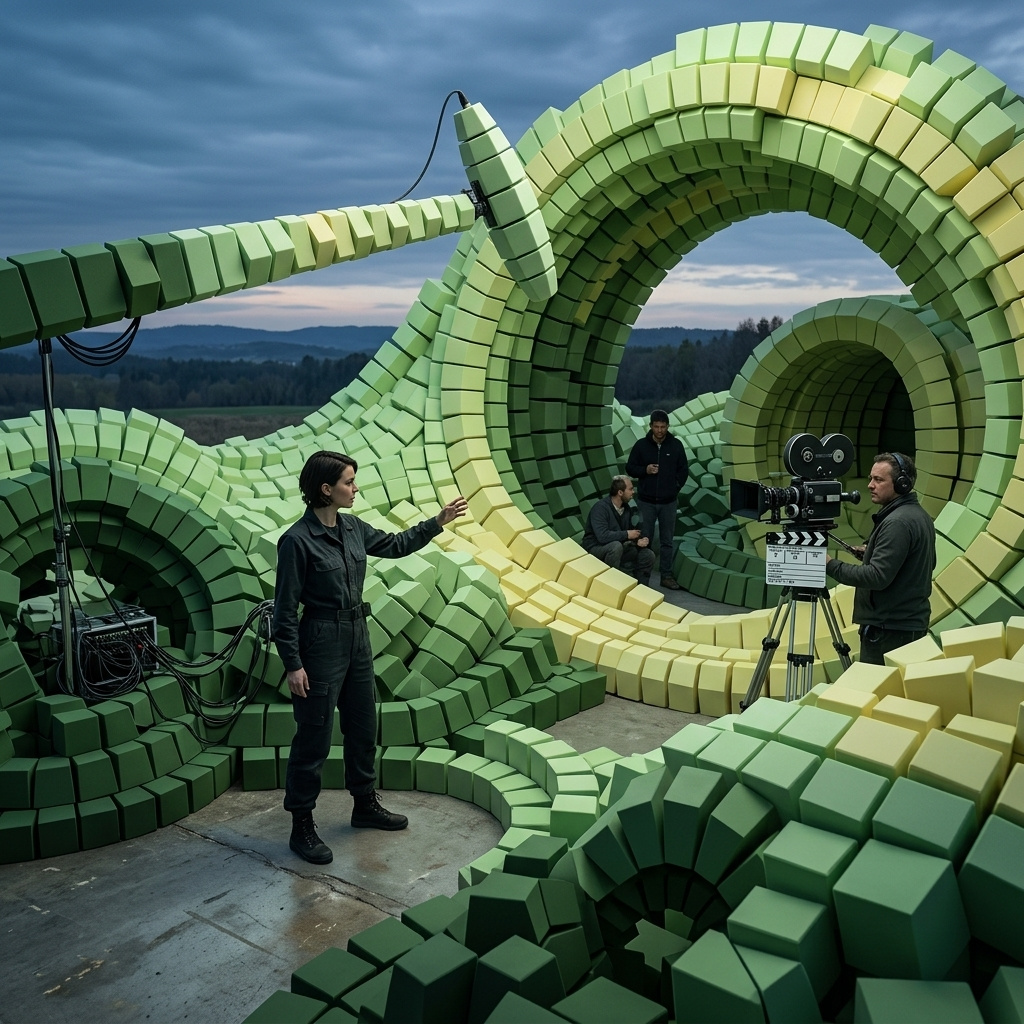
Keyframes with FLUX 3
How to pin images to specific frame positions in FLUX 3 videos: opening on a source image, storyboarding across positions, ending on a packshot, morphing between two states, and using timestamps for beat-precise timing.
Introduction
frameImages is FLUX 3's keyframing input. You pass up to 10 images and pin each one to a specific position in the generated clip, either as a frame index or a timestamp in seconds. FLUX 3 uses each pinned image as a strong anchor for how that position should look and generates the transitions between them.
The clip below is the simplest one-keyframe case: one source image pinned as the opening frame, then FLUX 3 continues the scene from there.
Use this image as the first frame. An 8-second clip: the camera holds locked on the knife for a beat, then a chef's hand enters from the top of the frame, picks up the knife by its walnut handle, and makes a single clean slice through a green lime that rolls onto the marble from the left just before the cut. The knife catches a warm beam of afternoon light as it comes down. Audio: the soft thunk of the knife entering the lime, the tick of the wooden board underneath, quiet kitchen ambience. No music, no on-screen text.
- First frame
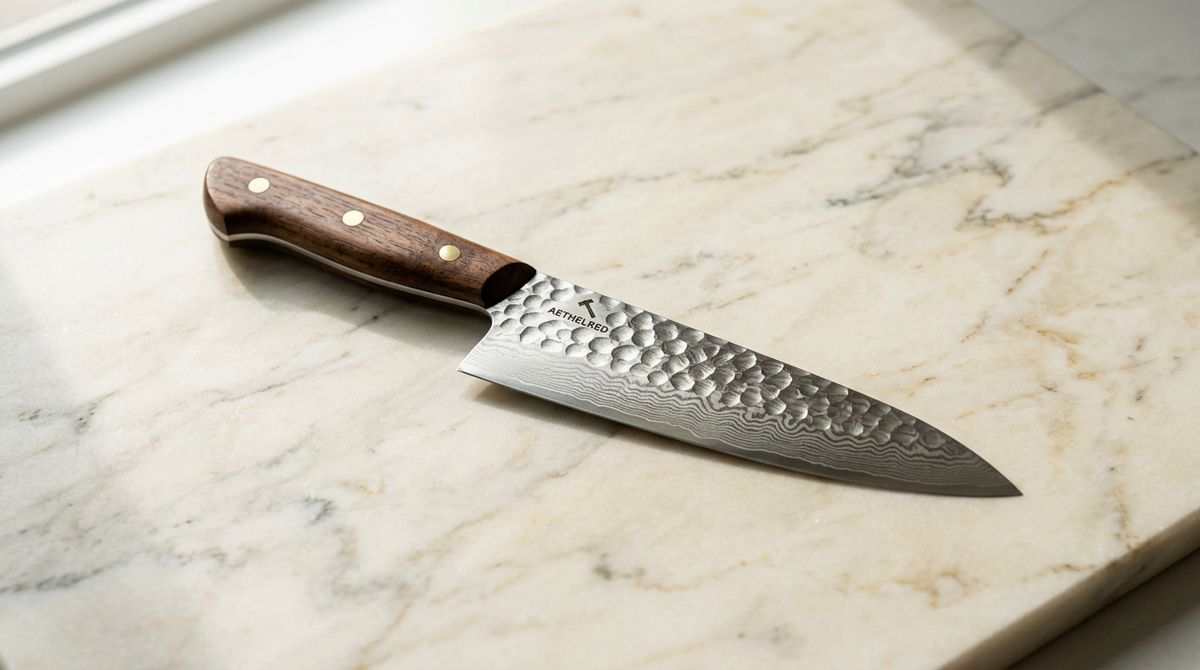
A single premium chef's knife with a full-tang walnut handle and a hammered damascus steel blade, laid at a slight diagonal on a warm cream marble slab in soft directional light from the upper left. Photoreal editorial product packshot, no text, no other objects.

The source image was passed to FLUX 3 as the single frame-image at position "first". The video opens on that frame and continues into motion from there. This guide covers the five keyframing patterns you'll reach for most: pinning a single opening frame, multi-image storyboards, pinning the closing frame, two-frame morphs for transformations, and beat-precise timing with timestamp.
frameImages is strong guidance, not a pixel-perfect pin. Pinned frames land close to the source images and drive the composition, but the model has some interpretive latitude: small drift on composition and framing, occasional props from earlier beats hanging around, and motion between distant keyframes that can jump or accelerate like a timelapse. Most first takes are good. Some warrant a re-roll. Don't expect bit-identical results across runs, and design prompts to be forgiving of small variations at each pinned position.
Single image as first frame
frameImages with one entry pinned to "first" (or frame index 0) uses your source image as a strong anchor for the opening frame. FLUX 3 then generates the rest of the clip forward from that frame, carrying the source's composition, lighting, and subject through to what follows.
import { createClient } from '@runware/sdk'

const client = await createClient({ apiKey: process.env.RUNWARE_API_KEY })
await client.connect()

const [result] = await client.run({
  model: 'bfl:flux@3-video',
  positivePrompt: 'Use this image as the first frame. An 8-second clip: the camera holds locked on the knife for a beat, then a chef\'s hand enters from the top of the frame, picks up the knife by its walnut handle, and makes a single clean slice through a green lime that rolls onto the marble from the left just before the cut. Audio: the soft thunk of the knife entering the lime, the tick of the wooden board underneath, quiet kitchen ambience. No music, no on-screen text.',
  inputs: {
    frameImages: [
      {
        image: 'https://im.runware.ai/image/os/a14d18/ws/2/ii/aabb1122-3344-5566-7788-99aabbccddee.jpg',
        frame: 'first'
      }
    ]
  },
  resolution: '720p',
  duration: 8
})
import asyncio
import os
from runware import Runware
async def main():
async with Runware(api_key=os.environ["RUNWARE_API_KEY"]) as client:
results = await client.run({
"model": "bfl:flux@3-video",
"positivePrompt": "Use this image as the first frame. An 8-second clip: the camera holds locked on the knife for a beat, then a chef's hand enters from the top of the frame, picks up the knife by its walnut handle, and makes a single clean slice through a green lime that rolls onto the marble from the left just before the cut. Audio: the soft thunk of the knife entering the lime, the tick of the wooden board underneath, quiet kitchen ambience. No music, no on-screen text.",
"inputs": {
"frameImages": [
{
"image": "https://im.runware.ai/image/os/a14d18/ws/2/ii/aabb1122-3344-5566-7788-99aabbccddee.jpg",
"frame": "first"
}
]
},
"resolution": "720p",
"duration": 8
})
asyncio.run(main())curl https://api.runware.ai/v1 \
-H "Authorization: Bearer $RUNWARE_API_KEY" \
-H "Content-Type: application/json" \
-d '[
{
  "taskType": "videoInference",
  "taskUUID": "e5f6a7b8-c9d0-1234-5678-9abcdef01234",
  "model": "bfl:flux@3-video",
  "positivePrompt": "Use this image as the first frame. An 8-second clip: the camera holds locked on the knife for a beat, then a chef's hand enters from the top of the frame, picks up the knife by its walnut handle, and makes a single clean slice through a green lime that rolls onto the marble from the left just before the cut. Audio: the soft thunk of the knife entering the lime, the tick of the wooden board underneath, quiet kitchen ambience. No music, no on-screen text.",
  "inputs": {
    "frameImages": [
      {
        "image": "https://im.runware.ai/image/os/a14d18/ws/2/ii/aabb1122-3344-5566-7788-99aabbccddee.jpg",
        "frame": "first"
      }
    ]
  },
  "resolution": "720p",
  "duration": 8
}
]'runware run bfl:flux@3-video \
positivePrompt="Use this image as the first frame. An 8-second clip: the camera holds locked on the knife for a beat, then a chef's hand enters from the top of the frame, picks up the knife by its walnut handle, and makes a single clean slice through a green lime that rolls onto the marble from the left just before the cut. Audio: the soft thunk of the knife entering the lime, the tick of the wooden board underneath, quiet kitchen ambience. No music, no on-screen text." \
inputs.frameImages.0.image=https://im.runware.ai/image/os/a14d18/ws/2/ii/aabb1122-3344-5566-7788-99aabbccddee.jpg \
inputs.frameImages.0.frame=first \
resolution=720p \
duration=8{
"taskType": "videoInference",
"taskUUID": "e5f6a7b8-c9d0-1234-5678-9abcdef01234",
"model": "bfl:flux@3-video",
"positivePrompt": "Use this image as the first frame. An 8-second clip: the camera holds locked on the knife for a beat, then a chef's hand enters from the top of the frame, picks up the knife by its walnut handle, and makes a single clean slice through a green lime that rolls onto the marble from the left just before the cut. Audio: the soft thunk of the knife entering the lime, the tick of the wooden board underneath, quiet kitchen ambience. No music, no on-screen text.",
"inputs": {
"frameImages": [
{
"image": "https://im.runware.ai/image/os/a14d18/ws/2/ii/aabb1122-3344-5566-7788-99aabbccddee.jpg",
"frame": "first"
}
]
},
"resolution": "720p",
"duration": 8
}Response
[
  {
    "taskType": "videoInference",
    "taskUUID": "e5f6a7b8-c9d0-1234-5678-9abcdef01234",
    "videoUUID": "1234abcd-5678-90ef-abcd-ef1234567890",
    "videoURL": "https://vm.runware.ai/video/os/a14d18/ws/2/vi/1234abcd-5678-90ef-abcd-ef1234567890.mp4"
  }
]
The prompt opens with "Use this image as the first frame" to signal to the model that the frame-image is a starting point rather than a reference to stylize away from. FLUX 3 renders the opening frame closely matching the source and continues from there.
Reach for this pattern when the source image is the deliverable and the video should animate around it. Product packshots that need to become "living" versions of themselves are the canonical case.
Multi-image storyboard
frameImages also accepts multiple images, each pinned to its own position. FLUX 3 renders each image on screen at its target position and generates the transitions between them. This is the storyboard shape: you give the model the beats and it fills in the motion.
A 10-second overhead cooking time-lapse on a warm walnut table. The camera stays locked overhead. Ingredients compose onto the plate in fast-motion between the pinned states: herb oil pooling into the centre by the midpoint, then asparagus and pecorino settling on top by the end. Warm kitchen ambience with a faint hum of activity, no music, no on-screen text.
- Frame 0: empty plate
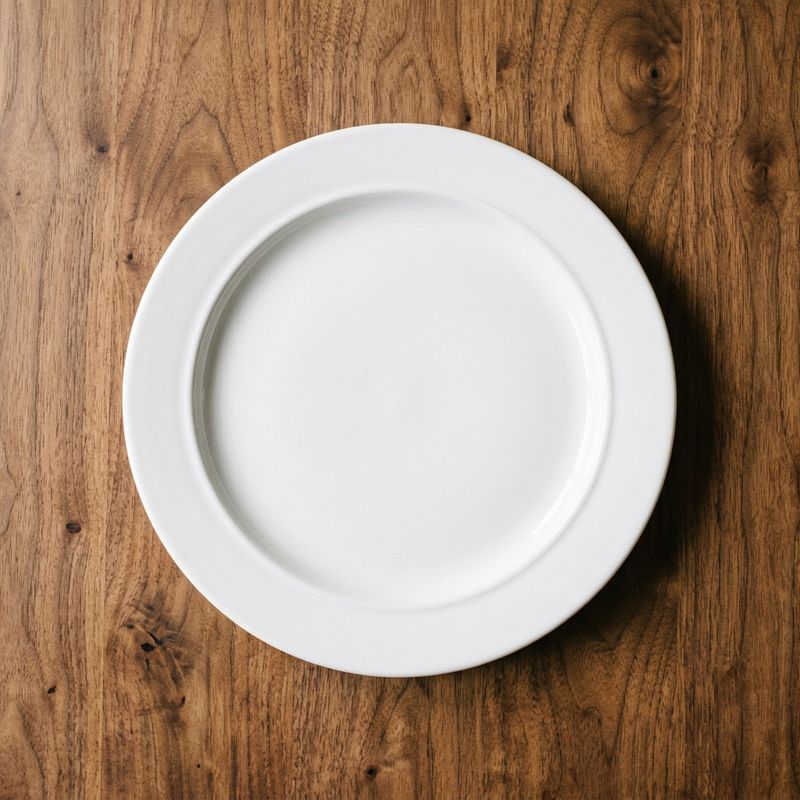
An overhead top-down shot of an empty pristine white ceramic plate centred on a warm walnut wooden table, soft warm afternoon kitchen light, editorial food photography aesthetic, no other objects, no text.
- Frame 120: oil swirl
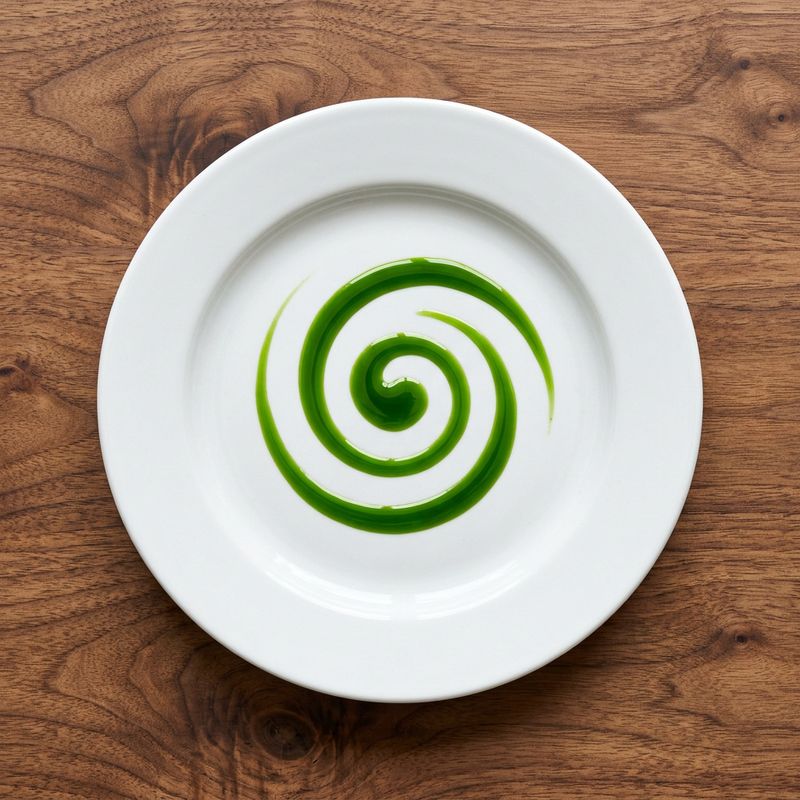
The same plate from the reference image, unchanged in every detail. Overhead top-down shot. A bright swirl of emerald green herb oil is now pooled in the centre of the plate. Same walnut wood, same warm afternoon light, editorial food photography aesthetic, no other objects, no text.
- Frame 240: finished dish
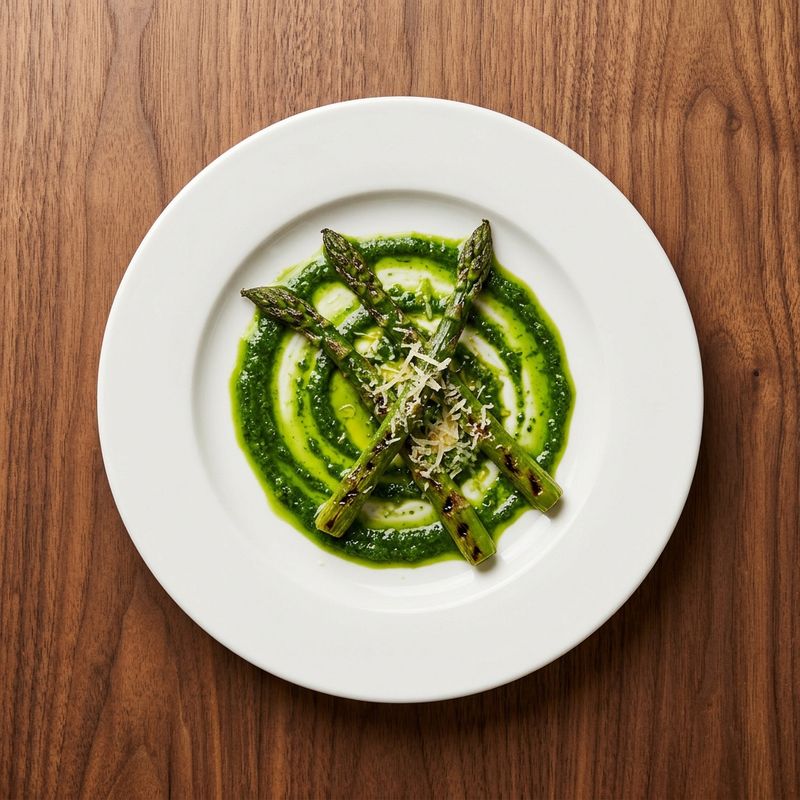
The same plate from the reference image, unchanged in every detail. Overhead top-down shot. The emerald green herb oil swirl is now topped with a small artful pile of grilled asparagus spears and shavings of pecorino cheese. Same walnut wood, same warm afternoon light, editorial food photography aesthetic, no other objects, no text.


The three images above sit at frame: 0, frame: 120, and frame: 240 on a 10-second clip. FLUX 3 aims for each pinned position with the source image and fills the transition between them, rendering the shot as a time-lapse where each ingredient materialises into place rather than as a shot of a hand placing them. All positions in a single call must be unique.
Multi-image storyboarding is currently experimental. FLUX 3 fills the transitions cleanly on simpler storyboards (a product being unwrapped, a plate being composed) but struggles on scenes with large subject motion or high visual complexity between frames. Two-image morphs (one image pinned to "first", one to "last") share the same experimental status.
Last-frame pinning
frameImages at position "last" (or numeric frame -1) does the opposite of first-frame pinning: FLUX 3 generates motion into an image rather than out of one. Use this when the target of the shot is a specific frame: a packshot reveal, a brand logo landing, a hero product coming to rest at a chosen final composition.
An 8-second unboxing shot on a warm walnut wooden counter under soft morning light. The clip opens on a plain kraft cardboard box being slid across the counter into frame from the left by a pair of hands. The hands lift the flaps, reach inside, unwrap a piece of soft tissue paper, and lift out a sealed kraft-paper coffee bag with a NORTHWIND ROASTERS label. The hands set the bag down centred in the frame, fold the tissue neatly to one side, and withdraw. The camera stays locked in a wide 16:9 overhead-ish angle throughout. Land on the pinned packshot as the final frame: the bag centred alone on the counter, no hands in view. Audio: the soft slide of cardboard on wood, the crinkle of tissue paper, the light thunk of the bag placed down, quiet morning ambience. No music, no on-screen text.
- Last frame
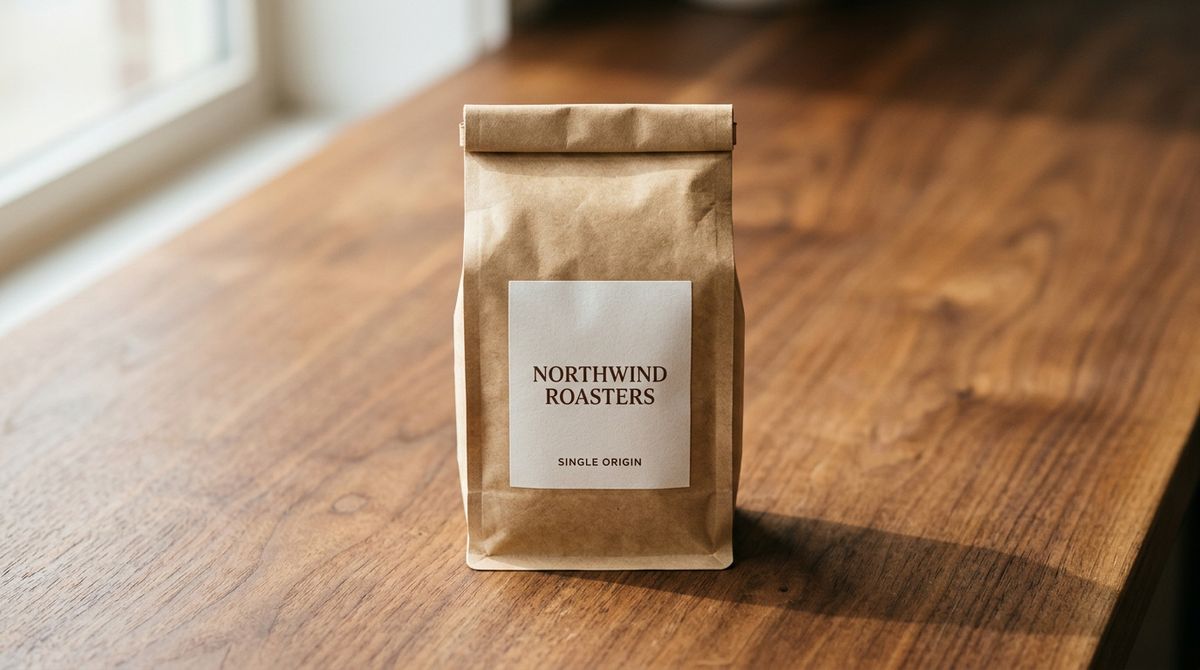
A single hero packshot of a kraft-paper coffee bag centred on a warm walnut wooden counter. The bag is sealed with a folded top, and a clean minimal typographic label reads NORTHWIND ROASTERS in small serif capitals with SINGLE ORIGIN underneath in smaller sans. Soft directional warm morning light from the upper left casts a subtle shadow to the right. Photoreal editorial product packshot, wide 16:9 framing with the bag centred, no other objects, no additional text.

The prompt describes what leads to the final frame. FLUX 3 walks motion toward the pinned image and lands on it. Because the last frame is anchored, the composition, lighting, and subject state at the end are strongly guided by the source, and the model works the intermediate motion toward landing there.
This pattern is what turns a keyframe into a near-deliverable: a product spot that has to end on the branded pack, a title card that has to resolve into the logo, a demo that has to close on the UI screenshot. Pinning the last frame narrows the "how does the clip end?" variance significantly. Expect a re-roll or two on takes where the ending doesn't quite land the source frame.
Pair "first" and "last" for full narrative control end-to-end, covered in Two-frame morph below.
Two-frame morph
frameImages with exactly two entries (one pinned to "first" and one to "last") is the transformation pattern. FLUX 3 generates the motion that turns the first image into the second. Before/after, product-in-motion, character transformations, room makeovers all fit this shape.
An 8-second locked-off overhead-ish morph between the two frame images: the cluttered desk at the start, the tidy desk at the end. Interpolate a plausible tidying motion between them — an unseen pair of hands stacking the papers, closing the notebook and squaring it, closing the laptop and centring it, lifting the mug out of frame, coiling the cables, placing the phone face down. Camera stays locked in the same wide 16:9 framing throughout. Warm morning light unchanged. Audio: the light rustle of paper stacks, the soft clack of the laptop closing, the click of the notebook cover, the muffled slide of the phone, a quiet room tone underneath. No music, no on-screen text.
- First: messy desk
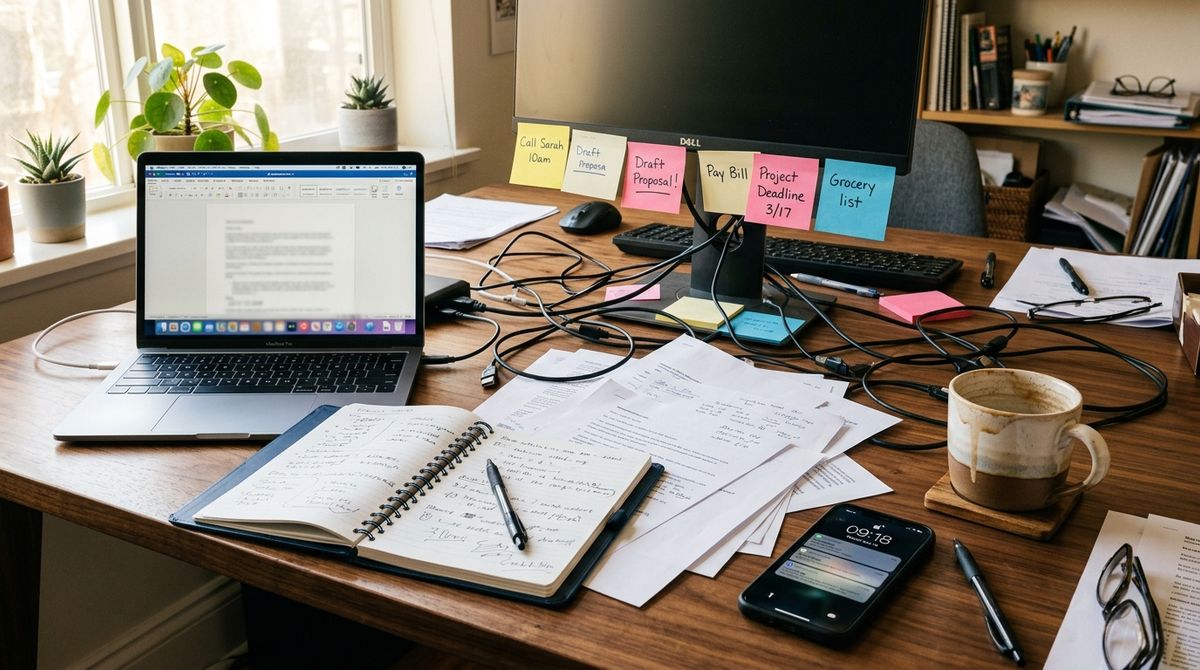
A locked-off wide 16:9 shot of a cluttered home office desk in warm morning light. Scattered loose papers, an open notebook, a laptop pushed to one side, a half-empty ceramic coffee mug, a tangle of USB and charging cables, a phone lying face up, sticky notes on the edge of the monitor stand. Warm walnut desk surface visible around the mess. Photoreal editorial, no on-screen text beyond incidental sticky notes, no people in frame.
- Last: tidy desk
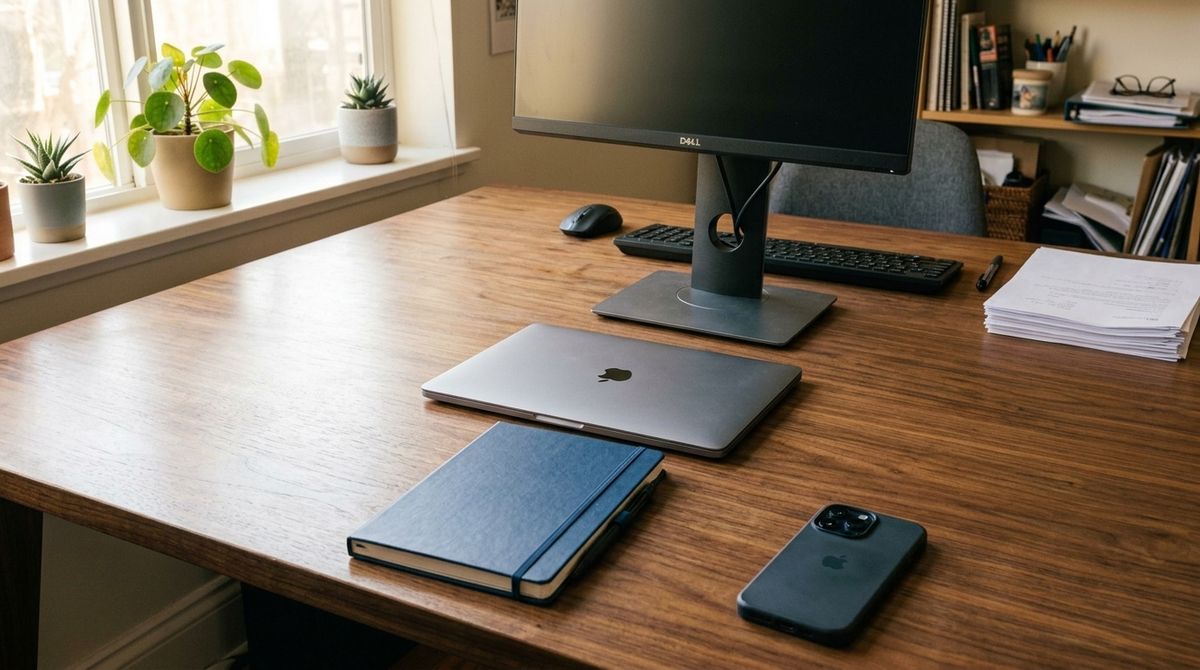
The exact same wide 16:9 shot of the same home office desk from the same locked-off angle in the same warm morning light, unchanged in every detail of the desk surface and framing. Now the desk is tidy: papers stacked and cleared to one side, the notebook closed and squared to the desk, the laptop centred and closed, the coffee mug removed, cables coiled neatly and tucked out of sight, the phone placed face down beside the notebook. The walnut desk surface is clean and visible. Photoreal editorial, no on-screen text, no people in frame.


The two-frame morph works cleanly when the images share composition: same camera position, same lighting, same objects with only some properties different. The desks above are the same desk from the same angle in the same light. Only the desk's state changes. That gives FLUX 3 an unambiguous transformation to interpolate.
Duration matters more here than in single-keyframe cases. Because the whole shot is defined by two anchors, duration decides the pace of the change. A short duration compresses the transformation into a punchy transition. A longer one gives the model room to interpolate plausible in-between states one by one. Pin duration to a specific number so the pacing is predictable rather than letting auto pick it.
Two-frame morphs share the experimental status of multi-image storyboards. Radical differences between the two frames (a subject who moves across the room, a scene that changes location entirely, a wildly different composition) don't interpolate cleanly. Reach for continuation (inputs.video) when the two states can't share a single frame.
Frame vs timestamp
Each frameImages entry accepts either a frame index or a timestamp in seconds. Both target the same underlying position, so pick whichever reads more naturally.
frameaccepts a named position ("first"or"last") or a zero-based integer index (-1addresses the last frame). Numeric indices count in real video frames at 24 fps, soduration × 24gives you the total frame count.timestampaccepts a number of seconds with hundredths-of-a-second precision (up to 20).timestamp: 2.5targets the same spot asframe: 60.
For the plating storyboard above, either form works and lands at the same beats:
{
  "frameImages": [
    { "image": "https://...", "frame": 0 },
    { "image": "https://...", "frame": 120 },
    { "image": "https://...", "frame": 240 }
  ]
}
or
{
  "frameImages": [
    { "image": "https://...", "timestamp": 0 },
    { "image": "https://...", "timestamp": 5 },
    { "image": "https://...", "timestamp": 10 }
  ]
}
Reach for timestamp when the beat you're targeting is stated in seconds (a two-second hold, a five-second push-in). It stays legible when the duration changes.
Reach for frame when you're thinking in exact frames or need "first" / "last" as named positions.
The two are mutually exclusive on a single entry: an image gets a frame or a timestamp, not both. Sending both on the same image returns a validation error.
Omit both to let FLUX 3 distribute the images automatically across the clip.
Timing beats with timestamps
timestamp unlocks patterns that are painful to reason about in frame indices. Anywhere a beat is stated in seconds ("the peak of the jump at three-and-a-half", "the door slams open at two"), timestamps map straight from the brief to the field without the duration × 24 math.
The example below pins one image at a fractional-second position: an athlete frozen at the peak of a jump, pinned at timestamp: 3.5 on a 7-second clip. The model runs the approach up to that peak, holds the pinned frame as the apex, then falls into the landing over the remaining time.
A 7-second locked-off tightly-framed wide 16:9 shot of the athlete on the same gym floor. She runs into frame from the left over the first two seconds, plants her feet, and jumps straight up. At the peak of the jump she holds the exact pose from the pinned frame image: arms above her head, feet drawn up under her, body compact and centred. She then falls into a clean landing over the next two seconds, absorbing the impact into a crouch and rising back to standing. Warm morning light through tall studio windows, softly blurred grey gym floor. Audio: the fast rhythmic slap of running shoes, a sharp exhale on the takeoff, the brief silence of the peak, the hard thump of the landing, a controlled exhale as she rises. No music, no on-screen text.
- Pinned at 3.5s
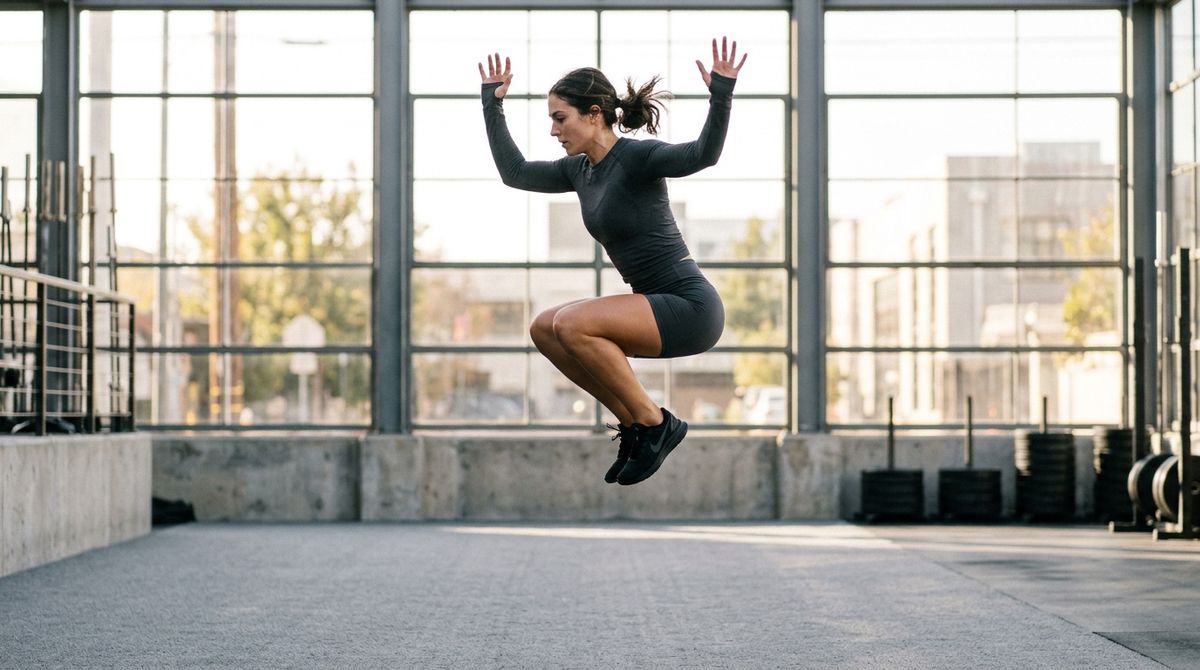
A tightly-framed wide 16:9 shot of an athlete in her twenties in dark athletic gear, frozen at the peak of a two-foot vertical jump on a wide outdoor gym floor. Her arms are lifted just above her head, her feet drawn up under her, her body compact and centred in the frame. Warm morning light through tall studio windows behind her, softly blurred grey gym floor visible below. Photoreal editorial sports photography, no other subjects, no text.

The peak lands close to the timestamp you set. That precision matters when the animation has to sync to something else: a sound the model is generating (a hard cut on a beat, a downbeat in a music bed), a caption overlay in post, or another clip you're planning to cut against. Sub-second precision (0.01) lets you target a keyframe between visual and audio beats when you need the sync tight. Motion into and out of the pinned moment can sometimes accelerate or compress. If the runway timing is critical, expect to iterate.
The pattern generalises: pin the moment that matters, let the model handle the runway on either side. A product landing on the counter at timestamp: 4. A door opening at timestamp: 2. A hand reaching frame at timestamp: 1.75. Same technique, different pinned image.
Duration and keyframe positions
duration and frameImages positions interact. The rules aren't complicated but they trip developers up when a call fails or the output isn't what they expected.
Positions must fit inside the duration. A keyframe at frame: 240 needs a 10-second clip (10 × 24 fps = 240 frames). A keyframe at timestamp: 6 needs at least a 6-second clip. Positions that overshoot fail validation. If you're not sure what fits, use "first" and "last" (they resolve relative to whatever duration you set) or timestamp values well inside the runtime.
Three or more plain images require a numeric duration. When frameImages has three or more items and each item is just an image (no frame or timestamp), duration must be pinned to a whole number rather than auto. The API rejects duration: "auto" in that case. Calls with one or two items, or with any item that sets a position, accept either.
Pin duration when the pacing matters. For a two-frame morph or a multi-image storyboard, duration decides how much runtime the model has to interpolate between beats. A short duration compresses the change into a punchy transition. A longer one gives room for more plausible in-betweens. auto picks a duration for you, which is fine for exploration but leaves the pacing to the model.
Omit positions on some or all frames to distribute them automatically. Plain { "image": "..." } entries with neither frame nor timestamp get spaced evenly across the duration. Mix pinned and unpinned entries when only some beats have fixed positions (a hero product at frame: 0, a packshot at "last", and one or two interstitial images auto-placed between them).
Tips
-
Open with "use this image as the first frame" (or "as the last frame"). Explicit framing tells the model to treat the pinned image as a hard anchor rather than a reference to stylize away from.
-
Match frame-image aspect to output aspect. A 16:9 source at a 1:1 output aspect will get letterboxed or cropped. Generate the source at the same aspect as the intended video.
-
Prefer
timestampfor scripted beats. Beats stated in seconds ("hold for two seconds, then land the gesture at 6") map more cleanly totimestamp: 2andtimestamp: 6than to frame math. Switch toframewhen you actually think in frames or need"first"/"last"as named positions. -
Pin the last frame when the ending has to be exact. A packshot reveal, a logo landing, a UI screenshot: anywhere the closing frame is a hard deliverable is a
"last"pin. Removes the "how does it end" variance. -
Two-frame morphs work best when the frames share composition. Same camera position, same lighting, same objects with only some properties different (state, arrangement, colour). Radical composition changes need continuation, not a morph.
-
Duration sets the pace of a morph. With two anchors and everything between generated, a shorter duration makes a punchier transition. A longer one gives the model room for a plausible in-between. Adjust
durationto the tempo you want. -
Keep multi-image storyboards simple. Multi-image
frameImagesis experimental. Storyboards with small deltas between frames (a plate being composed, a product being unwrapped) land more reliably than ones with large subject motion between frames. -
All positions in one call must be unique. Two images at the same
frameor the sametimestampfail validation. Space beats out enough to give FLUX 3 room to interpolate between them. -
Frame images and video continuation are mutually exclusive.
frameImages(image-driven) andinputs.video(continuation-driven) can't be sent in the same request. Sending both returns a 422 error listing your options. -
Version keyframe assets like brand assets. Once a set of keyframes works, reuse the exact same set for subsequent calls. Swapping in a "same but slightly different" replacement shifts the whole generation. If you need consistency across a series, pin the reference set and hold it stable.