FLUX 3 Image

FLUX 3 Image is Black Forest Labs' image generation and editing model built on the multimodal FLUX 3 backbone shared with FLUX 3 Video. It combines text-to-image synthesis, precise local editing, multi-reference composition, bounding-box placement, and native 4K output. The model preserves identities and fine details across references, supports targeted changes and in-place text editing, and renders accurate typography in text-heavy layouts across a broad range of visual styles.
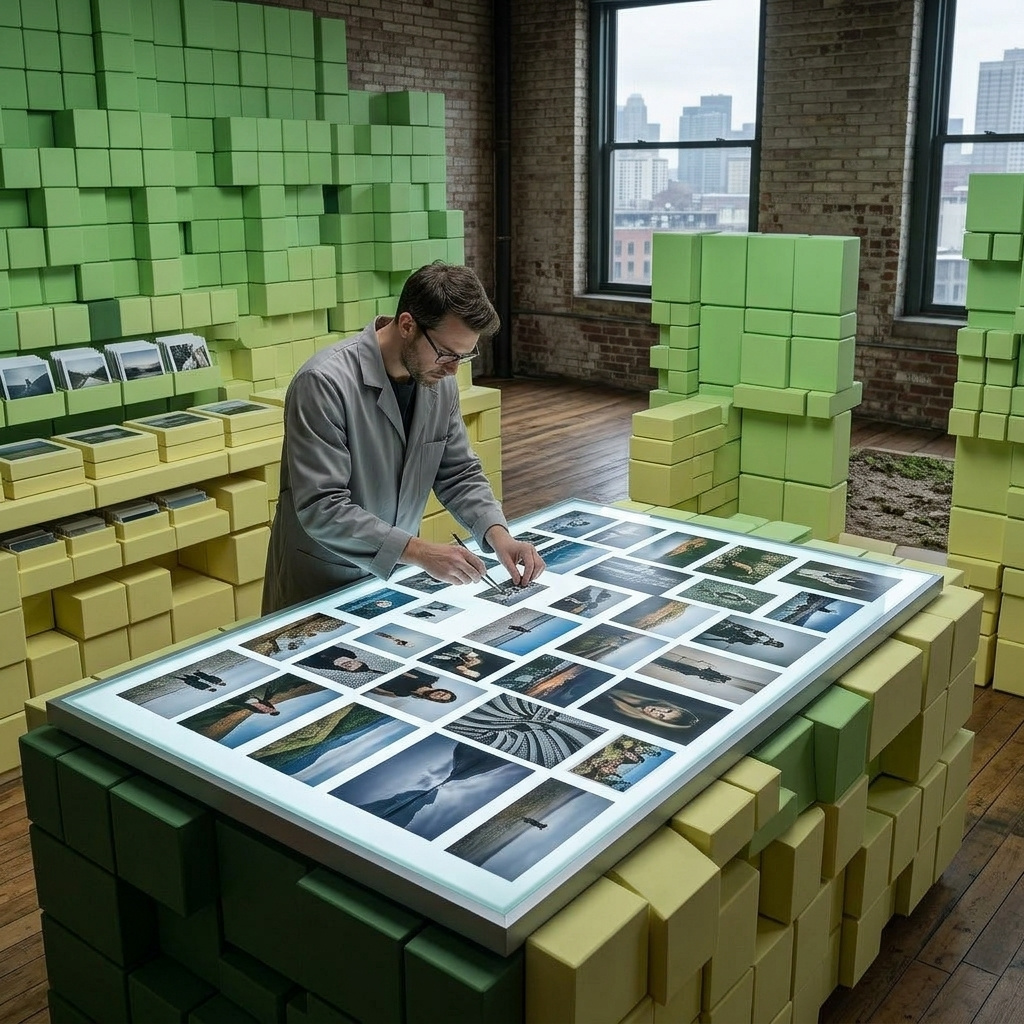
Multi-reference composition
How to combine up to ten reference images with FLUX 3 Image: assigning a role to each one, holding a face or a product across scenes, and borrowing a look.
Introduction
inputs.referenceImages takes up to ten images in one request, and the model reads them as raw material rather than as a stack of layers. Nothing about the array says which image is the subject, which is the backdrop and which is only there for its color treatment. The prompt assigns those roles, by index.
That is the whole technique. Once each image has a job in the sentence, a face, a garment and a location that were never photographed together come back as one frame.

Use image 3 as the location. Place the woman from image 1 standing in front of the pale teal shutters, turned three-quarters to camera with her hands in her pockets, looking straight to camera. Dress her in the burnt orange satin bomber jacket from image 2 over a plain white t-shirt and black jeans, keeping the jacket exact including its black ribbed cuffs, collar and hem and the chest zip pocket on the left. Keep her face exact including the mole on her left cheek. Match the flat overcast daylight of image 3 and give her a soft contact shadow on the concrete. Full-length shot at chest height, 35mm lens. Photoreal editorial fashion photography.
- The face
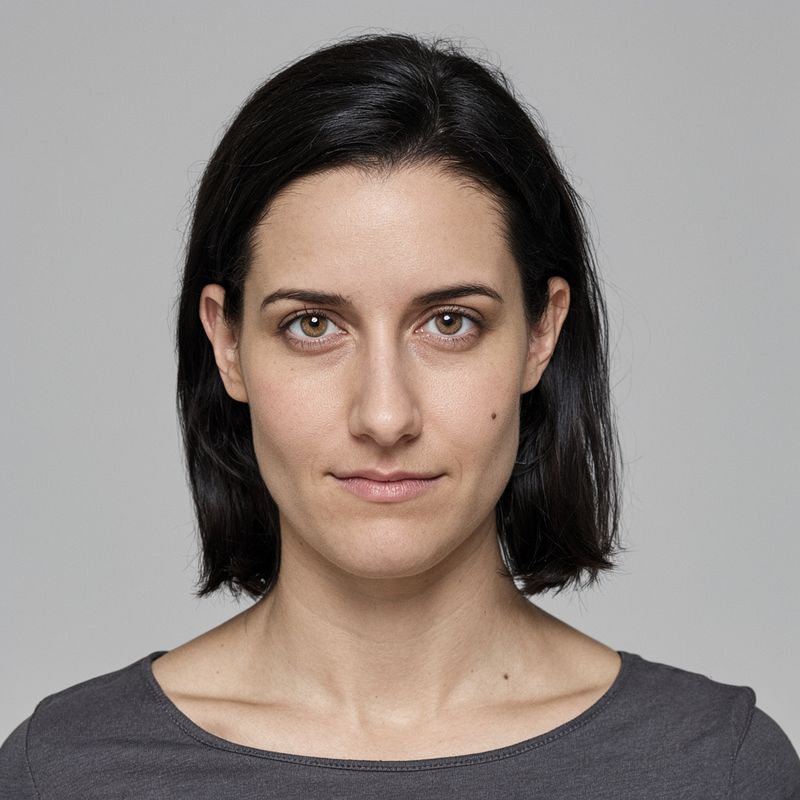
A studio headshot of a woman in her late twenties with dark shoulder-length hair tucked behind one ear, light brown eyes and a small mole on her left cheek, looking straight to camera with a neutral expression. Plain light gray seamless backdrop. Even soft frontal light. Head and shoulders, 85mm lens. Photoreal casting portrait, neutral palette.
- The jacket
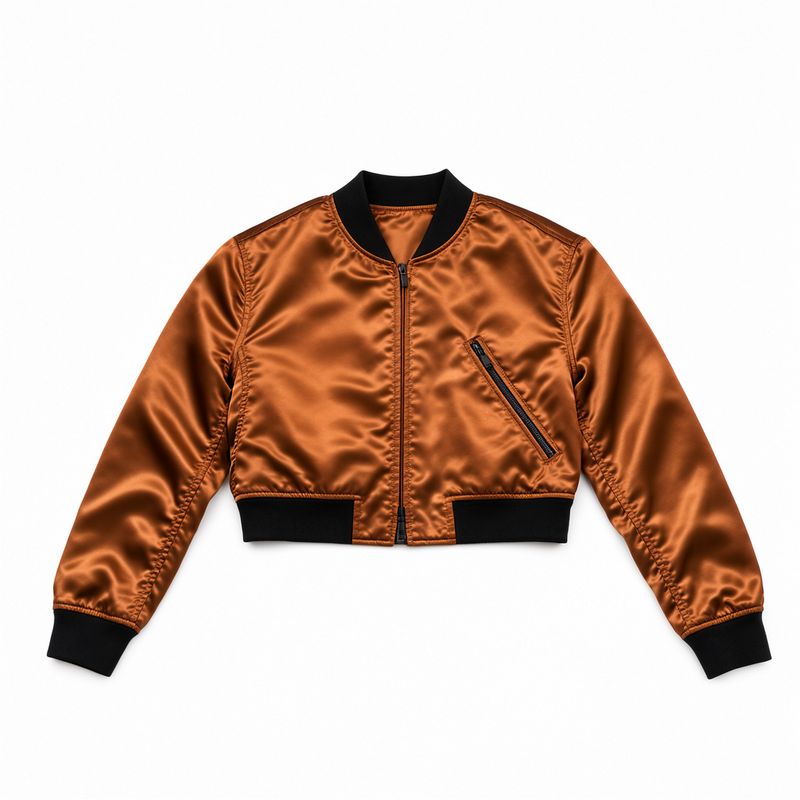
A packshot of a cropped bomber jacket in burnt orange satin with black ribbed cuffs, collar and hem, a single chest zip pocket on the left, laid flat and squared up on a seamless white background. Even shadowless studio light. Straight-on overhead shot, 50mm lens. Photoreal apparel e-commerce packshot, clean white palette.
- The location
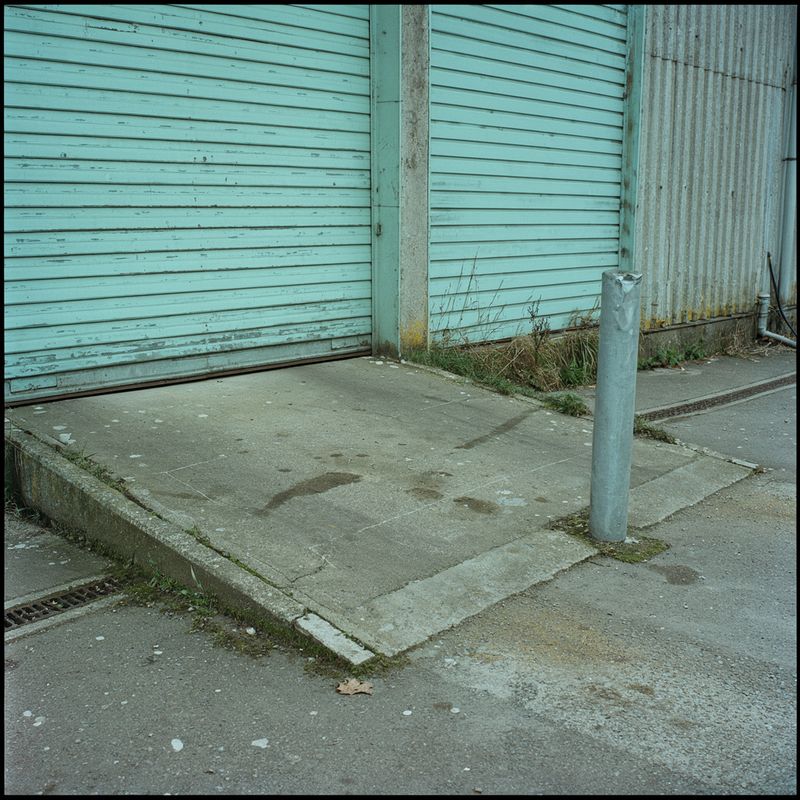
An empty loading bay behind a warehouse, corrugated steel shutters painted pale teal, a concrete ramp and a single steel bollard, weeds at the base of the wall. Flat overcast daylight, no hard shadows. Wide shot at standing height, 35mm lens, no people. Photoreal urban location photography, desaturated palette.


The headshot was lit flat in a studio and the location is overcast, so the prompt tells the model which of those two lighting conditions wins. That instruction is what stops the composite from reading as a cutout.
This guide covers how to write the role assignment, how to hold a face or a product steady across a set, how to use one reference purely for its look, and what the references are worth feeding in.
Assigning a role to each image
Reference images are numbered in the order you send them, and the prompt refers to them as image 1, image 2 and so on. The references are used either way: that is what sending them is for. What the roles decide is where the sofa lands and which lighting wins, and that is what makes the same request repeatable across a catalog.

A packshot of a three-seater sofa in mustard velvet with rounded arms, a single long bench cushion and tapered walnut legs, photographed straight on against a seamless white background. Even shadowless studio light, 50mm lens. Photoreal furniture e-commerce packshot, clean white palette.

An empty living room with white plaster walls, a herringbone oak floor, a tall sash window on the left with sheer curtains and a plain white ceiling rose. Soft daylight falling across the floor from the window. Wide shot at chest height, 24mm lens, no furniture and no people. Photoreal interior photography, bright neutral palette.

Use image 2 as the room. Place the sofa from image 1 against the wall opposite the window, squared up to the camera and sitting flat on the herringbone floor. Keep the sofa exact including its mustard velvet, its rounded arms, its single bench cushion and its tapered walnut legs. Match the soft daylight of image 2, falling on the sofa from the left, with a soft contact shadow under the legs. Wide shot at chest height, 24mm lens. Photoreal interior photography.
The prompt produces the same catalog shot on every run, because four separate instructions are doing four separate jobs:
- The setting: "use image 2 as the room"
- The subject and its placement: "place the sofa from image 1 against the wall opposite the window, sitting flat on the herringbone floor"
- What must survive the transfer: "keep the sofa exact including its mustard velvet, its rounded arms and its tapered walnut legs"
- Which lighting wins: "match the soft daylight of image 2, with a soft contact shadow under the legs"
That last pair is what separates a composite from a paste. A product carries the light of the studio it was shot in, and unless the prompt says to relight it, some of that studio comes along.
import { createClient } from '@runware/sdk'

const client = await createClient({ apiKey: process.env.RUNWARE_API_KEY })
await client.connect()

const [result] = await client.run({
  model: 'bfl:flux@3-image',
  positivePrompt: 'Use image 2 as the room. Place the sofa from image 1 against the wall opposite the window, squared up to the camera and sitting flat on the herringbone floor. Keep the sofa exact including its mustard velvet, its rounded arms, its single bench cushion and its tapered walnut legs. Match the soft daylight of image 2, falling on the sofa from the left, with a soft contact shadow under the legs. Wide shot at chest height, 24mm lens. Photoreal interior photography.',
  inputs: {
    referenceImages: [
      'https://im.runware.ai/image/os/a14d18/ws/2/ii/e5f6a7b8-c9d0-1234-ef12-345678901234.jpg',
      'https://im.runware.ai/image/os/a14d18/ws/2/ii/f6a7b8c9-d0e1-2345-f123-456789012345.jpg'
    ]
  },
  width: 1248,
  height: 832
})
import asyncio
import os
from runware import Runware
async def main():
async with Runware(api_key=os.environ["RUNWARE_API_KEY"]) as client:
results = await client.run({
"model": "bfl:flux@3-image",
"positivePrompt": "Use image 2 as the room. Place the sofa from image 1 against the wall opposite the window, squared up to the camera and sitting flat on the herringbone floor. Keep the sofa exact including its mustard velvet, its rounded arms, its single bench cushion and its tapered walnut legs. Match the soft daylight of image 2, falling on the sofa from the left, with a soft contact shadow under the legs. Wide shot at chest height, 24mm lens. Photoreal interior photography.",
"inputs": {
"referenceImages": [
"https://im.runware.ai/image/os/a14d18/ws/2/ii/e5f6a7b8-c9d0-1234-ef12-345678901234.jpg",
"https://im.runware.ai/image/os/a14d18/ws/2/ii/f6a7b8c9-d0e1-2345-f123-456789012345.jpg"
]
},
"width": 1248,
"height": 832
})
asyncio.run(main())curl https://api.runware.ai/v1 \
-H "Authorization: Bearer $RUNWARE_API_KEY" \
-H "Content-Type: application/json" \
-d '[
{
  "taskType": "imageInference",
  "taskUUID": "c3d4e5f6-a7b8-9012-cdef-123456789012",
  "model": "bfl:flux@3-image",
  "positivePrompt": "Use image 2 as the room. Place the sofa from image 1 against the wall opposite the window, squared up to the camera and sitting flat on the herringbone floor. Keep the sofa exact including its mustard velvet, its rounded arms, its single bench cushion and its tapered walnut legs. Match the soft daylight of image 2, falling on the sofa from the left, with a soft contact shadow under the legs. Wide shot at chest height, 24mm lens. Photoreal interior photography.",
  "inputs": {
    "referenceImages": [
      "https://im.runware.ai/image/os/a14d18/ws/2/ii/e5f6a7b8-c9d0-1234-ef12-345678901234.jpg",
      "https://im.runware.ai/image/os/a14d18/ws/2/ii/f6a7b8c9-d0e1-2345-f123-456789012345.jpg"
    ]
  },
  "width": 1248,
  "height": 832
}
]'runware run bfl:flux@3-image \
positivePrompt="Use image 2 as the room. Place the sofa from image 1 against the wall opposite the window, squared up to the camera and sitting flat on the herringbone floor. Keep the sofa exact including its mustard velvet, its rounded arms, its single bench cushion and its tapered walnut legs. Match the soft daylight of image 2, falling on the sofa from the left, with a soft contact shadow under the legs. Wide shot at chest height, 24mm lens. Photoreal interior photography." \
inputs.referenceImages.0=https://im.runware.ai/image/os/a14d18/ws/2/ii/e5f6a7b8-c9d0-1234-ef12-345678901234.jpg \
inputs.referenceImages.1=https://im.runware.ai/image/os/a14d18/ws/2/ii/f6a7b8c9-d0e1-2345-f123-456789012345.jpg \
width=1248 \
height=832{
"taskType": "imageInference",
"taskUUID": "c3d4e5f6-a7b8-9012-cdef-123456789012",
"model": "bfl:flux@3-image",
"positivePrompt": "Use image 2 as the room. Place the sofa from image 1 against the wall opposite the window, squared up to the camera and sitting flat on the herringbone floor. Keep the sofa exact including its mustard velvet, its rounded arms, its single bench cushion and its tapered walnut legs. Match the soft daylight of image 2, falling on the sofa from the left, with a soft contact shadow under the legs. Wide shot at chest height, 24mm lens. Photoreal interior photography.",
"inputs": {
"referenceImages": [
"https://im.runware.ai/image/os/a14d18/ws/2/ii/e5f6a7b8-c9d0-1234-ef12-345678901234.jpg",
"https://im.runware.ai/image/os/a14d18/ws/2/ii/f6a7b8c9-d0e1-2345-f123-456789012345.jpg"
]
},
"width": 1248,
"height": 832
}Response
{
  "data": [
    {
      "taskType": "imageInference",
      "taskUUID": "c3d4e5f6-a7b8-9012-cdef-123456789012",
      "imageUUID": "a7b8c9d0-e1f2-3456-1234-567890123456",
      "imageURL": "https://im.runware.ai/image/os/a14d18/ws/2/ii/a7b8c9d0-e1f2-3456-1234-567890123456.jpg"
    }
  ]
}
Holding a product across a set
One reference is enough when the job is consistency rather than combination. Send the packshot, then change everything around it. The clause that does the work is the list of features that have to survive, and it should name the things a buyer would notice if they moved: the color, the closure, the proportions, the label.

A packshot of a tall cylindrical shampoo bottle in opaque sage green plastic with a matte black flip cap and a narrow cream label band around the middle carrying no text, standing on a seamless white background. Even shadowless studio light, 50mm lens. Photoreal haircare e-commerce packshot, clean white palette.

Place the bottle from image 1 standing on a pale travertine plinth against a warm sand backdrop. Keep the bottle exact including its sage green body, its matte black flip cap, its proportions and the cream label band. Hard light from the upper right with a short sharp shadow to the left. Straight-on shot at plinth height, 85mm lens. Photoreal beauty product photography, warm palette.

Place the bottle from image 1 standing on the tiled ledge of a walk-in shower, water beading on the tiles behind it and a folded gray towel just visible at the edge of frame. Keep the bottle exact including its sage green body, its matte black flip cap, its proportions and the cream label band. Soft diffused daylight from the left. Three-quarter view at ledge height, 50mm lens, shallow depth of field. Photoreal lifestyle bathroom photography, cool palette.

Place the bottle from image 1 standing on a weathered wooden poolside deck, the blurred blue of a swimming pool behind it and a rolled striped towel beside it. Keep the bottle exact including its sage green body, its matte black flip cap, its proportions and the cream label band. Bright midday sun from overhead, a short hard shadow on the deck. Low three-quarter view at deck height, 50mm lens. Photoreal summer lifestyle photography, bright palette.
Three scenes and one product. Each prompt relights the bottle for its scene while the sage green, the black cap and the proportions stay put, which is what lets the set run as one campaign. The same pattern with a face instead of a bottle is how a spokesperson holds across a series.
A generated product is a likeness, not a duplicate. Fine print, a logo lockup and an exact color reference will not survive a transfer reliably, so anything that has to match a real SKU down to the label belongs in a composite you control rather than in the generation.
Borrowing a look
Style is just another role. Send the picture you want to keep and the picture whose treatment you want, then say plainly which is which and that the layout must not move.

Keep the scene of image 1 exactly as it is: the same bakery storefront, the same black timber facade, the same window of bread trays, the same folded awning, the same two pavement tables and bentwood chairs, the same camera position and framing. Render it in the visual treatment of image 2: monochrome with deep crushed blacks, blown highlights, heavy film grain and a slight vignette, with the light hardened into the same high contrast. Do not change the layout or add anything to the scene.
- The scene
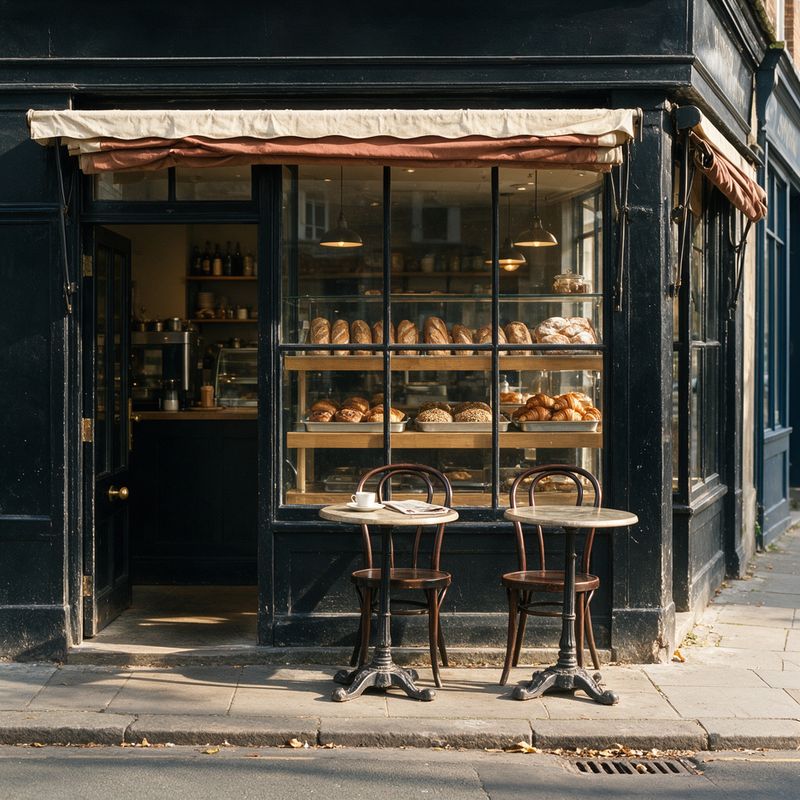
A corner bakery storefront with a black painted timber facade, a wide window showing trays of bread, a folded awning and two small pavement tables with bentwood chairs. Bright morning light from the left, crisp shadows on the pavement. Straight-on shot from across the street at standing height, 35mm lens. Photoreal small business photography, warm palette.
- The treatment
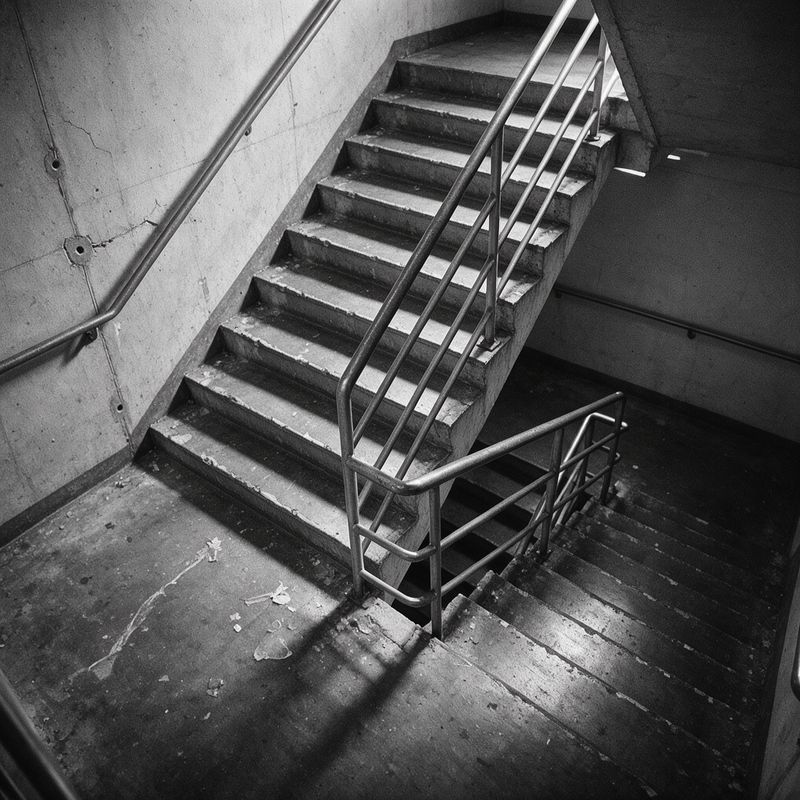
A high-contrast black and white photograph of an empty concrete stairwell, deep crushed blacks, blown highlights on the handrail, heavy visible film grain and a slight vignette. Hard directional light from a window out of frame. Wide shot, 28mm lens. Monochrome documentary photography, grainy 35mm film look.


Two references arrive and only one of them is content, so the prompt has to say which. Naming the layout as something to preserve is what keeps the treatment reference from contributing a subject, which is why the prompt ends on "do not change the layout or add anything to the scene" rather than on the description of the grain.
What the references are worth
A reference has to be at least 128 × 128 pixels, and that is the only size that gets a request rejected. Anything larger is accepted and scaled down to fit 6256 pixels on the long side and 16 MP in total, so a reference past that ceiling costs upload time on every request in the batch and buys nothing.
What does pay off is what the reference contains. A packshot on a clean background transfers better than the same product buried in a busy scene, because the model has less to disentangle before it can carry the object across. The same holds for a face: an evenly lit frontal portrait carries further than a three-quarter shot in mixed light.
Reference images are not billed. A request with one reference and a request with ten cost the same as the text-to-image call at that resolution tier, which makes multi-reference work cheap to iterate on.
When a request carries references, resolution becomes available as an alternative to width and height: it sets the output tier while the references supply the aspect ratio. Send one or the other, never both. A request that sends neither is rendered at the 1K tier.
Tips for best results
-
Refer to images by index. "Image 1", "image 2". The array order is the only handle you have, and a prompt that says "the jacket" leaves the model matching by description instead.
-
Give every reference a job. An image in the array with no role in the sentence still influences the output, usually by leaking color or texture into the result.
-
Name what has to survive. List the features a buyer would notice: the color, the closure, the proportions, the trim. General instructions to stay faithful do less than four concrete nouns.
-
Say which lighting wins. A product shot in a studio and dropped into daylight will keep its studio light unless the prompt hands the scene's lighting to it.
-
Ask for a contact shadow. Where the object meets the floor or the surface is where a composite gives itself away.
-
Shoot references clean. A plain background and even light on the reference transfer further than a busy frame, whatever the resolution.
-
Keep references under 16 MP. They are downscaled past that, so the extra pixels only cost upload time. Below 128 × 128 the request is rejected.