FLUX 3 Image

FLUX 3 Image is Black Forest Labs' image generation and editing model built on the multimodal FLUX 3 backbone shared with FLUX 3 Video. It combines text-to-image synthesis, precise local editing, multi-reference composition, bounding-box placement, and native 4K output. The model preserves identities and fine details across references, supports targeted changes and in-place text editing, and renders accurate typography in text-heavy layouts across a broad range of visual styles.
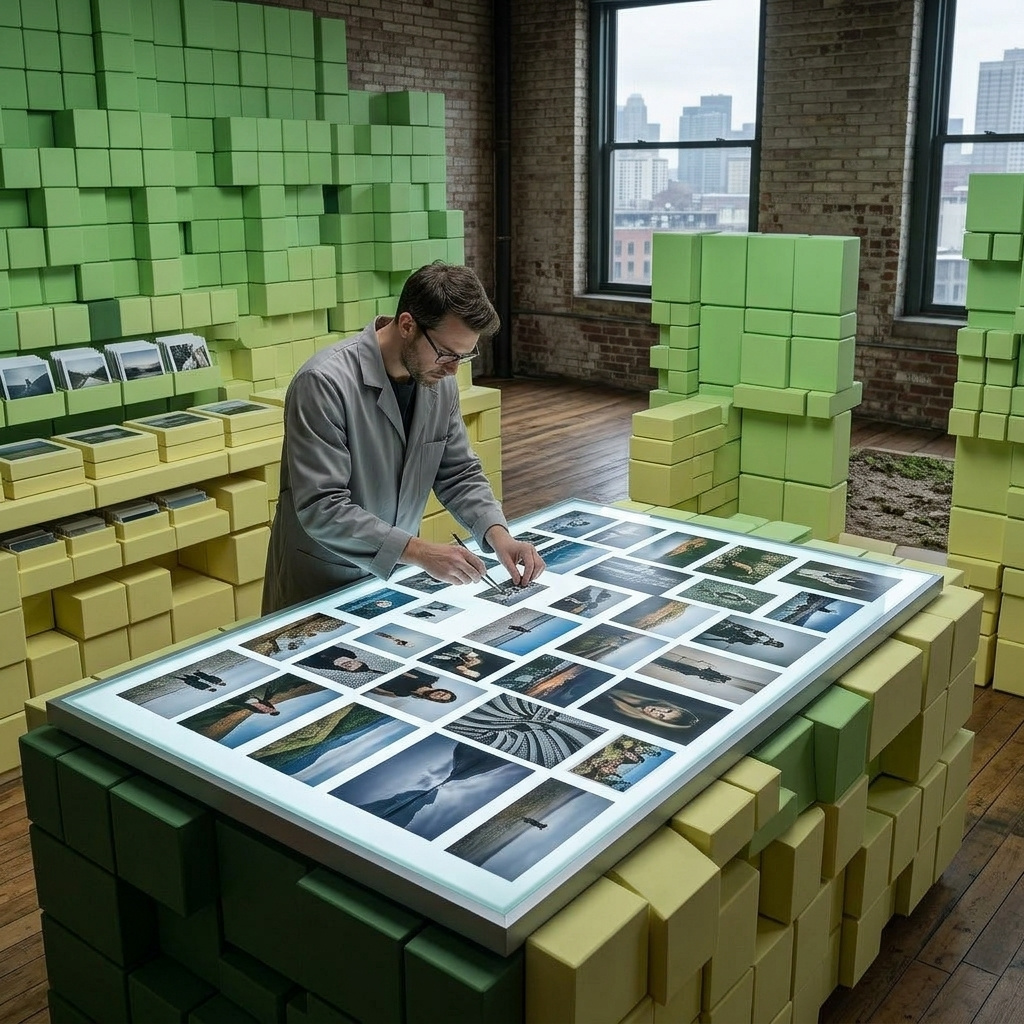
Bounding boxes
How to place and edit elements by region with FLUX 3 Image: the 0 to 1000 grid, composing a layout from scratch, moving a marked element, and removing one.
Introduction
A prompt can say what belongs in a frame, but it cannot say where. "A lamp on the right" is one more clause the model weighs against everything else you wrote, and it lands somewhere different on every run. Bounding boxes turn that suggestion into a coordinate.
settings.boundingBoxes carries one region per element. Each region has an id the prompt refers to as <id>, a targetBox saying where it sits in the output, and an optional description of what goes there. The sentence stops describing placement and starts pointing at it.

A beauty campaign key visual on a seamless warm sand backdrop, flat even studio light, soft contact shadows under every object. The frame holds <bottle_1>, <jar_1> and <sprig_1> and nothing else. Photoreal product photography, warm neutral palette.
[
  { "id": "bottle_1", "targetBox": [220, 90, 900, 310], "description": "a tall frosted glass serum bottle with a matte black dropper cap, standing upright" },
  { "id": "jar_1", "targetBox": [480, 400, 880, 600], "description": "a squat amber glass cream jar with a brushed gold lid, standing upright" },
  { "id": "sprig_1", "targetBox": [120, 660, 560, 930], "description": "a single eucalyptus sprig lying diagonally" }
]
Three objects, three boxes, and the arrangement is the same on every run. This guide covers the grid those coordinates live on, composing a layout from nothing, marking an element inside a reference so you can move or restyle it, picking one reference out of several, removing an element, and running several regions in a single request.
A prompt that already carries the annotation array the way the provider documents it keeps working, so there is nothing to migrate. settings.boundingBoxes is the validated path: a malformed box, a duplicate id or a reference index pointing past the images you sent is rejected before the request leaves. Either way the array travels inside the prompt, which is why the sentence has to name each region as <id> for the two to line up.
The coordinate grid
Every box is four integers, [top, left, bottom, right], on a grid that runs 0 to 1000 down and across whatever size the output is. Vertical comes first, which is the reverse of the x, y most drawing tools hand you, and reading it the wrong way round is the fastest way to get a layout back mirrored.

A flat overhead product layout on a seamless sand-colored field, soft even light. <sunglasses_1> is the only object in the frame. Photoreal accessories photography, warm palette.
[
  { "id": "sunglasses_1", "targetBox": [100, 500, 400, 900], "description": "a pair of tortoiseshell sunglasses lying flat with the arms folded" }
]
That box starts a tenth of the way down and halfway across, and ends two fifths down and nine tenths across, which puts the sunglasses in the upper right, wider than they are tall. Read as x, y the same four numbers would drop them into the lower left and stand them on end. Generating one asymmetric box like this is worth doing once when you wire the feature up, because it tells you immediately whether your side has the order right.
Because the grid is normalized rather than measured in pixels, a layout written once holds at every tier. The same four numbers frame the same part of the picture whether you render a 0.75K draft or a 4K delivery.
The grid runs 0 to 1000 on both axes independently, so it stretches with the canvas. A region that is square in grid units is square on a 1:1 output and wide on a 16:9 one. Set the boxes against the aspect you intend to ship.
Composing a layout
In text-to-image a region is pure placement: targetBox says where the element goes, description says what it is, and the prompt ties the two together by naming the id. referenceIndex and sourceBox belong to editing and are rejected in a request with no references.

A staged living room with white plaster walls and a herringbone oak floor, soft daylight from the left. The room holds a mustard velvet three-seater sofa, a brass arc floor lamp and a cream wool rug. Wide shot at chest height, 24mm lens. Photoreal interior photography, bright neutral palette.

A staged living room with white plaster walls and a herringbone oak floor, soft daylight from the left. The room holds <sofa_1>, <lamp_1> and <rug_1>. Wide shot at chest height, 24mm lens. Photoreal interior photography, bright neutral palette.
[
  { "id": "sofa_1", "targetBox": [430, 60, 850, 520], "description": "a mustard velvet three-seater sofa with walnut legs, seen straight on" },
  { "id": "lamp_1", "targetBox": [180, 560, 820, 700], "description": "a brass arc floor lamp with a dome shade, standing upright" },
  { "id": "rug_1", "targetBox": [780, 120, 960, 880], "description": "a cream wool rug lying flat on the floor" }
]
Both images come from the same scene sentence. The first hands the arrangement to the model and takes whatever composition it settles on. The second keeps the sentence and moves the three objects into the description of their own regions, so the caption carries the mood and the boxes carry the blocking.
That split is what makes the technique worth the extra payload. An art director's layout, a template that has to hold across a campaign, or a frame that has to leave a specific corner clear all stop being things you re-roll until they land.
import { createClient } from '@runware/sdk'

const client = await createClient({ apiKey: process.env.RUNWARE_API_KEY })
await client.connect()

const [result] = await client.run({
  model: 'bfl:flux@3-image',
  positivePrompt: 'A staged living room with white plaster walls and a herringbone oak floor, soft daylight from the left. The room holds <sofa_1>, <lamp_1> and <rug_1>. Wide shot at chest height, 24mm lens. Photoreal interior photography, bright neutral palette.',
  width: 1360,
  height: 768,
  settings: {
    boundingBoxes: [
      {
        id: 'sofa_1',
        targetBox: [
          430,
          60,
          850,
          520
        ],
        description: 'a mustard velvet three-seater sofa with walnut legs, seen straight on'
      },
      {
        id: 'lamp_1',
        targetBox: [
          180,
          560,
          820,
          700
        ],
        description: 'a brass arc floor lamp with a dome shade, standing upright'
      },
      {
        id: 'rug_1',
        targetBox: [
          780,
          120,
          960,
          880
        ],
        description: 'a cream wool rug lying flat on the floor'
      }
    ]
  }
})
import asyncio
import os
from runware import Runware
async def main():
async with Runware(api_key=os.environ["RUNWARE_API_KEY"]) as client:
results = await client.run({
"model": "bfl:flux@3-image",
"positivePrompt": "A staged living room with white plaster walls and a herringbone oak floor, soft daylight from the left. The room holds <sofa_1>, <lamp_1> and <rug_1>. Wide shot at chest height, 24mm lens. Photoreal interior photography, bright neutral palette.",
"width": 1360,
"height": 768,
"settings": {
"boundingBoxes": [
{
"id": "sofa_1",
"targetBox": [
430,
60,
850,
520
],
"description": "a mustard velvet three-seater sofa with walnut legs, seen straight on"
},
{
"id": "lamp_1",
"targetBox": [
180,
560,
820,
700
],
"description": "a brass arc floor lamp with a dome shade, standing upright"
},
{
"id": "rug_1",
"targetBox": [
780,
120,
960,
880
],
"description": "a cream wool rug lying flat on the floor"
}
]
}
})
asyncio.run(main())curl https://api.runware.ai/v1 \
-H "Authorization: Bearer $RUNWARE_API_KEY" \
-H "Content-Type: application/json" \
-d '[
{
  "taskType": "imageInference",
  "taskUUID": "e5f6a7b8-c9d0-1234-ef12-345678901234",
  "model": "bfl:flux@3-image",
  "positivePrompt": "A staged living room with white plaster walls and a herringbone oak floor, soft daylight from the left. The room holds <sofa_1>, <lamp_1> and <rug_1>. Wide shot at chest height, 24mm lens. Photoreal interior photography, bright neutral palette.",
  "width": 1360,
  "height": 768,
  "settings": {
    "boundingBoxes": [
      {
        "id": "sofa_1",
        "targetBox": [
          430,
          60,
          850,
          520
        ],
        "description": "a mustard velvet three-seater sofa with walnut legs, seen straight on"
      },
      {
        "id": "lamp_1",
        "targetBox": [
          180,
          560,
          820,
          700
        ],
        "description": "a brass arc floor lamp with a dome shade, standing upright"
      },
      {
        "id": "rug_1",
        "targetBox": [
          780,
          120,
          960,
          880
        ],
        "description": "a cream wool rug lying flat on the floor"
      }
    ]
  }
}
]'runware run bfl:flux@3-image \
positivePrompt="A staged living room with white plaster walls and a herringbone oak floor, soft daylight from the left. The room holds <sofa_1>, <lamp_1> and <rug_1>. Wide shot at chest height, 24mm lens. Photoreal interior photography, bright neutral palette." \
width=1360 \
height=768 \
settings.boundingBoxes.0.id=sofa_1 \
settings.boundingBoxes.0.targetBox.0=430 \
settings.boundingBoxes.0.targetBox.1=60 \
settings.boundingBoxes.0.targetBox.2=850 \
settings.boundingBoxes.0.targetBox.3=520 \
settings.boundingBoxes.0.description="a mustard velvet three-seater sofa with walnut legs, seen straight on" \
settings.boundingBoxes.1.id=lamp_1 \
settings.boundingBoxes.1.targetBox.0=180 \
settings.boundingBoxes.1.targetBox.1=560 \
settings.boundingBoxes.1.targetBox.2=820 \
settings.boundingBoxes.1.targetBox.3=700 \
settings.boundingBoxes.1.description="a brass arc floor lamp with a dome shade, standing upright" \
settings.boundingBoxes.2.id=rug_1 \
settings.boundingBoxes.2.targetBox.0=780 \
settings.boundingBoxes.2.targetBox.1=120 \
settings.boundingBoxes.2.targetBox.2=960 \
settings.boundingBoxes.2.targetBox.3=880 \
settings.boundingBoxes.2.description="a cream wool rug lying flat on the floor"{
"taskType": "imageInference",
"taskUUID": "e5f6a7b8-c9d0-1234-ef12-345678901234",
"model": "bfl:flux@3-image",
"positivePrompt": "A staged living room with white plaster walls and a herringbone oak floor, soft daylight from the left. The room holds <sofa_1>, <lamp_1> and <rug_1>. Wide shot at chest height, 24mm lens. Photoreal interior photography, bright neutral palette.",
"width": 1360,
"height": 768,
"settings": {
"boundingBoxes": [
{
"id": "sofa_1",
"targetBox": [
430,
60,
850,
520
],
"description": "a mustard velvet three-seater sofa with walnut legs, seen straight on"
},
{
"id": "lamp_1",
"targetBox": [
180,
560,
820,
700
],
"description": "a brass arc floor lamp with a dome shade, standing upright"
},
{
"id": "rug_1",
"targetBox": [
780,
120,
960,
880
],
"description": "a cream wool rug lying flat on the floor"
}
]
}
}Response
{
  "data": [
    {
      "taskType": "imageInference",
      "taskUUID": "e5f6a7b8-c9d0-1234-ef12-345678901234",
      "imageUUID": "a7b8c9d0-e1f2-3456-1234-567890123456",
      "imageURL": "https://im.runware.ai/image/os/a14d18/ws/2/ii/a7b8c9d0-e1f2-3456-1234-567890123456.jpg"
    }
  ]
}
Marking a region in a reference
With references attached, a region gains two fields and a second job. referenceIndex picks which reference the element lives in and sourceBox says where it sits inside that reference, while targetBox keeps saying where it ends up in the output. The relationship between the two boxes is the edit.
Matching boxes mean the element stays put and only its appearance is open. Different boxes move it, resize it, or both.

A pale oak desk against a plain white wall, holding an open silver laptop in the center, a closed navy notebook to its left, and a terracotta pot with a trailing pothos plant on the right. Even daylight from a window out of frame on the left, soft shadows on the desk. Straight-on shot at desk height, 35mm lens, the three objects spread across the width of the frame. Photoreal workspace photography, bright neutral palette.
[
  { "id": "pot_1", "referenceIndex": 0, "sourceBox": [260, 685, 720, 970], "targetBox": [260, 685, 720, 970], "description": "the terracotta pot with the trailing pothos plant" }
]
Replace <pot_1> with a matte black ceramic pot holding the same trailing pothos plant. Keep the desk, the laptop, the notebook, the wall, the framing and the lighting unchanged.

Move <pot_1> to the left end of the desk and leave clean desk surface where it stood. Keep the laptop, the notebook, the wall, the framing and the lighting unchanged.
[
  { "id": "pot_1", "referenceIndex": 0, "sourceBox": [260, 685, 720, 970], "targetBox": [265, 45, 725, 330], "description": "the terracotta pot with the trailing pothos plant" }
]
The middle image sends sourceBox and targetBox with the same four numbers, so the region is a pointer and nothing else: it tells the model which object the sentence means. The third keeps the source box and moves the target to the opposite end of the desk, and the instruction only has to name the move.
This is the answer to the targeting problem that plain editing lives with. A frame holding two similar objects gives a sentence no reliable way to pick one, and a box picks it by position instead of by description.
import { createClient } from '@runware/sdk'

const client = await createClient({ apiKey: process.env.RUNWARE_API_KEY })
await client.connect()

const [result] = await client.run({
  model: 'bfl:flux@3-image',
  positivePrompt: 'Move <pot_1> to the left end of the desk and leave clean desk surface where it stood. Keep the laptop, the notebook, the wall, the framing and the lighting unchanged.',
  width: 1248,
  height: 832,
  inputs: {
    referenceImages: [
      'https://im.runware.ai/image/os/a14d18/ws/2/ii/c9d0e1f2-a3b4-5678-3456-789012345678.jpg'
    ]
  },
  settings: {
    boundingBoxes: [
      {
        id: 'pot_1',
        referenceIndex: 0,
        sourceBox: [
          260,
          685,
          720,
          970
        ],
        targetBox: [
          265,
          45,
          725,
          330
        ],
        description: 'the terracotta pot with the trailing pothos plant'
      }
    ]
  }
})
import asyncio
import os
from runware import Runware
async def main():
async with Runware(api_key=os.environ["RUNWARE_API_KEY"]) as client:
results = await client.run({
"model": "bfl:flux@3-image",
"positivePrompt": "Move <pot_1> to the left end of the desk and leave clean desk surface where it stood. Keep the laptop, the notebook, the wall, the framing and the lighting unchanged.",
"width": 1248,
"height": 832,
"inputs": {
"referenceImages": [
"https://im.runware.ai/image/os/a14d18/ws/2/ii/c9d0e1f2-a3b4-5678-3456-789012345678.jpg"
]
},
"settings": {
"boundingBoxes": [
{
"id": "pot_1",
"referenceIndex": 0,
"sourceBox": [
260,
685,
720,
970
],
"targetBox": [
265,
45,
725,
330
],
"description": "the terracotta pot with the trailing pothos plant"
}
]
}
})
asyncio.run(main())curl https://api.runware.ai/v1 \
-H "Authorization: Bearer $RUNWARE_API_KEY" \
-H "Content-Type: application/json" \
-d '[
{
  "taskType": "imageInference",
  "taskUUID": "b8c9d0e1-f2a3-4567-2345-678901234567",
  "model": "bfl:flux@3-image",
  "positivePrompt": "Move <pot_1> to the left end of the desk and leave clean desk surface where it stood. Keep the laptop, the notebook, the wall, the framing and the lighting unchanged.",
  "width": 1248,
  "height": 832,
  "inputs": {
    "referenceImages": [
      "https://im.runware.ai/image/os/a14d18/ws/2/ii/c9d0e1f2-a3b4-5678-3456-789012345678.jpg"
    ]
  },
  "settings": {
    "boundingBoxes": [
      {
        "id": "pot_1",
        "referenceIndex": 0,
        "sourceBox": [
          260,
          685,
          720,
          970
        ],
        "targetBox": [
          265,
          45,
          725,
          330
        ],
        "description": "the terracotta pot with the trailing pothos plant"
      }
    ]
  }
}
]'runware run bfl:flux@3-image \
positivePrompt="Move <pot_1> to the left end of the desk and leave clean desk surface where it stood. Keep the laptop, the notebook, the wall, the framing and the lighting unchanged." \
width=1248 \
height=832 \
inputs.referenceImages.0=https://im.runware.ai/image/os/a14d18/ws/2/ii/c9d0e1f2-a3b4-5678-3456-789012345678.jpg \
settings.boundingBoxes.0.id=pot_1 \
settings.boundingBoxes.0.referenceIndex=0 \
settings.boundingBoxes.0.sourceBox.0=260 \
settings.boundingBoxes.0.sourceBox.1=685 \
settings.boundingBoxes.0.sourceBox.2=720 \
settings.boundingBoxes.0.sourceBox.3=970 \
settings.boundingBoxes.0.targetBox.0=265 \
settings.boundingBoxes.0.targetBox.1=45 \
settings.boundingBoxes.0.targetBox.2=725 \
settings.boundingBoxes.0.targetBox.3=330 \
settings.boundingBoxes.0.description="the terracotta pot with the trailing pothos plant"{
"taskType": "imageInference",
"taskUUID": "b8c9d0e1-f2a3-4567-2345-678901234567",
"model": "bfl:flux@3-image",
"positivePrompt": "Move <pot_1> to the left end of the desk and leave clean desk surface where it stood. Keep the laptop, the notebook, the wall, the framing and the lighting unchanged.",
"width": 1248,
"height": 832,
"inputs": {
"referenceImages": [
"https://im.runware.ai/image/os/a14d18/ws/2/ii/c9d0e1f2-a3b4-5678-3456-789012345678.jpg"
]
},
"settings": {
"boundingBoxes": [
{
"id": "pot_1",
"referenceIndex": 0,
"sourceBox": [
260,
685,
720,
970
],
"targetBox": [
265,
45,
725,
330
],
"description": "the terracotta pot with the trailing pothos plant"
}
]
}
}Response
{
  "data": [
    {
      "taskType": "imageInference",
      "taskUUID": "b8c9d0e1-f2a3-4567-2345-678901234567",
      "imageUUID": "d0e1f2a3-b4c5-6789-4567-890123456789",
      "imageURL": "https://im.runware.ai/image/os/a14d18/ws/2/ii/d0e1f2a3-b4c5-6789-4567-890123456789.jpg"
    }
  ]
}
Picking one reference out of several
referenceIndex is what makes a region work in a request carrying more than one reference: it says which image the element lives in, and sourceBox then says where inside that image. Together they identify an object that a sentence cannot, because near-identical objects have near-identical descriptions.

Use image 2 as the scene. Stand <bag_1> upright on the bench seat, centered, its strap coiled beside it and a soft contact shadow where the leather meets the wood. Keep the bag exact including its leather color, its brass buckle and its flap. Match the warm daylight of image 2 falling from the left. Keep the bench, the plaster wall, the terrazzo floor and the framing unchanged.
- Three bags
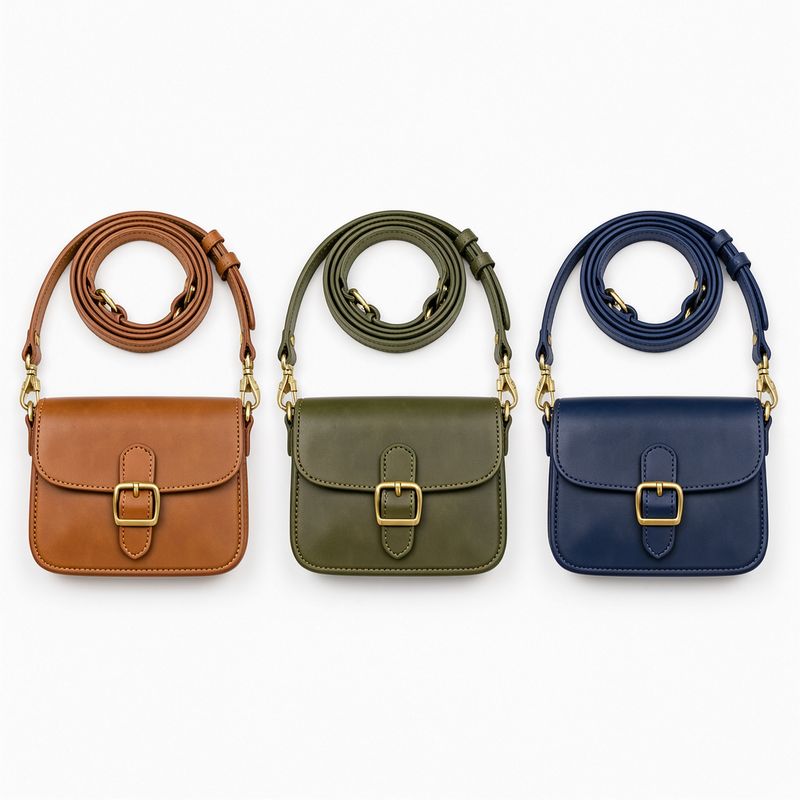
A flat overhead packshot of three identical crossbody bags laid in a row on a seamless white background, evenly spaced, each with a brass buckle and a thin adjustable strap coiled above it. Same shape and same hardware on all three, and they differ only in leather color: tan on the left, olive green in the middle, navy blue on the right. Even shadowless studio light, 50mm lens. Photoreal accessories e-commerce packshot, clean white palette.
[ { "id": "bag_1", "referenceIndex": 0, "sourceBox": [258, 352, 736, 646], "targetBox": [135, 430, 395, 575], "description": "the crossbody bag in the middle of the row" } ] - The scene
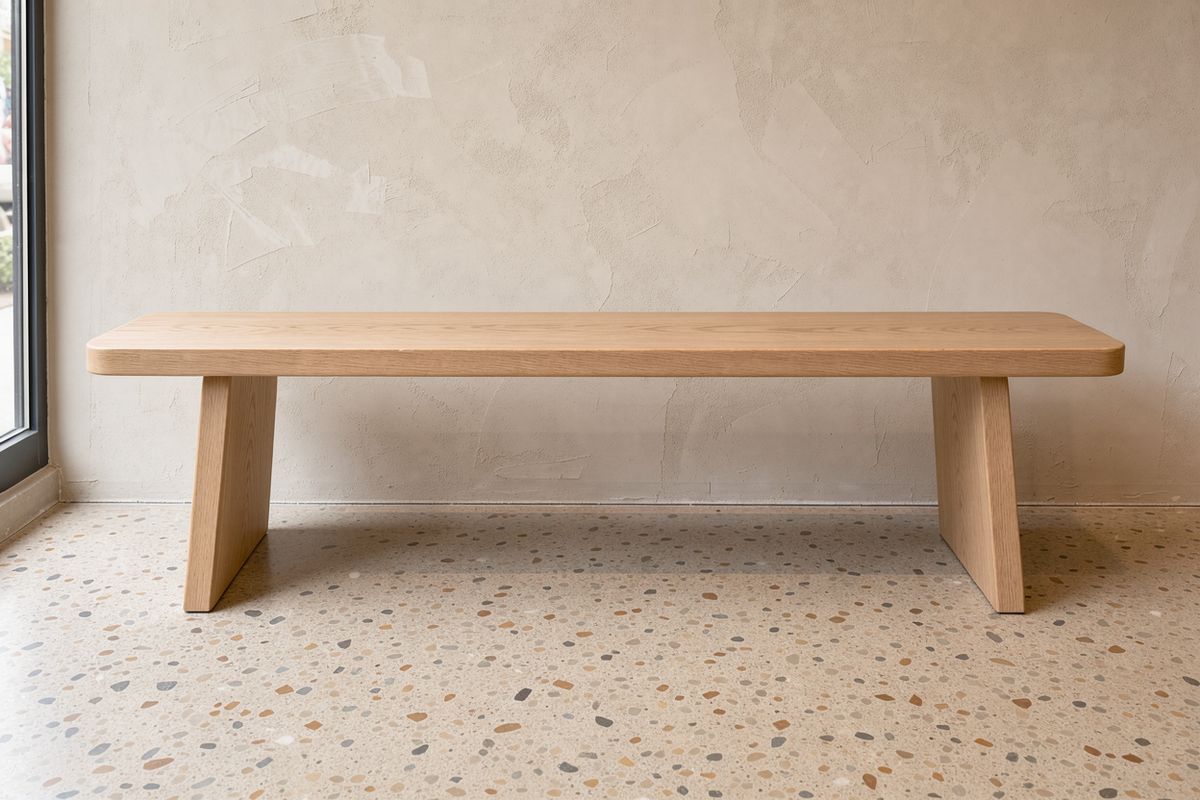
An empty pale oak bench against a lime-washed plaster wall in a sunlit retail space, a terrazzo floor below it. Warm daylight from a window out of frame on the left, a soft shadow under the bench. Straight-on shot at bench height, 35mm lens, nothing on the seat. Photoreal retail interior photography, warm neutral palette.


Three bags of the same shape in the same row, and the one that ships is the middle one. Naming its color would work here, and it stops working the moment the same request runs across a catalog where every SKU is a different color. The box names it by position inside a named image, which is the same answer whatever the copy says.
referenceIndex is zero-based while the prompt refers to the same images as "image 1" and "image 2". The box above carries referenceIndex: 0 and the sentence calls the scene "image 2", which is inputs.referenceImages[1]. Off-by-one here is the most common way a composite comes back built from the wrong picture.
import { createClient } from '@runware/sdk'

const client = await createClient({ apiKey: process.env.RUNWARE_API_KEY })
await client.connect()

const [result] = await client.run({
  model: 'bfl:flux@3-image',
  positivePrompt: 'Use image 2 as the scene. Stand <bag_1> upright on the bench seat, centered, its strap coiled beside it and a soft contact shadow where the leather meets the wood. Keep the bag exact including its leather color, its brass buckle and its flap. Match the warm daylight of image 2 falling from the left. Keep the bench, the plaster wall, the terrazzo floor and the framing unchanged.',
  width: 1248,
  height: 832,
  inputs: {
    referenceImages: [
      'https://im.runware.ai/image/os/a14d18/ws/2/ii/a3b4c5d6-e7f8-9012-6789-012345678901.jpg',
      'https://im.runware.ai/image/os/a14d18/ws/2/ii/b4c5d6e7-f8a9-0123-7890-123456789012.jpg'
    ]
  },
  settings: {
    boundingBoxes: [
      {
        id: 'bag_1',
        referenceIndex: 0,
        sourceBox: [
          258,
          352,
          736,
          646
        ],
        targetBox: [
          135,
          430,
          395,
          575
        ],
        description: 'the crossbody bag in the middle of the row'
      }
    ]
  }
})
import asyncio
import os
from runware import Runware
async def main():
async with Runware(api_key=os.environ["RUNWARE_API_KEY"]) as client:
results = await client.run({
"model": "bfl:flux@3-image",
"positivePrompt": "Use image 2 as the scene. Stand <bag_1> upright on the bench seat, centered, its strap coiled beside it and a soft contact shadow where the leather meets the wood. Keep the bag exact including its leather color, its brass buckle and its flap. Match the warm daylight of image 2 falling from the left. Keep the bench, the plaster wall, the terrazzo floor and the framing unchanged.",
"width": 1248,
"height": 832,
"inputs": {
"referenceImages": [
"https://im.runware.ai/image/os/a14d18/ws/2/ii/a3b4c5d6-e7f8-9012-6789-012345678901.jpg",
"https://im.runware.ai/image/os/a14d18/ws/2/ii/b4c5d6e7-f8a9-0123-7890-123456789012.jpg"
]
},
"settings": {
"boundingBoxes": [
{
"id": "bag_1",
"referenceIndex": 0,
"sourceBox": [
258,
352,
736,
646
],
"targetBox": [
135,
430,
395,
575
],
"description": "the crossbody bag in the middle of the row"
}
]
}
})
asyncio.run(main())curl https://api.runware.ai/v1 \
-H "Authorization: Bearer $RUNWARE_API_KEY" \
-H "Content-Type: application/json" \
-d '[
{
  "taskType": "imageInference",
  "taskUUID": "f2a3b4c5-d6e7-8901-5678-901234567890",
  "model": "bfl:flux@3-image",
  "positivePrompt": "Use image 2 as the scene. Stand <bag_1> upright on the bench seat, centered, its strap coiled beside it and a soft contact shadow where the leather meets the wood. Keep the bag exact including its leather color, its brass buckle and its flap. Match the warm daylight of image 2 falling from the left. Keep the bench, the plaster wall, the terrazzo floor and the framing unchanged.",
  "width": 1248,
  "height": 832,
  "inputs": {
    "referenceImages": [
      "https://im.runware.ai/image/os/a14d18/ws/2/ii/a3b4c5d6-e7f8-9012-6789-012345678901.jpg",
      "https://im.runware.ai/image/os/a14d18/ws/2/ii/b4c5d6e7-f8a9-0123-7890-123456789012.jpg"
    ]
  },
  "settings": {
    "boundingBoxes": [
      {
        "id": "bag_1",
        "referenceIndex": 0,
        "sourceBox": [
          258,
          352,
          736,
          646
        ],
        "targetBox": [
          135,
          430,
          395,
          575
        ],
        "description": "the crossbody bag in the middle of the row"
      }
    ]
  }
}
]'runware run bfl:flux@3-image \
positivePrompt="Use image 2 as the scene. Stand <bag_1> upright on the bench seat, centered, its strap coiled beside it and a soft contact shadow where the leather meets the wood. Keep the bag exact including its leather color, its brass buckle and its flap. Match the warm daylight of image 2 falling from the left. Keep the bench, the plaster wall, the terrazzo floor and the framing unchanged." \
width=1248 \
height=832 \
inputs.referenceImages.0=https://im.runware.ai/image/os/a14d18/ws/2/ii/a3b4c5d6-e7f8-9012-6789-012345678901.jpg \
inputs.referenceImages.1=https://im.runware.ai/image/os/a14d18/ws/2/ii/b4c5d6e7-f8a9-0123-7890-123456789012.jpg \
settings.boundingBoxes.0.id=bag_1 \
settings.boundingBoxes.0.referenceIndex=0 \
settings.boundingBoxes.0.sourceBox.0=258 \
settings.boundingBoxes.0.sourceBox.1=352 \
settings.boundingBoxes.0.sourceBox.2=736 \
settings.boundingBoxes.0.sourceBox.3=646 \
settings.boundingBoxes.0.targetBox.0=135 \
settings.boundingBoxes.0.targetBox.1=430 \
settings.boundingBoxes.0.targetBox.2=395 \
settings.boundingBoxes.0.targetBox.3=575 \
settings.boundingBoxes.0.description="the crossbody bag in the middle of the row"{
"taskType": "imageInference",
"taskUUID": "f2a3b4c5-d6e7-8901-5678-901234567890",
"model": "bfl:flux@3-image",
"positivePrompt": "Use image 2 as the scene. Stand <bag_1> upright on the bench seat, centered, its strap coiled beside it and a soft contact shadow where the leather meets the wood. Keep the bag exact including its leather color, its brass buckle and its flap. Match the warm daylight of image 2 falling from the left. Keep the bench, the plaster wall, the terrazzo floor and the framing unchanged.",
"width": 1248,
"height": 832,
"inputs": {
"referenceImages": [
"https://im.runware.ai/image/os/a14d18/ws/2/ii/a3b4c5d6-e7f8-9012-6789-012345678901.jpg",
"https://im.runware.ai/image/os/a14d18/ws/2/ii/b4c5d6e7-f8a9-0123-7890-123456789012.jpg"
]
},
"settings": {
"boundingBoxes": [
{
"id": "bag_1",
"referenceIndex": 0,
"sourceBox": [
258,
352,
736,
646
],
"targetBox": [
135,
430,
395,
575
],
"description": "the crossbody bag in the middle of the row"
}
]
}
}Response
{
  "data": [
    {
      "taskType": "imageInference",
      "taskUUID": "f2a3b4c5-d6e7-8901-5678-901234567890",
      "imageUUID": "c5d6e7f8-a9b0-1234-8901-234567890123",
      "imageURL": "https://im.runware.ai/image/os/a14d18/ws/2/ii/c5d6e7f8-a9b0-1234-8901-234567890123.jpg"
    }
  ]
}
Removing an element
A targetBox of null means the element has nowhere to land, which is how you take it out. The source box still marks what goes, so the instruction stays short.
A pale oak desk against a plain white wall, holding an open silver laptop in the center, a closed navy notebook to its left, and a terracotta pot with a trailing pothos plant on the right. Even daylight from a window out of frame on the left, soft shadows on the desk. Straight-on shot at desk height, 35mm lens, the three objects spread across the width of the frame. Photoreal workspace photography, bright neutral palette.

Remove <pot_1> and leave clean desk surface where it stood. Keep the laptop, the notebook, the wall, the framing and the lighting unchanged.
[
  { "id": "pot_1", "referenceIndex": 0, "sourceBox": [260, 685, 720, 970], "targetBox": null, "description": "the terracotta pot with the trailing pothos plant" }
]
Naming the surface that is left behind still matters, the same as it does in a plain removal. What the box adds is certainty about which object goes, which is the half that a sentence gets wrong when the frame holds more than one candidate.
A removal needs references by definition, so null is only accepted alongside inputs.referenceImages. In a text-to-image request every region has to land somewhere.
Several regions in one request
Each id is independent, so one request can carry as many regions as the frame needs, each with its own operation. The prompt names them all and says what happens to each.

A walnut nightstand against a warm cream hotel room wall, holding a ceramic table lamp with a pale linen shade on the left and a short stack of hardback books with a glass tumbler on top on the right. Warm lamplight plus soft ambient light from the right. Straight-on shot at nightstand height, 35mm lens, the two groups spread across the frame. Photoreal hospitality photography, warm palette.

Give <lamp_1> a deep teal linen shade, and replace <books_1> with a small potted fern in a white ceramic pot. Keep the nightstand, the wall, the framing and the lighting unchanged.
[
  { "id": "lamp_1", "referenceIndex": 0, "sourceBox": [20, 165, 695, 475], "targetBox": [20, 165, 695, 475], "description": "the ceramic table lamp with the pale linen shade" },
  { "id": "books_1", "referenceIndex": 0, "sourceBox": [440, 605, 750, 855], "targetBox": [440, 605, 750, 855], "description": "the stack of hardback books with the glass tumbler on top" }
]
Two regions, two instructions, one pass. Done as a chain instead, the shade and the fern would each cost a full re-render of the frame, and the walnut grain and the wall would drift a little further with every pass. Batching the regions keeps the untouched parts of the picture to a single rebuild.
Ids have to be unique inside a request, and referenceIndex has to point at a reference you actually sent. Both are easy to get wrong when the boxes come out of a UI, so validate them before the call rather than reading it back off the output.
Tips for best results
-
Write the box as top, left, bottom, right. Vertical first. If a layout comes back mirrored or rotated, check this before you touch the prompt.
-
Name every id in the prompt. A region the sentence never mentions is a description with nowhere to attach, and the caption is what tells the model how the elements relate.
-
Match the boxes when you only want a restyle. Identical
sourceBoxandtargetBoxturn the region into a pointer, which is the safest way to say "this one, not the other one". -
Keep the caption doing caption work. Mood, light and style belong in the sentence. What each object is belongs in its
description. -
Set the boxes against the aspect you will ship. The grid stretches with the canvas, so a layout blocked out on a square reads differently at 16:9.
-
Batch regions instead of chaining passes. Several edits in one request rebuild the rest of the frame once rather than once per change.
-
Mind the off-by-one.
referenceIndexcounts from zero and the prompt counts from one, so the second reference isreferenceIndex: 1and "image 2". -
Leave room around a region. A box pressed against the frame edge gives the model no space for the shadow or the contact point, and that is where a placed object stops looking photographed.