Grok Imagine Video 1.5 Lite

Grok Imagine Video 1.5 Lite is the lower-cost tier of xAI's Grok Imagine Video 1.5. It generates video with native audio from a text prompt or from a single starting frame, at 480p, 720p, or 1080p and durations from 1 to 15 seconds. It suits high-volume work such as social clips, ad variations, and fast iteration on prompts and motion.
Generating video
How to generate video with Grok Imagine Video 1.5 Lite: sizing the request, writing a shot as timed beats, putting a title on screen, and directing the sound.
Introduction
Grok Imagine Video 1.5 Lite turns a prompt into a clip of 1 to 15 seconds with the audio generated in the same pass. You send the prompt on its own, or the prompt plus one image that becomes the first frame, and the file that comes back already has its sound in it.
Beyond the prompt, a request takes a size and a length, plus an optional first frame. Everything else is directed in the prompt: the order of events, where a cut falls, what is written on screen and what you hear.
A rally car in plain white with no decals drifts through a gravel hairpin on a forest road, throwing a wide spray of stones and dust, then straightens and accelerates past the camera. The camera stands low on the outside of the corner and pans to follow the car. Photoreal motorsport footage, late afternoon light through the trees, no text. Sound: the engine screaming on the approach, gravel hammering the wheel arches through the slide, then the exhaust note falling away as the car passes.
Play it with the sound on.
This guide covers the request shape and the rule that decides which sizing field you send, writing a shot as timed beats, putting a title on screen, directing the sound, and starting from a first frame.
Request shape
A text-to-video request is a prompt, a size and a length.
import { createClient } from '@runware/sdk'

const client = await createClient({ apiKey: process.env.RUNWARE_API_KEY })
await client.connect()

const [result] = await client.run({
  model: 'xai:grok-imagine@video-1.5-lite',
  positivePrompt: 'A rally car in plain white with no decals drifts through a gravel hairpin on a forest road, throwing a wide spray of stones and dust, then straightens and accelerates past the camera. The camera stands low on the outside of the corner and pans to follow the car. Photoreal motorsport footage, late afternoon light through the trees, no text. Sound: the engine screaming on the approach, gravel hammering the wheel arches through the slide, then the exhaust note falling away as the car passes.',
  width: 848,
  height: 480,
  duration: 8,
  deliveryMethod: 'async'
})
import asyncio
import os
from runware import Runware
async def main():
async with Runware(api_key=os.environ["RUNWARE_API_KEY"]) as client:
results = await client.run({
"model": "xai:grok-imagine@video-1.5-lite",
"positivePrompt": "A rally car in plain white with no decals drifts through a gravel hairpin on a forest road, throwing a wide spray of stones and dust, then straightens and accelerates past the camera. The camera stands low on the outside of the corner and pans to follow the car. Photoreal motorsport footage, late afternoon light through the trees, no text. Sound: the engine screaming on the approach, gravel hammering the wheel arches through the slide, then the exhaust note falling away as the car passes.",
"width": 848,
"height": 480,
"duration": 8,
"deliveryMethod": "async"
})
asyncio.run(main())curl https://api.runware.ai/v1 \
-H "Authorization: Bearer $RUNWARE_API_KEY" \
-H "Content-Type: application/json" \
-d '[
{
  "taskType": "videoInference",
  "taskUUID": "a1b2c3d4-e5f6-7890-abcd-ef1234567890",
  "model": "xai:grok-imagine@video-1.5-lite",
  "positivePrompt": "A rally car in plain white with no decals drifts through a gravel hairpin on a forest road, throwing a wide spray of stones and dust, then straightens and accelerates past the camera. The camera stands low on the outside of the corner and pans to follow the car. Photoreal motorsport footage, late afternoon light through the trees, no text. Sound: the engine screaming on the approach, gravel hammering the wheel arches through the slide, then the exhaust note falling away as the car passes.",
  "width": 848,
  "height": 480,
  "duration": 8,
  "deliveryMethod": "async"
}
]'runware run xai:grok-imagine@video-1.5-lite \
positivePrompt="A rally car in plain white with no decals drifts through a gravel hairpin on a forest road, throwing a wide spray of stones and dust, then straightens and accelerates past the camera. The camera stands low on the outside of the corner and pans to follow the car. Photoreal motorsport footage, late afternoon light through the trees, no text. Sound: the engine screaming on the approach, gravel hammering the wheel arches through the slide, then the exhaust note falling away as the car passes." \
width=848 \
height=480 \
duration=8 \
deliveryMethod=async{
"taskType": "videoInference",
"taskUUID": "a1b2c3d4-e5f6-7890-abcd-ef1234567890",
"model": "xai:grok-imagine@video-1.5-lite",
"positivePrompt": "A rally car in plain white with no decals drifts through a gravel hairpin on a forest road, throwing a wide spray of stones and dust, then straightens and accelerates past the camera. The camera stands low on the outside of the corner and pans to follow the car. Photoreal motorsport footage, late afternoon light through the trees, no text. Sound: the engine screaming on the approach, gravel hammering the wheel arches through the slide, then the exhaust note falling away as the car passes.",
"width": 848,
"height": 480,
"duration": 8,
"deliveryMethod": "async"
}Response
[
  {
    "taskType": "videoInference",
    "taskUUID": "a1b2c3d4-e5f6-7890-abcd-ef1234567890",
    "videoUUID": "9c1b2d3a-4e5f-6789-abcd-ef0123456789",
    "videoURL": "https://vm.runware.ai/video/os/a14d18/ws/2/vi/9c1b2d3a-4e5f-6789-abcd-ef0123456789.mp4"
  }
]
width and height travel as a pair, and only as one of 21 exact combinations: seven aspect ratios (16:9, 9:16, 1:1, 4:3, 3:4, 3:2 and 2:3) at each of the 480p, 720p and 1080p tiers. Anything in between is rejected. The API reference lists every pair.
A request that carries inputs.frameImages is sized with resolution instead and takes its shape from the image. Which field you send is decided by the request, so there is nothing to choose between.
resolution is rejected on a text-only request, and width or height alongside inputs.frameImages is rejected too. The two paths never mix.
duration takes any whole number of seconds from 1 to 15 and defaults to 6. Audio has no parameter of its own. Every clip comes back with a track, and the prompt is the only place to direct it.
Writing the shot as timed beats
A prompt that describes one action gives you one continuous shot, like the rally car above. To get a sequence, split the prompt into time ranges and say what happens in each one. The model reads the ranges as the order of events, and it moves to a new location when a beat asks for it.
0-3 seconds: a front door swings open onto a bright apartment hallway and the camera glides through it. 3-7 seconds: cut to the living room, the camera panning slowly across a gray sofa, an oak coffee table and tall windows. 7-10 seconds: cut to the balcony, the camera pushing out past the railing to a view over city rooftops at sunset. Photoreal real-estate walkthrough footage, steady gimbal movement, no people, no text. Sound: the latch clicking as the door opens, soft footsteps on a wooden floor, then distant city traffic and a light breeze on the balcony.
The door, the living room and the balcony arrive in the order the prompt lists them, each in its own location. Treat the ranges as a sequence, not a schedule: a beat can land a couple of seconds before or after where you wrote it.
Beats are also how you spend a long duration. A 15-second request is 15 seconds to fill, and a beat for every few seconds gives the model something to do with each part of it.
Putting a title on screen
The model renders short on-screen text when the prompt spells it out. Quote the exact words, say where they sit, and give the title a time range of its own.
0-6 seconds: aerial footage of Lisbon at sunrise, gliding low over terracotta rooftops toward the river as a yellow tram climbs a steep street below, then the camera rises and tilts up to the open sky. No text on screen during this part. 6-8 seconds: the title "LISBON IN 48 HOURS" fades in once over the sky, centered, in bold white condensed uppercase lettering, and holds sharp and still until the end. No other text. Photoreal travel footage, warm golden light. Sound: a light breeze, a distant tram bell, and a soft rising music sting as the title appears.
Each part of that prompt does a job. Its own time range keeps the title off the opening shot. The quotation marks fix the wording, and centered with the lettering description fixes the look. The clause holds sharp and still until the end asks for a hold long enough to read, and No other text keeps the model from adding lettering of its own.
Like any beat, the title arrives in sequence and not on the second, and the model decides the line breaks.
Tilting to open sky before the title arrives is deliberate. Text placed over a plain region of the frame stays readable, where the same title over rooftops would compete with the detail behind it.
Directing the sound
Sound is generated from the prompt, and there is no second call. The working convention is a Sound: clause at the end, which keeps picture and track apart in the prompt. The label is a convention, and a plain sentence works too.
List the sounds in the order the action produces them, and each one lands near the moment it belongs to.
A home stovetop seen from the side at counter height. A hand uses a metal spatula to push sliced scallions and garlic off a wooden board into a hot carbon-steel wok, the oil flares and steams, and the spatula tosses everything twice. The camera holds a steady close shot. Photoreal food content, warm kitchen light, no text. Sound: the spatula scraping the board, a loud sizzle as the scallions hit the oil, two sharp scrapes of the spatula against the wok, then the sizzle settling.
The sizzle comes up at the moment the scallions hit the oil and settles as the tossing ends, the same order the clause lists them in.
Dialogue goes in the same prompt. Quote the line you want spoken, and the words come back as written.
A personal trainer in a gray polo crouches beside a client who is doing push-ups on a rubber gym floor and coaches her through the last reps, looking at the client and never at the camera. Full-frame vertical shot from the side, bright gym lighting. Photoreal fitness footage, no text. Sound: the trainer says, "Three more, keep your back straight." The client exhales on each rep, quiet gym ambience underneath.
A spoken line often comes back with its words burned into the frame as captions, and excluding them in the prompt does not prevent it. A subject talking straight to camera in a vertical frame can also arrive letterboxed between blurred bars. Take several runs and keep the clean one.
The voice is the model's choice. Picking a specific voice from a roster is a feature of Grok Imagine Video 1.5.
Ambience is worth naming even when nothing in the scene makes a noise. A prompt with no sound clause still returns a track, and what is on it is the model's guess at the room.
Starting from a first frame
Pass one image in inputs.frameImages and the clip opens on that exact frame, then moves according to the prompt. This is the path for a shot whose opening composition is already settled, such as a packshot you have approved.
The camera orbits slowly a quarter turn around the headphones while a soft key light travels across the ear cups and the aluminum arms. The headphones stay still on the plinth and the backdrop stays a clean seamless gray. Sound: quiet studio room tone under a soft low synth pad.
- First frame
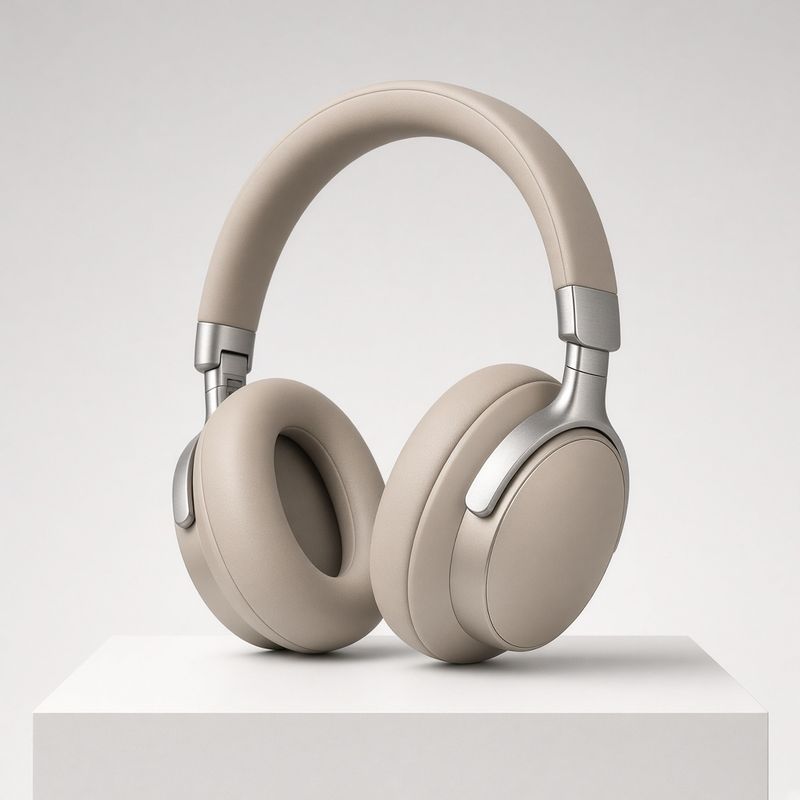
A pair of over-ear wireless headphones in matte sand beige with brushed aluminum arms, resting upright on a low white plinth, three-quarter view, centered on a seamless pale gray studio backdrop, soft even studio lighting with a gentle highlight along the headband. Photoreal commercial product packshot, no text, no logo, no other objects.

The request swaps width and height for resolution, which picks the tier while the image decides the proportions. The output keeps the image's own shape instead of moving to the nearest supported pair, so the square packshot above came back at 960 × 960 at 720p.
import { createClient } from '@runware/sdk'

const client = await createClient({ apiKey: process.env.RUNWARE_API_KEY })
await client.connect()

const [result] = await client.run({
  model: 'xai:grok-imagine@video-1.5-lite',
  positivePrompt: 'The camera orbits slowly a quarter turn around the headphones while a soft key light travels across the ear cups and the aluminum arms. The headphones stay still on the plinth and the backdrop stays a clean seamless gray. Sound: quiet studio room tone under a soft low synth pad.',
  inputs: {
    frameImages: [
      {
        image: 'https://example.com/headphones.jpg',
        frame: 'first'
      }
    ]
  },
  resolution: '720p',
  duration: 6,
  deliveryMethod: 'async'
})
import asyncio
import os
from runware import Runware
async def main():
async with Runware(api_key=os.environ["RUNWARE_API_KEY"]) as client:
results = await client.run({
"model": "xai:grok-imagine@video-1.5-lite",
"positivePrompt": "The camera orbits slowly a quarter turn around the headphones while a soft key light travels across the ear cups and the aluminum arms. The headphones stay still on the plinth and the backdrop stays a clean seamless gray. Sound: quiet studio room tone under a soft low synth pad.",
"inputs": {
"frameImages": [
{
"image": "https://example.com/headphones.jpg",
"frame": "first"
}
]
},
"resolution": "720p",
"duration": 6,
"deliveryMethod": "async"
})
asyncio.run(main())curl https://api.runware.ai/v1 \
-H "Authorization: Bearer $RUNWARE_API_KEY" \
-H "Content-Type: application/json" \
-d '[
{
  "taskType": "videoInference",
  "taskUUID": "b2c3d4e5-f6a7-8901-bcde-f12345678901",
  "model": "xai:grok-imagine@video-1.5-lite",
  "positivePrompt": "The camera orbits slowly a quarter turn around the headphones while a soft key light travels across the ear cups and the aluminum arms. The headphones stay still on the plinth and the backdrop stays a clean seamless gray. Sound: quiet studio room tone under a soft low synth pad.",
  "inputs": {
    "frameImages": [
      {
        "image": "https://example.com/headphones.jpg",
        "frame": "first"
      }
    ]
  },
  "resolution": "720p",
  "duration": 6,
  "deliveryMethod": "async"
}
]'runware run xai:grok-imagine@video-1.5-lite \
positivePrompt="The camera orbits slowly a quarter turn around the headphones while a soft key light travels across the ear cups and the aluminum arms. The headphones stay still on the plinth and the backdrop stays a clean seamless gray. Sound: quiet studio room tone under a soft low synth pad." \
inputs.frameImages.0.image=https://example.com/headphones.jpg \
inputs.frameImages.0.frame=first \
resolution=720p \
duration=6 \
deliveryMethod=async{
"taskType": "videoInference",
"taskUUID": "b2c3d4e5-f6a7-8901-bcde-f12345678901",
"model": "xai:grok-imagine@video-1.5-lite",
"positivePrompt": "The camera orbits slowly a quarter turn around the headphones while a soft key light travels across the ear cups and the aluminum arms. The headphones stay still on the plinth and the backdrop stays a clean seamless gray. Sound: quiet studio room tone under a soft low synth pad.",
"inputs": {
"frameImages": [
{
"image": "https://example.com/headphones.jpg",
"frame": "first"
}
]
},
"resolution": "720p",
"duration": 6,
"deliveryMethod": "async"
}A plain image string works in place of the object form. Write the prompt as what happens next: the frame already shows the subject and its setting, so describing them again only invites the model to change them. Spend the words on what moves and what you hear.
Tips
-
Let the sizing field follow the input. Text-only means
widthandheight. A first frame meansresolution, and the shape comes from your image. -
Pick the pair, don't compute it.
widthandheightaccept 21 exact pairs. Arithmetic that lands between them is a rejected request. -
Match the frame to the shape you want. The output keeps the image's proportions, so a vertical deliverable starts with a vertical image.
-
Write a sequence as time ranges. One range per beat, in order, with the cut named where you want one. The ranges set the order, and the timing stays loose.
-
Quote what must be exact. On-screen titles and spoken lines both go in quotation marks, which is what fixes the wording.
-
Order sounds the way the action produces them. A sound named beside its moment lands in time with it.
-
Take several runs. There is no
seed, so a prompt cannot be replayed. Generate a few takes and keep the one that landed, which is also how you get a spoken line without captions.