Krea 3

Krea 3 is Krea's image model for text-to-image generation and precise editing of existing images. Boxes mark the areas to change and the objects to bring in from up to eight reference images, each with an optional label and instruction, while the rest of the frame stays untouched. Output comes in 1K, 2K, and 4K across ten aspect ratios, with a fast or high thinking level.
Edit regions
How to edit parts of an image with Krea 3 using settings.editRegions: box coordinates, labels and notes, several regions at once, objects from another reference, and printed text.
Introduction
An instruction alone re-renders the whole picture, which is right for a new season or a new style and wrong for changing one object in a photo someone already approved. settings.editRegions marks boxes on the reference images. Boxes on the first image mark where the edit happens, and everything outside them stays as it was.

A living room photographed straight on for a real estate listing: a light gray three-seat sofa centered against a white wall, a large framed landscape print hanging centered above the sofa, a round walnut side table with a ceramic lamp to the right of the sofa and a potted fiddle leaf fig to the left. Light oak floor, soft daylight. Straight-on shot at seated height, 35mm lens, symmetrical composition. Photoreal interior photography, bright neutral palette.

Update @plant and @artwork as their notes describe. Keep the rest of the room exactly as it is.
Two boxes, two changes: the fig becomes a snake plant and the print becomes a line drawing. The sofa, the side table, the lamp and the floor are untouched, because nothing asked for them to change. Each box carries a label the prompt can name and a note with its own instruction.
import { createClient } from '@runware/sdk'

const client = await createClient({ apiKey: process.env.RUNWARE_API_KEY })
await client.connect()

const [result] = await client.run({
  model: 'krea:krea@3',
  positivePrompt: 'Update @plant and @artwork as their notes describe. Keep the rest of the room exactly as it is.',
  width: 2368,
  height: 1776,
  inputs: {
    referenceImages: [
      'https://assets.runware.ai/guides/krea-3/edit-regions/source-lounge.jpg'
    ]
  },
  settings: {
    thinkingLevel: 'high',
    editRegions: [
      {
        referenceIndex: 0,
        x: 0.03,
        y: 0.33,
        width: 0.21,
        height: 0.54,
        label: 'plant',
        note: 'Replace the fiddle leaf fig with a tall snake plant in a matte black ceramic pot.'
      },
      {
        referenceIndex: 0,
        x: 0.33,
        y: 0.11,
        width: 0.34,
        height: 0.35,
        label: 'artwork',
        note: 'Replace the landscape print with a black and white abstract line drawing in a thin black frame of the same size.'
      }
    ]
  }
})
import asyncio
import os
from runware import Runware
async def main():
async with Runware(api_key=os.environ["RUNWARE_API_KEY"]) as client:
results = await client.run({
"model": "krea:krea@3",
"positivePrompt": "Update @plant and @artwork as their notes describe. Keep the rest of the room exactly as it is.",
"width": 2368,
"height": 1776,
"inputs": {
"referenceImages": [
"https://assets.runware.ai/guides/krea-3/edit-regions/source-lounge.jpg"
]
},
"settings": {
"thinkingLevel": "high",
"editRegions": [
{
"referenceIndex": 0,
"x": 0.03,
"y": 0.33,
"width": 0.21,
"height": 0.54,
"label": "plant",
"note": "Replace the fiddle leaf fig with a tall snake plant in a matte black ceramic pot."
},
{
"referenceIndex": 0,
"x": 0.33,
"y": 0.11,
"width": 0.34,
"height": 0.35,
"label": "artwork",
"note": "Replace the landscape print with a black and white abstract line drawing in a thin black frame of the same size."
}
]
}
})
asyncio.run(main())curl https://api.runware.ai/v1 \
-H "Authorization: Bearer $RUNWARE_API_KEY" \
-H "Content-Type: application/json" \
-d '[
{
  "taskType": "imageInference",
  "taskUUID": "1d7f3b9e-6a2c-4e85-b0d4-8c3e1a7f5b29",
  "model": "krea:krea@3",
  "positivePrompt": "Update @plant and @artwork as their notes describe. Keep the rest of the room exactly as it is.",
  "width": 2368,
  "height": 1776,
  "inputs": {
    "referenceImages": [
      "https://assets.runware.ai/guides/krea-3/edit-regions/source-lounge.jpg"
    ]
  },
  "settings": {
    "thinkingLevel": "high",
    "editRegions": [
      {
        "referenceIndex": 0,
        "x": 0.03,
        "y": 0.33,
        "width": 0.21,
        "height": 0.54,
        "label": "plant",
        "note": "Replace the fiddle leaf fig with a tall snake plant in a matte black ceramic pot."
      },
      {
        "referenceIndex": 0,
        "x": 0.33,
        "y": 0.11,
        "width": 0.34,
        "height": 0.35,
        "label": "artwork",
        "note": "Replace the landscape print with a black and white abstract line drawing in a thin black frame of the same size."
      }
    ]
  }
}
]'runware run krea:krea@3 \
positivePrompt="Update @plant and @artwork as their notes describe. Keep the rest of the room exactly as it is." \
width=2368 \
height=1776 \
inputs.referenceImages.0=https://assets.runware.ai/guides/krea-3/edit-regions/source-lounge.jpg \
settings.thinkingLevel=high \
settings.editRegions.0.referenceIndex=0 \
settings.editRegions.0.x=0.03 \
settings.editRegions.0.y=0.33 \
settings.editRegions.0.width=0.21 \
settings.editRegions.0.height=0.54 \
settings.editRegions.0.label=plant \
settings.editRegions.0.note="Replace the fiddle leaf fig with a tall snake plant in a matte black ceramic pot." \
settings.editRegions.1.referenceIndex=0 \
settings.editRegions.1.x=0.33 \
settings.editRegions.1.y=0.11 \
settings.editRegions.1.width=0.34 \
settings.editRegions.1.height=0.35 \
settings.editRegions.1.label=artwork \
settings.editRegions.1.note="Replace the landscape print with a black and white abstract line drawing in a thin black frame of the same size."{
"taskType": "imageInference",
"taskUUID": "1d7f3b9e-6a2c-4e85-b0d4-8c3e1a7f5b29",
"model": "krea:krea@3",
"positivePrompt": "Update @plant and @artwork as their notes describe. Keep the rest of the room exactly as it is.",
"width": 2368,
"height": 1776,
"inputs": {
"referenceImages": [
"https://assets.runware.ai/guides/krea-3/edit-regions/source-lounge.jpg"
]
},
"settings": {
"thinkingLevel": "high",
"editRegions": [
{
"referenceIndex": 0,
"x": 0.03,
"y": 0.33,
"width": 0.21,
"height": 0.54,
"label": "plant",
"note": "Replace the fiddle leaf fig with a tall snake plant in a matte black ceramic pot."
},
{
"referenceIndex": 0,
"x": 0.33,
"y": 0.11,
"width": 0.34,
"height": 0.35,
"label": "artwork",
"note": "Replace the landscape print with a black and white abstract line drawing in a thin black frame of the same size."
}
]
}
}Response
[
  {
    "taskType": "imageInference",
    "taskUUID": "1d7f3b9e-6a2c-4e85-b0d4-8c3e1a7f5b29",
    "imageUUID": "b52e8d17-4c9a-4f3e-a6d1-0e7b3c9f2a58",
    "imageURL": "https://im.runware.ai/image/os/a14d18/ws/2/ii/b52e8d17-4c9a-4f3e-a6d1-0e7b3c9f2a58.jpg"
  }
]
This guide covers how a box is measured, editing a single object, naming boxes with labels or positions, giving each box its own note, running several regions in one request, bringing an object in from another reference and rewriting printed text.
Coordinates
A box is four numbers, each a fraction of the image it sits on. x and y are the upper-left corner, measured from the left edge and the top edge. width and height extend the box to the right and down. All four run from 0 to 1, so a box written once holds at any image size.
{
  "referenceIndex": 0,
  "x": 0.33,
  "y": 0.11,
  "width": 0.34,
  "height": 0.35
}
That box starts a third of the way across and a tenth of the way down, and covers 34% of the width and 35% of the height: the framed print in the hero above. referenceIndex says which image the box sits on, counted from zero in inputs.referenceImages.
Two rules decide whether a box is accepted. The box has to stay inside its image, so x + width and y + height are at most 1, and a box needs some area, so width and height are above 0. referenceIndex has to point at an image you actually sent. A request can carry up to 24 boxes.
Draw each box around the whole object, with a little room to spare. The box is the area the model may change, so a replacement larger than the original, such as a lounge chair in place of a plastic one, needs a box big enough to hold it.
Editing one region
The smallest edit is one box and one sentence. The box says where and the prompt says what.

A retail shoe wall with one white floating shelf across the middle of the frame holding three sneakers in side profile, evenly spaced with clear gaps between them: a black sneaker on the left, a white sneaker in the exact center and a navy sneaker on the right. Pale plaster wall, soft even store lighting. Straight-on shot at shelf height, 50mm lens. Photoreal retail photography, no logos.

Make @sneaker bright red suede with a white sole and white laces, keeping its shape and position.
Only the center shoe changes. The black and navy sneakers on either side and the shelf come back as they were, which is what lets a store show one colorway per image from a single shoot.
import { createClient } from '@runware/sdk'

const client = await createClient({ apiKey: process.env.RUNWARE_API_KEY })
await client.connect()

const [result] = await client.run({
  model: 'krea:krea@3',
  positivePrompt: 'Make @sneaker bright red suede with a white sole and white laces, keeping its shape and position.',
  resolution: '2K',
  inputs: {
    referenceImages: [
      'https://assets.runware.ai/guides/krea-3/edit-regions/source-shoe-wall.jpg'
    ]
  },
  settings: {
    editRegions: [
      {
        referenceIndex: 0,
        x: 0.38,
        y: 0.38,
        width: 0.24,
        height: 0.24,
        label: 'sneaker'
      }
    ]
  }
})
import asyncio
import os
from runware import Runware
async def main():
async with Runware(api_key=os.environ["RUNWARE_API_KEY"]) as client:
results = await client.run({
"model": "krea:krea@3",
"positivePrompt": "Make @sneaker bright red suede with a white sole and white laces, keeping its shape and position.",
"resolution": "2K",
"inputs": {
"referenceImages": [
"https://assets.runware.ai/guides/krea-3/edit-regions/source-shoe-wall.jpg"
]
},
"settings": {
"editRegions": [
{
"referenceIndex": 0,
"x": 0.38,
"y": 0.38,
"width": 0.24,
"height": 0.24,
"label": "sneaker"
}
]
}
})
asyncio.run(main())curl https://api.runware.ai/v1 \
-H "Authorization: Bearer $RUNWARE_API_KEY" \
-H "Content-Type: application/json" \
-d '[
{
  "taskType": "imageInference",
  "taskUUID": "4a9c2e6b-8d1f-4b37-9e05-f3a7c1d8b264",
  "model": "krea:krea@3",
  "positivePrompt": "Make @sneaker bright red suede with a white sole and white laces, keeping its shape and position.",
  "resolution": "2K",
  "inputs": {
    "referenceImages": [
      "https://assets.runware.ai/guides/krea-3/edit-regions/source-shoe-wall.jpg"
    ]
  },
  "settings": {
    "editRegions": [
      {
        "referenceIndex": 0,
        "x": 0.38,
        "y": 0.38,
        "width": 0.24,
        "height": 0.24,
        "label": "sneaker"
      }
    ]
  }
}
]'runware run krea:krea@3 \
positivePrompt="Make @sneaker bright red suede with a white sole and white laces, keeping its shape and position." \
resolution=2K \
inputs.referenceImages.0=https://assets.runware.ai/guides/krea-3/edit-regions/source-shoe-wall.jpg \
settings.editRegions.0.referenceIndex=0 \
settings.editRegions.0.x=0.38 \
settings.editRegions.0.y=0.38 \
settings.editRegions.0.width=0.24 \
settings.editRegions.0.height=0.24 \
settings.editRegions.0.label=sneaker{
"taskType": "imageInference",
"taskUUID": "4a9c2e6b-8d1f-4b37-9e05-f3a7c1d8b264",
"model": "krea:krea@3",
"positivePrompt": "Make @sneaker bright red suede with a white sole and white laces, keeping its shape and position.",
"resolution": "2K",
"inputs": {
"referenceImages": [
"https://assets.runware.ai/guides/krea-3/edit-regions/source-shoe-wall.jpg"
]
},
"settings": {
"editRegions": [
{
"referenceIndex": 0,
"x": 0.38,
"y": 0.38,
"width": 0.24,
"height": 0.24,
"label": "sneaker"
}
]
}
}In a request with several regions, recoloring a large surface at 2K is inconsistent: part of the surface can keep its original color, as on the left below. The same recolor sent as a request of its own comes back whole. Give a large recolor its own request and keep the other regions together. Replacing or adding objects holds up either way.

Reupholster @sofa in rust orange velvet, keeping its shape, cushions and legs, and replace the landscape print in @artwork with a black and white abstract line drawing in a thin black frame of the same size. Keep the rest of the room exactly as it is.

Reupholster @sofa in rust orange velvet, keeping its shape, cushions and legs. Keep the rest of the room exactly as it is.
Labels and positions
The prompt refers to a box as @ followed by its label: @sneaker, @plant. A label is a single word of up to 128 characters, and it cannot contain whitespace, so jarlabel or jar_label work and jar label is rejected.
A box without a label is referred to by its position in settings.editRegions, counted from one: the first box is @1, the second @2. Positions keep the payload short when the boxes are only ever addressed in order. Labels are safer once a request has more than two or three boxes, because inserting one box shifts every number after it.
Notes
A note is an instruction for one box. Inside its box the note takes precedence over the prompt, so a request with several boxes can give each its own change while the prompt stays short and general. The hero request works this way: its prompt only says to apply the notes and keep the room, and the two notes carry the actual edits.
Notes can refer to other boxes with the same @ syntax, and a note runs up to 600 characters. Use the prompt for what applies everywhere, such as what must stay unchanged, and the notes for what is specific to each region.
Several regions
One request can change several unrelated parts of a frame. Each box gets a note and the prompt names the boxes, so every change lands in one render instead of a chain of separate edits.

A modern kitchen photographed straight on: white flat-front upper cabinets on the left third of the wall, a stainless range hood in the center above a cooktop, open oak shelves with white plates on the right third, a white quartz counter running across the lower part of the frame and a single bowl of lemons on the counter just right of center. Soft daylight. Straight-on shot at counter height, 28mm lens, vertical lines kept straight. Photoreal interior photography, bright neutral palette.

Apply the change described in @1, @2 and @3, and leave the rest of the kitchen untouched.
import { createClient } from '@runware/sdk'

const client = await createClient({ apiKey: process.env.RUNWARE_API_KEY })
await client.connect()

const [result] = await client.run({
  model: 'krea:krea@3',
  positivePrompt: 'Apply the change described in @1, @2 and @3, and leave the rest of the kitchen untouched.',
  width: 2736,
  height: 1536,
  inputs: {
    referenceImages: [
      'https://assets.runware.ai/guides/krea-3/edit-regions/source-kitchen.jpg'
    ]
  },
  settings: {
    thinkingLevel: 'high',
    editRegions: [
      {
        referenceIndex: 0,
        x: 0.08,
        y: 0.6,
        width: 0.27,
        height: 0.3,
        note: 'Add a wooden cutting board with a fresh sourdough loaf on the counter here.'
      },
      {
        referenceIndex: 0,
        x: 0.6,
        y: 0.76,
        width: 0.12,
        height: 0.15,
        note: 'Replace the lemons with green apples in the same bowl.'
      },
      {
        referenceIndex: 0,
        x: 0.6,
        y: 0.24,
        width: 0.37,
        height: 0.41,
        note: 'Style these shelves with a few cookbooks and two small potted herbs next to the plates.'
      }
    ]
  }
})
import asyncio
import os
from runware import Runware
async def main():
async with Runware(api_key=os.environ["RUNWARE_API_KEY"]) as client:
results = await client.run({
"model": "krea:krea@3",
"positivePrompt": "Apply the change described in @1, @2 and @3, and leave the rest of the kitchen untouched.",
"width": 2736,
"height": 1536,
"inputs": {
"referenceImages": [
"https://assets.runware.ai/guides/krea-3/edit-regions/source-kitchen.jpg"
]
},
"settings": {
"thinkingLevel": "high",
"editRegions": [
{
"referenceIndex": 0,
"x": 0.08,
"y": 0.6,
"width": 0.27,
"height": 0.3,
"note": "Add a wooden cutting board with a fresh sourdough loaf on the counter here."
},
{
"referenceIndex": 0,
"x": 0.6,
"y": 0.76,
"width": 0.12,
"height": 0.15,
"note": "Replace the lemons with green apples in the same bowl."
},
{
"referenceIndex": 0,
"x": 0.6,
"y": 0.24,
"width": 0.37,
"height": 0.41,
"note": "Style these shelves with a few cookbooks and two small potted herbs next to the plates."
}
]
}
})
asyncio.run(main())curl https://api.runware.ai/v1 \
-H "Authorization: Bearer $RUNWARE_API_KEY" \
-H "Content-Type: application/json" \
-d '[
{
  "taskType": "imageInference",
  "taskUUID": "9e3b7d1a-2c6f-4a84-b9e0-5d1c8f3a7b46",
  "model": "krea:krea@3",
  "positivePrompt": "Apply the change described in @1, @2 and @3, and leave the rest of the kitchen untouched.",
  "width": 2736,
  "height": 1536,
  "inputs": {
    "referenceImages": [
      "https://assets.runware.ai/guides/krea-3/edit-regions/source-kitchen.jpg"
    ]
  },
  "settings": {
    "thinkingLevel": "high",
    "editRegions": [
      {
        "referenceIndex": 0,
        "x": 0.08,
        "y": 0.6,
        "width": 0.27,
        "height": 0.3,
        "note": "Add a wooden cutting board with a fresh sourdough loaf on the counter here."
      },
      {
        "referenceIndex": 0,
        "x": 0.6,
        "y": 0.76,
        "width": 0.12,
        "height": 0.15,
        "note": "Replace the lemons with green apples in the same bowl."
      },
      {
        "referenceIndex": 0,
        "x": 0.6,
        "y": 0.24,
        "width": 0.37,
        "height": 0.41,
        "note": "Style these shelves with a few cookbooks and two small potted herbs next to the plates."
      }
    ]
  }
}
]'runware run krea:krea@3 \
positivePrompt="Apply the change described in @1, @2 and @3, and leave the rest of the kitchen untouched." \
width=2736 \
height=1536 \
inputs.referenceImages.0=https://assets.runware.ai/guides/krea-3/edit-regions/source-kitchen.jpg \
settings.thinkingLevel=high \
settings.editRegions.0.referenceIndex=0 \
settings.editRegions.0.x=0.08 \
settings.editRegions.0.y=0.6 \
settings.editRegions.0.width=0.27 \
settings.editRegions.0.height=0.3 \
settings.editRegions.0.note="Add a wooden cutting board with a fresh sourdough loaf on the counter here." \
settings.editRegions.1.referenceIndex=0 \
settings.editRegions.1.x=0.6 \
settings.editRegions.1.y=0.76 \
settings.editRegions.1.width=0.12 \
settings.editRegions.1.height=0.15 \
settings.editRegions.1.note="Replace the lemons with green apples in the same bowl." \
settings.editRegions.2.referenceIndex=0 \
settings.editRegions.2.x=0.6 \
settings.editRegions.2.y=0.24 \
settings.editRegions.2.width=0.37 \
settings.editRegions.2.height=0.41 \
settings.editRegions.2.note="Style these shelves with a few cookbooks and two small potted herbs next to the plates."{
"taskType": "imageInference",
"taskUUID": "9e3b7d1a-2c6f-4a84-b9e0-5d1c8f3a7b46",
"model": "krea:krea@3",
"positivePrompt": "Apply the change described in @1, @2 and @3, and leave the rest of the kitchen untouched.",
"width": 2736,
"height": 1536,
"inputs": {
"referenceImages": [
"https://assets.runware.ai/guides/krea-3/edit-regions/source-kitchen.jpg"
]
},
"settings": {
"thinkingLevel": "high",
"editRegions": [
{
"referenceIndex": 0,
"x": 0.08,
"y": 0.6,
"width": 0.27,
"height": 0.3,
"note": "Add a wooden cutting board with a fresh sourdough loaf on the counter here."
},
{
"referenceIndex": 0,
"x": 0.6,
"y": 0.76,
"width": 0.12,
"height": 0.15,
"note": "Replace the lemons with green apples in the same bowl."
},
{
"referenceIndex": 0,
"x": 0.6,
"y": 0.24,
"width": 0.37,
"height": 0.41,
"note": "Style these shelves with a few cookbooks and two small potted herbs next to the plates."
}
]
}
}The three boxes have no labels, so the prompt addresses them as @1, @2 and @3 in the order they appear. The request also sets thinkingLevel to high, the setting meant for edits with several steps. A styled counter, a fruit swap and dressed shelves are three decisions a kitchen brand or a home-staging service would make separately, and here they come back in one image that a client can approve or reject as a whole.
Taking an object from another reference
Boxes on any image after the first mark source objects instead of edit areas. Put a box around the product in a packshot, put a box where it should go in the scene, and the prompt connects the two by label.

A sunny stone patio in front of a whitewashed wall, with a potted lemon tree at the far left and one old white plastic chair standing alone in the center of the frame, nothing else near it. Warm afternoon sun from the right, soft shadows on the paving. Straight-on shot at standing height, 35mm lens. Photoreal photography, warm Mediterranean palette.

Replace the plastic chair in @spot with @chair, at the same scale and position, lit by the warm afternoon sun of the patio with a soft shadow on the paving. Keep the patio, the wall and the lemon tree unchanged.
- The chair
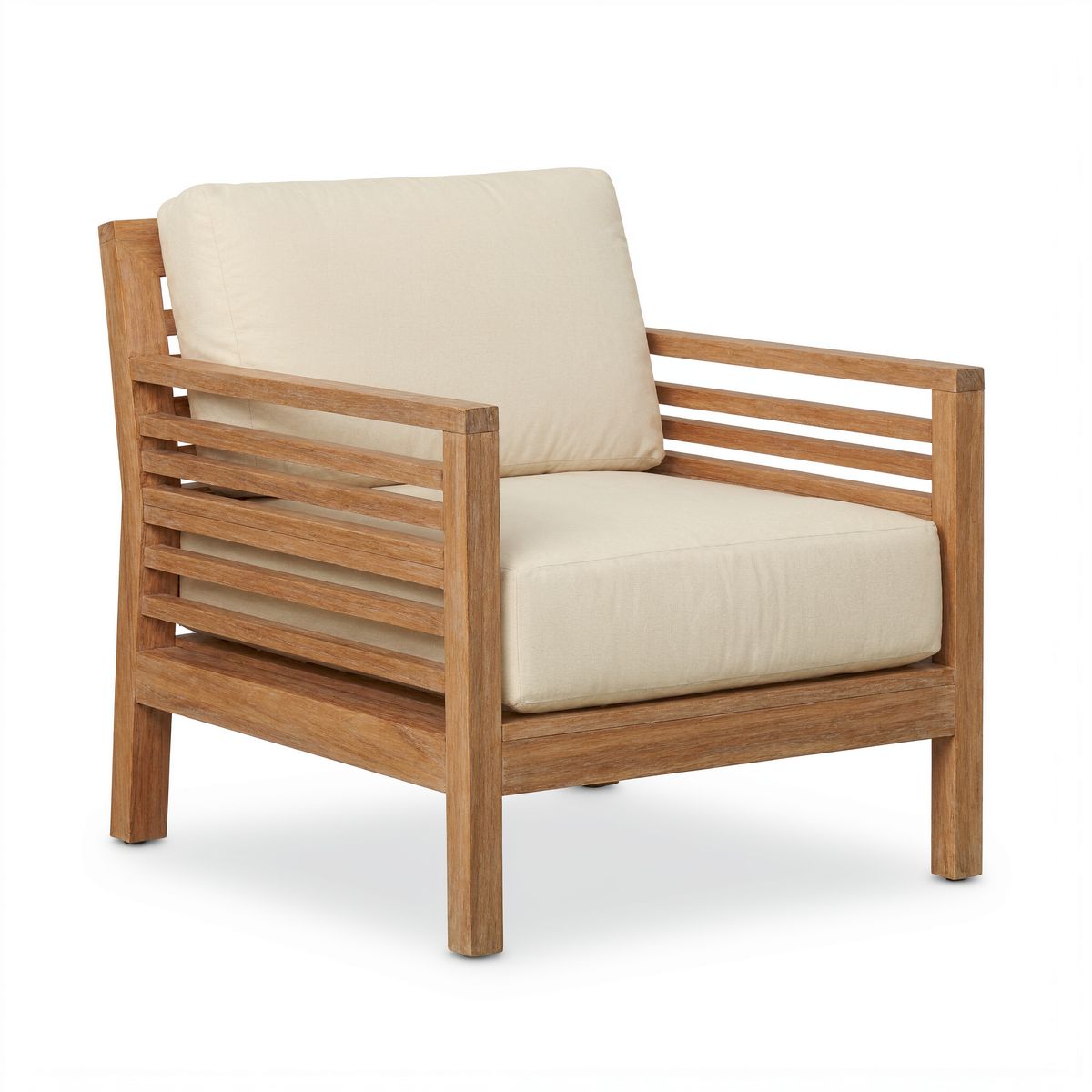
An e-commerce product photo of a teak outdoor lounge chair with thick cream cushions and slatted armrests, three-quarter view, on a white background. Even soft light, the chair centered and filling most of the frame. Photoreal product photography.
[
  { "referenceIndex": 0, "x": 0.36, "y": 0.33, "width": 0.3, "height": 0.4, "label": "spot" },
  { "referenceIndex": 1, "x": 0.05, "y": 0.12, "width": 0.9, "height": 0.8, "label": "chair" }
]

The spot box sits on the patio, the first image, so it is where the edit happens. The chair box sits on the packshot, the second image, so it tells the model which object to take. The teak chair comes back where the plastic one stood, at the same scale, in the patio's warm side light with the shadow of its slats on the paving.
A source box matters most when the reference holds more than one thing: a catalog page with several products, or a room photo where only the lamp is wanted. With a clean packshot it still removes any doubt about what the prompt means by @chair.
import { createClient } from '@runware/sdk'

const client = await createClient({ apiKey: process.env.RUNWARE_API_KEY })
await client.connect()

const [result] = await client.run({
  model: 'krea:krea@3',
  positivePrompt: 'Replace the plastic chair in @spot with @chair, at the same scale and position, lit by the warm afternoon sun of the patio with a soft shadow on the paving. Keep the patio, the wall and the lemon tree unchanged.',
  width: 2368,
  height: 1776,
  seed: 3102,
  inputs: {
    referenceImages: [
      'https://assets.runware.ai/guides/krea-3/edit-regions/source-patio.jpg',
      'https://assets.runware.ai/guides/krea-3/edit-regions/ref-chair.jpg'
    ]
  },
  settings: {
    thinkingLevel: 'high',
    editRegions: [
      {
        referenceIndex: 0,
        x: 0.36,
        y: 0.33,
        width: 0.3,
        height: 0.4,
        label: 'spot'
      },
      {
        referenceIndex: 1,
        x: 0.05,
        y: 0.12,
        width: 0.9,
        height: 0.8,
        label: 'chair'
      }
    ]
  }
})
import asyncio
import os
from runware import Runware
async def main():
async with Runware(api_key=os.environ["RUNWARE_API_KEY"]) as client:
results = await client.run({
"model": "krea:krea@3",
"positivePrompt": "Replace the plastic chair in @spot with @chair, at the same scale and position, lit by the warm afternoon sun of the patio with a soft shadow on the paving. Keep the patio, the wall and the lemon tree unchanged.",
"width": 2368,
"height": 1776,
"seed": 3102,
"inputs": {
"referenceImages": [
"https://assets.runware.ai/guides/krea-3/edit-regions/source-patio.jpg",
"https://assets.runware.ai/guides/krea-3/edit-regions/ref-chair.jpg"
]
},
"settings": {
"thinkingLevel": "high",
"editRegions": [
{
"referenceIndex": 0,
"x": 0.36,
"y": 0.33,
"width": 0.3,
"height": 0.4,
"label": "spot"
},
{
"referenceIndex": 1,
"x": 0.05,
"y": 0.12,
"width": 0.9,
"height": 0.8,
"label": "chair"
}
]
}
})
asyncio.run(main())curl https://api.runware.ai/v1 \
-H "Authorization: Bearer $RUNWARE_API_KEY" \
-H "Content-Type: application/json" \
-d '[
{
  "taskType": "imageInference",
  "taskUUID": "2b6e9a4d-7c1f-4e38-a5b0-9f3d6c1e8a72",
  "model": "krea:krea@3",
  "positivePrompt": "Replace the plastic chair in @spot with @chair, at the same scale and position, lit by the warm afternoon sun of the patio with a soft shadow on the paving. Keep the patio, the wall and the lemon tree unchanged.",
  "width": 2368,
  "height": 1776,
  "seed": 3102,
  "inputs": {
    "referenceImages": [
      "https://assets.runware.ai/guides/krea-3/edit-regions/source-patio.jpg",
      "https://assets.runware.ai/guides/krea-3/edit-regions/ref-chair.jpg"
    ]
  },
  "settings": {
    "thinkingLevel": "high",
    "editRegions": [
      {
        "referenceIndex": 0,
        "x": 0.36,
        "y": 0.33,
        "width": 0.3,
        "height": 0.4,
        "label": "spot"
      },
      {
        "referenceIndex": 1,
        "x": 0.05,
        "y": 0.12,
        "width": 0.9,
        "height": 0.8,
        "label": "chair"
      }
    ]
  }
}
]'runware run krea:krea@3 \
positivePrompt="Replace the plastic chair in @spot with @chair, at the same scale and position, lit by the warm afternoon sun of the patio with a soft shadow on the paving. Keep the patio, the wall and the lemon tree unchanged." \
width=2368 \
height=1776 \
seed=3102 \
inputs.referenceImages.0=https://assets.runware.ai/guides/krea-3/edit-regions/source-patio.jpg \
inputs.referenceImages.1=https://assets.runware.ai/guides/krea-3/edit-regions/ref-chair.jpg \
settings.thinkingLevel=high \
settings.editRegions.0.referenceIndex=0 \
settings.editRegions.0.x=0.36 \
settings.editRegions.0.y=0.33 \
settings.editRegions.0.width=0.3 \
settings.editRegions.0.height=0.4 \
settings.editRegions.0.label=spot \
settings.editRegions.1.referenceIndex=1 \
settings.editRegions.1.x=0.05 \
settings.editRegions.1.y=0.12 \
settings.editRegions.1.width=0.9 \
settings.editRegions.1.height=0.8 \
settings.editRegions.1.label=chair{
"taskType": "imageInference",
"taskUUID": "2b6e9a4d-7c1f-4e38-a5b0-9f3d6c1e8a72",
"model": "krea:krea@3",
"positivePrompt": "Replace the plastic chair in @spot with @chair, at the same scale and position, lit by the warm afternoon sun of the patio with a soft shadow on the paving. Keep the patio, the wall and the lemon tree unchanged.",
"width": 2368,
"height": 1776,
"seed": 3102,
"inputs": {
"referenceImages": [
"https://assets.runware.ai/guides/krea-3/edit-regions/source-patio.jpg",
"https://assets.runware.ai/guides/krea-3/edit-regions/ref-chair.jpg"
]
},
"settings": {
"thinkingLevel": "high",
"editRegions": [
{
"referenceIndex": 0,
"x": 0.36,
"y": 0.33,
"width": 0.3,
"height": 0.4,
"label": "spot"
},
{
"referenceIndex": 1,
"x": 0.05,
"y": 0.12,
"width": 0.9,
"height": 0.8,
"label": "chair"
}
]
}
}Changing printed text
A box around a label lets you rewrite the words and keep everything else on the package. Quote the old text and the new text in the prompt, and name what has to stay: the typeface, the size, the illustration and the paper.

A glass jar of golden honey with a wooden lid standing alone in the center of a light wooden kitchen counter, a white tiled wall behind. A rectangular kraft paper label wraps the middle of the jar, printed with the word "WILDFLOWER" in black serif capitals and a small bee illustration above it. Soft window light from the left. Straight-on shot at counter height, 85mm lens, the jar filling the middle third of the frame. Photoreal product photography, warm palette.

Change the word printed on @jarlabel from "WILDFLOWER" to "ORANGE BLOSSOM", in the same black serif capitals, size and position, keeping the bee illustration and the kraft paper.
The jar, the honey, the lid and the counter are outside the box and do not move. Inside it, the new name is set in the same black serif capitals as the old one, which is what a brand needs when one photographed jar has to become every flavor in the range.
Tips for best results
- Box the whole object. The box is the area the model may change, so it has to hold the object and anything larger that replaces it.
- Label boxes once you have more than a couple.
@plantsurvives reordering the array, and@3points at whatever box is third. - Put region-specific changes in notes. The prompt then only has to say what stays, and each box carries its own instruction.
- Keep labels to one word. Whitespace in a label is rejected, so use
jarlabelorjar_label. - Box the source object too. On a second reference, a box picks one object out of everything else in the image.
- Use
highfor several regions. A request with more than one change is a multi-step edit, which is what the stronger planning step is for. - Give a large recolor its own request. Next to other regions at
2K, a recolored sofa or run of cabinet doors can keep part of its original color. - Quote old and new text. In a text edit, naming the current words points the model at the characters to replace.