Wan3.0

Wan3.0 is Alibaba's higher-end all-in-one multimodal video model for longer, reference-heavy, production-oriented creation. It combines text-to-video, first- and last-frame image-to-video, reference-driven video generation, localized video editing, and temporal extension in one model, with support for image, video, audio, document, and webpage inputs. It is especially well suited to branded storytelling, product demos, explainers, music-led sequences, and other commercial workflows that need stronger character or product consistency, more impactful audiovisual motion, and tighter control over complex multi-input prompts.
Image inputs with Wan 3.0
How to use images with Wan 3.0's video generation: pin an image as the first frame, morph between two frames, and carry subject or product identity across new scenes with reference images.
Introduction
Wan 3.0 accepts images as input in two mechanically distinct roles. frameImages puts your image on screen at a specific frame position, pixel-close. referenceImages uses your image only for subject or product identity, and never renders it on screen. Which field the image goes into decides how the model uses it: as the opening frame of the shot, as the closing frame of a morph, or as a hidden identity anchor for a new scene the prompt describes.
The example below is the simplest single-frame case. A still product photograph is passed to Wan 3.0 as the single frame-image at position "first". The video opens on that exact frame and continues into motion: a hand enters, picks up the bottle, uncaps it, and applies a drop.
Use this image as the first frame. An 8-second beauty product spot: the camera holds locked on the skincare bottle for a beat, then a woman's hand in soft focus enters from the top of the frame, gently picks up the bottle, unscrews the cap and sets the cap aside on the marble, tilts the bottle over her wrist and squeezes out a small drop of clear serum. The camera stays locked in the same wide 16:9 framing throughout. Warm morning bathroom light unchanged. Audio: the soft click of the cap being unscrewed, the light tap of the cap set down on marble, the faint tick of the dropper, quiet bathroom ambience with distant birdsong through an open window. No music, no on-screen text beyond the label on the bottle.
- First frame
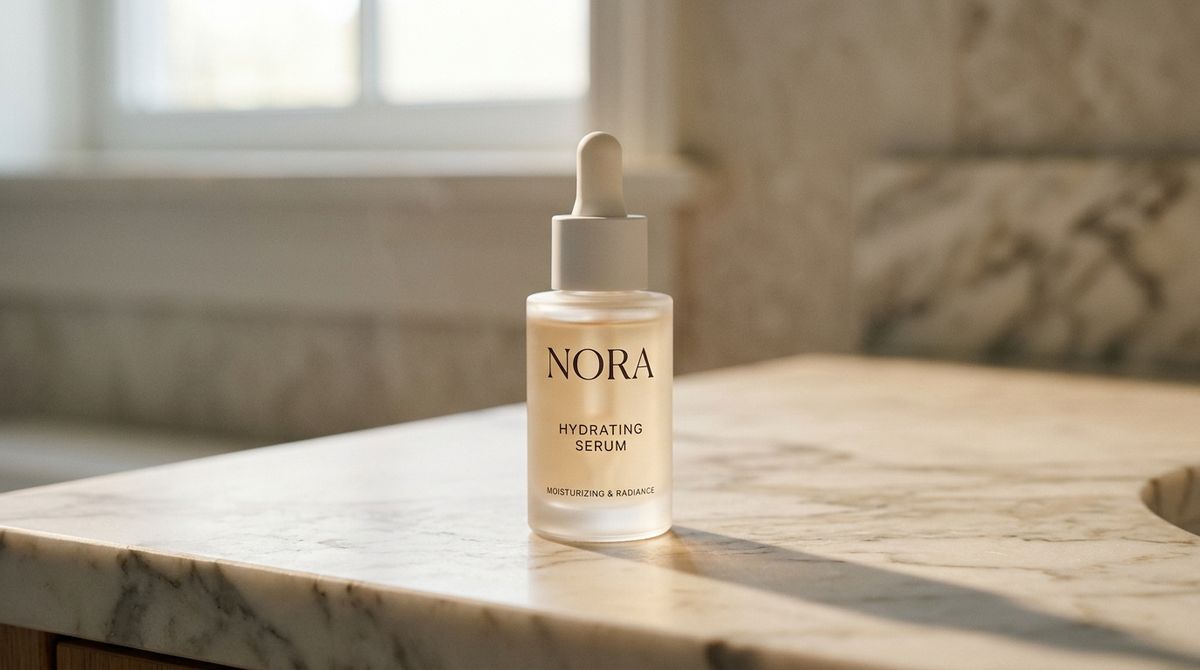
A premium skincare serum bottle centred on a warm marble bathroom counter in morning light. The bottle has a slim frosted-glass body, a matte-white cap, and a clean minimal label reading "NORA" in dark serif capitals with "HYDRATING SERUM" underneath in smaller sans. Soft directional daylight from the upper left creates a gentle shadow to the right. Photoreal editorial product photography, wide 16:9 framing with the bottle centred, no other objects, no additional text.

This guide covers frameImages for pinning images on screen (single first frame, or two-frame morph), referenceImages for identity carry across new scenes, and how to choose between them when you have a source image that could go either way.
Request shape
frameImages and referenceImages are attached under inputs, and they're mutually exclusive per request. Each image can be a UUID, a URL, a data URI, or Base64. For a first-frame pin, frameImages takes an array with one item that sets frame: "first".
import { createClient } from '@runware/sdk'

const client = await createClient({ apiKey: process.env.RUNWARE_API_KEY })
await client.connect()

const [result] = await client.run({
  model: 'alibaba:wan@3.0',
  positivePrompt: 'Use this image as the first frame. An 8-second beauty product spot: the camera holds locked on the skincare bottle for a beat, then a woman\'s hand in soft focus enters from the top of the frame, gently picks up the bottle, unscrews the cap and sets the cap aside on the marble, tilts the bottle over her wrist and squeezes out a small drop of clear serum. Warm morning bathroom light unchanged. Audio: the soft click of the cap being unscrewed, the light tap of the cap set down on marble, the faint tick of the dropper, quiet bathroom ambience. No music, no on-screen text beyond the label on the bottle.',
  inputs: {
    frameImages: [
      {
        image: 'https://im.runware.ai/image/os/a14d18/ws/2/ii/aabb1122-3344-5566-7788-99aabbccddee.jpg',
        frame: 'first'
      }
    ]
  },
  resolution: '1080p',
  duration: 8
})
import asyncio
import os
from runware import Runware
async def main():
async with Runware(api_key=os.environ["RUNWARE_API_KEY"]) as client:
results = await client.run({
"model": "alibaba:wan@3.0",
"positivePrompt": "Use this image as the first frame. An 8-second beauty product spot: the camera holds locked on the skincare bottle for a beat, then a woman's hand in soft focus enters from the top of the frame, gently picks up the bottle, unscrews the cap and sets the cap aside on the marble, tilts the bottle over her wrist and squeezes out a small drop of clear serum. Warm morning bathroom light unchanged. Audio: the soft click of the cap being unscrewed, the light tap of the cap set down on marble, the faint tick of the dropper, quiet bathroom ambience. No music, no on-screen text beyond the label on the bottle.",
"inputs": {
"frameImages": [
{
"image": "https://im.runware.ai/image/os/a14d18/ws/2/ii/aabb1122-3344-5566-7788-99aabbccddee.jpg",
"frame": "first"
}
]
},
"resolution": "1080p",
"duration": 8
})
asyncio.run(main())curl https://api.runware.ai/v1 \
-H "Authorization: Bearer $RUNWARE_API_KEY" \
-H "Content-Type: application/json" \
-d '[
{
  "taskType": "videoInference",
  "taskUUID": "a1b2c3d4-e5f6-7890-abcd-ef1234567890",
  "model": "alibaba:wan@3.0",
  "positivePrompt": "Use this image as the first frame. An 8-second beauty product spot: the camera holds locked on the skincare bottle for a beat, then a woman's hand in soft focus enters from the top of the frame, gently picks up the bottle, unscrews the cap and sets the cap aside on the marble, tilts the bottle over her wrist and squeezes out a small drop of clear serum. Warm morning bathroom light unchanged. Audio: the soft click of the cap being unscrewed, the light tap of the cap set down on marble, the faint tick of the dropper, quiet bathroom ambience. No music, no on-screen text beyond the label on the bottle.",
  "inputs": {
    "frameImages": [
      {
        "image": "https://im.runware.ai/image/os/a14d18/ws/2/ii/aabb1122-3344-5566-7788-99aabbccddee.jpg",
        "frame": "first"
      }
    ]
  },
  "resolution": "1080p",
  "duration": 8
}
]'runware run alibaba:wan@3.0 \
positivePrompt="Use this image as the first frame. An 8-second beauty product spot: the camera holds locked on the skincare bottle for a beat, then a woman's hand in soft focus enters from the top of the frame, gently picks up the bottle, unscrews the cap and sets the cap aside on the marble, tilts the bottle over her wrist and squeezes out a small drop of clear serum. Warm morning bathroom light unchanged. Audio: the soft click of the cap being unscrewed, the light tap of the cap set down on marble, the faint tick of the dropper, quiet bathroom ambience. No music, no on-screen text beyond the label on the bottle." \
inputs.frameImages.0.image=https://im.runware.ai/image/os/a14d18/ws/2/ii/aabb1122-3344-5566-7788-99aabbccddee.jpg \
inputs.frameImages.0.frame=first \
resolution=1080p \
duration=8{
"taskType": "videoInference",
"taskUUID": "a1b2c3d4-e5f6-7890-abcd-ef1234567890",
"model": "alibaba:wan@3.0",
"positivePrompt": "Use this image as the first frame. An 8-second beauty product spot: the camera holds locked on the skincare bottle for a beat, then a woman's hand in soft focus enters from the top of the frame, gently picks up the bottle, unscrews the cap and sets the cap aside on the marble, tilts the bottle over her wrist and squeezes out a small drop of clear serum. Warm morning bathroom light unchanged. Audio: the soft click of the cap being unscrewed, the light tap of the cap set down on marble, the faint tick of the dropper, quiet bathroom ambience. No music, no on-screen text beyond the label on the bottle.",
"inputs": {
"frameImages": [
{
"image": "https://im.runware.ai/image/os/a14d18/ws/2/ii/aabb1122-3344-5566-7788-99aabbccddee.jpg",
"frame": "first"
}
]
},
"resolution": "1080p",
"duration": 8
}Response
[
  {
    "taskType": "videoInference",
    "taskUUID": "a1b2c3d4-e5f6-7890-abcd-ef1234567890",
    "videoUUID": "b2c3d4e5-f6a7-8901-bcde-f12345678901",
    "videoURL": "https://vm.runware.ai/video/os/a14d18/ws/2/vi/b2c3d4e5-f6a7-8901-bcde-f12345678901.mp4"
  }
]
Two rules about dimensions apply when an input is attached: width and height are not allowed (they're required only for text-to-video), and the output aspect ratio comes from the attached image. Pick the tier with resolution (480p, 720p, or 1080p) or omit it to fall back to the 1080p default.
Single first-frame pin
frameImages with one entry pinned to "first" (or numeric frame index 0) puts your source image on screen at the opening frame. Wan 3.0 then generates the rest of the clip forward from that frame, carrying the source's composition, lighting, and subject through into the motion that follows.
The skincare hero above uses this pattern. The prompt opens with "Use this image as the first frame" so the model reads the source as a starting point rather than a general style reference. The subsequent prose describes what happens next: a hand enters, unscrews the cap, applies a drop. The rest is inference, but the opening is anchored.
frameImages is strong guidance, not a pixel-perfect pin. The opening frame lands close to the source image and drives the composition, but the model has some interpretive latitude: small drift on framing, occasional small differences in reflection or texture. Most first takes are good. Some warrant a re-roll. Don't expect bit-identical results across runs.
Reach for this pattern when the source image is the deliverable and the video should animate around it. Packshots that need to become "living" versions of themselves are the canonical case: an ecommerce brand can ship a still packshot and a short animated version of it from the same source.
Other content types that map well to first-frame pinning:
- Product packshots → animated versions of the same product in motion
- Book or magazine covers → an opening reveal into the interior
- Brand logos or signage → animated reveal or lighting on
- Real estate stills → camera moving through the space
- Character illustrations → animated versions of the same character
- Food packshots → a hand entering to interact with the dish
- Fashion stills → model turning or walking from the pose
Two-frame morph
frameImages with exactly two entries (one pinned to "first", one to "last") is the transformation pattern. Wan 3.0 generates the motion that turns the first image into the second. Before/after, product-in-motion, environment transformations, packaging reveals, room reconfigurations all fit this shape.
An 8-second locked-off time-lapse morph between the two frame images: the empty living room at the start, the fully furnished living room at the end. Interpolate a fast-motion assembly of the furniture between the pinned frames: sofa materialising into place against the back wall, coffee table appearing centred in front of it, art appearing on the wall above the sofa, rug unfurling beneath, floor lamp switching on in the far right corner. Camera stays locked in the same wide 16:9 framing throughout. Warm morning light unchanged. Audio: soft ambient room tone, the faint whoosh of the assembly, quiet birdsong through the window. No music, no on-screen text.
- First: empty room
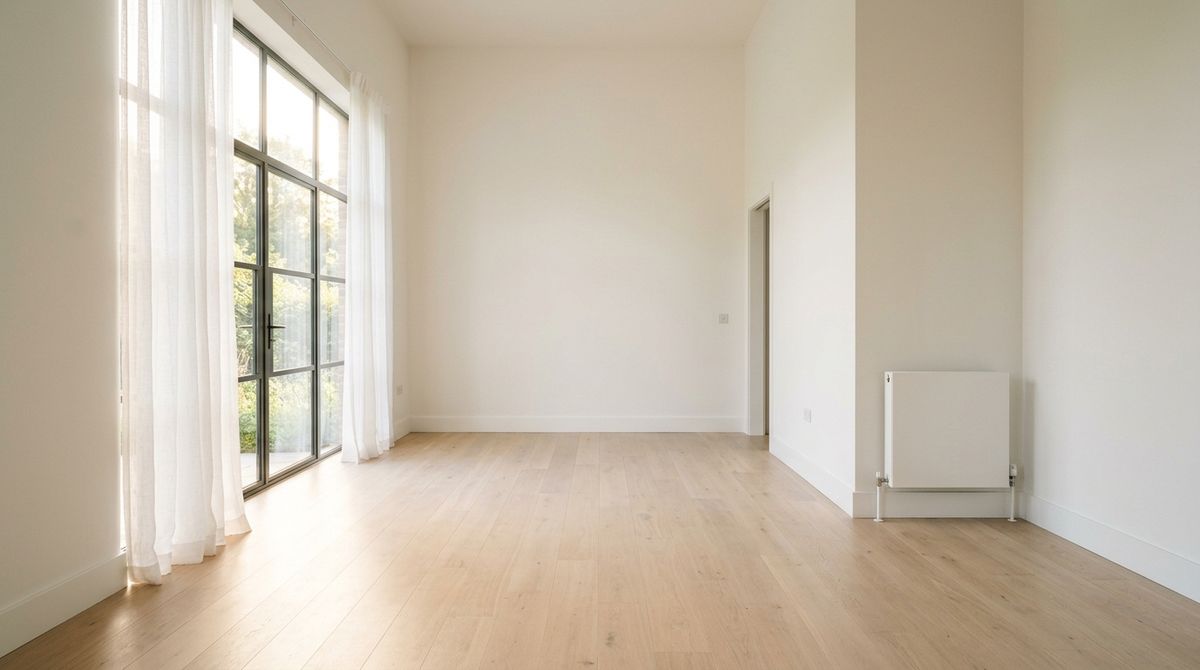
A locked-off wide 16:9 shot of an empty modern living room in warm morning light. Pale hardwood floors, tall white walls, one large window on the left with sheer curtains, no furniture at all, one clean corner with a plain white radiator. Warm daylight streams in through the window. Photoreal editorial architectural photography, no on-screen text, no people in frame.
- Last: furnished room
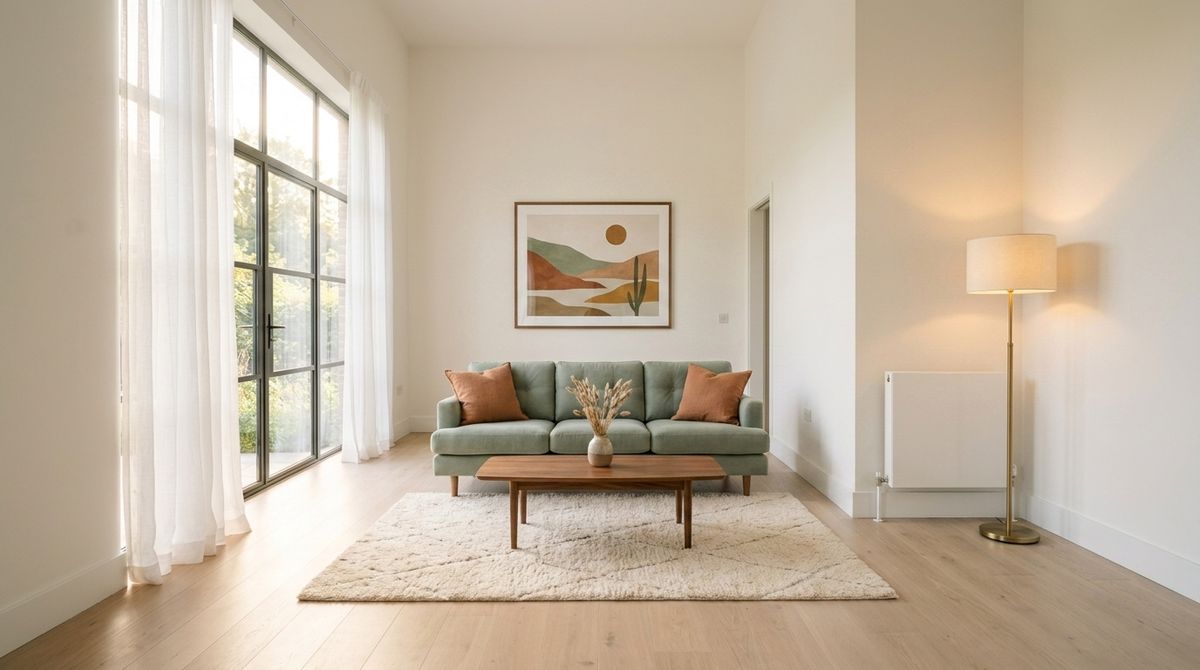
The exact same wide 16:9 shot of the same living room from the same locked-off angle in the same warm morning light, unchanged in every detail of the walls, floors, window, and framing. Now the room is fully furnished: a soft sage-green three-seater sofa centred against the back wall with two warm terracotta throw pillows, a low warm-walnut coffee table in front of it holding a small ceramic vase of dried grasses, a soft cream Berber rug beneath the coffee table, a floor lamp with a warm shade in the far right corner, and a large framed print of an abstract landscape above the sofa. Warm daylight from the window unchanged. Photoreal editorial architectural photography, no on-screen text, no people in frame.


The two-frame morph works cleanly when the images share composition: same camera position, same lighting, same wall/floor/window elements, only the content of the room changing. Radical composition changes between the two frames (a different camera angle, a different room entirely, a wildly different lighting scheme) don't interpolate cleanly.
For morphs where the change is additive (new objects appearing that weren't in the first frame), Wan 3.0 tends to render the transition as a time-lapse or materialisation rather than a physical placement. That's honest to what the pinned frames actually contain: neither shows a hand mid-placement, so the model has no visible motion to render. Naming the transition as a "time-lapse assembly" in the prompt gives the model permission to lean into that behaviour rather than fighting it.
Other content types that map well to two-frame morphs:
- Skincare or fitness before/after transformations
- Time-of-day shifts on the same location (dawn to dusk, seasons)
- Product colour or configuration variants (colour A → colour B, size A → size B)
- Home or workspace renovations (before → after)
- Packaging reveals (sealed → opened, closed box → contents arranged)
- Product-in-use progressions (unlit candle → lit candle, empty glass → filled glass)
- Landscape transformations (empty lot → constructed building)
Reference images for subject or product carry
referenceImages uses your images only for identity. The reference itself never appears in the video. Wan 3.0 reads the image to understand who or what the subject is, then generates a brand new clip in the scene the prompt describes. Up to 10 reference images per call.
The woman from the reference image is now in a warm modern kitchen at golden hour, standing at a large kitchen island preparing a fresh salad in a wooden bowl. She is wearing her same cream linen shirt, hair still in a loose low bun, chopping tomatoes with a chef's knife and adding them to the bowl. She glances up briefly and says naturally: "The trick is letting the vegetables breathe. Salt them, wait five minutes, then dress them." Warm evening light through a large window behind her, the kitchen softly out of focus. Camera locked at chest height in a mid-shot. Audio: her voice clean and warm, the crisp tap of the knife on the cutting board, quiet kitchen ambience, distant street sound through an open window. No music, no on-screen text, no subtitles.
- The spokesperson
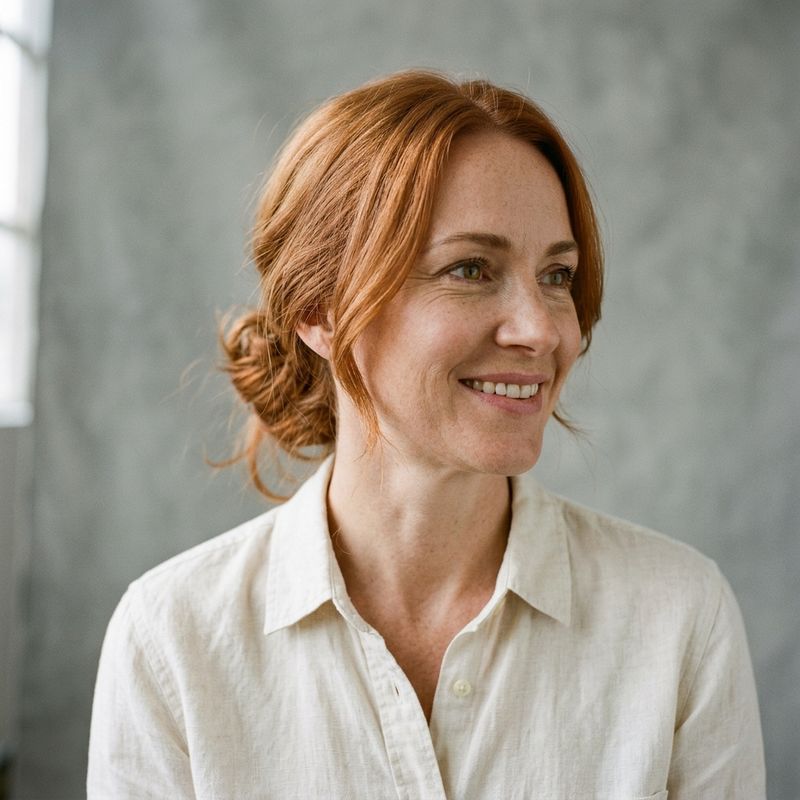
A photoreal editorial portrait of a woman in her late thirties with medium-length copper-red hair pulled into a loose low bun, warm hazel eyes, subtle freckles, and a plain cream linen shirt. She is smiling gently and looking slightly off-camera to the right. Neutral soft-grey studio backdrop, soft directional lighting from the upper left. Head-and-shoulders framing, no other subjects, no text. Editorial photography aesthetic.

The reference locked her identity (copper-red hair in a low bun, hazel eyes, cream linen shirt) and the prompt described a completely new setting she never appears in from the reference. Wan 3.0 built the kitchen scene fresh and placed her inside it, lip-synced to the quoted line.
Reference images accept up to 10 images. For a specific person or product, one clean reference is usually enough. For characters that need to appear from multiple angles or in different poses across a series, 3 to 5 references from different views hold identity better than a single shot. For a specific product where the branding has to read consistently, a single clean product photograph works.
Other content types that map well to reference images:
- Recurring brand mascots across a campaign or series
- Products placed in different lifestyle scenes (bathroom, kitchen, gym, outdoors)
- Fashion models in different outfits or contexts
- Characters carried across episodic content
- Team members shown in new settings for company content
- Specific packaging placed in real-world consumer scenes
- Personalised video content where a user's own photo becomes the video subject
referenceImages can be combined with referenceVideos and referenceAudios in the same request. The one thing that can't share a call with referenceImages is frameImages. See the video and audio references guide for how the multi-modal reference combinations work together.
Choosing between frameImages and referenceImages
The choice depends on what the source image is doing in the deliverable. Sometimes the same source works either way, and the choice reads on screen very differently.
The pair below runs one source through both modes. The source is a photoreal product shot of a supplement bottle. On the left, the source is pinned as the first frame of a video and the camera rotates around it as a product hero. On the right, the source is passed as a reference image only, and Wan 3.0 renders the bottle in a lifestyle scene it was never actually in.

A photoreal editorial product hero shot of a premium wellness supplement bottle standing centred on a soft matte-white surface. The bottle has a warm amber glass body, a white flat cap, and a clean minimal label reading "ALTA" in serif capitals with "DAILY IMMUNITY" underneath in smaller sans. Soft directional daylight from the upper left creates a gentle shadow to the right. Wide 16:9 framing with the bottle centred, no other objects, no additional text.
Use this image as the first frame. An 8-second product spot: the camera holds locked on the supplement bottle for a beat, then rotates slowly around it in a tight orbit, revealing the sides of the label and the amber glass catching the light from different angles. The camera returns to a front-facing position at the end. Soft directional daylight unchanged. Audio: only quiet ambient studio tone, no music. No on-screen text beyond the label on the bottle.
A woman's hand in soft focus places the supplement bottle from the reference image on a warm walnut kitchen counter beside a small glass of water at breakfast time. Morning sunlight through a window on the left, a small potted plant softly blurred in the background. The hand withdraws and the camera holds on the bottle and glass for a beat. 8-second locked-off wide 16:9 shot. Audio: the light tap of the bottle placed down on wood, the soft clink of the glass, quiet morning kitchen ambience, faint distant birdsong. No music, no on-screen text beyond the label on the bottle.
Same source image, radically different outputs. The frameImages clip opens on the exact product shot and animates the camera around it, keeping the studio backdrop and lighting intact. The referenceImages clip keeps the bottle's identity (the amber glass, the label, the ALTA branding) but places it in a kitchen scene it was never in, with a hand, a glass of water, and morning light generated fresh from the prompt.
The practical decision follows from that:
- Reach for
frameImageswhen the source image is itself the deliverable and the video should animate around it. Product hero animations, packshot reveals, and any deliverable where the source's exact composition is part of the value. - Reach for
referenceImageswhen the subject or product has to appear in scenes the source photograph doesn't cover. Product-in-lifestyle content, spokespersons in new settings, characters across a series, brand mascots in new campaigns.
Sending both fields in one request returns a validation error, since Wan 3.0 uses only one or the other per call. Pick the one that matches what the source image is doing in the deliverable.
Tips
-
Open frameImages prompts with "use this image as the first frame". Explicit framing tells the model to treat the pinned image as an opening anchor rather than a general style reference.
-
Match the input image aspect to the intended output. The output takes its aspect from the attached input, so a 16:9 source gives a 16:9 output. A vertical source gives a vertical output. Generate the source at the aspect you want the video to be.
-
Two-frame morphs work best when the frames share composition. Same camera position, same lighting, same core elements with only some properties changing (state, arrangement, colour). Radical composition changes need a different technique.
-
Additive morphs render as time-lapse. When the second frame has objects the first doesn't (like a furnished room from an empty one), Wan 3.0 tends to materialise the new content rather than render a physical hand placing it. Lean into that in the prompt ("time-lapse assembly") rather than fighting it.
-
referenceImagesnever appears on screen. The source image is used only for identity. If the source image itself needs to be visible in the output, useframeImagesinstead. -
One clean reference is usually enough for a product. Multiple angles help for characters and complex subjects. For a specific product where the branding has to read, a single clean product photograph works.
-
Give references clean silhouettes. A subject centred on a plain or softly blurred backdrop reads faster than one embedded in a busy scene. Busy backgrounds pull the model's attention onto surrounding shapes and dilute the identity signal.
-
Match the reference lighting to the target scene when you can. A reference lit warm from the left tends to carry that lighting bias into the output. When the target scene has different light, the model has to reconcile the two, usually well but with more variance than a lighting-matched reference.
-
Version reference sets like brand assets. Once a set of references works for a specific character or product, reuse the exact same set for subsequent calls. Swapping in a "same but slightly different" replacement shifts the identity subtly. Hold the set stable across a series.
-
frameImagesandreferenceImagesare mutually exclusive. Send one or the other per request, not both. If you need both patterns for a single deliverable, generate two clips and edit them together.