HappyHorse 1.1

HappyHorse 1.1 is Alibaba's upgraded multimodal video model for text-to-video, image-to-video, and reference-to-video generation. It improves motion continuity, prompt following, character consistency, facial texture quality, cinematic shot logic, and audio-visual synchronization over HappyHorse 1.0, making it better suited to multi-shot storytelling, multi-character scenes, close-up performance, and reference-driven production workflows.
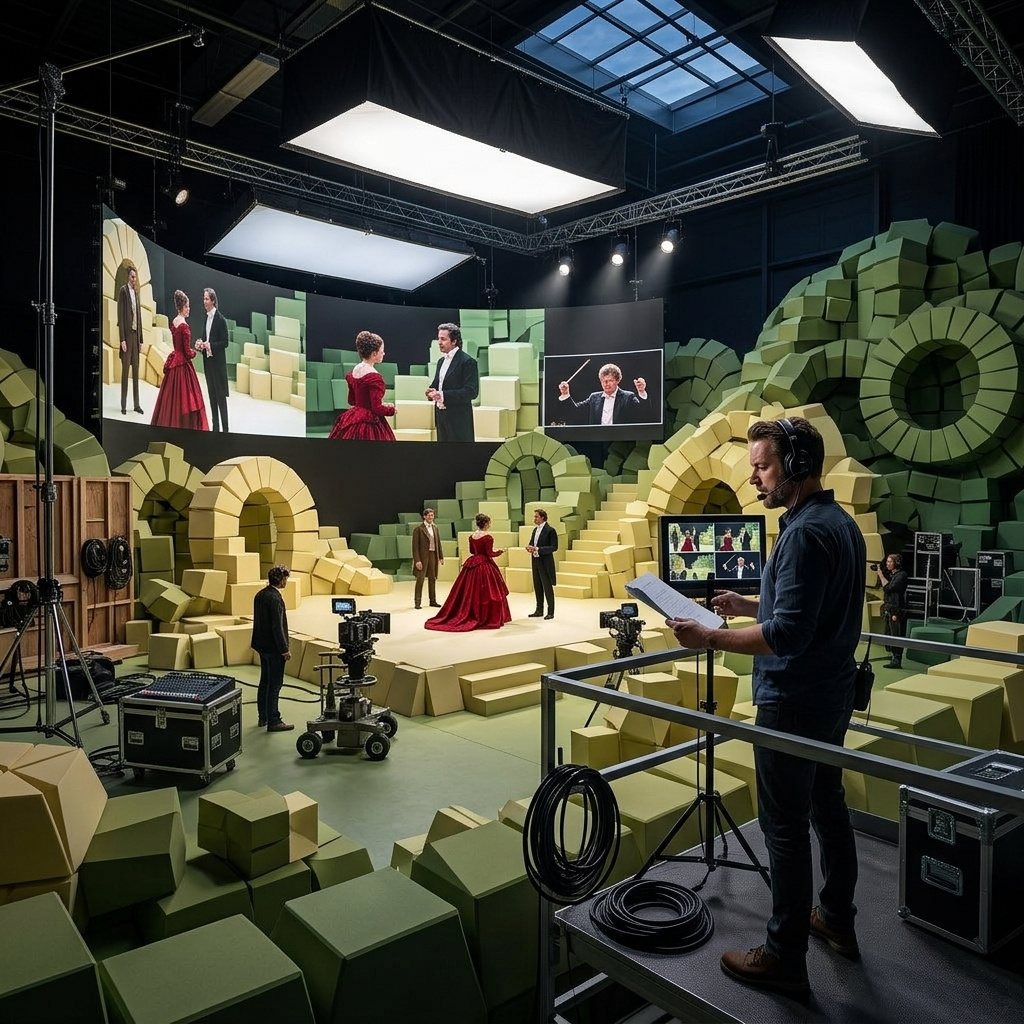
Casting multiple characters with reference images
How to use HappyHorse 1.1's reference workflow to cast one or more characters into a generated video and preserve their identity through every cut.
Introduction
Multi-character video usually means rolling the dice on identity. A text-to-video prompt asks for "a young woman with dark hair" and "an older man in a green coat", and the model invents two people who look one way in the wide shot and another way in the close-up. The producer signing off on the cast cannot point at a specific person. The model has only words.
HappyHorse 1.1 turns this around. You pass each character as a reference image to inputs.referenceImages, up to nine in a single call, and refer back to them by description in the prompt. The model treats the references as the truth and preserves the identities through every cut. Casting moves off the prompt and onto a stack of images.
A medieval guild meeting around a heavy oak table lit by tall iron candle stands. The burly blacksmith with thick black beard and leather apron sits to the left, the older herbalist in green hooded cloak sits opposite him to the right, the young scribe in brown wool robe sits between them with a scroll unrolled in front of him. Begin with a wide establishing shot of the three around the candlelit table. Cut to a close shot of the scribe's ink-stained hands smoothing the scroll. Shift to a side angle of the blacksmith leaning forward and pointing a thick finger at the parchment. End on the herbalist nodding gravely as she traces a finger across the scroll. Preserve the exact appearance of each character and the warm candlelit oak interior across every shot.
- Blacksmith
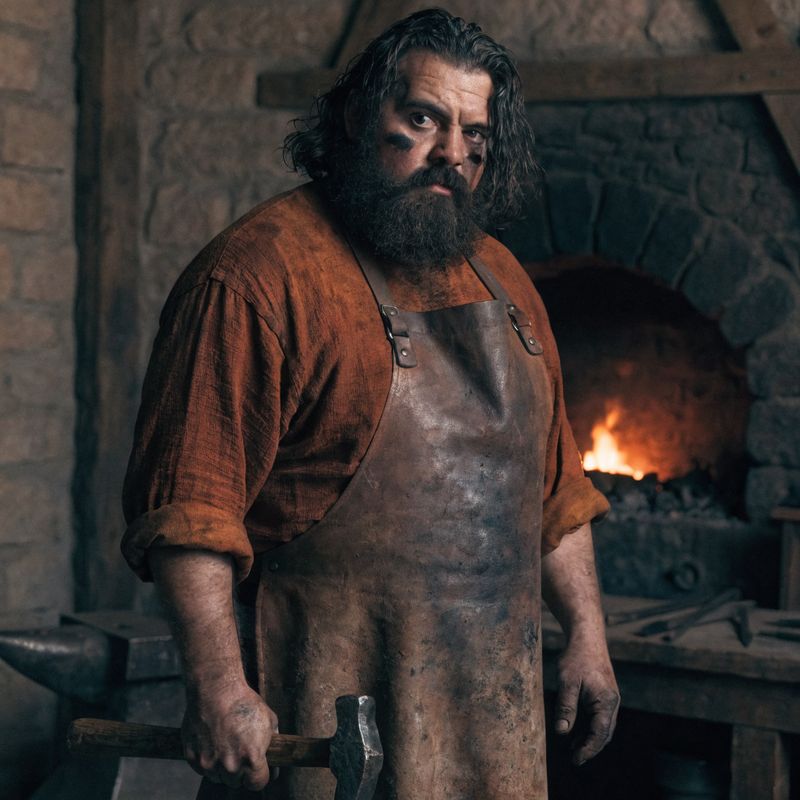
A burly medieval blacksmith standing in front of a stone forge, thick black beard and shoulder-length dark hair, broad shoulders, faded brown leather apron over a rust-colored linen shirt with rolled-up sleeves, a streak of soot across his right cheek, weathered calloused hands holding a worn iron hammer at his side
- Herbalist
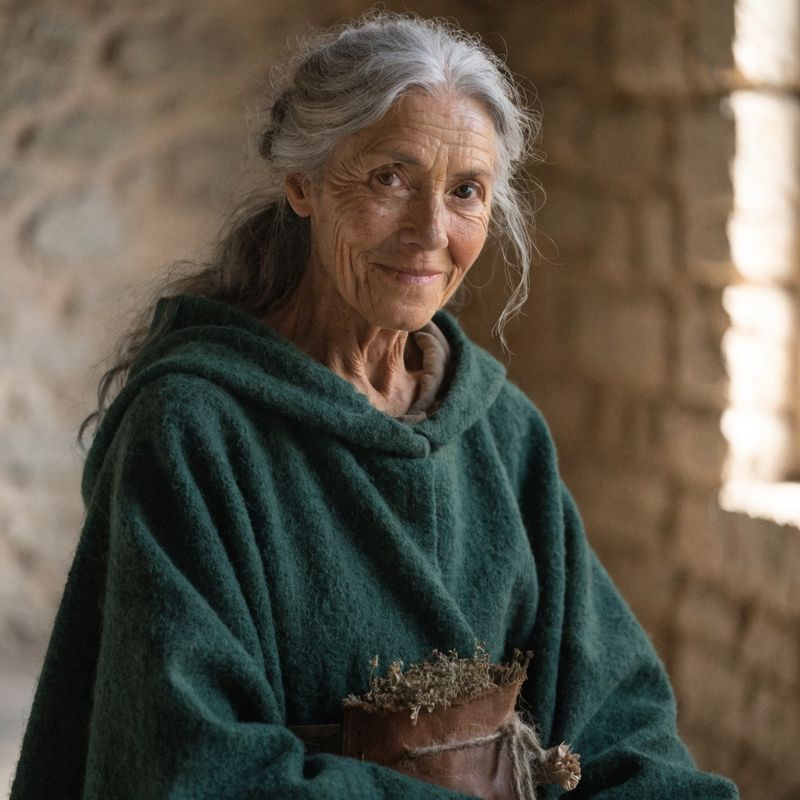
An older medieval herbalist woman in her sixties, long silver-grey hair pulled back, weathered face with bright kind eyes, deep forest-green hooded cloak draped over her shoulders, a small worn brown leather pouch of dried herbs and bundled flowers tied at her waist
- Scribe
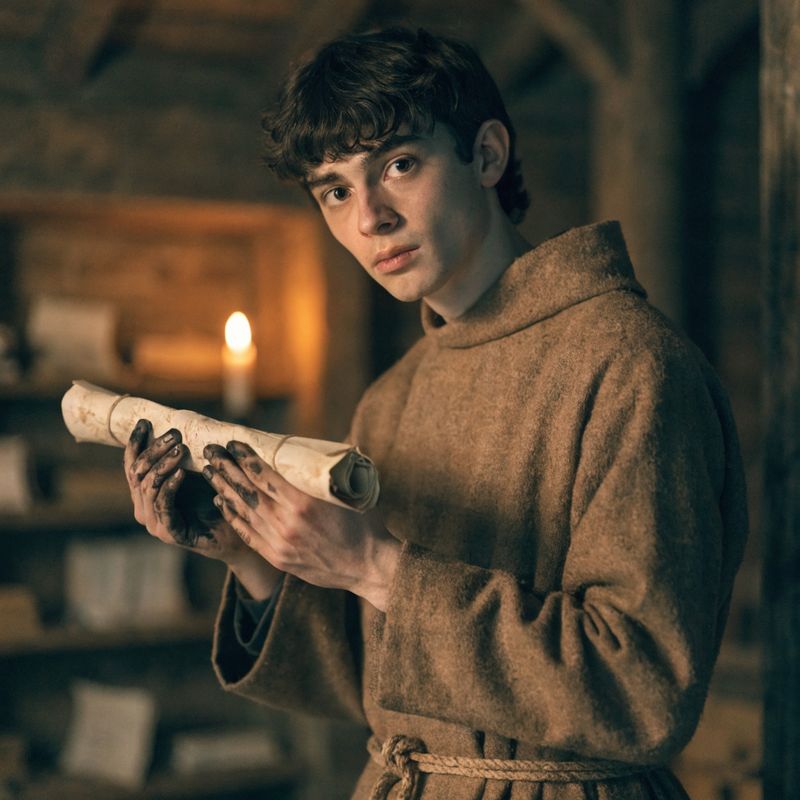
A young medieval scribe in his early twenties, short dark wavy hair, smooth pale face with a thoughtful expression, a simple un-dyed brown wool monk's robe with a knotted rope belt, ink-stained fingers holding a tightly rolled parchment scroll


The reel above used three reference images as its cast: the blacksmith, the herbalist, and the scribe. Each was generated separately as a clean mid-shot portrait, then passed alongside the prompt that placed them around the candlelit oak table. The model held all three identities through four cuts.
This guide covers the reference workflow end to end: starting from a single character, scaling up to multi-character scenes, separating the cast from the location with scene references, and combining a reference cast with a first-frame anchor when the opening composition also needs to be locked.
Request shape
A reference-driven HappyHorse 1.1 request takes a prompt and inputs.referenceImages. Set the output tier with resolution:
import { createClient } from '@runware/sdk'

const client = await createClient({ apiKey: process.env.RUNWARE_API_KEY })
await client.connect()

const [result] = await client.run({
  model: 'alibaba:happyhorse@1.1',
  positivePrompt: '...the blacksmith from the first reference image sits to the left, the herbalist from the second to the right, the scribe from the third between them...',
  inputs: {
    referenceImages: [
      'https://example.com/blacksmith.jpg',
      'https://example.com/herbalist.jpg',
      'https://example.com/scribe.jpg'
    ]
  },
  resolution: '1080p',
  duration: 11
})
import asyncio
import os
from runware import Runware
async def main():
async with Runware(api_key=os.environ["RUNWARE_API_KEY"]) as client:
results = await client.run({
"model": "alibaba:happyhorse@1.1",
"positivePrompt": "...the blacksmith from the first reference image sits to the left, the herbalist from the second to the right, the scribe from the third between them...",
"inputs": {
"referenceImages": [
"https://example.com/blacksmith.jpg",
"https://example.com/herbalist.jpg",
"https://example.com/scribe.jpg"
]
},
"resolution": "1080p",
"duration": 11
})
asyncio.run(main())curl https://api.runware.ai/v1 \
-H "Authorization: Bearer $RUNWARE_API_KEY" \
-H "Content-Type: application/json" \
-d '[
{
  "taskType": "videoInference",
  "taskUUID": "a1b2c3d4-e5f6-7890-abcd-ef1234567890",
  "model": "alibaba:happyhorse@1.1",
  "positivePrompt": "...the blacksmith from the first reference image sits to the left, the herbalist from the second to the right, the scribe from the third between them...",
  "inputs": {
    "referenceImages": [
      "https://example.com/blacksmith.jpg",
      "https://example.com/herbalist.jpg",
      "https://example.com/scribe.jpg"
    ]
  },
  "resolution": "1080p",
  "duration": 11
}
]'runware run alibaba:happyhorse@1.1 \
positivePrompt="...the blacksmith from the first reference image sits to the left, the herbalist from the second to the right, the scribe from the third between them..." \
inputs.referenceImages.0=https://example.com/blacksmith.jpg \
inputs.referenceImages.1=https://example.com/herbalist.jpg \
inputs.referenceImages.2=https://example.com/scribe.jpg \
resolution=1080p \
duration=11{
"taskType": "videoInference",
"taskUUID": "a1b2c3d4-e5f6-7890-abcd-ef1234567890",
"model": "alibaba:happyhorse@1.1",
"positivePrompt": "...the blacksmith from the first reference image sits to the left, the herbalist from the second to the right, the scribe from the third between them...",
"inputs": {
"referenceImages": [
"https://example.com/blacksmith.jpg",
"https://example.com/herbalist.jpg",
"https://example.com/scribe.jpg"
]
},
"resolution": "1080p",
"duration": 11
}Response
[
  {
    "taskType": "videoInference",
    "taskUUID": "a1b2c3d4-e5f6-7890-abcd-ef1234567890",
    "videoUUID": "9c1b2d3a-4e5f-6789-abcd-ef0123456789",
    "videoURL": "https://vm.runware.ai/video/os/a14d18/ws/2/vi/9c1b2d3a-4e5f-6789-abcd-ef0123456789.mp4"
  }
]
One required field, plus the inputs that define the mode:
positivePromptis required and capped at 2500 characters. Describe the scene and refer back to the cast by distinctive details from each reference image.inputs.referenceImagesaccepts up to 9 images. URLs, base64 strings, data URIs, or UUIDs from the Media Storage API. Each image is a character or scene the model will preserve in the output.inputs.frameImagesis optional, max 1, anchored to the first frame. Locks the opening composition. See Opening on a hero shot below.resolutionis"720p"(default) or"1080p". Valid wheneverreferenceImagesorframeImagesis present. Sets the output tier with the aspect ratio derived from the input images.widthandheightare not required in this mode, though they remain valid alongsidereferenceImagesif you want to lock the output to one of the model's 10 dimension combinations.durationis an integer from 3 to 15 seconds, default 5.
HappyHorse 1.1 has four modes that share the same model. Text-to-video needs width and height and no inputs. Image-to-video anchors the first frame via inputs.frameImages and uses resolution. Reference-to-video is the focus of this guide: cast via inputs.referenceImages with no anchor. Combined is the last section, with the anchor stacked on top of the cast.
One character, one scene
Start with a single reference. The character in the image is the one the model preserves through the cuts, and the prompt directs the action around her.
The vintage fortune teller from the reference image is seated at a small round table draped in deep red velvet in a candlelit interior. Begin with a medium shot of her shuffling an ornate deck of tarot cards. Cut to a close shot of her hands as she lays three cards face down on the red velvet. Shift to a slow push-in on her dramatic kohl-rimmed eyes as she glances up at the camera and turns over the centre card, revealing the Star arcana. End on a close shot of the revealed card on the velvet. Preserve her exact appearance across every shot.
- Tarot reader
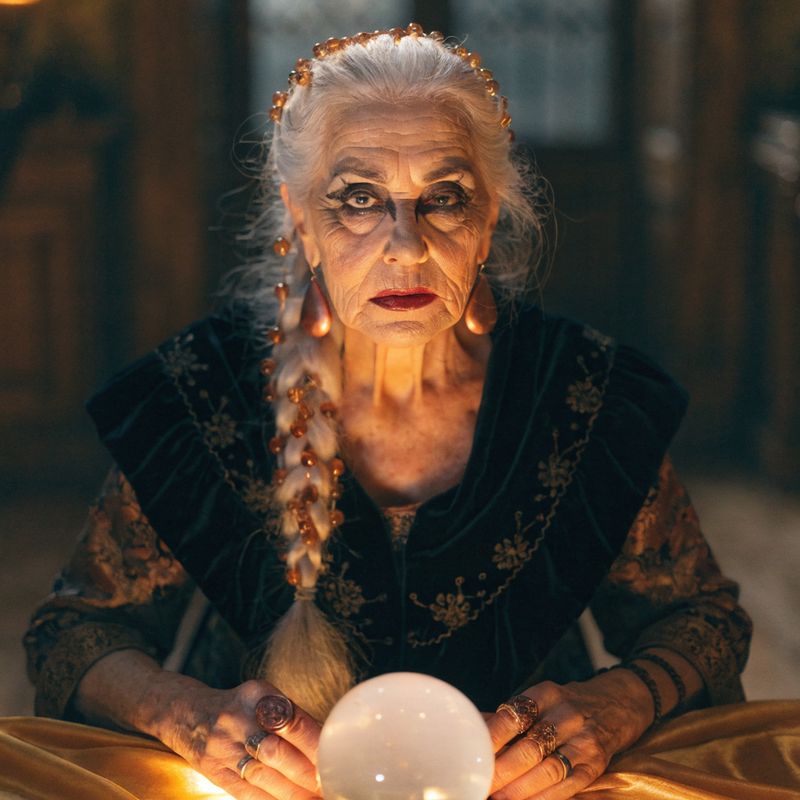
A vintage fortune teller in her sixties, long silver hair in a single braid with small woven amber beads, deep red lipstick, dramatic dark kohl eye makeup, embroidered black velvet shawl with subtle gold embroidery draped over her shoulders, large copper teardrop earrings

The reference was a clean mid-shot portrait. The output put her at a candlelit table laying out tarot cards across three shots. Her silver braid with amber beads, kohl-rimmed eyes, embroidered velvet shawl, and copper earrings all carried through every cut, exactly as they appeared in the reference image.
The prompt did the work of mapping the reference into the scene by repeating identifying details in the closing preservation clause. The reference defines the truth at frame zero. The closing clause tells the model to honor that truth across every cut.
Multiple characters in one scene
Two or more character references in a single call: the model has to keep each identity distinct. The prompt's job is explicit mapping. The description has to make clear which reference image is the apprentice and which is the mentor, otherwise the model can scramble them.
A sunlit Victorian greenhouse florist studio. The two florists from the reference images are present: the apprentice (young woman with light brown loose side braid, denim apron over cream blouse, pink ranunculus tucked behind her ear) stands at the workbench, the mentor (older woman with grey-streaked low bun, faded canvas apron, gold reading glasses on a chain) enters from the right. Begin with a wide shot of the apprentice at the workbench. Cut to a close shot of the mentor's weathered hands gently adjusting the apprentice's hands as she holds a sprig of eucalyptus. Shift to a medium two-shot of them both leaning over the arrangement. End on the mentor smiling and stepping back as the apprentice carefully tucks the final flower into place. Preserve the exact appearance of both women across every shot.
- Apprentice
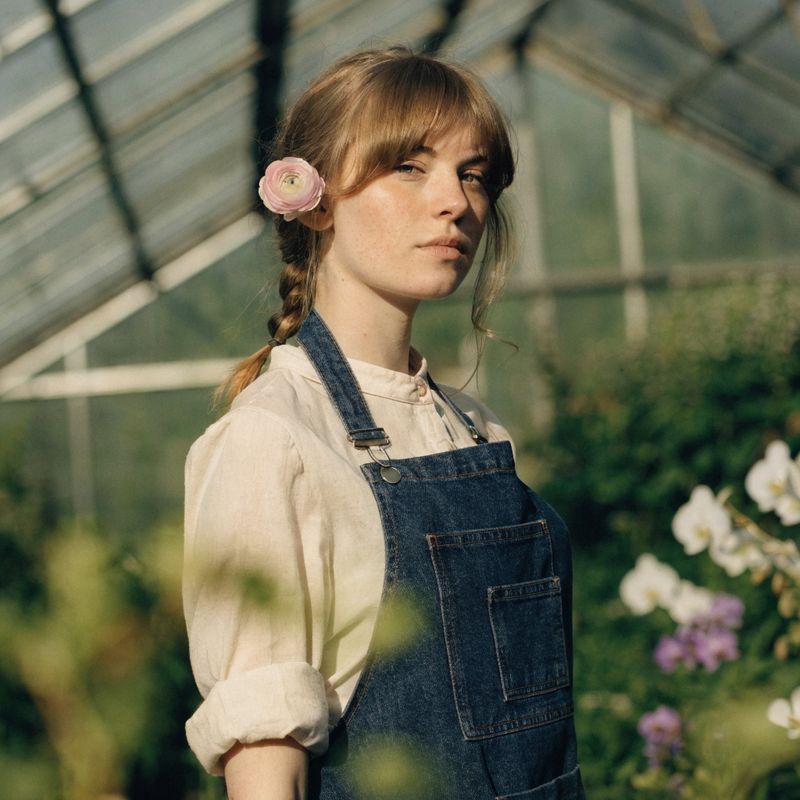
A young florist apprentice in her early twenties, light brown hair in a loose side braid over her right shoulder, soft fair skin with a scatter of light freckles, a denim work apron with multiple front pockets over a cream cotton blouse, a small pale pink ranunculus flower tucked behind her left ear
- Mentor
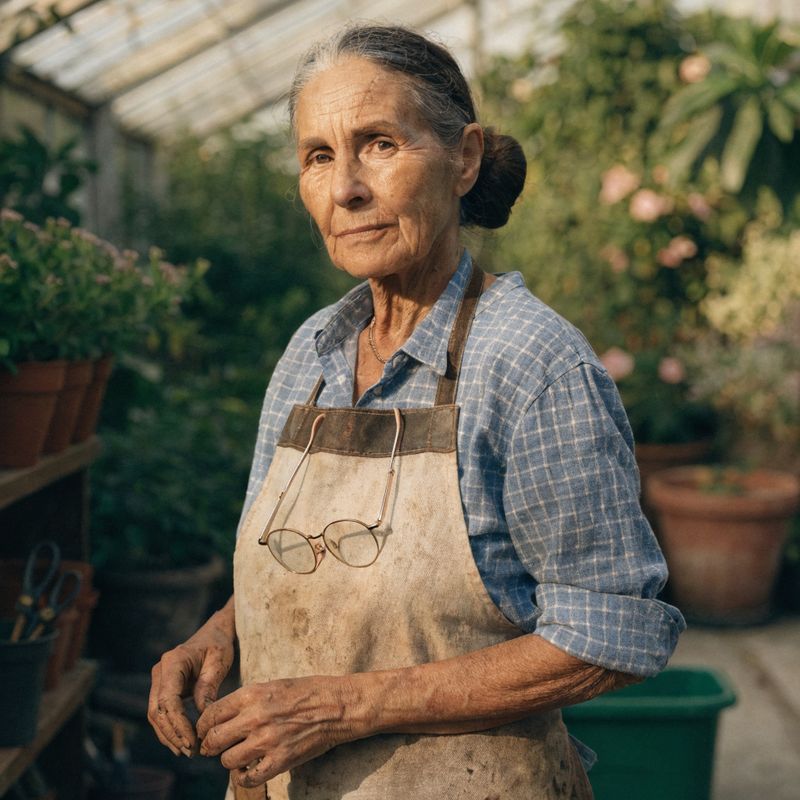
An older florist mentor in her sixties, dark grey-streaked hair pulled into a low practical bun, warm weathered face with crow's-feet, a faded canvas work apron with leather trim over a soft blue checked cotton shirt, vintage gold half-moon reading glasses resting on a thin gold chain around her neck


The two references were passed in this order: apprentice first, mentor second. The prompt described each one by distinctive single-detail anchors: the apprentice's pink ranunculus tucked behind her ear, the mentor's reading glasses on a thin gold chain. These weren't redundant. They're how the model decides which reference is the apprentice and which is the mentor when both are in the same shot.
Pick one or two distinctive identifying details per character and repeat them every time you reference the character in the prompt. A scar, a piece of jewellery, a colour of clothing, an accessory. Anything the model can grab and hold even as the camera moves. The action in the shot list (wide establishing, hands-on adjustment, two-shot, mentor stepping back) directed the interaction. The identifying details did the work of keeping the cast unscrambled.
Two characters who look too similar will blur into one another. If both your references are young women of roughly the same hair colour and the prompt only says "the woman", the model has no way to tell them apart. Give each character at least one visually unmistakable identifying detail before you pass them as references.
Locking the location alongside the cast
referenceImages does not have to mean "characters". One slot in the cast can be a scene reference: a still of a specific interior, a brand environment, a storefront you want preserved across the cuts. The prompt then maps each reference to its role. This image is the character. This image is the location.
The artisan candle maker from the first reference image is working inside the specific candle shop interior from the second reference image. Begin with a wide shot of her at the copper-topped workbench in the foreground, the warm amber-lit shop visible behind her with the candle drying shelves, brick walls, and antique brass cash register. Cut to a close shot of her hands carefully pouring molten golden wax from a brass ladle into a cylindrical mould. Shift to a medium shot of her lifting a finished cream pillar candle from the cooling rack. End on a slow push-in on her focused expression as she sets the candle down. Preserve the exact look of the candle maker and the specific candle shop interior across every shot.
- The candle maker
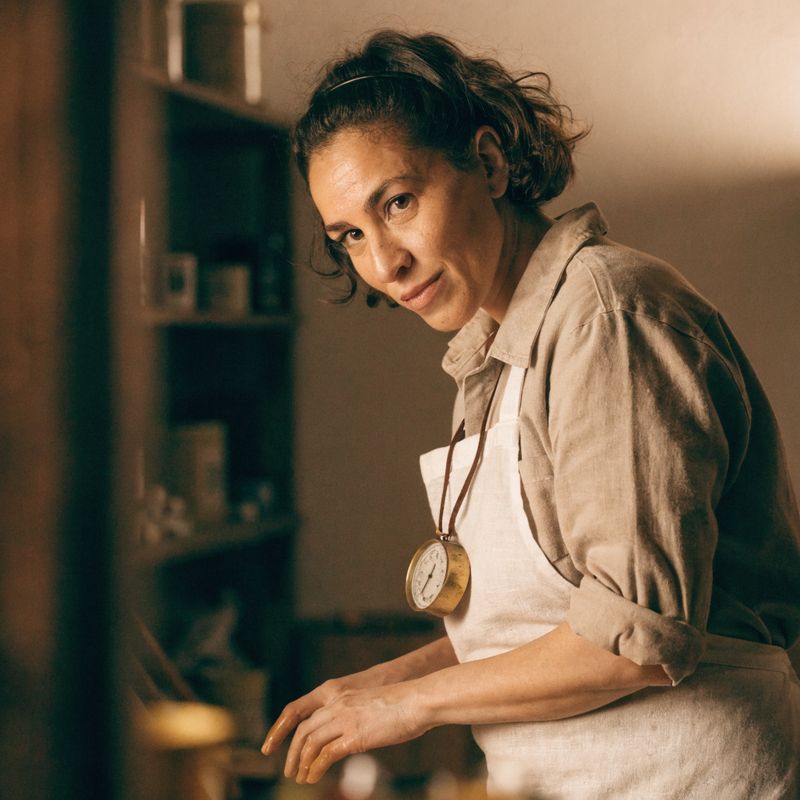
A 30-year-old artisan candle maker, short dark brown wavy hair pulled back with a thin black headband, focused warm calm expression, a soft white linen apron over a beige work shirt with sleeves rolled to the elbows, hands lightly stained with golden wax, a brass thermometer on a leather cord around her neck
- The shop interior
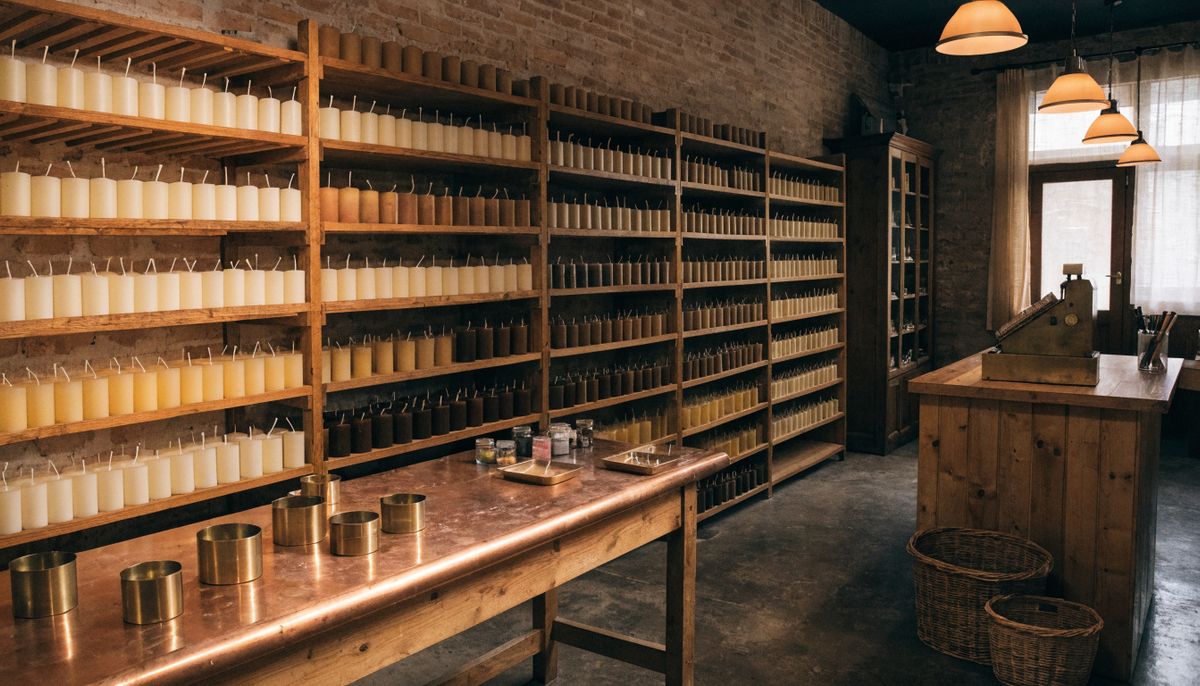
The interior of a small artisan candle shop. Copper-topped wooden workbenches in the foreground with brass molds and small jars of dyes. Rows of cream and amber pillar candles drying on wooden shelves along the back wall. Exposed warm-toned brick walls, an antique brass cash register on a side counter, warm amber pendant lighting throughout


Two references, two distinct roles. The first was the candle maker as a character portrait. The second was the specific shop interior as a wide architectural still. The prompt explicitly tied each to its role with "from the first reference image" and "from the second reference image". The output preserved both: the candle maker reads as the same person across every shot, and the shop reads as the same shop, with the copper workbenches, the brick walls, the candle drying shelves, and the brass register all in the right places in the background.
Use a scene reference when the location is brand-specific. A coffee chain with a recognisable shop layout, a designer studio with a custom workbench, a hotel lobby that customers identify on sight, a museum gallery with signature lighting on the walls. The description in the prompt can name the layout, but the scene reference is what holds the exact composition through the cuts.
Opening on a hero shot
When the first frame has to be exact (a brand storefront, a product reveal composition, an opening shot the marketing team signed off on, a logo splash that has to land at frame zero), combine inputs.frameImages with inputs.referenceImages. The frame anchor locks the opening composition. The reference holds the character identity through the rest of the sequence.
Begin exactly from the first frame: the vintage record store storefront window at golden hour with the pink and cyan neon sign, the hand-painted music note motifs, and the vinyl records in the window display. The music collector from the reference image (salt-and-pepper ponytail, grey-flecked beard, wire-frame glasses, denim jacket over faded black band tee, leather record case) walks into frame from the right and pushes open the shop door. Cut to a medium shot inside the warm wood-panelled record store as he sets the leather case down on the wooden counter. End on a close shot of his hands flipping open the brass clasps of the case to reveal a rare vinyl record. Preserve the storefront window composition from the first frame and the exact appearance of the music collector across every shot.
- Frame anchor
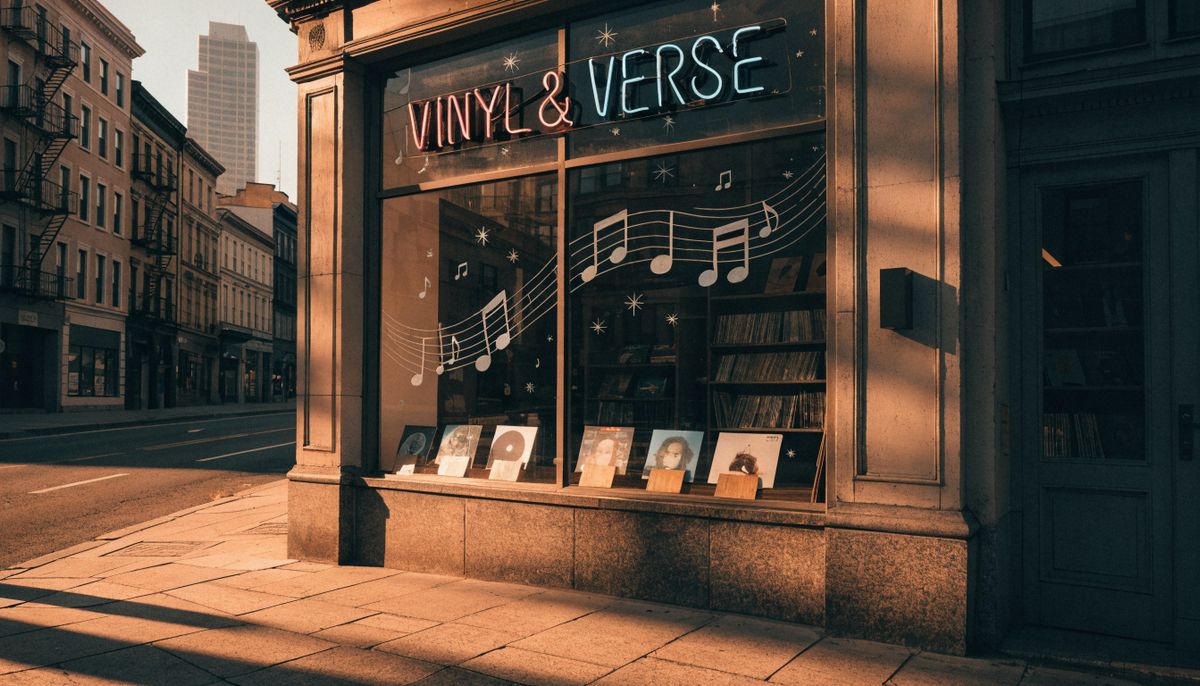
A vintage record store storefront window at golden hour seen from across a quiet city sidewalk. A neon sign reading "VINYL & VERSE" in pink and cyan glows above the window. Hand-painted music note motifs and small constellation-style star decorations are visible on the glass. Vintage vinyl records on small angled wooden stands in the window display
- Music collector
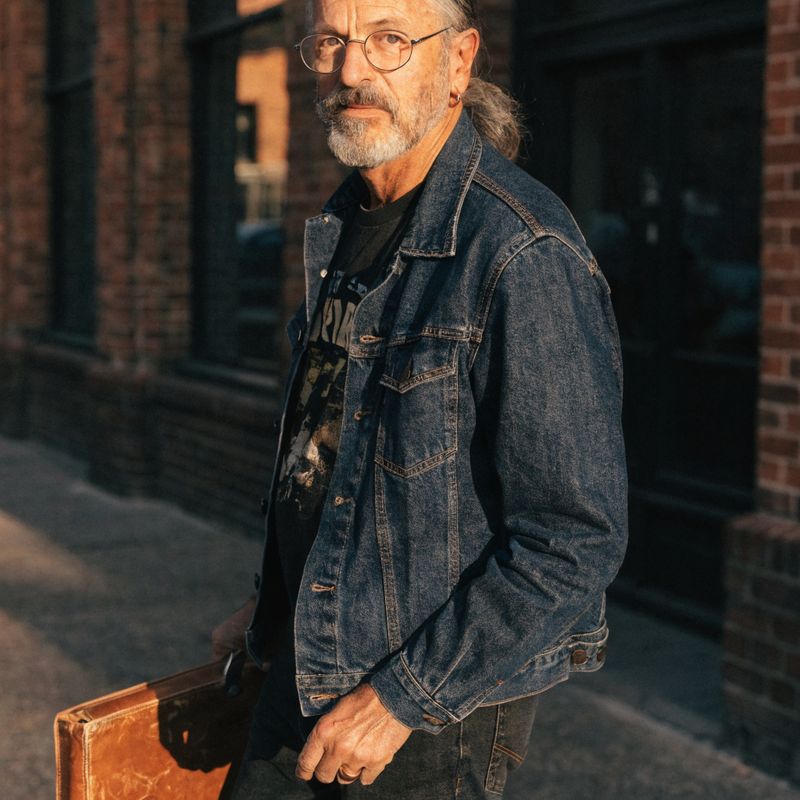
A music collector in his fifties, salt-and-pepper hair tied in a low ponytail at the nape of his neck, neatly trimmed grey-flecked beard, round vintage wire-frame glasses, vintage indigo denim jacket open over a faded black band t-shirt, holding a worn tan leather record case


The frame anchor was the storefront window with the pink-and-cyan neon "VINYL & VERSE" sign. The character reference was the music collector. The prompt opened with "Begin exactly from the first frame" and the model started exactly there: the same storefront with the neon sign and the vinyl displays still in the window. Then the music collector walked into frame and the interior shots took over, with his salt-and-pepper ponytail, his round wire-frame glasses, his denim jacket, and the tan leather case all preserved from the reference.
This combined mode is the answer when the opening is locked but the rest is not. Product reveals where shot one is the product or the storefront. Brand intros where shot one is a logo or a hero composition. Mini-series episodes where every chapter opens on the same establishing frame. E-commerce campaigns where the hero shot has to match the print catalog. Cast the people via reference, lock the opening via anchor, and the model holds both through the cuts.
With frameImages present, width and height are not accepted. Output dimensions come from the anchor image, and resolution sets the tier. The reference images still work the same way alongside the anchor, and you can pass up to nine of them in the same call.
Tips
-
Generate references as clean mid-shot portraits for characters. A waist-up portrait at 1:1 aspect, neutral pose, simple background, gives the model a clean read on the face, hair, wardrobe, and identifying details. Full-body shots, cluttered backgrounds, extreme angles, and harsh side lighting all dilute the lock.
-
Pick one unmistakable identifying detail per character and repeat it in every beat. The pink ranunculus tucked behind the apprentice's ear, the brass thermometer on the candle maker's cord, the chain on the mentor's reading glasses, the music collector's worn tan leather case. The model uses these as anchors to keep multi-character casts unscrambled.
-
Mix character references with scene references when the location is brand-specific. A specific storefront, a designer interior, a custom workspace, a hotel lobby: pass the location as one of the references and let the model lock both the cast and the environment in the same call.
-
Stack a frame anchor when the opening shot is the reveal. The combined mode (
frameImagesplusreferenceImages) gives you control over the first frame and the cast at the same time. Useful for product reveals, brand intros, opening credits, and mini-series episodes. -
Don't pass references for unrelated subjects in the same call. The reference workflow holds identities consistent for one scene or one short sequence. Passing two unrelated story setups in one call and asking the model to splice them produces mixed identities and broken cuts.
-
Treat the closing preservation clause as part of the prompt, not an afterthought. Naming what must stay continuous ("Preserve the exact appearance of each character") is the lever that keeps the references active across every cut. Without it, the model can drift toward generic descriptions in the later shots.