GPT Image 2

GPT Image 2 is a general-purpose GPT Image family model for text-to-image generation and image editing. Its strengths include strong prompt adherence, readable embedded text, detailed edits, photorealistic rendering, and structured visual outputs such as posters, packaging, product comps, diagrams, and other layout-sensitive images.
Prompting
How to write prompts for GPT Image 2 across the cases the model handles unusually well: photorealism, accurate text, world-knowledge composition, and multi-image editing workflows.
Introduction
GPT Image 2 is an LLM-based image model. Unlike diffusion models that compress your prompt into fixed-size embeddings, this model reads the full text the same way a chat model does. That changes what you can put in a prompt: structured formats, inline negation, pseudocode, and long design briefs all work because the model parses language, not tokens.

An editorial flat-lay photograph: a leather-bound notebook open to a hand-lettered page reading "TODAY's BREAD" in soft ink, surrounded by a small sourdough starter jar with a wooden spoon, scattered rye flour, a single rosemary sprig, and a linen cloth. Raw-wood tabletop. Top-down view, soft morning window light from the right, natural shadows, 50mm equivalent, shallow depth of field. Warm earth-tone color grade, soft contrast. Photorealistic, no extra text, no logos.
This guide covers what GPT Image 2 does differently: photorealism, text rendering, infographics, world knowledge, multi-image workflows, and prompt format tricks.
Photorealism
GPT Image 2 renders photorealistic images with natural lighting, real skin texture, plausible imperfections, and surface detail that most diffusion models smooth away. Two prompt habits push it further:
Say "photorealistic" explicitly. The word strongly engages the model's photorealistic mode. Phrases like "real photograph" or "shot on a real camera" also work, but "photorealistic" is the most reliable single trigger.
Use camera language for composition, not precision. Lens focal lengths, depth of field, film stock, and exposure hints guide the overall look. The model interprets them loosely (a "50mm lens" won't produce optically accurate focal-length behavior) but the compositional intent comes through clearly.

A candid photograph of an elderly fisherman mending a net on a weathered wooden dock at dawn. Deep smile lines, salt-and-pepper stubble, callused hands with visible veins. Worn canvas jacket with frayed cuffs, a faded wool cap. Shot on 35mm film, 85mm lens, shallow depth of field, soft golden coastal light from the left, natural film grain. The image should feel honest and unposed, real skin texture, no retouching, no glamorization. Photorealistic, no text.

A rain-slicked city street at night, shot from a low angle. Neon signs from a ramen shop and a pharmacy reflect in long streaks across the wet asphalt. A single pedestrian under a clear umbrella walks away from the camera, silhouetted against warm shopfront light. Shallow depth of field, 35mm lens, natural grain, cool blue-and-amber color palette. Photorealistic, cinematic, no text overlays.
The first prompt reads like a documentary brief: subject, detail cues (stubble, frayed cuffs), film stock, and lighting. The second is a moody urban scene with atmospheric lighting. Neither prompt micromanages the composition. The model fills in plausible reflections, shadow angles, surface wear, and material textures because it understands what these scenes look like in reality.
Text in images
GPT Image 2 renders in-image text more reliably than most image models. Three habits improve it further:
Quote the text literally. Wrap any text that must appear verbatim in straight quotes inside the prompt. Without quotes, the model treats your words as suggestions and will rewrite them. With quotes, the model treats them as literal output to render.
Specify the typographic treatment. "Bold serif gold typography across the lower third", "small sans-serif white tagline", "single-column list, one item per line". The model can render the same string in dozens of ways, and the prompt is where you pick.
Use quality: "high" for dense or small text. Menu items, infographic labels, slide footnotes, packaging copy: anything that will be read rather than glanced at benefits from high. Larger headline text usually renders well at medium.

A bold modern film poster. Large serif gold typography across the lower third reads "THE NIGHT BEGINS AT EIGHT", with a smaller sans-serif white tagline below reading "A STORY ABOUT WAITING". The upper two-thirds show a single silhouetted figure standing on an empty city street under one street lamp at twilight, cinematic high-contrast photography style, deep blues and warm amber tones. Render every line of text verbatim, exactly as written, no extra characters, no other text anywhere in the frame.

A close-up photograph of an elegant restaurant menu card on a linen tablecloth, candlelight from the side. The header in serif gold reads "TASTING MENU · OCT". Below, a single column of five dishes with prices in clean sans-serif, one per line: "Heirloom Tomato Salad · $14", "Pan-Seared Duck · $32", "Saffron Risotto · $26", "Beef Tenderloin · $46", "Vanilla Bean Tart · $12". Each line rendered verbatim, exactly as written, no extra characters. Shallow depth of field, warm color grade.
When the model rewrites a string or splices in extra letters, two prompt-level fixes usually work: add "render text verbatim, exactly as written, no extra characters" after the quoted string, and spell unusual words letter-by-letter the first time you mention them.
Infographics and structured visuals
Infographics, diagrams, slides, and charts are where GPT Image 2 pulls ahead of most image models. The combination of reliable text rendering and layout reasoning means you can generate structured visuals with real labels and readable data in a single pass.
Prompt these like a design brief, not an illustration request: name the deliverable (infographic, flowchart, dashboard), describe the data to cover, set the visual system (color palette, typography, chart types), and add constraints (no filler, no watermark). Use quality: "high" for these. Dense labels and small text need it.

Create a wide landscape infographic titled "GLOBAL INTERNET ACCESS AT A GLANCE". Layout: a world map in the top half with color-coded regions, and a data dashboard below with at least 6 stat blocks. Include: total internet users (percentage of world population), mobile vs desktop split, top 5 countries by users (bar chart with numbers), average connection speed by continent (horizontal bars with Mbps values), year-over-year growth rate, and a "digital divide" callout comparing Sub-Saharan Africa to Northern Europe. All data should feel plausible. Clean white background, dark charcoal text, accent colors of teal and coral. Modern sans-serif typography, tight spacing, no decorative filler, no watermark. The infographic should feel like a page from a data journalism publication.
The prompt above names the deliverable, lists six data blocks to include, sets a color system, and lets the model generate the actual numbers. A wide canvas (1792 × 1024) gives the model room for a map and dashboard side by side.
For process-oriented infographics, you can prompt conversationally: describe what you want to learn rather than specifying every label. Use a tall vertical canvas (1024 × 1792) to give the model room for many stages:

I want to understand how a deciduous tree works across a full year, from root absorption to leaf drop. Show it as a vertical infographic with a central tree cross-section. Cover: root water and mineral uptake, capillary action through xylem, photosynthesis in the canopy, sugar transport through phloem, cambium growth rings, spring bud break, summer energy storage, autumn leaf senescence and abscission. Include real numbers where relevant: water volume per day, chlorophyll wavelength absorption, growth ring width. Clean light background, botanical illustration style with labeled cutaway diagrams, earthy greens and browns, modern sans-serif labels, no watermark.
This prompt doesn't specify water volumes or wavelength numbers. The model supplies them because it understands tree biology. For technical subjects where you want accurate content but don't want to research the exact data points yourself, a conversational prompt lets the model do the research.
World knowledge
Because GPT Image 2 is built on an LLM, it carries factual knowledge into image generation. You can reference real events and historical periods by context rather than detailed visual description, and the model fills in the rest.

A realistic photograph of a large outdoor crowd scene in Bethel, New York on August 16, 1969. Period-accurate clothing, staging, and environment. Photorealistic, natural summer daylight, documentary photography style, wide-angle lens.
The prompt says "Bethel, New York on August 16, 1969" without ever mentioning Woodstock, tie-dye, or a concert stage. The model infers the event from the date and location and renders a period-accurate crowd scene. This is the kind of reasoning that diffusion models cannot do: connecting factual knowledge to visual output.
Ad creatives
Ad generation combines photorealism, text rendering, compositional reasoning, and brand direction into a single practical workflow. Prompt these like a creative brief: name the brand, describe the audience, set the visual tone, and include the exact copy.

A polished campaign image for a fictional streetwear brand called "Thread". A group of three diverse young friends leaning against a sun-warmed concrete wall in golden-hour light, wearing layered streetwear, relaxed confident poses, natural laughter. The tagline "Yours to Create." is rendered in clean white sans-serif typography across the lower third. Photorealistic editorial fashion photography, strong color direction, shallow depth of field. Render the tagline exactly once, clearly and legibly. No extra text, no watermarks, no logos other than the tagline.
The model handles brand positioning (youth streetwear), art direction (golden-hour, concrete, layered outfits), text rendering (clean tagline), and layout in a single pass. For campaign exploration, request numberResults: 3 or 4 to get visual variety without re-prompting.
Multi-image workflows
The inputs.referenceImages array accepts up to 16 reference images per request. The prompt language decides what the model does with them. Below are the patterns that come up most: style transfer, character consistency, product composites, and targeted edits.
Two conventions make multi-image prompts more reliable:
- Label references by index when there's more than one. "Image 1 is the scene to preserve. Image 2 is the style reference." The model is much better at obeying spatial and stylistic instructions when references have explicit roles.
- Be explicit about what to preserve and what to change. Multi-image work is where preserve lists matter most. "Preserve the bottle's shape, cap, label, and exact proportions" is the difference between a clean composite and a redesigned product.
The examples below each use one reference image plus a prompt.
Style transfer
Apply the visual language of one image to a new subject. The reference carries palette, brushwork, paper texture, line weight, and media grain. The prompt supplies the new subject.

Use the exact visual style of the reference image: loose watercolor on textured cotton paper, wet-on-wet bleeding, cool-blue and sage-green palette with warm ochre hints, fine ink contour suggestions. Render a stately deer standing in an open meadow at dusk, looking calmly toward the viewer. Preserve every stylistic choice from the reference (palette, brushwork, paper texture, line weight). Plain cream paper background. No text.
- Style reference
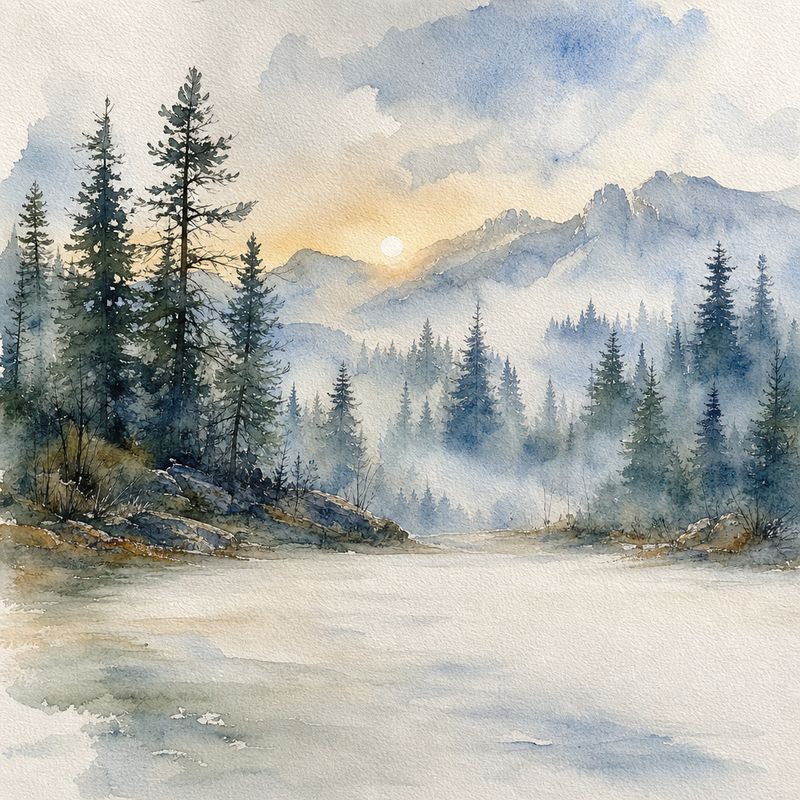
A loose watercolor landscape of a misty pine forest at dawn. Rendered on textured cotton paper with visible brush strokes, wet-on-wet bleeding, soft cool-blue and sage-green palette with hints of warm ochre, fine ink contour suggestions. Empty foreground for compositional balance, no text, no signature.

Character consistency
Reuse a specific character across multiple compositions. The reference fixes the character's design. The prompt places them in a new scene or activity.

The same fox character from the reference image, now sitting beneath a tree at twilight reading a small open book, with fireflies floating in the air around it. Preserve every aspect of the character's design: proportions, oversized amber eyes, hand-painted brushwork, warm autumn palette. Match the children's-book illustration style exactly. Soft cream paper background. No text.
- Character reference
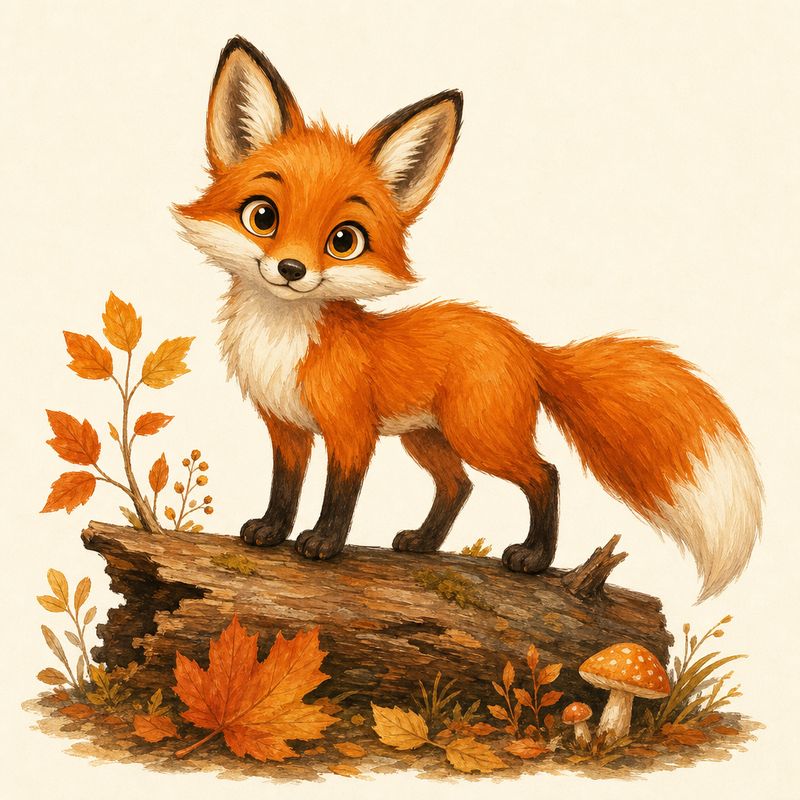
A children's-book illustration of an alert red fox standing on a fallen log, oversized expressive amber eyes, soft hand-painted brushwork, warm autumn palette of pumpkin orange, mustard, and cream. Simple cream paper background. Friendly and curious demeanor. No text.

For multi-page work (children's books, comic strips, illustrated docs), use the first generation as the anchor reference for every subsequent page. Don't re-prompt the character from scratch each time, because the model drifts.
Product composite
Place a specific product (with its real shape, label, and proportions intact) into a new scene. This is the workflow for swapping backgrounds on product photography without losing the identity of the product itself.

Place the exact perfume bottle from the reference image into a moody marble-bathroom scene. The bottle sits on a polished black-marble counter beside a folded white linen towel and a single sprig of eucalyptus. Soft window light from the left casts a long natural shadow across the counter, slight steam blurs the background. Editorial product photography, photorealistic. Preserve the bottle's shape, cap, label, and exact proportions; do not alter the bottle in any way.
- Product reference
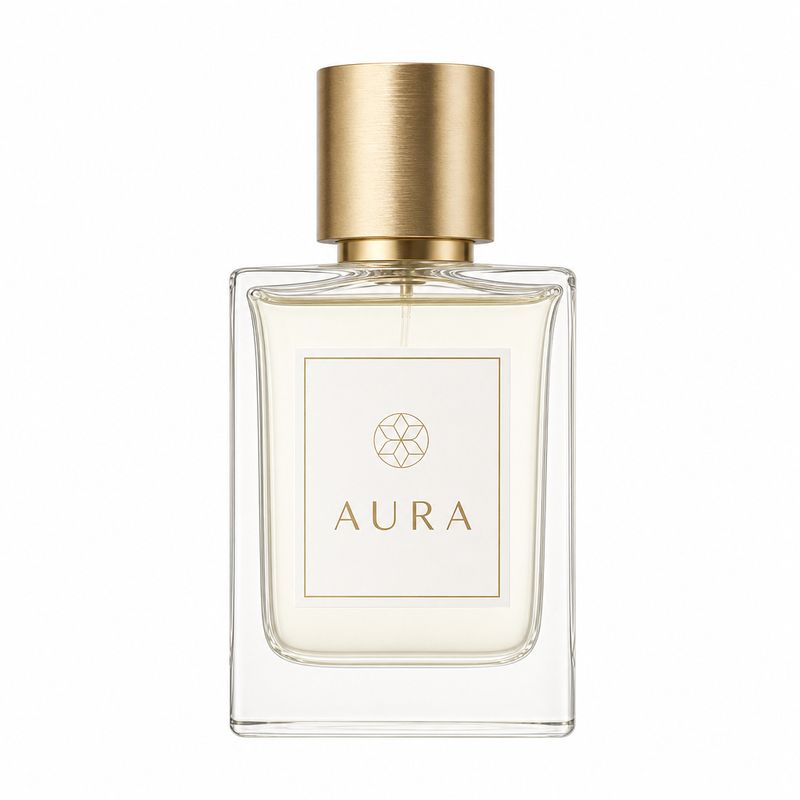
A minimalist glass perfume bottle with a brushed-gold cap and a simple geometric label that reads "AURA", centered on a pure white background, soft three-quarter studio lighting, clean product photography, no other objects, no shadows on the background.

The preserve list ("preserve the bottle's shape, cap, label, and exact proportions, do not alter the bottle in any way") is doing most of the work here. Without it, the model often "improves" the product by simplifying the cap or rewriting the label.
Edit with a preserve list
The same multi-image surface handles edits. Pass the source image as the reference, then write the prompt as two halves: what changes, and what must stay exactly the same. The more explicit the preserve list, the cleaner the edit.

Remove every small poster from the inside of the flower shop window. Preserve the "PETAL & STEM — OPEN" white vinyl lettering exactly as it appears, in the same position, with the same kerning and font. Preserve the green canvas awning, the building facade, the sidewalk flowers, the street, the lighting, and the camera angle. The window should show the shop interior naturally through unobstructed glass after the posters are gone. Do not change anything except removing the three small posters.
- Source scene
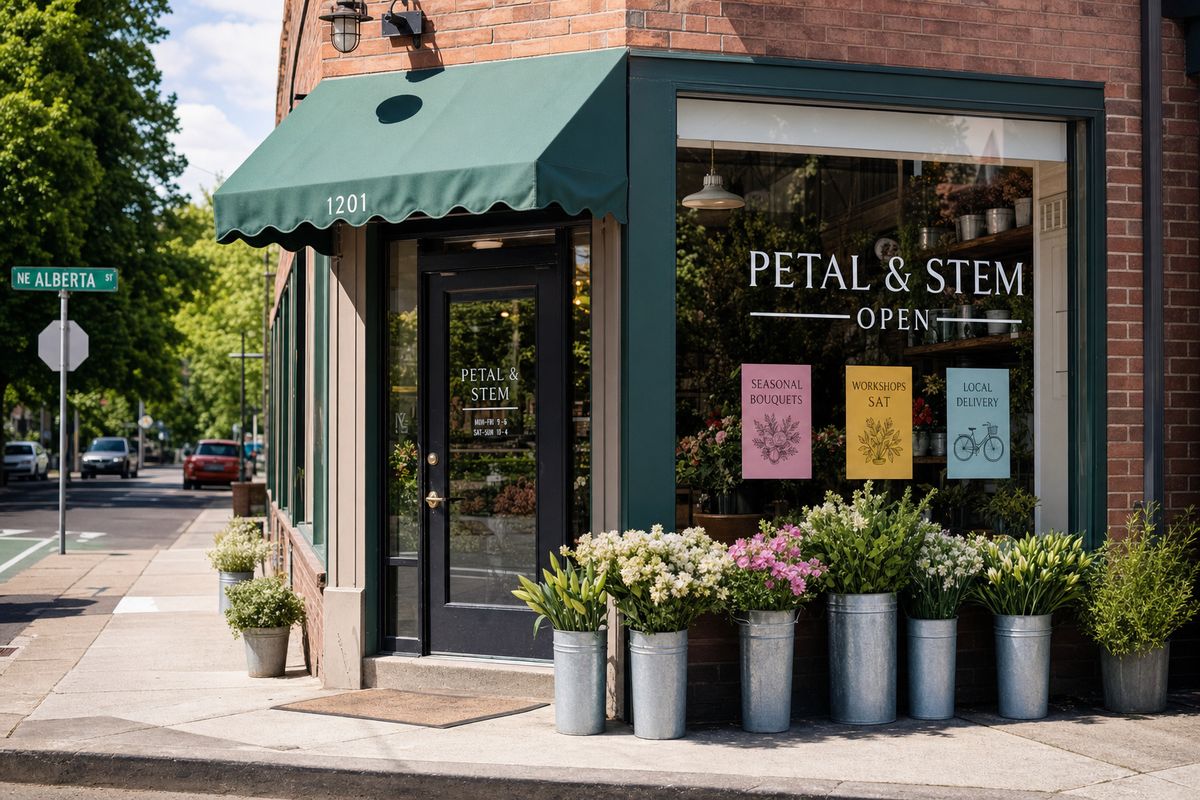
A corner flower shop storefront photographed from across the street on a sunny morning. The main window has "PETAL & STEM — OPEN" in white vinyl lettering. Three small posters taped inside the window advertise "SEASONAL BOUQUETS", "WORKSHOPS SAT", and "LOCAL DELIVERY", each on a different colored paper. A green canvas awning above the door, galvanized buckets of fresh flowers on the sidewalk. Realistic urban photography, even daylight, sharp focus, natural color, no people visible.

Edit prompts benefit from explicit redundancy. "Preserve the lettering exactly as it appears, in the same position, with the same kerning and font" reads heavy but each clause prevents a different drift mode. Trying to be concise here ("keep the sign") leaves room for the model to "improve" the text.
Sample request
A composite request showing the full shape:
import { createClient } from '@runware/sdk'

const client = await createClient({ apiKey: process.env.RUNWARE_API_KEY })
await client.connect()

const [result] = await client.run({
  model: 'openai:gpt-image@2',
  positivePrompt: 'Place the exact perfume bottle from the reference image into a moody marble-bathroom scene...',
  width: 1024,
  height: 1024,
  inputs: {
    referenceImages: [
      'https://example.com/perfume-bottle.jpg'
    ]
  },
  settings: {
    quality: 'high'
  }
})
import asyncio
import os
from runware import Runware
async def main():
async with Runware(api_key=os.environ["RUNWARE_API_KEY"]) as client:
results = await client.run({
"model": "openai:gpt-image@2",
"positivePrompt": "Place the exact perfume bottle from the reference image into a moody marble-bathroom scene...",
"width": 1024,
"height": 1024,
"inputs": {
"referenceImages": [
"https://example.com/perfume-bottle.jpg"
]
},
"settings": {
"quality": "high"
}
})
asyncio.run(main())curl https://api.runware.ai/v1 \
-H "Authorization: Bearer $RUNWARE_API_KEY" \
-H "Content-Type: application/json" \
-d '[
{
  "taskType": "imageInference",
  "taskUUID": "a1b2c3d4-e5f6-7890-abcd-ef1234567890",
  "model": "openai:gpt-image@2",
  "positivePrompt": "Place the exact perfume bottle from the reference image into a moody marble-bathroom scene...",
  "width": 1024,
  "height": 1024,
  "inputs": {
    "referenceImages": [
      "https://example.com/perfume-bottle.jpg"
    ]
  },
  "settings": {
    "quality": "high"
  }
}
]'runware run openai:gpt-image@2 \
positivePrompt="Place the exact perfume bottle from the reference image into a moody marble-bathroom scene..." \
width=1024 \
height=1024 \
inputs.referenceImages.0=https://example.com/perfume-bottle.jpg \
settings.quality=high{
"taskType": "imageInference",
"taskUUID": "a1b2c3d4-e5f6-7890-abcd-ef1234567890",
"model": "openai:gpt-image@2",
"positivePrompt": "Place the exact perfume bottle from the reference image into a moody marble-bathroom scene...",
"width": 1024,
"height": 1024,
"inputs": {
"referenceImages": [
"https://example.com/perfume-bottle.jpg"
]
},
"settings": {
"quality": "high"
}
}Prompt format tricks
Because the model is an LLM, it understands structured input that diffusion models ignore. Three formats stand out.
In-prompt negative prompting
GPT Image 2 doesn't have a negativePrompt parameter, but you can write negative prompt: directly inside the positive prompt and the model respects it. Append it after the main description, separated by a line break.

A ceramic fruit bowl on a marble countertop, filled with a colorful variety of fresh fruit. Bright natural kitchen light, photorealistic, shallow depth of field. negative prompt: bananas
The model treats the negative section as an exclusion list. This works for removing objects, styles, colors, or artifacts without needing a dedicated parameter.
Pseudocode and function syntax
The model interprets function-like syntax as generative instructions. You can write full function calls with named parameters or drop constructs like pick(), random_color(), random_pose(), random_texture(), or any variation you define, inline within natural prompts.

A tarot card with sum(3, 8) as the numeral, random_mythological() figure, gold and midnight palette, art nouveau border, no text

A random_animal() wearing a tiny pick("top hat", "crown", "beret"), studio portrait, black background, Rembrandt lighting
The tarot prompt uses sum(3, 8) to produce the numeral and random_mythological() to pick the figure, while locking the palette and border. The animal prompt reads as natural English with pseudocode slots dropped in. Both are useful for batch generation where you want variety in specific dimensions while keeping the style locked.
JSON-structured prompts
You can pass a raw JSON object as the prompt. The model parses the keys and generates accordingly.

{"scene": "a cozy reading nook by a rain-streaked window at dusk", "subject": "a steaming cup of tea on a stack of old books", "lighting": "warm lamp light from the left, cool blue rain light from the window", "style": "editorial lifestyle photography, 50mm, shallow depth of field", "mood": "quiet, contemplative", "constraints": "photorealistic, no people, no text"}
JSON prompts are most useful when you're generating images programmatically and want a structured, predictable interface between your code and the model. They also make it easy to swap individual values (change the subject, keep the lighting) without rewriting prose.
The 32,000-character prompt limit gives you room for detailed briefs in any of these formats.
Tips
-
Default to
medium, switch tohighfor small text or fine detail. The cost difference is real and the quality difference is invisible on most outputs. -
Say "photorealistic" for realism. This single word is the strongest trigger for the model's photorealistic mode. Add camera language (lens, film stock, lighting direction) for compositional control.
-
Lock text with quotes plus "verbatim".
Render the tagline "Stay Curious" verbatim, exactly as written, no extra characters.prevents the model from rewriting your copy. -
Use one reference image unless you need more. Each additional reference adds room for the model to lose track of the anchor. Two well-labeled references beat five vague ones.
-
Restate the preserve list on every iteration. Drift compounds across follow-ups. Repeating "preserve X, Y, Z" each turn is cheaper than fixing a botched second pass.
-
Pick
qualityexplicitly before shipping.autois fine for prototyping, but you lose control over latency and cost in a pipeline. -
Use
numberResultsfor exploration. Request 3-4 variations in a single call. The model's spread within a batch is wider than its consistency across separate calls, so a single batch shows more useful variety. -
Let the model reason about content. For technical infographics and historical scenes, describe what you want to learn rather than dictating every detail. The model's world knowledge fills in accurate data points, period details, and domain-specific content.