Google's Gemini Omni Flash is the AI editor you've been waiting for
Gemini Omni Flash brings stateful, conversational video editing to Google's multimodal stack. Here's how it compares to Veo 3.1, Kling, Seedance, and HappyHorse, and how to get started on Runware.

Update, October 7, 2026: now Gemini Omni Flash 1.1
The original Gemini Omni Flash has been deprecated on Runware and replaced by Gemini Omni Flash 1.1. This article covers the original release, so some limits below (720p, the 10-second cap, audio as an input) no longer apply. What 1.1 brings:
- 1080p and 4K output, plus a 360p draft tier
- Extension in 3- to 10-second runs, up to 30 seconds total
- First and last frame control
- Up to 7 reference images and 3 reference videos
1.1 takes text, image, and video inputs and generates native audio. It's billed per token; see current rates on the Gemini Omni Flash 1.1 page.
Every AI creator remembers when Google's groundbreaking image editing model, Gemini 2.5 Flash Image (Nano Banana), released. Google's Gemini Omni Flash is that moment for video generation.
If you were using generative image models at the time, you know exactly what that statement means. It wasn't just that the output quality improved, it was that the whole relationship between the creator and the tool changed. It was architectural: image generation moved from a stateless generation loop of "re-rolling" images to get the requested changes, to a stateful editing workflow, holding context across generations, remembering past edits, all at production-grade resolution and quality.
That was a shift in the industry, a real before-and-after moment for anyone working with image content.
What is Gemini Omni Flash?
Gemini Omni Flash is Google DeepMind's first natively multimodal generative media model, announced at Google I/O on May 19th, 2026. It's the first model in the Omni family, with an even more capable Pro variant in development.
The defining characteristic is native any-to-any processing. Text, images, audio, video are all valid inputs, in any combination. The output is video.
Until Omni, Google's generative media stack was segmented. Veo 3.1 handled video generation, image creation was split across two parallel families: Imagen (a dedicated diffusion-based model, now deprecated as of June 2026) and Nano Banana/2 (the Gemini-native image model that succeeded it). Omni consolidates all of that into a single architecture. It has taken the lead role in the Gemini app, YouTube Shorts and YouTube Create, with Veo 3.1 taking a back seat, though it remains available in Google Flow and via API.
How to break the regeneration loop?
The standard AI video iteration loop has a structural flaw. A prompt produces a clip, but one element is wrong. The prompt is adjusted, and the clip regenerated. The corrected element now works, but previously acceptable elements have changed. The model carries no memory of previous attempts, and every generation is a clean slate.
For developers building video generation into products, and for creators using these products, this creates a compounding problem; iteration costs multiply. Useful intermediate outputs can't be preserved and built upon, and the inconvenience of re-prompting entire scenes to change one element is a genuine issue.
The industry has recognized this, and many models have emerged over the past months, including Runway's Aleph 2.0 and Luma Labs' Ray 3.2, both tackling in-context video editing: transforming footage you already have through natural language prompting rather than requiring full regeneration. These in-context video editing models are invaluable to post-production editing workflows, but they're edit-only models. They start from source footage and return modified versions of it. Neither generates from a blank canvas, or accepts audio as a creative input, alongside video and image references, and neither draws on a backbone of "world knowledge" to bolster prompt instructions.
Omni addresses the editing problem, and goes further. Edits are applied to source footage rather than triggering full regeneration; only affected frames are re-rendered, and the rest of the clip remains untouched. In practice, this means an instruction like "remove the crowd from the background" strips out that specific element, while the subject, lighting, and camera motion remain intact.
That capability alone would represent a leap forward in terms of model capability. But for Omni, it's the entry point, and the model's full capability set extends well beyond targeted editing.
Exploring Omni's core capabilities
Conversational multi-turn video editing
A genuine departure from existing in-context video editing models, Omni maintains a persistent editing session where each instruction applies to the most recent output. There's no re-prompting of the full scene.
Multi-turn editing
Any-combination input handling
All four modality types function as inputs: text, images, audio, and video. These can be combined within a single request. A prompt can reference a source video for motion, an image for style, an audio file for synchronization, and a text description for the action, which Omni resolves into a single coherent output.
Physics simulation
Omni models physical behavior including gravity, kinetic energy, and fluid dynamics. This produces motion that follows real-world rules. It sounds like a baseline expectation, but anyone who has watched AI-generated water move like plastic or a dropped object defy gravity knows how immediately it pulls a viewer out of the scene. Physics errors are among the most noticeable failure modes in generated video, and among the hardest to prompt your way around. Complex physical events such as liquids spreading, objects colliding, or cloth moving under force are handled with notably more accuracy than models that generate video purely by pattern-matching from training data, without any underlying reasoning about how the physical world works.
Physics simulation: cloth
Physics simulation: liquid
Physics simulation: object collision
World knowledge integration
Because Omni is built on the Gemini architecture, it has access to Gemini's training across history, science, biology, and cultural contexts. This allows prompts that specify intent rather than visual detail to produce contextually accurate outputs. Ask it to explain the lifecycle of a star and it will produce a structured, technically accurate, animated explainer without specifically specifying the analogies it uses, or how the concepts should be sequenced. The model draws on what it actually knows about the subject, making those decisions independently.
World knowledge: life cycle of a star
Character and object consistency
With a reference image provided, Omni maintains consistency for a character or object across different scenes, environments, and lighting conditions. Face structure, outfit details, and product geometry hold up across multi-scene outputs. That extends to full multi-angle generation from a single reference: one image of a vehicle, a character, or a product can drive an entire sequence with different camera positions, different environments, different lighting conditions, while the subject remains identifiably the same throughout. For marketing and commercial workflows, that could mean a turnaround-style campaign video from a single asset.
Character consistency across scenes
Storyboard-to-video
A visual storyboard can be submitted as an input, and Omni generates a video sequence that follows the narrative structure panel by panel. That can be bolstered with character references, scene imagery, and product assets alongside it, effectively supplying Omni with everything a director would hand to a production team. The storyboard sets the structure and pacing, the reference images define the look and cast, and Omni handles the rest in a single pass. Pre-production and production, collapsed into one step.
Storyboard-to-video
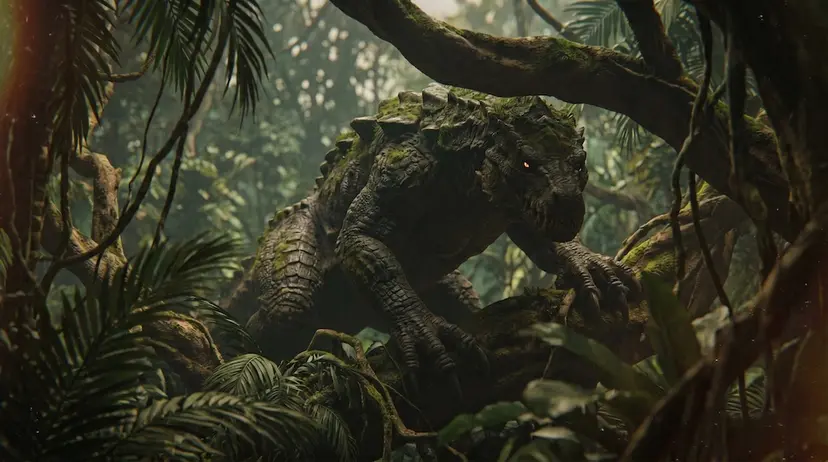

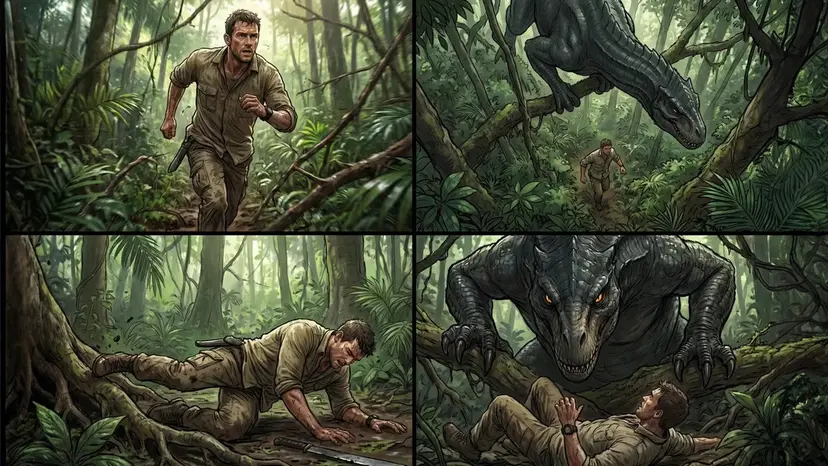
Style and motion transfer
Motion from a source video can be applied to a character from a reference image. Visual style can be transferred from one piece of content to an existing clip. This covers a broad range of aesthetic transformations including anime, claymation, watercolour, voxel art, and line drawing styles, all without regenerating the source scene.
Style transfer
Effective prompting
Omni doesn't require the same level of prompt precision as Veo 3.1. With Veo, granular instruction is how accurate results are produced. With Omni, high-level intent is frequently sufficient. The model draws on Gemini's reasoning capabilities and its knowledge of physics, history, science, and cultural context to resolve details that aren't specified. The model infers what's appropriate for camera movement, visual style, and pacing when you don't specify them.
Google's official prompt guide organizes effective Omni prompts around five elements: shot framing and motion, style, lighting, location, and action. The broader creator community building on Omni has converged on a prompt structure of Subject, then Motion, then Camera, then Mood, with each layer kept explicit.
Several patterns produce reliably better results:
Use cinematography vocabulary
Terms like "dolly-in," "locked-off," "Steadicam," "anamorphic," "shallow depth of field," and "rack focus" are understood and applied accurately. Supported camera direction vocabulary from the official Google documentation includes: "one continuous shot" or "oner" for continuous takes; "static," "locked-off," and "fixed" for stationary framing; "push in," "punch in," and "dolly zoom" for motivated movement; and "natural smartphone zoom," "film camera," and "webcam style" for camera character.
You can also specify lens type, and lighting sources rather than describing the overall visual feel abstractly.
Use timestamps for multi-scene prompts
"0 to 4s: wide establishing shot, 4 to 8s: push-in to medium, 8 to 12s: close-up" functions as a cut-list, giving the model structure to follow rather than leaving scene transitions to its own inference.
Test high-level intent prompts first
Before adding specificity, try prompting with creative intent only and observe what Omni produces. The model handles many decisions well, and over-specification can sometimes constrain outputs that would otherwise be stronger.
How does Omni compare to leading video models?
Omni isn't a direct quality competitor to every top video model below. It's solving a different problem. Most video models compete on generation quality; how photorealistic, coherent, or cinematic a single output looks. Omni, while holding its own in terms of fidelity, is also competing on workflow architecture: editing, any-to-any input handling, and world knowledge integration.
| Gemini Omni Flash | Veo 3.1 | Kling VIDEO O3 4K | Seedance 2.0 | HappyHorse 1.0 | |
|---|---|---|---|---|---|
| Input types | Text, image, audio, video | Text, image | Text, image, audio | Text, image, audio, video | Text, image |
| Native audio | Yes | Yes | Yes | Yes | No |
| Max resolution | 720p (4K reportedly coming with Pro) | 4K | 4K | 1080p | 1080p |
| Max duration | 10s | 8s | 15s | 15s | 15s |
| Aspect ratios | 16:9, 9:16 | 16:9, 9:16 | 16:9, 9:16, 1:1 | 16:9, 9:16, 1:1, 4:3, 3:4, 21:9 | 16:9, 9:16, 1:1, ~4:3, ~3:4 |
| Best fit | Iterative editing, mixed-input, reference-based workflows | Cinematic generation, high-resolution output | Character-driven content, 4K output, long-form | Audio-visual sync, multi-reference composition | High-quality no-audio generation |
| Launch model | Try it | Docs | Docs | Docs | Docs |
Gemini Omni Flash vs. Veo 3.1
Both models serve different purposes; this isn't a case of one model replacing the other, as Veo 3.1 is still relevant for developers, production pipelines, and enterprise workflows where cinematic output quality is the priority. It generates at up to 4K with highly saturated, film-like visuals, and its extend feature chains clips into longer sequences. Gemini Omni Flash takes a different approach: a slightly more neutral, true-to-life color palette, a 720p ceiling, and a workflow centered on iterative refinement through conversational edits. The practical decision is straightforward: reach for Veo 3.1 when you need 4K cinematic realism or a stable, well-documented API for production pipelines. Reach for Omni when you need multimodal inputs (text, audio, image, video) and conversational editing.
In the text2video examples below, Veo 3.1 takes the edge for pure "cinematic" energy:
Gemini Omni Flash vs. Kling VIDEO O3 4K
Kling is a dedicated video generation model optimized for cinematic short clips and product demos. Its signature strength is motion control; precise camera path control, smooth dolly moves, and cinematic framing. It also has an edge on API maturity over Omni right now, with a more established integration path for production workflows. Omni leads where Kling stops, but Kling VIDEO O3 4K is still a strong contender when camera control and cinematic motion are the priority. Choose Omni when the workflow needs to iterate, reason, or handle mixed-input composition.
Gemini Omni Flash vs. Seedance 2.0
Seedance 2.0 operates more like a creative director than an editing tool. It's built from the ground up to turn a prompt or image reference into fluid, cinematic video in a single pass, with a deep understanding of character emotion, complex action choreography, and physics-accurate motion for elements like water, cloth, and fire. Its multi-reference architecture is key: you can feed it up to 9 images, 3 audio tracks, and 3 video clips simultaneously to anchor strict visual identity across a scene. For realistic human subjects and lip-sync accuracy it's currently the stronger model, but Gemini Omni Flash produces comparably strong results for many other use cases.
Seedance 2.0: motion, water, and cloth physics, with a realistic human subject.
Omni: equally strong water and cloth physics, with slightly weaker human motion.
Gemini Omni Flash vs. HappyHorse 1.0
Of all the models in this comparison, HappyHorse and Omni are probably the least directly comparable. HappyHorse is a pure generation model: text or image in, high-quality video out. No audio, no conversational editing, no multimodal input combinations. It's here because it's earned its place on the leaderboard for output fidelity, reaching #1 on the Artificial Analysis Video Arena at launch. As of June 2026 it still leads the text-to-video no-audio category with an ELO score of 1292. Seedance 2.0 has overtaken it across image-to-video and audio-inclusive categories. If raw visual generation quality in a single pass is the only requirement, HappyHorse is worth knowing about. But if the workflow involves audio, editing, mixed inputs, or iteration, it's simply not built for that.
What comes next?
Nano Banana's significance wasn't fully apparent on launch day. It became clear over the following weeks as developers and creators discovered what stateful image editing made possible that stateless generation hadn't. Workflows that previously required multiple tools, multiple models, and manual intervention became single-model pipelines.
Omni is the same kind of transition. The real value of Omni shows up in the fourth or fifth natural-language video edit, not the initial generation. That's where Omni's architectural advantage over purely generative models becomes apparent.
Google has confirmed Gemini Omni Pro is in development, with the official line being that it ships "when we see a step change above Flash." There's no committed launch date or concrete specs, but the expectation is for native 4K outputs and clip durations beyond the current 10-second cap. If Omni Flash is the entry point, Pro is where the architecture's full potential starts to be realized.
Runware is the platform for accessing and building those workflows; Flash is available now, and Pro as soon as it's available via the video generation API.
Getting started on Runware
Gemini Omni Flash is now available on Runware.
Gemini Omni Flash is available in the Runware Playground for testing and experimentation, with no code required, or called directly via Runware's multimodal inference API using the same unified AI API endpoint, https://api.runware.ai/v1, as every other video model on the platform, with the same pay-per-request pricing model.
For teams using existing Runware video pipelines, integrating Omni Flash is a quick model ID swap.