---
title: Reference editing and remixing with Reve 2.1 — Reve 2.1 | Runware Docs
url: https://runware.ai/docs/models/reve-2-1/guides/reference-editing-remixing
description: How to use Reve 2.1 referenceImages with in-prompt frame tags to edit an existing asset or remix a subject into a new scene, from wall colour swaps to multi-product composites.
---
### [Introduction](https://runware.ai/docs/models/reve-2-1/guides/reference-editing-remixing#introduction)
Text-to-image is the right shape when the brief is a fresh idea. It's the wrong shape when the deliverable has to keep a **specific asset intact**: a product colour that already shipped, or a real-estate scene whose furniture cannot move. A prompt-only workflow starts from a description and drops whatever identity already existed.
Reve 2.1 handles that case with `inputs.referenceImages` and an in-prompt addressing convention. Up to eight references enter the request, each tagged inline with `N`, and the surrounding prose decides whether the reference is preserved (**editing**) or reimagined (**remixing**). Same request, same parameter set. The surrounding sentence is what changes.
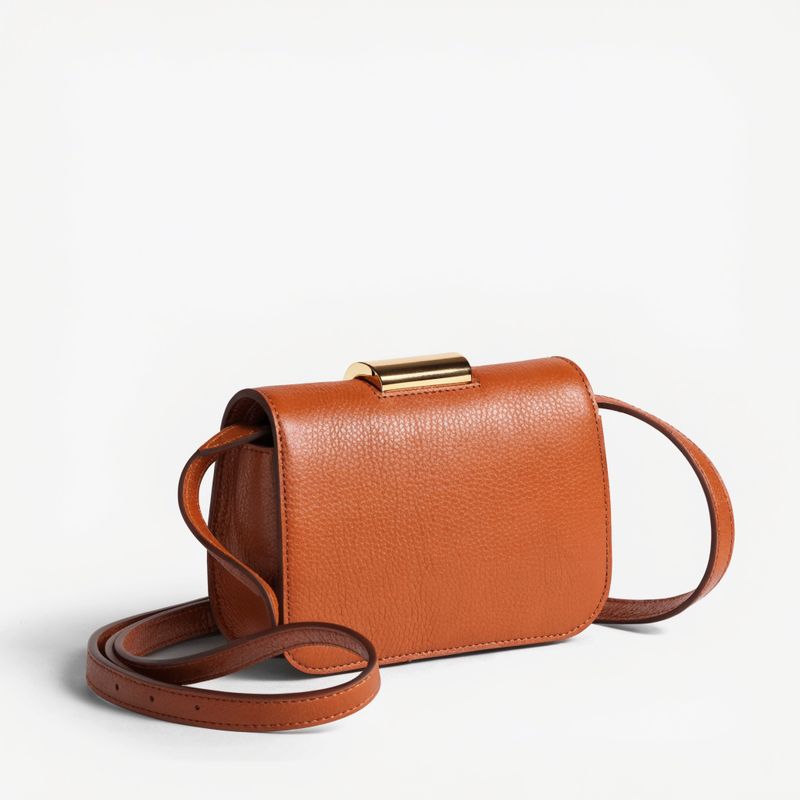
*Reference: original caramel packshot*
> **Prompt**: A caramel-brown pebbled leather crossbody handbag with a slim polished gold buckle, a fine adjustable leather shoulder strap coiled softly behind the body, and gently rounded top corners. Centered on a plain neutral off-white studio backdrop. Soft even overhead studio lighting with a subtle side shadow, three-quarter angle.
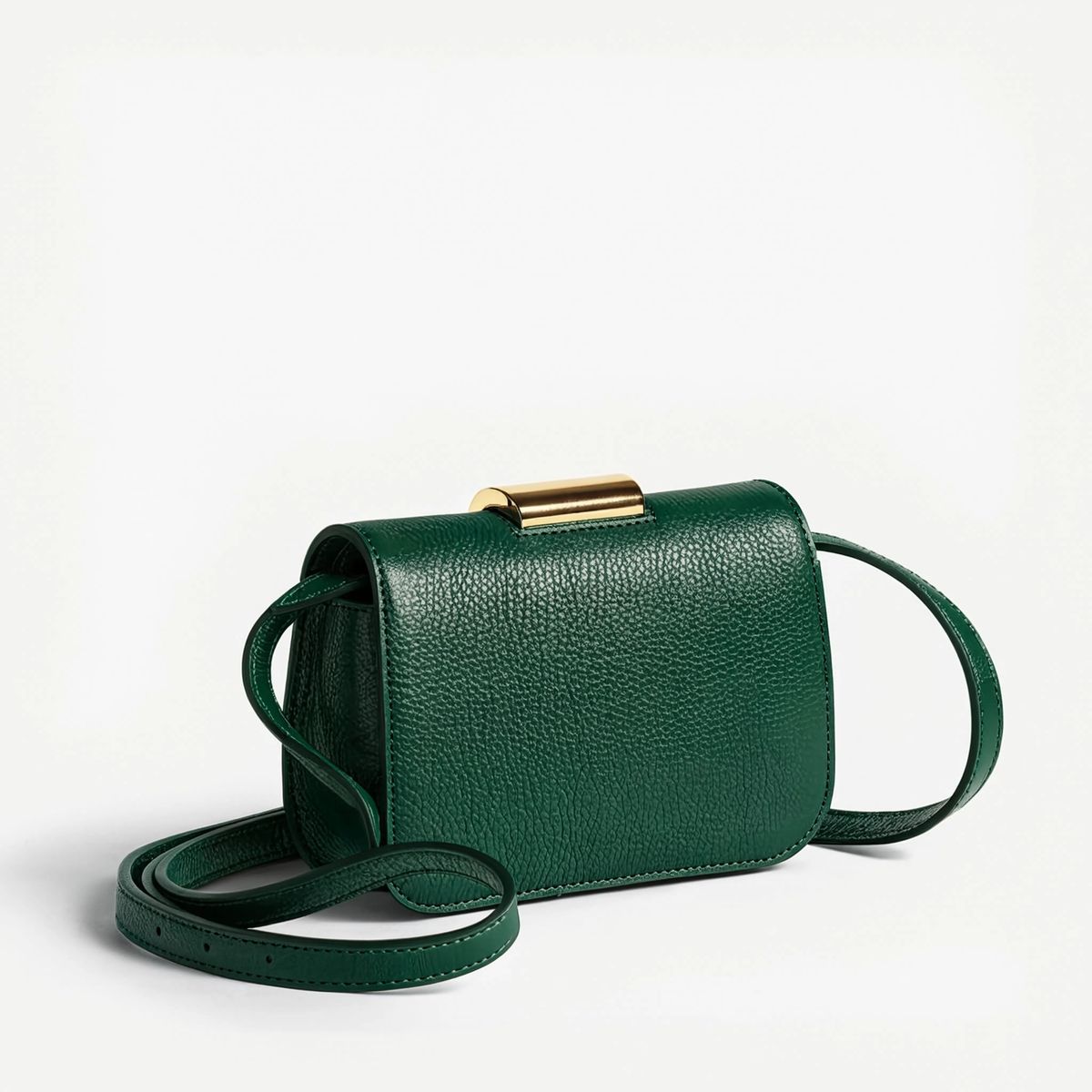
*Edit: same packshot, recoloured to forest green*
> **Prompt**: Edit 0: change the caramel-brown pebbled leather bodywork to a rich deep forest green pebbled leather with the same fine grain and same soft satin sheen. Keep the exact bag silhouette, the exact slim polished gold buckle, the exact fine adjustable shoulder strap, the exact plain neutral off-white studio backdrop, and the exact three-quarter studio lighting from the reference.
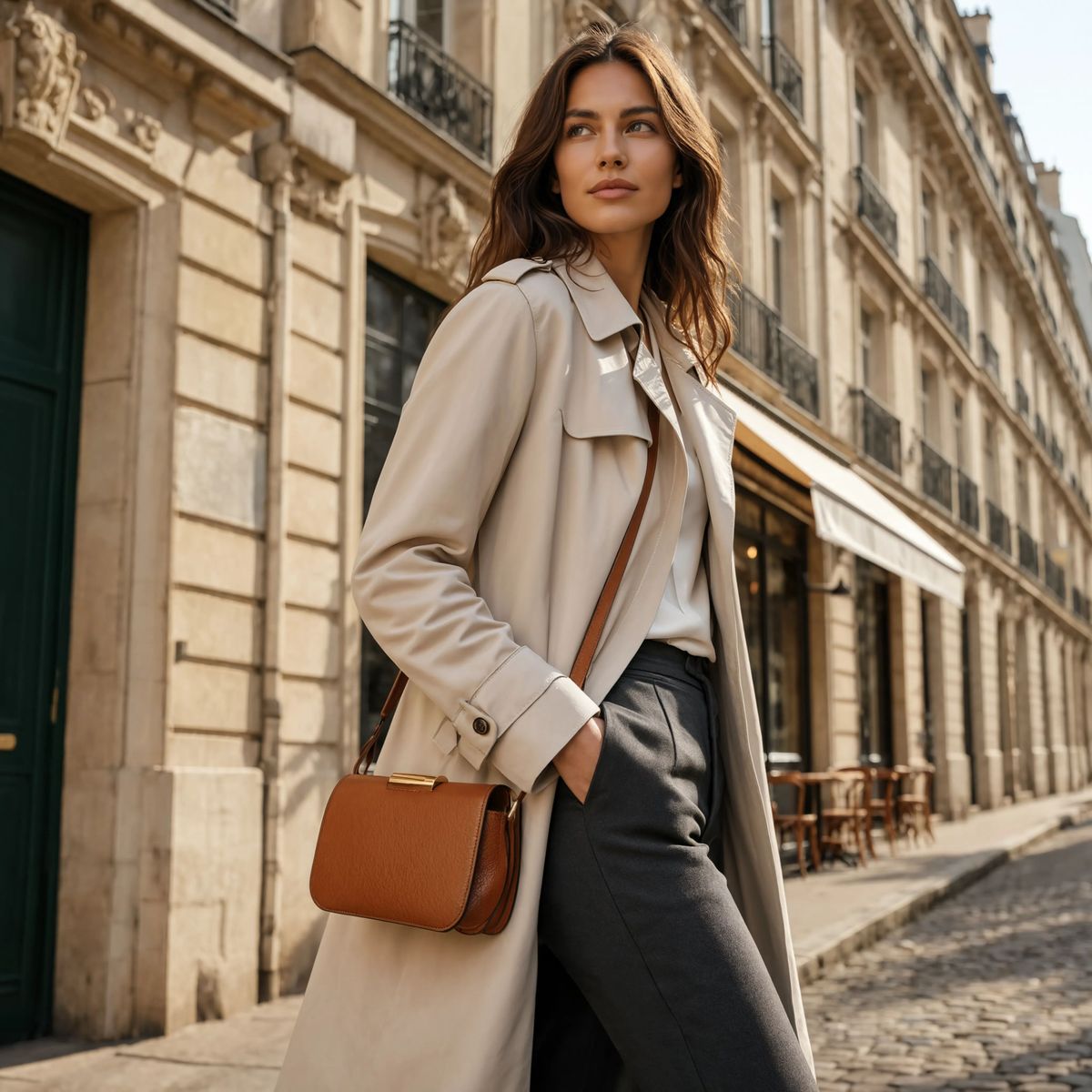
*Remix: same caramel bag, new scene on a model*
> **Prompt**: The caramel-brown pebbled leather crossbody handbag from 0 worn crossbody by a woman in her early thirties in a cream trench coat and slim tailored charcoal trousers, walking down a sunlit Parisian side street at mid-morning. Limestone Haussmann buildings frame the background with wrought-iron balconies, a small awning of a café behind her slightly out of focus, warm cobblestone underfoot. Warm morning side light with soft window bounce, editorial photojournalistic fashion campaign aesthetic, mid-shot from a low three-quarter angle, shallow depth of field.
Both outputs above came from the reference on the left and the same request schema. The **edit** kept the packshot geometry and lighting and only swapped the leather colour. The **remix** kept the bag's identity and rebuilt the shot around it on a Parisian street. Nothing else about the API call differed between the two runs.
### [Request shape](https://runware.ai/docs/models/reve-2-1/guides/reference-editing-remixing#request-shape)
A Reve 2.1 request needs a `positivePrompt`. When the deliverable is reference-based, it also takes `inputs.referenceImages`, and the `N` tag inside the prompt binds a clause to one of those references.
TypeScriptPythoncURLCLIJSON
```typescript
import { createClient } from '@runware/sdk'
const client = await createClient({ apiKey: process.env.RUNWARE_API_KEY })
await client.connect()
const [result] = await client.run({
model: 'reve:2@1',
positivePrompt: 'Edit 0: repaint the oatmeal-white feature wall behind the sofa in a deep terracotta clay red. Keep the exact sofa, the exact walnut coffee table, the exact arched windows and daylight, and the exact pale oak flooring from the reference.',
inputs: {
referenceImages: [
'https://im.runware.ai/image/os/a14d18/ws/2/ii/f4e3d2c1-b0a9-8765-4321-fedcba098765.jpg'
]
},
width: 4864,
height: 3328
})
```
```python
import asyncio
import os
from runware import Runware
async def main():
async with Runware(api_key=os.environ["RUNWARE_API_KEY"]) as client:
results = await client.run({
"model": "reve:2@1",
"positivePrompt": "Edit 0: repaint the oatmeal-white feature wall behind the sofa in a deep terracotta clay red. Keep the exact sofa, the exact walnut coffee table, the exact arched windows and daylight, and the exact pale oak flooring from the reference.",
"inputs": {
"referenceImages": [
"https://im.runware.ai/image/os/a14d18/ws/2/ii/f4e3d2c1-b0a9-8765-4321-fedcba098765.jpg"
]
},
"width": 4864,
"height": 3328
})
asyncio.run(main())
```
```bash
curl https://api.runware.ai/v1 \
-H "Authorization: Bearer $RUNWARE_API_KEY" \
-H "Content-Type: application/json" \
-d '[
{
"taskType": "imageInference",
"taskUUID": "a1b2c3d4-e5f6-7890-abcd-ef1234567890",
"model": "reve:2@1",
"positivePrompt": "Edit 0: repaint the oatmeal-white feature wall behind the sofa in a deep terracotta clay red. Keep the exact sofa, the exact walnut coffee table, the exact arched windows and daylight, and the exact pale oak flooring from the reference.",
"inputs": {
"referenceImages": [
"https://im.runware.ai/image/os/a14d18/ws/2/ii/f4e3d2c1-b0a9-8765-4321-fedcba098765.jpg"
]
},
"width": 4864,
"height": 3328
}
]'
```
```bash
runware run reve:2@1 \
positivePrompt="Edit 0: repaint the oatmeal-white feature wall behind the sofa in a deep terracotta clay red. Keep the exact sofa, the exact walnut coffee table, the exact arched windows and daylight, and the exact pale oak flooring from the reference." \
inputs.referenceImages.0=https://im.runware.ai/image/os/a14d18/ws/2/ii/f4e3d2c1-b0a9-8765-4321-fedcba098765.jpg \
width=4864 \
height=3328
```
```json
{
"taskType": "imageInference",
"taskUUID": "a1b2c3d4-e5f6-7890-abcd-ef1234567890",
"model": "reve:2@1",
"positivePrompt": "Edit 0: repaint the oatmeal-white feature wall behind the sofa in a deep terracotta clay red. Keep the exact sofa, the exact walnut coffee table, the exact arched windows and daylight, and the exact pale oak flooring from the reference.",
"inputs": {
"referenceImages": [
"https://im.runware.ai/image/os/a14d18/ws/2/ii/f4e3d2c1-b0a9-8765-4321-fedcba098765.jpg"
]
},
"width": 4864,
"height": 3328
}
```
Response
```json
[
{
"taskType": "imageInference",
"taskUUID": "a1b2c3d4-e5f6-7890-abcd-ef1234567890",
"imageUUID": "9c1b2d3a-4e5f-6789-abcd-ef0123456789",
"imageURL": "https://im.runware.ai/image/os/a14d18/ws/2/ii/9c1b2d3a-4e5f-6789-abcd-ef0123456789.jpg"
}
]
```
A few things worth knowing beyond the parameter list:
- `N` inside `positivePrompt` addresses a reference by its **0-based index** in `inputs.referenceImages`. That tag is what turns the prompt from prose into a directive.
- `inputs.referenceImages` accepts up to **eight references** per request. Editing takes one, remixing takes one or a few, and multi-reference composition scales up to the cap.
- `width` and `height` follow the same closed 17-preset list from the prompting guide. Omit them for reference work and Reve tends to inherit the source's aspect from the prompt.
- `settings.postprocessing` runs after the model render for any Reve call, including reference edits and remixes. See the [postprocessing guide](https://runware.ai/docs/models/reve-2-1/guides/postprocessing) for the request shape and the `removeBackground` step.
Full parameter constraints (character limits, reference size caps, allowed dimensions, postprocessing enums) live in the [Reve 2.1 model reference](https://runware.ai/docs/models/reve-2-1).
### [The `N` addressing convention](https://runware.ai/docs/models/reve-2-1/guides/reference-editing-remixing#the-framenframe-addressing-convention)
The tag is the only way to point a prompt clause at a specific reference:
- `0` is the first entry in `inputs.referenceImages`, `1` is the second, and so on. **Zero-based**, always.
- Indexing has **no cross-request memory**. Each generation resolves indices against its own `referenceImages` array, so rearranging the array between calls shifts every tag with it.
- The same tag can repeat inside one prompt. Naming a reference in two places is valid when the composition wants the subject twice.
- The tag's position in the sentence does not decide intent. The verbs and prepositions around it do.
An **edit clause** keeps the reference intact and mutates one target property. A **remix clause** keeps the reference's subject and rebuilds the rest of the frame around it. Both open with the same `0` token, and only the language on either side changes.
### [Editing: preserve the source](https://runware.ai/docs/models/reve-2-1/guides/reference-editing-remixing#editing-preserve-the-source)
An edit lands one target property and leaves the rest of the reference alone, provided the prompt **names what to keep**. Whether the target is a wall paint colour or a caption at the base of a poster, the request shape is the same. The workflow shows up whenever a signed-off asset needs one controlled change: one asset in, the same asset out with only the named change applied.
The clause structure that works reads: `Edit N: change X to Y. Keep the exact [A], [B], [C], and [D] from the reference.` The opening verb frames intent. The closing **pin clause** is what stops the model from repainting the whole room when it was only asked to repaint one wall.
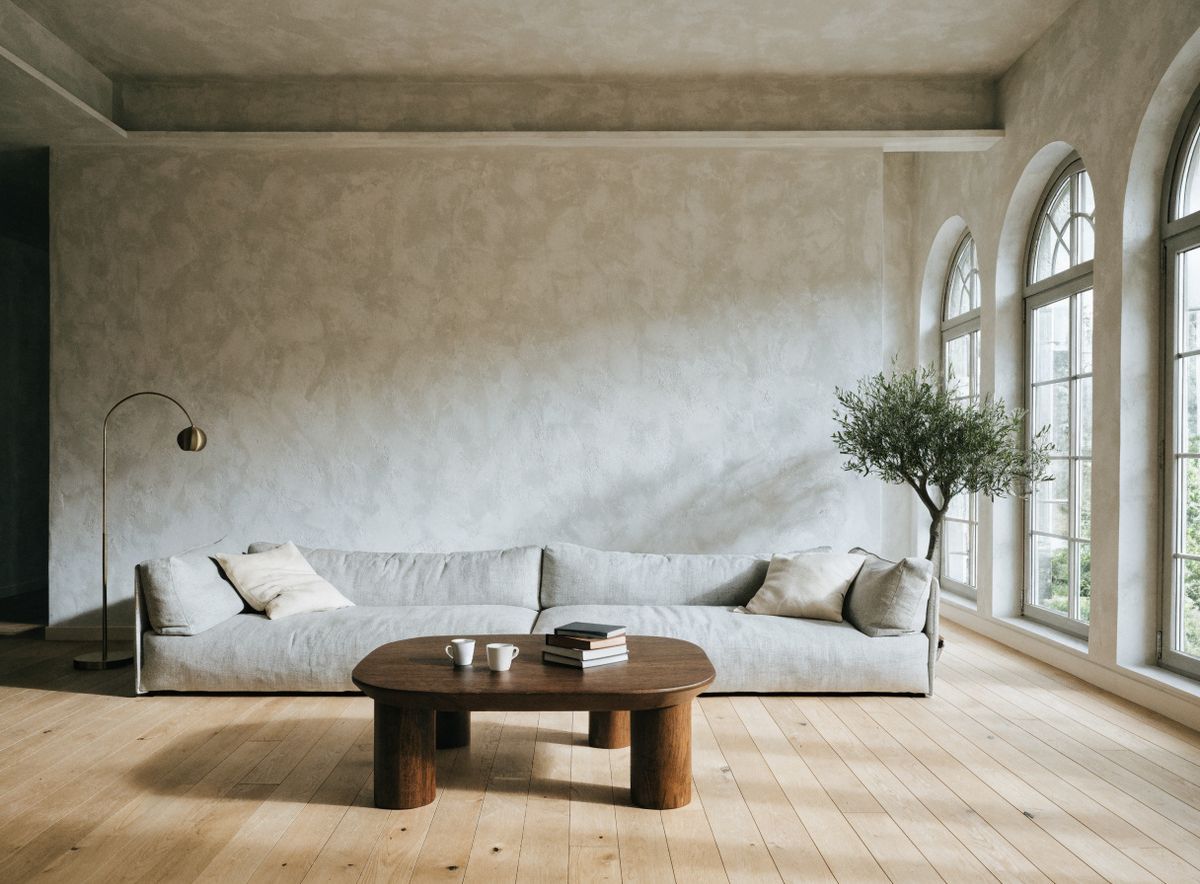
*Feature wall repainted terracotta, every other element held from the reference*
> **Prompt**: A modern living room interior real-estate photograph at mid-morning. A long low light-grey linen sofa with two soft cream cushions sits centred in the frame. A rounded walnut wood coffee table in front of the sofa carries two plain white ceramic cups and a small stack of hardcover design books. Tall arched windows on the right side let in soft natural daylight. A large unpainted oatmeal-white plaster feature wall behind the sofa. A slim brushed brass floor lamp in the left corner and a potted olive tree beside the windows on the right.
The output kept the sofa, the coffee table, the ceramic cups, the arched windows and their daylight, the oak flooring, the floor lamp, and the potted olive tree identical to the reference. Only the feature wall picked up the terracotta clay red the prompt named, and the ambient bounce across the room warmed slightly to match. Every held element was named explicitly in the pin clause.
For edits, the pin clause needs to cover **every element that could plausibly shift** under the change, not only the ones adjacent to the target. "Keep the exact sofa" is enough for a sofa the reference clearly shows, but if two objects in the reference could reasonably be affected by a paint change (a wall and a matching curtain, say), name both. Unmentioned elements are where drift creeps in.
> [!NOTE]
> Edits **chain by re-using the output as the next reference**. Repaint the wall, then feed that result back as `0` for the next call to swap the sofa on it. Every stage runs at native 4K, so iterative edits keep the same pixel budget from step to step. Each step is a separate $0.20 generation, so plan the chain rather than exploring one target at a time.
### [Remixing: keep the subject](https://runware.ai/docs/models/reve-2-1/guides/reference-editing-remixing#remixing-keep-the-subject)
Where an edit preserves the whole reference, a remix preserves only the subject. The **subject identity** from `N` carries through, but the composition and everything around the subject are regenerated from the prompt. The workflow shows up in lookbook expansions where a product from a plain packshot lands in a lifestyle shot, or in any campaign brief where the SKU is fixed but the scene is not.
The clause structure reads: `The [subject description] from N [placed in some new scene, lit some new way]`. There is no `Keep the exact …` list at the end. The reference's role is to lock the subject's geometry and materials. The rest of the frame is regenerated from the prose.
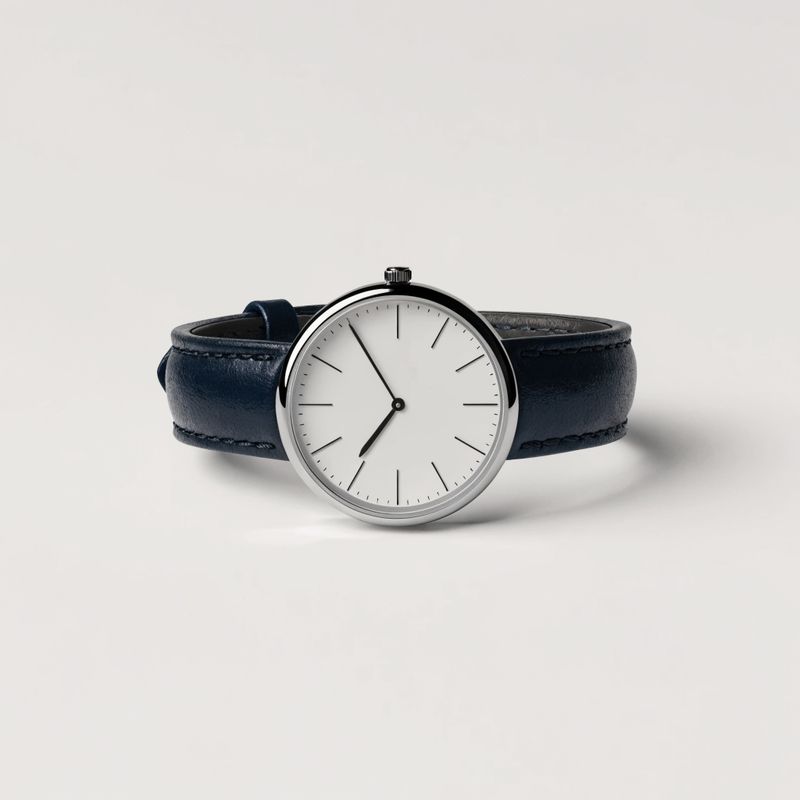
*Reference: dress wristwatch packshot*
> **Prompt**: A classic minimalist dress wristwatch. Slim polished stainless steel case with a fine bezel, a clean matte white dial with black baton hour markers and slim black hands, a smooth dark navy leather strap laid flat and slightly curled at the buckle end. Centered on a plain neutral off-white studio backdrop. Soft even overhead studio lighting, subtle catchlight on the crystal, three-quarter overhead angle.
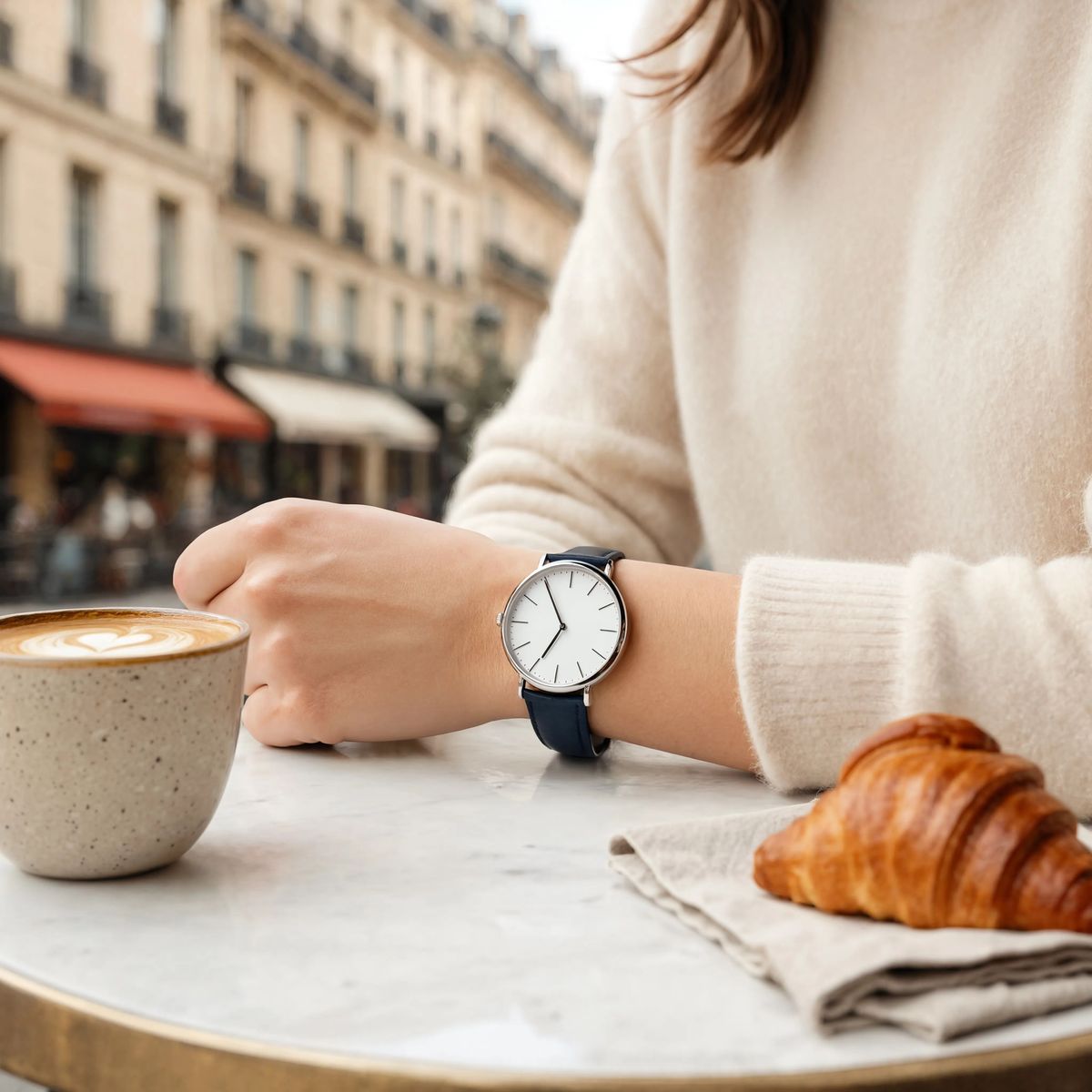
*Remix: on the wrist at a cafe*
> **Prompt**: The classic minimalist dress wristwatch from 0 worn on the wrist of a woman in her early thirties in a soft cream cashmere sweater, her forearm resting on a small round outdoor cafe table in soft late-morning light. A warm ceramic coffee cup with a fresh flat white sits beside her wrist, a small folded linen napkin under a plain butter croissant, a gently blurred Parisian street background of limestone buildings and warm awnings. Editorial lifestyle photography, warm natural light, shallow depth of field.
The wristwatch kept the exact case, the exact dial, and the exact strap it had in the reference. Everything around it was regenerated: a cream cashmere sleeve, a warm ceramic coffee cup with a fresh flat white, a small folded linen napkin under a butter croissant, and a soft blurred Parisian street background. The reference held the subject. The prose held the scene.
The remix pattern behaves better when the subject description **matches the reference's own vocabulary**. "The classic minimalist dress wristwatch from `0`" leans on the reference for identity while giving the model the terms it needs to place the object in the new scene. A prompt that just says "the watch from `0`" works too, but a description helps when the remix scene involves motion or occlusion where the subject might otherwise be pushed off screen.
### [Multi-reference composition](https://runware.ai/docs/models/reve-2-1/guides/reference-editing-remixing#multi-reference-composition)
Everything above used a single reference. Reve 2.1 accepts up to eight. When several are passed, each `N` tag in the prompt addresses one of them by index, and the model composes their subjects into a single coherent frame.
The four packshots below were shot separately on plain off-white backdrops. One Reve call composes them onto a walnut kitchen island in soft morning window light, addressing each product by its own `N` tag.
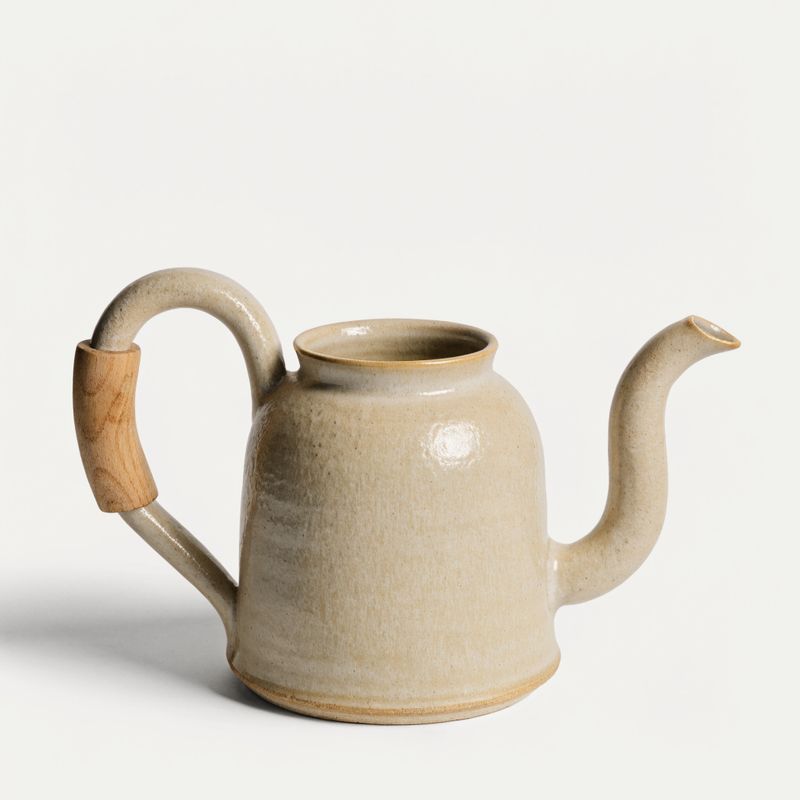
*Reference 0: cream ceramic kettle*
> **Prompt**: A hand-thrown stovetop ceramic pour-over kettle with a warm cream matte glaze and subtle throwing marks, a slim gently curved spout, and a natural blond wood grip fitted to the handle. Centered on a plain neutral off-white studio backdrop. Soft even overhead studio lighting, subtle side shadow, three-quarter angle.
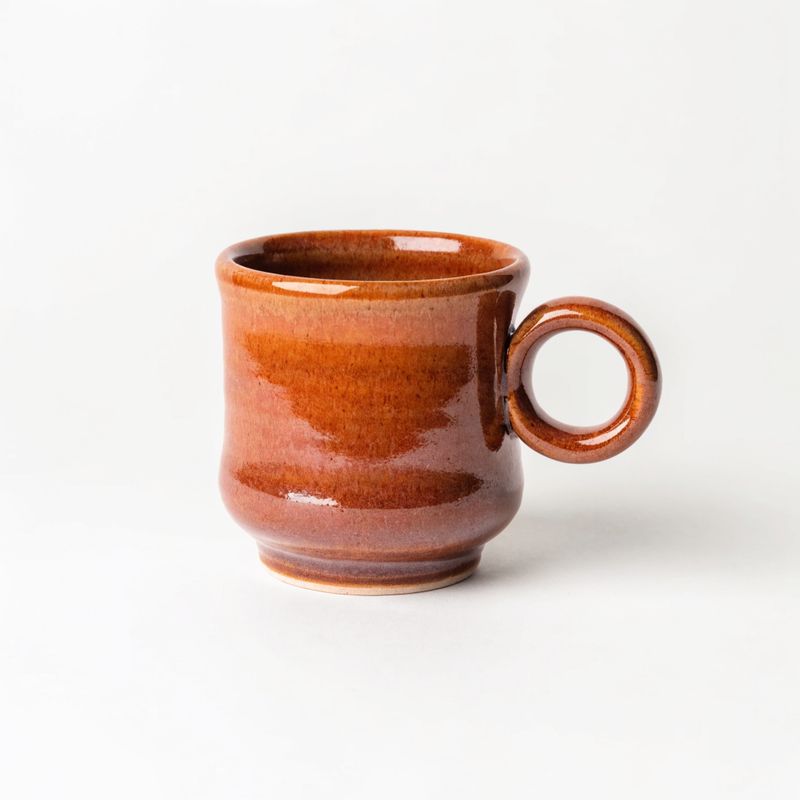
*Reference 1: terracotta coffee mug*
> **Prompt**: A hand-thrown stoneware coffee mug in a warm terracotta glaze with slight tonal variation across the surface and a small round handle, empty and clean. Centered on a plain neutral off-white studio backdrop. Soft even overhead studio lighting, subtle side shadow, three-quarter angle.
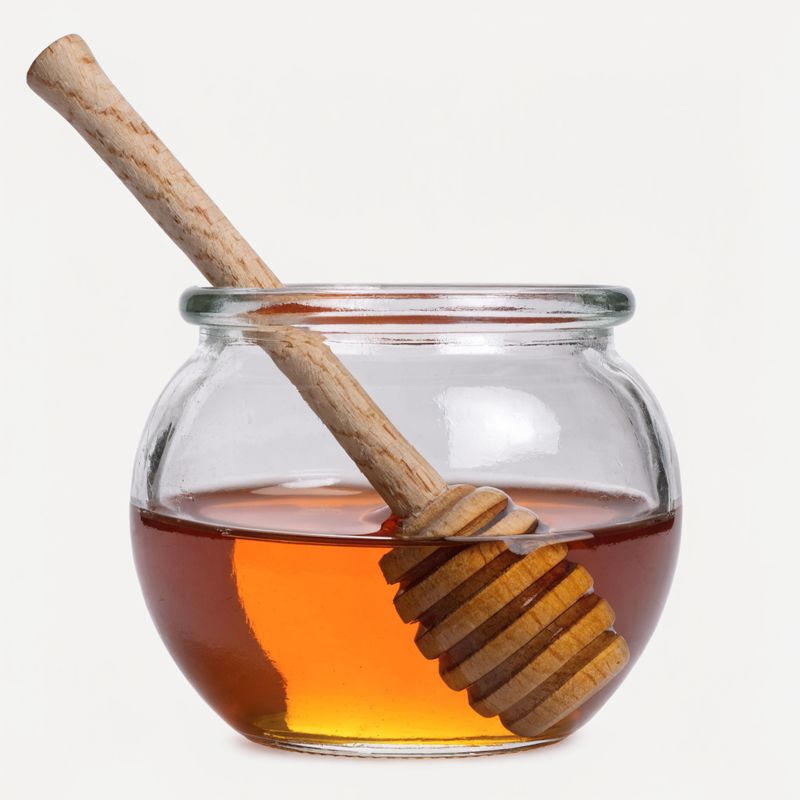
*Reference 2: honey jar with dipper*
> **Prompt**: A small round clear glass jar half-filled with warm amber honey, a natural birch wood honey dipper resting inside the jar, no lid on. Centered on a plain neutral off-white studio backdrop. Soft even overhead studio lighting, subtle catchlight on the glass, three-quarter angle.
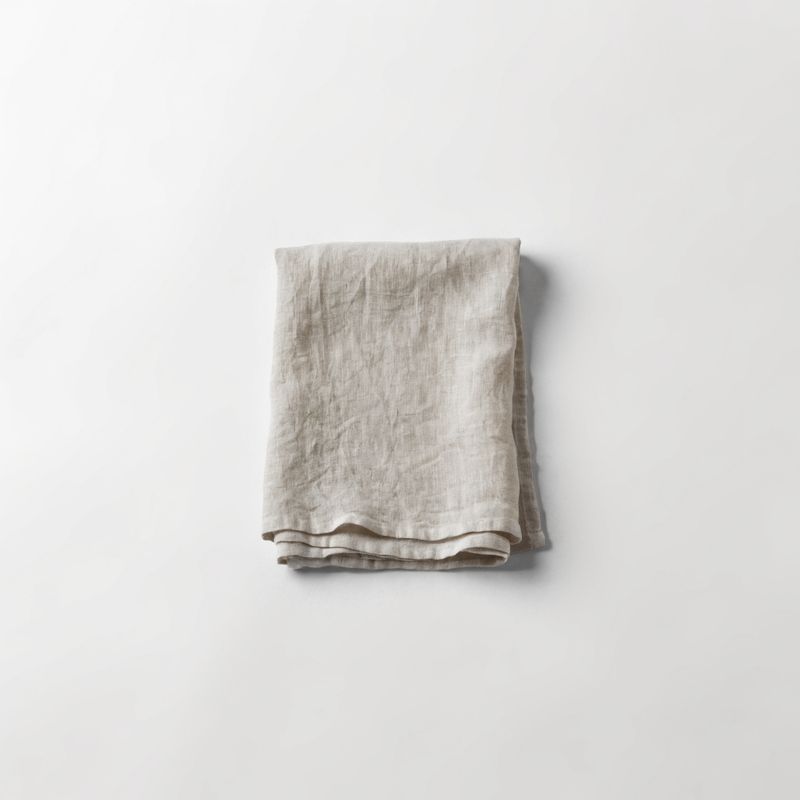
*Reference 3: folded linen tea towel*
> **Prompt**: A folded natural undyed linen kitchen tea towel with visible weave texture and gentle linen wrinkles, folded neatly into a clean rectangle. Laid flat on a plain neutral off-white studio backdrop. Soft even overhead studio lighting, subtle top-down shadow, slight overhead angle.
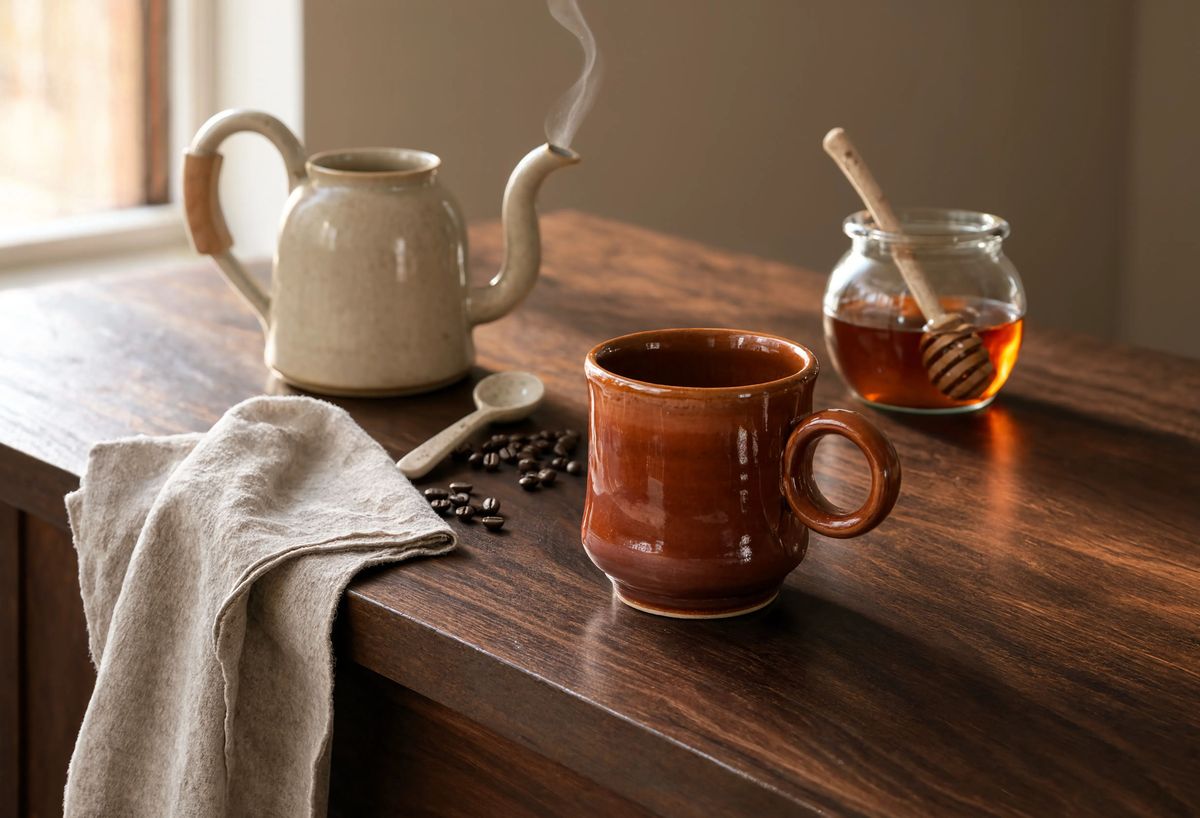
> **Prompt**: Compose the four products into one warm autumn morning retail lifestyle scene on a rich walnut wood kitchen island in soft window light. The stovetop ceramic pour-over kettle from 0 at the back left with its slim spout angled forward and a fine wisp of steam. The warm terracotta stoneware coffee mug from 1 front centre, empty and ready to be filled. The small round clear glass honey jar with birch wood dipper from 2 at the back right. The folded natural linen tea towel from 3 draped at the front left of the island, one corner spilling over the edge. A small ceramic spoon and a scattering of coffee beans between the mug and the kettle for scale. Warm morning window light streams in from the upper left, editorial retail lifestyle photograph in a warm autumn palette.
Each product carries its own identity across from its reference: the warm cream matte glaze on the kettle from `0`, the terracotta glaze on the mug from `1`, the amber honey in the jar from `2`, and the visible linen weave on the towel from `3`. The prompt named the composition and the lighting environment. The references did the identity work.
The composition prose works better when it walks the frame **one reference at a time**. The prompt above spells out four placement beats, one per `N` tag, and the model reads each beat as a placement directive rather than trying to infer which reference goes where from a general scene description.
### [Tips](https://runware.ai/docs/models/reve-2-1/guides/reference-editing-remixing#tips)
1. **Address by index, not by description.** The `N` tag ties one reference to one clause in the prompt. Naming a reference by its content ("the bag from the reference") gets ambiguous once three references share the array, while `0` never does.
2. **The verb decides intent.** Openings like `Edit 0:` bias the model toward preservation, while `The [subject] from 0 in [new scene]` biases it toward remix. Pick the opening verb before writing the rest of the sentence.
3. **Pin every element that must not change.** For edits, close the sentence with `Keep the exact [A], [B], [C], and [D] from the reference`. Unmentioned elements are where drift creeps in, and the pin clause reads verbose on purpose.
4. **Plan for one successful call.** Reve bills at $0.20 per 4K image, so iteration cost is real. Draft the prompt so a single pass does the job: name the change and the pins, then confirm the reference actually shows the identity you're asking the model to hold.
5. **Choose the 4K aspect deliberately.** When `width` and `height` are set, both must be from the same native 4K preset pair. Omit both dimensions and Reve reads the aspect from the prompt, which often matches an edit's source shape without any extra config.
6. **Match reference treatment across a set.** For multi-reference composition, feed the model reference photos with similar visual treatment (all clean packshots, or all lifestyle stills). Mixing a packshot with a busy environmental shot pulls at the identity carry-over on both.
7. **Repeat a tag when the subject appears twice.** `0` can appear more than once in a single prompt. A composition that reads "`0` shown open on the left and `0` shown closed on the right" is valid and produces both states of the same subject in one frame.
8. **Use `removeBackground` for cutout deliverables.** For downstream compositing where a hero product will land on a designed page, let the postprocessing step do the alpha cut instead of masking manually. Skip it when the shot ships as a complete image.